Skip to content
DevMeme
909 of 7435
The Humbling Experience of Codewars Solutions
Learning Post #1027, on Feb 6, 2020 in TG

The Humbling Experience of Codewars Solutions

Why is this Learning meme funny?

Level 1: Shortcut Surprise

Imagine you had to clean up a big messy room. You go around picking up each toy one by one, putting them in the box, slowly but surely tidying everything. It takes a while, but eventually the room is clean – and you feel pretty proud of your work. Now, your friend comes over, presses a magic button, and poof! all the toys zoom into the box in one go. The room is clean in just a second. You’d probably stare at your friend in disbelief, right? You’d be thinking, “Wait, all that time I spent… and you had a magic button?! 😳”

That’s exactly the feeling of this meme. In the coding world, the first way (picking up toys one by one) is like writing a long solution, doing each step manually. The magic button is like a special one-line trick that does the whole job automatically. The guy in the last picture is basically the kid watching the magic cleanup, with a blank look of shock and surprise. It’s funny because we totally get how he feels – amazed at how easy it could have been and a tiny bit annoyed that he didn’t know about that shortcut before. In the end, though, he learned something new, and next time he’ll remember that magic button!

Level 2: The Regex Shortcut

For a junior developer or someone early in their LearningToCodeJourney, this meme might spark curiosity: “What exactly happened here? Why is one solution so much shorter?” Let’s break it down in simple terms and define the key concepts:

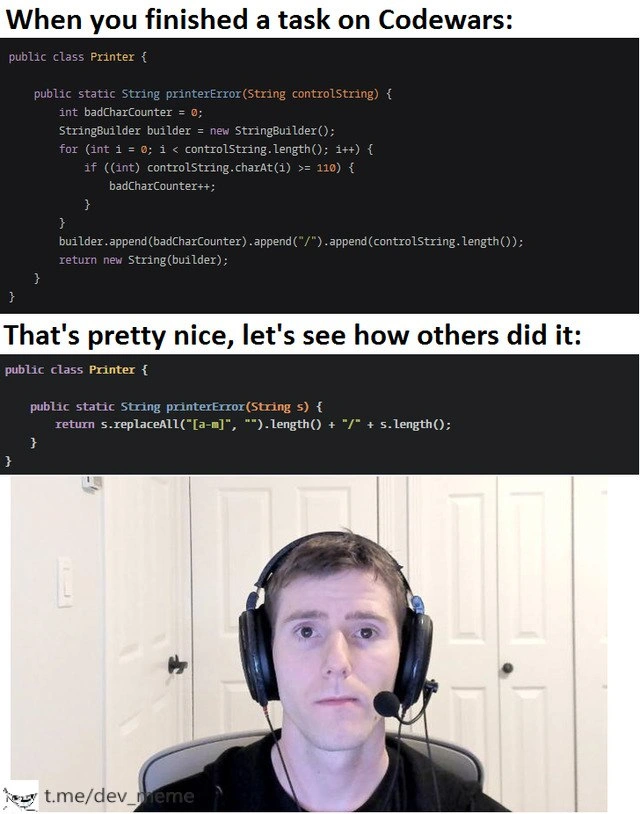
Codewars is an online platform where programmers practice by solving puzzles (often called “kata”). After you solve a problem, you can see how others solved it. The meme shows exactly that scenario. In the first panel, the developer has finished a task in Java and their solution works. The caption says:

“When you finished a task on Codewars:”

This implies the person is feeling good – they wrote a working answer. The screenshot of their code shows a Java class Printer with a method printerError. It uses a for loop to go through each character of a string and counts how many characters are outside the range 'a' to 'm'. Without even knowing the full challenge details, we can tell what the code does: it increments badCharCounter whenever a character’s ASCII/Unicode code is >= 110 (which corresponds to 'n'). Essentially, characters 'n' through 'z' are considered “errors” in this context. After the loop, it builds a result string like "3/56" (just as an example) meaning 3 errors out of 56 characters total. This approach is imperative – it spells out each step: initialize counter, loop, check each char, update counter, build result. It’s somewhat long (a bit verbose), but easy to follow for someone comfortable with basic Java syntax. This is a very typical way beginners solve problems: using fundamental constructs like loops and counters. Nothing wrong with it!

The second panel’s caption says:

“That's pretty nice, let's see how others did it:”

This is the classic moment of truth on Codewars (and similar sites like HackerRank or LeetCode). You click on other people’s solutions to maybe learn a new trick – and boy, do you learn something! The code shown here is another Java solution but condensed into one line inside the method:

return s.replaceAll("[a-m]", "").length() + "/" + s.length();

To a newer developer, that might look intimidating or like gibberish, but it’s actually straightforward once you understand regular expressions (regex) and a handy string method:

  • s.replaceAll(pattern, replacement) is a Java string method that replaces all occurrences of the pattern with the given replacement. In this case, pattern is "[a-m]" and replacement is "" (empty string).
  • "[a-m]" is a regex pattern meaning “any character from a to m”. Regex is like a mini-language for describing text patterns. So replaceAll("[a-m]", "") will go through the string s and remove every character that is between 'a' and 'm', because we’re replacing those with nothing.

Why remove 'a' to 'm'? If the problem defines that only letters 'a' through 'm' are the good or correct characters, then anything outside that range (like 'n' through 'z') is an error. By removing all the good characters, what’s left are only the bad ones! So after the replaceAll, the string consists solely of error characters. Then .length() on that result gives the number of errors. Meanwhile, s.length() gives the total length of the original string. So if s had 5 errors in a string of length 20, this one-liner returns "5/20". It’s doing the same job as the loop did, but in a declarative way: “Replace all allowed chars with nothing, then count what remains.”

This is a prime example of a concise code or a shortcut that leverages built-in language features. Java’s standard library has a full regex engine built in, so you don’t have to write loops to analyze strings character by character if a pattern will do. Many languages have similar capabilities:

  • In Python, for instance, you might do something like len([c for c in s if c < 'n' or c > 'z']) or use regex via the re module.
  • In JavaScript, you could use s.replace(/[a-m]/g, "").length (very similar to Java’s syntax).

So this isn’t just Java-specific; it’s a general programming insight: often a high-level string operation can replace a manual character-check loop.

Now, the humor and the relatability of the meme come from the developer’s reaction in the third panel. He’s sitting there with large headphones on, staring blankly, looking absolutely stunned. Why? Because he likely spent a good chunk of time carefully writing that loop solution, making sure it worked – maybe even debugging it – and he was proud of it (as one should be after solving a problem!). Then upon seeing the regex solution, it suddenly dawns on him that the same result could have been achieved with literally one line of code. It’s a mix of “How did I not know this?!” and “Is that even allowed?!”. For a newcomer, encountering these tricks can almost feel like cheating or magic.

Let’s decode the feelings and concepts tagged in the meme for a junior audience:

  • elegant_solution: This refers to a solution that achieves the result in a clever or non-obvious way, usually with less code, more readability, or using a creative approach. The regex one-liner is considered “elegant” because it’s succinct and leverages the power of the language’s features. It’s like a clever shortcut.
  • brute_force (brute-force): This usually means a straightforward approach that might not be the most efficient. The loop method here is somewhat brute-force in spirit: check every character one by one. It’s not terribly inefficient for a short string, but it’s the basic method. In contrast, the regex feels more high-level.
  • self_doubt: The look on the developer’s face screams self-doubt. New devs often experience this when they compare their code to others’. “Am I dumb for not thinking of that?” The meme is poking fun at that very human reaction. Don’t worry – feeling this is normal, and it’s how you learn. Next time, you might remember this trick!
  • code_golfing: This is a term for trying to solve problems using the fewest characters or lines of code possible (like a competition to write the shortest code). The regex solution, while written for practicality, also doubles as a “code golf” style answer because it’s so compact. On sites like Codewars, some users love to show off ridiculously short solutions – sometimes even sacrificing readability. It’s a fun challenge, though not always how you’d write production code.
  • online_challenges / post_submission_regret: After submitting a solution on online challenge sites, it’s common (and encouraged) to read others’ solutions. Sometimes that leads to “post submission regret,” a tongue-in-cheek way of saying you regret not having written that cooler solution yourself. The meme captures that exact moment of “Oh no... there was a much better way, and I missed it.” But hey, now you’ve learned a new trick!

In summary, for a junior dev: the meme is funny because it’s a learning moment packaged as a joke. You see a direct side-by-side of a long solution and a short solution. It’s as if the meme is saying, “We’ve all been here. You do it the long way, but someone out there knows the shortcut.” Instead of feeling discouraged, you can actually be excited – you just leveled up your knowledge. Next time you might remember to consider “Can I use a regex or a built-in function for this?” The developer’s bewildered face is hilarious because it’s so relatable – we recognize that mixture of confusion, envy, and admiration. The important takeaway for a learner is: don’t be afraid to learn from others’ code. Every “regex one-liner” you discover is one more tool in your toolbox. And soon enough, you’ll have your own little arsenal of elegant tricks to impress others with. 😄

Level 3: Regex vs Reality

At the senior engineer level, this meme hits home as a tale of concise code sorcery humbling a verbose solution. It highlights that classic moment in a developer’s life: you finish a coding challenge on Codewars with a perfectly serviceable (if long-winded) solution, feeling proud – then you eagerly click “View other solutions” and bam! you’re confronted with a one-line regex masterpiece that makes your 15-line loop look clunky. The humor is in that developer frustration and awe: “Why didn’t I think of that?!”

In the first panel, we see a fairly typical Java implementation using a for loop to count “bad” characters in a string. It’s not incorrect – in fact, it’s logically straightforward. But the second panel reveals an elegant solution using String.replaceAll with a regular expression, accomplishing in one line what the verbose code did in many. It’s a perfect example of how experienced developers leverage language features and libraries to write concise code that borders on magical. The juxtaposition is funny because it’s so relatable: even seasoned devs have had their verbose code one-upped by a clever one-liner.

To a senior dev, this scenario also underscores some deeper truths about CodeQuality and knowledge sharing:

  • Don’t reinvent the wheel: High-level languages and libraries often provide utilities (like regex or built-in functions) to handle common tasks. Newer developers might grind out a manual solution, while veterans reach for the ready-made tool. The shock on that developer’s face? We’ve all worn it after discovering a built-in method that could have saved us from writing all those lines.
  • Code Golf vs Readability: On coding challenge sites (and in the code_golfing culture), there’s a thrill in squeezing logic into as few characters as possible. The regex solution is essentially code golf at work – impressively short. But in a real codebase, senior devs balance brevity with clarity. They might chuckle at the clever regex and also recall the famous joke: “Some people, when confronted with a problem, think: I know, I’ll use regular expressions. Now they have two problems.” 😉 In other words, regex can be a double-edged sword – insanely powerful but often cryptic to the uninitiated. In this meme, though, the regex is pretty tame and elegant, so it’s more of a learning moment than a maintainability nightmare.
  • Shared experience and humility: The meme taps into the shared journey all developers go through (LearningToCodeJourney). No matter how long you’ve been coding, there’s always someone who knows a trick you don’t. That feeling in the third panel – the blank, thousand-yard stare of “I have so much more to learn” – is practically a rite of passage in software development. It’s funny because it’s true: every senior dev has been a junior who got their mind blown by a sleeker solution. And even as seniors, we keep encountering those “aha” moments via code reviews or open-source code. It keeps us humble and learning.

In real-world terms, this exact scenario often plays out in code reviews (hence the tag CodeReviewPainPoints). You submit a pull request proud of your new function, and a teammate comments, “You know, there’s a one-liner using java.util.regex that does the same thing.” It’s equal parts embarrassing and enlightening. The meme exaggerates it humorously: you’re not just getting a minor tip, you’re seeing an entirely different paradigm – a regex wizard has cast a spell to shrink your code by an order of magnitude.

Let’s break down what’s happening in those code panels from a technical standpoint. The “pretty nice” first attempt manually iterates through each character (likely checking if it’s outside the range 'a' to 'm'):

// Verbose counting approach:
int badCount = 0;
for (char c : controlString.toCharArray()) {
    if (c >= 'n' && c <= 'z') {  // if letter is outside 'a'-'m' range
        badCount++;
    }
}
// Compose result as "errors/total"
return badCount + "/" + controlString.length();

This is clear but verbose; it’s the kind of step-by-step solution a lot of us write on our first try. Enter the hero of the second panel: the regex solution using s.replaceAll("[a-m]", ""). In one fell swoop, it removes all characters that are between a and m (the “good” characters), leaving only the “bad” ones, and then counts them:

// Regex one-liner approach:
return s.replaceAll("[a-m]", "").length() + "/" + s.length();

That [a-m] pattern is a character class matching any lowercase letter from a to m. By replacing those with "" (empty string), the code essentially filters them out. What remains in the string are only characters not in [a-m] – exactly the ones that the loop was counting. Taking .length() of that remainder string gives the number of “bad” characters. Finally, it appends "/" + s.length() to format the result as "errors/total". It’s a brilliant little trick, and seeing it for the first time can indeed make a dev do a double-take, just like the guy in the photo with the giant headphones. He’s staring as if to say, “Did that seriously just solve the problem in one line?!” 😮

From a DeveloperExperience_DX perspective, this meme captures a mix of pride and self_doubt. Pride in finishing a task, followed by a gut-punch of doubt when comparing your solution to others'. It’s practically a meme-ified form of post_submission_regret: that moment after you hit “submit” on a challenge or project and then realize a far better approach existed. But every senior dev will tell you: this is how you grow. It’s funny because it’s a snapshot of learning in action – a tough pill coated in humor. Over time, you amass a mental toolbox of these elegant patterns (like regex for string tasks), so the next time you won’t need to brute-force with a loop. Today’s shock becomes tomorrow’s skill. And frankly, it’s kind of awesome how often our industry produces these little “wow” moments. 🌟 Embrace them – they mean you’re leveling up!

Description

A three-panel meme about the experience of solving programming challenges. The first panel is captioned, 'When you finished a task on Codewars:' and displays a lengthy, verbose Java code snippet that solves a problem using a traditional for-loop, if-statements, and a StringBuilder. The second panel, captioned 'That's pretty nice, let's see how others did it:', shows an extremely concise, elegant one-line solution to the same problem using a regular expression (`s.replaceAll("[a-m]", "").length()`). The final panel features a well-known reaction image of Linus Sebastian (from Linus Tech Tips) wearing a headset, staring blankly at the camera with a humbled and slightly defeated expression. The meme perfectly captures the moment of pride in one's own working solution being instantly crushed by the realization that there are far more efficient and clever ways to solve the same problem, a common and humbling part of the developer learning journey

Comments

7
Anonymous ★ Top Pick My first solution is O(n) complexity and O(n) lines of code. The top-voted solution is also O(n) complexity, but O(1) for my remaining self-esteem
  1. Anonymous ★ Top Pick

    My first solution is O(n) complexity and O(n) lines of code. The top-voted solution is also O(n) complexity, but O(1) for my remaining self-esteem

  2. Anonymous

    Spent an hour hand-rolling a O(n) loop, fussing over char codes and StringBuilder reuse - leaderboard’s top answer is a three-word regex. Apparently the real performance hack is “make the maintainer stop reading.”

  3. Anonymous

    The same feeling when you spend three sprints building a distributed event-sourcing system with CQRS, only to discover the business just needed a boolean flag in the database

  4. Anonymous

    The journey from 'I'll manually iterate and count with a StringBuilder' to discovering someone solved it with a single regex replaceAll is the programming equivalent of showing up to a knife fight with a full medieval siege engine - technically functional, but you're definitely overthinking the problem. That moment when you realize the entire for-loop, StringBuilder instantiation, and character-by-char validation could've been replaced by '.replaceAll("[a-m]", "").length()' is what separates a working solution from an elegant one. Welcome to Codewars, where your ego goes to get humbled by regex wizards

  5. Anonymous

    Codewars rite of passage: craft a manual reverse loop, then weep at StringBuilder.reverse() in 'view solutions'

  6. Anonymous

    Codewars humbling: you write a clear O(n) loop; the leaderboard answers with a one-liner regex - O(n) to run, O(∞) to maintain

  7. Anonymous

    Both are O(n); the leaderboard one adds O(explaining_regex) to the on-call SLA

Use J and K for navigation