Skip to content
DevMeme
4557 of 7435
The "It Works on My Machine" Certification
Bugs Post #4999, on Nov 14, 2022 in TG

The "It Works on My Machine" Certification

Why is this Bugs meme funny?

Level 1: Writing vs Wiring

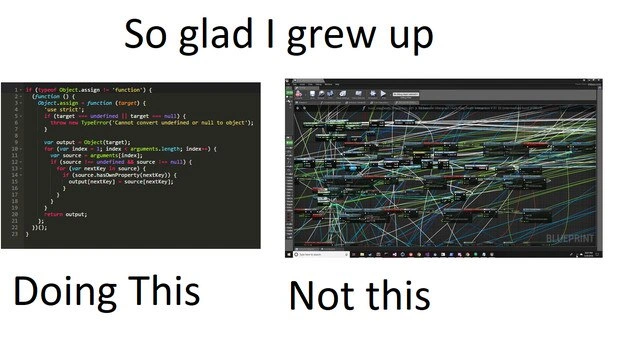
Imagine you have two ways to explain how something works. The first way is to write down clear steps on a piece of paper. The second way is to draw a big crazy chart with boxes and arrows going all over the place. The meme is joking that the person is really happy they learned using the simple written steps, and not that super tangled chart method.

It’s kind of like making a sandwich by following a nice, easy recipe list versus trying to follow a huge messy drawing where every ingredient is connected by crisscrossing strings. The recipe (like the text code) is straightforward – you read it line by line. The messy string diagram (like the visual Blueprint) might eventually also show how to make the sandwich, but it’s so confusing to look at that you’d get a headache! The text at the top of the meme says, "So glad I grew up doing this and not this," which basically means "I’m glad I learned the easy, clean way instead of that complicated, messy way." Even if you don’t know about programming, you can see the right side of the image looks overwhelmingly chaotic, like a bunch of spaghetti noodles tangled together. The left side looks like normal written stuff you might see in a book. So the joke is really simple: neat and orderly vs. wild and messy. Anyone would be relieved to deal with the neat one. The humor comes from recognizing how absurd the messy picture is and feeling a sense of relief (and a little pride) that you didn’t have to deal with learning things in that confusing format. It’s a fun way of saying "Sometimes, simpler is better – and boy, am I glad for that!"

Level 2: Visual Scripting vs. Text Coding

Let’s break down what’s happening in this meme for those newer to these concepts. We have two different ways to "code" being compared, using an example from GameDevelopment. On the left side is text coding in a normal code editor (what most people think of as programming: you type out instructions in a language like JavaScript, C++, Python, etc.). On the right side is an example of visual scripting, specifically Unreal Engine’s Blueprint system. Visual scripting means instead of writing lines of code, you create and connect nodes in a graph to define program logic. It’s like building a flowchart that the computer can execute. Each node in a Blueprint graph might represent an action (like adding two numbers, or applying a force to a game object) or a control structure (like an if check or a loop), and you draw wires from one node to the next to show the order of operations or how data flows. The end result is code – the engine runs those nodes as if they were code – but it’s presented graphically.

Now, Blueprints are very popular in Unreal Engine because they allow game designers and artists (who might not be comfortable writing C++ code) to create game logic by just tinkering with these building blocks. For example, instead of typing if(player.health <= 0) { player.die(); }, a designer can place an "If" node, connect the player's health variable to it, and then connect a "Destroy Actor" or "Play Death Animation" node to handle the player death. It’s intuitive for visual thinkers and great for quickly prototyping gameplay. However, as the meme highlights, visual_scripting can get out of hand if you have too many nodes all on one canvas. The phrase "Blueprint spaghetti" is a humorous way to describe a Blueprint graph that has become a tangled mess. The wires criss-cross so much that it literally looks like a bowl of spaghetti. 😅 Maintaining such a graph can be as frustrating as untangling a bunch of cables – you pull one thread and five other things move in confusing ways. In the image, the Blueprint editor window on the right is packed with hundreds of nodes and colored connections going everywhere; this is an exaggerated example of what we call spaghetti code in programming.

Spaghetti code is a general term (from long before visual scripting) that developers use to describe code with a messy, entangled structure. In text form, spaghetti code might be functions that jump all over the place, goto statements, or deeply nested logic that’s hard to follow. The term comes from the idea that the flow of the program twists and turns like a pile of cooked spaghetti, with no clear structure. In the Unreal Blueprint context, the term becomes quite literal: you can see the "noodle-like" wires. When someone says a Blueprint is "spaghetti," they usually mean it’s poorly organized, hard to read, and likely a nightmare to troubleshoot or extend. Best practices in Blueprint use encourage breaking up big graphs into smaller functions or macro nodes, and organizing nodes neatly. But not everyone does that, especially if they are rushing or not experienced in software architecture. So it’s not uncommon for a big game project to accumulate a few monstrous Blueprints that everyone is afraid to touch! (They work… for now, so you leave the spaghetti alone in its corner.)

Now, let’s talk about the left side: "Doing This" – which is coding in text. The screenshot looks like JavaScript code (recognizable by the function keyword and the if (typeof Object.assign !== 'function') line). What’s that doing? It’s checking if Object.assign is not already defined, and if not, defining it. In JavaScript, Object.assign is a built-in method that copies properties from source objects into a target object. Older browsers or environments might not have it, so developers include a polyfill – essentially a snippet of code that fills in the functionality if it's missing. That code snippet is exactly such a polyfill for Object.assign. It takes a target object and multiple source objects, and merges the properties of the sources into the target, returning the updated target. The code uses things like for loops to iterate over properties, Object.prototype.hasOwnProperty.call to avoid copying inherited stuff, and throws a TypeError if you call it with a null/undefined target. It’s a compact chunk of logic, probably around 15-20 lines of code.

Why show this particular code on the left? Likely because it exemplifies plain, old-school coding: using a text editor or IDE to write actual code, with braces {} and all. To someone who writes code, that snippet is reasonably clear and self-contained – you can read it top to bottom, see what it’s doing, and understand it. To accomplish the same thing in a Blueprint (copying properties from one object to another), you would need to use multiple Blueprint nodes: maybe a "For Each loop" node to go through object properties, branch nodes for the null check, etc., all connected with wires. It might not be nearly as huge as the crazy Blueprint on the right (which is probably doing something much more complicated than just an assign), but the point stands: even simple tasks in a visual language can take many boxes and connections. The DeveloperHumor here is implying, "Phew, I learned by actually typing code, which stays relatively tidy, instead of having to drag 100 little boxes around for every feature."

This ties into DeveloperPreferences and DeveloperExperience_DX. Some folks genuinely prefer the visual approach – it can feel more intuitive if you're not used to syntax or if you like seeing the flow graphically. Others find it cumbersome and slow, especially for large systems. For instance, imagine you want to make a small change: in code, you just insert a line or two at the right spot. In a Blueprint, you might have to drag a new node into some cramped area of the graph and somehow connect it without tangling other wires, possibly rerouting existing connections. It can be like playing a puzzle game. 😅 Another practical difference is IDEsAndTextEditors vs game engine editors. In a text editor or IDE (like VS Code, IntelliJ, or Visual Studio), you get powerful text manipulation tools, quick search (find all usages of a variable or function), and easy ways to compare changes (like using Git diffs). In the Unreal Engine Blueprint Editor, you do have a search function for nodes, and Unreal even provides a text dump of Blueprint graphs for version control, but it’s not as straightforward. Large Blueprint files are treated more like assets than code – merging changes from two team members is non-trivial. It’s not uncommon for teams to institute rules like "Only one person edits this Blueprint at a time" to avoid conflicts, something that text code handles more gracefully through merge tools.

To sum up this comparison: the meme is highlighting the contrast between visual scripting (right side) and text coding (left side) in a comedic way. GameDev newbies might start with Blueprints because it’s easier to click and connect things than to learn C++ syntax, just like beginners might use drag-and-drop coding tools (think Scratch for kids, or the Unity playmaker plugin) before they learn a full programming language. Visual tools can lower the entry barrier. But as projects grow, textual code often provides more scalability and manageability. The person who made this meme clearly has experience with both and has decided that typed code is the lesser evil, especially after seeing how gnarly a big Blueprint can become. It’s a bit of an inside joke among developers: we often poke fun at tools intended to make things simple that end up introducing their own complexity. DeveloperRelatability comes from anyone who’s opened a project and thought, "Whoever built this monster graph must have had a bad time... and now I’ll have a bad time understanding it!" So if you chuckled at this meme, you likely know enough about coding to appreciate why a wall of text might be preferable to a jungle of nodes. It’s not that one method is objectively the best in all cases – it’s that each has pitfalls, and the Blueprint spaghetti pitfall is hilariously visible. The meme simply expresses a personal preference in a humorous way: "Typing code? Yes please. Endless tangle of Blueprint wires? No thanks!"

Level 3: Node Graph Nightmare

For seasoned game developers, this side-by-side image triggers immediate flashbacks. On the left, we have a cozy little fortress of text code: a snippet of JavaScript implementing an Object.assign polyfill. It's crisp, linear, and contained within a dark-themed editor – the kind of environment where many of us feel at home. Each brace and keyword is neatly arranged; you can practically follow the logic top-down. This code is doing something straightforward: checking if Object.assign exists, then defining it if not. It loops through source objects and copies properties to a target object. All standard fare – nothing a senior engineer wouldn't handle before their morning coffee. The caption proudly says "Doing This", as if to announce "I grew up writing code by hand, and I'm proud of it."

On the right, however, looms the chaotic Unreal Engine Blueprint graph, an absolute rat’s nest of nodes and connecting lines. It’s an explosion of colored wires going every which way, the very picture of spaghetti code in visual form. This Blueprint screenshot (captioned "Not this") is the stuff of nightmares for experienced developers. Each box (node) represents some operation or function call in the game’s logic, and the lines between them represent execution flow or data passing. In theory, visual_scripting like this is supposed to make programming more intuitive – you literally connect the dots. In practice, as projects scale, you end up with a sprawling node_graph_overload: logic tangled like an old pile of cables. It's a ToolingFrustration special, where the very tool meant to simplify development becomes a new kind of headache. Seasoned devs have a term for this: "Blueprint spaghetti," referencing the classic "SpaghettiCode" metaphor – except here you can see the spaghetti! 😅

The humor here comes from a place of DeveloperRelatability. Anyone who’s been in GameDev for a while likely has a war story about opening a massive Blueprint someone else made. It's a common DeveloperExperience pain point: you double-click a seemingly innocuous asset in the Unreal editor, and suddenly you’re looking at the unreal_engine_editor equivalent of a 5,000-line God function – but in Technicolor 2D space. The meme’s text "So glad I grew up... Doing this, Not this" is a tongue-in-cheek boast by a Cynical Veteran coder. It satirizes the generation gap in DeveloperPreferences: older-school programmers cut their teeth writing code in text editors or simple IDEs, while some newer devs (or non-coder designers) might lean on visual scripting tools like Blueprints. The veteran in the meme is basically saying, "Our way may have been hard, but at least it wasn’t that."

Why exactly is the Blueprint approach often viewed with suspicion by experienced devs? For starters, maintenance and debugging can become a real-life scavenger hunt. In a script file, if something breaks, you search for a function name or a variable reference in your IDE and jump straight to the relevant line. In a huge Blueprint, you’re panning and zooming through a maze, hunting for the one rogue node hiding behind dozens of wires. The cognitive load skyrockets when logic isn’t linear. IDEs_Editors have features like find-and-replace, version control diffing, and linting – all built around text. But visual node graphs are notoriously hard to diff or merge: two people editing the same Blueprint can create a merge conflict nightmare, since under the hood these Blueprints are stored as complex binary assets. You can't just open a text diff and reconcile changes easily. Senior developers know that feel: it's 3 AM, the game crashes in production, and the bug lives somewhere in a labyrinthine Blueprint created by a colleague who left the company. Good luck, my friend.

There's also the issue of scalability and architecture. Good software design encourages breaking logic into modules, reusing code, and keeping things readable. You can structure Blueprint scripts into functions and events, but people often don't. A visual tool can give a false sense of simplicity – GameDesigners might drag out node connections for everything, and before you know it, one "Event Tick" node (which runs every frame) fans out into hundreds of boxes doing who-knows-what. It’s analogous to having a single function hundreds of lines long with deeply nested loops and conditionals – except now it’s splattered across a canvas. An experienced programmer looks at that and immediately feels their eye start twitching. They know that if this logic were in code, they could refactor it, split it into smaller functions, maybe write unit tests. In the Blueprint, it's literally drawn together; disentangling it is a manual process of dragging nodes into new graphs, re-linking pins, hoping you don’t break any connections in the process. The result? Teams often hit a wall where they say, "Alright, time to rewrite this mess in C++." The meme’s author is essentially preempting that pain with a smug grin – “Ha, glad I stuck with plain code!”

Another layer to the joke is performance and trust. Visual scripting (like Unreal’s Blueprints) is powerful and user-friendly, but it has overhead. Under the hood, Blueprints are interpreted by the engine, meaning they run slower than native C++ code. Veteran game developers know that if you build an entire feature with Blueprints, you might eventually need to convert heavy parts to C++ for speed. So there's an almost told-you-so attitude: the left side (JS code) might not be blazing fast either, but at least it’s directly source code – something you can optimize or run through a profiler and tweak at a granular level. The right side? It might look like a fun flowchart, but can hide performance pitfalls (like an expensive node repeating every tick). The meme riffs on that unspoken tension: fancy new tools promise to make coding accessible, yet when pushed to extreme, they lead to the same old problems of complexity, slowness, and mysterious bugs – just in a fancier wrapper. As the saying goes in software engineering, "There ain't no such thing as a free lunch."

In summary, the senior-perspective humor here is a mix of nostalgia and mild schadenfreude. DeveloperHumor at its finest: "Remember when coding meant typing on a keyboard and ending up with a clean text file? Good times. Look what kids these days have to deal with – a bowl of spaghetti wires!" It’s poking fun at the idea that despite all the evolution in GameDevelopment tooling (visual scripting, graph editors, etc.), you can still end up with a mess. And perhaps, that the old ways (plain script files) had their merits. After all, nothing beats a well-indented code block for readability – at least you won’t literally trip over lines trying to trace execution. The meme lands as a darkly funny DeveloperRelatability moment: anyone who’s opened an over-complicated Blueprint or a monstrous visual flow in any tool has likely muttered, "I wish this was just a script." The author is proud (ironically) that they came up in an era of direct coding, so they can dodge that particular brand of headache. In other words: plain text code for the win, and may the spaghetti stay on the dinner plate, not in the codebase.

Description

A humorous take on the classic developer excuse, this image portrays a certificate of completion. The certificate, in a formal font, awards the recipient the '"It works on my machine" certification'. This meme satirizes the frequent and often frustrating situation where a developer cannot reproduce a bug that is occurring in a testing or production environment. It's a relatable joke for any developer who has ever closed a ticket only to have it reopened with the dreaded comment, 'Still not working in production.' The humor lies in formalizing this common informal excuse into a recognized 'achievement'

Comments

57
Anonymous ★ Top Pick The only thing more unreliable than a bug report is a developer saying 'it works on my machine'
  1. Anonymous ★ Top Pick

    The only thing more unreliable than a bug report is a developer saying 'it works on my machine'

  2. Anonymous

    I’ll take a 30-line polyfill over a 300-node Blueprint any day; at least Git blame can highlight a line instead of asking me to untangle a Jackson-Pollock merge conflict

  3. Anonymous

    Visual programming: where "it's self-documenting" means you need a 4K monitor and a PhD in graph theory to trace a simple null check

  4. Anonymous

    Blueprint systems are like microservices architecture - they promise to make everything modular and easy to understand, but after six months of production changes, you're staring at a distributed monolith where tracing a single execution path requires a PhD in graph theory and a bottle of aspirin. At least with text-based code, your spaghetti stays in one dimension and grep still works

  5. Anonymous

    I grew up with grep, not zip ties - Git can diff code; reviewing a node graph is just cable management with a runtime

  6. Anonymous

    Give me Object.assign and a diff; Blueprints scale as O(n^2) edges and resolve merge conflicts via screenshots

  7. Anonymous

    Callback hell: the JS rite where stack traces read like family trees, pre-async/await salvation

  8. @iLavreniuk 3y

    What’s on the right screen?

    1. @callofvoid0 3y

      probably visual script of a game engine

    2. @nuff01 3y

      unreal engine "blueprints"

  9. @r1gor 3y

    blueprint is amazing🤩

    1. @SamsonovAnton 3y

      Look at my source — My souce is a maze thing! https://youtu.be/O3rpmctmC_M

  10. @ZgGPuo8dZef58K6hxxGVj3Z2 3y

    Please reupload in 64K resolution

    1. Deleted Account 3y

      There's no need as long as you don't want to reproduce this mess in your project

      1. @ZgGPuo8dZef58K6hxxGVj3Z2 3y

        I want an 1:1 clone

      2. @callofvoid0 3y

        or to recheck before release

        1. @ZgGPuo8dZef58K6hxxGVj3Z2 3y

          😂😂😂💀

      3. @ZgGPuo8dZef58K6hxxGVj3Z2 3y

        Btw don’t worry I do game development in C++/CX UWP just because I can

        1. Deleted Account 3y

          What's CX tho

          1. @ZgGPuo8dZef58K6hxxGVj3Z2 3y

            A Microsoft fork of C++ that could be a meme

            1. Deleted Account 3y

              "Microsoft fork" is a meme itself lol

              1. @ZgGPuo8dZef58K6hxxGVj3Z2 3y

                Hahhahah true

              2. Deleted Account 3y

                Waitin' for a mf saying "C# is a Microsoft fork of Java"

            2. dev_meme 3y

              Not just could be, it is! Lemme find it and post it

              1. @ZgGPuo8dZef58K6hxxGVj3Z2 3y

                Look at the doc that explains what you have to use instead of the classic c++ keywords

              2. @ZgGPuo8dZef58K6hxxGVj3Z2 3y

                https://learn.microsoft.com/en-us/cpp/cppcx/ref-classes-and-structs-c-cx?view=msvc-170

                1. @ZgGPuo8dZef58K6hxxGVj3Z2 3y

                  Imagine Microsoft would just replace the new keyword with “ms-new”

                2. Deleted Account 3y

                  Bruh they now recommend a new shit called c++/winrt Can't they just stop adding cringe postfixes to c++ like it doesn't have one already ???

                  1. @ZgGPuo8dZef58K6hxxGVj3Z2 3y

                    Hahahhahahhaha yeah CX was not liked because how many changes it had

                    1. Deleted Account 3y

                      Yeah it surely has somewhat weird syntax even being compared to c++

                      1. @ZgGPuo8dZef58K6hxxGVj3Z2 3y

                        Yeah I am just coding in it because I have a curiosity of float.infinity

        2. @RiedleroD 3y

          UWP is still incompatible with wine :(

          1. @ZgGPuo8dZef58K6hxxGVj3Z2 3y

            Yeah I doubt it will ever be fully compatible

            1. @RiedleroD 3y

              oh, it definitely will be. It'll just take a long time.

          2. Deleted Account 3y

            As a proud linux citizen i can doubtlessly say "Fuck uwp and ms office"

            1. @RiedleroD 3y

              yeah, but I'd still like to play Asphalt 8 on my laptop :(

              1. Deleted Account 3y

                Well you could play its mobile version through smth like waydroid/anbox

            2. @ZgGPuo8dZef58K6hxxGVj3Z2 3y

              Me as a UWP dev saying UWP is amazingly modern and in theory Microsoft could port it to Linux and other platforms

              1. @ZgGPuo8dZef58K6hxxGVj3Z2 3y

                At some point I even saw an environment property that would retrieve wether your OS uses / or \ or something completely custom

              2. Deleted Account 3y

                Okay let's just agree on "fuck ms"

                1. Deleted Account 3y

                  (I hate milliseconds)

                  1. @ZgGPuo8dZef58K6hxxGVj3Z2 3y

                    😂😂😂😂💀

                2. @ZgGPuo8dZef58K6hxxGVj3Z2 3y

                  I agree and don’t forget office

                  1. Deleted Account 3y

                    I hate ms office bcs ms devs somehow made it less compatible with wine than anything else. Tho i believe that ms software in general is terribly incompatible with wine bcs forza horizon 4 crashes every 10-15 minutes

                    1. @ZgGPuo8dZef58K6hxxGVj3Z2 3y

                      As far as I know MS Office actually has a custom UWP XAML branch that renders their shit

                      1. @ZgGPuo8dZef58K6hxxGVj3Z2 3y

                        So its not even using what UWP has but borrowed and modified it

              3. @frayxrulez 3y

                Do you use Unigram?

                1. @ZgGPuo8dZef58K6hxxGVj3Z2 3y

                  On mobile only why?

                  1. @frayxrulez 3y

                    I made it

                    1. @ZgGPuo8dZef58K6hxxGVj3Z2 3y

                      I know I should be in one of the Unibeta groups

                      1. @frayxrulez 3y

                        Cool!

  11. Deleted Account 3y

    Btw on the left picture is pre-es6 js code so it's not the best option either

  12. Deleted Account 3y

    FH4 and MS Office are the worst in terms of working in wine in my experience

    1. Deleted Account 3y

      "Why use MS Office at all didn't linux mega minds create an office software suite" there's plenty of office software for linux like libreoffice, onlyoffice etc. But none of them includes software for working with shitty MS Access forms and i had to bcs of my uni

  13. @Dark_Embrace 3y

    I opened comments to see Full-HD version of the project on the right or a similar one. And, oh, boy, I'm disappointed.

  14. @keeborgue 3y

    I am on this image and I find it offensive

    1. @callofvoid0 3y

      get out of the image and it will be neutral

Use J and K for navigation