Skip to content
DevMeme
903 of 7435
GitHub Facade vs. The Architectural Reality of Your Code
CodeQuality Post #1021, on Feb 4, 2020 in TG

GitHub Facade vs. The Architectural Reality of Your Code

Why is this CodeQuality meme funny?

Level 1: Tidy Room, Messy Closet

Imagine you’re playing in your room and you’ve pulled out all your toys, books, and clothes. The place is a total mess while you’re in the middle of having fun. Now your parent tells you that guests are coming over and will want to see your room. Uh-oh! What do you do? You quickly gather up all the toys and stuff and shove them into the closet. You grab the clothes off the floor and maybe hide them under the bed. Basically, you hide the mess wherever you can and straighten up what’s left in sight. In just a short time, your room looks clean and perfect. When the guests arrive, they see a neat, tidy room with everything in its place. But if someone were to open that closet door... a big pile of toys and clutter might tumble out!

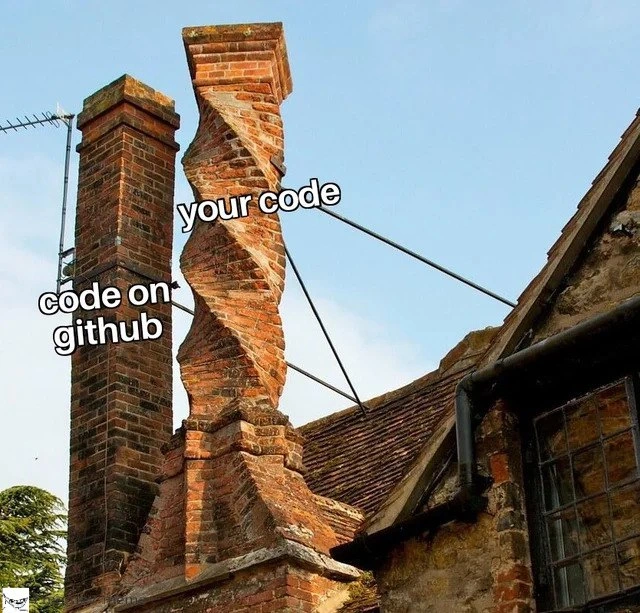
This meme is joking that programmers do the same thing with their code. The code on GitHub is like that tidy room you show to guests: it’s clean and organized on the surface. Your code on your own computer is like the messy room before the cleanup: it was all over the place while you were working on it. Developers clean up their code — just like hiding the mess in the closet — before letting anyone else look at it. The twisted chimney in the picture is like the overstuffed closet: it looks crooked and unstable because it’s hiding a lot of chaos inside. The straight chimney is like the front of the house that everyone sees, looking normal and nice. It’s funny because every programmer can relate to this little secret. We all want to present our best work, so we polish things up for others. But we can’t help remembering the wild mess that was really there during the process. The meme basically says: everyone’s code looks perfect on the outside, but behind the scenes, there’s a messy reality — and that’s okay (and kind of hilarious) because it’s true for all of us!

Level 2: Clean Commits

If you're newer to programming, let's break down what's going on. This meme is comparing code on GitHub to your code on your own computer, and it’s making a joke about the difference between the two.

First, some definitions:

  • GitHub is a popular website where developers store and share their code. Think of it like a library or a gallery for code projects (these projects are called repositories or "repos").
  • Git is the tool that actually keeps track of changes in code (a version control system). It lets you save snapshots of your work (called commits) as you go, and you can go back to earlier versions or compare changes over time. Each commit has a message describing what you did, like "Fixed a bug in user login".
  • A repository is basically a project folder tracked by Git. You usually have a repo on your local machine (your computer) and a repo on GitHub (a copy on the cloud). The GitHub repo is often where you share your code with teammates or the public.
  • A branch in Git is like a separate line of development. The main code (often on a branch named main or master) is typically stable. If you want to add a new feature or work on a bug, you might create a new branch (say, feature-X). On that branch, you can make a bunch of changes without affecting the main branch. Later, you merge your branch back into the main branch once your code is ready.
  • Code quality refers to how clean, understandable, and maintainable your code is. High-quality code is well-organized, uses clear names, has comments or documentation where needed, and handles errors gracefully. We strive for good code quality especially in code that others will see or use.

Now, the left chimney labeled "code on github" represents the code that gets pushed to the GitHub repository – in other words, the version of your project that you share with the world or your team. This code is usually cleaned up and nicely organized. The right chimney labeled "your code" refers to the code on your own machine before you clean it up – basically your rough draft or work-in-progress code. It's shown as a twisted, shaky chimney to suggest that this private version of the code is kind of a mess.

Why would your local code be messier? Imagine you're writing a program and trying to get a new feature to work. At first, you might write some quick-and-dirty code just to see if your idea works. You try different things: you add some lines, run the program to test it, see it crash or get an error, then change the code again. You might throw in print statements like print("got here") or console.log("step 2", value) to understand what's happening at certain points (these are basic debugging moves to trace the program’s execution). You might even comment out chunks of code (using // in many languages) instead of deleting them, just in case you need that code later. This phase of development is a bit chaotic, and that's totally normal. During this time, your code can get pretty tangled or clunky – kind of like that twisted chimney which looks unstable.

Now, when everything finally works, you don't want to leave all that trial-and-error evidence in the final version of your code. Before sharing your code on GitHub, you'll probably do some cleanup:

  • Remove those extra print/debug statements (nobody else needs to see your "Is this part working?" messages).
  • Rename variables or functions if you gave them placeholder names. For example, x might become userAge if that variable holds an age, or a function named testFunction() might get a real name like calculateInterest() once you know what it actually does.
  • Delete any code you commented out and ended up not needing. Those lines were useful while you were figuring things out, but they just confuse people if left in the final code.
  • Maybe reorganize the code for clarity. If you pasted the same snippet in two places to get it working quickly, you might turn that into a single function that both places can call, to avoid duplicate code. If a file got really long and does two things, you might split it into two files each handling one thing.
  • Add comments or documentation for tricky parts. If you had a hard time with something, a short comment like // workaround for timing issue can help the next person (or future you) understand why the code is written that way. You might also update the README file of the project if the new code affects how to use the program.

After tidying up the actual code, you also tidy up your Git history. Instead of a bunch of small commits like "trying something", "fixed it, I think", "oops, fix bug for real", you might combine your changes into a single or just a few commits with clear messages. For example, you could end up with one commit that says "Add search feature to navbar" which encompasses all those little fixes you did along the way. This gives a cleaner story of what changed when someone looks at your repository. Git has commands to let you edit your commit history (for instance, git commit --amend can fix the last commit, and interactive rebase can rearrange or squash commits). These are like editing your rough draft into a final draft.

Finally, you push your cleaned-up code to GitHub. "Pushing" in Git means sending your commits from your local repository up to the remote repository (GitHub) so that everyone else sees the updates. Now the code on GitHub looks well-structured and straightforward, almost as if you implemented the feature in one go from scratch with no hiccups. This is the straight chimney: solid and straight because all the bricks (commits) are in sensible order.

Meanwhile, you remember the reality: it took a bunch of tries and maybe some ugly fixes to get it right. For a while, your code was held together by hope and duct tape, much like that twisted chimney needed metal rods to keep it standing. But nobody sees that part once you've cleaned up. And that's okay! It's part of the development process. We often say "Don't compare your messy behind-the-scenes to someone else’s highlight reel." The code on GitHub is the highlight reel. Your local code is the behind-the-scenes.

For a new developer, it’s important to understand that this process is normal. When you see someone’s repository on GitHub with perfectly formatted code and a neat commit history, remember that they probably went through the same messy process you did, but they cleaned it before you ever saw it. Early in your career, you might feel pressure to get everything right on the first try. But even professionals rarely do that. They write messy code initially and then refine it.

Think about writing an essay or doing math homework: you might do a rough draft on scrap paper, scratch things out, and make mistakes. Then you write a neat final copy to hand in. No one sees the scrap paper, but it was necessary to work through the problems. Similarly, no one sees your scratch code (your local commits full of mistakes), they only see the polished result on GitHub.

That’s why this meme is both funny and reassuring to developers. It jokes that what we show publicly (the nice straight chimney/code) is very different from what it looked like initially (the twisted chimney/ code). It’s a nod to the fact that every programmer has a “messy closet” of code somewhere. In the end, we all do the same thing: we make a mess while solving a problem, and then we tidy up the mess so the solution looks clean.

Level 3: Linear History, Twisted Reality

This meme highlights a universal truth in programming: the expectation vs reality gap between how we present our code and how it actually looks during development. In the image, two brick chimneys illustrate this contrast. The perfectly straight chimney labeled "code on github" is our polished, pristine code as seen in a public repository. The neighboring chimney is wildly twisted and unstable, labeled "your code" – this represents the tangled state of your work-in-progress code on your local machine. The humor hits home because every experienced developer knows that the code we commit to GitHub often looks far cleaner than the code we had before cleanup. We show the world a straight and sturdy structure (clean architecture and neat commits), while hiding the fact that it took a maze of twisted trials and errors to get there.

In the realm of version control with tools like Git, it's common practice to rebase or squash commits to present a linear history. By the time code appears on GitHub, its change history is streamlined and logical – as if the feature was developed in one smooth, straight shot. However, the twisted chimney tells the real story of development. Locally, your code might have gone through numerous revisions, hacks, and patches. Perhaps you tried three different approaches before finding one that worked. You might have left // TODO comments, temporary logging statements, and chunks of experimental code commented out. The meme exaggerates this by showing that second chimney literally twisted like a spiral staircase. And notice the black iron support rods bracing it: those rods are the equivalent of the quick-and-dirty hotfixes and kludges we use to prevent our shaky code from collapsing. It's a comical reminder of how much duct tape and zip ties we sometimes rely on to hold a program together while we figure things out.

Seasoned developers will chuckle at how accurate this is. We've all had spaghetti code moments – when the logic in our program turns into a tangled mess as we hurriedly patch bugs and edge cases. Over time, we learn techniques to clean up that mess. For example, you might use git rebase -i (interactive rebase) to squash a dozen chaotic commits into a single elegant commit before pushing to GitHub. That way, the official repository shows a nice straight commit history, hiding the zigzag path it took to get there. Imagine a local commit history like this:

  • "WIP: start Feature X (broken)"
  • "Fix crash on startup"
  • "Attempt alternative approach for X"
  • "Temporary hack to handle edge case"
  • "Cleanup and finalize Feature X"

Before publishing, you might condense that into one commit on the main branch named "Add Feature X". To anyone browsing the repository, it looks like you implemented the feature in one go, following all the best practices. But you and your Git history (on a branch no one else saw) know the truth: it was a twisting journey of trial-and-error. This workflow is common, especially in open source projects or any team with high CodeQuality standards – the messy intermediate steps get cleaned up before merging.

The twisted chimney in the meme also symbolizes how your development code might violate clean coding principles temporarily. Maybe you hard-coded a value "just to test". Or you duplicated a function rather than abstracting it properly, because you planned to refactor later. These not-quite-right solutions accumulate as technical debt. It's like the structural quirks in that chimney – eventually, if you don't straighten things out, the whole thing might become unstable. But in the heat of development, taking on a bit of debt with a quick fix can be the difference between a working prototype and no progress at all. The key is that, before others see the code, we pay back that debt by refactoring the code to be more stable (or at least put some "iron rods" in place via tests and error handling) so the final result stands tall.

Another layer to this joke is the contrast between your private workspace and your public persona as a coder. On your local machine, you might have a branch called experiment or do-not-push full of print statements and half-baked code. You might even be running your app with special settings that conveniently bypass or auto-fix errors (like running a server in debug mode that auto-reloads on crash, acting like those support rods holding up the chimney). But when it's time to share code with the team or the world, you clean up those experiments. All the stray print statements and hacky variable names (foo, blah, temp1) get removed or renamed properly. You add comments where it's still confusing, so it at least appears well-documented. Essentially, you rebuild the chimney straight before anyone else takes a look.

This comedic exaggeration resonates with developers because of the unspoken camaraderie it exposes. We've all been there, even if nobody admits it upfront. The meme pokes fun at the façade of always having perfect code. In reality, even senior devs have moments when their local repo looks like a mad scientist's lab. Seeing a perfectly structured library on GitHub can give a junior developer imposter syndrome ("Their code is so clean, why is mine such a mess?"). But the truth is, that straight-code repository probably had a twisted path behind it too – we just don't see that part. In software development there's even a tongue-in-cheek saying: "If your early drafts of code don't embarrass you later, you probably spent too long polishing before moving on." The twisted chimney is that embarrassing draft; the straight one is the final polished result after all the learning and mistake-correcting.

To drive the point home, here’s a side-by-side comparison of the public vs private code realities:

On GitHub (Public) On Your Machine (Private)
Straight, well-structured code Twisted patches and ad-hoc fixes
Meaningful commit messages Commits like "oops, fix bug"
Clear documentation (README) Comments like "// TODO: fix later"
Thoroughly tested (CI passes) Only "works on my machine"

In short, the meme is funny because it’s true. Developers tend to present their code in the best light (a straight chimney), while the messy reality (the twisted chimney) is kept hidden in our local repos. It's a lighthearted reminder that the polished code we see online often started out as a wobbly, twisty draft. Everyone’s code is a bit of a fixer-upper before it gets cleaned – even if on GitHub it stands tall and straight.

Description

A two-part comparison meme featuring two brick chimneys on a rustic-looking building against a clear blue sky. On the left, a standard, straight rectangular chimney has a white text label that reads 'code on github'. On the right, a much more complex and ornate chimney is built in a spiraling, twisted design, with a text label that reads 'your code'. A small, stylized cartoon face watermark is visible in the bottom-left corner. This meme humorously contrasts the clean, polished appearance of a project as it's presented on a public repository like GitHub with the often convoluted, overly complex, and messy reality of the underlying source code that developers actually have to work on. It speaks to the concepts of technical debt, code quality, and the difference between a public interface and its private implementation, a feeling well-understood by experienced engineers

Comments

7
Anonymous ★ Top Pick The public API is the straight chimney, the implementation is the twisted one. We call it 'service-oriented architecture,' but the service is mostly to the masochistic tendencies of the maintenance team
  1. Anonymous ★ Top Pick

    The public API is the straight chimney, the implementation is the twisted one. We call it 'service-oriented architecture,' but the service is mostly to the masochistic tendencies of the maintenance team

  2. Anonymous

    GitHub shows one pristine squash-merge; my laptop has 43 tangled rebases, two force-pushes, and a shell script acting as a guy-wire - structurally sound as long as nobody looks up the chimney

  3. Anonymous

    The GitHub version passed all the architectural reviews, but the local one is held together by three setTimeout() calls, a global variable named 'temp_fix_2019', and a comment that just says 'DO NOT REMOVE - breaks production for reasons unknown'

  4. Anonymous

    This perfectly captures the moment you realize your production environment has accumulated six months of undocumented hotfixes, manual configuration tweaks, and 3 AM emergency patches that never made it back to the repository. The chimney on the left represents your pristine main branch with its clean commit history and passing CI/CD pipeline. The twisted chimney on the right? That's what happens when 'temporary' production fixes become permanent, when environment variables multiply like rabbits, and when your deployment process involves more manual steps than a Victorian-era factory. Senior engineers know this pain intimately: the repository is your architectural blueprint, but production is the building that's been renovated by five different contractors who never talked to each other, none of whom left documentation, and one of whom may have been slightly drunk. The real horror isn't the twist - it's knowing that somewhere, someone is actively preventing you from tearing it down and rebuilding it properly because 'it's working fine, don't touch it.'

  5. Anonymous

    GitHub: immaculate commits, straight as a chimney. Local: a baroque twist of unrefactored hot paths and orphaned branches

  6. Anonymous

    GitHub: straight chimney; production: the helix after auth, observability, retries, feature flags, multi‑tenant billing, and GDPR - turns out cross‑cutting concerns aren’t layers, they’re torque

  7. Anonymous

    Your GitHub shows a pristine, squash-merged commit history; behind the VPN the service is a 12-year twist of feature flags, one-off migrations, and 'just this once' cronjobs - squash doesn’t uncoil architecture

Use J and K for navigation