Skip to content
DevMeme
902 of 7435
Senior Developer's Brain: 90% Architecture, 10% Googling Basic Syntax
Learning Post #1020, on Feb 4, 2020 in TG

Senior Developer's Brain: 90% Architecture, 10% Googling Basic Syntax

Why is this Learning meme funny?

Level 1: Even Experts Need Reminders

Imagine one of your parents has been cooking your favorite dish for years. They’re really good at it and could probably do it with their eyes closed. But every now and then, you notice them opening the recipe book to double-check something simple, like “How much salt goes in again?” It might seem silly – they’re an expert cook, why do they need the recipe? The answer is that everyone forgets small details sometimes, especially if they haven’t thought about them in a while. It doesn’t matter if someone is a beginner or a pro; our brains can’t hold every little thing all the time.

This meme is funny in the same way. It shows a very experienced programmer (kind of like a master chef of coding) who still has to look up a basic recipe step: in this case, how to do a simple task in programming. Seeing that happen is a bit like catching your very confident teacher secretly peeking at the answer key for an easy question – it’s surprising at first, but also reassuring. It reminds us that even the people who seem to “know everything” are human just like us. They can still forget the basics and that’s completely normal. In fact, it’s kind of cute and funny to see that no matter how grown-up or skilled you are, you might still need a little reminder for something easy. The big idea: nobody knows everything by heart, and even experts use tools (like Google or recipe books) to help them remember stuff sometimes. That’s why we smile at this meme – it’s telling us that it’s okay to ask for help or look things up, no matter how good you are.

Level 2: Googling the Basics

So why would a skilled programmer need to search something as simple as how to declare a variable? Let’s break it down in plain terms. In programming, a variable is like a box for storing information (a number, a piece of text, etc.). Declaring a variable means telling the computer “Hey, I’m creating this box and here’s what I’m calling it (and maybe even what type of thing I’ll put in it).” Every programming language has its own specific way (syntax) to do this. If you’ve learned one way, learning another can be confusing, and remembering all of them at once is even harder.

For example, consider some popular languages and how they handle variable declaration:

  • Python – You don’t use any special keyword at all. You just write a name and set a value: x = 10. Python creates the variable on assignment. No need to specify a type or use a keyword – simple, but very different from some other languages.
  • JavaScript – You typically use keywords like let or const (and historically var). For example: let x = 10; creates a variable x. If you’re an older JS coder, you might recall using var x = 10; in the past, but now let is more common. Already, there’s a tiny decision: which keyword to use? That’s an extra detail to remember.
  • Java – In Java (and similarly in C# or other statically-typed languages), you must specify the type of data the variable will hold. For instance: int x = 10; declares an integer variable named x. If you want a word or sentence, you might do String name = "Alice";. There’s also always a ; semicolon at the end of the statement. Forgetting the semicolon or the type will result in an error.
  • C++ – Much like Java, you declare the type: int x = 10;. Modern C++ has an auto keyword that can infer the type for you (e.g. auto y = 5; will make y an int automatically), but that’s yet another variation to recall. And again, semicolons ; are required at the end of the line.

Now imagine you’re a developer who claims to know all these languages. In reality, you probably learned them over many years, not all at once. Each language’s syntax for basics like variables might live in a different corner of your brain. When you’re deep in Python mode (where you just type x = 5 without second thought) and suddenly you switch to write a quick snippet in JavaScript, you might momentarily hesitate: “Wait, do I need to put var or let here? Is the semicolon needed?” It’s easy to mix up the rules when jumping between contexts. This kind of developer_memory_lapse is extremely common—essentially every programmer has experienced the “oops, how do I do that again in this language?” feeling. It doesn’t mean you’re a bad programmer; it just means you’re human and juggling a lot of information.

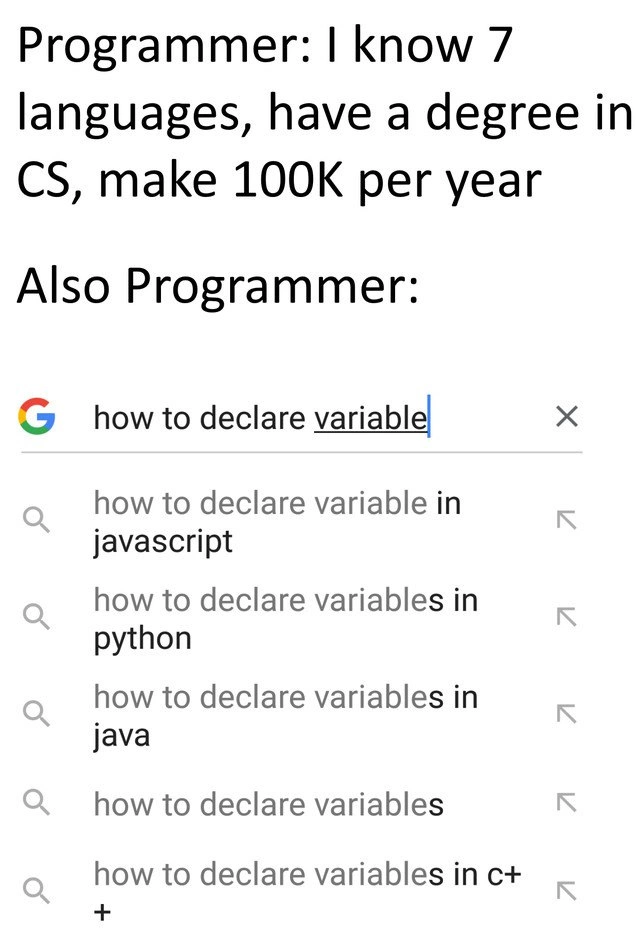
That’s where Google (and sites like Stack Overflow) come in to save the day. The meme shows a Google search box with the query “how to declare variable ...” being typed and a list of autocomplete suggestions popping up. Google_search_autocomplete tries to guess your question based on what thousands of other people have asked. The suggestions in the image include “how to declare variables in JavaScript/python/Java/C++” – which tells us lots of people have searched for those exact phrases. In fact, these suggestions are practically finishing the programmer’s sentence, implying, “Are you trying to ask how to declare a variable in JavaScript? Because that’s a super common question!” This is a wink from Google saying: Don’t worry, you’re not the only one who needs to look this up. For a newer developer, it’s actually reassuring to see that even queries you might consider “basic” are frequently searched by others. It means the LearningCurve is real for everyone, and even advanced users need refreshers.

Using Google to look up syntax or error messages is such a routine part of programming that it’s often joked about. You might hear things like “writing code is 90% Googling and 10% typing” as a form of CodingHumor. While exaggerated, there’s truth there: a big part of a developer’s job is problem-solving, and a lot of problem-solving involves research and learning. CopyPasteCoding is a term poking fun at how developers sometimes literally copy code from an article or answer (like from Stack Overflow) into their project. Of course, good developers understand what they copy and adapt it as needed, but the point is nobody writes everything from scratch relying only on memory.

Let’s also talk about Stack Overflow for a moment. It’s a question-and-answer site where programmers ask for help and others post answers. If you search “how to declare a variable in JavaScript”, one of the top results is likely a Stack Overflow page or a documentation page explaining it. Over time, developers become very skilled at quickly scanning search results to find the answer they need. This skill – sometimes jokingly called strong “Google-Fu” – is something you develop alongside your coding skills. In many workplaces, nobody bats an eye if a developer has a web browser tab open to look up documentation or syntax. It’s considered an efficient way to work, not a weakness. Modern DeveloperExperience is actually built around quick access to information. For instance, code editors will often link to documentation or have tool-tips for syntax. But when those aren’t enough, a quick web search is the next best thing.

The top caption of the meme lists impressive credentials (“7 languages, CS degree, $100K salary”) on purpose. It sets up an expectation: surely this person is an expert who has everything memorized. The punchline is the second caption: “Also Programmer:” revealing them performing a very novice-sounding Google query. This contrast is funny because it’s true – even experts do this. It highlights a key lesson for any learner: being a good developer isn’t about memorizing everything, it’s about knowing how to find and apply information. In fact, the field of software is so vast and changes so often that perpetual learning is just part of the job. What you learned in school gives you a foundation (like understanding what a variable is, or the concept of data types), but the day-to-day specifics might require a quick refresher. Today it might be “how to declare a variable,” tomorrow it could be “what’s the syntax for a lambda function in C++” or “the exact order of parameters for a library function.” No one’s brain is a perfect encyclopedia of code. Instead, good programmers develop a reliable process: when they don’t remember something, they efficiently look it up.

This meme resonates with developers of all levels. If you’re just starting out, you might feel embarrassed about googling “easy” stuff – but don’t! RelatableDevExperience posts like this are a reminder that everyone does it, even the pros making big salaries. If you’re more experienced, you see this and laugh, thinking, “Yep, that was me searching how to center a div in CSS for the 100th time,” and you feel a little less alone. It’s a lighthearted acknowledgment that the learning never stops in coding, and that’s okay.

Level 3: Syntax 404 Not Found

Programmer: "I know 7 languages, have a CS degree, make $100K per year."
Also Programmer: opens Google and types "how to declare variable..."

Seasoned developers can’t help but chuckle at this. The meme sets up a classic boast-versus-reality scenario: a programmer with an impressive resume and DeveloperExperience claims mastery over seven programming languages and a formal CS education, yet in the next breath they’re on Google struggling to recall the most basic syntax. It’s a playful jab at the contrast between how we present our skills and the humbling day-to-day truth of software development. DeveloperHumor often pokes fun at these little ironies that every engineer recognizes. No matter how many fancy frameworks you’ve conquered or the size of your salary, there are days you still blank on something as simple as “how to declare a variable” in whichever language you’re using at the moment.

Why does this happen? Blame context switching overhead – the mental cost of jumping between different tasks or languages. A programmer might work in JavaScript during the morning, write some Python in the afternoon, and review a bit of C++ code by evening. Each language has its own rules and keywords for something as fundamental as defining a variable. After a long day of swapping contexts, a quick syntax like let vs. var in JavaScript or whether C++ requires a type declaration might slip out of the brain’s cache. It’s a bit like a cache miss in your brain’s memory: the information isn’t immediately at hand, so you perform a lookup. In this case, that lookup is on Google. Experienced developers know their limitations – they don’t try to compile every syntax detail in their head. Instead, they rely on documentation, search engines, and Stack Overflow as an extension of their memory. This is often humorously called “Google-driven development” or CopyPasteCoding (writing code by copying from internet examples). Far from being shameful, it’s usually the most DeveloperProductivity-friendly approach. Why waste time wrestling with your memory (and risk a silly syntax error) when a 5-second search can confirm the correct answer?

The Google search screenshot in the meme is especially hilarious because of the auto-complete suggestions. That drop-down list shows queries like “how to declare variable in JavaScript”, “...in Python”, “...in Java”, “...in C++”. It’s basically Google shouting, “Don’t worry, you’re not the first to ask!” The google_search_autocomplete feature is revealing just how common these questions are. In other words, thousands of programmers – likely including many veteran devs – have searched those exact phrases. The humor digs into a shared secret: everyone, even the folks who “know 7 languages”, sometimes mix up syntaxes and reach for a quick refresher. It’s a unifying moment of RelatableDevExperience. That feeling when you confidently tell someone you’re a software engineer, yet moments later you’re hunched over your keyboard Googling a beginner question – we’ve all been there. 🤦‍♂️

This meme also speaks to the perpetual learning mindset of software engineering. Technology doesn’t sit still; languages evolve, best practices change, and memory is fallible. A developer with a formal degree might recall complex algorithms or design patterns with ease, yet not remember whether in Python you need to explicitly declare a variable (you don’t) or what keyword to use for a JavaScript variable in 2020 (it changed from var to let/const in modern practice). Rather than keeping every tiny detail in their head, experienced devs focus on understanding concepts and knowing where to find specifics when needed. It’s a form of pragmatic wisdom: use your brain’s CPU cycles for the hard problems and offload the trivial look-ups to reference materials (the “external memory”). In fact, being adept at quickly finding information is practically a superpower in this field. StackOverflow and search engines are like an extra toolkit senior engineers wield expertly. They might jokingly call Google their “pair programmer.” The meme’s joke lands so well because it loudly declares what every coder learns eventually: knowing how to solve problems matters more than memorizing syntax.

What’s more, this scenario highlights a healthy aspect of DeveloperExperience_DX in modern coding culture. Our tools and workflows assume that you will be searching and consulting documentation regularly. Integrated development environments (IDEs) will autocomplete code and show hints precisely because no one can remember everything. The collective knowledge of the internet (tutorials, Q&A sites, official docs) is part of the daily routine. So a developer shooting off a quick “how do I do X again?” query isn’t a sign of incompetence – it’s actually efficient. It reduces errors and frees mental space for the logic and design of the application. Senior engineers often laugh at this meme because it’s a moment of recognition: despite years of experience, they still do exactly this, and it doesn’t make them any less of an expert. In a way, the meme is celebrating humility and continuous learning. The LearningCurve in programming never truly ends; there’s always a new language, a new version, or simply that one detail you haven’t used in a while. Real pros aren’t the ones who pretend to know everything, but the ones who confidently admit “Hang on, let me Google that real quick” in the middle of a meeting. They know that a 30-second search beats 30 minutes of stubbornly trying to remember a detail.

In summary, the humor here comes from that highly relatable truth: even the most qualified programmer is human. No matter how advanced you are, you’ll occasionally experience a developer_memory_lapse for the basics. Instead of trying to conceal it, we’ve turned it into a joke we all share. It’s both comforting and comical to realize that the difference between a junior dev and a senior dev isn’t that one never forgets things – it’s that the senior has simply gotten really good at quickly looking stuff up! This meme nails that irony, leaving even veteran coders smirking and nodding in agreement.

Description

A two-part meme contrasting a programmer's self-proclaimed expertise with their actual workflow. The top section contains black text on a white background that reads: 'Programmer: I know 7 languages, have a degree in CS, make 100K per year'. The bottom section, introduced by 'Also Programmer:', shows a screenshot of a Google search. The search query typed into the bar is 'how to declare variable'. Below the search bar, Google's autocomplete suggestions are visible, including 'how to declare variable in javascript', 'how to declare variables in python', 'how to declare variables in java', and 'how to declare variables in c+'. The humor stems from the reality that even experienced, high-earning developers frequently look up fundamental syntax. For senior engineers, this is highly relatable; their value lies in understanding complex systems, architecture, and problem-solving, not in rote memorization of syntax for multiple languages. The meme serves as a comforting reminder that relying on search engines for basic information is a universal and efficient part of the development process


Comments

7
Anonymous ★ Top Pick The mark of a senior engineer isn't remembering the syntax for variable declaration in seven languages; it's knowing how to phrase the Google search to get the answer before the IDE's language server has even finished starting up
  1. Anonymous ★ Top Pick

    The mark of a senior engineer isn't remembering the syntax for variable declaration in seven languages; it's knowing how to phrase the Google search to get the answer before the IDE's language server has even finished starting up

  2. Anonymous

    I can whiteboard Raft’s log replication blindfolded, yet Chrome still autocompletes “how to declare variable in JavaScript” for me - apparently my brain’s LRU cache evicts keywords first

  3. Anonymous

    The seventh language is knowing which Stack Overflow answer to trust when six of them contradict each other about whether you need var, let, const, or just faith in JavaScript's hoisting

  4. Anonymous

    After two decades and seven languages, I've achieved true mastery: knowing exactly which Stack Overflow tab to keep open. The real senior engineer skill isn't memorizing syntax - it's understanding that 'let', 'var', 'const', 'auto', 'def', and whatever Rust is doing this week are all just different spellings of 'I'll Google this in production.'

  5. Anonymous

    CS degree masters Big O; production polyglotry masters 'site:stackoverflow.com variable declaration'

  6. Anonymous

    Two decades in, I can design for CAP and SLOs, but every repo switch triggers an LRU eviction of 'let vs const' - so I shard my memory across Google

  7. Anonymous

    CV: 7 languages. Brain: L1 cache miss - Google “how to declare variable”; between let, var, def, auto, and final, the only const in my stack is the search bar

Use J and K for navigation