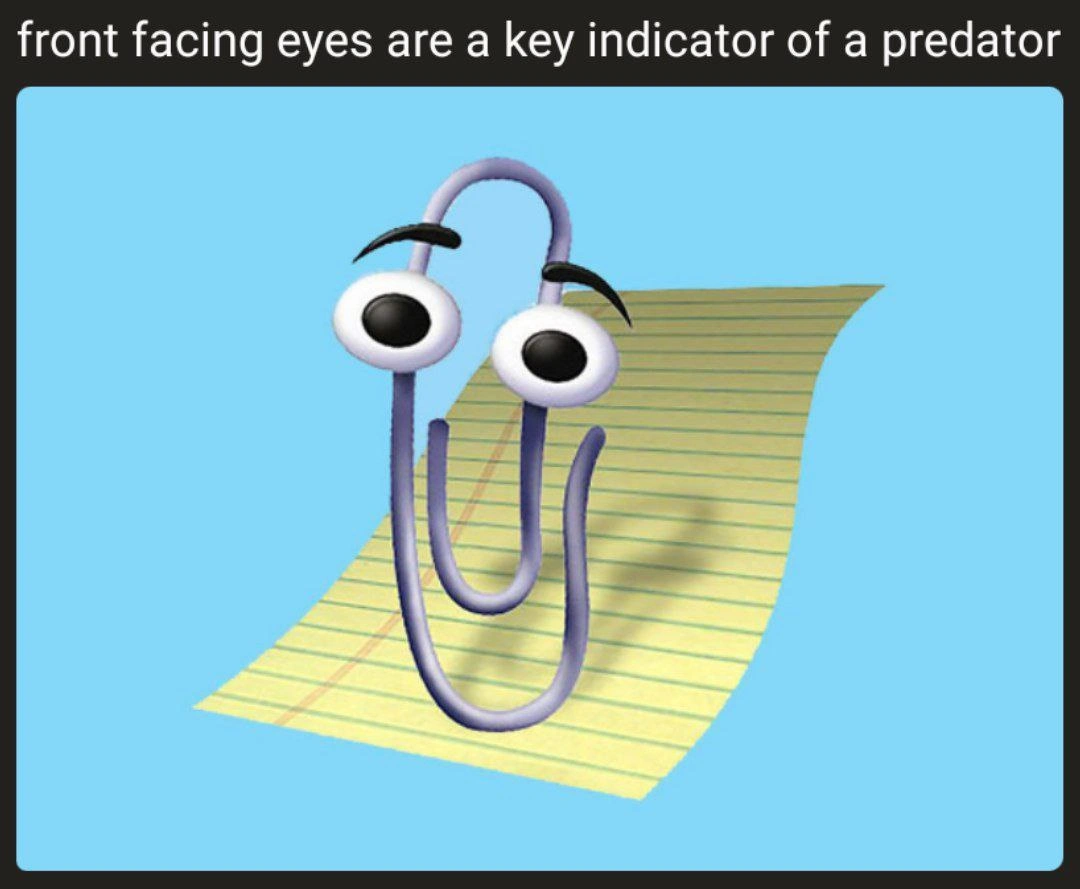
Clippy's front-facing eyes reveal the predator nature of legacy UX assistants
Why is this Microsoft meme funny?
Level 1: The Overeager Helper
Imagine you’re doing your homework, and a friendly cartoon character keeps popping up beside your notebook saying, “Hey, it looks like you need help with that!” at the worst times. At first, it seems kind of cute – it just wants to help. But after the third or fourth time, you might feel like, “Ugh, please just let me work!” It’s as if you have a helpful friend who doesn’t realize they’re being a pest. This meme is joking that Clippy (a little paperclip character from old computers) was just like that.
Clippy had big round eyes that always stared right at you, kind of how a cat watches a bird. The joke says animals with eyes in front, like lions or owls, are usually hunters (predators). So when Clippy stares at you head-on with those two big eyes, it’s like he’s a predator and you’re the prey he’s stalking – not to eat you, of course, but to jump out and give you tips when you least expect it. It’s a funny exaggeration. In real life, Clippy wasn’t evil; it was just a cartoon helper in Microsoft Word that often interrupted people. But to someone trying to concentrate, Clippy’s constant “Can I help you?” felt as startling (and annoying) as having someone sneak up behind you over and over.
So the simple idea is: sometimes something meant to be helpful can actually bother you if it doesn’t know when to stop. Clippy is the over-eager helper who ends up feeling like a sneaky critter watching your every move. That contrast is what makes people laugh – it’s taking an old, harmless paperclip character and jokingly calling it a sneaky predator. In other words, a friendly helper that’s a little too friendly can accidentally become the bad guy in the story. And that’s why seeing Clippy with those front-facing “predator” eyes is both silly and hilarious to people who remember him.
Level 2: It Looks Like You're Writing a Letter...
Let’s break down the joke for newer devs or those who never encountered Clippy. Clippy (officially named “Clippit”) was a cartoon paperclip and an early UX assistant built into Microsoft Office around 1997. Picture a little animated paperclip with giant googly eyes and eyebrows, popping up in your document with a speech bubble. Its most famous line (and the one developers love to quote) was:
It looks like you're writing a letter. Would you like help with that?
Clippy would say this whenever you started typing something like “Dear John,” assuming you were composing a letter and might need a template or formatting advice. This was an example of proactive UX: the software tried to anticipate your needs without you asking. The idea sounds nice – the computer helps you automatically – but in practice Clippy’s help often wasn’t relevant. If you weren’t actually writing a letter, that friendly offer felt more like an interruption.
Front-facing eyes in the meme refers to Clippy’s big eyes that look straight out of the screen at you. In animal biology, many predators (like lions, wolves, or humans) have two eyes facing forward, which gives them depth perception for hunting. By contrast, prey animals (like rabbits or deer) often have eyes on the sides of their head to watch for danger. The meme jokes that because Clippy has front-facing eyes, it fits the profile of a predator. In other words, Clippy is being compared to a hunting animal – a predator of your attention. This is funny because Clippy was supposed to be a helpful tool, not something scary or aggressive. But to many users, Clippy popping up felt intrusive, even menacing in a silly way (especially when you were focused on coding or writing and suddenly a cartoon face appears asking questions). It’s like the software was watching you type and jumping in whenever it “smelled” an opportunity – much like a cat pouncing on a moving string.
The term legacy UX assistant means Clippy is from an older generation of user interfaces. "Legacy" in tech usually refers to outdated software or systems that we keep around (often with a mix of fondness and frustration). Clippy is definitely legacy – a ‘90s design that didn’t survive because users hated it. It’s part of TechHistory now, a famous example of a feature no one really asked for. Developers who were around back then remember how Clippy became the butt of many jokes. It’s pure TechNostalgia: mentioning Clippy instantly brings back memories of Windows 98-era computing, CRT monitors, and installing Microsoft Office from a CD-ROM.
Anthropomorphic UI is a term we use to describe interfaces that have human or living characteristics. In Clippy’s case, Microsoft gave a stationery object (a paperclip) human traits – eyes, eyebrows, and a playful demeanor – to make it seem friendly and approachable. The idea was that users might feel more comfortable with a smiling paperclip guide than with a dry help menu. Unfortunately, as many learned, a smiling cartoon popping up uninvited can become an unwanted popup itself. Clippy would wiggle, bounce, and even say things like “Looks like you’re writing a resume.” These animations and messages were meant to engage users, but often they just annoyed people who already knew what they were doing. It’s a bit like a overly eager colleague who keeps suggesting how you should do your task even after you’ve got it under control.
Because Clippy was context-aware (trying to react to what you typed), it sometimes triggered at the worst times or kept repeating tips. Imagine you’re a junior dev writing comments in Word or typing pseudocode into a document – suddenly a paperclip pops up offering letter-writing help. It breaks your flow. You’d think, “I’m not writing a letter, go away!” This frustration was so common that people quickly learned how to turn Clippy off. In fact, one of the first things many users did in a new Office install was go into settings and disable the assistant. That’s why we call Clippy a predator in jest: it preyed on our focus. It wasn’t literally dangerous, of course, but it behaved in a nagging way that made it the enemy of productivity at times.
So, this meme is basically combining a nature fact with a piece of tech humor. Clippy’s forward eyes make it look like a predator, and given how aggressively helpful it was, developers jokingly agree it was kind of a predator – at least to our patience. For anyone who has experienced Clippy, the comparison makes immediate sense and usually triggers a knowing laugh (and perhaps a little groan of remembrance). For those who haven’t, now you know: that wide-eyed paperclip was one of the most famously annoying “helpers” in software history.
Level 3: It Looks Like You're Prey
From a seasoned perspective, this meme blends tech nostalgia with an almost zoological joke. In nature, predators have forward-facing eyes for tracking prey. Here, the predator is Clippy, Microsoft’s infamous Office assistant from the late ’90s. The banner text – “front facing eyes are a key indicator of a predator” – is humorously labeling Clippy as the lurking hunter of the user experience. And for many veteran developers, that’s exactly how Clippy felt: a legacy UX assistant always poised to pounce on our work with unsolicited “help.”
Clippy would appear the instant it sensed you might need help, much like a cat leaping at the slightest motion. It had those big, googly front-facing eyes staring directly at you, giving off a constant gaze. For developers who remember working in Microsoft Office 97 or Office 2000, that goofy paperclip’s stare could feel oddly aggressive – as if the software itself were watching your every keystroke. The meme exaggerates this feeling by suggesting Clippy’s design literally makes it a predator. It’s a DeveloperHumor way to say: “Remember how Clippy hunted us with pop-ups?”
On a technical level, Clippy’s behavior was driven by early context-aware algorithms. It monitored what you typed and triggered tips based on simple rules. For example, if you typed the salutation of a letter, Clippy would spring to life. It was essentially a primitive event-driven agent hooked into Word’s editing model. The humor for senior devs is that the anthropomorphic UI – a smiling paperclip – masked a relentless, automated interrupt. We’d be deep in thought, writing documentation or code comments in Word, and suddenly:
// Pseudo-code for Clippy's "predator" logic:
if (document.Text.StartsWith("Dear ") && !helpOfferedYet) {
Clippy.Show("It looks like you're writing a letter...");
}
In practice, this proactive UX felt more like an ambush. Clippy’s pop-up “It looks like you’re writing a letter…” became a running joke (and a mild jump-scare) for anyone on a deadline. The assistant would cheerfully ask if you needed help formatting a letter, even if you were just jotting down pseudo-code or notes. Developers quickly learned to disable Clippy (often the first thing IT did on Office installations). This once-Microsoft flagship feature turned into the emblem of unwanted_popups.
Historically, Clippy is a classic case of good intentions gone awry in DeveloperExperience (DX) and UI design. It was born from a 1990s idea that software should actively assist users. Microsoft wasn’t trying to annoy us; they were exploring intelligent user interfaces – even foreshadowing today’s in-app assistants and AI helpers. But Clippy was an over-eager pioneer. Its anthropomorphic design (those cartoony eyes and upbeat demeanor) was meant to be friendly, yet it triggered something almost primal in users: make it go away! Like a predator, it commanded our attention on its terms, not ours. Seasoned engineers laugh at this meme because we’ve lived through that era: Clippy interrupting presentations, offering coding advice while we wrote specs, or simply bouncing in the corner waiting to be noticed. The TechHistory lesson here is how not to design a helper. An assistant that forces help is about as welcome as a lion in a flock of sheep.
What seals the humor is that juxtaposition of evolutionary biology and old software: a paperclip with predator eyes. It slyly implies Clippy was hunting our mistakes. Indeed, many devs from that era still joke that Clippy was the original “software predator,” stalking users across Word documents. This shared memory – equal parts funny and frustrating – is why the meme lands so well. It’s a wry nod to a piece of tech history that united users and devs in a singular thought: “Who invited this thing?!” Now in hindsight, we can chuckle at the absurdity. After all, Clippy’s “help” taught an entire generation of designers that unsolicited advice in software can feel predatory instead of helpful. The meme captures that lesson in one perfect image: our old paperclip “friend” front and center, eyes on the target, reminding us that sometimes the friendliest-looking features conceal a predator of productivity.
Description
The meme shows Microsoft Office’s animated paper-clip assistant, Clippy, centered on a light-blue background with its signature yellow ruled-paper sheet behind it. Above the image, white text on a black banner reads, "front facing eyes are a key indicator of a predator." Clippy’s oversized cartoon eyes stare forward, humorously implying that the once-helpful assistant is lurking like a hunter. Technically, the joke plays on developers’ collective memory of Clippy’s intrusive pop-ups in the late-90s Office suite - an early, often-hated attempt at proactive UX that foreshadowed modern in-app assistants. For seasoned engineers, it’s a reminder of how aggressive context-aware helpers can feel predatory rather than helpful when usability, timing, and consent are ignored
Comments
19Comment deleted
Clippy was just the on-prem MVP of today’s ‘AI assistants’ - same predatory context scraping, only now the event loop runs in the cloud at $0.02 per 1K pop-ups
After 20 years in the industry, I've realized Clippy wasn't trying to help with our documents - it was hunting for our will to live, one unsolicited suggestion at a time. Those forward-facing eyes make perfect sense now; it needed binocular vision to accurately target the exact moment you were about to be productive
Clippy's forward-facing eyes weren't just for depth perception - they were optimized for detecting the exact moment you were in flow state, triggering an O(1) interrupt with 'It looks like you're writing a letter.' The only assistant in history with a 100% false positive rate and negative user satisfaction scores that somehow shipped in production for years
Clippy's binocular vision evolved perfectly for apex predation: spotting unformatted docs faster than a linter catches trailing whitespace
Clippy was the original focus-stealing ISR: TopMost=true, modal=true, priority=real-time; prey=your flow state
Clippy was the original apex predator of focus - front-facing eyes, a naive “Dear…” regex, and a modal that hijacked the event loop
zeroth Comment deleted
First Comment deleted
All those tractors look definitely dangerous: whoever they catch, is unlikely to survive. Comment deleted
none of those are tractors, but I definitely agree. I'm just not sure what exactly their main prey is. Comment deleted
actually, there's a tractor on the hill way in the background lol Comment deleted
Hey, there are IT professionals here - being familiar with construction machinery may not be one of their primary skills. 😁 Comment deleted
well, I read all of the childrens books about construction, naturally I would know them. (actually not sure how much I'm joking there ngl) Comment deleted
driveable objects Comment deleted
extends drivestuff (german joke, because literally translated: fahrzeug (vehicle) → drivestuff) Comment deleted
Well, in Arma videogame engine, every object capable of propelling is called a vehicle - not only tanks, cars, boats and airborne units, but even human beings and animals. That's pretty tense generalization of classes! Comment deleted
let me remind you again that bees are fishes Comment deleted
Probably roll the children in the asphalt Comment deleted
It explains a lot Comment deleted