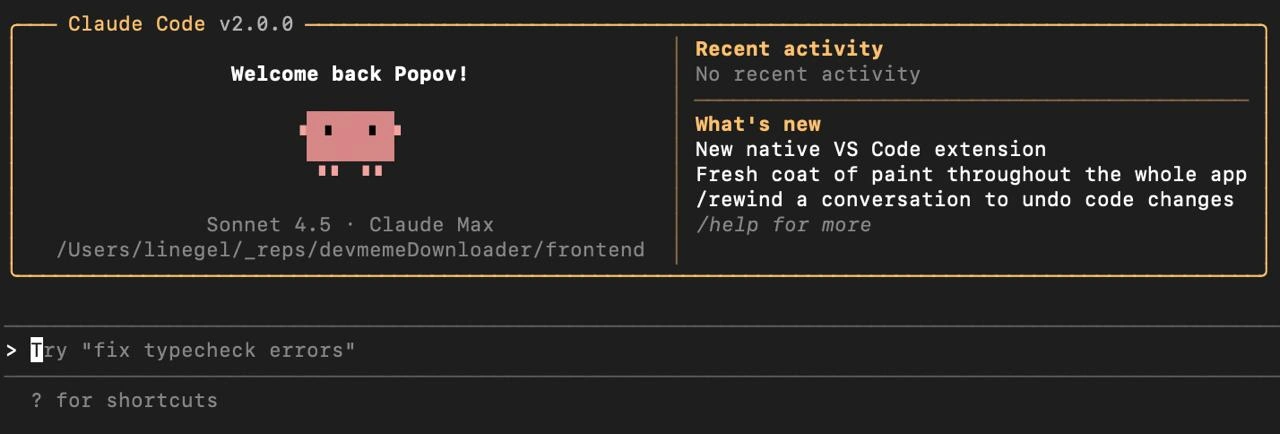
Claude Code v2.0.0 Welcome Screen Running Sonnet 4.5 on devmemeDownloader
Why is this AI ML meme funny?
Level 1: Homework Before Play
Imagine you come home from school and excitedly ask your parent if you can play your favorite game. Instead of just saying “yes,” they smile and hand you your homework with a gentle reminder: “Sure, but let’s finish these math corrections first.” That’s essentially what’s happening in this meme, but in a coding world. The AI helper is like a friendly teacher or parent figure for the developer. It says “Hello, welcome back!” but then immediately adds, “you should fix your mistakes before having fun with new stuff.” It’s funny because the developer was probably eager to dive into coding (or see the new cool AI features), and the AI is politely saying, “tidy up first!” It’s the same feeling as when a nice robot voice in a car greets you but then goes, “Please buckle your seatbelt.” It’s caring and correct – you do need to do it – but it might make you chuckle: even our machines are reminding us to handle the boring essentials before we can zoom off into the fun part.
Level 2: AI at Your Terminal
At this level, let’s break down what’s happening in this meme and explain the terms for someone who’s maybe new to these concepts. The image shows what looks like a terminal window (a text-based interface where you type commands) running a program called Claude Code v2.0.0. This program is essentially an AI assistant for programmers, made by a company called Anthropic (they develop AI models similar to how OpenAI made ChatGPT). The assistant has a text-based user interface (sometimes called a TUI, for Text UI) with a bit of styling: a yellow rectangular border, some colored text, and even a cute pixel art pig character in pink. All of this is happening in a dark theme (light text on black background), which is a very common aesthetic in programming because many developers prefer darker interfaces that are easier on the eyes during long coding sessions.
Now, the content inside that bordered box is greeting the user. It says “Welcome back Popov!” – presumably Popov is the username of the developer (perhaps their last name or handle). The pig sprite is just there for decoration and friendliness. It’s akin to having a little mascot in the tool. This is reminiscent of how some older software or even modern CLI tools include fun art or jokes to make the experience less dry. For instance, there’s a classic command-line toy called cowsay that prints out a cow saying whatever message you give it. Here we have a pig giving you a welcome message. 🐷 It immediately creates a warm, playful atmosphere rather than just dumping you at a plain prompt.
Below the welcome, we see Sonnet 4.5 • Claude Max. This line likely indicates the version or model of the AI running. Claude is the name of Anthropic’s AI model (similar to how GPT-4 is the name of one of OpenAI’s models). Claude Max might be a specific variant of Claude that is optimized for coding or has a larger capacity (the word “Max” hints it’s something like a maximum strength or maximum context model). Sonnet 4.5 could be the name of the software or the backend orchestrator – it might be a poetic codename for this release, since a sonnet is a type of poem and this is version 4.5 of whatever component that is. It’s not uncommon for tech products or models to have codenames; for example, Android releases are named after desserts. Here, the use of “Sonnet” also aligns with the name Claude (which possibly is named in honor of a famous person, maybe Claude Shannon, but that’s trivia). The key takeaway is: the tool is telling us what version of everything we’re running, which is useful info for a developer.
Next, it shows a path: /Users/linege1/_reps/devmemeDownloader/frontend. That’s the file path of the current project directory on the user’s computer (it looks like a Mac or Linux style path). It suggests that the developer is working on a project called “devmemeDownloader” in the “frontend” folder. By displaying this, the AI assistant likely knows the context of your project and maybe has loaded the files in that path to help you. Developer tools often show the current directory so you know where you are in the system.
On the right side of the box, there are two sections: “Recent activity” and “What’s new”. “Recent activity – No recent activity” probably means this is the first time (or at least there’s nothing notable from before) using this tool in this project, so there’s nothing to show. Or simply the user hasn’t used any AI commands recently that it would list there. The “What’s new” section is like a mini changelog or news bulletin about the tool. It lists a few new features in this version (v2.0.0):
- “New native VS Code extension” – This means they’ve released an extension for Visual Studio Code (VS Code), which is a very popular code editor. A native extension implies it’s officially supported and likely well-integrated. So if you prefer working in the VS Code editor rather than a terminal, you can install that extension and get the same AI assistance there. This is all about convenience and meeting developers where they work. Many devs spend most of their time in VS Code, so this is a big DX (Developer Experience) improvement.
- “Fresh coat of paint throughout the whole app” – This is a fun way to say they redesigned or polished the interface. We can actually see that: the UI looks pretty sleek for a terminal app (nice layout, color choices, the ASCII art, etc.). They likely improved the look-and-feel, maybe the alignment of text, colors, or added that pig icon in this update.
- “/rewind a conversation to undo code changes” – This one’s really interesting. It suggests that this AI assistant keeps track of the changes it makes to your code (probably via a conversation-like history), and now they’ve added a feature where you can rewind, meaning go backwards. Essentially, if the AI suggested some code modifications and perhaps applied them, you can undo those by rewinding the conversation to before the changes were made. Under the hood, this might integrate with some version control or an internal memory of edits. For a user, it means you have a safety net: you can experiment with the AI making changes, and if something goes wrong or you don’t like the result, you can say
/rewindto revert. This is similar to how in an editor you have an “undo” feature, but framed in the context of the AI session. - “/help for more” – This indicates you can type the command
/helpto get more information or commands. The slash prefix suggests that when interacting with this AI assistant in the terminal, commands that control the session (like help, or presumably rewind) start with a slash, whereas other input might be treated as prompts or questions for the AI. It’s similar to how in chat applications or some games, you use/to issue a command rather than say something.
Now, outside that welcome box, at the bottom of the screenshot, we see a prompt line. It has a suggestion: Try “fix typecheck errors”. This is likely the AI prompting the user to run a particular command or giving a hint of what to do next. The phrasing suggests that if the user types fix typecheck errors (or clicks it, if it’s clickable in the UI), the assistant will attempt to automatically fix the TypeScript type-checking errors in the project.
Let’s unpack type-check errors. In TypeScript (which is a programming language that builds on JavaScript by adding static type definitions), a type-check error happens when the code has a value or expression of one type where a different type is expected. For example, if a function is supposed to return a number but your code tries to return a string instead, the TypeScript compiler will complain. Here’s a quick illustration:
// Example of a TypeScript type error
function getAge(): number {
const age: number = "12"; // Error: Type 'string' is not assignable to type 'number'
return age;
}
In this snippet, we clearly have a mistake: we declared age as a number but assigned it a string "12". The TypeScript compiler (or the TypeScript language server in an editor) will produce an error like “Type 'string' is not assignable to type 'number'.” That’s a type-check error.
Now, why is everyone so concerned about fixing type-check errors first? In TypeScript projects, these errors mean something in your code is inconsistent or likely incorrect. Unlike plain JavaScript, which would only throw errors at runtime (or maybe not at all, letting weird bugs through), TypeScript catches these issues before you even run the code. Many projects treat TypeScript errors as a stop sign: you typically don’t release or even commit code that has type errors. Often, build tools will fail to produce an output if there are type errors (there’s a compiler option called noEmitOnError which stops the build if types don’t check out). Even if the compiler did emit JavaScript, running a program with known type errors is risky – it might crash or misbehave because, essentially, something is not as expected (like a function getting a string when it thought it had a number). So, fixing them is just a fundamental part of maintaining code health.
For a developer, especially a senior dev (meaning someone with a lot of experience), seeing a bunch of type errors is like seeing a messy desk – you can try to work without cleaning it, but it’s usually a bad idea. It’s ingrained in good practice that you address those errors promptly. What this AI assistant is doing is scanning the project (likely running tsc – the TypeScript compiler – or using the editor’s diagnostics) and noticing, “hey, there are errors.” Instead of waiting for the human to hunt them down, it politely points out that fixing them is a smart next step.
The polite tone is also worth noting. It says “Try ‘fix typecheck errors’” rather than something like “You have 5 errors, fix them.” It frames it as a suggestion, almost like a friend saying “Maybe we should tidy up those errors?” The meme title even says “AI terminal greeter politely reminds senior dev...” – indeed, it’s courteous. That’s part of the humor: it’s being so nice about telling you to do a pretty tedious thing.
Let’s talk a bit about AI assistants like this in general, just so it’s clear. In recent years, AI models that can generate code or help with code have become available. GitHub Copilot is one famous example (integrated in editors, it suggests code as you type). Anthropic’s Claude is another AI that, while it started as a general chatbot, can be used for coding tasks too. These AIs have been trained on lots of programming languages source code and can do things like write functions, explain code, find mistakes, etc. When integrated into a development environment (like a CLI tool or an IDE extension), they act like an on-demand assistant. You can ask them, “Hey, what’s wrong with my code?” or “Implement a login function,” and they’ll try to help by generating code or answers. In this meme’s case, the assistant is proactive: it’s already suggesting something without being asked – namely, to run the fix command. So it’s acting a bit like a senior team member who glances at your project and advises on housekeeping.
The Developer Experience (DX) aspect here is strong. DX means how easy and pleasant it is to do development work using certain tools or environments. This tool (Claude Code) clearly is designed with developer comfort and efficiency in mind: it greets you by name, shows a fun icon, provides quick info on what’s new (so you don’t miss out on new features), and gives you a hint on what to do next. It likely can do a lot more (like writing new code, explaining code, maybe answering questions about documentation, etc.), but it starts with the assumption that you might have some errors to clean up. This aligns with a common reality, as mentioned: often the first thing to do when you open a project is to get it to a clean state where everything compiles and all tests pass.
We should also clarify CLI vs IDE context since both are mentioned. CLI (Command Line Interface) is what we see – it’s text-based, you interact by typing commands. Many developers live in the CLI for tasks like using git (version control), running build tools, etc. IDEs (Integrated Development Environments) like VS Code provide a graphical interface, showing files, providing text editors with syntax highlighting, errors in line, etc. The fact that Claude Code has both a CLI tool and a “native VS Code extension” means users can choose how they want to use the AI: either through a chat/command interface in the terminal or through a sidebar or inline suggestions in the editor. Some people bounce between both. The CLI might allow more scripting or quick one-off commands (like a fix-all operation), whereas the IDE integration might offer real-time suggestions.
Now, what specifically is LLM humor in this context? The tags include LLMHumor, which refers to jokes or memes about Large Language Models (LLMs) and how they behave. Here the humor partly comes from the idea of an LLM being personified as a friendly helper that also knows your bad habits. Imagine an AI that’s read thousands of coding Q&As and forum posts – it “knows” that ignoring type errors is a common struggle. So it preemptively reminds you. This is humorous because it’s true to life; AI is holding up a mirror to our routine. There’s a bit of anthropomorphism (attributing human traits to the AI) in that pig graphic and the cheery welcome. It almost feels like the AI has a personality. Modern AI assistants sometimes do try to have a style or tone (like how Siri or Alexa have distinct friendly voices). In a developer tool, a touch of personality can make the experience more engaging. But it can also be funny – we don’t expect our serious coding tools to be playful or to talk back beyond error messages. So when one does, and in such a congenial way, it’s meme-worthy.
Finally, “Automation” is a relevant tag because what is being suggested (“fix typecheck errors”) is essentially an automated action. Instead of the developer manually going through each error, reading it, and fixing the code, the AI can attempt to do it in an automated fashion. Automation in development can range from simple things (like running a script to format your code) to complex things (like this: automatically refactoring code to satisfy the compiler). Here the AI blends automation with intelligence – it’s not a fixed script, but a smart agent figuring out the fix. This is a new horizon for developer tools, and the meme is poking fun at how one of the first uses of such powerful automation is just to do our “dirty work” (fixing errors), akin to having a little robot helper tidying your workspace.
In summary, the meme shows a modern AI-powered developer tool welcoming the user and politely suggesting they handle an important task (TypeScript errors) right away. It’s combining elements of developer humor (we’ve all seen those errors and sighed) with the latest trends in AI assistants and developer tooling (Anthropic’s Claude model, CLI dashboards, integration with editors). If you’re a newcomer: think of it like opening a friendly app that says hi and also gently points out, “Hey, you have some notifications or tasks pending.” Only here, the notification is “there are code issues to fix,” and the assistant even offers to fix them for you if you just give the word. Pretty cool, right? It’s simultaneously a joke and a demo of how far automation in coding has come.
Level 3: Chores Before Code
For a senior developer, this meme hits right at home. Picture the scene: you open up your dev environment after a long day (or first thing in the morning) and your shiny new AI assistant cheerfully says, “Welcome back Popov!” with a cute ASCII pig smiling at you. Immediately after the greeting, however, it nudges you with the unglamorous truth: “Try 'fix typecheck errors'.” This is funny because it encapsulates a routine every experienced dev knows too well – before any fancy new feature or grand refactoring, you’ve got to handle those pesky TypeScript errors that piled up. It’s the programmer’s equivalent of a morning chore. No matter how advanced our tools get, the day often begins with cleaning up yesterday’s build errors or lint warnings.
The meme cleverly weaves together nostalgia, modern AI hype, and daily developer life. The terminal UI shown (with its dark theme and yellow-outlined box) is reminiscent of old-school text UIs and even the classic “message of the day” terminals sometimes show. The pink 8-bit pig sprite adds a dash of whimsy – perhaps a nod to fun terminal art like the old cowsay program which would display a cartoon animal saying a message. It’s as if our new AI assistant has a personality, or at least a mascot, to make it feel friendly rather than purely utilitarian. Seeing a pixelated pig cheerfully announce “Welcome back!” is sure to make a grizzled engineer smirk – it’s cute, maybe a bit corny, but definitely more inviting than a bland prompt.
But then, right beneath the warm welcome, reality strikes: the prompt suggests fixing typecheck errors. This reflects a shared understanding in teams using TypeScript (or any compiled language) – you don’t leave type errors hanging around. They’re like red flashing lights on your project’s dashboard. A senior dev knows if you ignore them, your continuous integration (CI) pipeline might fail, your app might not compile for colleagues, and basically nothing productive can happen until those are resolved. By having the AI remind you immediately, the meme pokes fun at the idea that even our advanced AI tools are becoming like that conscientious colleague who reviews your code and says, “Looks cool, but you have to address these errors first.” It’s polite, but firm. As a developer you might chuckle, “Alright alright, I get it – even the AI won’t let me procrastinate on cleanup!”
There’s also an underlying commentary on AI assistants in development. Tools like GitHub Copilot and now Anthropic’s Claude Code are increasingly common. They often integrate into IDEs like VS Code or appear in your terminal as a chat. Here, we see Claude Code v2.0.0 launching with a dashboard-like TUI (Text User Interface). It lists Recent activity (none in this screenshot, meaning maybe no previous sessions to show) and a “What’s new” section. This is exactly what happens when your tools update – think of VS Code showing release notes after an update, or a changelog in the terminal. The dev who posted this meme even remarks on the pleasant surprise of learning about a new model from Anthropic as they opened Claude Code. That implies Claude Code v2.0.0 might be a new major release, possibly bundled with Claude’s latest model (maybe a more powerful code-solving AI). It’s like logging into a game and finding out a big patch dropped – exciting and a bit daunting. The “What’s new” highlights: a native VS Code extension (so you can use this AI in the popular editor directly), a UI revamp (“fresh coat of paint”), and new commands like /rewind to undo AI-driven code changes. These tell a story of a rapidly evolving developer tool improving its Developer eXperience (DX). Even the presence of a /help command hints that this AI assistant is controlled via chat commands, blending the world of CLI utilities with conversational AI.
The humor has another layer if you think about the relationship between developers and compilers. There’s a running joke that “the compiler is my first code reviewer.” It mercilessly points out mistakes in types, syntax, etc. Senior devs have a kind of battle-worn respect for these compiler errors – they can be annoying, but they save your bacon. Now enter an AI greeter that immediately channels the compiler’s concerns. It’s simultaneously a tease and actual good advice. It’s like the system is gently saying: “Hey, welcome back! I missed you… By the way, you left the kitchen a mess last night, might want to tidy that up.” You laugh because it’s true – you were going to do that anyway, but getting called out by a cheerful pink pixel pig first thing is hilariously blunt.
Additionally, that phrase “fix typecheck errors” is a subtle jab at a certain development philosophy. Some devs facetiously call their workflow “compiler-driven development”, meaning they rely on the compiler or type checker to guide them: write code, see what type errors pop up, fix a few, run again, and so on until it compiles. The meme’s prompt essentially formalizes “compiler-driven development” as a feature: you can literally type a command and have the machine do the boring part for you. For a senior developer who’s spent countless mornings wrestling with TypeScript’s strict type checks (maybe cursing those any vs string mismatches or function signature mismatches), it’s both amusing and intriguing. “Could it really just fix them all for me? Is this real life?” If you’ve ever opened a big legacy project only to see hundreds of TypeScript errors (like after upgrading a library or enabling strict mode), an automated fix sounds like science fiction a dream come true.
In essence, this meme gets a nod and a grin from experienced devs because it combines everyday developer reality with futuristic tooling in a lighthearted way. It says: no matter how advanced our AI helpers become – with their Sonnet versions and conversational UIs – they still have to start with the basics. The senior dev in on the joke knows that fixing errors is step zero of any productive coding session. It’s a gentle roast of our priorities: cool new AI features later, first fix the foundation. And hey, if a friendly terminal pig wants to help shoulder that burden, that’s both funny and actually kind of awesome.
Level 4: When Transformers Meet TypeScript
At the cutting edge of developer tooling, large language models (LLMs) are teaming up with compilers to improve code quality. In this meme’s scenario, Anthropic’s AI coding assistant (nicknamed Claude Code) integrates deeply with the TypeScript type checker. Under the hood, the assistant likely parses your code’s abstract syntax tree (AST) and reads compiler diagnostics to understand every type mismatch and error. Modern AI models like Claude (built on the Transformer architecture) boast huge context windows (Claude Max is presumably a high-end model variant), meaning they can ingest entire files – even multiple files – of your project at once. This allows the AI to consider your codebase holistically, almost like having an infinitely patient senior engineer read all your code and notes before offering help.
By suggesting fix typecheck errors, the AI is aligning itself with the uncompromising logic of the TypeScript compiler. TypeScript’s static type system is quite powerful (it can express complex constraints and even mimic logic computations at compile time). Resolving type errors can sometimes feel like solving little proofs – the code must satisfy the compiler’s rules before it will run without complaints. Here the AI acts almost like an automated theorem prover for your code: it reads the type error messages (e.g. “Type 'string' is not assignable to type 'number'”) and then synthesizes code changes that would make those messages disappear. This is a remarkably sophisticated task. In academic terms, it’s bridging formal methods (the strict type rules) with statistical ML generation (the AI’s learned knowledge of common code fixes). There’s some serious computer science behind this humor: type checking algorithms, constraint solving, and big neural networks all working in concert.
It’s also worth noting the version names: Sonnet 4.5 and Claude Max. They hint at iterative improvements in the model and interface. “Sonnet” evokes something poetic – perhaps a codename for the UI or the conversation engine version 4.5 – while Claude Max implies a maximum-strength AI model (Anthropic’s Claude with presumably maximal context length or capability). The greeting interface cleverly hides all this complexity. But the senior dev in the meme implicitly trusts that this AI assistant isn’t just making stuff up – it’s leveraging the compiler’s exact feedback. In an almost cyborg-like symbiosis, the deterministic compiler and the probabilistic AI work together: the compiler pinpoints what’s wrong and the AI figures out a way to fix it in natural code. The humor deepens when you realize this synergy is both ambitious and a bit ironic: we have cutting-edge AI to do what our past selves called “rubber-duck debugging”, except this duck (or pig!) actually suggests working code solutions.
And of course, there’s a subtext of compiler-driven development here – a tongue-in-cheek jab at the workflow where you iteratively “code until the errors go away.” Seasoned devs know that feeling well. Now the AI is formalizing it: instead of you trial-and-erroring until the TypeScript compiler yields a green light, the AI can do it for you in one go. It’s a high-tech remedy to an age-old problem, and it sits at the intersection of programming language theory and machine learning. The result? A friendly terminal greeter that not only says hello, but also wields type theory and transformer magic to keep your morning coding on track. It’s a wild illustration of how far developer experience has evolved, where even your “welcome back” banner is backed by advanced compiler integration and an AI that knows all about your code’s innermost truths (and errors).
Description
A screenshot of the Claude Code v2.0.0 terminal interface showing a welcome screen. It reads 'Welcome back Popov!' with a pixel art pig mascot. Below: 'Sonnet 4.5 - Claude Max' with the working directory '/Users/linegel/_reps/devmemeDownloader/frontend'. Right side shows 'Recent activity: No recent activity' and 'What's new: New native VS Code extension, Fresh coat of paint throughout the whole app, /rewind a conversation to undo code changes, /help for more'. At the bottom, a prompt reads '> Try "fix typecheck errors"' and '? for shortcuts'. The image is a meta-reference, showing the actual AI coding tool being used on this very project
Comments
9Comment deleted
When your AI coding assistant has a fancier welcome screen than your actual production application -- and you're using it to build a tool that classifies memes about AI coding assistants. It's recursion all the way down
Getting an unannounced AI model upgrade in your IDE is the professional equivalent of finding a legendary item drop. You're not sure what its stats are, but you're damn well going to equip it and see if it crits on the next refactor
The assistant’s onboarding flow is clearly written in TypeScript - its first user story is literally your unresolved ts-errors list
Ah yes, the classic 'Welcome back!' from an AI that's about to witness you frantically trying to fix typecheck errors at 3 AM, knowing full well it suggested half the code that's now failing CI/CD. The 'no recent activity' is just Claude's polite way of saying 'I see you've been cheating on me with GitHub Copilot.'
Claude Code's '/rewind' feature is basically git reset --hard for your AI conversations - because sometimes the best code review is pretending that last prompt never happened. Now you can gaslight your AI assistant with the same efficiency you use to gaslight your git history
Nice - Claude ships “/rewind to undo code changes”; seniors call that git revert, except now the TypeScript generics blow-up is the LLM’s fault
Nice - /rewind finally gives pair‑programming with an LLM ACID semantics: BEGIN chat; generate; tsc fails; ROLLBACK
Claude's rewind: because no architect wants to commit to an AI-proposed 'frontend overhaul' that hallucinates a monolith into microservices spaghetti
Not like I like benchmarks or believe them but lets see Comment deleted