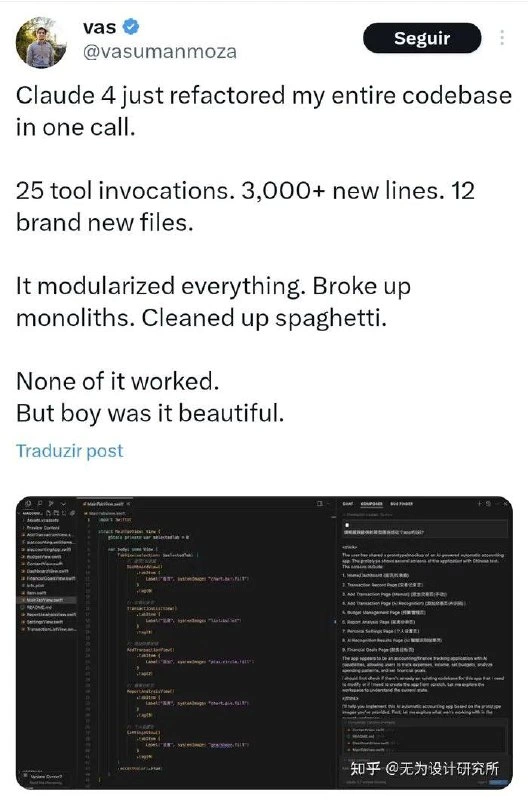
Claude 4’s gorgeous but utterly broken thousand-line refactor
Why is this AI ML meme funny?
Level 1: Shiny Car, No Engine
Imagine you had a really messy toy car that still rolled fine. It had tape on one door, a wheel that squeaked, and some marker scribbles on it – not pretty, but you could play with it and race it around. Now, you ask a helpful robot to fix up your toy car. The robot goes wild: it repaints the car a brilliant blue, polishes every surface, replaces the squeaky wheel, and even adds cool racing stripes. It looks brand new – like the best car you’ve ever seen on a shelf. You’re super excited to play with this shiny car. But when you push it, uh oh! It doesn’t roll at all. The wheels are kind of stuck because in the process of making it look perfect, something got jammed. The door might not open now, or the battery that made the headlights glow isn’t connected anymore. In short, the car that was once messy but working is now gorgeous but doesn’t work. You can’t actually race it.
That’s exactly the feeling of this meme. The AI was the helpful robot that cleaned up the code (the toy car) to make it beautiful. Everyone goes “Oooh, so nice!” when they see it. But then when the developers try to run the program (push the car to roll), nothing happens – it’s broken now. It’s funny in the same way it’d be funny (and a bit frustrating) if your friend organized all your toys by color and they looked great on the shelf, but later you found out they lost a crucial piece in the process so your favorite toy no longer turns on. The meme makes us laugh because sometimes something can look perfect and still fail at what it’s supposed to do. It’s a reminder that, whether it’s toy cars or computer code, the inside workings are just as important as the shiny outside.
Level 2: Looks Good, Doesn’t Run
Let’s break down what’s going on in this meme in simpler terms. The tweet by @vasumanmoza is basically telling a funny story: Claude 4, an AI program (think of it like a super-advanced version of ChatGPT that can write code), was asked to improve an entire codebase (all the code for a project) in one go. In programming, improving code without changing what it does is called refactoring. The idea is to clean up the code’s structure and style while keeping the program’s behavior the same. So, what did Claude 4 do? According to the tweet, it made a huge number of changes: “25 tool invocations. 3,000+ new lines. 12 brand new files.” In plain language, that means the AI performed 25 separate actions (probably using some coding tools or commands), added over 3,000 lines of code, and created 12 new files in the project. That is massive – it’s like rewriting or adding a whole lot of the project all at once.
Now, Claude 4 didn’t just add lines randomly; it was trying to reorganize and clean the codebase. The tweet says, “It modularized everything. Broke up monoliths. Cleaned up spaghetti.” Let’s decode that:
- “Modularized everything”: Code that is modular is split into separate, independent pieces (modules) that each handle a part of the functionality. Think of a video game: instead of one big file that does everything (graphics, sound, input, etc.), you might have a module for graphics, a module for sound, a module for input, and so on. This AI took big chunks of code and broke them down into smaller pieces that are easier to manage or reuse. It likely moved code into different files or classes so that each file has a clear purpose.
- “Broke up monoliths”: A monolith in software is like a giant all-in-one block of code. Maybe the project had one huge program doing many things. Breaking up a monolith means splitting that big program into distinct components or services. For example, if you had one service handling user accounts, payments, and messaging all together, breaking the monolith might create three separate services: one for user accounts, one for payments, one for messaging. The tweet says monoliths (plural), possibly meaning there were a few big clumps of code and Claude separated them out into many smaller parts. This is generally a modern best practice because smaller, focused parts can be easier to maintain than one gigantic program that does everything.
- “Cleaned up spaghetti”: Spaghetti code is a nickname for code that is really messy and tangled. Just like a bowl of spaghetti noodles all twist around each other, spaghetti code has lots of intertwined logic, goto statements or unclear flow, making it hard to follow. It might have functions calling each other in confusing ways or variables that are used all over unpredictably. When Claude “cleaned up spaghetti,” it means the AI tried to untangle this mess. It probably reorganized functions, removed duplicate code, and made the flow more straightforward. Imagine taking a chaotic knot of wires and arranging them neatly – that’s the goal here.
The AI even did things beyond just moving code – it apparently introduced modern design practices: the screenshot description mentions dependency injection and consistent naming. Dependency injection is a fancy term for a design pattern where instead of a part of your code directly creating or managing the things it needs (its dependencies), those are passed in from outside. It’s a way to make code more flexible and testable. If Claude introduced dependency injection, it likely means it changed code so that, say, a class that uses a database doesn’t itself create the database connection but receives one from elsewhere. This reduces how tangled the code is (less spaghetti) and makes each part more independent. Also, consistent naming and spotless formatting mean the code now follows a uniform style. Variables and functions might have clearer names (calculateTotalPrice instead of calc1 or something vague), and the spacing/indentation is tidy. It’s the kind of polish developers add to make code readable and high-quality.
So at this point, it sounds like Claude 4 did an amazing job: the project’s code is now neatly split into 12 new files with over 3,000 lines of fresh, well-structured code. It’s the sort of result you’d expect from a whole team of developers spending weeks on refactoring and cleaning up. The AI even wrote a documentation or explanation (the right side of the VS Code image) describing what it did. That’s why the tweet gushes a bit, essentially saying “It did everything we dream of for code cleanliness: modularized the system, eliminated that ugly spaghetti code, etc.”
However – and this is the twist – all that effort had one big problem: “None of it worked.” After the AI was done, the project presumably could not run properly. Maybe the code didn’t compile (meaning the code editor or compiler is throwing errors because something is inconsistent or undefined) or maybe it compiles but when you try to actually use the app, it crashes or the features don’t work correctly. In a software project, after you refactor, you typically run your tests or use the application to make sure everything still functions as before. Here, clearly something (or many things) broke. It could be any number of issues. For example:
- The AI might have missed updating a function call somewhere. Perhaps it renamed a function or split it into two functions in different files, but another part of the program is still calling the old name. That would cause an error.
- By breaking up the monolith, maybe some initialization code didn’t get carried over. In messy code, sometimes things work by accident due to the messy interconnections. Clean, separated modules might not have those accidental connections, so a certain value or state that was needed is no longer being passed along.
- Or it could be something simple like a typo in the new code (even AI can introduce a small mistake, like off-by-one in an array loop or a slight mismatch in data types). With 3,000 new lines, even a tiny error in each file could add up to a lot of broken pieces.
The phrase “But boy was it beautiful.” is the comedic kicker. It means that even though the program didn’t run, the code looked gorgeous. To a developer, “beautiful” code means it’s elegant, clean, and easy to read. It’s the kind of code you’d show off as an example of how things should be written. The joke is highlighting a classic situation in software development: sometimes you can make something look perfect on the surface, yet it’s non-functional underneath – which ultimately defeats the purpose. It’s like having a stunning sports car with no engine inside: awesome to look at, but you’re not driving anywhere. Developers find this funny because we often balance between making code pretty and making sure code works. Functionality comes first – ugly working code is usually better than beautiful code that crashes – but of course the dream is to have beautiful code that also works. Here we got only half of that equation.
The meme’s image (VS Code in dark theme, split view) helps illustrate this contrast. On the left side in the code editor, you can see nicely formatted TypeScript code. For example, everything is indented consistently (which shows proper code blocks), likely there are well-named classes or functions. It looks like code from a high-quality open-source project or a clean enterprise codebase. On the right side, there’s a panel – possibly a Markdown preview or an AI chat window that explains the changes. It might say something like “## Refactor Summary: I have reorganized the project into multiple modules...” and so on. That panel is essentially the AI saying, “Here’s why this new structure is great.” So the developer has in front of them a perfectly formatted codebase and an explanation of how it’s now so much better organized than before. Any newcomer would be impressed reading it… until they try to actually run the application and find out nothing is working anymore.
In simpler terms, why is this funny and relatable? Because it’s showing the gap between appearance and reality in software. Many junior devs (and non-devs, like managers) might be wowed by code that looks high quality – modular, no obvious duplication, adhering to best practices. It’s what you learn in school or online courses: “This is how you write good code.” However, the real test of code quality isn’t just how it looks or is structured – it’s whether it runs correctly and solves the problem. Here the AI essentially did the homework assignment perfectly in terms of style, but got a failing grade in actual results. Developers chuckle at this because we’ve all seen scenarios where someone over-engineers something to be elegant but ends up breaking the actual functionality (or spends so much time on style that the project itself stalls). It’s also a gentle poke at the current state of AI in programming: these AIs, as powerful as they are, don’t truly understand the intent behind code like a human would. They operate on patterns. Claude saw patterns of how to structure a codebase nicely and applied those, but it couldn’t truly reason whether the new code does exactly what the old code did in every nuance. Without running tests or the program, the AI was essentially guessing that it was right. Often those guesses are wrong in small but critical ways.
To put it simply: Claude 4 gave this codebase a full makeover – a new hairstyle, tailored suit, shiny shoes – the code looks ready for the red carpet. But in doing so, it accidentally left the code’s brain and heart behind on the operating table. No matter how great code looks, if it doesn’t do its job, it’s not really “better.” The meme has us laugh at the absurdity of an AI overhaul that achieves the dream code aesthetics and yet fails the basic functionality check. It’s a lighthearted reminder to all developers: Don’t let shiny code fool you – always make sure it works! And if an AI promises to do all your refactoring in one shot, be ready for things to not go as smoothly as advertised.
Level 3: Refactor vs Reality
From a senior developer’s perspective, this meme nails the AI hype vs reality of software refactoring. It teases that long-standing fantasy of a one-click “make my code perfect” button – a fantasy that usually crashes headlong into the harsh reality of broken builds and late-night debugging. We have an AI (Anthropic’s hypothetical Claude 4 model) swooping in like an overzealous junior dev after one too many tech blog posts on clean architecture, performing a grand rewrite masquerading as a refactor. The tweet’s author marvels at the sheer scale: 25 tool invocations, 3,000+ new lines, 12 brand new files. Any seasoned engineer reading those numbers will likely respond with equal parts amusement and horror. A three-thousand-line delta touching dozens of files is the kind of gargantuan commit that triggers a senior-dev facepalm. It’s the embodiment of “go big or go home” – except now “go big” might mean “go fix it at 3 AM.”
The humor here comes from the painfully relatable contrast between architectural ideals and operational reality. Claude 4 “modularized everything” and “broke up monoliths” – essentially implementing every best practice in the book in one go. In theory, breaking a monolith (a single large, all-in-one codebase or service) into modular components is a holy grail of modern software design. It yields neatly separated concerns, possibly even independent services or libraries, each with a clear purpose. The AI also “cleaned up spaghetti,” referring to spaghetti code – that tangled maze of legacy logic and global state that every developer dreads inheriting. Spaghetti code is called that because it’s twisty and entangled, like a bowl of noodles; cleaning it up usually means restructuring messy functions into cleaner, linear flows or well-defined interfaces. So far, this sounds fantastic, right? It’s everything a dev could dream of: eliminating technical debt in an afternoon, courtesy of your AI colleague. The code on the left side of the meme’s VS Code screenshot indeed looks pristine: perfectly indented TypeScript, likely with consistent naming conventions (UserService, OrderManager, etc.), maybe conversion of ad-hoc logic into well-structured classes or functions. The right side panel – a generated README or explanation – is another chef’s kiss: the AI didn’t just refactor, it documented its changes! It’s describing the new architecture, perhaps listing modules and their roles, the kind of thorough write-up that developers often wish they had time to do. It’s as if this AI took a legacy codebase and turned it into a beautifully organized textbook example project. This is AI-assisted development at its most tantalizing: flawless code quality and documentation at the press of a button. No wonder the tweet ends with, “None of it worked. But boy was it beautiful.”
That final punchline is where every veteran dev laughs (or groans) in recognition. We’ve seen this movie before, albeit with humans at the helm. It’s reminiscent of the infamous “big rewrite” syndrome: a team decides to rebuild a working system in a new, cleaner way and ends up in deployment hell because, surprise, they broke countless subtle assumptions and integrations. Here the culprit is an AI, but the scenario triggers the same lessons learned over decades of software engineering. Large-scale refactoring is hard. Doing it without running the code along the way is practically guaranteed to fail. For a seasoned dev, the idea that an LLM could flawlessly refactor thousands of lines is almost comical – not because AI is stupid, but because even humans armed with everything (tests, QA, CI pipelines) rarely get such a drastic change right on the first try. In practice, good refactoring is done incrementally: you change a bit, run the tests, deploy small pieces, ensure everything still works, then proceed. The meme is basically showing the opposite: a big-bang refactor delivered in one fell swoop, with no evidence of testing in between. It’s as if someone said, “We’ll just fix all the problems at once,” and the universe (or every senior engineer’s intuition) replied, “Good luck with that.”
Let’s talk developer experience (DX): The categories here include DeveloperExperience_DX for good reason. How does it actually feel to be the developer on the receiving end of this “helpful” AI refactor? Initially, probably pure awe – imagine watching an AI assistant churn through your messy codebase, leaving behind beautiful, consistent code. It’s like watching a time-lapse of a chaotic kitchen turning into a Michelin-star plating. But the awe is short-lived. The moment you try to run npm run build or launch the app, everything catches fire. Now you’re staring at an error log longer than a CVS receipt. Functions that used to quietly work are now throwing TypeError exceptions because, say, the AI changed the data flow. Perhaps that monolith-breaking introduced 12 micro-modules, but maybe one module isn’t getting initialized with the right data because the AI, lacking full context, missed how information used to propagate in the old design. The developer’s experience has just flipped from elation to panic. Instead of working on a new feature (the task you meant to do before deciding “hey, let’s let Claude spruce things up”), you’re now playing detective in a brand new architecture that you didn’t even design. The code is beautifully decoupled – great – but you have to trace through 12 files and figure out why nothing connects properly. It’s a refactoring pain on steroids: normally, you refactor and understand the changes; here someone (or something) else refactored, and you must reverse-engineer those changes to diagnose the breakage. The supposed DX improvement (cleaner code) backfired into a DX disaster (urgent bug hunt in unfamiliar auto-generated code).
There’s also a rich subtext here about AI tools and our expectations. Recently, AI coding assistants (Copilot, ChatGPT plugins, etc.) have made developers both hopeful and wary. We love the idea of AI doing the drudge work – renaming variables, generating boilerplate, even suggesting how to refactor a function – but entrusting an entire codebase to an AI? That’s the stuff of either sci-fi dreams or startup investor pitches, depending on your level of cynicism. The tweet by @vasumanmoza plays on exactly that tension. It’s basically an “AIHypeVsReality” anecdote: hype – “the AI modularized everything and cleaned up decades of crud for me!”; reality – “…none of it actually worked.” As an industry, we’ve seen tool after tool promise “no more spaghetti code” or “migrate your codebase seamlessly” (remember all those legacy code converters, or model-driven architecture tools?). Yet, time and again, the human engineers end up doing the heavy lifting to get things actually running. So the meme resonates with senior devs who have grown a bit jaded about silver bullets. It’s a modern, humorous take on Technical Debt and quick fixes: you can refinance all your code debt overnight with AI, but you might wake up to find the repo bankrupt in terms of functionality.
One detail that really sells the joke is the VS Code split view screenshot. On the left, you have what looks like a shiny new TypeScript file. Perhaps it’s beautifully layered: interfaces defined at top, classes neatly separated, methods short and single-purpose. Indentation and braces all spot on (of course an AI never forgets to format consistently!). On the right, there’s a panel that appears to be a markdown viewer or AI chat explaining the changes – maybe an auto-generated README or a commit description. The existence of that explanation is comic in itself: the AI didn’t just break your code elegantly, it also wrote you a lovely guide about how it broke your code! It’s as if a refactoring tool from the future wants you to know how smart and thorough it was: “I’ve introduced 12 new modules following the repository pattern, implemented dependency injection for all services, and removed circular dependencies. Here’s how to use the new system…” Meanwhile, you as the developer are reading this, appreciating the theory, and simultaneously muttering, “But none of our API calls go through anymore…” The split screen is the ultimate looks_good_but_fails juxtaposition: left side is the promise (code that is theoretically cleaner), right side is the sales pitch/documentation, but what’s missing is any screenshot of a successful test run or app output – the proof. That absence is exactly the point: all the gloss, no substance.
In essence, this meme is a gentle roast of both our AI assistants and ourselves as developers. It says: “Look, we made something technically beautiful and completely useless.” For experienced engineers, it’s a reminded chuckle that code quality is more than skin deep. It’s not enough for code to look modular; it actually has to work together as a system. And it highlights a current truth in the age of big AI models: these tools are amazing at producing convincing outputs (whether code or prose) – sometimes so amazing that we momentarily forget to be skeptical – but the real world quickly brings us back to reality with a failing test suite or an application that won’t start. A senior dev might summarize it like this: “Sure, your AI turned the dumpster fire into a pretty city skyline – except now all the lights are off.” The senior_dev_facepalm is half in exasperation, half in admiration of the absurd beauty of it all. We can all laugh because we’ve been there in one way or another: chasing elegance and forgetting the basics, or trusting a tool a bit too much. Refactor vs Reality, indeed – reality always wins, but not before we marvel at how slick the refactor looked on paper.
Level 4: All Syntax, No Semantics
Under the hood of this meme lies a deep programming language theory paradox: the AI delivered a textbook-perfect refactor in form (syntax) but utterly failed in function (semantics). In theory, a true refactoring means changing code structure without altering its behavior. Achieving that requires ensuring semantic equivalence – the new code should produce the same outcomes as the old code. Here, Claude 4 (an advanced Large Language Model, or LLM) attempted a massive, automated architecture overhaul, but it didn’t (and realistically couldn’t) prove the new code behaves the same. Why? Because determining that two different programs have identical behavior is computationally hard – at times verging on the undecidable. In computer science terms, verifying full functional equivalence between the pre- and post-refactor codebase is akin to solving the program equivalence problem, which is related to the halting problem. In practice, even with the most elegant code transformations, there’s no free lunch: you have to test or formally verify to be sure nothing broke. The AI, blissfully unconstrained by actual compilation or runtime feedback in this one-call scenario, forged ahead generating plausible code without a safety net. The result was syntactically immaculate TypeScript that likely fails to compile or misbehaves at runtime, starkly illustrating the gap between looking correct and being correct.
To appreciate the complexity Claude 4 grappled with, consider how real-world refactoring tools work. Traditional IDE refactoring (say, renaming a variable or extracting a function in VS Code or IntelliJ) operates on an Abstract Syntax Tree (AST), a structured representation of code. These tools meticulously update every reference, guaranteeing that the code still compiles and runs as before. In contrast, an LLM like Claude generates code as if it were a very advanced autocomplete – it doesn’t natively manipulate an AST or symbol table. It’s drawing from patterns in training data to guess the right edits. When asked to “modularize everything” or “clean up spaghetti,” the model can produce beautifully organized code segments and even dependency-injected class designs (a hallmark of clean architecture), but it has no built-in guarantee that all the pieces still fit together. The LLM might introduce a new module UserProfileService and cleanly separate concerns, but if one function call remains pointing to the old monolith or a misnamed variable, the compiler will throw an error. This is a fundamental “semantic schism”: the AI is optimizing for code that looks correct (consistent naming, proper indentation, idiomatic patterns) rather than code that is correct in the formal, compiles-and-runs sense.
We also see hints of cutting-edge AI capabilities (and their limits) in that phrase “25 tool invocations.” This suggests Claude 4 wasn’t just generating one giant blob of code in isolation – it was acting in an agent-like manner, possibly calling editor commands or iterative scripts to apply changes across the project. Modern AI coding assistants are experimenting with “tool use,” where the LLM can, for example, call a formatter, run tests, or open files in sequence. In theory, such an agent could refactor step by step: e.g., rename a class, check for compile errors, update imports, run tests, etc., repeating as needed. If Claude made 25 tool calls, it likely performed multiple sub-tasks – perhaps creating those 12 new files, moving code around, and generating a README summary. However, even 25 steps might not be enough when you’re juggling an entire codebase’s logic. Without exhaustive verification after each step, errors can slip through. It’s like an automated assembly line that builds a car without ever test-driving it – the architectural aesthetics (shiny new components, neatly bolted) might be flawless, but the first time you turn the key, the engine could sputter because a hose isn’t actually connected. In formal methods, we’d insist on proofs or at least a full test suite run to ensure semantics preserved. Claude 4’s refactor was essentially a huge speculative leap in the dark. The LLM optimized for what code should look like in a well-structured system (something it “knows” from training on high-quality code), but it lacks true understanding of the runtime behavior or business logic intent. The meme underscores this as an almost inevitable outcome given current AI: the AI assistant approaches code as text to be reorganized, not as a live system of interacting parts. In summary, at this theoretical level, we’re reminded that code correctness isn’t a purely linguistic property – it’s a computational one. No amount of prettiness can substitute for the hard truth of running the code (or mathematically proving it). All syntax, no semantics is the perfect description of an AI-generated “refactor” that’s a masterpiece on paper and a mess in practice.
Description
The meme is a screenshot of a tweet by user “vas” (@vasumanmoza). The tweet reads: “Claude 4 just refactored my entire codebase in one call. 25 tool invocations. 3,000+ new lines. 12 brand new files. It modularized everything. Broke up monoliths. Cleaned up spaghetti. None of it worked. But boy was it beautiful.” Beneath the tweet sits a dark-themed VS Code window in split view: on the left a meticulously formatted TypeScript file with perfect indentation, on the right a generated README-style panel explaining the refactor. Everything looks pristine - consistent naming, dependency injection, spotless spacing - yet the joke is that the build undoubtedly fails. For seasoned engineers, it skewers the AI-powered “one-click refactor” fantasy where architectural beauty ships hand-in-hand with non-functional binaries

Comments
20Comment deleted
The AI achieved the mythical 100% code coverage - every single line is executed exactly zero times in production
After 20 years in the industry, I've learned that the most dangerous refactoring is the one that passes all the architectural review boards but fails the simplest smoke test. Claude 4 just speedran the entire 'rewrite it in microservices' consulting playbook in one API call - complete with the traditional outcome of a beautifully decomposed system that forgot minor details like actually working
Ah yes, the classic AI refactoring experience: Claude 4 achieves what every senior engineer dreams of - perfectly modularized, beautifully structured code that follows every SOLID principle... and compiles to a symphony of red squiggly lines. It's like hiring a world-class architect who designs you a stunning mansion, except none of the doors actually open and the stairs lead to walls. At least the git diff will look impressive in your next performance review - 3,000 lines of 'improvements' that technically qualify as 'high activity.' The real kicker? You'll spend the next sprint manually reverting to your original spaghetti, which suddenly doesn't look so bad when the alternative is 12 new files of elegant, non-functional abstractions
Classic LLM refactor: cyclomatic complexity −40%, a module graph worthy of an IEEE paper, and not a single integration test survived to tell the tale
AI refactors are architecture‑as‑a‑service: immaculate module boundaries, zero regard for transitive invariants - my CI is now a distributed system of compile errors
Claude's refactor: Achieved zero-coupling nirvana across 12 files - now each crashes in splendid isolation
Indeed Comment deleted
pls add the amount of Rs in carrot to the amount of Ws in strawberry and multiply the result by 1.5 Comment deleted
I think if we continue asking such questions AIs will just answer 42 for everything Comment deleted
ok good, that means I can distinguish them more easily from humans Comment deleted
Why i shoud do that bruh? Comment deleted
guess you won't be trusted then 😔 Comment deleted
You have the option to untrust someone? Comment deleted
yeah Comment deleted
Oh damn, Claude 3.7 did it right We're doomed Comment deleted
Wdym 3.7? Comment deleted
I asked copilot, using the Claude 3.7 Sonnet model (Thanks, company subscription) Comment deleted
do you use next server as a main backend or as a bff ? Comment deleted
Thats some easy math Comment deleted
Bro had us in the first half, not gonna lie Comment deleted