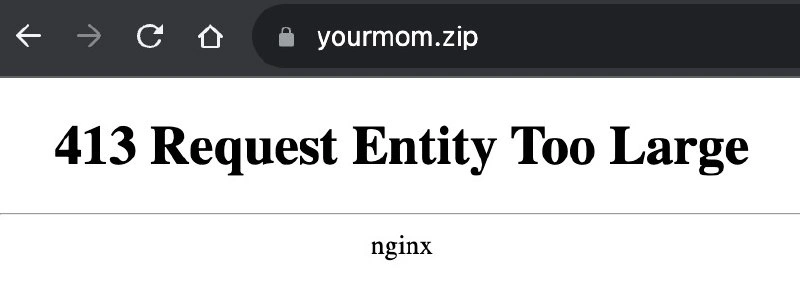
nginx throws 413 when yourmom.zip upload exceeds the server’s patience
Why is this Backend meme funny?
Level 1: Big Box, Small Door
Imagine you’re trying to push a huge box through a small door. The door has a rule: if the box is too big, it won’t let it in. Now, let’s say someone jokingly wrote “your mom” on that big box. You try to shove it through, and the door stops you with a sign that essentially says, “Too Large – Can’t Come In!” It almost feels like the door is cheekily saying, “Sorry, your mom is too large.” 😇
In simpler words, a computer server is like a doorman that only accepts packages up to a certain size. If you give it something too big, it refuses and gives an error message. In our case, the thing being sent was literally named “yourmom.zip” (imagine a file with that name). So the server’s message “Request Entity Too Large” comes across like it’s complaining that “your mom” is too large. It’s mixing a technical limit with a playground-style joke.
Why is that funny? It’s the surprise and silliness of it. Computers are usually very serious and literal. But here, by coincidence, the computer’s serious error message sounds like it’s making a yo momma joke – the kind of joke where someone says “Your mom is so big…” to tease you. Of course, the server isn’t actually trying to make a joke; it just doesn’t want such a big file. But because of the file’s name, the whole message looks like a roast. It’s as if the computer accidentally insulted someone’s mother! 😂
So even if you don’t know the tech details, you can laugh at the basic idea: something was too big for the computer to handle, and it ended up sounding like a funny insult. The tech folks find it extra funny because they deal with these “too big to handle” errors a lot (it’s a common headache when uploading big files), and seeing it phrased this way is like the situation making fun of itself. In short, it’s a geeky joke that says, “That file is HUGE – so huge the server joked about your mom!”
Level 2: Too Large to Handle
Let’s break down what’s happening in simpler terms. The image is showing a very basic Nginx error page. Nginx is a popular web server (kind of like a traffic cop for the internet, directing browsers to the right content). When something goes wrong, Nginx sometimes shows a plain white page with a number and a phrase. Here, that number is 413 and the phrase is “Request Entity Too Large.” In web lingo, a “request entity” usually means the data you’re trying to send to a server (for example, a file upload or a big form submission). “Too Large” means exactly what it sounds like – the server thinks that data is just too big to handle.
Why would a server complain about a file being too big? Servers often have rules or configuration settings to protect themselves. One such setting in Nginx is client_max_body_size, which defines the maximum size of the HTTP request body (i.e., the upload) that the server will accept. If you try to send a file bigger than that limit, Nginx immediately replies with this 413 error instead of even trying to process it. Think of it like a bouncer at a club: if your baggage is over the limit, you can’t even get in the door. It’s a useful feature to prevent accidents or misuse – for example, someone accidentally uploading a 10 gigabyte file or a malicious user trying to flood the server with data. But it can also catch honest users by surprise when the limit is set too low for a legitimate upload.
Now, the funny part is the URL shown at the top: yourmom.zip. The meme creator presumably typed that in as the file name they attempted to upload. This is a play on the classic “yo momma” jokes. In those jokes, someone exaggerates how big or bad something is by referencing “your mom.” For example, “Yo momma so large, she needs her own zip code.” It’s an old, kinda childish style of joke where “your mom” is the punchline. Here, the file is literally named “yourmom.zip” – as if it’s an archive file of your mom. So when Nginx says “Request Entity Too Large,” it reads like it’s humorously referring to your mom being too large. Essentially, the meme maker set it up so the error message unintentionally sounds like an insult: yourmom.zip is too large.
For a newcomer to WebDevelopment or Backend work, here’s what you need to know:
- HTTP 413 is an error status code meaning “Payload Too Large” (the newer terminology) or “Request Entity Too Large”. It’s one of many HTTP status codes (others you might know are 404 Not Found, 500 Internal Server Error, etc.). 4xx codes like 413 indicate the client did something wrong (in this case, sending a file that’s oversized), as opposed to 5xx codes which mean the server messed up.
- Nginx Configuration often has default limits. By default, Nginx’s
client_max_body_sizemight be set to 1 MB (one megabyte). That’s fine for text and small uploads, but if someone tries to upload, say, a high-res photo or a zip file larger than that, Nginx will refuse it. The web admin has to explicitly raise that limit in the config if they expect larger uploads. - In a real scenario, if you encountered this error, the fix is to go into the server settings and increase the allowed upload size. This is a common task for DevOps/SRE or backend engineers when setting up a web service. Forgetting to do it leads to exactly this error showing up for users.
The meme’s humor comes from combining that technical scenario with a joke format. It’s like two worlds colliding: the dry world of server errors and the cheeky world of internet jokes. If you’re a junior developer and you’ve just learned about HTTP errors, imagine deploying your first website and a user says, “Hey, I got a 413 error trying to upload my file.” You quickly learn it means you unknowingly set a size limit. It’s a bit embarrassing but also a learning moment. Now add the “your mom” gag on top – it lightens the mood. It’s saying, “Hey, we’ve all been there, and isn’t it kind of funny that the error wording can be taken this way?”
So in summary at this level: BackendHumor often involves these inside jokes about configurations. “Request Entity Too Large” is normally not a laughing matter when it happens in production – it means someone’s upload failed. But calling the file yourmom.zip turns it into a tongue-in-cheek joke about upload_size_limits. The meme is a nod to the fact that tech folks can find levity even in error messages. Once you understand the pieces – Nginx, the 413 code, the config setting, and the yo momma reference – the joke clicks into place. It’s a gentle poke at the sometimes absurd things we see on the job, and an invitation to laugh at an error that usually just causes headaches.
Level 3: The Mother of All Uploads
This meme hits home for every grizzled backend engineer who’s battled HTTP 413 errors in production. The image shows Nginx bluntly serving up its default “413 Request Entity Too Large” page. The kicker? The URL is yourmom.zip. It’s a perfect storm of low-brow humor and high-key ops pain: a classic yo momma joke embedded in a server error. Why is it funny? Because it’s absurdly relatable. Any seasoned DevOps or SRE has fixed the client_max_body_size misconfiguration at 3 AM, cursing under their breath. Seeing Nginx essentially say “Your mom is too large” – as an error – is the kind of dark, unexpected humor that makes a tired engineer snort coffee out their nose. It’s like the server itself decided to crack a joke while throwing an error.
From a senior perspective, there’s layers of irony here. The Backend is coughing up a 4xx error, which officially blames the client for sending something too big. But in reality, it’s our server-side config (our fault!) that set an upload limit too low. Nginx is essentially telling on us: “I was told to have the patience of a toddler – this upload exceeds my limits.” The phrase “exceeds the server’s patience” from the title wryly anthropomorphizes the server. WebDev folks know a 413 means the HTTP request’s body (like a file upload) was so large the server refused it. It’s a safeguard to prevent abuse – or at least, that’s what we tell ourselves when we forget to raise the limit for legitimate users. The humor is half yo_momma_joke and half gallows laugh for anyone who’s scrambled to adjust Nginx configuration under pressure. We’ve all been there: a frantic Slack message comes in – uploads are failing. Check logs, see request_entity_too_large, facepalm, edit config, reload Nginx, problem solved. The ErrorMessages are terse and unhelpful (“413 Request Entity Too Large” – thanks, Nginx, very descriptive), but here it accidentally became the punchline to a joke.
This meme also nudges at tech culture nostalgia. “Your mom” jokes are playground-level old-school, while HTTP status codes and Nginx’s spartan error page are hardcore tech. The collision of the two worlds is hilarious: the server sounds like it’s delivering a snarky insult. It’s as if the infrastructure itself has developed a sense of humor after one too many misconfigurations. A crusty veteran dev might chuckle, “At least it’s not another DNS issue – this time it’s just an upload_size_limits thing. Easy fix.” The mention of yourmom.zip is basically saying “Yo momma’s so fat, the server won’t accept her.” Only in our line of work can a misconfigured reverse proxy double as a stand-up comedian. This joke lands especially well because it’s BackendHumor that juniors might miss at first glance, but seniors recognize instantly. We laugh not just at the joke, but at ourselves – because we’ve all been the person who forgot to set client_max_body_size above 1MB and got burned by this exact error. Nginx throwing a 413 is practically a rite of passage in WebDevelopment deployment. The meme cleverly ties that war story to a one-liner, and that’s why it resonates.
# Nginx config snippet to prevent "413 Request Entity Too Large"
http {
client_max_body_size 100m; # let yourmom.zip (and other big uploads) through up to 100 MB
...
}
In short, this level dives into the bitter truth under the joke: DevOps_SRE folks fix these “entity too large” issues regularly. The combination of an all-business error message with a juvenile twist (“yourmom.zip”) is humor that speaks to the battle-hardened. We find it funny because it’s a stress-relief valve – laughing at an issue we normally groan about. After the 12th time upping a server’s upload limit, you either cry or laugh. This meme opts for laughter, and we veterans appreciate that every bit as much as we hate seeing another 413 in the wild.
Description
Screenshot of a dark-themed mobile browser displaying the URL bar text 'yourmom.zip'. The page itself is the default nginx error template: large, bold heading reads '413 Request Entity Too Large' followed by a thin horizontal rule and the single word 'nginx' centered below. No other graphics or colors are present, making the stark HTTP error page the entire visual focus. Technically, the image riffs on the well-known 413 status that appears when an upload is bigger than the server’s configured client_max_body_size. The joke combines a classic 'yo momma' punchline with a real-world ops misconfiguration that senior backend engineers have fixed a dozen times in production
Comments
11Comment deleted
Nothing like a 413 to remind the team that ‘infinite scale’ still needs client_max_body_size updated in the Ansible vars
After 20 years in tech, you realize the real 'Request Entity Too Large' is the accumulated technical debt that somehow became your responsibility when the original developers mysteriously vanished right before the refactoring sprint
When your nginx `client_max_body_size` is set to 1M but the payload is measured in astronomical units. Classic case of needing to bump that config from the default - though in this case, even `client_max_body_size 0;` (unlimited) might not suffice. The real engineering challenge here isn't the HTTP 413; it's explaining to the PM why we can't just 'compress it more' or 'use the cloud' to solve fundamental physics problems
Nginx's polite 413: even your mom's ZIP respects client_max_body_size more than that legacy monolith we shipped last quarter
413 at yourmom.zip: classic result of ‘support large uploads’ while nginx still has client_max_body_size 1m - maybe stream to object storage instead of holding the monolith hostage
413 is nginx politely reminding you that presigned URLs and multipart uploads exist - the reverse proxy isn’t your object store
You too guys Comment deleted
https://yourmom.zip Comment deleted
https://yourdad.zip also Comment deleted
https://yourwife.zip Comment deleted
This one’s actually different each time Comment deleted