
Skip to content
DevMeme
253 of 7435
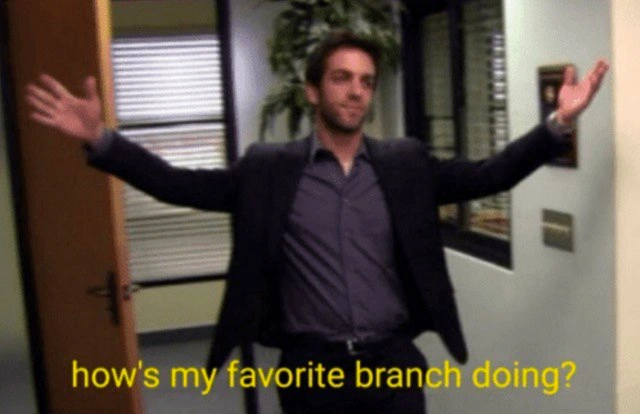
Manager strolls in asking: How's my favorite Git branch doing?
VersionControl Post #307, on Apr 8, 2019 in TG

Manager strolls in asking: How's my favorite Git branch doing?

Why is this VersionControl meme funny?

Level 1: Unfinished Homework

Imagine you had a group homework assignment due, and you left your part with a friend to finish while you went on a vacation. You come back to class, and it turns out your friend didn’t touch it – the project is still unfinished. Now picture your teacher walking in, smiling brightly, and asking, “So, how’s my favorite project doing?” You’d probably give a nervous smile, right? The teacher is being cheerful and expects good news, but inside you’re thinking, “Uh oh, it’s not ready at all!” In this meme, the manager is like that teacher and the unfinished homework is like the code work the developer left waiting. The word “branch” is like the project: the manager means it in a friendly way (like it’s his favorite team or project), but the developer hears it and panics a little because their branch (their piece of code) hasn’t been completed or checked by others yet. The situation is funny because the boss is all happy and excited, while the developer feels a bit of hidden panic – just like a kid who hasn’t done their homework when the teacher asks about it. It’s a playful way to show the mix of feelings: one person is carefree and the other is secretly worried, all because of that one word “branch” meaning two things in two different worlds.

Level 2: Pull Request Pending

To understand why this meme is funny, let’s break down the terms and situation. Git is a popular tool that developers use for version control – basically a way to track and manage changes in code. One of Git’s core ideas is the branch. A Git branch is like a separate workspace or timeline for your code where you can work on a new feature or fix a bug without disturbing the main code. Think of it as copying the code at a point in time, making changes on your copy, and later merging those changes back into the original when they’re ready. Developers create branches all the time – for new features, experiments, or hotfixes – so that multiple streams of work can happen in parallel. This process is part of a team’s Git workflow: everyone might branch off the main code (main or develop branch), do their work, and then merge back in.

Now, when the work on a branch is done or at least ready for feedback, developers usually open a Pull Request (PR). A pull request is essentially asking your teammates, “Hey, I have some code changes here. Can you review them and then pull (merge) them into the main codebase?” In platforms like GitHub or GitLab, a PR is where code review and discussion happen. Other developers or team leads will look at the code, comment on anything that needs improvement, approve it if it looks good, and finally merge it into the main branch so the feature becomes part of the official code. Code reviews via PRs are a staple of modern development because they help catch issues and ensure everyone’s changes work well together.

Now imagine a developer who finished some work on a feature branch and opened a PR right before going on vacation. They’re hoping that while they’re out, someone in the team will take a look at the code and perhaps even merge it in. The meme’s bottom text – “When you come back from vacation and check if anyone reviewed your PRs” – describes that exact scenario. The developer returns from a nice break and the first thing they do is check their pull requests, eager to see progress or feedback. It’s a moment of truth: did the team handle things, or did everything grind to a halt without them?

Enter the manager strolling in with “how’s my favorite branch doing?” The word “branch” here is the crux of the joke. In an everyday business context, a branch usually means a branch office or a division of the company – for example, you might have a New York branch and a London branch of a firm. Managers often talk about branches in those terms, perhaps even referring to one as their favorite if it’s performing well. It sounds like something a high-level boss would say while visiting one of his offices: a light-hearted greeting to the staff, calling the office his “favorite branch” to boost morale. CorporateCulture is full of these kinds of cheerful one-liners.

But in a development context – especially to a programmer who has been deep in code – the word branch immediately brings to mind the Git concept. So when the manager says this, the developer isn’t thinking about a regional office at all; they’re thinking about their feature branch named, say, awesome-feature or whatever they’ve been working on. The manager likely doesn’t literally have a clue about the details of the code branch; he’s just trying to be friendly or inquire generally if the project is going well. However, the timing is impeccable: the dev just came back and is anxious to know if their branch’s PR got any attention. The manager’s question accidentally feels spot on – almost too spot on – as if he’s specifically asking about that lonely little branch in the Git repo.

For a junior developer (or anyone new to Git), it helps to clarify: a code branch that sits around for too long without being merged can become problematic. While the developer was away, others might have continued working on the main branch (often called main or master). Each of those changes is like adding new chapters to a book. Meanwhile, the developer’s branch is an alternate chapter that hasn’t been added yet. The more chapters (commits) get added to the main book, the more the developer’s separate chapter might start to conflict with them. Maybe two people edited the same function in different ways – this leads to what we call a merge conflict when we try to combine the work. A merge conflict is Git’s way of saying, “I don’t know how to automatically fit these changes together, because they both changed the same part of the file. Human, please resolve this.” Resolving conflicts means the developer has to manually compare the code from the branch and the code from the main, and decide which parts to keep from each side or how to blend them. It’s doable, but it’s extra work and can be tricky if a lot has changed.

So, the developer coming back from vacation sees that no one reviewed or merged their pull request – it’s still pending. This means their branch is now likely behind the main branch. In Git GUI tools or commands, you might literally see something like “this branch is 5 commits behind main,” indicating it’s outdated. They’ll have to update their branch with the latest changes from main (often by doing git pull or merging main into their branch) and then deal with any conflicts, test again, etc., before the branch can finally be merged. It’s a bit of a headache, and it’s exactly the situation developers try to avoid by encouraging quick reviews or by merging frequently (some teams adopt a branch management strategy where you integrate changes often to prevent this scenario).

Now the manager, who likely isn’t deeply aware of all these gritty details, comes in with a big grin asking “How’s my favorite branch doing?” The DeveloperHumor here is that this simple question feels loaded to the programmer. It’s like the boss unwittingly asked, “Hey, how’s that complicated, outstanding task that’s only gotten more complicated since you left?” The developer might force a smile and say “Doing great!” while internally thinking, “Oh boy, wait till I open my IDE and see what state it’s in...”. It’s a humor derived from empathy – anyone who’s had unreviewed code or a project left idle knows the mix of dread and absurdity in that moment.

In summary, at this level the meme is highlighting a common scenario in software teams: Git and Branch semantics meeting office jargon. The manager’s use of “branch” is likely metaphorical (favorite branch = favorite project/team), but to the developer it’s literal (the code branch they left in limbo). The joke lands because it plays on this misunderstanding in a friendly way. The manager thinks everything is peachy, the developer knows there’s work to be done, and the word “branch” ties both meanings together in one perfect, laughable line. It’s the kind of innocent question that masks a technical challenge underneath – a little poke at how non-technical managers and technical staff sometimes speak different languages even when using the same words. And for a junior dev reading this, now you know: when your boss asks about your “branch,” it’s okay to laugh — they probably have no idea they just made a Git joke.

Level 3: When Branches Diverge

Picture a cheerful manager strolling into the dev area, arms wide open, enthusiastically asking, “How’s my favorite branch doing?” In that instant, every seasoned developer in earshot cringes and chuckles internally. Why? Because the manager just used the word “branch” in a way that collides two worlds: the CorporateCulture meaning (a branch office or team) and the VersionControl reality (a Git code branch full of unmerged work). This meme nails that awkward intersection. The boss thinks he’s asking about a thriving project or team (like a regional office he’s playfully calling his favorite). But to the developers, it sounds like he’s inquiring about a Git branch – and not just any branch, but one that’s probably been languishing with unreviewed commits. The humor comes from this double meaning and the dramatic irony: the manager’s rosy confidence versus the developer’s knowledge that the code in that branch is far from rosy. It’s a classic case of a non-technical person trying to speak tech lingo, inadvertently shining a spotlight on a painful truth known to the dev team.

From an experienced dev’s perspective, the phrase “favorite branch” is deliciously absurd. In a Git repository, you don’t typically have a “favorite” branch – especially not a long-lived feature branch that’s been sitting idle. In fact, any branch left alone for too long becomes a source of anxiety. Why? Because while you were away (say, on vacation) or waiting for feedback, the rest of the world didn’t stop. The main codebase (often the master or main branch) kept moving forward with new commits. Your once-fresh feature branch is now out-of-date, dangerously diverged from the latest code. Every senior developer knows that sinking feeling: the longer a branch lives in isolation, the more likely it is to become a merge nightmare. So when the manager proudly inquires about that branch as if it’s a pet project, the dev is likely thinking, “If only you knew… that branch is now a ticking time bomb of merge conflicts.” The contrast between the manager’s casual optimism and the developer’s grim realization is what makes this scene so relatable and funny in a dark way.

Let’s talk about what might have happened to that “favorite” branch. Perhaps before leaving for vacation, the developer pushed their code to a remote repository and opened a Pull Request (PR) for colleagues to review. In an ideal GitWorkflow with a solid BranchManagementStrategy, teammates would have reviewed the code promptly and merged the branch into the mainline, or at least kept it up-to-date. But reality often laughs at our plans. The PR sat unattended — maybe everyone was busy with their own tasks, or they assumed it could wait until the author returned. Meanwhile, other changes rolled into the main branch. The feature branch fell behind. In Git terms, it’s become a classic long-lived branch with all the attendant problems. We’ve all seen it: you come back to find your feature branch is now 20 commits behind main and even has a few conflicting changes. The code that worked a week ago might now fail tests because the ground underneath (the base branch) shifted. It’s like returning to a river you once dammed, only to find it has changed course while you were away.

To make matters more interesting, the manager’s greeting likely wasn’t meant to delve into any of this technical drama. It’s a bit of CorporateHumor on his part – managers often refer to teams or projects in friendly terms (“my favorite branch” as in favorite regional office or favorite project team) to boost morale. However, in the context of a developer who literally has a code branch by that name (or that thought), it triggers a completely different context. The dev hears “branch” and mentally braces for a status report on their code: Did someone finally review my PR? Is that branch still alive or has it rotted? Do I now have to perform Git sorcery to merge it without breaking everything? In essence, two parallel universes are colliding in this meme: the manager’s universe of simple progress updates and the developer’s universe of complex version control realities. The result is comedic gold born out of everyday tech workplace friction.

We can even appreciate the technical pun at a deeper level. In Git, a branch is essentially a pointer to a series of commits in a graph (often visualized as a tree of code history). In companies, a branch is a division of the business (often visualized as a tree of an org chart or a network of branch offices). Both use the tree metaphor, but in completely different domains. So when the manager cheerily asks about a “branch,” he unknowingly taps into that metaphor. The senior devs smirk because, in the back of their minds, they’re visualizing the other kind of tree: the commit tree where this poor feature branch has strayed far from the trunk (main). The phrase might also remind some of an episode from a workplace sitcom (the image style even screams The Office): it’s exactly the kind of oblivious-yet-lovable boss move Michael Scott would pull – using a term he heard the tech folks say, without grasping the headache behind it. The experienced folks see the trainwreck coming: that favorite branch is about to need some serious Git CPR.

To put it in concrete terms, imagine running a Git command to check the status of that feature branch right as the manager walks in:

$ git checkout favorite-branch
Switched to branch 'favorite-branch'
$ git fetch origin        # get latest updates from remote
$ git status
On branch favorite-branch
Your branch is behind 'origin/main' by 5 commits, and can be fast-forwarded.
  (use "git pull" to update your local branch)

Here Git is basically telling you, “Hey, your branch is 5 commits behind the main branch.” That means five separate changes were made to the main codebase while this developer was away. Those changes haven’t been applied to “favorite-branch” yet. The innocent-sounding suggestion to “use git pull” is where the real pain can begin. If any of those 5 commits touch the same parts of the code that the feature branch does, merge conflicts will pop up like unwelcome surprises. Now the developer must reconcile differences line by line, deciding which code to keep from each side – a delicate process that can introduce bugs if done hastily. And of course, Murphy’s Law says this will all happen right when they’re fresh back from vacation, catching up on dozens of emails, with the manager standing there expecting a happy report.

In summary, this meme hits home for many devs because it captures that DeveloperHumor sweet spot: a mix of technical truth and workplace absurdity. The manager’s upbeat question, the bright yellow subtitle text (just like a sitcom caption) juxtaposed with the developer’s likely internal groan – it’s all a little too real. Every experienced coder remembers a “favorite branch” moment: perhaps not with those exact words, but a time when someone high up asked innocently about a piece of work, unaware that under the hood, that work was stuck in PR limbo or suffering from bit rot. We laugh because we’ve been there. It’s a shared nod to the pain of Git and the sometimes comical disconnect between those who write the code and those who manage the people. In the end, the question “How’s my favorite branch doing?” translates in the developer’s head to, “Is that branch ever going to get merged, or is it one of those zombie projects?” – and the humor is in that translation failure. The manager meant no harm; in fact, he’s trying to be supportive. But in doing so, he accidentally highlighted one of the classic developer predicaments: the beloved feature branch that time (and the team) forgot.

Description

A man in a dark suit with his face blurred strides into an office corridor, arms spread wide in a welcoming gesture. The background shows glass-paneled interior windows, a wooden door, neutral walls, and a potted plant, all rendered in the slightly grainy style of a sitcom screenshot. Bright yellow subtitle text across the bottom reads, “how's my favorite branch doing?”. The joke hinges on swapping the sitcom’s meaning of a corporate branch for a Git branch, poking fun at managers who cheerfully inquire about code branches they rarely understand while developers dread merge conflicts and stale feature work

Comments

7
Anonymous ★ Top Pick Back from two weeks of PTO, I asked Git how my feature branch was doing - turns out it’s 137 commits behind main and the diffstat unrolls like Dead Sea scrolls; apparently only vacations are trunk-based here
  1. Anonymous ★ Top Pick

    Back from two weeks of PTO, I asked Git how my feature branch was doing - turns out it’s 137 commits behind main and the diffstat unrolls like Dead Sea scrolls; apparently only vacations are trunk-based here

  2. Anonymous

    Ah yes, the PR that's been 'awaiting review' so long it's now a historical artifact documenting what our codebase looked like before three major refactors and a complete CI/CD migration

  3. Anonymous

    He left the branch unattended for three months - it's now 412 commits behind main, and the rebase will require a séance with two departed engineers

  4. Anonymous

    Every senior engineer checking on that experimental feature branch they haven't touched in three months, only to discover 247 merge conflicts, 15 failed CI builds, and a comment from the architect saying 'we need to talk about this approach.' The enthusiasm quickly turns into 'how about we just start fresh on main?'

  5. Anonymous

    If a branch needs affection, it’s been around too long; the rebase interest on long‑lived features compounds faster than our cloud bill

  6. Anonymous

    PMs dote on favorite branches like kids - until rebase orphans them in hell

  7. Anonymous

    “How’s my favorite branch doing?” Translation: 300 commits ahead, 280 behind, custom migrations - aka why the rebase takes longer than the feature

Use J and K for navigation


