Skip to content
DevMeme
205 of 7435
Low-Level Graphics APIs Laugh at Web Dev 'Hardships'
Graphics Post #248, on Mar 20, 2019 in TG

Low-Level Graphics APIs Laugh at Web Dev 'Hardships'

Why is this Graphics meme funny?

Level 1: Mountains and Molehills

Imagine someone huffing and puffing to climb a little hill, complaining “This is so hard! There must be an easier way to get to the top.” Now picture a group of expert mountain climbers standing nearby — people who have climbed huge mountains like Everest — hearing that complaint and chuckling to themselves. To those expert climbers, that little hill is nothing at all, hardly a challenge, compared to the gigantic peaks they’ve conquered. In this meme, the web developer struggling with the canvas is like the person on the little hill, and the laughing experts represent people who have tackled the really big mountains (the truly hard ways of drawing graphics). They’re not laughing to be mean; it’s just funny because the beginner doesn’t realize how small their problem is in the grand scheme of things. What seems like a big deal to one person can be a piece of cake to someone with more experience – and sometimes the “easier way” you’re looking for is already what you have, you just don’t know how much harder it could be.

Level 2: Canvas vs GPU

Let’s break down the basics behind this meme. HTML5 canvas is a feature of modern web pages that lets you draw graphics using JavaScript. It’s essentially a rectangular area on a webpage where, instead of using HTML elements for shapes, you use code to instruct the browser to draw lines, fill areas with color, display images, etc. You can get a 2D drawing context from a canvas and call drawing methods on it. For example, if you wanted to draw a simple triangle on an HTML5 canvas, you could do something like this:

<canvas id="myCanvas" width="200" height="150"></canvas>
<script>
  const canvas = document.getElementById('myCanvas');
  const ctx = canvas.getContext('2d');      // get a 2D drawing context
  ctx.fillStyle = 'blue';                   // choose a fill color
  ctx.beginPath();                          // start drawing a path (shape)
  ctx.moveTo(50, 10);                       // move to the first vertex (x=50, y=10)
  ctx.lineTo(10, 140);                      // draw a line to the second vertex (x=10, y=140)
  ctx.lineTo(190, 140);                     // draw a line to the third vertex (x=190, y=140)
  ctx.closePath();                          // close the path (connect back to first vertex)
  ctx.fill();                               // fill the triangle with the specified color
</script>

In a handful of lines, you set up a blue triangle on the canvas. The browser takes care of actually figuring out which pixels to color in; you just provided the outline of the shape and a fill color. For a web developer (especially one new to canvas), there are a few things to learn here — the coordinate system (0,0 is at the top-left of the canvas), the methods like moveTo and lineTo, and remembering to call beginPath() and fill() — but overall it’s a relatively simple API designed for ease of use.

Now, compare that to the world of graphics APIs like OpenGL, Vulkan, or DirectX. These are libraries and interfaces that let programs (usually written in C or C++) talk to the GPU (Graphics Processing Unit) directly for rendering graphics. A GPU is a specialized processor in your computer or phone that's really good at drawing lots of triangles and pixels quickly (it’s what your games or 3D applications use to render images efficiently). OpenGL (Open Graphics Library) is one of the original cross-platform graphics APIs; it’s been around since the early ’90s and has been used for everything from video games to CAD software. To draw a triangle with OpenGL, a developer writes code to specify the triangle’s vertices, uploads those to the GPU, and writes additional code called shaders (small programs that run on the GPU) to handle how the triangle is drawn (e.g., what color it is, how it’s lit, etc.). DirectX is Microsoft’s collection of multimedia APIs; its part for graphics is called Direct3D. Many Windows games use Direct3D instead of OpenGL. It’s similar in concept — you still manage vertices, shaders, and so on — but it’s tailored for Windows (and Xbox consoles). Vulkan is a newer API (released in 2016 by the Khronos Group, the same organization behind OpenGL). Vulkan was designed to give developers more direct and fine-grained control over the GPU than OpenGL, to help improve performance and allow games to better use multi-core CPUs. The flip side is that Vulkan is more verbose — a lot more code is needed to get things done, because the API expects you to specify everything explicitly.

So, if you’re a newcomer to these terms, here’s a quick summary:

  • HTML5 Canvas: A high-level, easy-to-use way to draw shapes and images in a web page using JavaScript. Great for simple graphics, charts, animations on websites. The browser hides the complicated stuff so you just worry about 2D drawing commands.
  • OpenGL: A long-standing graphics API used in many languages (C++, Python, etc.) for 2D/3D rendering. It works on many platforms (Windows, Mac, Linux, smartphones via OpenGL ES). You have to manage more details than with canvas – things like loading data into graphics memory and writing shader code – but it’s well-documented and powerful. A lot of older games and apps run on OpenGL.
  • DirectX/Direct3D: Microsoft’s proprietary graphics API (Direct3D is the 3D graphics part of DirectX). Common in Windows games. Similar tasks to OpenGL (prepare vertex data, write shaders) but different function names and system. If you’re coding a game for Windows or Xbox, you might use this. Direct3D tends to be Windows-only, whereas OpenGL is cross-platform.
  • Vulkan: A modern, low-level graphics API that demands the programmer handle many details manually. It’s very efficient if used right (many new game engines support Vulkan for better performance, especially on Android and Linux), but it’s considered challenging to learn. A “Hello World” triangle in Vulkan involves setting up a lot of objects: you must create a Vulkan instance, pick a physical GPU device, create a logical device, set up command pools, allocate command buffers, create swapchains for presenting images to the screen, and more — all before you even define the triangle’s three vertices and draw them. It’s powerful but definitely not what you’d call beginner-friendly.

One more term mentioned is WebGL. WebGL is essentially the web version of OpenGL. It allows you to use a <canvas> element in a special way: instead of the normal 2D drawing context, you get a WebGL context that lets you use OpenGL ES (a slimmed-down OpenGL for embedded systems) in JavaScript. With WebGL, you can draw 3D scenes and triangles using the same concepts as OpenGL — you’ll write vertex and fragment shaders in GLSL, you’ll create buffer objects, etc., but you do it all with JavaScript calls. WebGL is how you can run 3D graphics in the browser (for example, using libraries like Three.js to simplify it). It’s much lower-level than the regular canvas 2D drawing methods. In fact, many browsers internally implement the canvas 2D API by issuing GPU commands behind the scenes for speed, potentially using something like WebGL or DirectX – but as a web dev you don’t see or control that, it “just works.”

Bringing it back to the meme: the HTML5 canvas is a frontend tool meant to be easy to use, whereas OpenGL, Vulkan, DirectX are backend or system-level tools that require you to do a lot more. A web developer complaining about canvas is a bit like a person complaining that a powered lawnmower is hard to push, not realizing others are out there using scissors to cut grass as an analogy. It’s all about levels of abstraction. The canvas abstracts away the hard parts of drawing, whereas those other APIs put you much closer to the metal (the hardware). For a junior developer, it’s important to understand that higher-level tools save you from dealing with many low-level details. That’s their job. The trade-off is you might have less flexibility or knowledge of what’s happening underneath, but you usually don’t need to worry about it for everyday tasks. So in the context of this meme: drawing a triangle in canvas vs. drawing a triangle with a low-level API are vastly different in complexity. The meme is funny once you know that difference, because the question “surely there’s an easier way?” has the ironic answer: “Yes, the easier way is what you were already using!”

Level 3: Low-Level Laughs

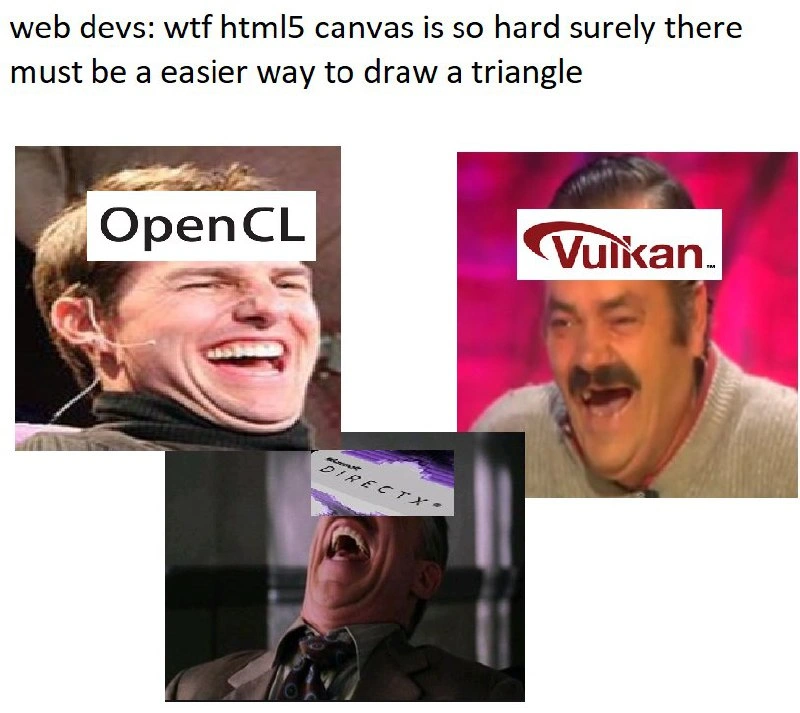
This meme highlights a classic disconnect between the frontend world and the graphics programming world. The top caption — “web devs: wtf html5 canvas is so hard surely there must be a easier way to draw a triangle” — shows a frustrated web developer who finds the HTML5 Canvas API challenging. Below that, we see three people laughing hysterically, with the logos of OpenGL, Vulkan, and DirectX covering their eyes. The joke here is that these logos represent low-level graphics APIs (or the veteran developers who use them), and they are cracking up at the idea that drawing on a canvas is considered “hard.”

Why is this funny to experienced devs? Because anyone who has worked with OpenGL, Vulkan, or DirectX knows that drawing even a basic shape via those APIs is way harder than using something like HTML5 canvas. It’s a “if only you knew” kind of laugh. The web developer in the meme is essentially saying, “Man, it’s tough to draw a triangle with this high-level tool, there must be an easier method.” Meanwhile, the OpenGL/Vulkan/DirectX crowd has spent years dealing with the true nitty-gritty of rendering triangles and can’t help but find that statement absurdly naive. They know that the canvas is actually a simplified interface built on top of much more complex systems. It’s like a novice cook complaining that chopping vegetables is tedious, while a group of gourmet chefs who routinely prepare seven-course meals by hand are chuckling in the background. The newbie doesn’t realize how good they have it with the small task.

In more concrete terms, think about what the web dev is doing versus what the low-level graphics devs do. On the web, to draw a triangle, you might write a little bit of JavaScript to set up a canvas and use commands like lineTo or fill() to get a colored triangle. It might involve some learning curve (figuring out coordinates, remembering to call beginPath() or fillStyle for color), but within a few tries, you’ll see something on the screen. Now put yourself in the shoes of a graphics programmer using OpenGL or DirectX in a desktop application. To get a single triangle on the screen there, you have to: initialize a window and graphics context, manually load vertex data into GPU memory, write shader programs (little GPU-side programs) to handle the triangle’s vertices and pixels, compile those shaders and link them with the graphics pipeline, set a bunch of state (like telling the GPU what kind of primitive you’re drawing, e.g. triangles, and how to blend colors, etc.), and then finally issue a draw call. If any one of those steps is wrong or missed, you won’t see the triangle at all. Many of us have spent an entire day (or week!) debugging why our first OpenGL triangle was invisible — maybe we had the winding order wrong, or forgot to turn on the correct vertex attribute, or our coordinate system was off. It’s a lot of steps and a lot of ways to go wrong.

So when the meme shows the OpenGL, Vulkan, and DirectX guys literally rolling on the floor laughing, it’s portraying that seasoned dev perspective: “Ha! You think the canvas is hard? Try doing it the way we do!” There’s a strong element of developer humor here built on shared experience. Pretty much every graphics programmer remembers their “hello triangle” moment — it’s the graphics equivalent of a “Hello World” program, except it’s notorious for how much setup it requires. Vulkan, in particular, is infamous: a basic “draw a triangle” app in Vulkan might run to hundreds of lines of code and dozens of API calls. OpenGL and DirectX aren't quite as heavy as Vulkan in boilerplate, but they still demand deep knowledge of the graphics pipeline and careful handling. Meanwhile, the web developer using the canvas is shielded from 90% of those details by the browser.

It’s also worth noting the layered irony: the web dev is searching for an “easier way,” but any easier way is already what the browser provides. If that web dev tried to bypass canvas and go straight to something like WebGL (which is the web’s version of using the GPU directly, essentially exposing OpenGL ES in JavaScript), they would find themselves doing a lot more work, not less. They’d have to write vertex and fragment shader code in GLSL, just like a native OpenGL programmer, manage buffer data, and so on. In other words, the only “other” ways to draw a triangle involve those very technologies represented by the laughing logos – and those are undeniably more complicated. The meme exaggerates this contrast for comic effect: the high-level Frontend developer worries that their task is difficult, while the low-level Graphics experts know that task is actually the tip of a very large iceberg.

In summary, the meme gets laughs from developers because it’s a gentle poke at the ignorance of our past selves. Many of us have been that person thinking “Surely there’s an easier way to do this!” without realizing we’re already using a pretty convenient approach compared to the alternatives. The OpenGL, Vulkan, and DirectX folks in the meme aren’t literally real people, of course, but they embody the voice of experience. They’ve sweated over GPU code, they’ve debugged why a triangle comes out upside down or not at all, and they’ve learned just how complex “drawing a triangle” can be when you do it from scratch. Their laughter is a mix of schadenfreude and relief — it’s funny to see someone stress over a canvas API call, given what they themselves have been through. It’s the kind of inside joke that both frontend developers (once they learn a bit about graphics APIs) and seasoned game/graphics developers can chuckle at together, each from their own side of the abstraction gap.

Level 4: Triangles to Pixels

At the deepest technical level, drawing a simple triangle involves orchestrating a full graphics pipeline on the GPU. While an HTML5 canvas call might internally handle these details for you, low-level APIs like OpenGL, Vulkan, and DirectX require the developer to explicitly manage every stage of that pipeline. This is the realm of graphics programming where nothing is implicit and the complexity is much higher:

  1. Geometry to vertices: First, the triangle’s corner coordinates (its three vertices) must be defined and sent to the GPU. In a low-level API, you typically create a vertex buffer in memory and load the triangle’s vertex positions into it. Each vertex might also carry other data like colors or texture coordinates.
  2. Shaders and transformation: Next, you provide small programs called shaders to tell the GPU how to process the triangle. A vertex shader will run for each vertex, transforming its 3D coordinates into the appropriate 2D location on the screen (this involves linear algebra – multiplying coordinate vectors by transformation matrices for projection). Then a fragment shader runs for each pixel that the triangle covers, determining the pixel’s color (for example, filling it in with a solid color or a gradient). Even if all you want is a plain colored triangle, you generally have to write or use these shader programs in languages like GLSL or HLSL.
  3. Pipeline state: With your shaders ready, you must set up a graphics pipeline (especially in modern APIs like Vulkan or DirectX 12). This means configuring how the GPU will connect the dots: you specify how vertices are assembled into triangles, which shaders to use, and fixed settings like depth testing or blending. In older OpenGL, many pipeline stages had default settings or fixed-function helpers, but modern graphics APIs make you define a lot of this explicitly. It’s like assembling a complex machine: you have to slot in every part correctly, from input assembly (feeding in your vertex buffer) to the rasterizer (that figures out pixel coverage) to the output merger (that writes pixels to the screen).
  4. Issuing draw commands: Finally, after all that preparation, you call a draw function to actually render the triangle. In OpenGL, this might be a call to something like glDrawArrays(GL_TRIANGLES, ...). In Vulkan, you record a vkCmdDraw call into a command buffer. This is the moment where the GPU takes over: it runs the vertex shader on your three vertices, projects the triangle into screen space, breaks the triangle into pixels (this process is called rasterization), and runs the fragment shader for each of those pixels to color them in. If everything was set up correctly, your triangle appears on the screen.

Each of these steps involves quite a bit of code and careful handling of the API’s details. Vulkan, for instance, is notorious for how much boilerplate you need. A basic “draw a triangle” program in Vulkan C++ can span hundreds of lines, because you have to handle things like creating a swapchain (a series of frame buffers for display), allocating GPU memory, and synchronizing the CPU and GPU operations — all manually. Even a simpler API like modern OpenGL (using its core profile) demands that you write and compile shader source code, bind vertex data, and manage state calls. In fact, there’s a running joke among graphics programmers that getting your first triangle on the screen with Vulkan feels like writing a mini graphics engine from scratch. By contrast, the HTML5 canvas API spares you from almost all of that: you call a few methods in JavaScript, and the browser handles the heavy lifting (internally, the browser might itself use OpenGL/DirectX behind the scenes, but as a web dev you never see that).

This explains why the folks represented by the OpenGL, Vulkan, and DirectX logos are laughing in the meme. The web developer’s complaint — “WTF, HTML5 canvas is so hard, there must be an easier way to draw a triangle!” — is ironic. From a low-level graphics perspective, the canvas is the easier way. All the hard work (the matrix math, GPU buffer management, shader compilation, etc.) has been abstracted away by the browser. The meme humorously highlights how much deeper the rabbit hole goes: drawing a triangle seems simple until you peel back the layers of abstraction. The higher-level canvas calls are resting on an entire stack of graphics operations that the web dev doesn’t see. Those low-level APIs are effectively saying, “You think that was hard? Try doing it directly with us!” and then bursting into laughter because they know the true complexity hidden under that innocent <canvas> tag.

Description

A meme that contrasts the perceived difficulty of web development tasks with the complexities of low-level graphics programming. The top of the image has text that reads, "web devs: wtf html5 canvas is so hard surely there must be a easier way to draw a triangle". Below this text are three separate, well-known images of men laughing hysterically. The first is Tom Cruise, labeled 'OpenCL'. The second is the 'Spanish Laughing Guy' (El Risitas), labeled 'Vulkan'. The third is J. Jonah Jameson from Spider-Man, labeled 'DirectX'. The joke centers on the vast difference in complexity between high-level and low-level APIs. A web developer's struggle with the HTML5 Canvas API, which is highly abstracted, is seen as comically trivial to engineers who work with low-level graphics APIs like OpenCL, Vulkan, and DirectX, where drawing even a simple triangle requires hundreds of lines of boilerplate code, direct memory management, and a deep understanding of the graphics pipeline
Comments

8
Anonymous ★ Top Pick Drawing a triangle in Canvas is like making instant noodles. Drawing a triangle in Vulkan is like growing the wheat, milling the flour, sourcing the salt from three different continents, and then building the factory to assemble the noodle packet
  1. Anonymous ★ Top Pick

    Drawing a triangle in Canvas is like making instant noodles. Drawing a triangle in Vulkan is like growing the wheat, milling the flour, sourcing the salt from three different continents, and then building the factory to assemble the noodle packet

  2. Anonymous

    “Canvas felt ‘complex’ until I wrote 2,000 lines of Vulkan swap-chain, descriptor-set, and pipeline boilerplate - just so my triangle could silently die in the wrong image layout.”

  3. Anonymous

    Wait until they discover that drawing a triangle in Vulkan requires 1000 lines of boilerplate, three weeks of reading specs, and a PhD in understanding why your validation layers are screaming about synchronization barriers you didn't know existed

  4. Anonymous

    In Canvas you draw a triangle; in Vulkan you first prove to the GPU, across 900 lines of structs, that you deserve one

  5. Anonymous

    Ah yes, the classic developer journey: 'Canvas is too hard, let me just write some SPIR-V shaders, manage my own memory pools, synchronize command buffers, and handle device queue families instead.' Nothing says 'easier' quite like replacing three Canvas API calls with 500 lines of Vulkan boilerplate just to render a triangle. At least when your Vulkan app segfaults, you can take comfort knowing you've achieved maximum performance for that single triangle - assuming you ever get it to render before the heat death of the universe

  6. Anonymous

    “Canvas is hard - there must be an easier way to draw a triangle.” Sure: OpenGL’s undefined‑behavior lottery, Vulkan’s 1,000‑line descriptor‑set ceremony, or DirectX’s COM baptism - because in graphics, Hello World ships with a swapchain and ten driver bugs

  7. Anonymous

    Canvas triangle: 10 lines of JS. Vulkan: 10k lines, SPIR-V, and validation layers just to not crash on AMD

  8. Anonymous

    Whenever someone says "Canvas is hard," a Vulkan tutorial allocates a swapchain, command buffers, a pipeline layout, and two descriptor sets just to draw the same single triangle

Use J and K for navigation