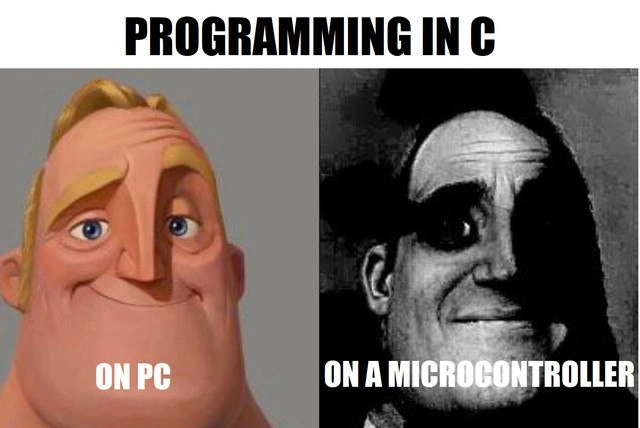
Programming C on a PC vs on a microcontroller, Mr. Incredible style
Why is this LowLevelProgramming meme funny?
Level 1: No Training Wheels
Imagine you learned to ride a bike in a nice playground with training wheels on and a parent watching to catch you if you wobbled – that’s like programming in C on a PC. It feels pretty safe: if you lose balance (make a mistake), the training wheels (the operating system) keep you from falling too hard, and someone’s there to help. Now picture taking those training wheels off and suddenly biking on a rocky, narrow mountain trail all by yourself – that’s what programming in C on a microcontroller feels like! 😨 The same bike, but now every little mistake could send you tumbling down, and there’s no one to catch you. In one scenario you’re smiling and confident, in the other you’re wide-eyed and holding on for dear life. That’s why the meme is funny: it shows how the exact same activity (riding a bike or writing C code) can feel easy or terrifying depending on the situation. On a regular computer, C programming is a bit easier and more protected; on a tiny microcontroller, it’s just you and the wild hardware, no safety net – and that contrast is both true and hilariously portrayed by the two Mr. Incredible faces.
Level 2: Pointers and Ports
Let’s break down what this meme is highlighting in simpler terms. We’re dealing with C programming in two different contexts: on a normal personal computer (PC) and on a microcontroller. First, what do those terms mean? A PC is what you’re using right now – a general-purpose computer (like a laptop or desktop) that runs an operating system (Windows, macOS, Linux, etc.) and can juggle many programs at once. A microcontroller, on the other hand, is a much smaller computer usually found inside gadgets, appliances, or IoT devices (think of the little chip that might be inside a microwave, a fitness tracker, or an Arduino board controlling some sensors). A microcontroller is a self-contained system on a chip: it has a processor, some memory, and is often dedicated to a specific task, like reading sensor data and turning on an LED based on input. Importantly, microcontrollers typically do not run a full operating system – there’s no Windows or Linux on that tiny chip (unless it’s a more advanced embedded OS, but many have none at all). It’s just your program running on the raw hardware, often referred to as bare-metal (because there’s no software layer in between you and the metal of the hardware).
Now, C is a programming language – one of the classics, known for being very powerful and very close to the hardware (which is why it’s heavily used in both systems programming on PCs and firmware on microcontrollers). The meme text says “PROGRAMMING IN C” at the top, and then splits into “ON PC” vs “ON A MICROCONTROLLER.” The joke here is that even though it’s the same language, the experience of programming in C is cheerful on a PC (hence the happy Mr. Incredible face) but horrifying on a microcontroller (hence the scary black-and-white Mr. Incredible face). Why would that be?
Memory management is a big reason. In C, unlike some higher-level languages, you have to manage memory manually. That means if you need some memory to store data, you explicitly ask for it (using something like malloc), and when you’re done you should give it back (using free). This is called manual memory management. On a PC, managing memory is still the programmer’s job, but the system is more forgiving. If your program forgets to free some memory, the operating system will reclaim it when the program ends. You have a lot of memory available, so a small leak might not even be noticed during a short run. On a microcontroller, however, you might only have, say, 8 KB of RAM total for everything. If you leak even a little memory or use more than you have, you can quickly run into trouble (your program might overwrite important data or just crash). Plus, there’s no OS to clean up – if you use memory and don’t free it, that memory is lost until you reset the device. This makes memory management on microcontrollers a critical, delicate task. Many microcontroller programs avoid dynamic allocation altogether (no malloc at all) and instead use static allocation or very carefully managed pools of memory, precisely because one mistake can be fatal for the program.
Next, let’s talk about pointers and pointer arithmetic. A pointer in C is basically a variable that holds a memory address (think of it like a note that says “the data you want is at this location in memory”). Pointer arithmetic means moving that pointer around, like “go to the next item in an array” or “skip ahead 10 bytes”. It’s a powerful feature of C, but it’s also where many bugs come from. If you miscalculate an address or use a pointer that wasn’t initialized, you might end up reading or writing memory that you’re not supposed to. That leads to what we call undefined behavior – the program might crash, or produce wrong results, or even seem to work fine sometimes and crash later. On a PC, when you do something really wrong with a pointer (like try to write to memory that doesn’t belong to your program), the operating system typically steps in and segfaults (short for segmentation fault). A segmentation fault is basically the OS saying “Nope, you can’t access that memory” and terminating the program. It’s a harsh stop, but it prevents the program from doing more damage. On a microcontroller, there is no OS to do that. So what happens if you do the same bad pointer operation? Possibly nothing immediately visible – you might have just overwritten some other part of your program’s memory or a hardware register – or the microcontroller’s hardware might trigger a fault that just resets the whole system. In any case, you don’t get a nice error message or a logged crash; the program just behaves weirdly or dies. It’s like the difference between having a security guard catch you when you go into a restricted area (PC) versus wandering into a minefield with no warning signs (microcontroller).
Another key term is register-level access. Microcontrollers control hardware by using special memory addresses called registers. These are not like regular memory that holds data; instead, each register is wired up to some hardware feature. For example, one register might control whether an LED is on or off by writing a 1 or 0 to a specific bit. On a PC, if you want to do hardware-related tasks (like display something on screen or send data over USB), you almost always call an operating system function or use a driver. The OS or driver will eventually poke the hardware registers for you, but you (as the application programmer) rarely touch those directly. On a microcontroller, you write to those registers in C code to make things happen. For instance, to turn on an LED connected to a certain pin, you might do something like:
// Example: set the LED pin (say, bit 5 of PORTA) to output high
#define PORTA_DIR (*(volatile uint8_t*)0x4000) // direction register for Port A pins
#define PORTA_OUT (*(volatile uint8_t*)0x4001) // output value register for Port A pins
PORTA_DIR |= (1 << 5); // configure bit 5 (the LED pin) as output
PORTA_OUT |= (1 << 5); // set bit 5 to 1, turning the LED on
(The actual addresses and bit logic vary by microcontroller, but the concept is the same.) Here, 0x4000 and 0x4001 might be special addresses that the microcontroller’s memory map reserves for controlling I/O pins. By writing to those addresses, we’re directly communicating with the hardware. We use volatile in C for these because it tells the compiler “this value could change in ways you don’t expect, so always actually perform the read/write” – important for hardware registers that might change due to external events. This kind of code is totally normal in embedded C programming, but you’d never see it in a regular PC application – it’s very low-level programming, talking to hardware at the bit and byte level. When the meme says “On a microcontroller” with the scary face, it’s hinting at this kind of scenario: you, the programmer, have to deal with all these nitty-gritty details.
Let’s contrast the day-to-day life of a C programmer on PC vs on a microcontroller:
On PC: You write C code, compile it on your computer, run it on the same computer. If there’s a bug, you might get an error message or it might crash to the desktop with some clues. You can use a debugger to step through the program easily. You have features like threads, console output, and possibly gigabytes of memory to play with. The system and tools are designed to help you catch mistakes (like address sanitizers, debuggers, etc.). Development is typically done on a comfortable IDE or at least with tools that run on the powerful PC itself.
On a Microcontroller: You write C code on your PC, but you have to cross-compile it for the microcontroller’s processor (which might be a different architecture entirely, like ARM or AVR). Then you flash the compiled program onto the microcontroller (this means transferring the binary to the device’s memory, often via a special cable or programmer device). The program runs on the microcontroller itself. If there’s a bug, the microcontroller might just stop working, or it might get stuck in an infinite loop, or some LEDs that should blink just stay off – not very informative! To debug, you might connect a special hardware debugger to the chip to pause execution and inspect memory, but that requires setting up and understanding the chip’s internals. Alternatively, you add a lot of
printf-style debugging, but since there’s no screen, that often means sending text out through a serial port to your PC or blinking codes on an LED. It’s primitive by necessity. For example, a common beginner’s surprise is realizing that a simpleprintforscanf(for input) won’t work unless the microcontroller is set up with somewhere to send or receive that data (like a UART connected to a PC). In essence, you have to create or enable the “devices” (like serial communication, etc.) that a PC just has by default.
Now, embedded systems (the category this falls under) operate with a different mindset: you optimize for reliability and efficiency within tight constraints. A lot of us first learn C programming on a PC – maybe writing simple console programs or small applications – where you don’t really worry about what the hardware is doing. But when we take those skills to a microcontroller project (like programming an Arduino or a custom board), it’s a shock. The same C language suddenly feels much more complex and dangerous. This meme captures that feeling in a funny way. The “On PC” image basically says: “Hey, I got this, C programming is fun and under control.” The “On a microcontroller” image says: “Oh no, what fresh hell is this?!” – because everything you took for granted is gone or different.
Let’s define some of the terms from the tags in context:
- ManualMemoryManagement: As mentioned, C requires you to manually allocate and free memory. On PC, mistakes here can cause memory leaks or crashes, but tools exist to detect them. On microcontrollers, manual memory management is often done with even more caution (or avoided), because the stakes are higher with limited memory.
- PointerArithmetic: Moving pointers around in memory. Powerful for performance (like iterating through an array quickly) but easy to mess up. A common beginner bug is off-by-one errors (going past the array bounds) – on PC this might cause a crash or weird behavior, on a microcontroller it could corrupt critical data with no immediate sign.
- UndefinedBehavior: In C, certain errors (like using an uninitialized pointer or overflowing an integer) are called undefined behavior, meaning the C standard doesn’t define what should happen. Maybe it crashes, maybe it prints gibberish, or maybe it seems fine and then causes an error later. On microcontrollers, undefined behavior can be especially pernicious because it might directly mess with hardware state. Essentially, the program goes “off script” and anything can happen. The meme’s scary face is basically the embodiment of encountering undefined behavior in an embedded context – you’re staring at the device in terror, wondering what on earth is happening.
- EmbeddedSoftwareDevelopment / EmbeddedSystemsAndIoT: These terms refer to writing software for embedded devices (like microcontrollers, IoT gadgets, any small device with a dedicated function). IoT stands for Internet of Things, which often involves tiny sensors or controllers that collect data or perform actions and maybe send info over a network. These devices frequently run on microcontrollers, and they often use C (or C++) because of the need for efficiency. The meme plays into the shared understanding in this community that developing for these devices is a different beast – rewarding, yes, but also sometimes “scarier” or more challenging than equivalent coding on a PC.
- MemoryManagement: This is closely related to manual memory management – basically how you handle memory usage in your program. On microcontrollers, you have to be very mindful of how much RAM you use (because you might only have, say, 2048 bytes for everything: variables, stack, etc.). A simple mistake like a large array allocation can eat up all your memory. On a PC, that same array would be a drop in the ocean of available RAM.
- SegmentationFault: We discussed this – it’s what happens on a PC when your program goes out-of-bounds in memory. It’s one of the most common crashes for C programs on desktops. The OS halts the program and usually prints something like “Segmentation Fault (core dumped)” in a Linux environment, or just closes the program on Windows. On microcontrollers, you typically don’t get such a clear signal, which is why the experience is more frightening (metaphorically shown by the monstrous face of Mr. Incredible).
All of this boils down to the meme’s main point: Programming in C on a PC vs on a microcontroller can feel like night and day. The left side (PC) is your everyday, relatively easier scenario – you have support, you have guardrails. The right side (microcontroller) is the hardcore mode – you’re on your own dealing with very low-level details. The meme uses the Mr. Incredible images to exaggerate the emotional state: happy confidence vs haunted shock. It’s funny because it’s a bit true – many programmers remember thinking they knew C well, then they tried to write firmware for an embedded device and ended up feeling totally spooked by how much went wrong initially.
If you’re a newcomer (junior developer or a student) and you see this meme, now you know: it’s saying “Brace yourself! The same C code that runs fine on your PC can turn into a scary adventure on a tiny microcontroller.” It’s a friendly warning wrapped in humor, and a nod to all the developers who have been through that learning curve.
Level 3: Bare-Metal Pandemonium
The humor of this meme strikes immediately for anyone who’s experienced both sides of C programming. The left panel’s bright and confident Mr. Incredible (from Pixar’s The Incredibles) labeled “On PC” represents the comfortable side of coding in C on a regular computer. The right panel – the creepy, high-contrast Mr. Incredible – labeled “On a microcontroller” portrays the horror many developers feel when taking those same C skills down to a tiny, bare-bones device. It’s a dramatic before-and-after contrast: same language, vastly different vibe. Why is that? Because writing C for a desktop or server is often a vastly easier experience than writing C for a microcontroller, almost like two different worlds. The meme taps into an inside joke among programmers: C on a PC is Mr. Incredible, but C on an embedded device is Mr. Incredible after witnessing unspeakable horrors. 😂
On a PC, programming in C can feel straightforward (relatively speaking). You have an operating system to lean on, plenty of libraries, and tools that handle a lot of heavy lifting. Need memory? Call malloc – the OS will find some free memory for you (and if you forget to free it, the OS will clean up when your program exits, avoiding long-term damage). Need to print debugging info? printf to the console and you’ll see your message pop up in a terminal or debugger. Want to read a file or send data over the network? You’ve got system calls and frameworks that abstract away the gritty details. And crucially, if your program does something really bad – like dereferencing a null pointer or indexing an array out of bounds – the OS typically stops it with a segmentation fault, preventing you from corrupting the whole system. Sure, you can still get into trouble on a PC (memory leaks, race conditions, the infamous undefined behavior that can cause weird bugs), but there are seatbelts and guardrails. Essentially, when you write C on a modern computer, you’re standing on the shoulders of an OS giant. The development cycle is also forgiving: you compile on a powerful machine, run the program immediately, get meaningful error messages, and have powerful debugging tools (like gdb or Visual Studio debuggers) that can inspect memory and state when something goes wrong. It’s still low-level programming, but it’s done in a relatively cushy environment. Low-level doesn’t feel so low when there’s a big operating system cushion beneath you.
Now look at the microcontroller side – the reason for the grayscale, haunted Mr. Incredible face. 😱 Writing C for a microcontroller (MCU) is often a lesson in humility and caution. Suddenly, that nice OS safety net is gone. You are the OS now. There’s no background process sweeping up your memory leaks or scheduler juggling your threads – if you allocate memory and forget to free it on a device that runs 24/7, you will eventually run out of those precious bytes. If you write past the end of an array, you might overwrite an important variable or even a control register that changes how the hardware runs. The result isn’t a polite crash; it might be a bizarre malfunction that’s devilishly hard to trace. For example, writing one byte too many into an array might inadvertently switch off an LED or disable an interrupt if that neighboring byte happens to map to a hardware register. That’s the kind of embedded systems bug that can drive a developer to the edge – hence the traumatized look of Mr. Incredible in the meme. It’s funny because it’s true: many of us have been that wide-eyed, horrified Mr. Incredible at 3 AM, staring at an inexplicably non-responsive microcontroller, muttering “But this same code worked fine on my PC…”
Shared experience alert: a classic gotcha is printing or debugging. On a PC, printf("Hello\n") Just Works™ – the text appears on your screen. On a microcontroller, if you naively call printf, nothing visible happens because… where would it print to? There’s no console unless you set up a serial port or a debug interface. The first time you try this, it’s equal parts confusing and enlightening. Many embedded developers resort to blinking an LED or sending messages over a tiny serial connection (UART) as a “printf” substitute. Imagine trying to debug your program’s logic by observing blink patterns (“two blinks means it reached here, three blinks means it went there”) – it sounds absurd, but it’s often done! It’s both comical and a rite of passage in embedded software development. The meme’s right panel face perfectly captures the “I have seen things…” feeling after you spend an afternoon diagnosing why your microcontroller only blinks an LED once and then freezes (spoiler: it was a stack overflow corrupting the return address, so your code jumped into oblivion – a classic undefined behavior saga).
Another aspect is resource constraints. On a typical PC, you have megabytes or gigabytes of memory and storage, and a CPU that can run billions of instructions per second. On a microcontroller, you might have 256 kilobytes of flash for your program and 32 KB of RAM (or even less!). There’s no room for bloat. That fancy data structure or convenience code you used on PC might not even fit on a microcontroller. This leads to a kind of programming that can feel like a tightrope act: you’re counting bytes, optimizing for every bit of performance, and constantly aware of the hardware limits. It’s exciting but also nerve-wracking – one wrong move and you run out of memory or CPU cycles and the whole system keels over. Developers often joke that programming on a microcontroller turns them into bit-counting misers. The meme nails this contrast: the calm smile of Mr. Incredible on the left is like a developer happily using a big std::vector or allocating memory casually on a PC, whereas the disturbed face on the right is that same developer on a micro, eyes twitching, because even a simple for loop or a malloc requires deep consideration (“Will this allocation fragment my memory? How many CPU cycles will this loop take between two timer interrupts?”).
And let’s not forget debugging nightmares. On a PC, if something crashes, you often get a stack trace or at least the ability to attach a debugger and see what went wrong. On a microcontroller, a crash might just blink an error LED or output a hex code to a debug port – if you’ve set that up. If not, the device may simply reset with no explanation. It’s debugging without an OS to assist, truly an art form of its own. You often need special hardware (like a JTAG or SWD debugger) to step through code on the device, and even then, you’re peering at raw memory and processor registers to infer what went wrong. It can feel like solving a mystery with only the faintest clues, which is equal parts thrilling and terrifying. When Mr. Incredible’s face turns from Pixar-handsome to sketchy-horror, it’s basically depicting a programmer’s sanity after hours of chasing a bug in an embedded system with literally no output except “it stopped working”.
The meme resonates because it exaggerates a truth every low-level developer knows: Programming in C on a microcontroller is a whole different ball game than programming in C on a PC. It’s the same language, and yet the experience can be as different as a walk in the park vs. a trek through a jungle. Seasoned embedded developers chuckle (perhaps a bit cynically) at this meme because they’ve lived both sides. They remember their first segmentation fault on a PC – maybe frustrating but straightforward to fix – and then recall the first time their microcontroller program just silently died due to a bug, leading to hours of hair-pulling. The meme captures that duality in one image: the left side says, “C is a nice powerful language,” and the right side adds, “… and with great power comes great responsibility (and fear) when you’re on your own with the hardware.” The humor works because it’s a wink-nudge acknowledgement of the almost comical shift in a programmer’s demeanor: from confident to horrified, just by changing the computing context.
Why is fixing this harder than it looks? Because the challenges on microcontrollers aren’t just accidental – they’re by design. We use C on microcontrollers precisely because we need that low-level control and minimal overhead. There’s no heavyweight OS because many small devices can’t afford the performance or memory cost, especially in realtime or IoT scenarios. So developers are stuck in this love-hate relationship with C on micros: we love the control and efficiency, but we sometimes hate how one small mistake can lead to a night of debugging through disassembly. The industry has coped with this through better tools (IDEs for embedded, static analyzers to catch certain errors, unit testing frameworks trimmed for embedded), but fundamentally, writing firmware (another term for software on microcontrollers) is always going to be a bit of a tightrope walk. The meme’s exaggerated facial transformation is funny, but ask any embedded engineer and they’ll tell you: it’s not that exaggerated!
In summary, the “Programming in C – on PC vs on a microcontroller” meme strikes a chord by highlighting a universal truth in low-level programming: your experience of a language can drastically change depending on the environment and constraints. It’s a comedic take on the culture shock one gets when moving from general-purpose computing to the embedded systems and IoT realm. The left side is comfort, the right side is challenge; one is Mr. Incredible, the other is Mr. Incredible’s nightmare. And as any embedded developer will half-joke, half-lament: once you’ve seen the grim face of debugging an undefined behavior bug on a microcontroller at 2 AM, you truly understand why that right panel looks the way it does.
Level 4: Bare-Metal Reality
At the bare-metal level, the difference between coding in C on a PC versus on a microcontroller comes down to how close you are to the hardware and how few safety nets exist. On a modern PC (be it Windows, Linux, etc.), programs run within an operating system that provides services like virtual memory, process isolation, and device drivers. There’s usually a Memory Management Unit (MMU) and an OS kernel making sure that if your C program does something wild – say, tries to access memory it shouldn’t – the OS steps in and delivers a segmentation fault (essentially saying “🛑 Stop right there!” and killing the program before it can harm other processes or the system). The hardware and OS are doing a lot of behind-the-scenes work: allocating pages of memory, scheduling your program’s threads, handling I/O via device drivers, and generally acting like a safety net or a supportive infrastructure.
On a microcontroller, by contrast, you’re running without an OS – this is often called bare-metal programming. There’s no kernel to catch errors, no fancy memory virtualization, and sometimes not even an addressable stack in the way you expect. Many small microcontrollers don’t have an MMU, meaning all memory addresses are real, physical locations. If your code writes to a bad pointer, it might overwrite critical data or even dip into memory-mapped hardware registers. The result? Possibly a bizarre malfunction or a complete freeze of the device. Instead of a nice error message or a core dump file, the microcontroller might just halt or reset with only a cryptic hardware fault indicator (if you’re lucky enough to have a debugging interface attached). In other words, undefined behavior on a microcontroller can truly unleash chaos: one moment your code is running, the next moment it’s straight-up bricked or behaving erratically, with no operating system to contain the damage.
Consider memory access. On a PC, your program is given a sandboxed view of memory; addresses your process shouldn’t touch are off-limits (hence that segmentation fault for wild pointers). On a microcontroller, the memory map is often flat and completely accessible: code, data, and hardware control registers are all sitting in a single address space that your program can poke. For example, many microcontrollers use memory-mapped I/O – special memory addresses correspond directly to hardware registers that control peripherals (timers, LEDs, sensors, etc.). Writing to those addresses changes hardware state. This is powerful but perilous: if your pointer arithmetic is off by even one, you might end up flipping the wrong bit on some device or jumping to an invalid instruction. There’s no separation between “regular memory” and “device control” memory; it’s all one big playground (or minefield 😅).
// On a PC: this would likely cause a segmentation fault (invalid memory access)
// On a microcontroller: it may write to some random memory or trigger a hardware fault
int *ptr = (int*)0xDEADBEEF; // an address where we (hopefully) have no valid memory
*ptr = 42; // PC: OS kills the program; Microcontroller: ???
In the snippet above, writing to a random address like 0xDEADBEEF on a desktop OS will almost certainly be blocked by the MMU (ensuring the low-level programming mistake doesn’t crash the whole machine). But on a small embedded system, there is no “protected” address 0xDEADBEEF — it might just be an out-of-range address that triggers a CPU exception and resets the chip, or worse, it could be in-range and inadvertently toggle some hardware. This stark difference highlights why programming in C on resource-constrained devices can feel like walking a tightrope: the language is the same C family syntax and semantics, but without the usual guardrails, every pointer and memory allocation has to be handled with extreme care.
Another deep-dive difference is in architecture and performance assumptions. Desktop CPUs (like x86_64 processors) are complex beasts: out-of-order execution, caches, branch prediction, multiple cores, gigabytes of RAM – they can mask some inefficiencies in your C code. Microcontrollers often run on simpler architectures (like ARM Cortex-M or even 8-bit AVR chips) with no cache and much lower clock speeds (say 16 MHz instead of 3.5 GHz). They might use a Harvard architecture (separating instruction memory and data memory) which means things like string literals or function pointers work a bit differently at the machine level. There’s no luxury of loading a huge OS runtime; your code is the only thing running on the metal, often in a single main loop with carefully managed interrupts for concurrent events. Timing becomes critical: a for loop that takes a millisecond on a PC might consume too many precious CPU cycles on a tiny microcontroller that needs to, for example, toggle an output pin with microsecond precision. This is why embedded software development in C demands a strong understanding of the hardware – you need to know about special function registers, interrupt service routines, and even weirder things like disabling interrupts or using DMA (Direct Memory Access) for efficiency. The language might be the same C, but the programming model feels closer to hardware design.
In short, at this level we’re seeing the raw truth of low-level C: on a PC, a lot of complexity is abstracted away by the OS and the environment; on a microcontroller, that complexity lands squarely on the programmer’s shoulders. This “Mr. Incredible” meme captures it perfectly: the normal face is happily coding C when the runtime is plush and forgiving, and the distorted face is the coder’s thousand-yard stare after wrestling with register-level access and memory bugs on a tiny chip that gives no hints when things go wrong. It’s the same language, but the context switch from PC to microcontroller plunges you into a much more intense, unforgiving world.
Description
The meme has a wide white top banner with bold black text that reads “PROGRAMMING IN C”. Below, the image is split vertically into two equal panels. Left panel: the colorful, clean Pixar-style face of the normal Mr. Incredible with a faint white caption at his neck level that says “ON PC”, symbolizing everyday C development on a full computer. Right panel: the infamous grim, desaturated, high-contrast “uncanny” Mr. Incredible face, accompanied by white text along the bottom edge that reads “ON A MICROCONTROLLER”, evoking the harsher reality of bare-metal, resource-constrained C. The visual contrast humorously conveys how the same language feels simple on a desktop but terrifying when writing register-level code with manual memory management, tight timing, and no OS safety nets

Comments
6Comment deleted
Programming C on a PC: leak some heap, you watch top. On a microcontroller: omit one volatile and the optimiser erases your heartbeat ISR - now the only thing still blinking is the panic LED (and your faith in determinism)
On PC you get segfaults. On a microcontroller, you get to explain why the coffee machine is now mining Bitcoin
The meme perfectly captures the existential journey from 'malloc() just works' to 'I have 2KB of RAM and the linker script is my new religion.' On PC, you debug with printf and Stack Overflow. On a microcontroller, you're toggling GPIO pins to trace execution flow because your debugger crashed the watchdog timer, and the only documentation is a 1,200-page datasheet written by someone who clearly hates humanity. Welcome to embedded systems, where 'undefined behavior' isn't a bug - it's Tuesday, and your pointer arithmetic just corrupted the interrupt vector table
Desktop C gives you a segfault and a backtrace; MCU C gives you a HardFault, a silent UART, and a reminder that volatile is a hardware contract, not a suggestion
PC C: GDB catches your segfaults. MCU C: segfaults catch you mid-deployment
Programming in C: pointers and UB; on a microcontroller: add a linker script, IRQ priority roulette, and a printf that costs 20KB and your timing budget