Button Stealer: A Gloriously Useless Chrome Extension for Digital Hoarders
Why is this Frontend meme funny?
Level 1: Button Treasure Hunt
Imagine visiting a bunch of different candy stores, and at each store you secretly pocket one of their little “Buy me!” signs. One store’s sign says “Try for free!” in bright green, another’s says “BUY NOW” in big red letters, another’s is in German saying “Anmelden” (which means “Sign in”), and so on. By the end of the day, you’ve collected a whole bag full of these colorful signs from all over town. When you lay them out on your floor, it looks totally crazy – a rainbow of messages like “Join Now,” “Yes,” “Cancel,” “Click & Collect,” all jumbled together. It doesn’t help you do anything useful at all, but it’s pretty funny to look at this weird collection and remember where each came from.
That’s exactly what this joke is about, but with websites. There are so many big shiny buttons on websites begging you to click them – “Sign up!”, “Get the app!”, “Accept cookies!” – that one playful idea was to collect one button from every site, like souvenirs. A browser add-on (kind of like a little helper program for your web browser) would automatically grab one button each time you visit a new page, just like you grabbing a sign from each store. Later, you can open your collection and laugh at all the different styles and words. It’s called Button Stealer because it’s “stealing” buttons (in a pretend, harmless way). The whole thing is meant to be silly. It makes us laugh because it shows how the web is full of these requests and prompts – and instead of getting annoyed by them, this turns it into a goofy game of collecting them all. It’s like a treasure hunt for buttons on the internet, serving no real purpose except that it’s fun to see just how many “Click Me!” signs we encounter and to marvel at the pile of them when we put them all together.
Level 2: Button Snatcher 101
For those newer to WebDevelopment, let’s break down what’s going on. The meme proposes a Chrome extension called "Button Stealer" that automatically grabs one button from every website you visit. A Chrome extension is like a small plugin or add-on for your Chrome browser that can change how web pages behave or add new features. In this case, the feature is pretty wacky: as you browse, the extension would pick out a call-to-action (CTA) button on each site and save it to a personal collection. A CTA is any button or link that tries to get you to do something – for example, a big “Sign Up Now” button on a homepage or an “Add to Cart” button on a shopping site. Modern websites are full of these CTAs (you’ve probably seen tons of “Try for free,” “Buy Now,” “Agree & Join,” and “Continue with Google” buttons everywhere). This extension jokingly treats those buttons like Pokémon collectibles: Gotta catch ’em all! 🏆
How would it technically work? Chrome extensions have something called content scripts, which are bits of JavaScript code that can run inside the web pages you visit. These scripts have access to the page’s content – the text, images, and yes, all the buttons in the page’s DOM. The DOM, or Document Object Model, is basically the structure of the webpage that your browser builds from the HTML. Think of the DOM as a tree representation of all the elements on the page – headers, paragraphs, images, buttons, etc. A content script can traverse this tree and find elements. In our case, the Button Stealer’s script might do something like document.querySelector('button') to find the first button on the page. If it finds one, it could copy the HTML for that button and send it back to the extension for storage.
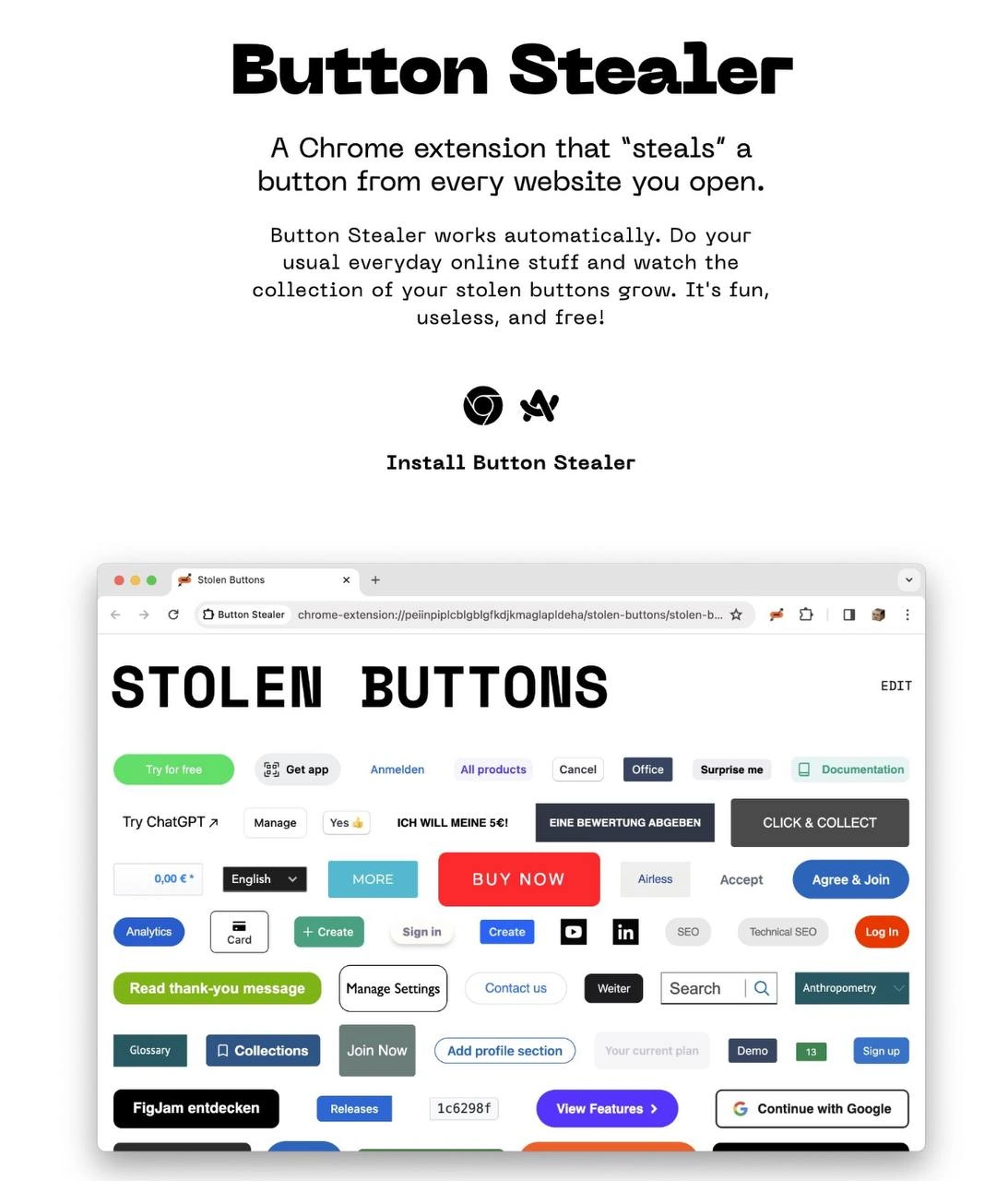
So essentially, Button Stealer is doing some browser_dom_manipulation and DOM scraping: it’s programmatically grabbing a piece of the page’s UI. The joke is that it’s grabbing something totally useless to the user. Normally, scraping or extensions are used to get valuable info – say, downloading all images, saving a recipe, or blocking ads. Here we’re grabbing a random UI element (a button) just for fun. The extension then shows you all the “stolen” buttons in one place – the meme’s image shows an example collection_of_ui_elements: a Chrome window full of dozens of buttons of different shapes and colors, with labels like “All products”, “Cancel”, “Ich will meine $€!” (German for “I WANT MY $€!”), “Search”, “Join Now”, “FigJam entdecken” (German for “Discover FigJam”), and so on. It’s like a weird scrapbook of the internet’s UX/UI bits and bobs.
Let’s clarify a few terms and concepts here:
Chrome extension: A small software module you install in Chrome (or other Chromium-based browsers). It can modify web pages or add toolbar buttons, etc. Developers create these for tasks ranging from productive (like grammar checkers) to playful (like turning all images upside-down). They’re defined by a
manifest.jsonfile and can include scripts, popup UIs, and pages. Button Stealer would be one such extension, presumably with permission to run on every site you visit.CTA (Call to Action): In web design, this means a prominent button or link that encourages the user to do something that the site wants. Examples: “Sign Up Now,” “Subscribe,” “Try for Free,” “Get the App,” “Accept Cookies.” They’re usually styled to stand out (bright colors, large font) so you notice them. In the meme, each stolen piece is one of these, reflecting how every website you visit is trying to prompt you into an action.
DOM scraping: This is when a script programmatically reads the content of a webpage (via the DOM) to extract data. Here it’s done via the extension’s content script to get the button element. It’s similar to what you do when you open BrowserDevTools and inspect elements, except automated. DeveloperTools like DevTools let you manually copy elements; an extension can do it automatically on every page.
browser_dom_manipulation: This just means using scripts to modify or interact with the page’s content in the browser. The Button Stealer does a minimal form of manipulation: potentially removing a button from the live page (if it literally “steals” it) or at least reading it. Some extensions manipulate the DOM to do useful things like remove ads or change colors; here we manipulate it to be a little thief 😄.
Now, the meme’s humor also lies in calling this a pet project. In developer culture, a pet project or side project is something you build for yourself on the side, usually for fun or learning, not because your boss asked for it. Often these can be quirky or featureless_mvp experiments – MVP stands for Minimum Viable Product, meaning the smallest possible thing that sorta works. Button Stealer as described is basically an MVP: it has one quirky feature (collect buttons) and not much else. It’s proudly useless in a practical sense, but making it is an exercise in creativity and probably a bit of skill. The “fun, useless, and free” slogan is the creator laughing at their own idea – it doesn’t provide value except making people smile or go “Wait, what?!”
For a junior frontend dev, there’s actually some neat learning involved in such a project. You’d practice selecting DOM elements in various websites (which teaches you about different HTML structures and how consistent – or inconsistent – button elements can be). You’d learn how to use the Chrome extension APIs, like messaging between a content script and a background script or saving data in chrome.storage. You might wrestle with how to preserve each button’s style. (If you only save <button>Click me</button> without CSS, when you display it later it might look totally plain.) So you’d think about solutions: maybe capture screenshots of buttons, or inline their computed styles. It’s like a little frontend_playground for experimenting with the web’s building blocks. And because it’s a parody of UX/UI trends (so many CTAs!), it doubles as a light critique of web design: you end up literally seeing how many "Please click me!" elements you encountered in a day.
Finally, the absurd collection shown – with different languages and contexts all jumbled – emphasizes the DeveloperHumor of the idea. For instance, you see “Anmelden” (German for “Log in”), “English” (language switcher), “0,00 €” (a price or cart indicator), and random things like “Anthropology” button (perhaps from a site menu). None of these make sense together, and that’s the joke. It’s a useless museum of buttons. A junior web developer can appreciate it as “LOL, so many buttons!” but also learn the underlying tech: a chrome_extension can indeed snag pieces of a page. In fact, projects like this often pop up in dev communities as playful hacks. It’s a reminder that not every coding project has to be serious – sometimes you build something just to joke about the state of web design, or to one-up your friends with a zany idea. Here the zinger is aimed at UXFailures (too many CTAs) and the creative use of developer tools to turn those failures into a comic collection of UI elements.
Level 3: The Great CTA Heist
Button Stealer is a tongue-in-cheek tribute to the modern web’s obsession with CTA overload. It imagines a Chrome extension quietly injecting itself into every page you visit and pilfering one shiny call-to-action button as a souvenir. This isn’t your typical data-scraping utility – it’s more like a UI kleptomaniac. The humorous premise has senior devs smirking because it satirizes both the surplus of promotional buttons we build into sites and the power (or overreach) of browser extensions to manipulate the DOM for absurd ends.
From a technical standpoint, a Chrome extension like this would use a content script to perform some crafty browser_dom_manipulation on each site. As soon as a page loads, our mischievous script might run something like:
// Content script: steal the first button element from the page
const firstButton = document.querySelector('button');
if (firstButton) {
// Clone the button's HTML and styles for safekeeping
const stolenHTML = firstButton.outerHTML;
chrome.runtime.sendMessage({ action: 'stashButton', html: stolenHTML });
// Optionally remove it from the page to truly "steal" it
// firstButton.remove();
}
This bit of code would grab the first <button> it finds (often a juicy CTA like "Buy Now" or "Accept") and send its HTML off to the extension’s background script or storage. The DOM (Document Object Model) scraping here is straightforward – we’re literally snatching a chunk of the page’s UI. The overreach joke is that a simple plugin can alter any site you visit, highlighting how much freedom BrowserExtension developers have (for better or worse). In real life, malicious extensions might steal your data; this one steals something utterly trivial – the buttons – which makes it a perfect piece of DeveloperHumor and commentary on UXDesign practices.
What really tickles experienced developers is why anyone would do this. It’s hilariously useless by the author’s own admission ("It’s fun, useless, and free!"). We’ve all seen those useless_side_project demos on GitHub or Hacker News – the kind of frontend playground experiment that a bored engineer whips up on a weekend. This extension doesn’t solve any real problem except perhaps boredom, but it does poke fun at how every website bombards us with colorful call_to_action_buttons. By hoarding one from each site, Button Stealer effectively creates a trophy case of modern web UX clichés. Each stolen button in the collection – “Try for free,” “Get app,” “Agree & Join,” “Buy Now,” etc. – is a little relic of some product manager’s growth strategy. Seen all together in a chaotic mosaic, it’s a UI Frankenstein that visualizes just how many pleas for user attention a typical internet stroll generates.
There’s clever irony in the extension’s own promo material too. The mock-up proudly displays an Install Button Stealer button – yet another CTA! It’s a meta-joke: to enjoy this satire about button-hoarding, you have to click a big inviting button. The senior dev perspective here appreciates layers of humor: we have a featureless_mvp extension (basically one gimmick, no real “features”) making a statement about UX failures and design trends. In practice, if such an extension actually ran, it could even have comical side effects. Imagine browsing your favorite site only to find the “Sign in” or “Add to Cart” button mysteriously vanished – our extension literally stole it. It’s like a prank on both the user and the site’s conversion funnel. Of course, the likely implementation would be to copy the button rather than remove it (so you can still do your “usual everyday online stuff”), but the phrasing “steals a button” playfully teases the idea of causing a little chaos. Seasoned web developers chuckle at this balancing act: we could disrupt the page (we have that power in a content script), but for the joke to remain lighthearted, we’d just duplicate the element and leave the original intact.
Another wink for the experienced: preserving the stolen button’s look and feel outside its native habitat is non-trivial. If you just copy the HTML, you might end up with a naked <button> with no styling in the extension’s gallery page. A real WebDev knows that the button’s pretty green color or fancy font (“Try ChatGPT” in neon green, or “BUY NOW” in bold red) comes from the site’s CSS, which doesn’t automatically come along for the ride. The meme shows a patchwork of perfectly styled buttons, which implies our phantom extension either inlined each element’s computed styles or took some snapshot of it. That’s an extra technical challenge hiding behind the joke: effectively performing a mini DOM and CSS theft. It’s the kind of detail a Frontend veteran notices and appreciates (“hehe, to truly hoard these buttons, they had to also steal the styles... now that’s commitment to the gag!”).
Ultimately, Button Stealer resonates in developer circles because it’s absurd yet relatable. It exaggerates the reality that modern websites are littered with CallToAction elements – from cookie consent UXDesign pop-ups to “Join our mailing list” banners – and turns that into a collectible game. It’s a cheeky commentary on the state of WebDevelopment: we’ve engineered an endless sea of CTAs, so we might as well make a collection_of_ui_elements out of them. Plus, it highlights the creative mischief possible with simple DeveloperTools: a few lines of JavaScript in a Chrome extension can magically yoink UI components from every site you visit. It’s the kind of inside joke that makes seasoned devs laugh, then maybe actually consider coding it up for kicks (and quickly realize the hardest part might be not the stealing, but arranging that messy grid of stolen buttons in a halfway decent layout!). The meme perfectly captures that blend of technical insight and satire that frontend folks love – a true FrontendHumor gem about the lengths we’ll go to entertain ourselves amidst the CTA clutter of the web.
Description
A promotional image for a whimsical Chrome extension called 'Button Stealer'. The top section of the image features bold black text on a white background, explaining that the extension 'steals' a button from every website you open. The description humorously and honestly states, 'It's fun, useless, and free!'. Below the text is a screenshot of the extension's user interface within a browser window. The window is titled 'STOLEN BUTTONS' and displays a large, chaotic collage of dozens of buttons collected from various websites. The buttons are of all shapes, sizes, colors, and languages, featuring text like 'BUY NOW', 'Try for free', 'Agree & Join', 'Anmelden', and 'Continue with Google'. This project is a satirical take on developer side-projects, creating a perfectly functional tool that serves no practical purpose. For experienced developers, it's a relatable joke about the joy of building something for the sake of it, while also serving as an accidental museum of modern web UI design inconsistencies
Comments
24Comment deleted
This isn't a useless tool; it's a design system anti-pattern generator
Finally, a micro-frontend strategy that centralizes our button sprawl into a single tab - now to figure out who owns the SLA for stolen-CTA latency
Finally, a Chrome extension that validates my 20 years of arguing that every website's button styling is just a cry for help - now I can collect them all like Pokemon cards and present them at design reviews as 'Exhibit A: Why we need a design system.'
Finally, a Chrome extension that solves the age-old problem of 'where did I see that perfectly styled button?' by creating a museum of stolen UI elements. It's like web scraping, but make it whimsical - and completely useless. Perfect for the senior engineer who's seen every button pattern imaginable and wants to prove it with a collection that would make Marie Kondo question whether these buttons truly spark joy. Bonus points: it's the most honest description of a side project ever - 'fun, useless, and free' - which is basically the motto of every developer's GitHub profile at 2 AM
Finally, an internet-wide design-system audit: a content script that hoards one CTA per domain and proves that a "button" is a distributed system - everyone reimplements it, half are divs with onclick, and none share the same contract
The ultimate design system update: npm install every-saas-button --save-dev
Button Stealer: finally, a design-system migration strategy - just steal every CTA on the internet; still cheaper than getting 18 microfrontends to agree on one primary color and :hover
Diabolical Comment deleted
Link it, NOW Comment deleted
https://chromewebstore.google.com/detail/button-stealer/iiikidmnimlpahbeknmkeonmemajpccj?hl=en Comment deleted
Who will use it to allow the plug-in to crawling your tab? Comment deleted
Well, most plugins crawl tabs, especially ad blockers Comment deleted
isn't chrome addon open source? Comment deleted
https://adnauseam.io is what it reminds me of Comment deleted
This punishes publishers more than it does Google lol Comment deleted
Personally I use PrivacyBadger+uBlock Origin with https://www.eff.org/files/effdntlist.txt since I don't have an issue with ads, but the surveillance and usability issue cookie banners and overlays etc. present I do have https://ecosia.org allowlisted in both and run the Google opt-out extensions in hopes of it surviving their war on adblockers as I can accept untargeted ads especially if any money from it goes to combating climate change Comment deleted
(all this and more with managed browser policy affecting all users and profiles https://aminda.eu/blog/english/2024/05/22/policy-contentblocker.html ) Comment deleted
Need the same for fonts haha Comment deleted
That'd be useful Comment deleted
Be funnier if it actually stole them like removed them from the page Comment deleted
This goes hard Comment deleted
Saving this for Friday night Comment deleted
wtf am I watching Comment deleted
This is better than pokemon and background crypto miner combined Comment deleted