The Ancient Technology of the Ethernet Cable
Why is this Networking meme funny?
Level 1: Plug It In, Who Knew?
Imagine everyone has been using wireless headphones because they’re cool and convenient – you can dance around without any cords. But sometimes the sound in wireless headphones cuts out or they run out of battery, right? Now picture a news article excitedly announcing, “Hey, did you know you can use headphones with a wire and get better sound that never cuts out?!” People who have used wired headphones forever would probably giggle at that, because of course plugging in headphones with a wire makes the sound steady – it’s common sense to them. This meme is funny in the same way. It’s like the tech world spent years going wireless and loving it, but then someone basically said, “Actually, a simple wire works better for this.” All the folks who already knew this are shaking their heads and smiling. It’s a full circle moment: sometimes the old, basic way (using a wire) turns out to be the best, and it’s pretty funny to see it presented as a brand new idea.
Level 2: Wired vs Wireless
Let’s break down the joke in simpler terms. The article in the meme is explaining what an Ethernet cable is. That’s the cable you use to plug a computer or laptop directly into a router or modem to get internet. It kind of looks like a chunky phone cable, with a little plastic clip at the end – that clip is on a connector called RJ-45, which is the standard jack for Ethernet networking. Using an Ethernet cable is a wired connection – you have a physical wire running from your device to your internet box. Before Wi-Fi became common, this was how pretty much everyone went online: you’d connect your PC to a router or switch with a cable to join your home or office network. It might seem retro now, but it’s still very much in use, especially in offices, server rooms, and for any setup where reliability is important.
Wi-Fi, on the other hand, is a wireless connection – no cable needed. Your laptop, phone, or tablet uses a radio signal to talk to the router through the air. This is obviously super convenient because you’re not tied down by a cord. You can walk around the house or office and stay connected to the internet. However, Wi-Fi can be finicky. The signal strength can drop if you’re too far from the router or if there are thick walls in between. Ever noticed how your Wi-Fi might be weaker in that one corner of your house? That’s because things like walls, metal appliances, and distance interfere with the signal. Also, if a lot of devices are on Wi-Fi at the same time (your phone, your laptop, your smart TV, your roommate’s devices, etc.), they’re all sharing the same “airtime” to communicate with the router. This can slow things down, kind of like a bunch of people trying to talk to the same person – if everyone talks at once, nobody gets through clearly. You might also have seen that certain devices (like microwaves or older cordless phones) can interfere with Wi-Fi – that’s because they operate on similar radio frequencies. All this means Wi-Fi, while super handy, isn’t always as stable or fast as we’d like, especially when there’s interference or heavy usage.
Now, the reason the article claims using an Ethernet cable gets you “a speedier connection” is because, usually, wired is faster and more reliable than wireless. When you plug in with a cable, your data doesn’t have to contend with walls or other devices shouting over each other. It’s like having a direct talk with your router vs. trying to yell across a noisy room. In practical terms, if your internet service provides, say, 100 Mbps speed, you’ll more consistently hit that 100 Mbps (or very close to it) on a wired connection. On Wi-Fi, you might only get a portion of that speed, maybe 50–60 Mbps, because of signal loss or sharing with others, unless you’re sitting very close to the router with a great signal. Also, latency (the little delay in sending/receiving data) is usually lower on wired connections. That’s important for things like video calls and online gaming. Lower latency means your actions (like your voice in a call or your move in a game) get transmitted almost instantly without waiting. With Wi-Fi, that latency can jump around a bit (one moment it’s quick, the next moment there’s a delay) especially if the wireless signal has to resend data. So, plugging in can make things feel snappier and more consistent.
The Business Insider headline basically says: “Here’s how to connect to the internet without Wi-Fi and get a faster connection.” In plain English, they are telling readers that if you use a wired Ethernet cable instead of Wi-Fi, you’ll probably have a better experience online. Now, within the general public or less tech-savvy folks, there really are people who might not know this. Many people just do what the default is — and the default these days is connecting via Wi-Fi. If something’s slow, they might not realize there’s an alternative way to connect. So the article is informing them, which is fine. But in developer and IT circles, this is incredibly obvious. It’s the kind of basic advice you give your friend when they say their Netflix is buffering: “Why don’t you plug in your laptop directly to the router to see if it’s faster?” We’ve known this forever. So when that headline made the rounds, tech folks found it funny. It was like, “Oh wow, welcome to 1998, we’re explaining Ethernet cables again.”
That’s why the meme caption says, “We’ve finally come full circle.” Think of it like a big loop in trends. We started out wired (because there was no wireless). Then came the grand wireless revolution — Wi-Fi everywhere, no more ugly cables, yay! People even started to call Ethernet cables old-fashioned or assumed everything should just be wireless. But now, due to the limitations of Wi-Fi, even mainstream media is acknowledging that the old wired option can be better for speed and stability. So we’ve come full circle: back to recommending wires. This tickles tech veterans because it’s a mix of nostalgia and validation. It’s nostalgic to see Ethernet cables get a shout-out (many of us have fond memories of LAN parties or the first time we set up a home network with actual cables running along the baseboards). And it’s validating because, hey, the thing we’ve been doing all along — plugging in for better performance — is being officially recommended.
In short, the meme is funny to developers because it highlights a moment where tech news is treating a very basic concept as if it’s new and noteworthy. It’s as if the industry forgot about the trusty solutions of the past and is now “rediscovering” them. For a newcomer or junior dev, the takeaway is: yes, using an Ethernet cable can indeed make your internet faster and more stable compared to Wi-Fi, especially in tough conditions. It’s basic Networking knowledge that’s good to have. And the reason people are joking about it is because this basic knowledge took a headline spot on Business Insider. So if your Wi-Fi ever feels slow or unreliable, remember this meme and feel free to join the club of folks who know to “just plug it in.” Welcome to the club, we’ve got cables 😉.
Level 3: Back to the Wired Future
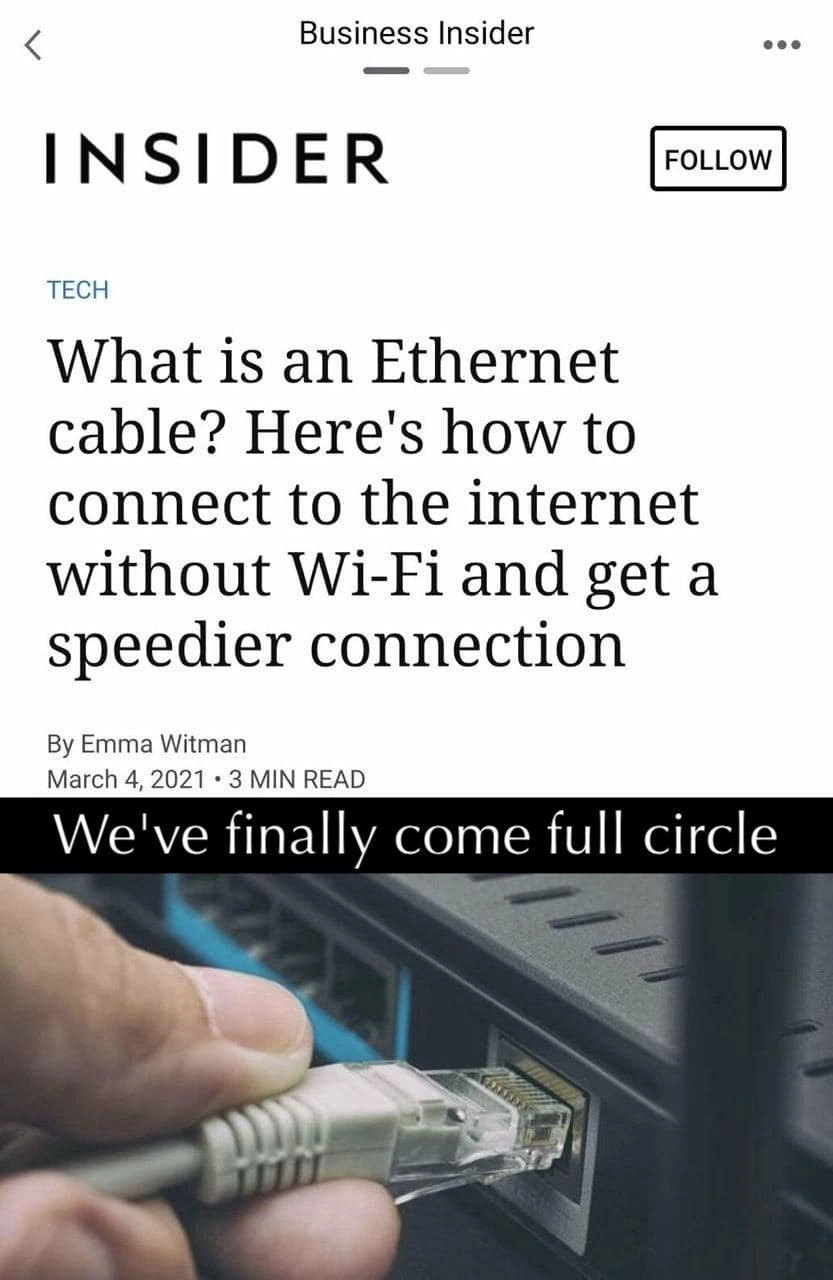
For a senior developer or network engineer, this meme lands with a mix of amusement and a touch of “I told you so.” The image is literally a screenshot of a Business Insider Tech article titled, “What is an Ethernet cable? Here's how to connect to the internet without Wi-Fi and get a speedier connection.” The meme’s own caption plastered on it says, “We've finally come full circle.” The humor is immediate and absurd: imagine having used Ethernet cables for decades, and now seeing a mainstream news outlet explain, as if to beginners, that plugging in a cable can make your internet faster. It reads almost like self-parody — a bit of accidental tech_journalism_satire. One can practically hear the deadpan joking voice: “Breaking News: Wires Might Make Your Internet Faster!” Yes, it’s obvious to us, but apparently not to everyone, which is what makes it funny.
This situation drips with IndustryIrony. For years, tech has been all about Wi-Fi everywhere, cutting the cord, “mobility first” mindset. We’ve gone from clunky dial-up desktop PCs to sleek laptops and phones that are online anywhere via wireless. Cables were seen as old-school, even a nuisance. Yet here we are in the 2020s, and Performance concerns (laggy Zoom calls, buffering videos, online games needing low ping) have people scrambling back to good old wired connections. The meme’s caption “full circle” nails it: after all the innovation and hype, we’re back to recommending the same solution we had in the beginning – plug in a wire. It’s the classic pendulum swing: convenience took us one way, but then reality (and physics) pulled us back. To an experienced dev, there’s comedy in how tech trends can boomerang like that.
There’s also a bit of a generational wink in this meme. Seasoned folks in IT chuckle and say, “Kids these days, they don’t even know what an Ethernet cable is until an article explains it.” It’s true – many younger tech users (and even junior devs) have grown up on Wi-Fi as the default. If your first laptop was something like a MacBook Air, it might not have even had an Ethernet port! Meanwhile, veterans remember a time when wired_vs_wifi wasn’t a debate because Wi-Fi was either nonexistent or painfully slow. We remember 10 Mbps coax networks, then 100 Mbps Fast Ethernet in the office, and the joy of wiring up a whole house so your “LAN party” games wouldn’t lag. We watched Wi-Fi become popular in the 2000s and improve a lot (802.11b to 802.11ac to today’s Wi-Fi 6). And yet, we always knew the wire was there as the trusty fallback. So when this article spells out the obvious — that a wired connection can be faster and more reliable — it’s like an expert secret is being presented as a revelation. Except it’s not even a secret; it’s common knowledge we kinda assumed everyone knew… until now.
The meme carries a wave of TechNostalgia too. That photo of a hand plugging in an RJ-45 connector might give some of us flashbacks: the satisfying click of an Ethernet cable locking in, the time you spent crawling under a desk to find the network jack, or crimping your own cables in the server room. There’s a tactile memory there – networking used to have a physical aspect. Over the last decade, we’ve drifted into an invisible, wireless world. Seeing a headline explain wired networking basics feels like a throwback. You can almost hear the collective groan of senior sysadmins: “Back in my day, kid, this is just how you got on the internet… and it still works best!” The meme makes us smile because it validates that old-school wisdom. The ancient networking gurus who always insisted on plugging in for important tasks are now proven right in a very public way.
Another layer to the joke is the state of tech media. Business Insider is a popular publication, but its tech section often caters to a general audience. That means sometimes explaining very basic tech concepts. For developers and IT pros, headlines like this can be unintentionally hilarious. It’s like if a major news site ran “What is a wheel? Here’s how using one can make your car go faster.” The dev community can’t resist ribbing on it a bit. We know why the article exists (there truly are people who don’t know the difference between Wi-Fi and wired, and perhaps many folks suddenly working from home on flaky Wi-Fi during 2020–21 who might Google such a question). Still, it’s a perfect storm for TechHumor: an obvious tip presented as insight. Sharing this meme is our way of saying “Can you believe we have to explain this?” – with a good-natured laugh, of course.
History has a pattern of repeating itself in tech, and this meme is basically pointing that out. We’ve seen it time and again:
- Mainframes vs. Cloud: In the 1970s, computing was centralized – you had a dumb terminal connected to a big mainframe in the back. Then we decentralized to personal computers and local servers. Now with cloud computing, we’re back to huge centralized data centers (just called “the cloud”) and our devices often act like the dumb terminals, offloading work to the server again.
- Thick Clients vs. Thin Clients: We moved from heavy desktop applications to lightweight web apps (thin clients) in the 2000s. But then web apps grew more powerful and complex, essentially becoming heavyweight applications running in the browser. Technologies like Electron even let you run what is basically a bundled web app on your desktop – and it can consume as much resources as the old native apps did. The cycle of fat vs. thin client just keeps swinging back and forth.
- Wired vs. Wireless Networking: We started with everything wired (you literally couldn’t network without a cable). Then Wi-Fi liberated us from the tyranny of the cord. And now, when wireless hits its limits, the advice is “hey, try a wire again.” Even modern “wireless” gadgets often hide a wired truth – e.g. a wireless home mesh Wi-Fi system still has an Ethernet cable somewhere linking it to the modem, and many “wireless” charging pads still plug into the wall. Completely cutting the wire is harder than it sounds!
These examples show how we keep coming full circle. The meme’s caption isn’t just about networking; it’s a tongue-in-cheek commentary on the industry as a whole. We chase the new shiny solution, then realize the old solution had some benefits we really needed after all. The phrase “we’ve finally come full circle” encapsulates that with a dash of I-knew-it-all-along smugness.
From a senior dev’s perspective, this meme is a friendly eye-roll at the state of things. It’s a facepalm at tech journalism (“I can’t believe this needs to be an article in 2021”) and simultaneously a nod to the enduring truths of TechHistory. It validates those countless times an IT pro said, “Have you tried plugging in with a cable?” during a troubleshooting session. The humor lives in that shared understanding and surprise: of course a direct Ethernet line is often faster and more reliable — everybody in IT knows that — yet here we are seeing it in big bold headlines as if it’s breaking news. It’s satisfying and funny, a reminder that even in a world of cutting-edge innovation, the old-school solutions often remain undefeated.
Level 4: Full Duplex Redux
Decades before Wi-Fi, Ethernet defined how local networks operate at the most fundamental levels (physical and data link). The name itself comes from “luminiferous ether,” the once-theorized invisible medium for electromagnetic waves – a fitting metaphor since original Ethernet (the 10BASE5 standard in the early 1980s) used a thick coaxial cable as a shared communications medium. Multiple computers literally tapped into the same coax cable, and they had to take turns talking. The protocol was called CSMA/CD (Carrier Sense Multiple Access with Collision Detection). In simpler terms: each device would listen to the cable (carrier sense), wait until it seemed quiet, then send its data. If two devices accidentally sent data at the same time (multiple access leading to a collision), they’d detect the collision by the garbled signal and both stop (collision detection). Each would then wait a random back-off time before retrying, which avoided repeat collisions. This elegant algorithm let a bunch of machines share one wire fairly efficiently – a breakthrough at the time that made networking feasible on a single cable bus.
As technology progressed, Ethernet moved from a single shared cable to twisted pair wiring with hubs and then switches (think of standards like 10BASE-T and 100BASE-TX in the 1990s). Instead of all devices on one coax line, now each device got its own pair of wires running to a central hub/switch, with the RJ-45 connector becoming ubiquitous. Hubs still acted like a shared party line (they just echoed signals to all ports, causing similar collisions), but once switches came along, collisions virtually vanished. A switch directs network packets only to the intended recipient port, so two devices can communicate without interrupting others. Even better, this allowed full-duplex mode – meaning data can travel in both directions simultaneously on the cable (one pair for sending, another for receiving). No more waiting your turn to speak. By the early 2000s, a wired Ethernet connection (using Cat5e/Cat6 cables) could easily offer 100 Mbps or 1 Gbps speeds, rock-solid reliability, and consistent low latency. It’s like having a private, high-speed lane on a highway just for your computer’s data.
Wi-Fi (IEEE 802.11), by contrast, is more like a busy open-air market than a private highway. It’s a shared medium – radio waves that anyone nearby can use – so it had to adopt a different strategy, more akin to the old coax days. Wi-Fi can’t physically detect a collision in the air the same way a cable can (a radio transmitter can’t hear others while it’s sending). So Wi-Fi uses CSMA/CA (Collision Avoidance). Devices “sense” before they send (carrier sense), but instead of detecting collisions, they attempt to avoid them by waiting if the channel is busy and using acknowledgments to know if a packet got through. There’s even an optional polite hand-raising mechanism: RTS/CTS (Request to Send / Clear to Send), where a device essentially asks for permission to hog the air for a moment. All this coordination means only one device can effectively talk at a time on a given Wi-Fi channel, making Wi-Fi fundamentally half-duplex for that channel. And if two devices do transmit at the same time unintentionally, their signals collide (interfere) and data gets lost, requiring retries. In essence, Wi-Fi trades speed for convenience: it’s incredibly flexible and cable-free, but you share the airwaves with everyone else.
Then there’s the real world: walls, microwaves, and neighbors. Wi-Fi signals can be blocked or weakened by physical barriers (like walls or floors in your house) and can be drowned out by interference (think of a microwave oven running, or your neighbor’s router on the same channel). The more devices on Wi-Fi, the more they have to take turns using the network. So the actual throughput you get is often much lower than the theoretical maximum. For example, you might have a router advertising “1200 Mbps” Wi-Fi, but a single device might only ever see a fraction of that (say 200–300 Mbps in practice), and that’s when you’re in the same room as the router. Move a few rooms away, and maybe you’re down to double-digit Mbps and your video call is freezing. Latency (delay) is also less predictable on Wi-Fi. One moment you have a 5 ms ping to your router, the next it spikes to 50 ms because two devices tried to talk at once or a signal had to be resent. It’s the networking equivalent of a conversation where you occasionally have to say, “Sorry, could you repeat that?” – those retries add delay.
Now compare that to plugging in with an Ethernet cable: suddenly you have a direct line with none of those over-the-air contentions. Your machine’s messages go straight to the router, and exactly one device (your device) is using that wire at a time. The throughput over a wire is generally consistent and as fast as the hardware allows (a 1 Gbps port will give you close to 1 Gbps of real data transfer under good conditions). Latency on wired is super stable – maybe 1–2 ms ping to your router every single time, with very little jitter. The reliability is high: unless the cable is damaged or ridiculously long, errors are rare and there’s no need for retransmissions. In short, a wired link removes the variables that plague Wi-Fi. There’s a reason gamers and IT pros often say, “If you want no-fail connectivity, plug in.” It’s not just ritual – it’s physics and network architecture.
For the academically inclined, this contrast ties back to information theory and good old engineering trade-offs. Claude Shannon’s channel capacity theorem tells us the maximum data rate of a communication channel depends on its bandwidth and signal-to-noise ratio. A wired Ethernet cable, especially a shielded or twisted pair, has a high signal-to-noise ratio (minimal interference) and plenty of bandwidth, so it can approach its theoretical limits. Wi-Fi, on the other hand, deals with a noisier environment and shared spectrum, so its effective throughput often falls short of the glossy spec sheet numbers. Additionally, Ethernet’s evolution (switches, full-duplex links) eliminated many inefficiencies (like collisions) over time, whereas wireless will always need some overhead to manage a shared medium. Thus, the “speedier connection” claim in that headline simply reflects a real, quantifiable advantage: fewer packet collisions and retransmits, lower latency, and more consistent bandwidth when you use a cable instead of Wi-Fi.
Given all this, the meme’s scenario is delightfully ironic to anyone steeped in networking. The Business Insider headline is essentially reintroducing the well-known benefits of wired networking – truths that have been Networking gospel for decades – as if they’re a new lifehack. Seeing “What is an Ethernet cable?” in 2021 evokes a chuckle because behind that basic question lies all the nuance above. Of course plugging in an ethernet_cable yields a more stable, faster connection; every network engineer knows that. The article isn’t technically wrong; it’s just amusing how late to the party it sounds. It highlights a classic tech pendulum effect: Wi-Fi solved the tangle of cords and gave us mobility, but introduced new issues (interference, inconsistency). Now, hitting those limits, people swing back to wires for a solution. That sense of coming full circle – the industry re-learning an old lesson – is exactly what this meme is pointing out. To a veteran engineer, seeing Ethernet lauded as a “hack” for better speed is like a mathematician watching an old theorem go viral on TikTok: equal parts amusing, gratifying, and nostalgic.
Description
The image is a screenshot of a Business Insider article titled 'What is an Ethernet cable? Here's how to connect to the internet without Wi-Fi and get a speedier connection'. Below the article's title and byline (By Emma Witman, March 4, 2021), a black bar with white text reads 'We've finally come full circle'. The bottom half of the image shows a hand plugging a grey Ethernet cable into a router. The meme humorously points out the irony of a major tech publication explaining a fundamental piece of technology as if it were a novel discovery. For experienced tech professionals, it's a funny reminder of how wireless technology has become so dominant that wired connections are now being 'rediscovered' by the mainstream, highlighting a generational or knowledge gap in technology

Comments
13Comment deleted
I showed this to my router and it started crying tears of joy. It hasn't felt a physical connection in years
Ethernet is apparently the hot “no-Wi-Fi performance trick” - can’t wait for the follow-up piece that rebrands CSMA/CD as a groundbreaking consensus algorithm
Next week on Business Insider: 'Revolutionary discovery: You can actually compile code BEFORE deploying to production! Here's how this ancient technique called a 'build process' can prevent your site from crashing at 3am.'
After decades of wireless evangelism, cloud-first architecture, and 'the network is the computer' mantras, we've reached peak irony: Business Insider publishing a tutorial on Ethernet cables in 2021. It's the infrastructure equivalent of a microservices team discovering that sometimes a well-designed monolith with a direct database connection actually outperforms their distributed system with 47ms of network latency between services. Turns out physics still matters, and that Cat6 cable gathering dust in your drawer might be the ultimate performance optimization - no Kubernetes required
After a decade of mesh magic and QoS sermons, the top performance trick is still Ethernet - deterministic latency ships on a spool
WiFi's 'cut the cord' promise lasted until PHY layer reality bit: Ethernet's the reliable underlay we always deserved
After the RF surveys, mesh extenders, and QoS policies, the final fix was to roll out a bold new protocol: 802.3 via Cat6
Zoomers have discovered wired connection Comment deleted
Next up: "You won't need to worry about your laptop battery life if you keep it connected to that thingy in the wall" Comment deleted
Retarded generation Comment deleted
that's some insider knowledge right there Comment deleted
its the parents fault for letting them use phones and tablets instead of computers and books ;P Comment deleted
😂 Comment deleted