
Skip to content
DevMeme
207 of 7435
When the browser forgets what localhost means
WebDev Post #250, on Mar 21, 2019 in TG

When the browser forgets what localhost means

Why is this WebDev meme funny?

Level 1: Knock Knock, It's Me

Imagine talking to yourself in your own kitchen, and a smoke alarm interrupts to announce "PHONE LINES ARE DOWN — CONVERSATION IMPOSSIBLE." You don't need a phone line — you're both people in this conversation, standing in the same room! That's why the man in the picture is furious: his computer told him he can't reach... his own computer. The funny part is the pure indignation of being told you're disconnected from yourself, and his answer is perfect — fine, if the internet is gone, then I am the internet now.

Level 2: The Call Is Coming From Inside the House

Key terms worth unpacking:

  • localhost / 127.0.0.1: A special hostname and IP address that always means "this machine." Reserved by the IPv4 standard, it's how you talk to programs running on your own computer — like your dev server (npm run dev, python -m http.server, Rails, etc.).
  • Loopback interface: A virtual network device. Data sent to it never leaves your computer — no cables, no Wi-Fi, no internet required. That's the whole joke: connecting to localhost while offline should work perfectly.
  • Dev server: When you build a website locally, you run a small web server on your machine and visit it at something like http://localhost:3000. You, the browser, and the server are all the same computer.
  • Browser offline detection: Browsers check whether you have connectivity and show a "No internet" page (the one with the dinosaur, in Chrome's case) when you don't. The detection is a guess about general connectivity, and it can wrongly interfere with local requests that need no connectivity at all.

Early-career rite of passage: Wi-Fi drops, you keep coding because your stack is local, you refresh — and the browser claims there's no internet. Your first instinct is to doubt your server. Don't. Check whether the page even tried to connect (the network tab is your friend), nuke any registered service workers, and remember that "offline" and "can't reach localhost" should never be the same error.

Level 3: Say My Name (Resolution)

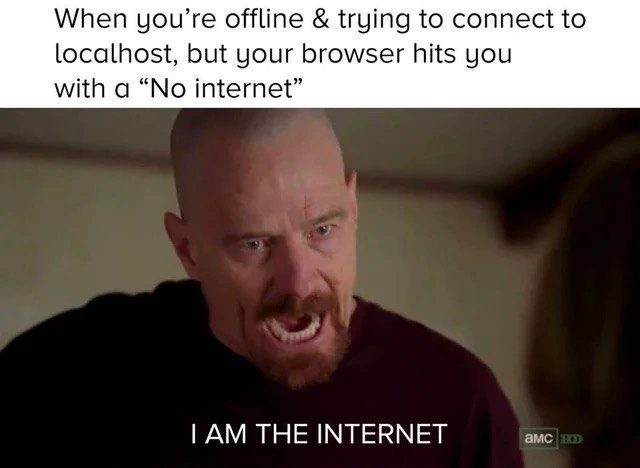
The rage on Walter White's face is technically justified, and that's what elevates this meme above generic browser-bashing. The top caption sets the scene — "When you're offline & trying to connect to localhost, but your browser hits you with a 'No internet'" — and the subtitle delivers the developer's entirely correct rebuttal: "I AM THE INTERNET." Because for this request, you literally are. localhost resolves to 127.0.0.1, the loopback address, and traffic to it never touches your Wi-Fi card, your router, your ISP, or any cable. The packet goes down the stack, hits the loopback interface, and comes right back up — a round trip that happens entirely inside the kernel. The "internet" being down is as relevant to this request as the weather in another hemisphere.

So why does the browser block it? Because browsers conflate two distinct concepts: network reachability ("can I see a gateway / get a captive-portal probe response?") and per-request routability ("can this specific destination be reached?"). When the OS reports the machine offline, some browsers short-circuit into error pages or aggressive offline-cache behavior before even attempting the connection — never mind that a 127.0.0.1 request requires zero network. Sprinkle in adjacent failure modes that every web developer has hit: a stale service worker intercepting requests and serving cached "offline" pages for your own dev server; DNS misconfiguration where localhost doesn't resolve because someone "cleaned up" /etc/hosts; proxy settings (HTTP_PROXY set globally) dutifully forwarding loopback traffic to an unreachable corporate proxy. The pattern being satirized is a deep one: a convenience layer designed for the average case confidently overruling a user who knows better. It's the same energy as an IDE auto-formatting your deliberate alignment or an OS "helpfully" sleeping the machine mid-build. The heuristic is right 99% of the time, and the 1% is exclusively people who can articulate, with Heisenberg-level intensity, exactly why it's wrong.

The Breaking Bad template choice is surgical. The original scene is Walter rejecting the framing that he's the one in danger — I am the one who knocks. Here the developer rejects the framing that they've lost the internet. They haven't lost it; for this loopback transaction, they are it: client, server, and the entire network path, all on one machine, no middlemen. The browser, like Skyler, is not prepared for this conversation.

Description

A two-panel meme using a famous scene from the TV show Breaking Bad. The top panel has white text that reads, "When you're offline & trying to connect to localhost, but your browser hits you with a 'No internet'". The bottom panel shows an intense, angry Walter White yelling, with the subtitle "I AM THE INTERNET". The meme humorously captures the frustration developers feel when their browser incorrectly reports a lack of internet connection while they are intentionally trying to access a local server on their own machine (`localhost`). For a senior developer, this is a relatable annoyance that highlights how even sophisticated software like a browser can fail at basic context, treating the local loopback address as if it were a remote one requiring an external network


Comments

8
Anonymous ★ Top Pick My browser has trust issues. It thinks 'localhost' is some exotic remote server and refuses to connect without its security blanket, the public internet
  1. Anonymous ★ Top Pick

    My browser has trust issues. It thinks 'localhost' is some exotic remote server and refuses to connect without its security blanket, the public internet

  2. Anonymous

    Chrome misses its generate_204 heartbeat, slaps up “No internet,” and refuses 127.0.0.1 - the k3d cluster humming on my loopback just mutters, “Relax, Heisenberg, the packets never even left the NIC.”

  3. Anonymous

    After 20 years in tech, I've explained to three different CTOs why our "cloud-native" app still needs to work on localhost, but Chrome's offline detection logic remains the only code I truly fear

  4. Anonymous

    The browser says 'No internet' while you're hitting 127.0.0.1 - the one address that, by definition, was never going to use any

  5. Anonymous

    The irony here cuts deep: localhost is literally the one address that should work when everything else fails - it's the networking equivalent of talking to yourself. Yet modern browsers, in their infinite wisdom, perform connectivity checks that can block access to 127.0.0.1 when they detect 'no internet.' It's like your house refusing to let you talk to yourself because the phone lines are down. Senior engineers know this pain intimately - you've got your entire development stack running locally, Docker containers humming along, your API responding perfectly on port 8080, but Chrome decides you need permission from the internet gods to access your own machine. The real kicker? This usually happens right before a demo, when you're on a plane, or when the office WiFi decides to have an existential crisis

  6. Anonymous

    Localhost: the single-node cluster where even zero-latency traffic hits a network partition thanks to browser zealotry

  7. Anonymous

    Your browser saying “No internet” when you hit localhost is CAP theorem cosplay: partition the WAN, sacrifice availability of the only node that’s up

  8. Anonymous

    Nothing like a browser whose captive‑portal probe failing to phone home turns 127.0.0.1 into a production outage - accidental WAN coupling at the UI layer

Use J and K for navigation
