Skip to content
DevMeme
2874 of 7435
The Joy of Collaborative Coding: Merge Conflict Edition
VersionControl Post #3177, on Jun 1, 2021 in TG

The Joy of Collaborative Coding: Merge Conflict Edition

Why is this VersionControl meme funny?

Level 1: When Code Collides

Imagine two kids coloring the same picture at the same time without talking to each other. One starts coloring a tree on the page, and at that exact moment the other one also starts coloring a tree in the very same spot. They both end up scribbling over each other’s work. The picture turns into a messy mix of crayon marks because they didn’t plan who would draw where. Now someone has to fix the picture – maybe erase the extra scribbles or start all over. As you can guess, both kids would feel pretty annoyed that their drawing got messed up. But it’s also a little bit funny: the kid who was copying everything the other kid did is now the one who has to clean up the mess. It’s like a fair punishment in a silly situation. The humor comes from seeing how doing the same thing at the same time without communicating can create a chaotic outcome, and the copycat friend ends up with the not-so-fun job of sorting it out.

Level 2: Merge Conflict 101

This meme highlights a common issue when using Git (a popular version control system that helps teams manage code changes) with teammates. Imagine a shared code repository (like a project folder that tracks every file’s history). You and a coworker each have your own local copy of the repository – maybe on separate branches (independent lines of development in Git) but starting from the same codebase. Without telling each other, you both decide to make changes to the project. Let’s say you each add a new file or you both edit the same file. When you finish a set of changes, you create a commit (saving a snapshot of your changes in Git with a message). Now comes the tricky part: sharing those changes. You push your commit to the remote repository (the central server copy, e.g. on GitHub). Pushing is like uploading your local changes so everyone can see them. So far so good for you.

Now your coworker tries to push their commits. But uh-oh – Git notices the remote already has your updates, which overlap with what your coworker did. Git won’t automatically overwrite or combine them because it detects a conflict. Instead, it stops the second push and throws up a warning. This situation is called a merge conflict. That means Git doesn’t know how to merge the two sets of changes together – especially if both of you edited the same lines of code or added a file with the same name. The only way forward is for your coworker to incorporate your changes first and manually reconcile the differences. In practice, your coworker now has to pull (download) your updates from the remote repository and let Git attempt a merge on their machine. When Git merges and finds conflicting edits in a file, it marks those sections for human attention. The file will contain both versions of the code, highlighted with special markers like <<<<<<<, =======, and >>>>>>> to show the conflicting parts. For example, if you both edited the same line in a file, your coworker might open that file and see something like this:

<<<<<<< HEAD
console.log("Hello from A");
=======
console.log("Hello from B");
>>>>>>> teammate_branch

The <<<<<<< HEAD part (above the line) is showing your coworker’s version (their current HEAD), and the ======= line separates it from the >>>>>>> teammate_branch part, which is the code from your commit that came from the remote. In this snippet, both you and your teammate wrote a console.log line, each with a different message ("Hello from A" vs "Hello from B"). Git couldn’t decide which one to keep, so it put both in the file for a human to sort out. Your coworker must now resolve the merge conflict by editing the file: they might choose one of the lines or even combine them into a single solution, and then delete all those <<<<<<, ======, >>>>>> markers. After cleaning up the file and making it consistent, they will mark the conflict as resolved and commit the merged result. Only then can they finally push their changes to share them.

This manual merge process is tedious and can be tricky if there are a lot of conflicts. For a new developer, seeing those conflict markers in the code the first time can be scary – it looks like the file got corrupted with weird symbols – but it’s actually a normal part of working with Git on a team. It basically means “you and someone else edited the same part of this file, now you have to decide whose change to keep or how to combine them.” The key point is that this happened because both people worked on the same thing at the same time without coordinating. If the team had communicated better (for example, by deciding who would add which file or section of code ahead of time), they could have avoided doing the same work twice. Alternatively, if each person had frequently pulled updates from the remote, they might have noticed the other’s changes earlier and adjusted course. The meme uses an exaggerated, humorous tone (borrowing Borat’s comedic style) to describe this scenario. It’s funny to developers because it’s a relatable mix-up: one teammate unknowingly duplicates another’s work, and then ends up having to fix the mess. For a junior coder, the lesson here is clear – sharing code requires communication and a good Git workflow, otherwise you’ll spend a lot of time untangling these “merge mishaps.”

Level 3: Feature Branch Folly

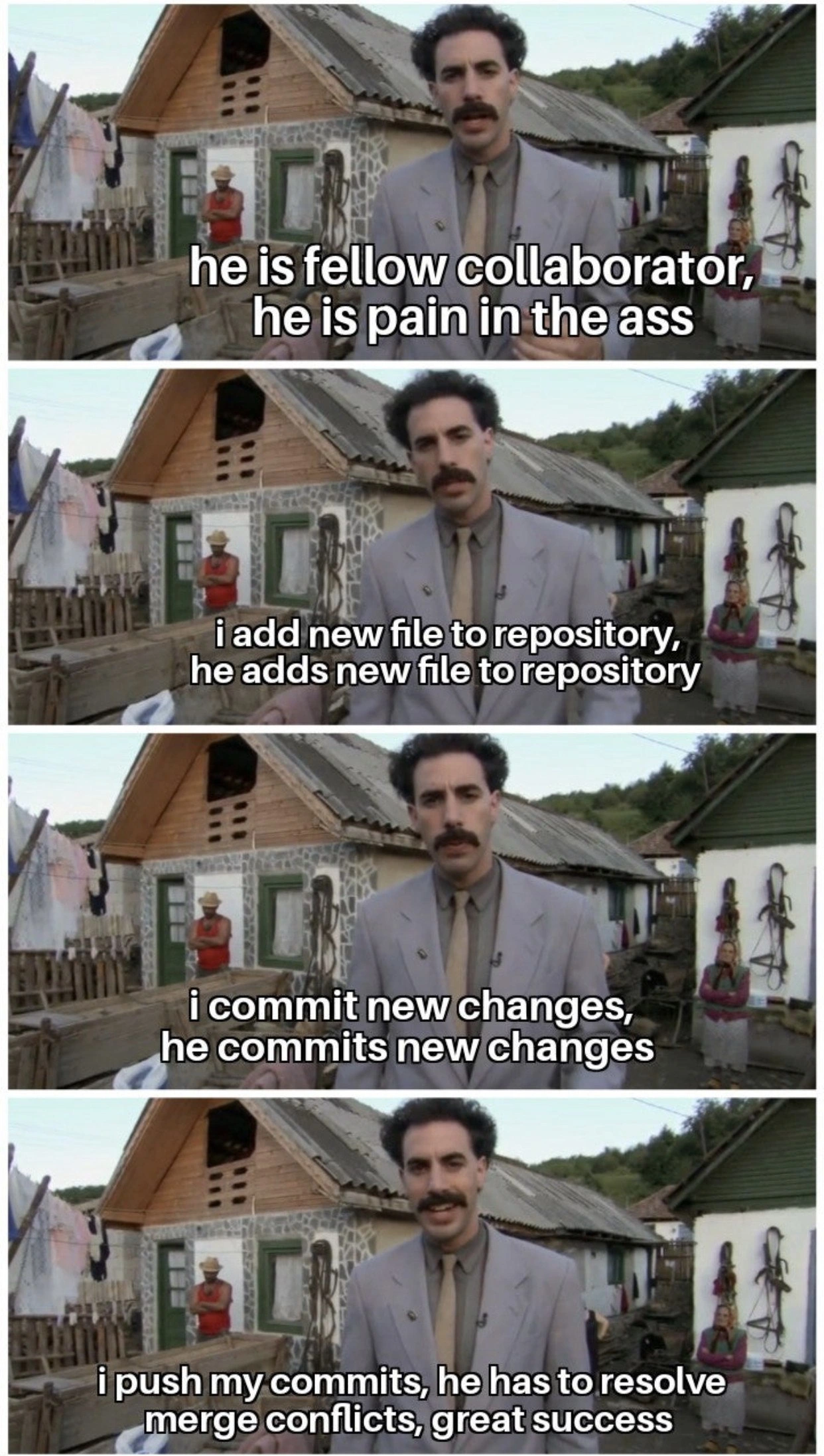
"he is fellow collaborator, he is pain in the ass"

In this four-panel Borat-style meme, a mustached narrator in a shabby village suit deadpans about his teammate – a pain-in-the-backside coworker who mirrors every Git action. The format mimics Borat’s comedic delivery: “I add new file… he adds new file. I commit… he commits. I push… he resolves merge conflicts, great success.” It humorously portrays that one colleague who’s like your personal code shadow, copying every move in your Git workflow. The punchline is that after all this duplication, the buddy gets the joy of fixing a gnarly merge conflict by hand – “Great success,” indeed, with a roll of the eyes. Seasoned devs laugh (and cringe) because we’ve all met that one merge-happy teammate who turns every push into a merge conflict tornado.

Behind the laughs is a painfully familiar headache. In real life, this scenario means two developers made overlapping changes in a distributed version control system (Git) without coordinating. Git happily lets multiple people commit in parallel – there’s no immediate lock or warning when someone edits the same file as you on their own branch. The drama unfolds only when changes meet: as soon as you try to integrate (merge or push) at the same time, the conflicts surface. For example, one dev pushes their update, and when the other dev tries to push, they get that cheerless rejected (fetch first) error hinting “the remote contains work you do not have.” In other words: someone got there first, now deal with it. Git forces the second person to pull the latest code and resolve differences before proceeding. Of course, this always seems to happen late on a Friday or right before a deadline, turning a simple task into an emergency patch-up session.

Technically, the meme highlights poor coordination in a team’s Git workflow. Both collaborators duplicated effort – maybe each created the same new file or edited the same function – so their parallel changes collided. Resolving this isn’t fun: it means manually merging code, deciding whose changes to keep or how to combine them without breaking the build. It’s a hit to DeveloperProductivity: time wasted untangling two versions of the “same” work. The root cause is a Communication breakdown: if they had communicated tasks or pulled each other’s changes sooner, they wouldn’t be stepping on each other’s commits. Instead, they ended up with unplanned branch collisions (a classic CollaborationChallenge). On the bright side, there’s a sliver of schadenfreude in the meme’s story – the troublemaker who duplicated your work is the one stuck cleaning up the mess. This little justice makes the absurdity cathartic. In the end, the meme nails a truth of dev team life: code collaboration without coordination can devolve into a comedy of errors (and endless conflict resolution) — “Not very nice!”, as Borat might say.

Description

A four-panel meme featuring the character Borat Sagdiyev from the movie 'Borat'. In each panel, Borat is speaking to the camera with a rural village setting behind him. The text overlays on the panels describe a sequence of events with a collaborator. First panel: 'he is fellow collaborator, he is pain in the ass'. Second panel: 'i add new file to repository, he adds new file to repository'. Third panel: 'i commit new changes, he commits new changes'. Fourth panel, with Borat smiling: 'i push my commits, he has to resolve merge conflicts, great success'. The meme uses the Borat 'great success' format to humorously depict a common developer scenario. It highlights the passive-aggressive satisfaction a developer feels when they successfully push their changes first, forcing their colleague to deal with the tedious and often frustrating task of resolving Git merge conflicts that arise from working on the same files simultaneously
Comments

9
Anonymous ★ Top Pick The best conflict resolution strategy is a faster internet connection. He who pushes first, deploys. He who pushes second, rebases for the rest of the day
  1. Anonymous ★ Top Pick

    The best conflict resolution strategy is a faster internet connection. He who pushes first, deploys. He who pushes second, rebases for the rest of the day

  2. Anonymous

    Our team’s version of optimistic concurrency control: he optimistically pushes straight to main, and I pessimistically spend the sprint running three-way diff therapy between HEAD, origin, and whatever he was thinking

  3. Anonymous

    The real 'great success' is when you realize the junior who keeps beating you to the push is actually just committing directly to main while you're carefully crafting atomic commits with meaningful messages on feature branches

  4. Anonymous

    The fundamental theorem of distributed version control: merge conflict entropy always increases, and it always increases in the direction of whoever pushed second. It's like a game of musical chairs where the music is your CI/CD pipeline and the prize is spending the next hour deciphering three-way diffs while your 'fellow collaborator' is already in their next standup explaining how productive they've been

  5. Anonymous

    Optimistic concurrency in Git: push first so merge conflicts become someone else’s eventual consistency problem

  6. Anonymous

    Git's optimistic concurrency control: first push claims great success; second implements a manual CRDT across HEAD markers while praying rerere remembered

  7. Anonymous

    Merge conflicts: Git's elegant reminder that 'main branch' means 'mutual assured destruction' without feature branches

  8. @FunnyGuyU 5y

    When you try to annoy someone, make a pull request

    1. @gDanix 5y

      *laughs in hacktoberfest

Use J and K for navigation