
Skip to content
DevMeme
4992 of 7435
From Teletype to Electron: Baudrillard’s Four Stages of Terminal Reality
CLI Post #5459, on Sep 15, 2023 in TG

From Teletype to Electron: Baudrillard’s Four Stages of Terminal Reality

Why is this CLI meme funny?

Level 1: Rocket to Cross the Street

Imagine you want to send a simple message to a friend. In the beginning, you just walk over to their house and say it face-to-face – that’s straightforward and real. Next, you decide to use a bicycle to get there and shout the message from the yard – a bit extra, but you still deliver it. Later on, you upgrade and drive a car just to go next door and hand them a note – now it’s getting a little over-the-top for such a short trip. Finally, you go completely crazy: you hop into a rocket ship, fly to the moon and back, and then drop the message in their mailbox. 🚀 Sounds absurd, right? You went from a simple walk to a cosmic journey, all to do the same thing.

This meme is funny for the same reason. In the beginning, using a computer terminal was direct and simple (like walking over). But in the end, we built a huge, complicated system (like that rocket) just to do the exact same task – showing text from the computer to the user. Each new version of the terminal was more elaborate and far removed from the original way of doing things. It’s poking fun at how we sometimes make things way more complex than they need to be. Even if you don’t know anything about computer terminals, you can laugh at how extreme and silly it became to accomplish a basic job. In other words, we took something that worked and added so many layers that it turned into a parody of itself – and that’s why it’s hilarious to developers.

Level 2: Terminals Through the Ages

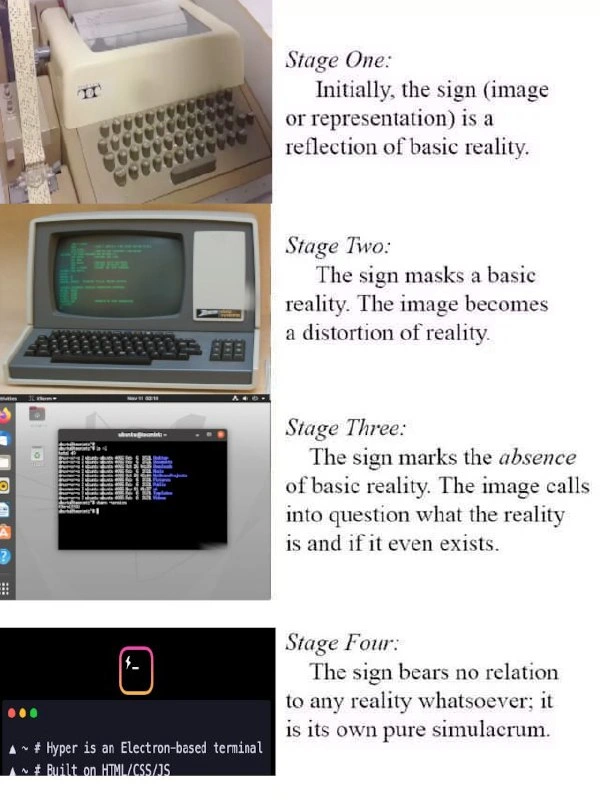
A terminal is basically a text-based interface to a computer – a place where you type commands and see the computer’s responses. This meme shows how terminals have changed over time, while humorously quoting a philosopher to make a point about reality versus imitation. Let’s break down each part:

  • Teletype (Physical Terminal): The top image shows an old beige machine (an ASR-33 teletype) from the 1960s. This was essentially an electric typewriter connected to a computer. When you typed on it, the machine would send those characters to the computer; when the computer responded, the teletype would literally print the output on paper. It’s called a “teletypewriter” because it could type over a distance (like a telegraph for letters). This was a real, physical interaction – if a program printed “Hello, World,” it hammered out those letters onto a sheet of paper in front of you. In the meme’s terms, this is basic reality. There’s nothing virtual here: the output is as real as ink on paper. If you did a directory listing or ran a program, you’d end up with a stack of paper showing everything that happened. It was slow and loud, but very concrete.

  • CRT Monitor Terminal: The second image is a green-text computer terminal (imagine those retro screens from old movies). CRT stands for Cathode-Ray Tube, which is the old type of TV/monitor technology. In the 1970s and 1980s, terminals evolved into video screens with attached keyboards. These devices were often called “dumb terminals” because they didn’t do any computing on their own – they were just a screen and keyboard that let you interact with a powerful central computer (like a mainframe or a minicomputer). Instead of printing on paper, a CRT terminal displayed text on a screen. This was a big improvement: it was faster, you didn’t consume mountains of paper, and you could update the display dynamically. For example, if you logged in, the system could clear the screen and show a menu, whereas on paper you’d just have an endless scroll of output. However, this also meant the output was now ephemeral – once something scrolled off the screen, it was gone unless the system kept an internal log. The meme refers to this stage as the image distorting reality a bit. That’s because the screen could “lie” or rather, it could hide things: the computer could delete what it showed you or overwrite it. With a teletype, you always had a physical record of what happened; with a CRT, the computer’s output was a temporary image. Still, it was very much a real terminal – a piece of hardware dedicated to interacting with the computer, just using a screen instead of paper. You might think of it like the evolution from mailing someone a letter (permanent record) to a live phone call (here and then gone).

  • Terminal Emulator (Software Terminal): The third image is a modern terminal window on a desktop (specifically, an Ubuntu Linux system running GNOME Terminal). This is not a separate physical machine at all – it’s a program on your computer that behaves like those old terminals. We call it a terminal emulator because it emulates (imitates) how a physical terminal works, but in software. When you open such a terminal on your screen, you get a text interface with a prompt (like $ or C:\> for Windows) where you can type commands. Behind the scenes, your operating system is handling everything – it starts a shell (a command-line program that actually processes what you type) and connects it to this window. On Linux/Unix, there’s something called a pseudo-tty (PTY) that acts as the pretend terminal device, so the shell thinks it’s talking to a real terminal, even though it’s all virtual. The key point is, by this stage there is no independent terminal hardware at all. It’s just your computer creating an illusion for you so that you can use text commands. This is incredibly useful and flexible: you can have multiple terminals open at once, you can scroll back, you can copy and paste text, etc. None of those things were possible with the old physical terminals (you only had one teletype per user, and if you wanted a record you kept the paper, and forget about copy-paste!). The meme calls this stage the absence of reality, meaning the actual standalone terminal isn’t there anymore – it’s been absorbed into the computer as software. For a user, the experience is still “I have a terminal to type into,” but that terminal is now just a program like any other, not a piece of hardware sitting on your desk.

  • Hyper (Electron-based Terminal): The bottom image shows an app called Hyper. Hyper is a modern terminal emulator, but unlike GNOME Terminal or the Windows Terminal, it’s built with web technology using a framework called Electron. Here’s what that means: Electron lets developers create desktop applications using the same languages used to create websites. It bundles a Chromium browser (the engine inside Google Chrome) and a Node.js JavaScript runtime into a single app. Essentially, an Electron app is a web browser under the hood, but it can behave like a desktop application. So, Hyper is a terminal emulator where everything you see – the black background, text, cursor, etc. – is actually an HTML/CSS webpage rendered inside an embedded browser, and all the logic (responding to keypresses, updating the display) is written in JavaScript. It still connects to the real shell on your system to run commands, but everything about the user interface is done like a website. This is a pretty “meta” concept: you’re using a web browser engine to mimic a computer terminal. Why do this? One reason is to make the terminal extensible and theme-able using web technologies, which many developers know how to work with. Another reason is that it’s cross-platform – the same Hyper app (written in JavaScript) runs on macOS, Windows, or Linux with minimal changes, thanks to Electron. The downside is that it’s much heavier. Electron apps tend to use a lot more memory and CPU than a traditional native app, because you’re running an entire browser behind the scenes. For something like a terminal – which is basically just text – this feels like overkill to many people. The meme highlights this by quoting Baudrillard’s fourth stage: at this point the “terminal” isn’t grounded in any original reality at all; it’s a pure simulation. In everyday terms, Hyper is a terminal that’s quite far removed from the simple device it started as. It’s like a copy of a copy of a copy. It works and it looks cool (you can style your prompt with CSS and add nifty effects!), but under the hood it’s doing a lot more than what is actually needed to show text on the screen.

So, what about those quotes on the right side? They’re lines from Jean Baudrillard, who was a social theorist and philosopher. He talked about how symbols, signs, or images can go through stages in relation to reality. To paraphrase:

  • Stage One: the image is a faithful copy of reality (it shows something real as it is).
  • Stage Two: the image starts to distort or mask reality (it’s showing something real, but in a misleading way).
  • Stage Three: the image suggests the reality isn’t there (it’s like a sign telling you something exists when in fact the thing might be gone).
  • Stage Four: the image is purely its own thing, with no connection to any reality – basically a wholly made-up thing or a copy with no original.

The meme playfully applies these stages to the progression of computer terminals:

  • Stage One (Reflection of reality): The teletype gave you the computer’s output in a direct, physical form. It’s like the terminal was “real” because it was just printing exactly what happened inside the computer onto paper.
  • Stage Two (Distortion of reality): The CRT terminal showed you output on a screen. It’s still real output, but now the computer can manipulate what you see (erase it, change it), so it’s one step removed from the raw truth. It’s a representation that can be altered.
  • Stage Three (Absence of reality): The GUI terminal emulator shows you output in a window, but there’s no dedicated device producing that text. The actual “terminal” is absent – it’s all being done by the computer’s imagination, so to speak. The terminal is a virtual concept.
  • Stage Four (Pure simulacrum): The Hyper/Electron terminal goes even further – now even the way we create the text interface is simulated through layers of other software (like the browser). This terminal isn’t connected to any original hardware idea at all; it’s just doing its own thing. It’s a terminal for the sake of appearance and convenience, built out of completely different technology (web tech). In Baudrillard’s words, it has “no relation to any reality” of the original terminals; it’s its own artifact.

The humor of this meme comes from recognizing this increasingly convoluted setup. It’s exaggerating reality a bit to make a point. In truth, Hyper is a functional terminal app and not that crazy – it still lets you do your work – but when you line things up from the teletype to Hyper, you can definitely see how each step became more abstract and complex. It’s funny in the way that technological progress can be ironic: we made something very advanced in order to imitate something very simple. It tickles the nerdy sense of humor because it combines a high-level philosophical reference (Baudrillard’s stages of reality) with a very down-to-earth tech trend (terminals getting more and more high-level). Even if you don’t know Baudrillard, you can laugh at the idea that we now need HTML, CSS, and JavaScript – the trio of web design – to draw letters on a screen, whereas once upon a time that was accomplished by a few metal keys and a roll of paper. The meme is essentially saying, “Look how far we’ve abstracted things, isn’t it crazy?” and anyone who has used both old-school and new tools can appreciate that comedic contrast.

Level 3: From Teletype to Hype

This meme lands its punch by showing how each generation of the command-line interface (CLI) drifts further from the metal, to the point of absurdity. Seasoned developers recognize a classic pattern of creeping abstraction and overengineering in our tools. We’ve literally gone from a clacking teletype printing on paper (tangible and honest) to an Electron-fueled app running a full-blown browser just to draw text (flashy but resource-hungry). It’s poking fun at how even our simplest developer tools aren’t immune to the latest hype. Here’s how the four stages play out from a pragmatic tech perspective:

  • Stage 1 – Teletype (Reality): The beige ASR-33 in the meme is an actual typewriter-like machine wired into a computer. It prints every character on real paper at a blistering 10 characters per second. It’s noisy, slow, and strictly hardware-bound, but what you see is exactly what the machine outputs – no filters, no magic. Old-timers recall that these terminals were so real that if the computer crashed, the printer might just halt mid-line with a half-typed command dangling on paper. The upside? Zero abstraction. It was you, the machine, and a roll of paper logging everything. This was a terminal in the most literal sense, and it faithfully reflected the computer’s processes (if the program output a bell character, you’d hear an actual bell ding).

  • Stage 2 – CRT Terminal (Distortion): Next, we see a green phosphor screen (think of a vintage DEC VT100 or IBM 3270 terminal). This “dumb terminal” still connected to a central computer over a serial cable, but now the output was shown on a CRT monitor (an old-style cathode-ray tube display). This made interaction faster and less messy – no paper needed – and you could even move the cursor or update sections of the screen. But it introduced a new layer of control over what you saw. Text could blink or be cleared from the screen, which means the device could quietly erase history or redraw output in ways impossible on paper. In Baudrillard’s terms, the screen image could mask some of the reality: once a line scrolled off or got deleted, it effectively ceased to exist for the user. For developers back then, this was a huge improvement (you could finally edit text on the screen, or run full-screen applications like text editors), yet it was also the moment the terminal experience became a bit of an illusion. The data was still real, but how it was presented could be manipulated. The terminal had started to mediate reality instead of just reflecting it.

  • Stage 3 – Terminal Emulator (Absence): Fast forward to the era of personal computers. The meme’s third image is a GNOME Terminal on Ubuntu – which is just a window on a PC that behaves like those old terminals. We call these programs terminal emulators because they emulate (imitate) the behavior of a standalone terminal in software. Here, the dedicated terminal hardware is completely gone. When you open a few terminal windows on your desktop, there isn’t a closet full of teletypes magically materializing – your OS is just running multiple shell processes and giving each a UI to interact with. In Unix-like systems, a pseudo-terminal device (pty) pretends to be a terminal so that the shell and programs run as if they’re communicating with a real one. But it’s all virtual. This is what Baudrillard would call the absence of reality: the idea of the terminal persists, yet there’s no independent terminal machine anymore – it’s a figment of software. Developers understand that at this stage, “terminal” is purely a software construct. It’s incredibly useful (you can copy-paste text, have tabs, adjust fonts – all things real teletypes or old CRTs never allowed), but it’s also a replication. The computer is play-acting both roles: it’s the main system and it’s faking a “terminal” to interact with itself. There’s a nostalgic comfort in that black-and-white (or green) text interface, so we keep it alive. But make no mistake, the authentic physical reality is missing. If something goes wrong, you might see an error message in the window, but there’s no separate device to blame or observe – it’s the computer talking to itself. The meme highlights this by saying the sign (terminal window) “marks the absence of basic reality.” In real-life terms, that means the terminal you see is a convenient illusion created by your operating system.

  • Stage 4 – Hyper (Simulacrum): Now the punchline: Hyper – a terminal built with web tech, running on Electron. Electron apps are essentially Google Chrome packaged as a desktop application, so when you run Hyper, you’re launching a Chromium browser instance under the hood. Hyper then renders a page that looks like a terminal and uses JavaScript to send and receive data from your actual shell. This is the simulation of a simulation. It’s a terminal (Stage 4) imitating a terminal emulator (Stage 3) which was imitating a physical terminal (Stages 1–2). For many developers, this is where things enter the theater of the absurd. We’ve got an entire browser engine spinning just to show us white text on a black background with a $ prompt. It’s the epitome of over-engineering: using a multi-megabyte application and significant system resources to achieve what a 1970s era 8-bit microprocessor could do with 2 KB of RAM and a serial port. When the meme quotes “The sign bears no relation to any reality whatsoever; it is its own pure simulacrum,” this is what it’s getting at. The Hyper terminal isn’t grounded in any unique hardware or necessity – it exists because developers thought it’d be cool to have a terminal reimagined with HTML/CSS customization and JavaScript plugins. It’s a pure software artifact, a fancy reimplementation of an old idea using modern tools for the sake of convenience and novelty. The humor for developers comes from the sheer extravagance of it: Hyper might consume on the order of a few hundred MB of RAM just to idle with an empty prompt, whereas the Stage 1 teletype had no electronic memory at all (it was all on paper!). It’s like opening up Chrome to run \ls -al``. Sure, it works and it might even look prettier or animate smoothly, but it’s almost comically inefficient compared to a basic terminal. This stage embodies the current IndustryTrends_Hype where JavaScript and web tech are used to rebuild every tool (sometimes for good reasons, like cross-platform ease and familiar DX, and sometimes just because it’s the trend). Seasoned devs often joke about Electron apps: “Electron is great – now my simple text editor uses as much RAM as an entire operating system!” In the case of Hyper, the joke writes itself: we commandeered a whole web browser just to paint text on a screen. It’s a love letter to modern convenience and a tongue-in-cheek critique of it at the same time.

In short, the meme strikes a chord by contrasting the blunt, mechanical honesty of computing’s past with the flashy, abstracted complexity of today’s solutions. It uses Baudrillard’s high-brow concept of simulacra as an elaborate metaphor, which gives tech veterans a laugh: it’s saying “our beloved command line has become a copy of a copy of a copy – isn’t that insane?” The CLI started as a necessity – a direct line to big, aloof machines. Decades later, we’ve turned the CLI itself into a trendy, heavy-weight app for the sake of DeveloperExperience and aesthetics. The meme perfectly captures that ironic journey from Teletype to hype. Experienced devs laugh (and maybe cry a little) because they’ve seen this pattern before: today’s slick, over-abstracted tool was yesterday’s straightforward gadget. It’s a reminder that in technology, we often add layers upon layers – sometimes gaining productivity and sometimes just complexity – until one day we step back and realize how far we’ve drifted from the simple truth of “print characters on the screen.”

Level 4: Simulacra & Emulators

In the world of Jean Baudrillard’s philosophy, representations (signs) evolve from faithful reflections of reality into independent simulacra with no tether to the real. This meme cleverly maps Baudrillard’s four stages of simulation onto the history of the computer terminal. At Stage One, the ASR-33 teletype is a direct physical interface: a faithful reflection of the computer’s output. Each character printed on paper is literally the machine speaking in real, tangible form. The sign (printed text) is grounded in a basic reality – a continuous ribbon of typed paper that you can hold, archive, or literally tear off.

Stage Two brings in a layer of electronic mediation: the green-text CRT terminal. Here the output is a glowing image on a screen. It’s still showing the real data from the computer, but it introduces ephemerality and malleability – you can now redraw or erase text. In Baudrillard’s terms, the terminal’s screen image “masks a basic reality.” The output is not an unalterable record on paper; it’s a transient visualization that can distort our sense of permanence. The CRT’s text is a representation that can blink, clear, or scroll instantly – a slight distortion of the once purely physical output. Reality is being mediated and managed by electronics, much like a sign that starts to obscure some of the raw truth (for example, a memory buffer could wipe the screen, hiding what was “really” printed before).

By Stage Three, we arrive at the modern GUI-based terminal emulator (like GNOME Terminal on Ubuntu). This is where the sign marks the absence of basic reality. There is no dedicated hardware terminal at all – the “terminal” is just a program simulating the old physical terminals. Baudrillard’s third stage is about signs that suggest the real is gone and only the sign exists. Indeed, when you open a terminal window on a desktop, there’s no actual teletype or CRT – it’s a shell process connected to a pseudo-terminal interface (the Unix /dev/tty, tellingly named after actual TeleTYpe machines). The graphical terminal window is effectively questioning reality: it conjures the experience of a stand-alone terminal while that dedicated reality no longer exists. The user sees a black box with a blinking cursor, but it’s a carefully constructed illusion by the OS – a simulation of a serial console. The “image calls into question what the reality is and if it even exists,” as Baudrillard puts it. In practice, your commands and output are handled by software pretending to be the old-school device. The concept of a “terminal” has become an abstraction – a necessary fiction to maintain continuity with computing’s past. (In fact, the Unix/Linux kernel still labels terminal interfaces as TTY, harkening back to the physical TeleTYpe machines, even though no such independent device exists on a modern PC.)

Finally, Stage Four is Baudrillard’s realm of “pure simulacrum” – a sign that has no relation to any reality, a copy without an original. Enter the Hyper terminal, an Electron-based emulator built with HTML/CSS/JS. This is a terminal that runs inside a full-fledged web browser engine (Chromium) and a Node.js runtime, only to present a command-line interface. It’s a terminal imitating other software terminals which were themselves imitations of hardware terminals. In Baudrillard’s terms, the Hyper app is a simulation of a simulation – a metastage where the implementation is so removed from the original hardware that the concept of a “terminal” here is purely hyperreal. The meme explicitly notes Hyper’s nature: “Hyper is an Electron-based terminal” — essentially a Chrome browser instance dressed up as a CLI. Under the hood, Hyper spawns a shell through Node and renders text in a browser DOM; it’s essentially an emulator running inside another emulator (the browser engine), a kind of meta-simulacrum. The result is a glossy facsimile: a terminal UI that exists for its own sake, bundling an entire web engine just to render a blinking prompt. This is akin to creating a map so detailed that it covers the whole territory, or building an elaborate stage set for a play with no audience except the actors. The sign (the terminal interface) no longer points to a concrete device or necessity; it’s self-contained. In software terms, we have an overly elaborate stack orchestrating something that used to be simple and direct. Baudrillard would call this the triumph of the simulacrum: the modern terminal bears almost no relation to the basic reality of the original teletype — it’s an aesthetic and convenience-driven recreation, a hyperreality of the command line where the medium (a web app) has completely taken over the message (typing commands).

Description

Composite meme divided into four horizontal tiers. Left column shows, from top to bottom: (1) a beige ASR-33 teletype printing on paper, (2) a green-text CRT computer terminal, (3) an Ubuntu desktop window running GNOME Terminal with a white-on-black shell session, and (4) a screenshot of the Hyper app with a tiny pink-outlined prompt. Right column quotes Jean Baudrillard word-for-word: “Stage One: Initially, the sign (image or representation) is a reflection of basic reality.” ; “Stage Two: The sign masks a basic reality. The image becomes a distortion of reality.” ; “Stage Three: The sign marks the absence of basic reality. The image calls into question what the reality is and if it even exists.” ; “Stage Four: The sign bears no relation to any reality whatsoever; it is its own pure simulacrum.” The Hyper panel adds its own text: “~ Hyper is an Electron-based terminal” and “~ Built on HTML/CSS/JS”. The meme satirizes how each generation of ‘terminal’ drifts further from hardware - ending with a web-stack emulator that ironically ships a full browser just to render a shell prompt


Comments

11
Anonymous ★ Top Pick Somewhere between baud rate and Baudrillard rate we decided that spawning an entire Chromium instance per bash prompt was a reasonable trade-off - until the docker image hit 5 GB and reality seg-faulted
  1. Anonymous ★ Top Pick

    Somewhere between baud rate and Baudrillard rate we decided that spawning an entire Chromium instance per bash prompt was a reasonable trade-off - until the docker image hit 5 GB and reality seg-faulted

  2. Anonymous

    The ultimate irony: we've gone from 30KB terminals that directly interfaced with hardware to 150MB Electron apps that simulate terminals through multiple abstraction layers, perfectly embodying Baudrillard's simulacrum - where the terminal no longer represents computing reality but exists as its own hyperreal construct built on the very web stack it was meant to escape

  3. Anonymous

    We've gone from terminals that were actual hardware to Electron apps that consume 500MB of RAM to render a blinking cursor - Baudrillard would argue we've achieved pure simulacrum, but senior engineers know we've just reinvented bloat with extra steps and a package.json

  4. Anonymous

    Hyper: Simulating a terminal so faithfully it needs 300MB of V8 just to pretend it's not a browser tab

  5. Anonymous

    By stage four, running ls spins up Chromium, allocates a Node heap, and renders a DOM to talk to a pty in tmux inside a Docker VM - proof the UNIX philosophy has become a React component

  6. Anonymous

    My CLI now runs on a PTY that emulates a VT100 rendered by Chromium; 'ls' wakes a GPU and 300 MB of RAM - but the theme is fire

  7. @karumsenjoyer 2y

    so deep

  8. @rglrd 2y

    The next stage: os kernel based on Scratch/JS.

    1. @realVitShadyTV 2y

      The last stage: jQuery for NodeJS.

      1. dev_meme 2y

        What do you mean last? It’s already real

        1. @realVitShadyTV 2y

          Why??? Pourque??? Dlaczego???

Use J and K for navigation
