Skip to content
DevMeme
3011 of 7435
The Unshakable Endurance of Bash Scripts in DevOps
DevOps SRE Post #3326, on Jun 24, 2021 in TG

The Unshakable Endurance of Bash Scripts in DevOps

Why is this DevOps SRE meme funny?

Level 1: New Gadgets, Old Tricks

Imagine you have a very old, trusty broom that you’ve used to clean your room for years. Now, over time, you keep getting fancy new cleaning robots and gadgets. One year you got a cool automated vacuum, later a robot mop, then some high-tech cleaning drone – each new thing promises to do all the cleaning for you. It’s exciting and each new tool is different, just like new presidents in a country. But guess what ends up happening every time? At some point, that fancy gadget can’t reach a corner or spills something, and you grab your old broom to finish the job. In every era, no matter the new cleaning machine, the broom is always there, shaking hands (so to speak) and helping out.

This meme is joking about the same idea, but with computers and coding. Bash scripts are like that trusty old broom. Developers keep inventing new special tools (the fancy robots of the story) to manage computers automatically. Each new tool is like “I can do everything, you won’t need those old methods anymore!” But in the end, the developers still use Bash scripts (simple old programs) to get certain things done. It’s a funny “some things never change” message. No matter how shiny or advanced the new gadget is, we often end up relying on the basic, reliable way – just like using your hands or a basic tool to fix something when the high-tech solution doesn’t fully work. The meme makes us smile because it’s showing world leaders shaking hands to make it extra dramatic: it’s like saying even the biggest, most powerful new “leader” (tool) still ends up partnering with the old-timer (Bash) to succeed. In the end, it teaches that new tools don’t completely replace the old basics – they work together.

Level 2: Fancy Tools & Simple Scripts

Let’s break down what this meme is showing in more straightforward terms. In the world of Automation and DevOps, we have a bunch of tools that help manage servers and applications. On one side, we have Bash scripts – which are basically sets of commands written in a file (usually ending with .sh) that the computer can run to do tasks automatically. Bash is the common shell on Linux systems – think of it as the command-line interpreter that lets you type commands, and a Bash script lets you put a bunch of those commands in a file to execute in sequence. Bash scripts are very powerful and flexible, but they’re considered a bit old-school or low-level in the modern DevOps/SRE practice. They’re like the basic building blocks of automation: simple, do exactly what you tell them, but you have to handle a lot of details yourself (like checking for errors, making sure things are done in the right order, etc.).

On the other side, over the years, people have developed more specialized orchestration tools and configuration management tools to automate infrastructure in a more organized way. Think of these like fancier, smarter assistants that understand higher-level instructions. The meme specifically references several big-name tools (each represented by a logo in the handshake):

  • Puppet: Puppet is a configuration management tool. It came out in the mid-2000s and was one of the first widely adopted systems to manage server setups at scale. With Puppet, instead of writing a script with every command, you write Puppet manifests (files in Puppet’s own language, somewhat like a Ruby-based DSL) describing the state you want (e.g. “there should be a user named X”, “the service Y should be running”, “package Z should be version 3.1”). Puppet then takes those manifests and applies them to your servers, making changes as needed. The idea was to avoid error-prone manual scripts by describing what you want rather than how to do it. However, if Puppet didn’t have a built-in way to express something, you often had to resort to an exec in Puppet (which basically runs a shell command). So even with Puppet, sometimes you’d still run a Bash script for special cases.

  • Ansible: Ansible is another automation tool that came a bit later (early 2010s) and became very popular because it’s simpler to start with. Ansible uses YAML files called playbooks to define tasks. It’s agentless, meaning you don’t have to install a heavy agent on target machines; it just SSHs into them (i.e., connects via secure shell) and runs the commands you specify. Ansible has lots of ready-made modules (like instructions to install packages, copy files, start services) so you can write playbooks that are fairly high-level. For example, “ensure Apache is installed” can be one YAML task and under the hood Ansible knows the commands to do that on different operating systems. But again, when you need something specific that there isn’t a module for, you use the shell or command module in Ansible, where you literally provide a shell command to run. In other words, you drop back into a Bash command. So even though you’re using Ansible, you might have lines in your playbook that are basically “run this Bash script on the server.”

  • HashiCorp Nomad: Nomad is a newer tool (by HashiCorp, mid-2010s) for orchestration. Orchestration in this context means handling running applications or services across many machines or in containers, kind of like an orchestra conductor making sure every instrument (app component) comes in at the right time and place. Nomad is a bit like a simpler alternative to Kubernetes. You write job specifications (in HCL, HashiCorp’s configuration language, or JSON) describing what to run (could be a Docker container, a Java jar, a script, etc.) and Nomad finds where to run it on a cluster of machines. It’s designed to be simpler and more flexible. Still, “flexible” often means Nomad will happily run a Bash script for a task if that’s what you give it. For instance, you might use Nomad to schedule a periodic backup job that is literally a shell script doing database dump – Nomad handles when and where to run it, but the content of the job is just a Bash script you wrote. Nomad also allows defining tasks that might need to run before or after main jobs (like setup or cleanup), and typically those are little scripts too. So Nomad, for all its sophistication, doesn’t eliminate Bash; it often just schedules it 🙂.

  • Docker Swarm: Docker Swarm is a tool to manage a cluster of Docker containers. Containerization (Docker being the famous example) is about packaging an application and its environment into a container so it runs the same anywhere. Swarm lets you take many Docker hosts (servers running Docker) and treat them like a single pool for deploying containers. You could say “run 5 instances of this web app container” and Swarm figures out placement, monitors them, etc. It was Docker’s built-in answer to orchestration before Kubernetes became dominant. While Swarm simplifies using multiple machines, a lot of people found they still needed to glue things together with scripts. For example, to deploy an update, you might have a Bash script that does docker pull (to get new images), then uses docker stack deploy to update the stack, then maybe checks the status of containers. Swarm has commands for these, but unless you’re typing them manually each time, you often wrap them in a shell script or a CI job (which itself often runs in a shell environment). So the presence of Docker Swarm in the meme is saying: even with container orchestration made “easy,” we ended up writing some scripts to actually make it work in practice.

  • Kubernetes: Kubernetes is the heavyweight champion of container orchestration, originally developed by Google. It does a ton: manages tens or thousands of containers, handles networking between them, allows you to define desired states for deployments, does health checks, scaling, and so on. It’s very powerful — almost like an operating system for the cloud. If each application is a “microservice” container, Kubernetes is what makes sure each container is running where it should, has what it needs, and can talk to others. Given how much it automates, you might expect that there’d be no need for manual scripting. But in reality, to use Kubernetes you often interact with it through command-line tools like kubectl or higher-level tools like Helm (which is basically a fancy templating system that often calls kubectl under the hood). Teams frequently write deployment scripts (in Bash or another scripting language) that handle building containers, then using kubectl apply to push configs to Kubernetes, then perhaps verifying the rollout. Moreover, inside Kubernetes, if you need to do something special for your app startup, you might include a small shell script in the container image (commonly as an ENTRYPOINT or init script). That’s why you’ll hear about Bash scripting even in a Kubernetes environment – it’s often hiding in the containers or in the CI/CD pipeline. The meme’s final handshake (Biden with the Kubernetes wheel icon) is emphasizing that today’s most advanced system still teams up with Bash scripts.

So, what is the meme’s overall message in simple terms? It’s saying: with every generation of DevOps or automation tools, we keep thinking we won’t need to write those pesky Bash scripts anymore, but we always do. The handshake pictures are a fun way to show “partnership.” Bash (the label on the left side in every image) is like the old reliable partner. The tools (Puppet, Ansible, Nomad, Docker Swarm, Kubernetes) are like new players in the game who come in with great promises. In each picture, the new player is shaking hands with Bash, meaning they end up working together.

For a junior developer or someone new to infrastructure:

  • Why do they always end up using Bash? Because Bash is ubiquitous on Linux systems and extremely flexible. All these tools are ultimately running on top of an operating system, and the operating system runs things through shell commands. If a tool doesn’t natively support a certain operation, the easiest workaround is often “just run this command.” Bash is the common language that the underlying system speaks. It’s installed by default almost everywhere, and an admin can quickly write a script to do almost anything on the system. So tool-makers give ways to execute shell commands as an escape hatch for anything they didn’t implement as a first-class feature.

  • Is this a bad thing? Not necessarily! It can be seen as a practical thing. Real-world systems are complicated, and no single tool covers every scenario perfectly. Being able to incorporate a Bash script means you’re never completely stuck; you can always script your way out of a corner. The meme is poking fun at how this happens over and over. It’s like “we introduced this great new automation system, but we still needed our good old Bash scripts to fill in the gaps.”

  • DevOps/SRE culture actually encourages using the right tool for the job and automating tasks. Sometimes the “right tool” is a purpose-built system (like Kubernetes deploying containers), and sometimes it’s a quick script to tie things together. Many junior DevOps folks learn quickly that even though these orchestration platforms exist, they still need to get comfortable with shell scripting. It’s a foundational skill for automation. You might use Ansible to manage 100 servers at once, but what is Ansible doing on each server? Often, invoking shell commands! And if Ansible isn’t doing exactly what you want, you might have to log in and run a command manually or tweak a script and have Ansible run that.

In simpler terms, each tool introduced in the meme was meant to simplify operations:

  • Puppet vs Bash: Puppet was supposed to remove the need for lots of custom scripts by modeling configs, but teams still had some scripts around.
  • Ansible vs Bash: Ansible was supposed to be easier than writing shell scripts (since it’s YAML and has modules), but you often use it to run shell commands on many machines at once.
  • New orchestration tools (Nomad, Swarm, Kubernetes): They manage complex systems, but you still end up writing scripts for deployment or container setup.

The meme uses the handshake metaphor (and flags in the background) humorously, like these tools are making diplomatic agreements with Bash. It implies there’s almost a treaty: “Okay old friend, I still need you around.” As someone new, just know that Bash scripting is a bit like the common glue or fallback plan in automation. All the logos you see (Puppet’s orange “P”, Ansible’s black A, Nomad’s green cube, Docker Swarm’s whale, Kubernetes’ ship wheel) are there to represent different eras or versions of doing automation. The constant presence of "bash scripts" means no matter which tool was in vogue, Bash was in the picture doing part of the work. It’s a funny way to learn that in DevOps, knowing some Bash is pretty much essential, even if you also learn higher-level tools.

Level 3: DevOps Détente

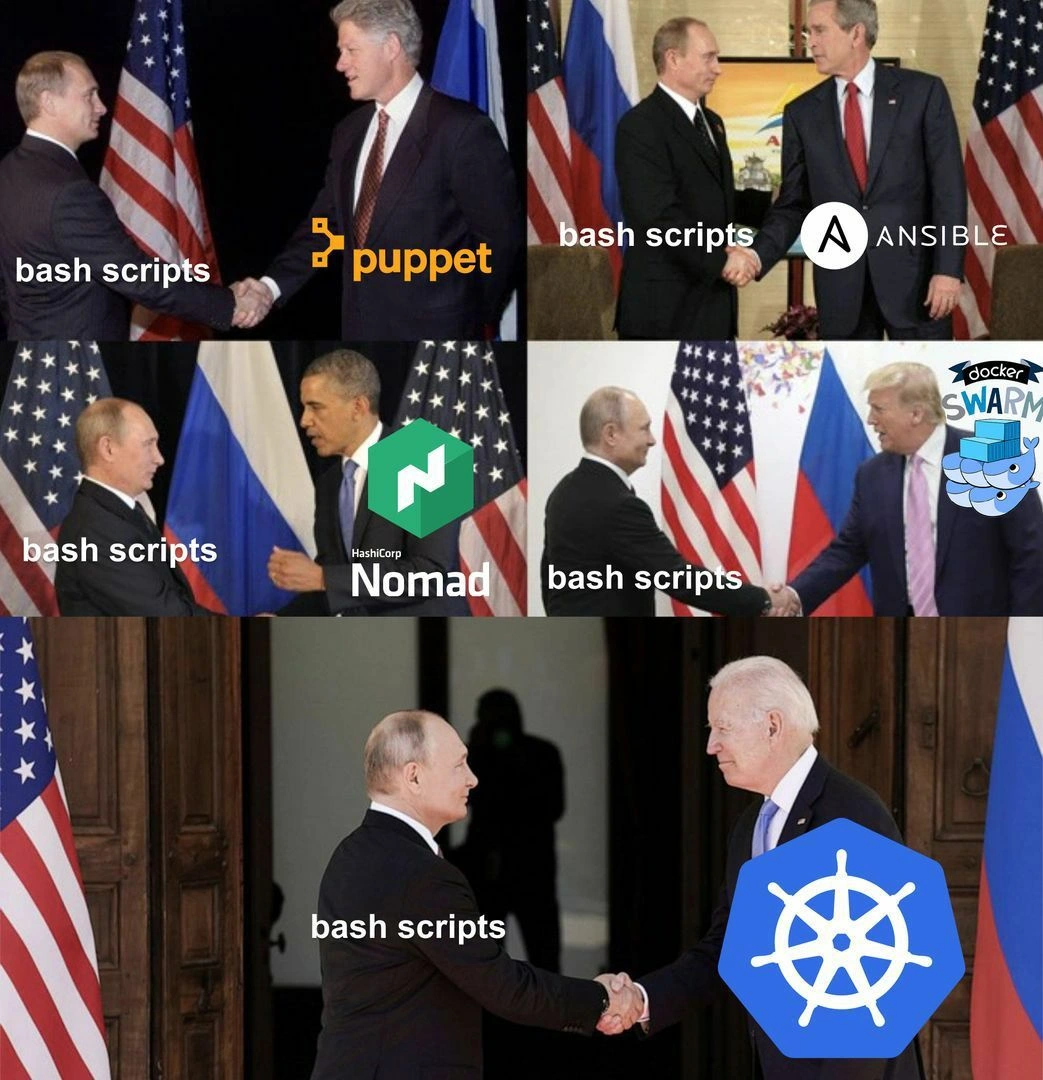
For seasoned DevOps engineers and SREs, this meme hits like a diplomatic déjà vu. It humorously chronicles the evolution of automation tools by casting Bash scripts as the one constant world power (on the left, a familiar long-serving Russian leader) and each new configuration/orchestration tool as a series of U.S. presidents on the right. The joke? Every new “leader” in infrastructure automation inevitably ends up cooperating with Bash, the old guard. In other words: fancy new DevOps tools come and go, but bash scripts are forever.

Look at each handshake in the image:

  • Puppet (captioned under Bill Clinton’s era) was one of the early big configuration management tools (circa mid-2000s). It promised to replace ad-hoc scripts with structured manifests and a declarative model of system state. Yet, anyone who maintained Puppet in depth knows that complex real-world setups often required Puppet’s exec resource or external Puppet manifests that simply call out to shell scripts. (It was common to see a Puppet manifest ensure a package is installed, then use an exec to run a custom script for a niche fix). Puppet’s DSL was powerful but limited enough that writing a quick Bash chunk was sometimes the easiest solution. In the meme’s “diplomacy” terms, Puppet had to shake Bash’s hand to get certain jobs done.

    # Puppet manifest example: calling an external shell script via an exec
    exec { 'custom_fix':
      command => '/usr/local/bin/fix_edge_case.sh',
      unless  => 'grep -q DONE /var/run/edge_case_status',
    }
    

    Above: Even in Puppet, an exec is basically “let Bash handle this part.” The unless ensures idempotence (only run the script if a certain condition is true), but the heavy lifting is deferred to a shell command.

  • Ansible (on the next panel, George W. Bush handshake) came along in the early 2010s boasting agentless, human-readable automation with YAML playbooks. It was simpler than Puppet: no agents, just SSH into machines and run tasks. But what are those tasks often doing under the hood? Running shell commands. Ansible has modules for common actions (like installing packages or updating configs), but the moment you hit something not pre-packaged (or you need logic that doesn’t fit cleanly), you drop down to a shell or command task. Many of us have written Ansible playbooks where half the tasks are essentially “run this Bash command to do X” because it was faster than wrestling with a new module. We joke that Ansible is basically a YAML wrapper around SSH and Bash. You’re still writing the same commands, just indented under some YAML keys 😆. The meme captures this by showing Ansible’s logo shaking hands with Bash scripts — yes, even mighty Ansible makes peace with the old shell. For example:

    - name: Do custom cleanup not covered by modules
      shell: /opt/scripts/cleanup.sh {{ inventory_hostname }}
      register: cleanup_result
    

    Above: In Ansible, a shell task simply executes that script on the remote host. It’s literally Ansible saying, “I’ll log in and let Bash take it from here.”

  • HashiCorp Nomad (Barack Obama panel) enters as a newer player (mid-2010s) in cluster orchestration. It’s like a lightweight alternative to Kubernetes, capable of orchestrating containers, VMs, or just raw binaries. Nomad’s configuration is declarative too (job files defining tasks and constraints). But even Nomad doesn’t reinvent the wheel entirely – when a job runs, if it’s an exec task, it’s essentially launching a process via the OS. Need to do something custom on node startup or allocate some system resource that Nomad doesn’t handle out-of-the-box? You’ll be writing a hook script or bundling a Bash step in your container. Nomad jobs can specify prestart or poststart tasks, which are often just scripts to prepare the environment. Again, the handshake: Nomad coordinates, but Bash actually performs the nitty-gritty tune-ups. The meme implying Putin/Obama handshake says: even a “Yes We Can” era orchestrator like Nomad has to ally with bash scripts to fully get things done.

  • Docker Swarm (Donald Trump panel) represents Docker’s attempt at clustering (around 2016). Swarm made it easy to run Docker containers on multiple machines with simple commands, aiming to abstract away the need for manual scripts that start containers on each host. Yet, in practice, many teams using Docker in the early days still relied on homemade Bash deployment scripts. Before Swarm, a “poor man’s orchestrator” was literally a shell script with a list of servers and a loop calling docker run via SSH. Swarm automated a lot of that, but if you needed an action like seeding a database or doing a health check across the cluster, you might still end up scripting it. Additionally, interacting with Swarm (or any Docker setup) often meant running the docker CLI – again, usually via a script in a CI pipeline or admin workstation. The Docker Swarm handshake with Bash in the meme is a nod to the reality that even with “swarm mode,” ops people were writing scripts to manage configs, coordinate deployments, or recover from issues. It’s like Swarm tried to build a beautiful wall 😜 between humans and manual ops, but we tunneled through with Bash scripts whenever we needed flexibility.

  • Kubernetes (big bottom panel, Joe Biden meeting Putin) is the current superstar of container orchestration (especially around the meme’s 2021 date). Kubernetes is incredibly complex under the hood – it’s essentially a distributed operating system for containers. It handles scheduling, self-healing, service discovery, scaling, and more, with a declarative paradigm (you declare a desired state in YAML and it has controllers to make reality match it). One might think in a Kubernetes world, the era of custom scripts is over – after all, Kubernetes automates so much! Yet, here we see K8s shaking hands with Bash, which is hilariously accurate. Why? Because real clusters often need glue logic and lifecycle hooks that Kubernetes doesn’t inherently know about. Common examples: you use an init container that runs a Bash script to set up an environment before the main app container starts, or you mount a ConfigMap containing a script that containers execute for custom startup logic. Many Kubernetes deployment pipelines rely on kubectl or Helm commands invoked by Bash scripts in CI/CD systems. (Think of a deploy.sh script that calls a series of kubectl apply commands for manifests, because wrapping those in a nicer tool ended up being overkill or too inflexible.) Even editing a live cluster often boils down to someone running a one-liner kubectl command in their shell to patch a resource. In essence, Kubernetes provides an uber-powerful orchestration platform, but we still frequently interface with it through shell scripts and command-line tools. The Biden-Putin handshake being the largest panel signifies that even at the pinnacle of today’s DevOps tech (Kubernetes), Bash remains a key partner. It’s a bit like saying: “Meet the new boss, same as the old boss’s trusted advisor.” Kubernetes didn’t manage to retire Bash; it just works alongside it.

The collective message to experienced folks is dripping with been-there-done-that irony. We’ve witnessed waves of tools each claiming to abstract away the pain of shell scripting and “snowflake” one-off solutions. Infrastructure as Code! Immutable servers! GitOps! Each innovation implies we’ll finally have everything defined in pure code or config, with no hacky scripts lurking about. But inevitably, edge cases and practical realities force us to write or maintain Bash scripts somewhere in the process. It might be to bootstrap the tool itself, to handle an unsupported scenario, or simply to glue multiple systems together. For many of us, it’s almost a running joke: “Automate all the things!” we say, brandishing the latest tool, but a few months in we’re debugging a 500-line deploy.sh that the system now depends on.

The meme’s humor is amplified by the political handshake metaphor. The left side figure (with the “bash scripts” label) is the same in every frame – that’s clearly Vladimir Putin, who has been the constant Russian leader across multiple US presidencies. On the right side, each image shows a different U.S. President (Clinton, Bush, Obama, Trump, and Biden), each labeled with a different tool’s logo (Puppet, Ansible, Nomad, Docker Swarm, Kubernetes respectively). Savvy viewers recognize Putin as the ever-present power, and the US presidents as transitory. This perfectly maps to Bash being a perennial force in DevOps, while tools come and go with each era. It’s a clever use of historical imagery to convey tech history: Bash (created in 1989, descended from the 1970s Unix shell) has “shaken hands” with every generation of automation tech. There’s also an implicit chuckle at how each new “president” (tool) likely campaigned on change (“no more messy scripts, we’ll do it better!”) only to end up working hand-in-hand with the old regime (shell scripts) once in power.

For those of us who have been on 3 AM on-call rotations, the meme is painfully true and funny. We recall how the Automation category’s noble ideals often meet gritty reality:

  • That time a Puppet deploy broke, and the fastest fix was to SCP a quick patch script across servers.
  • Or when an Ansible playbook wasn’t idempotent in a weird scenario, causing us to write a bash snippet to clean up before re-running it.
  • Or deploying a Docker Swarm stack only to realize we needed a script to verify each container’s health and rebalance things.
  • Or carefully crafting Kubernetes YAMLs, yet still needing a rollout-monitor.sh because the built-in rollout status wasn’t quite what we needed for alerts.

It’s almost a rite of passage in DevOps/SRE: no matter how shiny the tool, you eventually open a terminal and write a one-off command or script to solve a problem the tool didn’t anticipate. The meme garners knowing nods and chuckles because it visualizes that shared experience. It’s the DevOps Cold War détente – after all the ideological talk of “no more custom scripts,” we acknowledge Bash as a partner rather than the enemy. In practice, Bash scripting is the glue that fills the gaps between heterogeneous systems. Each new orchestrator usually provides hooks or escape hatches for custom scripting precisely because its creators know no tool can cover every scenario.

There’s also a meta-message: Legacy automation scripts have incredible staying power. Sometimes entire companies have a few ancient .sh files in a corner that are critical to the infrastructure (“if it ain’t broke, don’t rewrite it”). These might be remnants from pre-Puppet times, yet they continue to be invoked by newer pipelines. For instance, you might find a modern Terraform or Kubernetes-based deployment pipeline that still calls a 8-year-old configure_network.sh script because it does some magic no one fully replaced. Bash is like the career bureaucrat that remains in the org while flashy CEOs (tools) are hired and fired above them.

In summary, the meme’s comedic impact on experienced developers comes from the recognition of this pattern: every time we adopt “the next big thing” in infrastructure automation, we soon discover we still need Bash scripts to actually get things done. It’s both humbling and hilarious. Humbling because it reminds us not to get too smug about new tech (there’s always a place for the old shell), and hilarious because we’ve seen the cycle repeat so often that Bash feels like that old friend who we pretend we’ve moved on from, but keep calling for help. The handshake imagery with world leaders gives it an extra punch of absurd gravitas – as if saying “Bash scripts are the real power behind the throne of DevOps.” The DevOps humor here is equal parts affectionate and sardonic: we love our automation tools, but oh boy, do we know that when all else fails, bash saves the day.

Level 4: The Turing-Complete Diplomat

At the most theoretical level, this meme highlights a fundamental truth of computing: no matter how specialized or advanced an automation tool is, it ultimately must interface with the underlying system’s primitive operations. In Unix-like systems, those primitives are often exposed through the shell (namely, bash). Bash is a Turing-complete scripting language – you can implement any computable logic with it – making it the universal translator between high-level orchestration intent and low-level execution. Each new orchestration framework (Puppet, Ansible, Nomad, Docker Swarm, Kubernetes, etc.) introduces its own domain-specific language or model for describing automation. These DSLs are intentionally constrained for reliability (e.g. ensuring idempotence or declarative state), but that very constraint means they aren’t as freely expressive as a general-purpose language. From a computer science perspective, it’s a classic trade-off between specificity and universality. The meme jokes that under the hood, all these sophisticated systems eventually invoke shell commands – essentially “shaking hands” with Bash – to get the real work done.

In distributed systems theory, this is analogous to how high-level consensus or scheduling algorithms still rely on low-level primitives. For example, Kubernetes uses complex controllers and the Raft consensus algorithm via etcd to maintain cluster state across nodes (ensuring all servers agree on what pods should run where). That’s cutting-edge distributed computing! Yet when it comes time to actually start a container or configure a setting inside it, the Kubernetes agent ultimately executes OS-level commands (often by calling out to container runtimes or the kernel) – the moral equivalent of running a Bash command. The CAP theorem or Paxos won’t save you if your app needs a custom file tweak during deployment; you’ll probably resort to a script. The meme’s humor is rooted in this contrast: even with rigorous algorithms and orchestrators making decisions, the final implementation step frequently involves a humble Bash script to actually enact those decisions on a machine.

This pattern is also backed by theoretical limits of automation languages. Many infrastructure-as-code tools use declarative models (describe what state you want, not how to achieve it). They internally solve a convergence problem – often building a dependency graph of tasks or using a reconciliation loop to reach the desired state. Tools like Puppet compile manifests into a directed acyclic graph and sequence resource changes; Nomad and Docker Swarm solve scheduling as a bin-packing optimization problem for containers. These are non-trivial computational problems, sometimes NP-hard in theory, which the orchestrators approximate with clever algorithms. But after all the planning, a unit of work still boils down to “run this command” or “change this file” on a server. In theoretical computer science terms, the orchestrators must reduce high-level descriptions to primitive actions – and Bash scripting is the venerable medium for those actions. It’s as if Bash is the diplomatic protocol that every higher-level nation-state (each fancy automation system) inevitably speaks when it’s time to actually do something. The meme’s “handshake” imagery captures this idea of a negotiated interface: /bin/bash is the meeting ground where lofty configuration models reconcile with gritty OS reality. No matter how elegant your model or how exhaustive your configuration grammar, there will always be some corner case or integration point that requires writing a quick script. It’s practically a law of nature in computing (perhaps we could tongue-in-cheek call it the Conservation of Shell Scripts principle). In summary, from a deep technical standpoint, the joke underscores that even the most advanced orchestration paradigms ultimately rely on the generic, Turing-complete substrate of shell scripting to accomplish tasks that their specialized formalisms cannot fully encapsulate.

Description

A five-panel meme format showing Russian President Vladimir Putin shaking hands with five different U.S. Presidents over the years. In every panel, Putin is labeled "bash scripts". The U.S. Presidents are labeled sequentially with logos of popular infrastructure and orchestration tools: Bill Clinton with "Puppet", George W. Bush with "Ansible", Barack Obama with "HashiCorp Nomad", Donald Trump with "Docker SWARM", and Joe Biden with "Kubernetes". The visual metaphor humorously asserts that while shiny, complex DevOps tools and platforms constantly change and replace one another, the humble and resilient bash script remains an enduring, unkillable constant in system administration and automation. It's a cynical but relatable take for senior engineers who have seen many tech trends come and go, yet still find themselves relying on simple scripts to get the job done

Comments

27
Anonymous ★ Top Pick The C-suite sees a roadmap of sophisticated orchestration tools. The SRE team sees a series of fragile abstractions built on top of the same immortal, undocumented bash script
  1. Anonymous ★ Top Pick

    The C-suite sees a roadmap of sophisticated orchestration tools. The SRE team sees a series of fragile abstractions built on top of the same immortal, undocumented bash script

  2. Anonymous

    Fifteen years of “idempotent, declarative orchestration,” and the peace treaty still gets signed by deploy.sh - 900 lines no one dares run through shellcheck

  3. Anonymous

    After 20 years in the industry, you realize bash scripts are like that one senior engineer who's outlasted five CTOs, three rewrites, and every 'revolutionary' orchestration platform - they just keep shaking hands with the new hotness while quietly running half your critical infrastructure through a 500-line script nobody dares to touch

  4. Anonymous

    The meme brilliantly captures the infrastructure engineer's eternal truth: no matter how sophisticated your orchestration platform becomes - whether you've graduated from Puppet's declarative manifests to Ansible's playbooks, experimented with Nomad's simplicity, flirted with Docker Swarm, or finally embraced Kubernetes' complexity - you'll still find yourself SSHing into a node at 3 AM to run a bash script because 'it's just faster this way.' The constant handshake partner represents that one senior engineer who's been there since the beginning, still maintaining those critical bash scripts that somehow run the entire production environment, while management keeps adopting the latest orchestration buzzword. It's the infrastructure equivalent of 'we have Kubernetes at home' - and at home, it's a cron job running a shell script

  5. Anonymous

    Fifteen years of orchestration and the only stable API is still: ssh && bash; the rest is YAML and logos

  6. Anonymous

    Architects evangelize Nomad and Helm, but ops knows every job spec hides a bash provisioner

  7. Anonymous

    DevOps maturity model: bash → bash via Puppet → bash via Ansible → bash via Nomad → bash via Swarm → bash orchestrated by 6,000 lines of Kubernetes YAML

  8. @ZgGPuo8dZef58K6hxxGVj3Z2 5y

    Lol is putin forever president?

    1. @firstgambit 5y

      Like a bash, jquery

      1. @ZgGPuo8dZef58K6hxxGVj3Z2 5y

        Oh 😂😂😂😂😂

        1. @firstgambit 5y

          If Putin want be president, we will use native js and Windows cli

          1. @ZgGPuo8dZef58K6hxxGVj3Z2 5y

            Please yes. No more 20% CPU at idle open tabs

            1. @firstgambit 5y

              Welcome to Russian

              1. @ZgGPuo8dZef58K6hxxGVj3Z2 5y

                I need tickets then

                1. @firstgambit 5y

                  One way ticket

                  1. @ZgGPuo8dZef58K6hxxGVj3Z2 5y

                    Yes of course but I think I need multiple

          2. Deleted Account 5y

            There're multiple windows clis and none of them is bash AFAIK (except the wsl one)

    2. @Cachatt 4y

      I hope not 😭

      1. @feskow 4y

        Putin applied for another year ===== YOU ARE HERE ===== Scientists found out way to copy mind into computer Boston Dynamics created full robotic human - android Russians created shit version of proprietary program for android, costed 5% of Russia's budget Putin is the first human to try out android Putin is forever Russia president

  9. @firstgambit 5y

    Where is Jenkins?

  10. Deleted Account 5y

    Wait, where is translation of the reposted channel's name ? I guess admin must warn themselves for this

    1. @sylfn 5y

      I think it isnt needed, as it isn't needed to translate your nicknames

      1. Deleted Account 5y

        I would like to see translations of some russian names like Sergay, Stass, Vladick in nicknames

        1. @sylfn 5y

          your translations look like gachi versions of real translations... what about non-cyrillic scripts (katakana for example)?

          1. Deleted Account 5y

            > your translations look like gachi versions of real translations... That was intended as an easter egg for non-russian commentators. Non-cyrillic scripts should be translated too 'cause there's no exceptions in the rule! /s

  11. @fflops 5y

    yeee nomad ftw

  12. @dugeru42 4y

    *sounds of sad laughter in russian *

Use J and K for navigation