Scumbag Bank's Two-Factor Authentication: Strong Rules, No Hashing
Why is this Security meme funny?
Level 1: Fancy Lock, Key Under Mat
Imagine you have a very special box where you keep your favorite toys or most valuable Pokémon cards. Now, let’s say your parent (or teacher) tells you: “Put an extremely strong lock on that box. Make the combination something no one can guess – use numbers, symbols, whatever – and change that combination every few months just to be extra safe.” That sounds like solid advice to keep your stuff safe, right? You struggle a bit, but you create a really tricky combination for your lock, something like 9-4-7-*-# that nobody would easily figure out.
But then you find out that the same parent or teacher who insisted on that super lock... wrote down your secret combination and left it taped to the box for anyone to see! 😲 All the effort you put into that fancy lock is wasted, because if a sneaky person walks by, they can just read the combination from the paper and open the box. In other words, your box might as well not have a lock at all at that point.
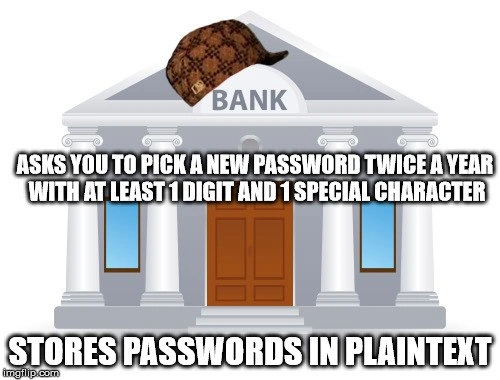
That’s exactly why this meme is funny (and a bit scary): the bank is acting like that parent or teacher. They made you come up with a hard-to-guess password (the super strong lock) and even make you change it regularly so it stays secret. But then the bank went and kept the password in plain sight on their side (like leaving the key under the welcome mat). So any bad guy who sneaks in can grab it. It’s a silly, frustrating situation – kind of like locking your door with a complex code but then hanging the code on the doorknob. Even a kid can see that that makes no sense! The meme jokes about this crazy contradiction, and that’s why we shake our heads and laugh at it: the bank dressed up like it was super serious about safety, but in reality, it wasn’t keeping our secrets safe at all.
Level 2: Strong Password, Weak Storage
Let’s break down what’s happening in this meme in simpler, concrete terms. The bank is telling you, the user, to create a strong password and to change it regularly. "At least 1 digit and 1 special character" means your password can’t be something simple like "password" or "letmein" – it needs to have a mix of letters, numbers, and symbols (for example, P@ssw0rd! has a capital P, some letters, a number 0 instead of 'o', and an exclamation mark). And doing this twice a year means every 6 months you have to come up with a new password that meets those criteria. This policy is annoying but is supposed to make your account harder for bad guys to break into. It's a common corporate authentication rule: many workplaces or banks enforce these password complexity rules and expiration periods. They want to prevent weak passwords and limit how long a password can be abused if it somehow leaked. So far, so good in theory.
Now, the bottom text: "STORES PASSWORDS IN PLAINTEXT." This is where everything falls apart. Plaintext means the password is stored exactly as you created it, with no protection – just plain text characters in a file or database. Think of it like this: if your password is P@ssw0rd!23, somewhere in the bank’s system there is literally a record that says User: Alice, Password: P@ssw0rd!23. That is extremely dangerous! Why? Because if anyone ever gets access to that user database (a hacker, a rogue employee, an IT person who’s careless, etc.), they can see everyone’s actual passwords. It’s equivalent to the bank writing down your secret code in a big book and not even locking the book – anyone who opens it can read everything. And remember, people often reuse passwords across sites. If your bank password is the same or similar as your email password and it’s stored in plaintext, a single breach means the attacker now knows your bank login and possibly can get into your email or Facebook or anywhere else you reused that password. This type of SensitiveDataExposure is one of the worst security failures an organization can have regarding user credentials.
In modern web development and IT, the correct way to store passwords is to never actually keep the raw password at all. Instead, you store a hash of the password. A hash is basically the result of a one-way scrambling function. For example, your password might go through a hash function and turn into something like 5d41402abc4b2a76b9719d911017c592 (that’s actually the MD5 hash of "hello"). That looks like gibberish, right? That’s the point. You can compare hashes to check passwords without knowing the password itself. Here’s how it works in practice: when you first create your password, the system computes the hash and stores that. Later, when you log in, you type your password again, the system hashes the input you gave, and checks "does this hash match the hash we have on file for this user?" If yes, you are allowed in. If a hacker steals the hash, all they have is that gibberish string, which is not easily reversible – they can’t directly get "hello" back from 5d41402abc4b2a76b9719d911017c592 without a lot of computation and guesswork. And if the system is well-designed, it adds a unique salt (a random extra ingredient) to each password before hashing, which means even two users with the same password end up with totally different hash results. This all makes a hacker’s job much harder. Importantly, it means even the company (in this case, the bank) doesn’t actually know your password – they only store the scrambled version. That’s good, because it means they can't inadvertently reveal it or misuse it either.
So when the meme says the bank stores passwords in plaintext, it’s highlighting that the bank ignored this very standard procedure. It’s like a giant no-no in the world of SecurityFlaws. Every new developer, in their first web app tutorial, is taught: don’t store passwords as plain text. Use hashing and salting. It's such a well-known rule that discovering a real company violating it is shocking. And yet, there have been real cases. If you’ve ever used a website that, when you click "Forgot password," it emails you your actual password instead of a reset link, big red flag: that means they kept your password around in a readable form. It still happens in some poorly-made systems. For a bank, doing this would be an outrageous example of security misconfiguration or a really outdated system.
Let’s put it in perspective with a simple comparison of how data might be stored:
| User | Secure Storage (hashed) | Insecure Storage (plaintext) |
|---|---|---|
| Alice | 5f9c2dfbd1... (hash) |
SuperSecret!9 (actual password) |
| Bob | 7c6a180b368... (hash) |
Password123! (actual password) |
In the left column, even if someone gains access, they see only scrambled hashes. They can’t tell what Alice’s or Bob’s real passwords are at a glance. In the right column, if that database leaks, an attacker immediately knows Bob’s password is "Password123!" (which, by the way, meets the complexity rule with a number and a symbol but is still pretty guessable!). They also know Alice’s password is "SuperSecret!9" immediately. That’s game over for security.
Now think about the effort the bank demands from users: making a complex password and changing it every 6 months. That is a non-trivial burden. Many users struggle to remember such passwords, often resorting to writing them down somewhere or reusing a base password with slight modifications. So users are doing their part (albeit grudgingly) to comply with the bank’s security policy. But the bank isn’t doing its part by safely storing those passwords. It’s very much a one-sided effort. The phrase SecurityVsUsability comes to mind – usually there’s a trade-off between security measures and user convenience. Here the users are paying the price in inconvenience, yet not even getting the security benefit they deserve, because the bank’s poor implementation undermines it.
For a newer developer or someone early in their IT career, a meme like this is a lesson: don’t let this happen in your projects. If your boss or client asks you to implement password storage, never store the raw password. Use established libraries or algorithms to hash them. And if you encounter a legacy system that’s storing passwords in plaintext, you should raise the alarm and push to fix it, because it’s a ticking time bomb. The humor of the meme is also a bit of a coping mechanism – developers joke about this stuff because it’s frustratingly common to see theoretically secure institutions do incredibly insecure things. The bank_security_fail depicted is an exaggerated example to make a point: policies on paper mean nothing if you don’t follow through in code. In other words, the bank making you create a complex password and change it often is half of a good security practice, but the missing other half (proper storage) completely negates it.
Finally, let’s decode the visual: the image shows a bank building (to represent, well, a bank) with a Scumbag Steve hat photoshopped on top. The Scumbag Steve hat is a classic meme symbol of douchebaggery or hypocrisy – if something is wearing that hat in a meme, it means that entity is about to do something scummy or two-faced. In text-based memes, it’s used like: “Scumbag X: does something seemingly helpful; also X: does the undermining thing.” So here, the bank is the scumbag entity. It does the first thing (asks for new complex passwords twice a year) which seems like it cares about security, but then it also does the second thing (stores them in plaintext) which completely betrays that pretense. So even if you’re not an expert in security, you can understand the irony: it’s like a betrayal of trust. The bank says "We care about your security, use a strong password!" and at the same time it’s doing something incredibly insecure behind your back. A junior dev or someone not deeply familiar with security might still get that this is backwards. And through this meme, they also learn an important security concept: hashing_vs_plaintext storage, and why one is right and the other is very, very wrong.
Level 3: All Policy, No Protection
The meme’s punchline hits home for experienced developers and security professionals because it highlights a password policy paradox we've seen too often in large organizations. On the surface, the bank is very stern and by-the-book: "Choose a new password twice a year, include at least one number and one special symbol." This is the kind of strict policy that frustrates employees and customers alike – we’ve all had to come up with P@ssw0rd!-style creations or change a password just when we finally memorized it. Such rules are usually justified as good security. They imply the institution is serious about protecting accounts. But then comes the kicker: the same institution isn’t even doing the bare minimum to protect those precious passwords internally. The bank is essentially making a show of security – security theater at its finest. It’s a scenario dripping with irony and hypocrisy: all those elaborate password rules are just for show if the backend is a sieve. Compliance_theater is exactly that: policies that satisfy audits or give a semblance of safety, without actual substance behind them.
Seasoned engineers recognize this pattern from real life. Maybe you’ve encountered an application that enforces 12-character passwords with uppercase, lowercase, digits, and hieroglyphics… yet one day you discover a configuration file or database table with passwords in plaintext or a reversible format. Cue the facepalm. It’s an all-too-real SecurityFlaw pattern: the organization fixates on user behavior (because it's easy to lecture users) but fails at organizational security hygiene. The lax security attitudes on the inside negate whatever strictness they imposed on users. In enterprise settings—banks, insurance companies, big corporates—this often happens due to legacy systems or siloed teams. For example, an old core banking system from the 1970s might not have been designed to hash passwords (maybe it assumes it needs the plaintext for some antiquated integration), and over decades nobody updated this component. Meanwhile, a compliance officer or IT policy group keeps adding requirements like periodic rotations and complexity because "that’s what our policy says since 1995," or because regulators demand it. The developers implementing the website or login portal are forced to add these annoying checks. But perhaps those developers also assume that "surely, downstream, this gets hashed in the database." If that assumption is wrong, you end up with exactly this: a disconnect where security vs usability is completely out of whack and security best practices are ignored.
Let’s talk about why this situation is so jarring (and funny) to insiders. For one, storing passwords in plaintext is universally considered a cardinal sin among developers. It’s one of those things that junior devs get taught to avoid from day one. It's part of basic SecurityBestPractices and any modern framework or authentication library you use will hash passwords by default. So finding out a big bank is doing it wrong triggers equal parts incredulity and exasperation. It’s like hearing that a hospital, after insisting all doctors wash their hands religiously, is reusing dirty bandages behind the scenes. Veteran developers have been burned by or at least witnessed the fallout of such mistakes. Many of us have gotten those emails: "Our database was compromised, please change your password immediately on our site and anywhere else you used it." Often, that subtext means they had your password stored in a form that the attackers could use. If it were properly hashed, the company would likely phrase it differently and you'd have a bit more time to react (since the attackers would still need to crack the hashes). We share a collective eye-roll for organizations that demand difficult-to-remember credentials from us but can’t be bothered to secure those credentials on their end. The meme nails this shared frustration humorously by crowning the bank building with the infamous Scumbag Steve hat – an iconic meme symbol for someone who says one thing and does another (being a total scumbag about it). The top text and bottom text format (“does X; meanwhile does the contradictory Y”) is classic for calling out hypocrisy. Here, the bank is the scumbag: it asks you to jump through hoops for security, then cuts corners itself.
From a senior perspective, there's also an element of dark comedy in how backward this scenario is. Banks are supposed to be paragons of security diligence – they handle money, after all. They often have entire departments dedicated to cybersecurity, compliance, risk management, audits, you name it. So when we see a bank enforcing something as pedantic as twice-yearly password rotations (which even security experts now argue has diminishing returns), but failing at something as fundamental as not storing passwords as plain text, it hints at systematic failure. Likely multiple people dropped the ball: the developers who wrote the storage logic, the security team that didn’t catch it in code reviews or audits, and management that perhaps invested in glossy external security policies but neglected internal training or code quality. Why do smart people keep making this mistake? Because often the incentives and knowledge distribution are skewed. The person writing the password policy might not be the person implementing the database storage. If the policy enforcer is non-technical (e.g., an auditor or manager who just follows a checklist: "force password change every 180 days - check!"), they might assume the technical basics are covered. Meanwhile, the development team might be under pressure to ship features quickly, and someone decides "eh, storing as plain text is simpler, we'll secure the database itself, it's fine" – a grievous misunderstanding of risk. Or perhaps the system is so old and crusty that hashing would require a major refactor that nobody has budget or courage to tackle, so they put a band-aid by adding more user rules to compensate (though it's a false compensation).
This leads to another point: usability and false sense of security. Forcing complex passwords and frequent changes can actually backfire. Users fed up with constant resets often resort to predictable tricks: incrementing a number at the end of their password each time or writing the password on a sticky note (the very thing you don’t want). They might use the same base password with slight tweaks to meet the rules. Attackers know this; if they somehow got hold of an old password (from another breach or whatever), and the policy is a change every 6 months, they might guess the new one follows a pattern. The bank's policy potentially creates WeakPasswords in practice (despite the intent to make them strong), while the bank's poor storage creates a single point of failure that nullifies even truly strong passwords. It's a lose-lose for the user: they suffer the inconvenience for little to no actual security gain. Essentially, the password_policy_irony here is that the user is inconvenienced under the banner of "security" while the organization’s negligence puts them at even greater risk.
For senior folks, there’s also a grim chuckle about “we did it because compliance said so.” Banks and other regulated industries often have to tick certain boxes (e.g., PCI-DSS, SOX, internal policies) that might include outdated notions like regular password rotation or composition rules. Historically, regulators believed these practices mitigated damage if credentials were stolen. But storing passwords in plaintext would itself be a gross violation of most compliance regimes! So this hypothetical bank is failing compliance in a much more serious way while likely over-focusing on another. It’s comedic in a tragic way: they’re zealously enforcing a minor security measure and utterly ignoring a major one. This is reminiscent of many real-world breaches and reports where after the fact, we learn that an organization had fancy security policies and maybe expensive security software, yet the root cause of the breach was something basic like default credentials, an unpatched server, or yes, plaintext passwords left in a database. One part of the company was busy with SecurityVsUsability tug-of-war, while another part left the back door wide open.
In sum, the humor resonates because it’s painfully true in the industry. The meme format exaggerates it as a caricature (the bank literally wearing the jerk hat of hypocrisy), but it strikes a chord because so many of us have dealt with this exact kind of nonsense. It’s the software/security equivalent of a restaurant that makes you wear a hairnet and gloves (strict rules) but then stores all the food on the floor in the back room (no basic hygiene). We laugh, then we sigh, because we know that behind this joke are countless infosec incidents and war stories. It's a pointed reminder: a fortress with an open gate is no fortress at all, no matter how tall you build the walls. Or in the meme’s terms, the bank’s password policy is the tall wall, and its plaintext storage is the open gate.
Level 4: One-Way vs Wrong Way
At the deepest technical level, this meme underscores a blatant violation of basic cryptographic principles. A bank that enforces complex password rules should be the first to apply proper encryption or hashing to those passwords, yet here it’s doing the opposite – storing them in plaintext. In security architecture, passwords are never supposed to be kept as-is; instead, they're transformed via a one-way hash function. A one-way hash (like SHA-256 or bcrypt) is a mathematical algorithm that converts your password into a seemingly random string of bits (a digest) that cannot feasibly be reversed. This is crucial: even if an attacker steals the database, they shouldn't be able to recover the original passwords easily. By saving passwords in plaintext, the bank effectively nullifies decades of advancements in cryptographic safety. It's as if they took the one-way street of secure storage and turned it into a two-way highway for hackers – the wrong way entirely.
To appreciate the severity: a strong hashing scheme means even the bank itself doesn't know your actual password, only the hash. When you log in, your input is hashed again and compared to the stored hash. Without the correct password, reproducing that exact hash is astronomically difficult thanks to properties like the avalanche effect (tiny input changes yield vastly different hashes) and computational complexity. Proper implementations also add a salt – a unique random value per user – before hashing, to thwart rainbow table attacks (precomputed lookup tables for cracking hashes). All these practices are baseline SecurityBestPractices. Storing passwords in plaintext throws them all out the window: if anyone gains unauthorized access to the user database (through a SQL injection, an internal leak, etc.), every password is immediately compromised. No need for brute force or crypto-analysis – the keys to the kingdom are just sitting there in plain English. In terms of time complexity, secure hashing intentionally makes verifying a guess slower (e.g., using algorithms like PBKDF2, bcrypt which are O(n) or more per guess) to deter mass guessing. But with plaintext, verifying a guess is O(1) – trivial, since the guess is the password. In fact, no guesses are needed at all; the attacker can log in as each user straight away.
It's a startling case of SensitiveDataExposure and security misconfiguration. Modern security frameworks and guidelines (like OWASP Top 10) explicitly warn against storing sensitive credentials in cleartext. The mathematics of modern cryptography give us tools (hashes, MACs, encryption) to protect stored secrets, and ignoring those tools is not just lazy – it's dangerous. Fundamentally, this contradiction points to a breakdown in the bank’s understanding of authentication design. The whole raison d'être of forcing a password with "at least 1 digit and 1 special character" is to increase entropy (randomness) and reduce the chance of somebody guessing or brute-forcing it. Yet if the stored password isn't hashed, that entropy is wasted: an attacker doesn't need to guess the password by brute force; they can just read it directly from the database. It's the ultimate irony: they’ve required a complex key, then left that key under the doormat.
This scenario also hints at the broader concept of security vs. compliance. Why would a bank get something so fundamental so wrong? Often, it’s because of compliance theater: adhering to visible rules and checkboxes (like mandatory password rotations and complexity requirements that auditors can see) while neglecting deeper, invisible safeguards (like secure storage) that truly matter. Cryptographically speaking, the bank is satisfying the letter of some outdated policy (forcing users to frequently update passwords under the guise of better security), but completely violating the spirit and science of data protection. It’s a perfect storm of misguided security priorities. The underlying cryptographic truth is simple: hashing_vs_plaintext is the difference between a password system that can withstand breaches and one that crumples instantly. By choosing plaintext, this bank essentially invites any breach to become a full-blown disaster. There's a famous principle in security engineering: don't roll your own crypto and don't treat user credentials carelessly. This situation is a textbook example of the latter – so egregious that it borders on absurd from a theoretical security standpoint. The humor here springs from that absurdity: it’s like hearing a smokehouse brag about their complex locks while the back door is a flimsy curtain. For any security engineer or seasoned developer, the lack of hashing or encryption is not just a flaw, it's almost an offensive negligence – the gap between what should be (one-way cryptographic safety) and what is (plaintext catastrophe) couldn't be wider.
Description
A meme using the 'Scumbag Steve' format, but replacing the person with a classical-style bank building. The building, featuring columns and a pediment with the word 'BANK', is wearing the iconic brown checkered scumbag hat tilted on its roof. The image has two captions in bold white text with a black outline. The top text reads: 'ASKS YOU TO PICK A NEW PASSWORD TWICE A YEAR WITH AT LEAST 1 DIGIT AND 1 SPECIAL CHARACTER'. The bottom text reads: 'STORES PASSWORDS IN PLAINTEXT'. The meme satirizes the hypocrisy of institutions that enforce strict, often inconvenient, user-facing security policies while neglecting fundamental backend security practices. For developers, the joke is painfully familiar: witnessing security theater that burdens users but fails to implement basic measures like salting and hashing passwords, leaving them vulnerable in a data breach
Comments
10Comment deleted
Their password policy is just security theater. The frontend demands a password worthy of Fort Knox, while the backend stores it in a .txt file named 'DefinitelyNotPasswords.txt'
Six hours arguing over NIST 800-63 password entropy, zero minutes to notice the dev wrote `logger.info("user={} pass={}")` - but hey, it’s “inside the firewall.”
The real vulnerability isn't the password complexity requirements - it's the senior architect who insists their 20-year-old custom 'encryption' function that just Base64 encodes passwords is 'military grade' because it survived three acquisitions and two SOC2 audits
Ah yes, the classic enterprise security paradox: mandate password rotation every 90 days with uppercase, lowercase, numbers, special characters, hieroglyphics, and a blood sacrifice - then store it all in a VARCHAR(255) column. Because nothing says 'we take security seriously' quite like enforcing NIST-deprecated policies while violating OWASP Top 10. At least when the inevitable breach happens, the attackers won't have to waste GPU cycles on rainbow tables. It's almost considerate, really - like leaving the vault door open to save them the trouble of cracking it
Enterprise security: biannual rotation and a regex, backed by a VARCHAR(255) password column with no salt or hash
Mandate 12+ chars and 180-day rotation, then store it in users.password VARCHAR(255) - congratulations, you just shipped Security Theater as a Service
Enforcing NIST SP 800-63B minus the hashed storage clause: peak enterprise security theater
Shitty sberbank be like Comment deleted
and a max limit of 8 characters and no you cant copy and paste it from your password manager we disabled that with javascript for security Comment deleted
And we provide our own in app ABC keyboard Comment deleted