Self-Inflicted Source Code Deletion
Why is this Bugs meme funny?
Level 1: The Friendly Fire Lesson
Imagine you spent all week building a beautiful sandcastle. You’re really proud of it – it has towers, windows, and even a little moat. Now, one of the things you learned while building it is how to use a big shovel to knock down sand walls (maybe because you eventually want to clear the sandcastle away). Eager to try this new skill, you decide to test the shovel on your sandcastle right there on the beach. Not on a spare pile of sand, not on a little test wall off to the side – but on the actual sandcastle you just finished. Of course, the shovel works great… and your entire sandcastle is gone in an instant. 😢🏰
This meme is essentially telling that kind of story, but with computer code. The boy in the picture is like the kid who made the sandcastle and then accidentally destroyed it. He wrote a computer program to delete files, and then he ran it in the wrong place and deleted his only copy of the program (and everything else with it). It’s a funny-but-sad story that all the grown-up programmers find relatable. They’re basically shaking their heads and saying, “Oops! We feel your pain, we’ve all broken our own toys before.”
The moral of the story is simple: be careful when you test something destructive. In kid terms: if you invent a powerful eraser, don’t try it on your best drawing first. In grown-up terms: if you write a delete feature, practice on some dummy files and keep a backup of your work. This way, you won’t end up accidentally ruining the very thing you worked so hard to create. The humor makes it easier to remember the lesson – we laugh a bit at the silliness of it, and we learn to double-check before we hit the big red delete button.
Level 2: Self-Deleting Assignment
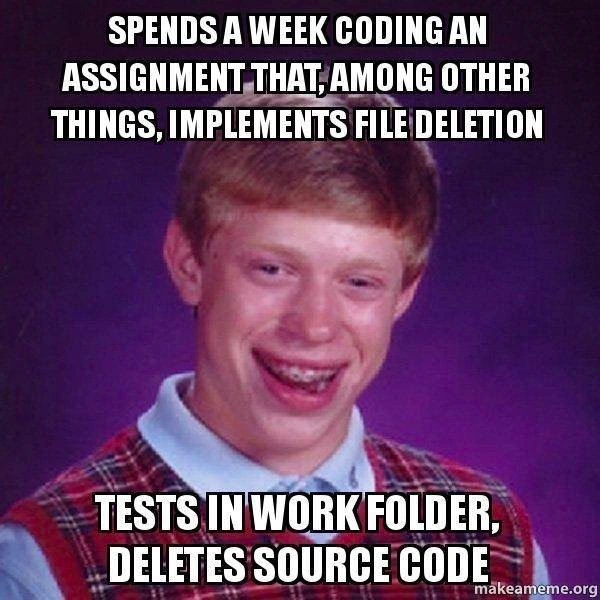
Let’s break down what’s happening in this meme in simpler terms, assuming you’re newer to programming or the situation. The image shows a teenage boy in a yearbook-style photo with a goofy smile and braces, known in meme culture as “Bad Luck Brian” – a character who is famous for having unbelievably unlucky things happen to him. In this meme, he represents a developer who has done something very unfortunate. The text on the image is in big bold white letters (the classic Impact font used for memes) at the top and bottom. It reads:
- Top text: “SPENDS A WEEK CODING AN ASSIGNMENT THAT, AMONG OTHER THINGS, IMPLEMENTS FILE DELETION.”
- Bottom text: “TESTS IN WORK FOLDER, DELETES SOURCE CODE.”
Now, in plain language, this tells a little story: The developer (likely a student doing an assignment) spent an entire week writing code. One of the features of that code is a file deletion function (a part of the program that can delete files from the computer). After working so hard, he decides to test this new deletion feature. But he runs his test in the “work folder”, which is the folder where his project’s only copy of source code is stored (basically, the folder containing all the programs he wrote). The result? The deletion feature works too well: it deletes the source code files themselves – effectively erasing the very program he just wrote.
Think of the source code as the blueprint or recipe of the software – it’s the original code files you write in languages like Python, Java, C++, etc. Losing your source code is disastrous because it means losing the work you’ve done (unless you have a backup). When the meme says the deletion feature “unit-tests itself” on your only copy, it’s using a bit of irony. Normally, a unit test is a controlled way to test a small part of your program to make sure it works correctly, typically using a separate test file or framework. Here, instead of a proper test, the feature basically tested itself by running on the real thing – like testing a fire extinguisher by setting your only house on fire to see if it works. It’s not a recommended testing strategy, to say the least!
Why is this funny (and painful) to developers? Because it highlights a common rookie mistake in software development: not using proper safeguards like version control or backups, and not separating the test environment from the real environment. Let’s decode some terms and context:
- Work folder: This is the directory (folder) on the computer where the developer’s project lives. It contains all his code files. In a proper setup, you might have separate folders for testing or at least sample files to delete. Testing a deletion feature in the same folder where your only copy of the program exists is dangerous – it’s like practicing throwing darts on a board that’s right in front of your glass window.
- File deletion feature: The assignment likely required writing code that can delete files. For example, if it’s a command-line tool or a function, maybe it should delete certain files when called. Writing such code isn’t too hard (most languages have a function to delete files), but doing it safely is tricky. You have to be careful what you delete. The meme implies the code did something like delete everything in the given folder.
- Deletes source code: This is the punchline. It means the program ended up erasing its own source files. If you ran a program that, say, deletes all
.txtfiles in a directory, and you accidentally pointed it at your project folder, it might delete important.javaor.pysource files if your logic is wrong or too broad. In any case, the result is the code you wrote is gone. - No backups / no version control: The scenario specifies it was the “only copy.” This suggests the developer did not use any Version Control system like Git, nor did they copy the files elsewhere. Version control is hugely important in real development; it keeps track of changes and maintains copies of your code history. If our unlucky friend had committed his week’s work to a Git repository (even just a local one), he could likely recover the code easily by checking out the last commit. Similarly, a backup (like copying the folder somewhere else or using a service like Dropbox or Google Drive auto-save) could have saved him. The meme doesn’t explicitly say this, but every developer reading it is thinking, “Ouch, didn’t you even use Git?!” This is why one of the tags is VersionControl – it’s hinting that version control would have prevented this tragedy.
- accidental
rm -rfon src: This tag is tech-speak for what happened. On Unix-like systems,rm -rfis a shell command to force-delete files and directories recursively (meaning it deletes folders and everything in them). “src” is a common name for the source code directory. So “accidental rm -rf on src” literally translates to “accidentally running a delete-all command on the source code folder.” It’s a concise way developers describe this kind of mistake. Even if you don’t use Unix, the concept is universal: one wrong command or buggy script can wipe out your work if you’re not careful. - Debugging Frustration: Normally, when you encounter a bug, you go into debugging mode – trying to figure out why the code didn’t work as expected. Here the frustration is extreme because the bug’s effect is removing the code itself. It’s hard to debug lines of code that have vanished! The only “debugging” you do here is perhaps checking the recycle bin or running file recovery tools, hoping to salvage something. It’s basically the worst-case scenario of a bug.
The meme uses the Bad Luck Brian template to exaggerate the “facepalm” misfortune vibe. It's basically saying: this developer had the worst luck (or judgment) – he effectively shot himself in the foot with his own feature. In software terms, he wrote a bug that didn’t just crash the program, it erased the program. That’s ironically a very effective bug!
For a junior developer or a student, this meme is a cautionary tale. Key takeaways explained simply:
- Always back up your code. Use a version control system like Git (even if working solo) or at least manually copy your work folder before messing with file-deleting code. If something goes wrong, you have a fallback.
- Test in a safe environment. If you write code that deletes files, don’t test it on anything you’re not prepared to lose. Create a separate test directory with some dummy files to see if it works. Think of it like testing a delete button on a fake file, not on your precious real file.
- Be careful with wildcards and paths. Many accidental deletions happen because a program is pointed to the wrong path or a wildcard (
*) matches more than intended. Double-check any code that can destroy data. Perhaps add confirmations or “dry runs” (which show what would be deleted without actually deleting). - Learn from mistakes. The reason experienced devs chuckle is because many have a similar story from early in their career. It might not be as dramatic as deleting their whole project, but maybe deleting a database table or losing a day’s work for not hitting Save. The important thing is that after you do something like this once, you put safeguards in place so it doesn’t happen again. That’s why we joke about it – it’s funny later, and it teaches an unforgettable lesson.
So, in a nutshell, Level 2 has explained that this meme is about a new developer accidentally destroying their own week-long project by testing a file deletion feature in the wrong place. It’s poking fun at the lack of experience and the importance of good practices like version control, backups, and careful testing. The humor comes from the extremity of the mistake and the relatable horror any coder would feel in that moment.
Level 3: rm -rf Regrets
At the highest level, this meme is a painfully real developer horror story wrapped in humor. The top caption sets up a scenario every engineer dreads: after a week of coding, our hapless developer has proudly implemented a file deletion feature as part of an assignment. The bottom caption delivers the gut punch: he tests this deletion code in his actual work folder and it promptly deletes his source code. This is the stuff of Debugging Hell, where a bug in your script doubles as a digital self-destruction sequence. Seasoned engineers instantly recognize the classic rookie mistake: running a dangerous operation (like deleting files) on live data without a safety net. It’s a textbook example of “worked too well in the worst possible way.”
For veteran developers, this image conjures war stories of accidental rm -rf commands pointed at the wrong directory at 3 AM. In Linux/Unix, rm -rf is the nuclear option for deleting files: remove recursively, force—no confirmations, no survivors. One wrong path and you’ve wiped out critical filesystems or your entire project. Here, the code’s file deletion logic gone wrong had a similar effect. The humor has that dark, “we’ve been there” edge: the deletion feature essentially **unit-tested itself **by obliterating the only copy of the code. It’s like a QA test from the Twilight Zone, where the code’s final exam is to see if it can erase its own existence.
Behind the laughs is a hard-earned lesson about Version Control and backup strategy. The meme’s subtext screams: why on earth was there “only copy” of the code? Using any version control system (Git, SVN, etc.) or at least keeping backups would have made this a recoverable oops rather than a total catastrophe. The tags like VersionControlHumor and BackupStrategy point to this underlying message. When the post says "Hope your morning not like this," every experienced dev knows that sinking feeling – realizing your code is gone – and hopes they’ve pushed to a remote repo the night before. We laugh now because it’s Dark Comedy in hindsight, but at the moment it happens, it’s pure panic and despair.
On a deeper level, this scenario touches on why isolated test environments and immutable infrastructure matter. You never want to test dangerous operations like deletion on the only instance of something you care about. In modern practices, we spin up disposable environments to test destructive actions or use flags like --dry-run to simulate them. We also keep infrastructure and code in a state where they can be recreated (immutable, versioned) so that even if one copy is obliterated, it's not game over. This poor developer treating his working directory as a playground violates the cardinal rule: never practice your chainsaw juggling on the only bridge you have.
To illustrate, consider what the deletion feature might have looked like in code form:
import os
def delete_folder_contents(folder_path):
for filename in os.listdir(folder_path):
file_path = os.path.join(folder_path, filename)
os.remove(file_path) # permanently deletes the file at file_path
If our unlucky coder calls delete_folder_contents(".") while inside his project directory, this function will cheerfully iterate through every file in “.” (the current folder) and delete it. That includes source files, images, documentation – everything. The code is bug-free in that it does exactly what it was told to do, but the real bug was in the testing approach and assumptions. There were no safeguards like confirming the target folder, excluding critical files, or at least prompting "Are you sure?" The Debugging_Troubleshooting nightmare here is that after running the test, there’s nothing left to debug! The source vanished, leaving our developer in the lurch.
This meme perfectly captures a junior_dev_mistake: a combination of overconfidence and inexperience. The developer likely thought, “Let’s test the deletion feature real quick” without considering the consequences. It’s an accidental self-inflicted outage on a personal scale. In big corporations, similar mishaps (like a script that wipes a production database or a misconfigured deployment that deletes servers) have caused severe outages. It’s always funny only when it’s someone else’s turn — hence seasoned devs chuckle, having survived their own past blunders by either pure luck or good practices. The inclusion of the “Bad Luck Brian” meme template (the unlucky student with braces) is the perfect embodiment of this scenario: a face that says “I made an honest effort, and it backfired spectacularly.” The juxtaposition of the earnest week-long coding effort with the instant devastation of that effort is comedic gold in programming circles. It satirizes how software bugs can destroy even the work meant to create them.
In summary, Level 3 perspective on this meme dives into the shared trauma and lessons learned. It highlights:
- The importance of Version Control: If he’d used Git or any VCS, deleting the working directory wouldn’t mean losing a week’s work — a
git cloneorcheckoutcould resurrect things. - Testing vs. Production Isolation: Even for a school assignment, treat your source like production data. Test deletion in a dummy folder or provide a safe sandbox. Never test on your only copy (that’s like testing a bomb by detonating it in your own house).
- Bugs and Unintended Consequences: A feature can be 100% functionally correct and still be a disaster if misused. The code did delete files—just not the right ones. This is a logical bug or a testing bug rather than a syntax bug.
- Dark Humor of Dev Life: The meme format uses humor to cope with a truly frustrating event. It’s funny because it’s true — many devs have a cringe-inducing story of the time they accidentally deleted or overwrote something important. And those who don’t... are probably due for one (or lying).
Ultimately, the meme elicits a knowing groan-laugh from seasoned developers. It’s a reminder that experience is the name we give to our mistakes. And nothing imparts experience quite like cleaning up after literally deleting your own project.
Description
This image uses the 'Bad Luck Brian' meme format, which features a cringeworthy yearbook photo of a young man with braces and a plaid sweater vest, set against a purple background. The meme is used to describe unfortunate or embarrassing situations. The text on this meme reads: 'SPENDS A WEEK CODING AN ASSIGNMENT THAT, AMONG OTHER THINGS, IMPLEMENTS FILE DELETION' at the top, and 'TESTS IN WORK FOLDER, DELETES SOURCE CODE' at the bottom. The humor comes from the catastrophic, yet relatable, mistake. The developer created a destructive function and, through carelessness, tested it in their own project directory, wiping out all their work. It's a painful lesson in the importance of sandboxed testing environments, careful path management, and, most critically, consistent use of version control like Git
Comments
7Comment deleted
The fastest way to learn about the importance of version control is to ship a feature that deletes its own source code. It's the ultimate 'move fast and break things' moment, where 'things' is your entire project
Half the battle is writing code; the other half is not letting delete() win
Twenty years in, and I still get PTSD flashbacks when juniors ask why we need separate test data directories. This is why my .gitignore has more entries than our requirements doc
This is why senior engineers have a visceral reaction when they see `rm -rf` in production code - we've all been that developer who learned the hard way that 'testing in prod' includes your local work folder. The real tragedy isn't losing a week of work; it's realizing you could have prevented it with a single `git init` five minutes into the project. At least this developer's file deletion feature worked flawlessly... perhaps too flawlessly
Everyone laughs until the rm -rf "$TARGET"/* integration test runs with TARGET="" - then dry-run-by-default, temp namespaces, and pre-commit greps become company policy
Delete feature works flawlessly the first time you run it from the repo root - proof that dry-run flags, tmp sandboxes, and pre-commit hooks are cheaper than rebuilding unstaged work from editor swap files
When your delete function achieves 100% code coverage - literally