When AWS turns a simple ‘Hello World’ app into a full-blown architecture diagram
Why is this AWS meme funny?
Level 1: Bakery for One Cookie
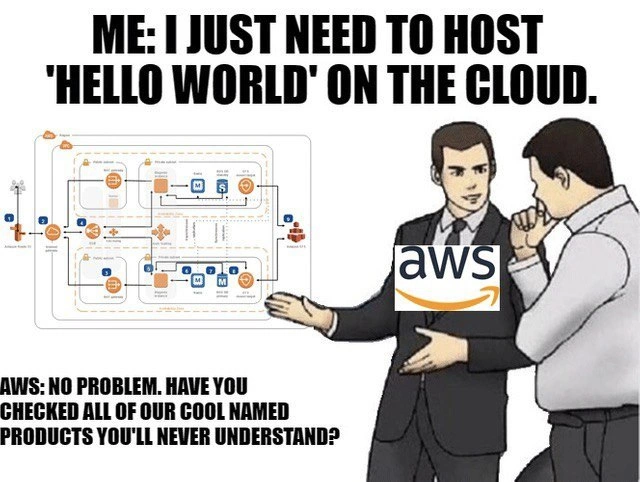
Imagine you ask a friend for a single cookie, and instead they hand you a whole bakery. They say, "Here you go, you now have ovens, mixers, a staff of bakers, and 50 types of dough – have fun!" You’d probably laugh and think, "I just wanted one cookie, not all this!" That’s basically what’s happening in this meme. The developer just wanted to put a tiny "Hello World" message online (a very simple task, like wanting one cookie), and AWS responded by offering an entire complicated setup (like giving a whole bakery). It’s funny because it’s over-the-top. The person in the meme says, "I just need to host 'Hello World'..." and AWS effectively says, "Sure, no problem, here’s EVERYTHING!" We find it humorous how excessive that response is. It’s like using a giant hammer to crack a tiny nut. The emotional core here is the feeling of being overwhelmed and amused at the same time. The developer is overwhelmed by all the stuff AWS is showing off for a simple job, and we’re amused because it’s such an overreaction to a small request. Anyone can get the joke: it’s funny when a simple task gets an unnecessarily complicated solution. The meme is pointing out in a lighthearted way how dealing with AWS (or big systems in general) can sometimes be like that – you ask for something small, and you get a whole lot more than you bargained for, in a comically confusing way.
Level 2: Too Many Pieces
Let’s break down what’s going on in simpler terms. AWS (Amazon Web Services) is a huge cloud platform offering many different services that let developers run applications on remote computers (the "cloud"). When someone says “host 'Hello World' on the cloud”, they typically mean deploying a very simple application online. “Hello World” is the go-to simple app — usually just printing or displaying the text "Hello, World!" to show everything is working. You might expect that putting such a basic app on AWS would be easy: maybe just copy the code to one server and run it. However, AWS provides so many options and encourages certain best practices that even this simple task can involve a lot of components. The meme shows an architecture diagram full of AWS icons, which represent different services and pieces of infrastructure. Each icon is one piece of the puzzle that AWS suggests you use. The joke is that for something as basic as "Hello World," AWS is showcasing an entire production-grade setup with dozens of pieces.
What are these pieces? For example, one icon is a load balancer (in AWS lingo, an Elastic Load Balancer). A load balancer’s job is to sit in front of your servers and distribute incoming requests (like people visiting your site) across multiple servers so none of them get overloaded. In a simple scenario, you might not even need multiple servers – one small server could handle a "Hello World" page. But AWS might say, "Hey, use two servers in case one fails, and put a load balancer to split traffic between them." Those arrow icons connecting things in the diagram show how data flows through: user requests hit the load balancer first, then go to one of the servers (often in an Auto Scaling Group, which means AWS will automatically add or remove servers based on demand). The diagram also shows VPC subnets – a VPC (Virtual Private Cloud) is basically your own private network segment in AWS, and subnets are subdivisions of that network. This is about security and network organization: AWS best practice is to put your servers in a private subnet (not directly exposed to the internet), and maybe only the load balancer is in a public subnet. Again, for "Hello World," that’s a lot of network setup for a tiny site!
Other pieces visible are an S3 bucket (AWS S3 stands for Simple Storage Service, used to store files, like maybe your website assets or logs), and an RDS instance (Amazon RDS is the Relational Database Service, which is a managed database server). If your Hello World app needed to store data (perhaps user messages or a counter of visits), AWS might suggest using a robust database like RDS rather than, say, a simple file. There’s also a mention of Lambda functions in the description. AWS Lambda lets you run code without keeping a server running all the time – it’s called serverless because AWS manages the servers for you. For a tiny snippet of code like printing "Hello", Lambda is actually a service that could handle it, but in the diagram it looks like they included both servers (EC2 instances) and Lambdas and more – which is kind of humorous because you normally wouldn’t use every option at once. It’s like they threw the entire kitchen sink of cloud services at the problem.
This can be overwhelming for new developers. Imagine you’re new to cloud computing and you log into the AWS console to deploy a simple site. You’re greeted by a list of hundreds of services with names like EC2, EKS, CloudFront, DynamoDB, Cognito, and so on. Each name is a brand or acronym: EC2 is essentially renting a virtual machine, EKS is a managed Kubernetes cluster, CloudFront is a content delivery network, DynamoDB is a NoSQL database, and Cognito handles user login... It’s a lot! The meme captures that feeling of “I have no idea what half these things are.” The text at the bottom ("cool named products you’ll never understand") playfully jabs at AWS’s branding. Indeed, AWS often gives services friendly or catchy names (like LightSail for a simplified server service, or Fargate for a serverless container engine) that sound cool but don’t immediately tell a newcomer what they do. The result is confusion: do I need all these for my little app? The meme’s answer (from AWS’s side) is a sarcastic "No problem, use them all!" which highlights over-engineering – using a very complex solution when a simple one would do.
In reality, you don’t have to use all these services for a tiny app. One server on EC2 running a web server could host "Hello World" just fine. AWS even has simpler hosting options (like AWS LightSail or Amplify) for straightforward use cases. But often their documentation, tutorials, or solution architects will introduce a lot of AWS components under the banner of making your solution “scalable and production-ready.” For a beginner, this feels like going from 0 to 100 real quick. You start by asking “How do I put my code online?” and suddenly you’re learning about IAM roles (that’s AWS Identity and Access Management, for controlling permissions between services), Security Groups (firewall settings for your virtual servers), and CloudWatch (the monitoring/logging service, so you can see your Hello World logs!). Each of these pieces is useful in a serious application, but together they create a steep learning curve. The hidden joke is also about vendor lock-in: if you do go ahead and use all these AWS-specific services, your app becomes tightly tied to AWS. That means if you ever wanted to move it to another cloud provider or back to a local server, you’d have a hard time, because it’s been built with all these Amazon-only tools. This is something newbies wouldn’t realize at first, but experienced devs are wary of. The meme isn’t directly saying all that, but anyone who’s struggled with a cloud deployment will nod at the notion that a "simple" request often becomes entangled in a web of cloud services. It’s funny and a little scary the first time you encounter it, which is exactly why this meme has traction among developers.
Level 3: Fits So Many Services
This meme lands squarely with experienced developers because it nails a common industry quirk: over-engineering a trivial application by using every AWS service under the sun. The image uses the popular "slaps roof of car" template, with AWS essentially saying "This bad boy can fit so many services in it!" The humor comes from the absurd service sprawl: the developer innocently asks to host a tiny "Hello World" app, and the AWS representative enthusiastically rolls out a full enterprise-grade architecture diagram. We recognize those orange and blue icons: a load balancer (for distributing traffic even if there’s only one user), auto-scaling groups (to handle a grand total of maybe 5 requests per day), multiple Availability Zones (because what if an entire data center goes down while someone hits your Hello World page?), an RDS database (to store two rows of "Hello" data perhaps), an S3 bucket (to serve a single static file with utmost durability), and even Lambda functions (maybe to handle the serverless printing of "World"). It’s a comical exaggeration of the AWS mindset where every solution, no matter how small, seems to involve wiring together a dozen managed services. Seasoned engineers have seen this in real life: the simple project that ballooned into a cloud labyrinth after following AWS's "Well-Architected Framework" or an overzealous solutions architect's advice.
The meme highlights how AWS’s vast product catalog and naming conventions can overwhelm developers. The bottom caption, "Have you checked all of our cool named products you’ll never understand?", satirizes AWS’s penchant for quirky, sometimes opaque names: you start wanting a server, and suddenly you’re debating between EC2, ECS, EKS, or Fargate. Need storage? AWS offers EBS, EFS, S3, Glacier... each with its own quirks. The "cool named products" line is a wink to things like Elastic Beanstalk (which is not a plant, but a platform service), Route 53 (DNS service named after the 53rd TCP/UDP port for DNS), or CloudFormation (infrastructure templating, as if summoning a cloud by magic). An AWS veteran might chuckle remembering the first time they tried to decipher an AWS bill or the service list – "why do I see charges for Lambda, CloudWatch, NAT Gateway and what even are those?" It’s DeveloperHumor 101: feeling lost in the AWS console because every click reveals another service you apparently need just to do something simple. This shared experience of cloud confusion and documentation rabbit-holes makes the meme highly relatable. Many of us have hopped on AWS to deploy a small app and ended up with a Rube Goldberg machine of interconnected services, partly thanks to AWS tutorials that imply you really should use all these managed components "for your own good" (and perhaps for AWS’s revenue).
There’s an element of truth that gives the joke its bite: AWS and cloud architecture in general encourage you to think about scalability, security, and resilience from the get-go. That’s good practice for a production system, but it can feel ridiculous for a toy project. The meme exposes the gap between “I just want it to work” and AWS’s “but what about best practices?” In real organizations, this often leads to over-engineering. For example, a team might spend weeks setting up CI/CD pipelines, multi-region failovers, and container orchestration for a simple internal tool that five people will use. Here, AWS is the caricature of that senior engineer or solutions architect who can’t resist adding more layers: “Oh, you said Hello World? Let’s put it behind an API Gateway, use Lambda so it’s serverless, trigger a Step Function for workflow (just in case), and don’t forget CloudFront CDN to cache that hello globally!” Meanwhile the developer (or the junior engineer) is left wide-eyed, thinking “I just wanted a simple website...”. The slaps roof format perfectly captures AWS’s salesman-like enthusiasm in pushing all the things.
In practice, developers find this funny because it’s a coping mechanism. We’ve all spent late nights untangling why our simple deployment isn’t working, only to find we misconfigured one of the many AWS services involved — maybe an IAM role that wasn’t set, or a security group that blocked traffic (the classic “Why is my Hello World not reachable? Oh right, I forgot to open port 80 on the firewall”). The meme underscores the hidden complexity: each service (VPC, IAM, load balancer, etc.) introduces its own configuration, potential for error, and learning curve. Sure, these services solve real problems (isolate networks, manage identity, handle scaling), but when piled on all at once, it feels like using a chainsaw to cut a cupcake. Experienced devs have learned to be wary of this overkill. Some might quip, “AWS will have you containerize and orchestrate your toaster if you let them.” The mention of vendor lock-in is subtle but present in the meme’s DNA: once you adopt all these unique AWS solutions (each with cool names like Athena, Kinesis, or SageMaker that sound Greek — literally in some cases), you’re entangled in AWS’s ecosystem. Moving your "Hello World" elsewhere becomes non-trivial because now it relies on proprietary AWS magic (try explaining to a non-AWS platform what a Security Group or Lambda is). This lock-in aspect adds a dark twist to the humor: you laugh, then nervously realize that the simple app has become an AWS-specific beast.
To sum up the senior perspective: the meme is satirizing cloud architecture bloat. It’s funny because it’s true enough — many of us have been that person staring at an AWS architecture diagram for a tiny app, equal parts amused and horrified. It highlights a common disconnect between what a developer asks for and the complex solution provided, especially in big enterprise or cloud consultant scenarios. It's the classic joke of taking something straightforward and complicating it beyond reason, dressed up in Amazon's cloud services. The next time someone says “It’s easy, just throw it on AWS,” every senior dev who saw this meme will smirk and think, “Yeah, and this baby will fit so many services.”
# For comparison, here's all the code you wanted to run:
def hello_world():
return "Hello, World!"
# ...and here's a glimpse of the AWS infrastructure you'll configure for it:
Resources:
HelloServer:
Type: AWS::EC2::Instance
Properties:
ImageId: ami-0123456789abcdef0 # Amazon Machine Image for your server
InstanceType: t2.micro # small instance type (still probably overkill)
SecurityGroups: [ HelloWorldSG ]
# ... many more settings ...
HelloWorldSG:
Type: AWS::EC2::SecurityGroup
Properties:
GroupDescription: Allow HTTP
SecurityGroupIngress:
- IpProtocol: tcp
FromPort: 80
ToPort: 80
CidrIp: 0.0.0.0/0 # world can access Hello World
# ... and more ...
HelloLoadBalancer:
Type: AWS::ElasticLoadBalancing::LoadBalancer
Properties:
Instances: [ !Ref HelloServer ]
# ... and on and on ...
# (This is the "simple" diagram in code form, and it could go on for pages...)
(Above: A tongue-in-cheek comparison of the trivial code vs. the sprawling AWS setup. The endless YAML is the textual equivalent of that architecture diagram in the meme, illustrating how a Hello World can balloon into a full CloudFormation template.)
Level 4: Complexity as a Service
At the highest level, this meme pokes fun at the theoretical underpinnings of distributed systems that sneak into even trivial projects on the cloud. What should be a one-file "Hello World" script suddenly entails grappling with CAP theorem trade-offs and distributed architecture complexities. Why does a simple app need a load balancer and multiple instances? Because in a cloud environment, even "Hello World" is expected to be highly available and fault-tolerant. AWS's architecture diagrams force you to consider fundamental constraints: a single server is a single point of failure (violating high availability), a single region might go down (Partition tolerance issues per CAP theorem), and storing state on ephemeral instances risks consistency problems. The humor is that AWS implicitly drags you into solving real distributed computing problems that the simplest local app would never have. It’s as if deploying "Hello World" triggers an accidental lesson in distributed consensus (replicating state across an RDS cluster) and network reliability (configuring VPC subnets and routing). The meme exaggerates this: the poor developer just wants to say hello, but the cloud demands a whole thesis on system design.
Digging deeper, each AWS service in that convoluted diagram embodies a significant computer science concept. The load balancer icon isn’t just about spreading traffic; it represents an implementation of consistent hashing or clever routing algorithms to distribute load evenly, concepts we study in distributed algorithms. The auto-scaling group is underpinned by control theory (feedback loops adjusting capacity) and scheduling algorithms (deciding how to allocate resources on the fly, an NP-hard problem tackled with greedy heuristics). Even storing "Hello World" in an S3 bucket touches on the PACELC trade-off (an extension of CAP: if Partitioned, trade Availability vs Consistency; Else trade Latency vs Consistency) because historically Amazon S3 embraced eventual consistency, meaning your newly uploaded “Hello” might not instantly appear in all regions. In essence, AWS’s "cool named products" abstract away intense distributed systems engineering: consensus protocols (for RDS multi-AZ data replication using Paxos under the hood), distributed caches (to make that simple page load faster globally), and multi-zone redundancy (tackling the famous Two Generals Problem by ensuring at least one general—err, server—survives to deliver the “Hello”). The meme is funny to seasoned engineers because it’s technically true: behind AWS’s friendly service names lurk the hard truths of computing (network failures, consistency challenges, latency vs throughput trade-offs). Hello World in the cloud isn’t trivial at all – it’s backed by a symphony of algorithms and protocols engaging in a complex dance just to reliably say "Hi" to the world. The result is Complexity-as-a-Service: you offload the heavy theory to AWS, but you’re still confronted with the architectural map of all those moving parts, which is hilariously daunting for something so basic.
Description
Meme uses the classic “slaps roof of car” template: two suited men stand on the right, faces blurred; the one on the left wears a large AWS logo on his chest and gestures toward a detailed cloud architecture diagram on the far left. Bold black top text reads, “ME: I JUST NEED TO HOST 'HELLO WORLD' ON THE CLOUD.” Bottom caption says, “AWS: NO PROBLEM. HAVE YOU CHECKED ALL OF OUR COOL NAMED PRODUCTS YOU'LL NEVER UNDERSTAND?” The diagram itself is packed with standard orange and blue AWS icons - load balancers, auto-scaling groups, VPC subnets, S3 buckets, RDS instances, Lambda functions - connected by arrows in a convoluted layout. Visually and humorously, the meme highlights the hidden complexity, service sprawl, and vendor lock-in developers face when a trivial deployment request meets the vast AWS product catalog
Comments
15Comment deleted
Told the AWS SA I just needed a static “Hello World”; walked out with three VPCs, cross-region Lambdas, a Well-Architected report, and a bill so granular I need Athena to query it
Remember when hosting meant FTP'ing index.html to a $5/month shared host? Now you need a solutions architect certification just to figure out if you should use Lambda@Edge, Fargate, or EC2 with an ALB behind CloudFront - and that's before someone mentions you forgot to set up VPC peering for your RDS instance in a private subnet
The real 'Hello World' in AWS: 'Hello VPC, meet my ALB, who's friends with my ASG, which talks to my RDS through a NAT Gateway, all monitored by CloudWatch, secured by IAM, deployed via CloudFormation, and billed through Cost Explorer - oh, and we haven't even discussed the 47 other services you'll need for 'production readiness.'
“Hello World” on AWS somehow became a landing zone: three VPCs, two NATs, an ALB, IAM that denies everything, KMS to encrypt the greeting, and a Well‑Architected review declaring S3 static hosting “non‑enterprise.”
AWS 'Hello World': EC2 to run it, S3 for the string, Lambda for punctuation, VPC to isolate the space - because one VM would be too damn simple
AWS’s idea of “Hello World” is a multi‑account landing zone, three VPCs, NAT Gateway tax, and a Well‑Architected review - because printing two words obviously needs an event bus
3000th meme! congratulations🎉🎉🎉 Comment deleted
Wow Comment deleted
https://t.me/dev_meme/3507 3507th message though, some of them were polls, but some were videos which aren't included in the count of 3000 Comment deleted
But how would you write this program? Comment deleted
write another program Comment deleted
iterate 1000 times, appending a line to the code Comment deleted
or you can write once, copy the whole code, paste for 10 times then delete last 24 lines Comment deleted
S3 - just put file helloworld.html and make it public. EC2 - start VPS in few clicks and do whatever you want. Lambda - just Node.Js "hello world" here. Thats it. Comment deleted
Damn it really do be like that Comment deleted