Skip to content
DevMeme
5591 of 7435
Azure Front Door outage forces devs into nonstop status-page refresh loop
Cloud Post #6134, on Jul 30, 2024 in TG

Azure Front Door outage forces devs into nonstop status-page refresh loop

Why is this Cloud meme funny?

Level 1: Waiting for the Lights to Come Back

Imagine you’re at home and suddenly the power goes out in your neighborhood. Your house goes dark – no TV, no internet, no lights. You can’t fix the power yourself; you have to wait for the electric company to fix the problem. What do you do? You probably keep flipping the light switch every few minutes to see if the electricity is back, even though you know it might take a while. Maybe you peek outside to see if the streetlights have turned on or ask your parents if there’s any news. That feeling of waiting and checking, over and over, hoping the lights come on – that’s exactly what developers feel during a cloud outage like this. Their app is “in the dark” because Azure (the electric company of their apps) is having an issue. So all they can do is keep refreshing the status page (like flipping the switch) to see if things are back to normal. It’s a mix of boredom, worry, and hope – a little funny because checking so often doesn’t make the fix come any faster, but you just can’t help doing it. It’s like waiting for a delayed flight at the airport, glancing up at the info screen every few minutes even though you know it updates only once in a while. You just really want to see that “power’s back on” or “flight is now boarding” message. In the end, when the lights finally do come back (or the status page says “Resolved”), everyone cheers with relief, and life goes back to normal – until the next time it happens and we start the waiting game all over again.

Level 2: Cloud Outage 101

Azure is Microsoft’s giant cloud platform – basically a collection of data centers and services around the world that companies use to run their applications. Instead of owning physical servers, companies rent Microsoft’s computers and network. Now, Azure Front Door (AFD) is one of those services. Despite the name, it’s not a door you can touch – it’s a network service that acts like the entry gate to your application. Imagine your app is a big apartment building; Azure Front Door is the friendly security guard at the front lobby who directs visitors to the right apartment (i.e., routes user requests to the right server). It also helps speed things up by caching content and making sure each visitor takes the best route to get to you. In short, AFD is supposed to make your app fast and available globally.

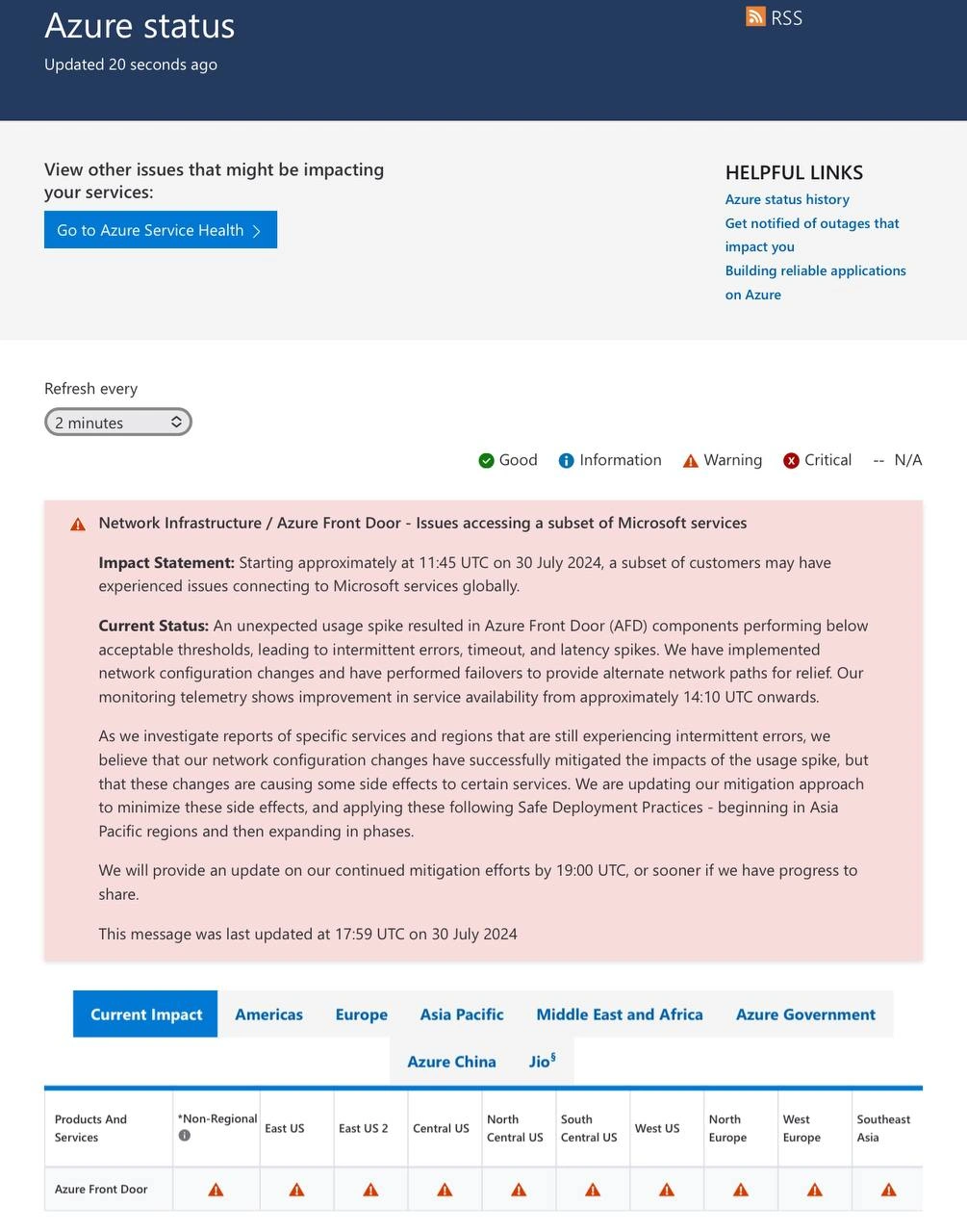
An outage means that a service (here, Azure Front Door) isn’t working correctly – it’s partially or completely down. In the meme’s scenario, starting around 11:45 UTC on July 30, 2024, Azure Front Door had issues, and that caused many Microsoft/Azure services (and the applications that rely on them) to become inaccessible or slow. A status page is a website where cloud providers like Azure post updates about service health. The screenshot in the meme is from the official Azure status page. It’s basically Azure’s way of saying “Hey, we know something’s wrong and here’s what we’re doing about it.” The page has colored icons (Green for Good, Orange for Warning, Red for Critical) to indicate the status of each service in each region. In the image, Azure Front Door is marked with a warning or critical icon in multiple regions, meaning it’s having trouble everywhere.

Now, what do developers do when a core cloud service goes down? They go into on-call mode. On-call is when a developer (often on a rotating schedule) is responsible for responding to any issues with their application, especially if it’s a 24/7 live service. If your app depends on Azure and Azure is having a problem, you, the on-call dev, will get alerts even if your own code is fine – because your users can’t reach your app. The first thing you’ll likely do is check Azure’s status page to confirm if it’s a known outage. That’s exactly what happened here. Once you see the big warning about Azure Front Door, you realize “Ah, it’s not just us – it’s a platform issue.” Both relief and dread set in: relief that you didn’t cause it, dread that you can’t directly fix it.

The “status-page refresh loop” refers to repeatedly reloading that status webpage to get the latest update. Why the loop? Because during an outage, information is king. If Azure posts a new update (for example, “We’ve applied a fix, things are improving”), you need to know as soon as possible. You might have your own company executives or customers asking “Any news? When will it be fixed?” So you end up refreshing constantly. The meme shows “Updated 20 seconds ago” at the top – that means Azure last posted an update 20 seconds before the screenshot. There’s also a dropdown that says “Refresh every 2 minutes”, which is a built-in auto-refresh feature. But many developers are so anxious, they manually hit that refresh button (or press F5 on the keyboard) much more frequently, hoping for a quicker update. It’s a mix of impatience and anxiety – we joke that pressing F5 harder or more often might magically make Azure fix things faster (it won’t, but it feels better than doing nothing). In the context tags, “f5_refresh_war” humorously calls it a war – essentially a battle of waiting, fought by hammering the refresh key.

Let’s break down some of the technical terms and events described:

  • Unexpected usage spike: This means a sudden surge in traffic (users or requests) that Azure didn’t anticipate. Think of it like an unexpected traffic jam on a highway at an odd hour – maybe caused by a viral event or an error that made a program send too many requests. This spike overwhelmed Azure Front Door’s capacity in some areas.

  • Performing below acceptable thresholds: Azure Front Door has certain performance targets (thresholds) like response time, error rate, etc. “Below acceptable thresholds” is a formal way to say it wasn’t meeting those targets. In plain terms, it was struggling – users were likely seeing errors or very slow responses (timeouts).

  • Intermittent errors, timeout, and latency spikes: Intermittent means off-and-on problems – not every single request failed, but many did. Timeout means some requests waited too long for a response and gave up (like calling someone and they never pick up). Latency spikes mean some requests that did succeed took much longer than normal, which users experience as slowness or buffering.

  • Network configuration changes: The engineers at Azure tweaked some settings in the network – perhaps rerouting traffic, or adjusting filters, or increasing capacity limits. Exactly what they did isn’t specified, but it was something they could change quickly in the network’s setup to alleviate pressure.

  • Performed failovers to provide alternate network paths: Failover means switching from a primary system to a backup when the primary has issues. In this case, Azure likely shifted traffic from the usual network path to a backup path. For example, if one data center or region was overwhelmed, they might start sending new traffic through a different region that’s less busy. It’s like saying “don’t use the main highway, take the detour side road” to reduce the jam.

  • Monitoring telemetry shows improvement: Azure has monitoring tools (telemetry) that measure how the service is doing (error rates, traffic flow, etc.). By ~14:10 UTC (a couple of hours after the incident started), those tools indicated things were getting better – fewer errors, more traffic getting through. That suggests their initial fixes helped.

  • Certain services still experiencing intermittent errors: Even though things improved overall, some specific services or regions were not completely back to normal yet. “Intermittent errors” were still happening in places, meaning the issue wasn’t 100% resolved everywhere.

  • Updating our mitigation approach to minimize side effects: Their first fixes had side effects – in fixing the big problem, they might have caused smaller issues for some services (for example, maybe one region’s traffic reroute caused higher load on a secondary service). So they’re fine-tuning their solution (“updating our mitigation approach”) to fix those new issues without bringing back the old ones.

  • Safe Deployment Practices – beginning in Asia Pacific regions and then expanding in phases: This is a standard practice when making changes to a live global system. Rather than deploying a change everywhere at once (which could backfire globally if the change has a bug), they start in one region (Asia Pacific, in this case). If it works well there and doesn’t cause new problems, they gradually roll it out to other regions (Europe, Americas, etc.) in steps. This phased rollout is considered “safe” because if something goes wrong, it affects only the early phase region and can be stopped or fixed before affecting everyone.

  • Update on continued mitigation efforts by 19:00 UTC: This is Azure’s way of setting expectations. They promise to post another status update by 19:00 UTC or sooner if they make significant progress. It doesn’t necessarily mean everything will be fixed by 19:00, just that they’ll tell you what’s going on by then. It basically prevents everyone from continuously guessing – you know when to check back for the next official news (though, of course, we still keep refreshing anyway).

All of this technical talk boils down to: Azure had a big network issue because too much traffic hit at once, they responded by re-routing traffic and adjusting the system, things got mostly better after a few hours but they were being very careful rolling out the final fix.

For a junior developer or someone new to cloud computing, a situation like this is both an eye-opener and a lesson in patience. You learn that even the biggest platforms can have hiccups. Being on-call means you need to stay calm and inform others, even when you can’t do much to fix the root problem. You might use this time to double-check your own systems: for example, does your application recover once Azure is back, do you have good communication channels to update your users, and is there anything you can tweak (like a temporary switch or fallback) to lessen the impact? Often, in a Front Door outage, there’s not a lot you can do except wait, because it’s the entry point. If you had a backup method (say, a second “front door” in another cloud or a way to bypass it), you’d try that. But setting that up is complex and usually not done in the moment. So, instead, you sit in what we jokingly call “on-call hell”, watching the status page. It’s a shared experience – if you hop on developer forums or Twitter during an incident like this, you’ll see everyone making the same jokes about sacrificing to the server gods or offering Microsoft some coffee to speed up the fix.

The meme’s combination of the orange warning bar, the constant refresh message, and that wall of text update is instantly recognizable to anyone who’s been through a production incident involving a cloud provider. It’s equal parts comforting (okay, it’s not just my app, it’s a known issue) and frustrating (I can’t do anything but refresh and wait). And when it’s over, the status page will quietly turn green, and life goes on – until the next 3 AM page that sends you back into the trenches. The key takeaway for a newcomer is: this is what real-world production issues can look like. It’s not always your code – sometimes the very platform you rely on has a hiccup. Your job is to monitor, communicate, and be ready to verify everything is running normally once the platform people fix the issue. And maybe consider reading that “Building reliable applications on Azure” link later – it might have tips to survive the next outage, like using multiple regions or caching responses so your app isn’t completely unusable when Azure has a blip. Because as this meme shows, in the cloud, stuff happens – and it helps to be prepared and have a sense of humor about it.

Level 3: Status Page Siege

For seasoned developers, this scenario is painfully relatable. You’re on call for your service, and suddenly users everywhere can’t connect. Your own dashboards are lit up red, but the issue isn’t in your code – it’s Azure Front Door having a bad day. In the meme’s screenshot, we see the official Azure Status page bannered with an outage: the pink panel of doom announcing a global Network Infrastructure incident. The title reads “Azure Front Door – Issues accessing a subset of Microsoft services”, but for you and thousands of others, that subset feels like “basically the whole internet”. The moment this went live, every on-call dev for an Azure-based app likely dropped whatever they were doing and started the ritual: opening the status page, hitting refresh... and repeating. Welcome to the nonstop status-page refresh loop, a special kind of purgatory for cloud engineers.

Why is this funny? Because it’s true. We’ve all been that bleary-eyed engineer frantically pressing F5 (refresh) like a gamer hitting a respawn button, hoping the next page load shows a green “all clear”. The meme even shows “Updated 20 seconds ago” – you can almost hear the collective hammering of refresh buttons around the world. In fact, Azure thoughtfully provides a dropdown for “Refresh every 2 minutes”, but let’s be honest: when your production is down and the CEO is slacking you for updates, 2 minutes feels like an eternity. Many of us set it to the fastest interval or just mash that F5 key manually, practically DDOSing the status page ourselves. This desperate ritual is so common it’s spawned its own dark humor: calling it the F5 war room or the “status page siege,” where the enemy is silence and the only weapon is your refresh finger.

The content of the status update is corporate-calm, but any experienced dev can read between the lines. “Unexpected usage spike” – maybe it was a legitimate surge (some viral event or a rogue client spamming traffic), or maybe it’s a polite way of saying a bug or misconfiguration unleashed chaos. Either way, it implies Azure got caught off-guard. Cue the eye-roll from veterans: did we forget to scale up capacity? Whoops. Then: “components performing below acceptable thresholds” – a genteel way to say services were timing out and users were screaming. The update mentions they implemented network configuration changes and failovers to provide alternate paths – translation: “we’re moving traffic around behind the scenes to take pressure off the parts that are on fire.” There’s improvement by 14:10 UTC, which tells a story of roughly two and a half hours of global whisking-the-smoke-away while engineers reroute and redistribute load. Two and a half hours is actually pretty fast for such a big outage mitigation, but when you’re the on-call, it feels never-ending. And then they say they’re still investigating some intermittent errors and carefully rolling out a final fix with Safe Deployment Practices. That term right there is a double-edged sword for on-call devs: you’re glad they’re being safe, but you also know “safe deployment” means this is going to drag on for many more hours. It’s like hearing a doctor say “Recovery will be gradual” while you’re itching to just get up and run.

Humor and exasperation blend in details like the Helpful Links on that status page. One of them literally says “Building reliable applications on Azure”. Talk about timing – you’re reading that as your “reliable” app is utterly crippled by an Azure outage. It’s as if Microsoft is cheekily saying, “See, you should’ve designed for this scenario!” Seasoned devs might chuckle (or groan) at that. Sure, best practice is to build redundancy and graceful failovers in your application for when Azure hiccups. Multi-region deployments, maybe even multi-cloud failover, in theory could save you. But in reality, many teams don’t have the luxury or foresight to set up a backup for the front door service itself. After all, Azure Front Door is supposed to be the reliable global entry point. It’s like paying for a fancy security service – you don’t plan a backup for when the security service guard falls asleep. So when that guard does doze off, you’re stuck outside with everyone else, peering in.

The phrase “forces devs into nonstop status-page refresh loop” in the title nails the collective anxiety. This is a classic OnCall nightmare: you can’t fix the problem, because the problem is in your vendor’s hands. All you can do is constantly check if they have fixed it. It’s a mix of helplessness and duty. You still have to communicate updates to your team and customers, join internal war-room calls to assess impact, and perhaps implement any temporary workarounds (which often amounts to “wait and monitor”). The dark comedy here is that an army of highly skilled developers around the world have essentially been reduced to impatient spectators, collectively refreshing a webpage. When the status text finally changes (e.g. to “Mitigated” or “Resolved”), there’s a wave of relief – and maybe a few sarcastic claps. Some will joke, “Well, that ruined my day. Time to update the post-mortem doc: Root cause – the cloud had a cloud of its own.” Others will share war stories: “Remember that time Azure AD went down and nobody could even log in to half the services? At least this time it was ‘just’ Front Door.” It’s a bonding experience through shared trauma – gallows humor at its finest.

From an industry perspective, this meme highlights the fragility of our robust systems. Cloud infrastructure is incredibly advanced, but it’s not magic. A single misbehaving component in a global service can send shockwaves to thousands of dependent systems. Senior engineers have learned that no cloud provider is infallible – AWS, Azure, GCP, they’ve all had big outages that made headlines. The lesson is always “Design for failure.” But even when you do, failure has a way of finding the one gap in your plan. Here, that gap was Azure Front Door. Many organizations might now be re-evaluating their reliance on a single traffic distribution layer. But in the heat of the moment, all you can do is endure the siege. You keep one tab on the status page, another on your incident chat, and maybe a third on Twitter (because you know other devs will be joking about #AzureFrontDoor trending). You watch phrases like “monitoring telemetry shows improvement” and quasi-optimistic promises of an update by a certain time. And you cope with humor: coffee-fueled, meme-posting, ironic humor. It’s either that or cry, and we prefer laughing.

Ultimately, the meme is funny to developers because it’s a mirror of our worst days on the job. It pokes at that shared experience: the frantic refresh, the corporate-speak updates that try to sound reassuring, the helplessness of depending on someone else’s infrastructure, and the absurdity of a multi-million-dollar application team reduced to “just waiting.” It’s a reminder that in tech, “reliable” doesn’t mean unbreakable, and when things break, even the best of us are essentially hitting refresh and praying to the demo gods. As the cynical saying goes, “In the cloud, downtime is just someone else’s computer having a bad day.”

Level 4: Global Congestion Cascade

At the bleeding edge of Azure’s cloud, Azure Front Door (AFD) is like a traffic conductor for the entire internet. It uses a globally distributed network of edge nodes and clever routing (think anycast IPs and BGP announcements) to funnel user requests to the nearest available backend. But when an unexpected usage spike hit at 11:45 UTC, that well-oiled distribution system stumbled into a classic congestion collapse scenario. In network theory, congestion collapse is what happens when a system gets so overloaded that performance drops off a cliff – routers start dropping packets, requests timeout, and latency skyrockets. Azure’s status update politely says “AFD components performing below acceptable thresholds” – translation: the Front Door’s hallway was jam-packed with more packets than it could handle.

Behind the scenes, Azure’s engineers initiated emergency failovers to alternate network paths. This is essentially cloud-speak for rerouting traffic away from the clogged parts of the network onto backup routes and data centers. Imagine slamming some doors shut and opening others to divert a flood – you hope the water finds a new way around. Technically, this likely involved adjusting BGP route advertisements or shifting load to other Points of Presence (PoPs) around the globe. But distributed systems obey physics and queueing theory, not wishful thinking. Rerouting traffic in the midst of an onslaught can cause its own turbulence: propagation delays as new routes take effect, cold caches on alternate servers leading to slower responses, and potential cascading load as previously quiet regions suddenly get a surge diverted from the troubled spot. The status message hints at this: the mitigation changes were working by ~14:10 UTC, but “causing some side effects to certain services.” In other words, moving the traffic firehose around saved the core service, but some smaller fires popped up in corners of the network that weren’t expecting the dousing.

This is where Azure’s famed Safe Deployment Practices come into play. Instead of a risky instant global fix, they roll out changes gradually – starting in Asia Pacific, then expanding in phases. This controlled rollout is a hallmark of site reliability engineering: limit the blast radius of any change, even during a crisis. It’s a bit of a paradox: to fix the global outage safely, you intentionally don’t fix everything at once. Think of it as performing open-heart surgery on the internet – you don’t just yank every artery at once; you route blood through a bypass (traffic reroute) and repair one section at a time. This disciplined approach is rooted in hard lessons from past incidents: a too-hasty global change can trigger a cascading failure that’s even worse. It’s essentially applying control theory to infrastructure – avoiding the feedback overshoot that could send the system into shock again. The downside? It takes time for the full relief to propagate worldwide, which is why the status page promises another update by 19:00 UTC. From a theoretical perspective, Azure is balancing on the tightrope between availability and stability: every distributed system faces this trade-off. Instant, aggressive fixes might promise quicker recovery (availability) but risk destabilizing other components (harming overall stability). Azure chose the cautious path, prioritizing a stable, if slower, recovery – a decision any old-timer who’s pushed a bad config at 3 AM can respect.

In summary, this meme captures a real-world application of deep distributed-systems principles: global networks grappling with sudden load (the thundering herd problem), the inevitability of queueing delays when capacity is exceeded, and the careful dance of mitigation that follows. The humor (and horror) for veteran engineers is realizing that even with all our advanced cloud architecture, sometimes the internet’s “front door” gets stuck, and solving it is like debugging a planet-spanning traffic jam in real-time. It’s equal parts terrifying and awe-inspiring – a reminder that all the fancy acronyms (CDN, DNS, BGP, SLOs, etc.) boil down to humans fighting entropy in large-scale systems, one safe deployment increment at a time.

Description

Screenshot of the Azure status portal shows the header "Azure status" with sub-text "Updated 20 seconds ago" and an orange "RSS" icon. A grey banner reads "View other issues that might be impacting your services:" followed by a blue button "Go to Azure Service Health"; the right column lists "HELPFUL LINKS" with "Azure status history", "Get notified of outages that impact you", and "Building reliable applications on Azure". A dropdown says "Refresh every" set to "2 minutes" beside a legend of colored dots for Good, Information, Warning, Critical and N/A. The main pink alert card is titled "Network Infrastructure / Azure Front Door - Issues accessing a subset of Microsoft services" and contains the full incident text: "Impact Statement: Starting approximately at 11:45 UTC on 30 July 2024, a subset of customers may have experienced issues connecting to Microsoft services globally. Current Status: An unexpected usage spike resulted in Azure Front Door (AFD) components performing below acceptable thresholds, leading to intermittent errors, timeout, and latency spikes. We have implemented network configuration changes and have performed failovers to provide alternate network paths for relief. Our monitoring telemetry shows improvement in service availability from approximately 14:10 UTC onwards. As we investigate reports of specific services and regions that are still experiencing intermittent errors, we believe that our network configuration changes have successfully mitigated the impacts of the usage spike, but that these changes are causing some side effects to certain services. We are updating our mitigation approach to minimize these side effects, and applying these following Safe Deployment Practices - beginning in Asia Pacific regions and then expanding in phases. We will provide an update on our continued mitigation efforts by 19:00 UTC, or sooner if we have progress to share. This message was last updated at 17:59 UTC on 30 July 2024." Tabs underneath read "Current Impact", "Americas", "Europe", "Asia Pacific", "Middle East and Africa", "Azure Government", "Azure China", and "Jio", with a table listing "Products And Services" and regional columns such as "Non-regional", "East US", "West Europe", etc., all indicating "Azure Front Door" status icons. Technically, it captures a real-time cloud incident where an unexpected traffic spike overloads the Azure edge, triggering failovers, safe-deployment rollouts, and on-call anxiety for engineers awaiting production stability
Comments

19
Anonymous ★ Top Pick Nothing shatters the illusion of “active-active, five-nines” quite like Azure Front Door going orange and you realizing the only truly redundant component in your architecture is the browser tab you’re mashing F5 on
  1. Anonymous ★ Top Pick

    Nothing shatters the illusion of “active-active, five-nines” quite like Azure Front Door going orange and you realizing the only truly redundant component in your architecture is the browser tab you’re mashing F5 on

  2. Anonymous

    Ah yes, the classic 'unexpected usage spike' - Azure's polite way of saying someone forgot to implement rate limiting and now the entire internet is trying to route through three overworked load balancers in West US while the on-call engineer frantically googles 'terraform rollback production without getting fired'

  3. Anonymous

    Nothing says 'cloud reliability' quite like watching every region on your status page turn into a field of warning triangles while your mitigation strategy creates 'some side effects.' At least they're following Safe Deployment Practices by starting in Asia Pacific - because if you're going to make things worse while trying to make them better, might as well do it in phases. The real irony? The page refreshes every 2 minutes, which is probably faster than their incident response time

  4. Anonymous

    Azure Front Door outage: When your global CDN decides to distribute downtime more evenly than traffic across three continents

  5. Anonymous

    Azure Front Door "unexpected usage spike" means the autoscaler hit the CFO cap, failover added latency, and "safe deployment" is just migrating the blast radius region by region

  6. Anonymous

    SRE translation: “unexpected usage spike” means the AFD control plane pushed a config that propagated unevenly across POPs, the WAF started rate‑limiting reality, and now we’re canarying APAC while the error budget ticks like a metronome

  7. @ZgGPuo8dZef58K6hxxGVj3Z2 1y

    What is this somebody explain

  8. @Sp1cyP3pp3r 1y

    Azorious is my favorite guild from Ravnica

  9. @lord_nani 1y

    The west has fallen, billions must complain

  10. @JackOhSheetImSorry 1y

    Microsoft continues getting problems this month. I'm not even sure that it's a meme

    1. @chupasaurus 1y

      it's a running joketheme of Azure since the beginning

  11. @yaroslav_antipov 1y

    Omg, is it happening again?

    1. @ZgGPuo8dZef58K6hxxGVj3Z2 1y

      Somebody from iran got assasinated by USA again

  12. @Jebbyk 1y

    Я чо дурак что-ли по вашему такое количество текста читать?

    1. @sylfn 1y

      please use english in this chat

    2. @purplesyringa 1y

      You can unsubscribe if you don't like it here

      1. @Jebbyk 1y

        It was kinda trolling uk, just kiddin

    3. @ZgGPuo8dZef58K6hxxGVj3Z2 1y

      Skill issue

  13. @Jebbyk 1y

    Ok

Use J and K for navigation