Android Dev Beginner Feels God-Like After Creating Empty Activity
Why is this MobileDev meme funny?
Level 1: Training Wheels Triumph
Imagine you’re learning to ride a bike using training wheels. You manage to pedal a short distance without falling, and you feel so proud – like you’re ready for the big leagues of bike racing. 🎉 In reality, you just took a tiny first step, but it feels enormous. That’s exactly what’s going on in this meme. A person who’s just started making apps had a tool set everything up for them (like training wheels on a bike), and now they have a basic app that runs. They’re super excited and call themselves an “app developer,” kind of like a kid saying “Look, I’m a biker now!” after riding with training wheels. It’s funny and cute because everyone knows there’s a lot more to learn, but that first success feels amazing. The meme is laughing in a friendly way about that little beginner victory that makes you feel on top of the world for a moment.
Level 2: Scaffolding Pride
Let’s break down what’s happening in simpler terms. Android Studio (the main program used to write Android apps) has a feature where it can create a new basic app for you. When you select “Empty Activity” and hit create, the IDE sets up a starter project with some default code and files — this is called scaffolding. There’s pride in using this scaffold because suddenly you have an app that runs, even if you haven’t typed much code yourself. The meme jokes that as soon as this template runs, the person feels like an “App devlpr” (slang for app developer, missing a letter in a goofy way).
So, what does the Empty Activity template actually include? It sets up an Activity class, which in Android is basically one screen of the app (think of it as one page or window that a user sees). It also generates a layout file for the UI (usually an XML file) that defines what’s on that screen – in this case, it’s almost nothing, just a blank canvas with perhaps a default “Hello World” label or an image placeholder. All of this is done by the wizard automatically. The new developer hits “Run”, and Android Studio compiles the app and either launches it on an emulator or a real phone. The result? A real, installable app opens up, showing an empty screen. And that feels amazing when you’re just starting out. You can literally say, “Hey, I made an app!” even if it doesn’t do anything yet.
To a beginner, seeing the default code pop up in the editor is like seeing a foreign language suddenly appear, but it’s your app’s code. Here’s a peek at what that auto-generated code might look like:
package com.example.myfirstapp // package name for the app
import androidx.appcompat.app.AppCompatActivity
import android.os.Bundle
// This is the Activity class for the app's main screen
class MainActivity : AppCompatActivity() {
override fun onCreate(savedInstanceState: Bundle?) {
super.onCreate(savedInstanceState)
setContentView(R.layout.activity_main) // Loads the UI layout for this Activity
}
}
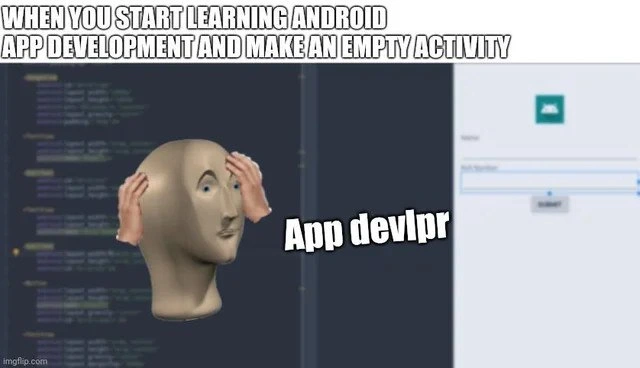
In the code above, MainActivity is the name of the screen (Activity). It extends AppCompatActivity, which just means it’s using a standard Android screen behavior. The onCreate() function is called when this screen starts, and setContentView(R.layout.activity_main) is the magic line that displays the UI – here it’s linking to a layout file named activity_main.xml. That XML file describes the visual layout (in this case, practically empty). The design preview on the right side of the meme image is Android Studio showing what the activity_main.xml layout looks like – we see a blank design with maybe just an icon or placeholder because nothing has been added yet. It’s a handy feature that lets developers drag and drop UI elements, but initially it’s just showing an empty screen.
All this stuff – the Activity code, the XML layout, and some configuration in the AndroidManifest.xml (a file where you declare your activities) – is generated by the android_starter_template. It’s called boilerplate code: necessary code that sets up the basic structure. The newbie didn’t have to write any of that from scratch; the IDE did it automatically. That’s what we mean by ide_generated_code or scaffolding. It’s super useful because it gives beginners a working starting point. But the funny part is, at this early stage, many beginners don’t fully understand what was generated. They just see “My app runs without errors!” and feel accomplished. It’s a great confidence boost.
The meme plays on this scaffolding_pride – the pride a learner feels when using a template to get an app running. In the image, the text at the top sets up the scenario: “WHEN YOU START LEARNING ANDROID APP DEVELOPMENT AND MAKE AN EMPTY ACTIVITY.” The mannequin-looking figure holding its head in astonishment is labeled “App devlpr,” implying the person is overwhelmed and thrilled to suddenly be an app developer. We’ve all been there: the first time you see something you made (even if a lot was pre-made by the tool) actually working on your phone, you feel like a genius. 🚀 It’s a LearningToCodeJourney milestone. Of course, as you keep learning, you realize that this was just a tiny first step. There’s a lot more to Android development – making buttons do things, saving data, handling different screen sizes, dealing with app crashes, etc. But at that moment, running an app you “built” (with a lot of automated help) is pure joy. The meme humorously celebrates that naive, heart-warming moment of triumph. It’s gentle poking fun: the caption “App devlpr” is like the person proudly declaring a new title for themselves, even though all they have is a blank app. In the world of DeveloperHumor, this contrast between the small achievement and the huge pride is a common theme, especially for juniors who are just starting out.
Level 3: Boilerplate Bravado
At the highest technical level, this meme captures a classic case of boilerplate-induced bravado. A new Android developer uses Android Studio’s project wizard to generate an Empty Activity – essentially the simplest possible app skeleton – and suddenly feels like a seasoned app creator. From a senior developer’s perspective, it’s humorous because all the heavy lifting was done by the IDE’s scaffolding. The left side of the image shows auto-generated Kotlin/Java code (the kind of boilerplate every Android app needs), and the right side shows a design preview of a blank UI. In an experienced dev’s eyes, this “instant app” is just a stub: an Activity class with a default layout. The novice hasn’t written a single line of original logic yet, but the perceived accomplishment is huge.
What’s going on under the hood? The Android Studio template created a subclass of AppCompatActivity, registered it in the app’s manifest, and set up a default XML layout file. It’s all standard for any basic Android app. The humor comes from the disparity between the newbie’s confidence and the actual simplicity of what’s been done. There’s a whiff of the Dunning-Kruger effect here – in the early stage of the LearningCurve, when you know just enough to be excited, but not enough to realize how much more there is to learn. Seasoned devs recognize this instant expert vibe because many of us went through it. We remember the first time we got a “Hello World” app running on our phone and thought we were ready to publish to Google Play 😅. In reality, an Empty Activity app is the bare minimum – there’s no real functionality, just a lot of IDE-generated code and placeholders.
Still, it’s a MobileDevelopment rite of passage. The meme’s top text (“WHEN YOU START LEARNING ANDROID APP DEVELOPMENT AND MAKE AN EMPTY ACTIVITY”) sets the stage: it’s a beginner’s first triumph. The mannequin figure clutching its head – often used in memes to express mind-blown amazement or overwhelm – labeled as “App devlpr” (intentionally misspelled for comic effect) represents the newbie proudly calling themselves an app developer. The joke works because experienced devs know that feeling so well: that rush of power when your first auto-generated screen lights up, contrasted with the knowledge of how far there is to go. In a tongue-in-cheek way, the meme lovingly pokes fun at the enthusiastic ignorance of beginners. It highlights the Junior vs Senior gap: what a junior sees as a monumental achievement, a senior recognizes as just the first baby step. The senior perspective isn’t to belittle that excitement – it’s to chuckle knowingly because we’ve all been that person, celebrating a victory we don’t yet realize was setup by the tools.
Description
A 'Meme Man' format meme. The top text reads, 'WHEN YOU START LEARNING ANDROID APP DEVELOPMENT AND MAKE AN EMPTY ACTIVITY'. The image is split, with a blurred code editor on the left and a screenshot of the Android Studio new activity wizard on the right. In the center is the surreal, 3D head of Meme Man, looking accomplished, with the intentionally misspelled text 'App devlpr' next to him. This meme humorously captures the exaggerated sense of achievement new developers feel when completing a very basic, automated task, like generating a boilerplate 'Empty Activity' - the equivalent of a 'Hello, World!' for a mobile app screen. For experienced developers, it's a nostalgic joke about the Dunning-Kruger effect in the early stages of learning a complex new platform like Android

Comments
7Comment deleted
That feeling when you generate an empty activity and think you're a mobile guru. Wait until you see the deprecated libraries, Gradle sync errors, and the 30 different screen densities you have to support
Savor that “I’m an app dev!” thrill after File → New → Empty Activity - right before Gradle’s 25-minute build, the 65 K method wall, and the Play Console asking why your arm64 split is a no-show
After 15 years of architecting distributed systems, nothing quite prepares you for explaining to a junior why their 'empty activity' with 47 gradle dependencies, 3 deprecated support libraries, and a 120MB APK size is technically working as intended - it's Android's way of teaching humility through XML namespaces and build variants
The Android development rite of passage: generating 47 files, 300 lines of XML, a Gradle build that takes longer than your coffee break, and enough lifecycle callbacks to make you question your career choices - all to render a blank screen with a toolbar. Welcome to mobile development, where 'Hello World' requires a master's thesis in dependency injection and an intimate understanding of why your Activity got destroyed for the third time this minute
Android’s “Empty Activity” is the only template where a ConstraintLayout at 0dp and three Gradle plugins take longer to compile than our last microservice
Android’s “Empty Activity”: five-minute Gradle sync, three dexing passes, 40MB APK - proof you can ship nothing at scale
Android's 'empty' activity: bootstrapping a maintenance nightmare with findViewById hell since API 1