Developer vs. Designer Reactions to AI Assistance
Why is this AI ML meme funny?
Level 1: Smart Helper, Clumsy Artist
Imagine you have a special robot friend. This robot is really good at some things but not so good at others. One day, you ask the robot to help you clean up and sort your toys. It does it super fast and perfectly – all the cars in one box, all the dolls on the shelf, every LEGO piece in the right place. You’re so happy you throw a little celebration, like, “Yay! 🎉 This is awesome!” The robot was a smart helper for cleaning up, and it made your day easier.
Now, the next day, you ask the same robot to draw a birthday card for your friend. The robot tries its best, but the drawing it makes is kind of weird. The colors are smudged, the people in the picture have funny proportions (one eye bigger than the other or an extra finger), and overall it just doesn’t look right. It’s not at all like the nice cards you make yourself. You feel upset and even a bit angry looking at it, like “Ugh, this is not what I wanted 😡.” In this task, the robot turned out to be a clumsy artist. It made a mess of the drawing, and now you either have to fix it or start over.
This meme is joking about a situation just like that. We’re comparing AI (artificial intelligence) to that robot friend. When the AI helps with something straightforward and rule-based – like writing code (which is kind of like sorting toys, there’s a right place for each piece) – all the developers (the people who write code) are celebrating happily because the AI did a good job. But when the AI tries to do something creative, like design a picture or a user interface (which is more like drawing the birthday card – creative and needing a personal touch), the people who see the result are unhappy and annoyed. They expected something nice, but the AI’s work is awkward or not up to human standards, so it “ruins the mood.”
In simple terms: the meme says our helpful robot friend (AI) is a hero when it does coding chores, but it’s not a very good artist when it tries to do design work. That contrast is what makes it funny and true to life. Kids and adults alike can get it: sometimes a tool can be great for one job and terrible for another, and it’s both silly and relatable to see how our feelings towards it can flip from 🎉 to 😡 depending on what it’s doing.
Level 2: Coder’s Friend, Designer’s Foe
Let’s break down the meme in simpler terms. It’s showing two opposite reactions to AI depending on what the AI is doing:
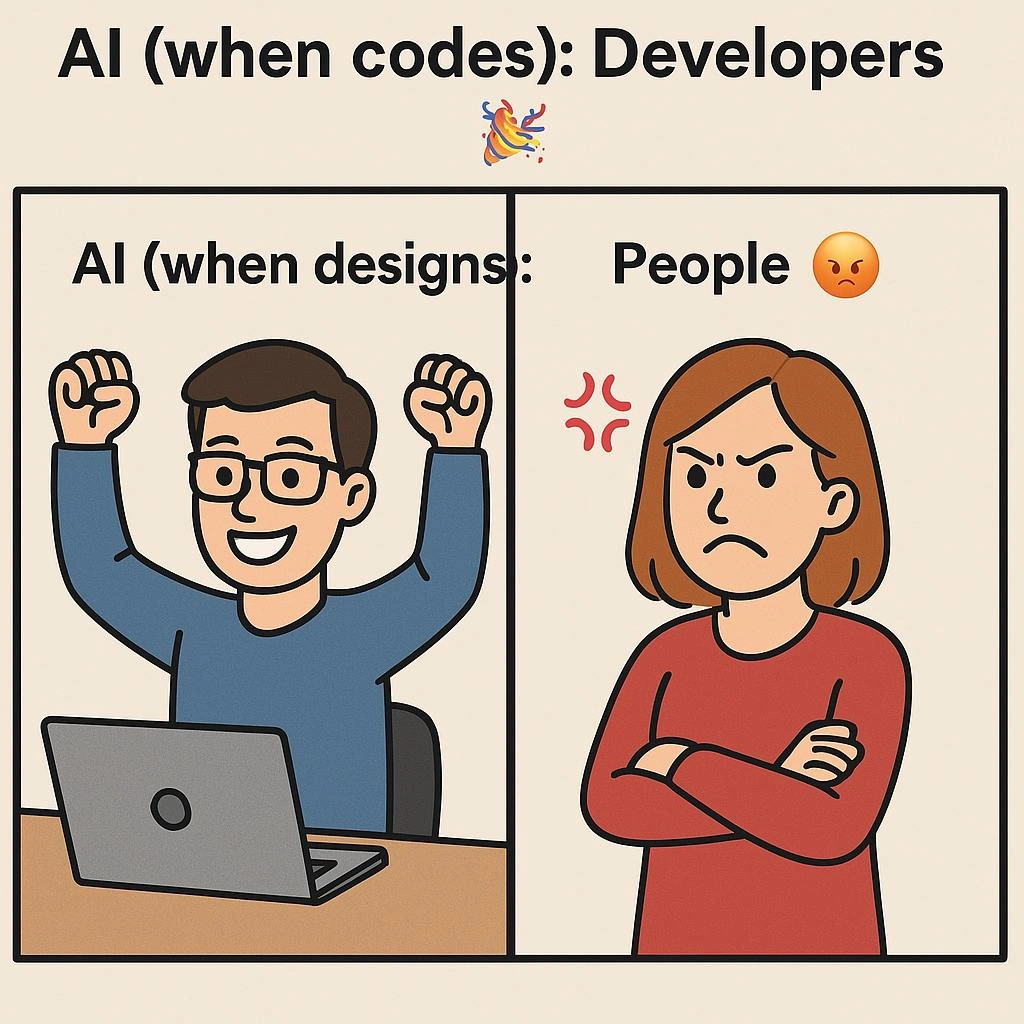
“AI (when codes): Developers 🎉” – When an AI helps with coding tasks, developers are celebrating (hence the party emoji 🎉).
“AI (when designs): People 😡” – But when an AI tries to do design tasks, people (especially designers) are angry or annoyed (hence the angry emoji 😡).
In the first panel, a cartoon man is at his laptop with both fists raised in triumph. This represents a developer who just used an AI coding tool and is super happy with the result. What tool are we talking about? Most likely GitHub Copilot or a similar AI code assistant. GitHub Copilot is essentially an AI pair programmer that lives in your code editor. As you type, it suggests the next lines of code or even entire functions. For example, if you start writing a function calculate_tax(...) and add a comment “// compute sales tax”, Copilot might instantly fill in the code for you. It’s like magic autocomplete on steroids. For a junior developer (or really, any developer), the first time this happens feels amazing – you think “Wow, the AI actually wrote correct code for me!” That’s why the developer in the meme is cheering. It’s not an exaggeration: many developers share stories of how Copilot helped them finish code faster or gave them a hint when they were stuck. It can save you from having to search Stack Overflow for the hundredth time. So developers treat this AI coding tool as a friend or hero. It’s doing some of the heavy lifting, and they’re relieved and happy (hence the confetti emoji implying celebration). 🎉
Now, look at the second panel. There we see a cartoon woman with her arms crossed, looking very unimpressed, with a red anger symbol near her head. The caption says “AI (when designs): People 😡.” Here, “AI (when designs)” means when AI is used for design tasks. Design tasks could mean creating visual art, graphics, or user interface designs. A well-known example is DALL-E. DALL-E is an AI model that can generate images from text descriptions. You might have seen on social media people typing something like “a cat riding a skateboard in space” and the AI draws it. That sounds really cool, and it is fun! 🙂 However, when it comes to serious design work (like making a company logo, designing a website layout, or creating artwork for a project), AI image generators can disappoint people. The meme says “People 😡” but it especially means designers – the folks who do UX/UI design (User Experience/User Interface design) for a living. Why would they be angry?
For one, AI-generated designs often come out a bit off. Imagine asking an AI to draw a professional portrait. It might look okay at first glance, but then you notice the person in the picture has one ear slightly higher than the other, or the hands look a little freaky with extra fingers. 😬 Or imagine asking an AI to design a webpage. It might place elements in weird ways – maybe the button is half off the screen or the text is unreadable. In essence, AI designs can lack the polished touch that human designers pride themselves on. This can be frustrating. If you’re a designer, you might feel like, “Great, now I have to redo this anyway,” or “This AI doesn’t understand the vibe we need.” It’s like having an assistant who doesn’t listen to instructions very well – more annoying than helpful.
Let’s define a couple of key terms from the tags and context:
- AI-generated code: This is code that is written by an AI program rather than typed by a human from scratch. GitHub Copilot is the big example – it was trained on lots of public code, so it learned patterns and can write code in various languages when you prompt it. Think of it as autocomplete that sometimes can write whole paragraphs of code that actually work. Developers use it inside their IDE (Integrated Development Environment, basically their coding app like VS Code or IntelliJ) as they code.
- AI-generated design: This refers to images or visual designs created by an AI from a description or some input. DALL-E (by OpenAI) and other tools like Midjourney or Stable Diffusion are commonly used for this. You give them a text prompt (e.g., “design a logo with a blue eagle and a shield”), and they try to produce an image. These fall under the AI_ML category because they use machine learning models to generate the content.
- UX/UI: UX stands for User Experience, which is about how a product feels to use, and UI stands for User Interface, which is how it looks (the layout, colors, typography, etc.). Designers in UX/UI care a lot about things being intuitive and visually pleasing. When the meme says “AI (when designs): People 😡,” it’s implying UX/UI people (or really anyone looking at the design) are not happy with what AI made.
- Designer pushback: This phrase (from the context tags) means designers pushing back against, or resisting, the use of AI in their field. There have been real instances of this—like graphic artists on forums saying “please don’t use AI for art competitions” or UI designers skeptical when someone suggests “let’s have AI draft the app’s interface.”
- Copilot vs DALL-E: The meme title literally calls this out: Copilot is seen as a “hero” (for coding) and DALL-E as one who “ruins the mood” (for design). This is highlighting the gap in quality or usefulness between an AI coding tool and an AI art tool, at least as of the meme’s timing.
For a junior developer or someone new to these tools, the meme is a quick lesson in expectations:
- AI coding tools can be awesome. If you haven’t tried them: imagine you’re writing a basic Python function to add two numbers. You start typing it out, and before you finish, the AI suggests the rest of the code correctly. It feels like someone read your mind or like you yourself suddenly got super fast. Early-career devs often celebrate that it helps avoid mistakes or get syntax right. Just remember, you still need to know what the code means – AI won’t always be 100% right, but it’s a helpful guide.
- AI design tools can be hit-or-miss. If you’ve tried an image generator for something serious, you might have seen it give bizarre results. Maybe you wanted a nice icon and it delivered something unusable or inconsistent. Many people’s first reaction is excitement (“Look, it made a picture from nothing!”). But when the novelty wears off, you start seeing flaws (“Hmm, why does that cat have 3 eyes?!”). For someone working on design, that can be more frustrating than helpful, especially if they need a high-quality result. It might even create extra work trying to fix the AI’s output.
A good analogy from early experiences: think of autocomplete in coding (even simple ones that suggest code based on what you typed) – we’ve had that for a while and it’s generally helpful and non-intrusive. Copilot is like autocomplete on steroids, so developers are mostly cool with it. But in design, there isn’t really an equivalent of “autocomplete” that designers use day-to-day (design is more free-form). So an AI design tool feels like a wild experiment. Sometimes it might spark an idea (which is cool), but other times it outputs something that no sane designer would actually use without major tweaks, which leads to eye-rolls or anger.
The meme is categorized as AIHumor and AIHypeVsReality because it’s pointing out in a funny way that just because AI works great in one area (coding) doesn’t mean it’s great in all areas (design). The HumanVsAI tag also fits: the “Developers 🎉” panel is like humans being happy teaming up with AI, whereas the “People 😡” panel is humans disappointed or clashing with the AI’s attempt. And of course, DeveloperHumor and UXFailures are written all over this: developers are laughing because they know how it feels when code generation goes right vs. when an AI tries to design something and fails hilariously.
In short, for someone new: this meme is saying “We love when AI helps us code, but when it tries to make art or design, it usually doesn’t go so well – and people aren’t thrilled about it.” It reflects a real sentiment in the tech world. Developers and designers both use AI, but their experiences are very different. One side is throwing a party with their new AI buddy, and the other side is frowning at the mess the “helper” made. 😅
Level 3: Developer Delight, Designer Dismay
From a seasoned developer’s perspective, this meme rings painfully true about the current state of AI tools. On the left, we have the euphoria of programmers using AI to write code. Picture a coder who just let Copilot handle the boring part of writing a repetitive class or a tricky regex – they’re literally pumping their fists in triumph like the cartoon guy. Why? Because it feels like having a brilliant pair-programming buddy who never complains about writing unit tests or boilerplate. The caption “AI (when codes): Developers 🎉” nails this feeling: Copilot is the hero for developers, saving time and mental energy. Many devs have shared stories of how an AI suggestion solved a problem in seconds that would’ve taken them an hour. It’s like someone secretly slipped an extra developer into your computer. Even skeptics in the industry had to crack a smile the first time Copilot auto-completed an entire function correctly – it’s both amazing and a little eerie. But crucially, developers maintain control: they review the AI’s code, run it, test it, and if something’s off, they can fix it. That safety net means the AI can be celebrated even if it isn’t perfect out-of-the-box. Shared experience: countless programmers joke now that they’re “10x developers” because 9 of those 10 parts are done by AI. 🎉
On the right side, though, we see a very different story – one that UX/UI designers and regular folks instantly recognize. “AI (when designs): People 😡” captures the frustration and pushback from the design community when AI tries to do their job. The woman in the meme, arms folded and anger symbol floating, might as well be a composite of every graphic designer who’s been shown an AI-generated logo and asked, “Isn’t this cool?” The reaction is visceral annoyance. Why? Because to designers, a lot of AI-generated visuals range from bland and derivative to outright abominations (six-fingered hands, anyone?). Where Copilot can produce usable code, tools like DALL-E often produce laughable or unusable design outputs if you expect professional quality. It’s the difference between “Yay, it compiled on the first try!” and “Ugh, that picture is not going on our homepage.”
This contrast speaks to a broader AI hype vs. reality pattern in the industry. When AI coding assistants emerged, developers were quick to integrate them – the ROI was immediate. Who wouldn’t want help writing tedious getters and setters or even brainstorming a solution? It’s an engineer’s dream: automation of the mundane. There’s a shared memory among veteran devs of earlier attempts at automated code generation (like those clunky code wizards or 4GL tools from decades past) that never lived up to the hype. But modern AI like Copilot finally delivered on that promise in a surprising, almost magical way. So the 🎉 is well-earned. Many senior developers joke that Copilot is the intern who never sleeps, churning out suggestions all day. It’s not stealing any coder’s joy – if anything, it’s freeing them up to focus on higher-level problems or polish.
Now flip to design: AI image generators also came with huge hype (“AI will create art! design logos! even make UX layouts!”). But reality hit hard. Designers quickly noticed that while AI can churn out something, it often misses context, purpose, and polish – the very things human designers are experts at. An experienced UX designer knows their work isn’t just about making a pretty picture; it’s about understanding users, brand identity, accessibility, and consistency. When an AI returns a design that technically has the elements requested but zero understanding of those subtleties, designers collectively facepalm. Real-world scenario: A company decides to use an AI to generate some icons or a marketing graphic to save time. The result comes back looking a bit off – maybe the proportions are weird or the style doesn’t match the brand guidelines – and the designer now has to either heavily edit it or scrap it and do it manually. Far from saving time, it created an extra hassle. No wonder the meme character’s arms are defiantly crossed; she’s basically saying, “This AI design stuff is not meeting our standards.” 😡
Another angle is the threat perception. Developers largely see Copilot as a helpful assistant, not a job threat – it takes away drudge work, but you still need a human to architect and ensure quality. Many even comment that Copilot occasionally makes mistakes or writes suboptimal code, but that’s fine because a skilled dev can catch those. In contrast, some designers see AI image generation as encroaching on their territory in a less controlled way. There have been public outcries from artists about AI models trained on their artwork without permission, and the results feel like cheap imitations. So the anger isn’t just about quality; it’s also about principle and originality. When the meme says “DALL-E ruins the mood,” it’s not just that the picture might look weird – it’s that the whole idea of an AI doing creative design can sour the mood among people who value human creativity. It’s like showing up to a gourmet cooking class with a microwave dinner — the chefs (designers) are going to be annoyed. 🍜⚡
We also have an industry in-joke here about how each community reacts to new tools. Developers historically love tooling that automates boring stuff (we’ve embraced linters, auto-formatters, code generators). So Copilot was greeted with party poppers (just like the 🎉 emoji) as another step in that evolution. But designers and end-users have a more cautious relationship with automation in creativity. There’s a reason design work still heavily relies on human touch and why “one-size-fits-all” template solutions are often frowned upon. The meme’s humor plays on this double standard: the same AI technology is the golden child in coding tasks and the awkward step-child in design tasks. For an engineer who dabbles in both worlds, it’s comedic because you literally shift from “hooray, it did my work!” in one meeting to “ugh, let’s not use that AI design” in the next.
In practice, we see this dichotomy even within teams. A product team might happily use AI to generate code samples or even writing documentation, but suggest using AI to design the app’s new logo and watch the room go silent or hostile. 😬 Designers might raise concerns: “It’s going to look generic,” or “It won’t understand our branding,” or even ethically, “We shouldn’t use potentially stolen art.” The meme’s People 😡 panel encapsulates that pushback. It’s a bit exaggerated (not every designer is that angry), but anyone who’s been on a project where someone floated “let’s just have an AI do the graphics” has probably seen at least a few raised eyebrows or frowns.
Ultimately, experienced devs and designers laugh at this meme because it’s true to life. There’s almost a role reversal from expectations: code – which outsiders might think is rigid and too hard for a machine to handle – is the area where AI is excelling. Design – which one might think an AI could brute-force by mixing styles – remains a tough nut, often producing comically bad results. The humor has a bit of schadenfreude too: developers (known to struggle with CSS and design themselves) are gleeful that even an advanced AI struggles with design. It’s like, “See, it’s not just me – even the AI can’t get the button spacing right!” Meanwhile, designers get to say “Told you so” when an AI’s attempt falls flat. The meme perfectly captures that shared understanding: AI has its moments of heroism in coding, and its moments of infamy in design. The cheering developer and scowling designer are cartoon proxies for these communities. And if you’ve lived through the recent AI tool explosion, you can’t help but nod and chuckle at how accurately this split is portrayed.
Level 4: Coding vs Canvas Conundrum
At the most technical level, this meme highlights a fundamental difference in what AI is good at: generating structured code versus creating unstructured visual designs. GitHub Copilot (the coding AI hero in question) is powered by a large language model trained on tons of source code. It treats programming like a formal language with strict grammar and syntax. This means it can predict and produce code that often compiles without errors, because code follows rules – if the AI puts a semicolon in the wrong spot or misspells a variable, the mistake is obvious and fixable. The AI’s suggestions can be validated by a compiler or unit tests, which act as an objective measure of correctness. In essence, code has a clear goal: does it run and do what we expect? 🟢 If yes, the developer is happy.
Visual design, on the other hand, lives in the realm of pixels, aesthetics, and subjective judgment. DALL-E (the design AI “villain” here) uses a generative model – often a diffusion model – to create images from text descriptions. Unlike code, there’s no strict grammar for images. A picture can fail in subtle ways: an extra finger on a hand, awkward symmetry, strange eyes – things that violate the unwritten rules of human appearance and design harmony. There’s no compiler for art that can red-flag a slightly off composition. An AI-generated design might technically satisfy the prompt (“draw a woman folding her arms angrily”), yet still feel “wrong” to human viewers. This is the uncanny valley of design: the image is close to normal but those small anomalies trigger a negative reaction (hence the red 😡 anger symbol).
Another key difference is how performance is measured in these domains. AI code generation can be evaluated with automated tests or by simply running the program – a very binary outcome (it works or it crashes). Researchers even measure code-gen models by metrics like passing unit tests or function correctness. Meanwhile, evaluating an AI design is fuzzy: there’s no automated test to decide if an illustration is beautiful or a layout is user-friendly. At best, you have metrics like user ratings or heuristic scores, but ultimately a human eye decides if an image “looks right.” Without an objective check, the AI’s visual output can slip by with hidden flaws until a person reacts with “Ew, that’s not what we wanted.”
This leads to a quality expectations gap. Developers will happily take an AI-generated function that’s 90% correct and quickly debug the remaining 10%. Code is modular: if Copilot writes a sorting function incorrectly, a programmer can tweak a few lines to fix it. But design is holistic – you can’t easily “patch” a weird-looking AI-generated illustration; often you must redraw significant parts or scrap it entirely. Even small design errors (an off-brand color shade or misaligned icon) ruin the whole vibe. The cost of errors is perceived differently: a code bug lives hidden in the IDE until runtime, whereas a design flaw is immediately visible on the canvas. In technical terms, programming languages are discrete and unforgiving but highly checkable, whereas visual art is continuous and forgiving in formation but hard to evaluate. The meme cleverly points out that the same AI techniques shine in the rigid world of code yet struggle in the free-form world of design. This isn’t just bias or hype – it’s baked into the very nature of how these AI models learn and operate. Copilot’s transformer brain can complete a partially written function because the space of likely correct completions is constrained by logic and past code patterns. But asking DALL-E for a “creative UX design” is like asking it to navigate an infinite art space with only a few words of direction – the results can land anywhere, often in the realm of “meh” or “huh? 😂”.
In summary, at this deep technical level, the meme is spotlighting the “structured vs. unstructured AI” conundrum. We cheer when AI acts as a deterministic problem-solver (writing code), and we jeer when it tries to be an imaginative artist without the je ne sais quoi that true design requires. The hero vs. villain contrast in the meme stems from these inherent constraints: AI code generation aligns with formal logic and thus meets our expectations, while AI design generation grapples with creative complexity and often falls short. The result? Developers treat the AI like a genius coding sidekick 🎉, but everyone becomes a critic when that same AI picks up a digital paintbrush 😡.
Description
A two-panel comic illustrating different reactions to AI in creative fields. The top of the image has a title that reads, 'AI (when codes): Developers 🎉'. The first panel, below this, shows a cartoon man with glasses sitting at a laptop, smiling and raising his fists in the air triumphantly. The text above this panel says 'AI (when designs):'. The second panel shows a cartoon woman with reddish-brown hair, wearing a red shirt. She is scowling, with her arms crossed and red anger symbols next to her head. The text above her says 'People 😡'. The meme humorously contrasts the enthusiastic adoption of AI coding assistants by developers with the widespread anger and concern from artists, designers, and the general public regarding AI-generated art and design. It highlights the cultural divide where developers often see AI as a productivity tool that handles grunt work, while creatives often view it as an existential threat to their profession, raising ethical issues of copyright and originality

Comments
20Comment deleted
Developers love AI because it writes their boilerplate and unit tests. Designers hate AI because it confidently generates a user interface with seven buttons that all lead to the same 404 page
Funny how we trust a stochastic parrot to refactor microservices, yet panic when it chooses the wrong primary button color
We'll happily let AI write our unit tests and debug our race conditions, but the moment it suggests a color palette, we suddenly become ardent defenders of human creativity - as if our git commit messages weren't already proof we surrendered that battle long ago
Developers celebrating AI code generation while everyone else panics about AI design perfectly captures our industry's selective enthusiasm - we're thrilled when AI automates *other people's* jobs, but the moment it touches our sacred code reviews, suddenly we're all about 'the human element' and 'craftsmanship.' The irony is that AI-generated code actually passes our PRs more often than AI-generated art passes the uncanny valley test, yet here we are, arms raised in victory while the rest of the world crosses theirs in justified concern
Everyone loves AI when it stamps out plumbing and boilerplate; the moment it autogenerates a redesign, the bikeshed committee files a P0 ethics ticket - there’s no unit test that silences a color palette
LLMs sail through linting and unit tests, but the moment they invent design tokens and a seven‑step border‑radius scale, the build fails on the only check we can’t automate: taste alignment
Copilot refactors your monolith into microservices; DALL-E turns 'responsive navbar' into a Rorschach test
wut Comment deleted
ai (when humor: 🤯 Comment deleted
Shot Comment deleted
plagiarism when for function: ☺️ plagiarism when for aesthetics: 😡 simple as Comment deleted
Ever tried to release on friday, huh? Comment deleted
This one is from ~2016, not about recent Ghiblification Comment deleted
Yeah, I know - used it just for a joke 🙈 Comment deleted
My guy, what was the fuggin prompt‽ Comment deleted
You can put this meme into gpt and reverse engineer the promt 🙈 Comment deleted
Sure, but that's not the actual prompt, though... Nor is it like reverse compiling code from a binary. Comment deleted
Ohhh... I think we've lost "originality" with AI boom tho... Comment deleted
AI when designs people: 💀 Comment deleted
Biblically accurate sticker Comment deleted