Skip to content
DevMeme
6236 of 7435
Everyone adds AI; senior dev immediately searches for the off-switch
AI ML Post #6838, on Jun 3, 2025 in TG

Everyone adds AI; senior dev immediately searches for the off-switch

Why is this AI ML meme funny?

Level 1: Cool New Toy, Off Switch

Imagine you and your friends all get a brand-new smart toy – let’s say a little robot car that can drive itself using some fancy computer tricks. It’s the coolest thing and everyone is super excited to see it zoom around on its own. You show it to your family, and they go, “Wow, that’s impressive. Very nice!” 😃 But then, the older, wiser person in the room (maybe your dad or an older sibling) claps politely and the first thing they ask is, “This is great… now how do we turn it off if it starts acting weird?”

It might sound a bit funny, right? Why are they already talking about turning it off when we just got this amazing new toy working? Well, that’s because they’ve seen toys go haywire before – maybe a remote control car that wouldn’t stop or a gadget that started glitching. They know that no matter how cool a new thing is, it’s important to have a big stop button or an off switch, just in case. It’s like if you got a super fast bicycle – a parent would immediately check that the brakes work before letting you zoom off. 🚴‍♂️

In the meme, the new AI feature is like that fancy self-driving toy car. Everyone is adding these AI features to their products because they look awesome (just like everyone getting the latest cool toy). The senior developer is like the cautious adult in the room saying, “Nice job, it’s really cool… but show me how I can shut it down if I need to.” It’s funny because it’s so true to life: kids (or in this case, excited tech folks) might be all about the new abilities, while the experienced person immediately thinks about safety and control. They’re not trying to spoil the fun – they actually like the new feature – but they’ll enjoy it a lot more knowing there’s an off switch for when things don’t go as planned.

So the heart of the joke is this: No matter how amazing something new is, a wise person always asks, “how do I stop it if something goes wrong?” It’s a bit like having a cool magic wand that can do incredible tricks, and someone immediately wants to know the magic word to undo the spell. It makes us smile because we recognize both the excitement of the new thing and the responsible voice saying “let’s be careful.” In the world of developers, that responsible voice often comes from the senior dev, who’s seen a thing or two. In simple terms: new tech is cool, but knowing you can turn it off when needed – that’s what really puts their mind at ease.

Level 2: Where’s the Off Switch?

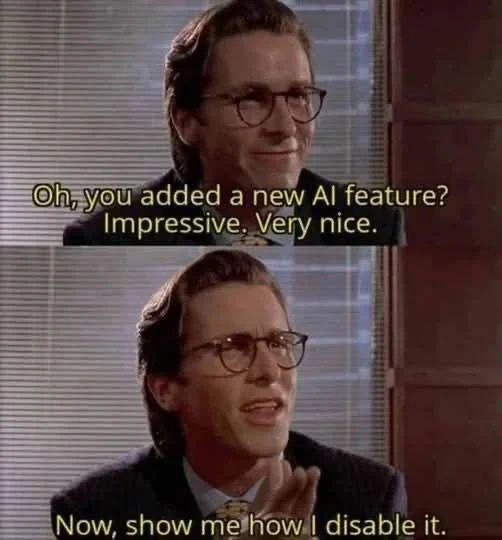
Let’s break down the meme in simpler terms. We have a two-panel image (using the popular American Psycho template for memes). In panel one, the character (with a pixelated face for anonymity, though many recognize it’s Patrick Bateman from American Psycho) is smiling in a suit, looking impressed. The caption on that panel reads:

“Oh, you added a new AI feature? Impressive. Very nice.”

Panel two shows the same character politely clapping, with a caption:

“Now, show me how I disable it.”

The joke here is all about a new AI feature being added to a product and the different reactions it gets. AI (Artificial Intelligence) in this context means some smart software feature, likely involving machine learning or generative AI (like when apps add a chatbot or an automatic content generator). Lately, there’s a big trend of adding AI into everything – this is the industry hype. Non-developers (like some executives or product managers) often get excited and say, “Wow, our app can now do this intelligent thing! So impressive!” That’s represented by the first line: “Impressive. Very nice.” It’s the enthusiastic acknowledgement.

Now enters the senior dev (short for senior developer). A senior developer is an experienced programmer who’s been around long enough to know that new features, especially complex ones like an AI integration, can introduce problems. They’ve likely encountered times when a new feature didn’t work as expected or caused issues in the live product (production). So, their immediate response is not just excitement, but caution. The second line – “Now, show me how I disable it.” – is exactly that cautious response. It implies: “Okay, cool feature… but I hope we have a way to turn it off when it starts acting up.”

This is referencing a common practice in software development: the feature toggle (also known as a feature flag). A feature toggle is like a hidden on/off switch in the software that developers use. When a feature toggle is on, the new AI feature would be active for users; when it’s off, the new feature is completely bypassed or hidden. Senior developers love feature toggles for risky or new features because it means if something goes wrong – say the AI starts giving wrong answers, or maybe it slows down the system – they can quickly flip the switch to disable that feature without uninstalling anything or deploying new code. It’s a safety net. This can be done via a config file setting, an environment variable (a setting in the app’s environment), or a special admin control panel. For example, an environment variable might be set like AI_FEATURE_ENABLED=false to turn the AI off.

Why the paranoia about turning off a cool new AI? A few reasons:

  • Stability: New AI features can be unpredictable. Maybe the AI tries to call an external service that fails, causing part of your app to hang or crash. A senior dev has seen this unpredictability before and wants a way to quickly restore the app’s stability (by turning the AI off if needed).
  • Compliance and Privacy: Many AI services (like those that generate text or images) might send user data to a third-party cloud service (for example, sending what a user says to OpenAI’s API to get a response). An experienced dev knows this could be a legal or privacy issue if not approved. If a customer or law says “no AI data sharing allowed,” the dev might need to disable the feature immediately.
  • User Trust and Quality: If the AI feature says something wrong or inappropriate, users will blame the product. A senior dev is prepared to yank the feature offline (via that off switch) until it can be fixed, rather than leave a broken or untrustworthy tool in place. It’s much like having an emergency stop button.

The meme is funny because it contrasts the AI hype with the engineer’s pragmatic reaction. It’s labeled as AIHumor and DeveloperHumor because it’s a joke that developers (especially those who’ve been around a while) can relate to. They’ve all been in a meeting where someone excitedly demos a new thing (“We added AI!”) and everyone claps. Meanwhile, the senior dev in the room is the one politely clapping but internally thinking, “I hope to God we have a way to turn that off.” In the meme, he actually says it out loud: show me the off-switch. 😂

To put it simply: The AI hype vs reality here is that adding AI might impress people, but the reality for developers is that it could become a headache. The senior dev immediately looks for a config toggle or some setting – basically asking “how do I opt out of this AI feature if it causes trouble?” Sometimes new features come without an obvious disable button (either for users or devs), and that’s scary for someone responsible for keeping the system running. This mindset isn’t negativity; it’s caution earned from experience. Much like an airplane has a manual override for autopilot, software engineers want a manual override for an AI feature. The meme’s text and imagery convey this perfectly in a comedic way. Even if you didn’t know the movie, you can infer he’s being politely sarcastic: “Nice job adding that – now let’s make sure it doesn’t blow up everything, alright?”

In summary, to a junior developer: this meme is saying that while it’s cool to add new AI-driven capabilities (AI_ML is exciting!), an experienced developer’s first concern is managing risk. They ensure there’s a way to turn off or roll back new things because they’ve seen hype turn into horror when a new feature misbehaves. Feature toggles are one of the tools that make this possible. So the next time a hot new feature is added and everyone’s cheering, don’t be surprised if the old-timer in the corner claps and then asks, “awesome, where’s the off switch for it?” That’s exactly what’s happening in this meme, and it’s a lesson in good sense masked as humor.

Level 3: Hype Cycle Hangover

At first glance, this meme humorously captures the AI hype vs reality that seasoned developers know all too well. In today’s industry, every product manager and their dog seems to want a slice of the generative AI trend – slapping a chatbot or some machine-learning magic onto apps because it’s the hot thing (hello, TechHypeCycle 🙃). The top panel shows a polished corporate type (from American Psycho, no less) saying “Oh, you added a new AI feature? Impressive. Very nice.” in an overly admiring tone. This is the senior dev playing along with the excitement – a polite slow-clap for the new shiny AI/ML feature that management is so proud of. But the punchline hits in the second panel: “Now, show me how I disable it.” 😏

This twist perfectly nails the executive_hype_vs_engineer_reality dynamic. The higher-ups and trend-chasers see AI as impressive – an instant win to brag about. Meanwhile, the battle-hardened engineer’s very next thought is a sober “Cool story, but where’s the kill switch?” Why? Because experience has taught them that any new AI feature could become tomorrow’s 3 AM emergency. Maybe the fancy AI will start hallucinating gibberish or leaking sensitive data. Perhaps it will spike the server CPU or breach some compliance rule nobody considered in the rush to ride the AIHumor wave. In theory, the AI might enhance user experience; in practice, it’s also a potential DeveloperPainPoints time-bomb. The meme’s dark corporate setting (venetian-blind shadows and all) underscores how behind the professional facade, the senior dev is already anticipating disaster. It’s that cynical veteran mindset: “I’ve seen brilliant new features take production down in flames. Impressive? Sure. But show me the OFF switch, now.” 🔥

From a software architecture perspective, this reaction is textbook prudent engineering. Seasoned devs insist on a feature toggle (a configuration flag or runtime switch) for any risky new component – especially one fueled by unpredictable AI algorithms. In real life, you’ll see them ask: “Is there a config flag or environment variable to turn this AI off in production?” before they even merge the pull request. They might set up something like:

use_ai_feature = config.get("ENABLE_AI_FEATURE", False)
# Only use the fancy AI-driven path if explicitly enabled
if use_ai_feature:
    result = ai_model.generate_response(user_input)
else:
    result = regular_algorithm(user_input)

The code above reflects the senior dev’s peace of mind: feature flags ensure that if (when) the AI starts misbehaving or the AIHypeVsReality sinks in hard, they can quickly flip a switch to disable it. No need to painfully rollback deployments or issue a hotfix at midnight – just toggle the feature off. This is crucial for stability, compliance, and user trust. For stability: a misbehaving AI won’t take down the whole system if it can be gracefully turned off. For compliance: if someone discovers the AI is sending data to a third-party or violating GDPR, you bet there’d better be an off-switch while legal sorts things out. For user trust: an experimental AI writing assistant that suddenly suggests something offensive or dangerously wrong can erode credibility fast – better to have a quick way to remove it until it’s fixed.

The humor also hints at AI limitations and reality checks. Sure, an OverEngineering enthusiast might bolt on a neural network to your application “because we can.” But the senior dev knows that just because everyone’s jumping off the AI cliff, doesn’t mean you should do it blindly. They’ve likely endured the aftermath of hype-driven projects before. (Remember when every app had to have a blockchain, or earlier, a social feed, or going further back, Clippy the paperclip assistant in MS Office? Each time, the pattern repeats: initial “wow” followed by “how do we turn this thing off?” 😅) The IndustryTrends_Hype cycle can lead to features that are half-baked and hard to control. In many cases, the real impressiveness is not adding the AI, but having solid DeveloperExperience_DX practices like feature flags, monitoring, and rollback plans to handle it. The meme strikes a chord with developers who’ve been burned by the latest-and-greatest feature that wasn’t so great at 2 AM. It’s a wry nod: No matter how fancy the AI integration, an experienced dev immediately thinks about ai_feature_toggle – essentially asking, “Cool AI. How do we opt-out or disable it when things go wrong?” Because in the end, “Now, show me how I disable it.” is the senior engineer’s version of trust but verify. It’s funny ’cause it’s true: in tech, being able to turn stuff off is just as important as turning it on.

Description

Two-panel meme using a scene from the film American Psycho; the character’s face is pixel-blurred for anonymity. Panel 1 shows him looking at someone off-screen with caption text: "Oh, you added a new AI feature? Impressive. Very nice." Panel 2 shows the same character clapping politely, captioned: "Now, show me how I disable it." The muted office background has venetian-blind shadows and beige walls, evoking a corporate setting. Technically, the meme riffs on the current craze of bolting generative-AI widgets onto every product: architects may admire the novelty but immediately ask for a feature flag, environment variable, or config toggle to turn it off in production for stability, compliance, and user-trust reasons

Comments

10
Anonymous ★ Top Pick If the new AI doesn’t come wrapped in a rollout flag and a rollback plan, its mean time to being hard-disabled is one deploy
  1. Anonymous ★ Top Pick

    If the new AI doesn’t come wrapped in a rollout flag and a rollback plan, its mean time to being hard-disabled is one deploy

  2. Anonymous

    After 20 years in tech, I've learned that every 'revolutionary AI-powered enhancement' is just three if-statements away from being a config flag that 98% of power users will immediately set to 'false' - right after they finish explaining to the PM why their ML model for button colors has a 500ms latency overhead

  3. Anonymous

    Every product manager in 2024: 'We've added AI to your text editor, terminal, calculator, and toaster.' Every senior engineer: 'Great. Now add a feature flag so I can ship it disabled by default.' The real innovation isn't the AI - it's finding the deeply nested settings menu where they buried the off switch three layers deep under 'Advanced > Experimental > Legacy > Please Don't Click Here.'

  4. Anonymous

    Nice LLM integration - now show me the tenant-level kill switch wired to RBAC, audit logs, and data residency, because the only thing that generalizes faster than your model is our legal team’s escalation process

  5. Anonymous

    AI features: Ship the model, ship the flag - because no senior dev trusts black-box 'smarts' without an escape hatch

  6. Anonymous

    We implemented RAG the enterprise way - Remove All Gimmicks - with FEATURE_AI=false behind an org policy and a kill switch

  7. @SamsonovAnton 1y

    Nearly every single "killer" feature (not necessarily AI-related) in modern apps. 👌

    1. @deadgnom32 1y

      totally agree

    2. @tema3210 1y

      Well, those features in fact are killers

  8. @Art3m_1502 1y

    Thanks!💐

Use J and K for navigation