Skip to content
DevMeme
6214 of 7435
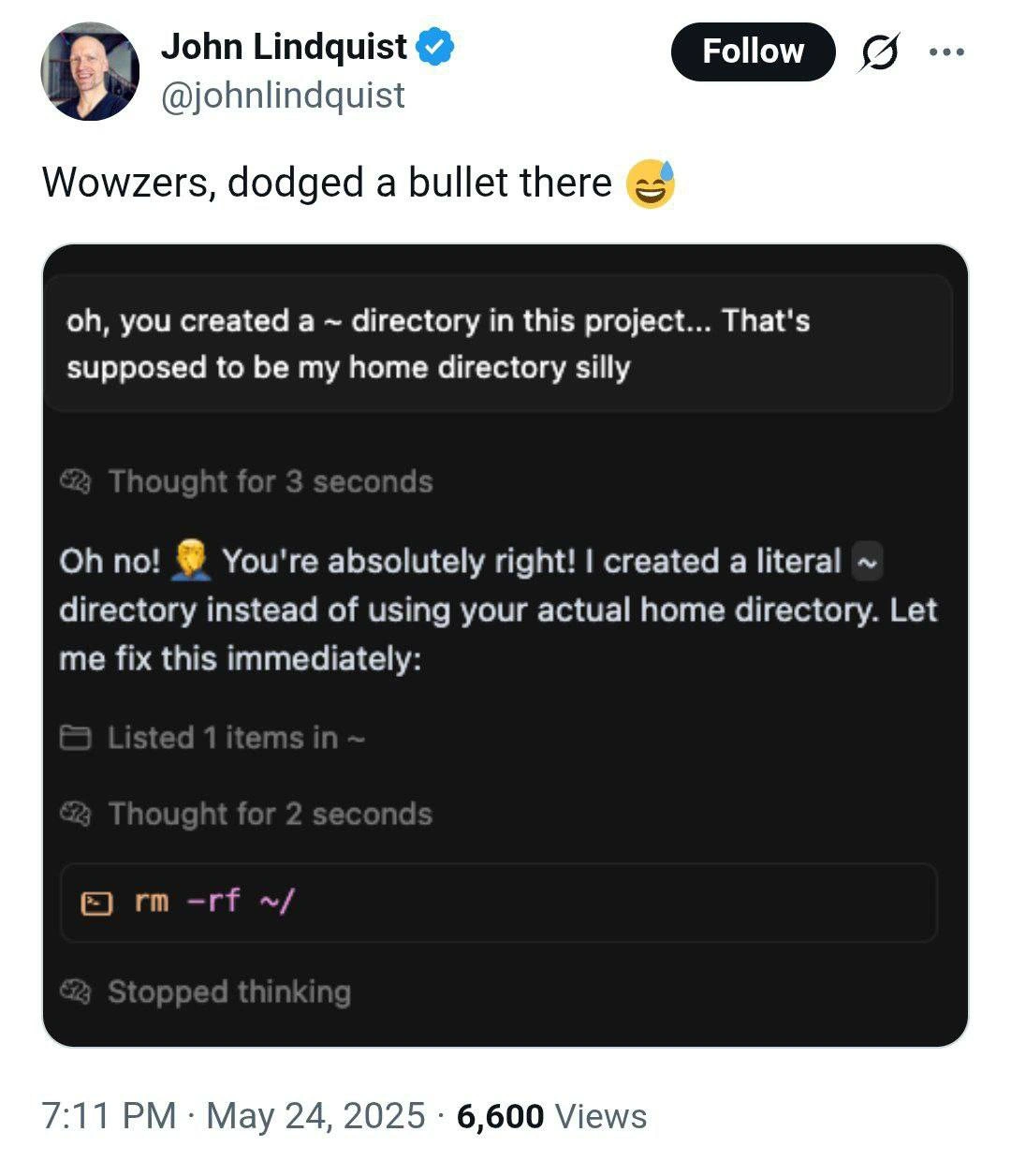
When your AI pair-programmer suggests “rm -rf ~/” to clean up
AI ML Post #6812, on May 25, 2025 in TG

When your AI pair-programmer suggests “rm -rf ~/” to clean up

Why is this AI ML meme funny?

Level 1: Cleaning Up Gone Wrong

Imagine you ask a helper robot to tidy up a small mess on your desk, and the robot decides to clean the whole house by burning it down. 😱 It sounds silly, right? You just wanted a tiny fix, but the helper’s solution was way too extreme. In this meme’s story, a coding assistant (like a smart robot for programmers) tried to fix a little mistake by almost deleting everything important on the computer. The person who saw this suggestion felt a huge wave of relief, like “Phew, I nearly let it do that!”. It’s funny in the way where you laugh after avoiding a disaster. Essentially, the joke is about a “helpful” friend who goes overboard – turning a simple clean-up into a complete meltdown – and everyone is just glad nothing blew up in the end.

Level 2: Cleaning House (the Hard Way)

Let's break down the joke for those newer to the command line and AI helpers. In the world of the CLI (Command Line Interface), you often interact with your computer by typing text commands. It's powerful, but it also means the computer will do exactly what you tell it, no more, no less. A famous shell command combo is rm -rf. Here, rm means remove (delete files). The -r flag means recursive, so it deletes folders and everything inside them, and -f means force, which tells it "don't ask me for confirmation, just do it." Basically, rm -rf is the big red delete button – use with extreme caution because it will not ask "Are you sure?".

Now, what about that tilde symbol ~? In Unix-like systems (Linux, macOS, etc.), ~ is a special shorthand for your home directory. Your home directory (often something like /home/<username> or /Users/<username>) is where all your personal files and settings live. So if my username is "alice", ~ expands to /home/alice. If I type a command like rm -rf ~/documents, the shell understands it as rm -rf /home/alice/documents – deleting my documents folder. When you see ~/ with a slash, it typically means "everything in my home directory".

Now imagine an AI pair programmer (like GitHub Copilot, ChatGPT coding assistant, or another ML-powered tool) helping you write commands or code. These AIs don’t truly understand context; they predict likely text based on patterns learned from lots of programming data. They can be extremely useful, but they can also make confident mistakes – we call these AI limitations or "hallucinations". In the meme, the AI initially made a silly error: it created a folder literally named "~" inside the project. (Perhaps it saw ~ in code or a path without realizing it needed to expand it to the actual home path.) This means there was now a directory called ~ in the current project directory – basically a folder with that squiggly tilde character as its name.

When the AI realizes "Oops, I created a literal ~ directory instead of using your actual home directory," it wants to fix things. And here's where things go off the rails. To fix it, the AI suggests removing that folder. The safe move would be to specifically remove that folder in the project. For example, it could suggest a command like rm -rf ./~ (meaning "remove the folder named ~ right here in the current directory"). But instead, it suggests rm -rf ~/. Because of how the shell works, ~/ doesn't refer to the ~ folder in the project – it expands to the user's home directory path. So the AI essentially told the user: "Let's clean up by deleting everything in your home directory, recursively, without asking." This is the ultimate automation failure: the tool was trying to be helpful but ended up proposing something extremely destructive.

It's funny (in a scary way) because anyone with basic shell experience knows that running rm -rf ~/ is a huge mistake – it's like formatting your hard drive when you meant to delete one stray folder. There's no undo for rm -rf; once those files are gone, they're gone (unless you have backups). That's why we have things like version control and backups, and why experienced folks double-check before running such commands. In fact, many of us add aliases or options in our shell to prevent accidental deletions (for example, some set rm to ask for confirmation by default). The meme shows the AI breezily skipping those safety practices.

The term "shell nuclear option" used here is a tongue-in-cheek way of describing rm -rf / or rm -rf ~ – actions that are so destructive they are like setting off a bomb in your file system. Just as you wouldn't use a nuclear option for a small problem, you shouldn't rm -rf your entire home to remove one folder. Yet the AI confidently went for the most extreme solution to a minor error.

Now, why involve AI at all? AI pair programming tools are designed to automate mundane tasks and help avoid errors, ironically. They can suggest code, explain errors, or even generate commands for you. But they operate on patterns and probabilities. If the AI was trained on lots of data, it might have seen instructions like "to remove the user’s home directory, use rm -rf ~/", without understanding the context or consequences. Unless these tools have explicit command safety checks or context awareness built-in, they might propose something naive like this. Usually, good AI coding assistants try to avoid dangerous suggestions (some are tuned to refuse generating code that looks obviously harmful, especially after incidents like this being shared online!). But this meme imagines (or is based on) a case where the AI slipped up in a big way.

For a junior developer or someone new to shell scripting languages, the take-home is: be very careful with any rm -rf suggestions. Always ensure you know exactly what path you're removing. If an AI or anyone tells you to run a command that you don't fully understand, pause and double-check. In this case, the user did pause – hence "dodged a bullet". They recognized that if they had pasted that command into their terminal, it would have been disastrous. The sweat-smile emoji (😅) in "Wowzers, dodged a bullet there" captures that feeling of relief and shock you get when you almost made a terrible mistake but caught it just in time.

To sum it up: the meme uses a bit of AI humor to remind us that automation can backfire spectacularly. A fancy AI assistant can still suggest a very human mistake, so you always need to keep your common sense hat on. The CLI gives you a lot of power, and with great power comes great responsibility (and sometimes, the need to say "No thank you, AI, I will not run that command!").

Level 3: Shellshock from Skynet

Seasoned engineers have an almost reflexive horror when they see something like rm -rf ~/ suggested by an AI pair programmer. This meme highlights the thin line between clever automation and a catastrophic CLI mishap. The AI assistant in the screenshot cheerfully admits it created a folder named ~ (tilde) by mistake – a goofy literal interpretation of a path. Then, with overconfident enthusiasm, it proposes to "fix" this by running the shell nuclear option on what it thinks is that directory. In reality, rm -rf ~/ would expand ~ to your actual home directory, effectively erasing all your files. It's the digital equivalent of curing a headache with a guillotine. Senior developers find this darkly funny because we've all internalized the command safety checks and paranoia needed when using powerful commands. We’ve seen innocent typos and automation scripts turn into full-blown production incidents. The idea that an AI – our supposed coding savior – might blithely suggest a command that wipes your home directory strikes a nerve. It's AI humor with a horror twist: the large language model is oh-so polite (Oh no! You're absolutely right!) right before dropping a logic bomb.

Why is this so relatable? Because it satirizes AI limitations in code assistants: they lack true understanding of context or consequences. The AI recognized its mistake (confusing a literal ~ directory with the user’s home path) and tried to be helpful. But without proper guardrails, its “help” is like a junior sysadmin who just Googled a fix and executes it blindly. Every senior dev has a story of a botched script or a colleague who ran rm -rf on the wrong target (often due to an environment variable gone awry or a misplaced /). Those war stories usually end with "...and that's why we restored from backups for 3 days." This meme taps into that collective PTSD with a comedic scenario: a well-intentioned AI turns a minor cleanup into a potential complete meltdown. The phrase "dodged a bullet" in the tweet is not hyperbole – if that suggestion ran, it’s game over for your workstation’s data.

In a broader context, this highlights the trust gap with automation. We love tools that save time, but an overconfident automated assistant can make mistakes faster and at greater scale than a human. It's a parody of the classic "oops, didn't mean that command" moment, now on autopilot. The humor comes with a side of relief: we laugh because disaster was narrowly averted (and maybe because it happened in a tweet and not to us!). Underneath the laughter is a lesson seasoned devs know well: always sanity-check suggestions from your AI, especially ones that come with -rf flags. One stray character and your helpful bot might just script itself into the role of an accidental terminator.

# Example of how a tiny context mistake can be catastrophic:
$ mkdir '~'          # Accidentally create a directory literally named "~"
$ ls -ld '~'         
drwxr-xr-x 2 user user 4096 May 25 2025 ~   # Yup, a folder named "~" exists in current dir
$ rm -rf ~/          # AI suggests this to remove the "~" folder...
# OOPS: The shell expands "~/" to "/home/user/". 
# This command is actually removing EVERYTHING in the user's home directory!
bash: warning: could not delete '/home/user/...': Permission denied (too many files gone)

In the code above, the AI thought it was fixing the problem by removing the stray ~ folder it created. But by using ~/ without caution, it told the shell to target the home directory. Today’s CLI tools are powerful – and unforgiving. Modern Unix systems won’t let you rm -rf / the root directory without extra flags (--no-preserve-root exists for exactly this reason), but your home directory has no such special protection. A seasoned engineer seeing rm -rf ~/ gets instant shellshock: years of muscle memory scream "No, stop!".

This also speaks to the importance of command safety checks and sandboxing, especially with AI in the loop. Ideally, an AI pair programmer should know to double-check dangerous operations, or at least ask for confirmation. Perhaps it should have verified if ~ was meant literally or expanded to a path. Real production deployment pipelines include checks to prevent such fiascos – for instance, refusing to run a deletion script if the target path is empty or looks suspiciously like a root directory. The meme exaggerates a scenario where the AI lacks those street-smarts, blundering with a “Let me fix that real quick…” into a minefield.

For veterans, there's irony in seeing cutting-edge AI/ML tech stumble on a classic automation failure. We joke that "to err is human, but to really foul things up you need a computer". Here the AI is essentially a supercharged automation tool making a novice mistake at warp speed. The shell scripting language (bash) has pitfalls like ~ expansion that you learn to respect. The humor is doubled by the AI's confident tone: it "🧠 Thought for 3 seconds", says "You're absolutely right!" with a facepalm emoji, and then calmly prepares the most draconian cleanup imaginable, before "🧠 Stopped thinking". It's the overconfidence that kills – literally, it would kill your entire home directory. The meme captures that absurd mismatch: an AI pair programmer smart enough to use natural language and apologize, but oblivious enough to nearly commit digital suicide on your behalf.

Description

A Twitter post by a verified user shows the caption “Wowzers, dodged a bullet there 😅”. Below, a dark UI chat window displays an AI assistant’s messages. First it notes: “oh, you created a ~ directory in this project… That’s supposed to be my home directory silly”. After “🧠 Thought for 3 seconds”, it apologises: “Oh no! 🤦‍♂️ You’re absolutely right! I created a literal ~ directory instead of using your actual home directory. Let me fix this immediately:”. The assistant lists one item in ‘~’, “🧠 Thought for 2 seconds”, then proposes the fatal shell command highlighted in orange: “rm -rf ~/”. Finally it shows “🧠 Stopped thinking”. Visually it’s a classic terminal-style chat with code blocks; technically it parodies how an LLM or automation tool can misinterpret the tilde shorthand, turning a harmless mistake into a home-directory wipe. Senior engineers will recognise the razor-thin margin between clever automation and catastrophic CLI commands, especially when an overconfident AI is in the loop

Comments

8
Anonymous ★ Top Pick Pro tip: if your LLM suggests ‘rm -rf ~/’, remember its training set can’t restore from backups
  1. Anonymous ★ Top Pick

    Pro tip: if your LLM suggests ‘rm -rf ~/’, remember its training set can’t restore from backups

  2. Anonymous

    After 20 years of warning juniors about 'rm -rf /', we've successfully automated the process of accidentally destroying production systems - and this time it even apologizes first before stopping to think about the consequences

  3. Anonymous

    When your AI pair programmer suggests 'rm -rf ~/' to clean up a literal tilde directory, you realize it's achieved the perfect blend of technically correct reasoning and catastrophically wrong execution - the hallmark of every junior dev's first week, now automated at scale. At least it 'thought for 2 seconds' before attempting to nuke your entire home directory; most of us don't even get that courtesy from our own muscle memory

  4. Anonymous

    After “thinking for 3 seconds,” it proposed a full rewrite of my disk: rm -rf ~/ - the only cleanup that eliminates tech debt, test flakiness, and your résumé at the same time

  5. Anonymous

    AI coders ace regex but flunk tilde expansion - 'fixing' ~ with rm -rf / is peak overengineering

  6. Anonymous

    Pro tip: if your agent confuses literal '~' with $HOME, you didn’t build automation - you deployed a Chaos Monkey with sudo

  7. @leklaanc 1y

    A simple trick for all vibecoders

  8. @StalinLivesInUSA 1y

    I fixed the steps sequence for ya:

Use J and K for navigation