When the Milan ticket kiosk gives you cmd.exe instead of a ticket
Why is this CLI meme funny?
Level 1: Climbing Through the Window
Imagine you’re trying to get into a house, but the front door has a super confusing lock that you just can’t open. Meanwhile, there’s a side window left wide open. Instead of struggling with the weird door lock, you simply climb in through the window. Silly, right? You were just trying to do something normal (go through the door), but you had to use a totally unintended route. In this story, the “front door” was the ticket machine’s touch-screen for buying a ticket – it was so confusing (or maybe broken) that the person gave up on it. Instead, they found a “window” into the machine’s computer system (a secret back-end screen with text where you can type commands). That window was not supposed to be open, but it was! It’s funny (and a bit absurd) because normally the easy way is through the front door and sneaking in through a window is hard. Here, the easy way turned out to be the sneaky way!
Level 2: Ticket to Terminal
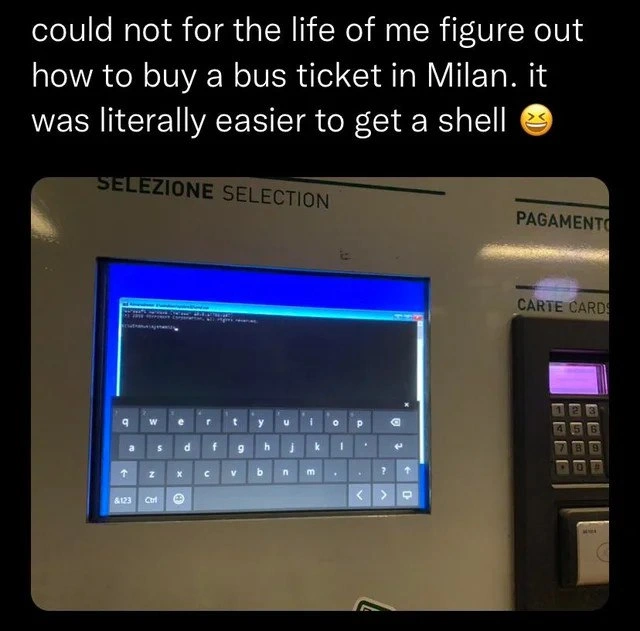
Let’s break down what’s happening here in simpler terms. You know those machines at train stations or bus stops where you touch the screen to buy a ticket? That’s a ticket kiosk. It usually runs a special program that displays a menu for destinations, ticket types, payments, etc., and it’s supposed to be locked down so you can’t do anything else on it. In this case, the ticket kiosk in Milan clearly had a mishap: instead of the normal ticket-buying screen, it’s showing a Windows command prompt (that black window with C:\Windows\system32\cmd.exe in the title bar). This tells us the kiosk isn’t just a simple dedicated gadget – it’s literally a regular Windows PC behind the scenes. The people who set it up probably intended to use Windows but hide it behind a full-screen ticketing app, a setup commonly referred to as kiosk mode. Kiosk mode is like putting the computer in a cage where only one application (the ticket software) is allowed to run. However, here we see the creature has escaped its cage!
So what exactly is that black screen with text? That’s called a CLI (Command Line Interface), also known as a “shell” or command prompt. It’s a way to interact with the computer by typing text commands instead of pressing buttons on a graphical menu. If you’ve ever seen a movie where a hacker is furiously typing into a black screen with white or green text – that’s the idea. In Windows, the default CLI program is cmd.exe (often just called “Command Prompt”). It lets you do things like browse folders, launch programs, or check network settings by typing commands. It’s a very powerful tool for someone who knows how to use it. But on a public ticket machine, no normal user is ever supposed to see that! It would be like a Coca-Cola vending machine suddenly showing you a Windows desktop, or a bank ATM minimizing its transaction app and revealing the Windows Start menu. It’s jarring and clearly not intended for public eyes.
The photo also shows an on-screen keyboard pop-up at the bottom. That’s the virtual keyboard Windows provides for touchscreens or for accessibility (when a physical keyboard isn’t available). The presence of that on-screen keyboard gives us a clue about how this might have happened. Many kiosks don’t have physical keyboards attached, so if you want to type anything, the on-screen keyboard is the only option. Perhaps the user discovered a way to summon that keyboard (there might be an accessibility icon on the screen or a certain tap gesture that brings it up). Once the keyboard was up, if the system wasn’t locked down well, they could use it to hit some special key combinations. For example, pressing Win + R on Windows brings up a “Run” dialog box. From there, typing cmd and hitting Enter would launch the Command Prompt window. On a properly secured kiosk, that shouldn’t be possible – the Run dialog would be disabled or the cmd.exe program would be blocked or require a password. But apparently, none of that was in effect here! Another possibility is that the ticket application itself crashed or was closed, and the underlying Windows desktop became visible. In that case, the user might have just tapped around until they found a way to open the command prompt (since Windows was basically in normal mode at that point). Either way, it boils down to the machine not preventing access to the Windows system when it should have.
Now, why is this a security issue? Think of it like this: the ticket kiosk is meant to do one thing – sell you a bus ticket – and nothing more. You’re not supposed to be able to mess with it beyond that. If someone can reach the Command Prompt, they suddenly have much more control than any customer should. It’s like a theme park ride where a visitor somehow gets into the operator’s control room. In computer terms, this is essentially a broken access control problem, meaning the system’s safeguards that should keep a user in the “guest area” failed. A random person managed to enter the “staff only” part of the computer. That’s dangerous because a malicious person could misuse that power: they might try to dig into files, install malware, or even disable the machine. Even if the person isn’t trying to do harm (in our case it seems they were just curious or frustrated), just exiting the normal kiosk software can disrupt service. Imagine the next traveler coming up to buy a ticket and seeing a black command prompt screen – they’d be totally lost (and probably assume the machine is broken). So, this is a big oversight by whoever set up the system. It’s an example of a security misconfiguration – basically, a settings mistake that leaves a door open that should have been locked.
For someone starting out in development or IT, the lesson here is the importance of proper configuration and good user interface design, especially for public-facing systems. These might not be the flashiest parts of tech work, but they are critical. If you configure a system poorly, users can end up wandering into parts of the system they should never see. And if you design a UI poorly, people can get so confused that they look for any other way to accomplish their goal. In this story, both things went wrong: the UI design was confusing enough that a person abandoned it, and the system security was weak enough that they stumbled into the admin console. It’s a bit like a real-life cautionary tale. Next time you work on an app that runs on a kiosk or a locked-down device, remember this scenario. Always ask: “What if someone tries to do something we didn’t expect?” and “Is the normal path easy enough that no one feels compelled to get clever?” Balancing usability (making the system easy and obvious for legit users) and security (making sure people can’t abuse the system) is tricky, but absolutely necessary. The Milan ticket machine fiasco is a memorable reminder that if you neglect either aspect, you might end up as the next viral meme for all the wrong reasons.
Level 3: The Kiosk Shell Game
"could not for the life of me figure out how to buy a bus ticket in Milan. it was literally easier to get a shell 😆"
This meme combines equal parts security blunder and UX failure into one absurd situation. Imagine walking up to a ticket vending machine in Milan, expecting a simple touch-screen menu to buy a bus ticket, but instead you end up staring at a Windows command prompt. For seasoned developers and IT folks, that image is both hilarious and painfully familiar. It’s poking fun at a classic pattern: poorly secured public kiosks that accidentally drop into a tech interface regular users should never see. We’ve all spotted those airport info displays or ATM screens that crash and reveal a Windows desktop or an error dialog – it’s the same genre of humor. Here, it’s even more on-the-nose: the machine is running cmd.exe, the old-school Command Line Interface (CLI), as if a random traveler suddenly became an admin on the system. The incongruity is golden: buying a bus ticket is supposed to be straightforward for anyone, yet here the machine is essentially saying, “Alright, just tell me directly what you want in DOS-style commands.”
The tweet’s author jokes that getting a shell was easier than navigating the normal UI. That’s the kind of salty quip that makes developers smirk knowingly. It highlights how user-hostile the interface must have been if a tech-savvy user would rather play hacker than try to figure it out. It’s a reversal of the usual roles: normally privilege escalation (obtaining a high-privilege shell) is a complex, illicit act, while buying a ticket is trivial and legitimate. But in this upside-down scenario, the legit path was maddeningly convoluted, and the illicit path (hacking into a Windows shell) turned out to be the path of least resistance. That’s dark comedy for anyone who’s wrestled with bad enterprise software or labyrinthine user flows. It’s essentially saying, “Your system’s security is so lax and your design so bad that hacking it is literally easier than using it properly.” Ouch. This is a prime example of security vs. usability failure — the system failed on both fronts at once, much to our amusement.
From an engineering standpoint, it’s a textbook case of Security Misconfiguration. The kiosk obviously wasn’t locked down correctly. In an ideal setup, a public-facing Windows kiosk would have all special keys and system dialogs disabled or password-protected. There’s an "Assigned Access" (kiosk) mode in Windows 10+ that lets you restrict a user account to a single app, and group policies to disable things like Task Manager, Alt+Tab, the Windows key, etc. Clearly, something slipped through the cracks here. Maybe the vendor left a default admin password or forgot to disable a certain gesture that brings up a system menu. Or perhaps the custom ticket software crashed, and when it did, the system ungracefully fell back to the Windows desktop. (In the photo, you can see a Windows taskbar or title bar, so it looks like the kiosk application wasn’t covering the whole screen at that moment.) There might even have been an on-screen keyboard exploit involved: often there’s an accessibility icon that launches the on-screen keyboard. If that wasn’t removed, our clever user could have tapped it, then used the on-screen keyboard to hit a special shortcut (for example, Win + R to open the Run dialog, then typed cmd). Voilà – instant shell access! The specifics vary, but the end result is the same: a kiosk shell bypass. The normal layers of access control failed, and the user got into a part of the system that should have been off-limits.
What’s really relatable (and cringeworthy) for developers is imagining how this slip-up happened. It’s likely the product of a rushed deployment or the assumption that “users won’t try to break things.” Maybe the contractors setting up the Milan ticket machine didn’t anticipate a bored or frustrated techie poking around. (Pro tip: if something has a computer inside, some nerd will eventually try to tinker with it.) There’s often a gap between best practices and reality in these situations. Best practice says you thoroughly test your kiosk in locked-down mode: try every weird key combo, make sure the app auto-relaunches if it crashes, disable all known OS hotkeys, and maybe even physically secure ports so nobody can plug in a USB or keyboard. But in reality, perhaps the project was behind schedule or over budget, and they shipped it “secure enough” without heavy testing. Or an update/patch might have reset some security settings unknowingly. Any seasoned IT admin has tales of some configuration bug or oversight leading to public embarrassments like this. It’s equal parts horror and humor for the tech community — horror at the security failure, and humor at the absurdity of seeing a bus kiosk suddenly turn into a PC.
The meme also underscores how bad UX/UI design can drive even a normal user to desperate measures. The caption implies the ticket-buying interface was so confusing (or non-functional) that the person simply gave up on it. That’s a huge user experience failure: a public ticket machine should be dead simple to use, ideally in multiple languages, with clear steps. If someone with enough know-how decides that invoking a command prompt is preferable to using the official UI, you know the UI failed spectacularly. It’s like if an electronic door lock was so unintuitive that people start climbing in through windows instead — a real “you had one job!” moment for the designers. For developers and IT pros, this is both funny and a facepalm: the one thing this machine needed to do (sell a ticket easily) it couldn’t, and one thing it should never do (expose the system internals) it did.
All in all, the humor comes from the absurd contrast and the double fail on the part of whoever set this system up. It’s a DeveloperHumor two-for-one special: mocking sloppy security and mocking terrible design in one go. The image basically shouts that the system had one job and it messed it up in a spectacular way. For the tech crowd, we laugh but also shake our heads, because we’ve seen similar scenarios or can imagine how such a thing transpired. It’s a comical reminder that in the real world of software, sometimes the “impossible” (a random user getting a shell on a kiosk) becomes possible due to oversight, and often at the worst time. At least this user got a funny story (and the internet got a meme) out of it – though we bet the engineers responsible for that kiosk scrambled to fix this bug as soon as they found out!
Level 4: Turing-Complete Ticket Booth
For all its mundane purpose of printing tickets, this machine is actually a fully general-purpose Windows computer under the hood. That’s a common design choice – using an off-the-shelf OS like Windows or Linux to power kiosks because it’s easier to build on a familiar platform – but it also means the device inherits all the complexity (and pitfalls) of a normal PC. In other words, it’s a Turing-complete system capable of doing anything a regular computer can, given the right inputs, even though it’s supposed to be restricted to one task. Kiosk mode on Windows is intended to enforce those restrictions by limiting the user to a specific application (like the ticket-vending interface) and blocking access to everything else. However, trying to perfectly sandbox a general-purpose OS is extraordinarily difficult – there are countless execution paths and interface tricks a developer might never anticipate. It’s like trying to seal every possible crack in a dam; miss one tiny gap (say, an on-screen keyboard loophole), and the whole ocean of functionality bursts through.
In this meme, that’s exactly what happened: the frustrated user discovered a path from the limited kiosk UI to the Windows shell (C:\Windows\system32\cmd.exe). Breaking out to a shell is the last thing you want a random commuter doing on a public kiosk, so this scenario is essentially a Broken Access Control failure – the kiosk’s software should never allow a public user to reach the OS’s command layer, but here that barrier was breached. Once you pop a shell (as hackers like to say), the kiosk’s whole security premise collapses. The machine stops being a single-purpose ticket dispenser and reverts to being a fully programmable computer. > “If an attacker can physically touch your computer, it’s not your computer anymore.” This old security adage holds true: physical access (or in this case, prolonged public interactive access) means an attacker can try all sorts of input combinations that a developer may never have considered. All it takes is one overlooked keystroke combo or gesture, and the underlying system will dutifully respond with its full capabilities.
What’s fascinating here is the interplay between usability and security. Operating systems include features like on-screen keyboards and special key combos (e.g. the Sticky Keys dialog or other accessibility shortcuts) to ensure that even users with disabilities can always interact with the machine. In a hardened kiosk scenario, those very accessibility features can turn into backdoors if not properly locked down. They often run with high privileges or at system level by design (so they’re available even at the login screen), which makes them an enticing target for exploitation. This highlights a core dilemma: a system that’s flexible and user-friendly for all scenarios is inherently harder to completely lock down. The paradox is that the more accommodating and powerful an OS is, the more ways there are to poke at its edges. Here, something as benign as a virtual keyboard became the key to escape the intended UI. The humor (and irony) is that the simplest way to use the machine ended up being to unleash the infinite possibilities hidden behind the scenes, rather than to navigate the confusing official interface. The user essentially said, “Forget the normal menu, let’s talk directly to the brain of this thing,” – and the brain (the OS) happily responded with a command prompt.
Description
Meme screenshot shows a public bus-ticket vending machine in Milan. A black banner caption at the top reads, "could not for the life of me figure out how to buy a bus ticket in Milan. it was literally easier to get a shell 😆". The kiosk bezel is labeled "SELEZIONE SELECTION" with "PAGAMENTO" and a card reader on the right, but the touchscreen displays a full Windows desktop window titled "C:\Windows\system32\cmd.exe" running a command prompt over a blue desktop background, with an on-screen keyboard covering the lower half. Instead of the normal ticket UI, the user has somehow escaped kiosk mode and obtained a shell. Technically, the image pokes fun at poor kiosk hardening, broken access control, and how user-hostile UIs sometimes make privilege escalation easier than legitimate usage

Comments
7Comment deleted
Pro tip for Milan’s transit kiosk: skip the 5-step ticket flow and just hit Shift five times - apparently the cheapest fare is a Kerberos golden ticket straight to NT AUTHORITY\SYSTEM
When your UX is so bad that users accidentally discover CVE-2024-MILAN before finding the "Buy Ticket" button, you know someone's getting a strongly worded JIRA ticket about "improving the customer journey."
The kiosk's threat model assumed nobody could reach a shell; the UX assured nobody could reach checkout - only one of those guarantees held
When your production kiosk's error handling is so robust that 'Press Alt+F4 to exit' becomes 'Press any key for root access.' This is what happens when you deploy Windows Embedded without proper lockdown policies - the user journey goes from 'Insert card' to 'INSERT INTO users' faster than you can say 'least privilege principle.' At least the on-screen keyboard works flawlessly, which is more than we can say for the actual ticket purchasing flow. Classic case of spending millions on the hardware and $50 on the security audit
Milan kiosks run bash: normies panic at the prompt, devs instinctively type 'man ticket'
Milan’s ticket kiosk: 6 dialogs to pay, Win+R via the on‑screen keyboard to pop cmd. That’s not kiosk mode, that’s a public CTF
When your kiosk hardening is just “hide the taskbar,” Win+R → cmd.exe becomes the real checkout flow - pretty sure that puts the card reader in PCI scope