
Skip to content
DevMeme
184 of 7435
When the IDE says “push successful” and panic instantly sets in
VersionControl Post #224, on Mar 13, 2019 in TG

When the IDE says “push successful” and panic instantly sets in

Why is this VersionControl meme funny?

Level 1: The Big Red Button

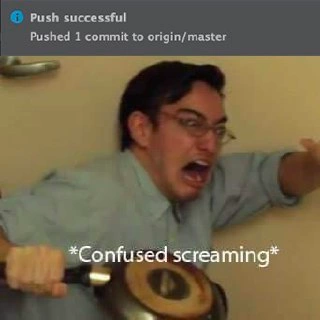
Imagine there’s a big red button with a warning sign that says “Do Not Push.” You push it anyway (because of course you do). The very second you do, your eyes go wide and you dive behind the couch, clutching a pillow like a shield. You’re thinking, “Uh-oh… what’s going to happen now? Is something going to explode or start an alarm?” You feel that rush of panic because you know you can’t un-press the button. That’s the feeling this meme is showing in a nutshell. In the picture, the developer basically pressed his project’s big red launch button – he sent his work out for everyone to use – and now he’s crouching with a frying pan, worried about the bang that might follow. In other words, he did something that seemed fine a moment ago, and now he’s scared of the consequences. It’s a funny way to show that even when something says “Success!”, you might still duck for cover if you’re not sure what comes next. Just like you would panic after pressing a mysterious button and realizing you can’t take it back, the developer panics right after pushing his code, nervously waiting to see if anything bad happens.

Level 2: Straight to Production

Let’s break down what’s happening in simpler terms. The top part of the meme shows an IDE (Integrated Development Environment) notification saying “Push successful – Pushed 1 commit to origin/master.” In plain English, that means the developer just used Git (a version control tool) to send some code changes (one commit, which is like a snapshot of his edits) from his computer to a shared remote repository. The remote is nicknamed origin by default, and master is the name of the main branch in that repository. In many projects, the master (or “main”) branch represents the official codebase – the one that could be deployed or released to users. So pushing to origin/master is essentially updating the primary line of code that everyone else on the team relies on and that might go directly into the app or website people use.

Why would that simple action cause panic? Because it’s a bit like editing the final copy of a book without anyone else proofreading it. Most teams avoid pushing directly to the master branch precisely to prevent mistakes from going live unchecked. The usual workflow is to create a new feature branch for your work (basically a safe workspace for your changes), then push that branch to the remote and open a Pull Request (PR). In a pull request, your teammates review the code, automated tests run, and only after everything looks good does the code get merged into master. Many repositories have branch protection rules turned on, which enforce this process. Branch protection can require that PRs get approved by another developer and that all tests pass, and it will block any direct push to the protected branches (like master) that doesn’t follow the rules. If such protection was in place here, the developer’s attempt to push would have been rejected with an error, essentially saying “Stop! You’re not allowed to do that.” The fact that he got a “Push successful” means no safety mechanism stopped him – he either mistakenly committed straight to the master branch or the project doesn’t have those safeguards. In simpler terms, he sent his changes straight to production with no one else looking at them first.

Now, the bottom image with the guy crouching and holding a frying pan shield has a caption “Confused screaming”, which is a funny way to show he’s freaking out. Why the freak-out? Because if there’s a bug or problem in that commit he pushed, it’s now immediately in the master code. That could mean the next person who pulls the code gets the bug, or if the project automatically deploys the master branch, the bug could already be live for users. It’s like hitting “Send” on a message and then realizing you sent it to the wrong group – you can’t take it back, and now you’re a bit scared of what’s going to happen. Here, the developer is scared that his last change might crash something or cause an issue for everyone. The frying pan he’s holding is a silly little “just in case” shield, like he’s preparing for an explosion or an attack. In real software terms, after a risky push like that, a developer might start rapidly checking whatever monitoring tools or tests they have, essentially hiding behind whatever flimsy protection is available and hoping nothing blows up.

This meme highlights a common experience for developers: instant release regret. Even if you didn’t intend to bypass the usual process, the moment you realize your code is in the wild, your mind races through all the things you might have overlooked. Did I run all the tests? What if this code has an error that will break the login or checkout for users? That anxiety is common enough that there’s a nickname for it – deployment panic or release anxiety. The funny part is that the IDE is saying “Push successful,” like everything is fine, but the developer is reacting as if a fire alarm just went off. It shows the difference between the computer’s perspective (“The code went up to the server, operation succeeded.”) and the human perspective (“Oh no, that change is live…what if something goes wrong?!”).

For someone new to this, the key takeaway is: be careful pushing to the main branch. It’s not that pushing code is bad – deploying updates is what developers do – but it should be done with care and usually with some procedure. When you do it haphazardly, you end up like the guy in the meme: technically things worked, but you’re nervously bracing for problems. That’s why teams have processes like code review, testing, and branch protection – to make releasing code a calm, routine event instead of a panic-inducing gamble. The meme exaggerates the panic for humor, but it’s rooted in that real feeling of “I just did something risky and I really hope I didn’t mess everything up.”

Level 3: Master of Disaster

The seemingly innocuous IDE message “Push successful – Pushed 1 commit to origin/master” might as well be a jump-scare for seasoned engineers. In theory, it’s a confirmation that your code changes have safely landed on the master branch of the remote repository (often referred to as origin in Git). In practice, seeing that message pop up when pushing directly to the primary branch sends a jolt of adrenaline through any developer who’s been around the block. Why? Because it usually means you’ve just bypassed the normal safety nets. No code review, no QA approval, possibly no automated tests gating the merge – just your code immediately in the most critical branch. It’s the software equivalent of crossing the streams in Ghostbusters: technically possible, but universally agreed to be a bad idea unless you really know what you’re doing.

In a well-disciplined Git workflow, direct pushes to the master (or main) branch are typically forbidden through branch protection rules. These rules exist specifically to prevent this exact scenario: the heart-stopping moment when you realize you may have unleashed unvetted changes upon everyone. If proper protections were enabled here, the IDE wouldn’t be cheerfully chirping “Push successful” at all – you’d get a nasty rejection telling you the push was denied. (Picture running git push origin master and seeing an error like “remote rejected – protected branch update failed” instead of success.) The absence of that error and the presence of this success notice tells us this repository likely has zero guardrails. It’s the Wild West of version control, and our panicked developer just became the unwitting cowboy who fired off code to origin/master from the hip.

Now consider what happens the instant after this push. Many teams have Continuous Integration/Continuous Deployment pipelines wired to the master branch. A commit to master might automatically trigger test suites, build processes, and even a deployment to production. So that tiny “push successful” toast might as well read, “🚀 Deployment initiated. May the odds be ever in your favor.” Our poor developer knows that any second now, the CI/CD pipeline could start red-lighting with failures, or worse – the new code goes live and something critical breaks. This brand of release anxiety hits hard: he’s suddenly replaying every line of code in his head. Did I remember to run all the tests? What if I left a stupid bug in there? It’s that split-second realization that a “push to master” isn’t the end of a task, but the beginning of potentially firefighting if things go sideways. The meme’s caption “Confused screaming” perfectly captures that mental state: the code technically shipped, and now you’re waiting for the other shoe to drop.

The image of the man cowering in a doorway with a frying pan for protection is hilariously on-point. Once you push to master, there’s often little you can do except brace yourself and watch the monitors (or Slack alerts) for signs of trouble. The frying pan is a comically flimsy shield – just like our only real “shield” after a reckless push is maybe a quick git revert to undo the commit, which is small comfort if production is already on fire. The developer’s pose says, “I’ve armed myself with the bare minimum and I’m expecting chaos to come through that door any second now.” It’s a visceral portrayal of instant regret. One moment you happily click “Push”, and the next you’re basically hiding under your desk, thinking, “Oh no... please tell me I didn’t just break everything.” The humor here comes from that dramatic contrast: the IDE’s bland, light-grey notification says success, but the developer’s body language screams panic. Seasoned devs recognize this irony immediately and can almost hear a grizzled colleague muttering, “Congrats, you just became the on-call person's problem – which is probably you. Better keep that frying pan handy.”

In the end, this meme pokes fun at a common anti-pattern in version control: pushing to master without a safety net. It’s the kind of mistake most of us make exactly once, because the sheer terror and subsequent scramble to fix things teach a lasting lesson. It highlights the gap between theory and practice: in theory a push succeeding is good, but in practice how and where it succeeds matters a lot. For experienced developers, it’s a laugh wrapped in a wince. We’ve all felt that stomach-dropping moment when you realize your latest commit is now running on the same branch as your production code. It’s funny after you survive it. The meme perfectly captures that “oh no” moment that turns your blood cold — followed (hopefully) by relief when you find out everything didn’t actually explode. It’s a rite of passage in a dev’s career: learning to respect the master branch, or as the joke goes, learning not to “YOLO push” your code and then duck for cover.

Description

The image is split into two parts: at the top, a dark-grey IDE notification bar reads, "Push successful - Pushed 1 commit to origin/master" with a small blue information icon on the left. Below it is a reaction meme frame: a man in a light-blue shirt crouches in a doorway, clutching a frying pan like a shield while stretching his other arm outward in alarm; his face is blurred for anonymity. Over the reaction frame, white subtitle text says "*Confused screaming*". The juxtaposition humorously captures the moment a developer pushes code directly to the master branch and is immediately filled with terror about what unintended side-effects that commit might unleash, highlighting common anxieties around version-control workflow discipline and lack of branch protection


Comments

7
Anonymous ★ Top Pick IDE: “Push successful → origin/master.” Translation for seasoned architects: you just bypassed the entire change-advisory board and scheduled an unscripted chaos test - hope the SOX auditors like improv
  1. Anonymous ★ Top Pick

    IDE: “Push successful → origin/master.” Translation for seasoned architects: you just bypassed the entire change-advisory board and scheduled an unscripted chaos test - hope the SOX auditors like improv

  2. Anonymous

    The scariest part isn't the push to master - it's realizing your pre-commit hooks were disabled and now 47 console.logs, 3 hardcoded API keys, and that TODO comment about your manager are live in production

  3. Anonymous

    The scariest words in Git aren't 'merge conflict' - they're 'Push successful' to a branch you didn't mean

  4. Anonymous

    The five stages of pushing to master: confidence during the commit, satisfaction seeing 'Push successful', brief moment of peace, sudden realization you didn't run the full test suite, and finally the confused screaming while frantically checking monitoring dashboards. Bonus points if it's 4:45 PM on a Friday and you just remembered that one TODO comment that said 'fix this before production.'

  5. Anonymous

    Push successful → origin/master - when you realize branch protection was just a Confluence page and your commit message is about to be quoted in the postmortem

  6. Anonymous

    Push successful to origin/master - the only toast that simultaneously triggers CI, a blue/green deploy, and your sympathetic nervous system

  7. Anonymous

    Push to origin/master: success. Prod outage: the real async callback

Use J and K for navigation
