
Linux Package Managers vs App Store Meme Explained
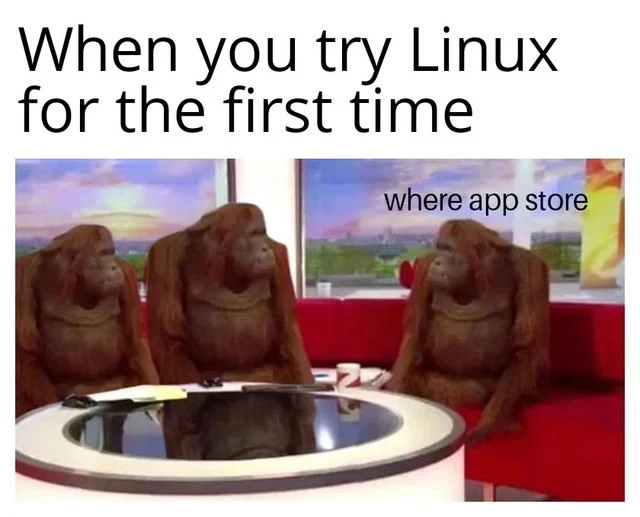
Three confused orangutans stand in for newcomers who expect a phone-style app store on Linux and instead meet package managers, repositories, and terminal install commands.
Level 1: Some Assembly Required
Imagine you’re a kid who just got a new toy, but when you open the box, the toy isn’t fully built yet – it’s just a bunch of pieces and an instruction sheet. You were excited to play right away, so now you’re a little confused, thinking, “Huh? Why isn’t it ready to go?” That’s what’s happening in this meme. The new Linux user expected an easy App Store button they could click (like getting a toy that’s ready to play with), but instead they found out they have to do a few steps themselves to get the app (like putting the toy pieces together). It’s funny because we can all relate to that feeling of “Wait, I have to do it on my own?!” The orangutans look as puzzled as a kid with a pile of toy parts, perfectly showing that “Uh oh, what do I do now?” moment. In the end, the toy will work (and the app will install), but the surprise of not finding an instant, one-click solution is the whole joke.
Level 2: Where's the App Store?
Linux is an operating system (like Windows or macOS), but it works a bit differently, especially when it comes to installing new programs. In this meme, a first-time Linux user is confused because they can’t find an app store. If you’re coming from a smartphone (Android’s Google Play or Apple’s App Store) or from Windows/macOS, you’re used to clicking on a single marketplace icon, searching for an app, and hitting “Install.” On Linux, especially certain Linux distributions (versions of Linux such as Ubuntu, Fedora, or Arch Linux), there might not be an obvious app store icon at all.
Instead, Linux typically uses a package manager to handle software installation. A package manager is a tool (often used through the Terminal) that downloads and installs software for you. Each Linux distribution has its own “repository” (an online server full of vetted software packages). So rather than opening a store app, you usually open a Terminal – which is a window with just a text prompt, no buttons or graphics – and you type a command to install the program you want. For example, on Ubuntu (a popular Linux distribution), if you wanted to install the Firefox web browser, you could open the Terminal and type:
sudo apt-get update    # updates the list of available software
sudo apt-get install firefox
The first command makes sure your system knows about the latest software available. The second command, sudo apt-get install firefox, tells Ubuntu to download and install Firefox from its online repository. Here apt-get is the package manager command (specific to Ubuntu/Debian-based systems), and sudo means “do this as an administrator” (it gives you permission to install stuff). Essentially, you’re telling Linux: “please fetch me this application from the internet and set it up.”
Why are the orangutans in the meme looking so puzzled? Because the new user in the picture is basically saying, “I’m on Linux now, but where is the app store? How do I get apps?” They expected a friendly graphical interface to find apps, and instead they have to use something like the Terminal or a not-so-obvious software tool. It’s like turning on a computer and not seeing an icon you’ve seen on every other device – you’d wonder if something went wrong.
Now, to be fair, some Linux versions do have a GUI (graphical user interface) app for finding and installing software – for instance, Ubuntu has an application called “Ubuntu Software” that lets you browse and install programs with a few clicks, and other distros have their own software centers. But many newcomers either don’t realize that tool is there (it might not literally be called “App Store,” so they overlook it), or they might have installed a version of Linux that doesn’t come with a store-like app by default. So a beginner might genuinely think something is missing because they can’t find an App Store button on the desktop or in the menu.
This meme resonates with developers because it captures a common learning curve moment. If you’ve ever helped someone use Linux for the first time, you’ve probably heard them ask, “Uh, how do I install Chrome on this thing?” The confusion is real! We’ve all been that person at one point, staring at our screen the first time we opened a Terminal window. Eventually, you learn that installing software via the package manager can actually be pretty convenient (it grabs everything you need automatically and keeps things updated). But initially, not having that one-click store feels disorienting – kind of like trying to drive a car and not being able to find the steering wheel at first. The orangutans in the image perfectly capture that “umm... now what?” feeling that every new Linux user experiences.
Level 3: CLI Culture Shock
When a newcomer tries Linux after being used to Windows or macOS, there's an immediate clash of expectations that seasoned developers find both hilarious and relatable. The meme depicts three orangutans seated around a bright news desk with blank, bewildered looks – a perfect representation of the awkward confusion a first-time Linux user feels when searching for something as familiar as an app store. The smallest caption on the image even has one orangutan basically asking:
where app store
This blunt, unpunctuated question floating next to our primate friend succinctly captures the newbie's core frustration.
In the world of operating systems, Linux has its own way of doing things. Instead of a shiny one-click App Store icon like on your phone or Mac, Linux distributions rely on package management and the command-line interface (CLI). New users expect a friendly marketplace app, but are greeted with the need to open a terminal and type out cryptic commands like sudo apt-get install firefox. For someone raised on app stores and graphical installers, this is genuine culture shock. The humor here comes from that stark contrast: the orangutan is essentially every baffled newcomer thinking, "Wait, how do I install stuff on this thing?"
Experienced Linux folks chuckle because they remember being that orangutan. They know that behind the scenes, those terminal commands and package managers like apt, yum, or pacman are powerful tools. These tools pull software from online repositories (imagine curated warehouses of apps) and automatically handle dependencies and updates. It's actually pretty elegant and efficient — no hunting down .exe setup files or dragging .dmg applications around — but to a beginner, it feels like being dropped into a foreign country with no phrasebook.
This meme pokes fun at a classic Developer Experience (DX) problem in desktop Linux. Why do new users often bounce off Linux? Moments like "where's the app store?" are a big part of it. The learning curve can be steep. There's a philosophical difference too: Linux’s open, decentralized nature means there isn't a single company-run store for everything. Each distribution (Ubuntu, Fedora, Arch, etc.) has its own approach to software management, which only adds to the confusion. Sure, some beginner-friendly distros include a GUI tool that works like an app store (Ubuntu’s Software Center, etc.), but if our confused orangutan installed a more minimal flavor or simply didn’t recognize that "Software" app as the app store, they're going to feel lost.
To a veteran, the orangutans' blank stares are funny because we've all seen that scene play out. A friend or junior developer says, "I just installed Linux... where do I go to download programs?" and you get to introduce them to the world of the terminal. It’s almost a rite of passage. They go from panicking "I think my Linux is missing something!" to the enlightened "Oh, I just type those commands and it does it for me." The meme exaggerates the situation (orangutans on live TV, completely flummoxed), which makes it even funnier. It's an absurd visual for an absurd feeling we all recognize.
| New User Expectation | Linux Reality |
|---|---|
| A universal App Store icon for apps | Different package managers per distro (apt, yum, pacman) – maybe a software center if you’re lucky |
| One-click GUI installs with progress bar | Typing commands in a Terminal (ex: sudo apt-get install vlc) and watching text scroll by |
| Self-contained apps (every program brings all its own pieces) | Shared libraries & dependencies managed by the system’s package manager (often with an apt update first to sync up) |
| Apps from one big official store | Apps from multiple sources: official distro repositories plus community/third-party archives you might add |
Over time, even those baffled newcomers learn that this "no app store, use the terminal" approach has its advantages. But the initial surprise is memorable. The orangutan panel is hilariously fitting – a group of intelligent creatures placed in an environment they don't fully understand. It reflects exactly how a new Linux user feels in that first moment: a bit lost, a bit astonished, and wondering if they missed a step. The joke lands because anyone who's been through it can picture themselves at that news desk, scratching their head with the same expression, until someone whispers, "Just open the terminal, I'll show you..."


In Linux, the App Store is a sacred place called `/dev/null`. You just pipe your hopes and dreams into it, and if you're lucky, a compiled binary comes out the other side after a few hours of wrestling with dependencies
In Linux, the “app store” is that existential choice between apt, yum, pacman, snap, flatpak, or ./configure && make && pray your glibc agrees
Twenty years later, you're explaining to the new CTO why the company's critical infrastructure runs on a custom fork of Gentoo because "we needed those compiler flags optimized" and now only Dave from 2008 knows how to update OpenSSL
Ah yes, the classic 'where app store' moment - that beautiful inflection point where you realize your muscle memory for clicking 'Install' is about to be replaced with memorizing whether your distro uses apt, dnf, pacman, or zypper. Welcome to Linux, where the 'app store' is actually seventeen different package managers, three competing universal package formats, and a GitHub repo with installation instructions that start with 'first, compile from source.' But hey, at least you'll finally understand what dependency hell really means
Linux onboarding: you ask for an “App Store” and get a theology class - apt vs dnf vs pacman, the snap/flatpak schism, GPG keys, and mirrors that mysteriously die exactly at deploy time
On Linux, the 'app store' is a SAT-solver talking to GPG-signed repos; checkout is apt/dnf/pacman, and your card declines when the libc ABI changes
First boot: 'Where's the app store?' Terminal replies: 'Held my beer while you compile from source.'
You guys use app store on windows?
The app stores are in the command line, named apt, yum, pacman, pakku, npm, gem e.t.c.
It's not massively
Especially base models with m1
They are the best deal for the price in that form factor
If you are not using Linux at some point in your life, your life isn't complete.
Have you played Devil May Cry 3?
depends on your distro, but it's there are you coming from macOS or Windows? if Windows, condolences on seeing mostly malware or fake apps there