
Angular Migration: The Copy-Paste Delusion
Description
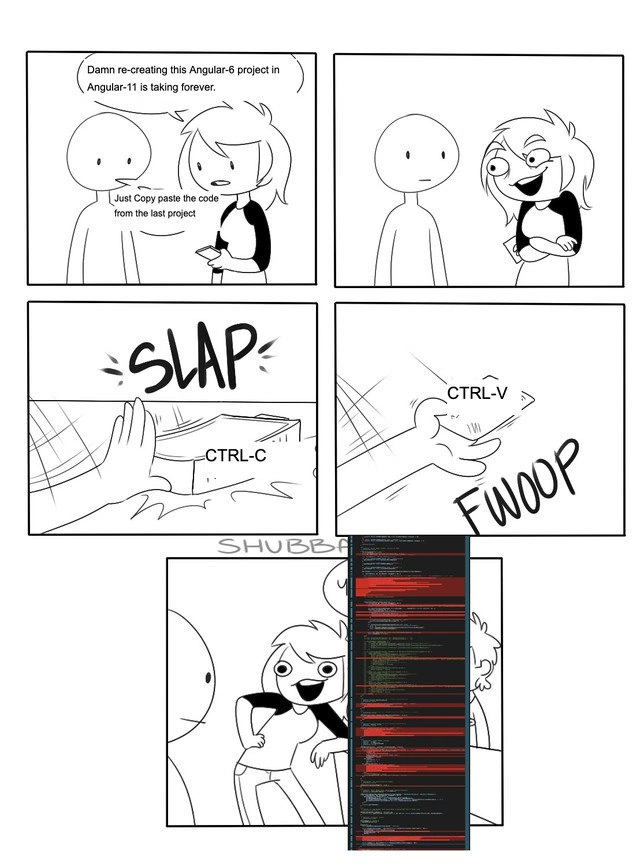
A five-panel, black-and-white webcomic illustrating a developer's painful experience with framework migration. In the first panel, a character despairs, 'Damn re-creating this Angular-6 project in Angular-11 is taking forever.' A second character naively suggests, 'Just Copy paste the code from the last project.' The second panel shows the first character with a devious grin, deciding to take the bad advice. The third and fourth panels depict the action with onomatopoeia: 'SLAP' for a hand hitting CTRL-C, and 'FWOOP' for a hand pasting with CTRL-V. The final panel shows the character standing proudly next to a catastrophically long scroll of code in an editor, almost entirely highlighted in red, signifying countless errors. This comic perfectly captures the futility and disastrous outcome of trying to shortcut a complex migration process between major framework versions, a scenario all too familiar to senior engineers who understand that breaking changes make a simple copy-paste a recipe for disaster

Comments
17Comment deleted
An optimist sees the Angular migration guide. A pessimist sees the breaking changes. A senior engineer sees a six-month project and just starts rewriting it from scratch
Pro tip: paste your 2018 Angular 6 code into an Angular 11 repo and watch the TypeScript compiler turn into an archaeologist, unearthing every deprecated pipe, RxJS operator, and life choice you made in the last five years
The real horror isn't copying code from the last project - it's realizing your 'last project' was Angular 6 when the client specifically asked for 'modern Angular,' and now you're explaining why half the dependencies are deprecated and the other half are security vulnerabilities that npm audit won't stop screaming about
Ah yes, the classic 'Angular 6 to 11 in one CTRL-V' migration strategy - because who needs to read CHANGELOG.md when you can just let npm's peer dependency resolver write your resignation letter for you? Five major versions, countless breaking changes in the renderer, Ivy compilation, and TypeScript requirements, but sure, that code from 2018 will definitely compile in 2020. The terminal's red waterfall of errors is just Angular's way of saying 'I tried to warn you about ViewEncapsulation.Native being removed, but you were too busy being efficient.'
Ctrl+V into Angular: because peer deps are peer pressure you can't audit away
Ctrl‑C/Ctrl‑V is the Angular migration strategy that converts ng update into peer‑dependency arbitration - then Ivy and RxJS pipeables flood tsc with red squiggles
Migration strategy: Ctrl+C from Angular 6, Ctrl+V into 11; the TypeScript compiler immediately charged compound interest on every implicit-any and RxJS import
angular говно, получается?) Comment deleted
そうだよ。 [yes] Please use English as main language in this chat. If you want to write message in other language, please translate it to English. Государственный язык этого чата --- английский. Если пишешь на любом другом, надо перевести сообщение на английский, чтобы всем было понятно, что написано в сообщении. Approximate translation: so, angular is shit?) Comment deleted
sorry Comment deleted
Same shit for almost any languge or framework. Backward compatibility isnt honored nowadays. Comment deleted
yeah: "So, angular is shit then?" Comment deleted
Migration from 2 to 12 takes an hour for medium sized project Comment deleted
2021 @ angular hmmm... ok Comment deleted
"damn, migrating this codebase from c to c++ is hard" "just copy paste the code from the last project" "error: iso c++ forbids conversion of string constant to char *" Comment deleted
const it Comment deleted
oh, thanks Comment deleted