Skip to content
DevMeme
775 of 7435
A Developer Warning Label for Mark Zuckerberg
TechHistory Post #879, on Nov 30, 2019 in TG

A Developer Warning Label for Mark Zuckerberg

Why is this TechHistory meme funny?

Level 1: Better Safe Than Sorry

Imagine you have a group photo from your birthday party, and you want to show it to your whole class. But one of your friends in the picture is really shy and says, “I don’t want everyone to see me.” What can you do? Maybe you take a big sticker and cover your friend’s face in the photo before you hold it up in front of the class. Now your classmates can see the picture — they see you and your other friends, and the cool desert background from the party — but the one shy friend’s face just shows a funny sticker or a blurry spot. It looks a bit silly, right? 😄 Still, no one can tell who that person is. You’ve hidden your friend’s identity so they can’t be recognized.

You did that to be careful and respectful. You’d rather have part of the picture look goofy than accidentally reveal your friend when they didn’t want it. In other words, you’re just being extra safe. This is exactly what’s going on in the meme. The company has a picture (or a software screen) with someone’s personal info, and they cover that personal part up — in this case by blurring the face — before showing it to a bunch of people. It might make the demo or picture look a little awkward or less useful (because you can’t see everything), but it protects the person’s privacy. In real life and in tech, we often say “better safe than sorry.” That means it’s wiser to be overly careful and prevent bad outcomes than to be careless and regret it later. So, the blurred face might get a laugh because it’s so extreme, but it’s there for a good reason: to keep personal information private and play it safe. In the end, everyone can focus on the cool stuff being shown without worrying that someone’s private details are being exposed. Better safe (even if it’s a bit funny) than sorry!

Level 2: Data Masking 101

Let’s break down what’s happening in simpler terms. PII stands for Personally Identifiable Information. That means any piece of data that can identify a specific person. Think of bits of information like pieces of a puzzle that, when put together, point to you. If a detail can be used to figure out who you are, it’s considered personal and sensitive. Some common pieces of PII include:

  • Your full name (first name and last name)
  • Your email address (like [email protected])
  • Your phone number
  • Your home address
  • A clear photo of your face (or other unique physical features)

Basically, anything unique to you that could let someone else recognize or locate you counts as PII.

In a company setting, protecting PII is a big deal. There are laws and rules – such as the well-known GDPR in Europe – that require businesses to handle personal data very carefully. Data privacy isn’t just a buzzword; it’s about people’s right to control their own information. If a company shows or shares someone’s private info without permission, they can get into serious trouble (legal fines, lawsuits, or just angry users leaving). So companies have privacy policies and often whole teams (legal/compliance departments) whose job is to make sure “no sensitive data leaks out.” They might remind engineers and marketers, “Hey, you can’t put that person’s name in a presentation,” or “Blur out that photo unless we have consent.” It’s all part of data protection – keeping users’ personal info safe and used only in proper ways.

Now, what does it mean when legal says “blur all PII” before a demo? Imagine you built a cool new application that shows user profiles or customer information, and you’re about to demonstrate it in a meeting or a video call. If you were using real data from your system (say, actual customer names, their pictures, contact info, etc.), showing that to people outside your team could violate privacy rules. Those viewers might not be authorized to see real user data, and the users certainly didn’t consent to have their info put on display. So, before the demo, someone responsible for privacy says, “You have to hide all those personal details.” One way to do that quickly is by blurring or obscuring the information. Data masking or anonymization is the general term for this kind of hiding. It means altering the sensitive parts so that you can’t tell who the real person is. It’s like putting masks on the data.

The meme’s image is a perfect example: the person’s face is covered by a heavy blur filter. Blurring is basically mixing up the pixels so much that you can’t see the clear picture anymore. It’s the same technique used on TV when they don’t want you to recognize someone – for instance, hiding the face of a minor or a bystander in news footage. In our tech scenario, blurring PII can apply to more than just images. If it’s text data, masking might mean replacing a name with something like “[REDACTED]” or “Alice ****”. For an email address, you might show only the first letter and domain, like j*****@example.com. The goal is to sanitize the output. We often use the word sanitize in development to mean “clean it up by removing dangerous or sensitive parts.” Here, cleaning up means no private info remains visible. So if you look at the demo screen after sanitization, you’ll still see the structure (like the layout of a profile page), but all the personal bits are gibberish, blurred, or obviously fake data.

By doing this, the company is staying privacy compliant – which just means they’re following the privacy laws and their own policies. If someone were to take a screenshot of that demo or if the call is recorded, there’s no real personal data in it, only dummy or obscured data. That way, there’s no harm done. The real customers’ identities aren’t exposed. Think of it like showing off a house with all the family photos on the wall turned face-down. You can appreciate the house itself, but you can’t snoop on who lives there. It might look a bit odd, but it’s done out of respect for the family’s privacy. Similarly, the developer in the meme blurred out the person’s face (and presumably would blur any names or IDs in the app) out of respect for and obligation to privacy. It’s a precaution: no identifiable data, no problem. This is a common task in tech now – often called data anonymization or PII redaction – and it’s a basic step whenever you want to share real-ish data with an audience that shouldn’t see the raw real thing.

Level 3: Better Pixelate than Litigate

If you’ve been around the tech block a few times, this scenario is painfully familiar (and therefore hilarious). When legal says “blur all PII,” you know it’s CYA time – “Cover Your Assets”, in polite terms. In practice, that means taking your lovingly crafted app demo and aggressively censoring it until it’s safer than a witness protection interview. The humor here comes from the overkill and the timing. Typically, this edict drops in at the last minute. Picture a frazzled developer the night before a big production demo call with a client or executives. The feature is ready, the slides are prepared with screenshots of the real system using real data (because of course the demo has to look authentic). Then someone from the Legal or compliance team gets wind of it: “Hold on, is that actual customer info on slide 7? Yeah, no, we can’t show that!” Cue the developer facepalm. With only hours to go, the quickest solution is brute-force data masking. Did we plan a proper toggle to use fake data? Nope. Did we have a sanitized demo environment? Of course not. So out comes the blur tool like a fire extinguisher for sensitive data. The meme image – a person’s face turned into a chunky pixel salad – is exactly what that feels like. We had to destroy the details to save the demo. It’s funny because it’s true: seasoned devs have all done some version of this frantic redaction dance. You end up with screenshots where every name is blacked out, every email is replaced with “xxxxx”, and every user photo looks like an 8-bit avatar. The finished demo looks kind of ridiculous, but hey, no privacy rules were harmed in the making of this presentation.

This memetic situation perfectly captures the tension between engineering and compliance. As engineers, we want to show off our work in the best light, often using real examples to be impressive. But compliance folks (rightfully) want to avoid any possibility of a breach. So, we get these over-the-top safety measures. It’s the corporate equivalent of “better safe than sorry” turned up to eleven. We laugh because we’ve experienced that awkward moment of presenting something that’s been scrubbed so hard it’s almost useless. Ever seen a live demo where the host says, “We’ve obscured the real names for privacy,” and half the UI is just blank labels or *****? It kills the vibe a bit – like showing a photo album with faces scratched out – but it’s become standard practice. We joke about it, but we also know why it has to be done. The meme exaggerates it with that fully blurred face, as if saying, “Look, we didn’t just blur a little, we blurred everything. Happy now, Legal?” You can almost hear the legal team channeling their inner Gandalf:

“No PII shall pass!”

That’s essentially the decree. And once that decree comes down, developers comply, sometimes with a sigh. The phrase “Better pixelate than litigate” sums it up: it’s preferable to have a goofy-looking, overly censored demo than to risk a privacy lawsuit or a GDPR fine because a real person’s data slipped out. We’ve all heard horror stories of companies getting dinged for inadvertently revealing customer info. No one wants to be the engineer whose demo screenshot sparked a multi-million dollar oopsie. So while it’s absurd to cover half the screen with blurs, it’s also a case of collective PTSD in the dev community: we do this because one time someone didn’t, and it ended badly.

The image itself adds an extra layer of nerdy chuckle. You’ve got a majestic desert canyon background – crystal clear sky, detailed rocks – and smack in the middle, where a person’s face should be, it’s just a big block of pixels. It’s visually jarring and comical. That contrast is exactly what a hyper-sanitized demo screenshot looks like. All the unimportant stuff (the app chrome, the placeholder data, the background) is normal, and all the interesting bits (the user’s face, name, personal stats) are obscured. It reminds experienced devs of looking at heavily redacted documents where entire sentences are blacked out. You know something important is there, but you’re not allowed to see it. During a demo, this can lead to tongue-in-cheek commentary like, “As you can clearly see, our user’s name is <redacted> and their email is ***@******.***.” Everyone chuckles, but also nods approvingly because that’s just proper procedure now.

Importantly, this meme also hints at the lesson learned: plan for privacy from the start. A senior engineer reading this might sigh and think, “Yep, next time, use fake data or a toggle for demo mode.” In fact, many teams now build features specifically to avoid this scramble – e.g. a configuration that automatically masks sensitive data in the UI when activated. But not every project has that built in, especially legacy systems or fast-and-loose startups. So the result is often a manual, last-minute cleanup, just as depicted. The DataPrivacy and Security folks get what they need (no leaking info), and the devs get a funny war story to share. It’s a shared understanding: showing a pixelated face is embarrassing, sure, but showing real customer data to strangers would be far worse. In a twisted way, we’re proud of that ugly blur because it means we did the responsible thing. The meme resonates because it takes that mundane office scenario – an engineer hastily obeying a legal requirement – and turns it into a visual gag that we can all laugh at, precisely because it’s true.

Level 4: Privacy by Pixelation

Behind the humor lies a serious truth about data privacy and security. As regulations like GDPR (the EU’s General Data Protection Regulation) have come into force, companies have embraced privacy-by-design (or at least a last-minute facsimile of it). This meme exemplifies the nuclear option of data anonymization: full-on pixelation. Blurring a face beyond recognition is essentially applying a one-way function to visual data. It’s akin to hashing personal information with a lossy algorithm. In other words, it’s easy to go from a clear image to a blurred one, but practically impossible to reconstruct the original face from those chunky pixels (unless you’ve got some sci-fi-level machine learning to guess it, and even that is hit-or-miss). In security terms, a heavy blur filter is like a crypto hash for images – you’ve effectively irreversibly scrambled the identifying features. The meme shows that concept in action: the person’s identity has been mathematically obliterated into a mosaic of colored squares.

There’s a fundamental principle at play here known as the privacy-utility tradeoff. Essentially, the more you protect or randomize data, the less useful or clear it becomes. Academically, this is discussed in concepts like $k$-anonymity and differential privacy. For instance, $k$-anonymity requires that any given individual is indistinguishable from at least $k-1$ others in a dataset – great for privacy, but achieving it might mean stripping out so much detail that the data’s usefulness drops. Differential privacy takes another route: adding carefully calibrated random noise to data or query results, so you can’t pinpoint any single person’s info. It’s mathematically elegant, offering provable privacy guarantees. But crank that privacy dial too high and your data turns to gibberish – high privacy, low utility. In the visual domain, blurring out PII is the same kind of dial turned to max. The developer in this meme effectively sacrificed all detail (utility) in the face to achieve maximum anonymity (privacy). The result is comically extreme: perfect privacy – you could never tell who that was – at the expense of the photo’s entire purpose (you also can’t tell what the person looks like anymore!). It’s a very literal demonstration of “privacy first” where privacy wins and information content loses.

What’s being protected here is what we call PIIPersonally Identifiable Information. A person’s face is absolutely PII; in fact, it’s considered biometric data under laws like GDPR, meaning it’s highly sensitive. Showing someone’s unblurred face (especially if it’s a real user or customer) in a public demo could be a legal violation if done without consent. This is why tech solutions exist to do exactly what we see in the meme: automatically blur or mask personal data. A famous example is Google Street View: their cameras captured millions of people and license plates, so Google implemented automatic face-blurring and plate-blurring algorithms. Every face in Street View is algorithmically detected and pixelated to protect privacy. Think of that as privacy by pixelation at scale – an entire pipeline devoted to finding PII in images and obscuring it. It’s a direct response to privacy expectations; people rightfully complained about seeing themselves or their homes clearly on Street View without permission, and regulators frowned upon it. The fix was to remove that identifying information while keeping the rest of the image useful. Sound familiar? It’s exactly the tradeoff this meme highlights in a single photo.

In theoretical terms, the meme hints at the idea that the only truly safe personal data is data you don’t reveal at all. It’s a bit like the old security joke: the only truly secure computer is one that’s unplugged. Here, the surest way to avoid leaking PII is to not show any in the first place. Blurring everything identifiable is essentially the “unplug it” approach for data exposure. Sure, it’s overkill from a usability standpoint – you’ve basically made the data useless for the viewer – but it’s guaranteed to satisfy legal/compliance. There’s zero risk of a privacy breach if there’s zero personal info visible. This is why in strict compliance environments, you’ll see overzealous redaction: companies would rather over-censor than accidentally slip up. It might look silly (just as that fully blurred face in a beautiful landscape looks silly), but it’s grounded in a very real fear of data leaks and the hefty consequences that follow. In summary, this top level of the joke is a nod to the almost philosophical extremes of data protection – when in doubt, wipe it out. It’s privacy maximization taken to the point of absurdity, and we’re laughing because as tech folks we recognize the truth in it. Better a goofy pixelated demo than an angry regulator or a multimillion-dollar lawsuit, right?

Description

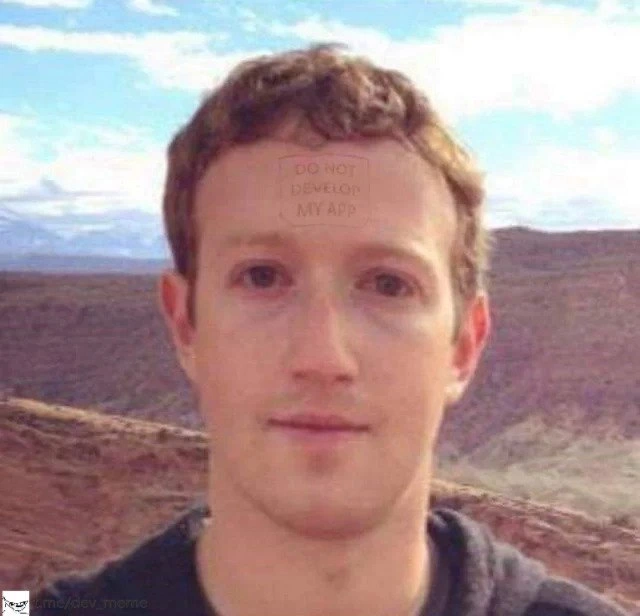
This is a meme featuring a photograph of a young Mark Zuckerberg's face, set against an outdoor, possibly desert-like background. Photoshopped onto the center of his forehead is a faint, reddish, rectangular box containing the text 'DO NOT DEVELOP MY APP'. The text is in a simple, capitalised font. The image is a direct and humorous reference to the controversy surrounding the founding of Facebook. It alludes to the accusation by the Winklevoss twins and Divya Narendra that they hired Zuckerberg to build a social networking site for them called HarvardConnection (later ConnectU), and that he deliberately stalled their project while secretly building his own, TheFacebook. The joke is that his forehead carries a warning label for potential clients, a piece of cynical advice born from one of tech's most famous and litigious origin stories
Comments

7
Anonymous ★ Top Pick This was the original MVP for Facebook's developer documentation
  1. Anonymous ★ Top Pick

    This was the original MVP for Facebook's developer documentation

  2. Anonymous

    “GDPR achieved: slap a 200-px blur on the face for the demo, forget the network tab is still streaming the full user JSON - ship it.”

  3. Anonymous

    The same engineer who implemented Facebook's cross-site tracking pixel just submitted a PR removing all analytics from his personal blog because "it felt creepy knowing everything about my twelve visitors."

  4. Anonymous

    After watching Facebook deprecate Parse, sunset countless APIs, and arbitrarily change rate limits overnight, this forehead tattoo should be mandatory reading before any architect approves a Meta platform integration. It's the tech equivalent of 'Here Be Dragons' on ancient maps - except the dragons are real, they eat your production traffic, and they're governed by quarterly OKRs you'll never see coming

  5. Anonymous

    Our privacy plan: CSS filter: blur(24px) on avatars; twelve unencrypted PII replicas - differential privacy by marketing

  6. Anonymous

    Zuck's forehead nails the 20+ YoE engineer's stare-down with a Heisenbug in Meta-scale spaghetti: LOL WHY

  7. Anonymous

    Finally saw Terraform apply in the wild - took a few million years, zero drift, and the rollback is called plate tectonics

Use J and K for navigation