The DevOps Engineer's Unwinnable CAPTCHA
Why is this DevOps SRE meme funny?
Level 1: Ketchup on Everything
Imagine you really like ketchup. It’s pretty good on a burger or with fries, right? Now picture that every meal you get – breakfast, lunch, dinner, even dessert – comes covered in ketchup. 🍅 Cereal with ketchup, ice cream with ketchup... Yikes! At first it’s kind of okay (because hey, you liked it), but after a while you’d be totally sick of that one flavor on everything. You’d probably laugh and say, “Seriously, ketchup again? Does it have to be on everything I eat?”
That’s the feeling this meme is joking about, but with technology instead of food. YAML is like the ketchup that’s being put on every tool and process in a developer’s life. It’s a nice ingredient (useful and tasty in the right amount), but when every single thing has YAML in it, it gets tiring and funny in a ridiculous way. Developers see this picture and laugh because it’s as if a test is asking them, “Spot the ones with ketchup (YAML),” and the answer is: they all have it. It’s a silly way to say “ugh, this thing is everywhere!”
Level 2: Select All That Apply
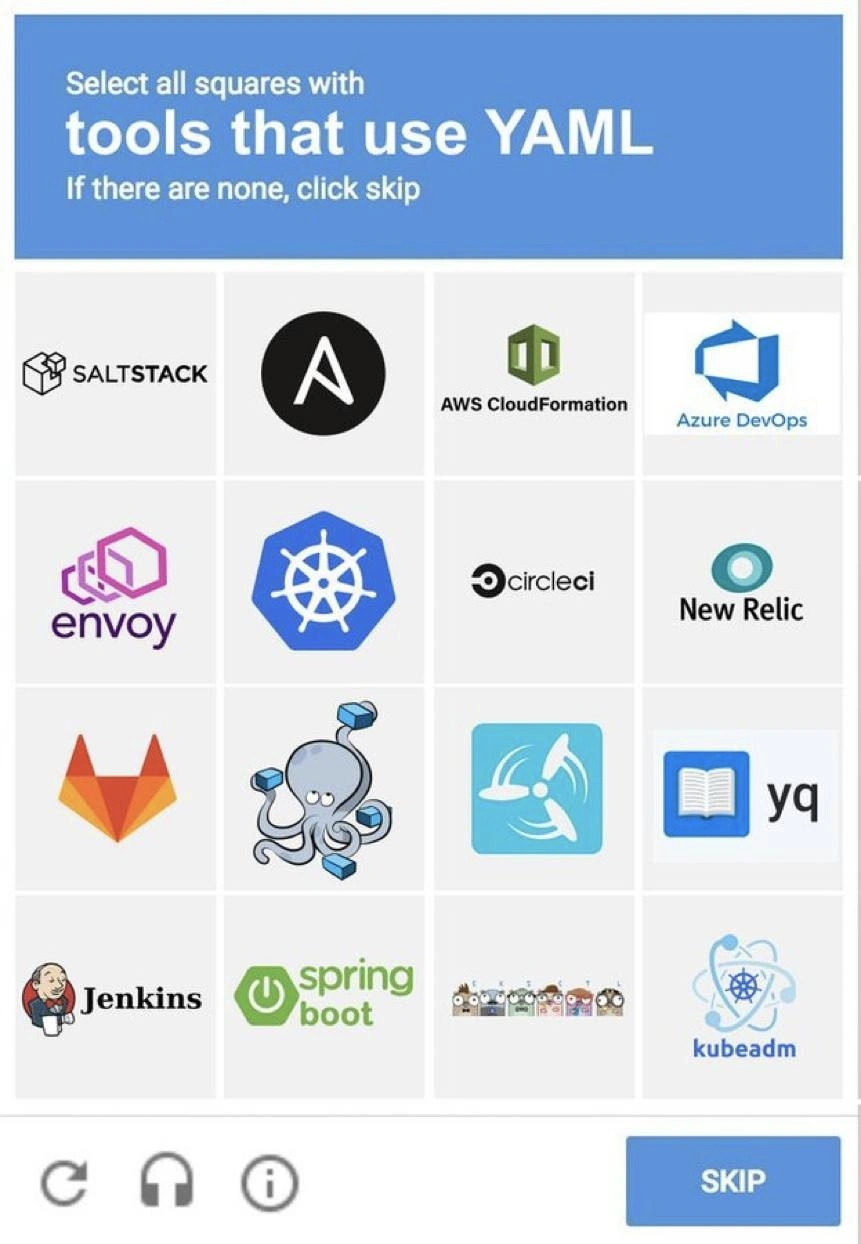
This image mimics a CAPTCHA, those “prove you’re not a robot” tests where you click all the squares containing things like crosswalks or traffic lights. Instead, here it says: “Select all squares with tools that use YAML. If there are none, click skip.” The grid is filled with logos of various dev tools and platforms. The twist is that all these tools use YAML for their configuration in one way or another. In a real captcha you might find no match and hit skip, but in this devOps captcha you’d end up selecting every single square! The joke is pointing out that YAML has become nearly unavoidable in modern DevOps and cloud workflows – basically yaml_everywhere.
Let’s break down what YAML means and why it shows up so much. YAML (which humorously stands for “YAML Ain’t Markup Language”) is a text-based data format for writing configuration files. It’s similar in purpose to JSON or XML (other ways to store structured data), but its syntax is designed to be easier for humans to read and write. YAML files typically end in .yml or .yaml. Instead of lots of {} braces or <tags>, YAML uses indentation and colons to organize information. For example, a simple YAML snippet might look like this:
# Example of YAML structure (Kubernetes Pod config)
apiVersion: v1
kind: Pod
metadata:
name: demo-pod
spec:
containers:
- name: demo
image: nginx:latest
In this example, you can see how YAML uses spacing to nest details (for instance, name: demo-pod is indented under metadata, indicating it's a sub-item). Lists are indicated with a hyphen (-) as in the containers section. YAML is popular because it’s human-friendly – you can often glance at it and understand the hierarchy of settings. Developers and system engineers use it to describe how systems should be configured or behave, a practice often called “configuration as code” or “infrastructure as code”.
Now, the meme specifically shows a bunch of DevOps and cloud tool logos, implying that each of these expects you to write a YAML file to use it. Here are some of the items and what they do with YAML:
- SaltStack and Ansible – These are automation and configuration management tools. You write instructions for servers in YAML files (Salt calls them state files, Ansible calls them playbooks). For example, an Ansible playbook YAML might list tasks like “install package X” or “start service Y” in order.
- AWS CloudFormation and Azure DevOps Pipelines – These let you define cloud infrastructure or CI/CD pipelines through templates. Instead of clicking around a web console, you can write a template (in JSON or YAML, but many prefer YAML for its clarity) that describes resources. For instance, an AWS CloudFormation YAML template can declare “Create a server, a database, and a network” all in one file. Azure DevOps can use YAML to set up build/test steps in an azure-pipelines.yml file.
- Kubernetes (the wheel logo, plus the kubeadm icon and that row of cute Kubernetes mascots) – Kubernetes is a system for running containers. To tell Kubernetes what to do (like run an app or set up networking), you give it YAML files called manifests. Each manifest describes an object (a pod, deployment, service, etc.). kubeadm is a tool to initialize a Kubernetes cluster, and yes, it also can take a YAML config file for cluster settings. Essentially, the entire Kubernetes ecosystem revolves around YAML – if you want to deploy anything on Kubernetes, you’ll likely write a
.yamlfile describing it. - Docker Compose (the octopus icon) – Docker is for containers, and Docker Compose is a tool to run multiple containers together (for example, a web app, a database, and a cache). You define all those services in one YAML file (commonly
docker-compose.yml). That YAML lists each container, its image, ports, and how they all link up. - CircleCI, GitLab CI, Drone CI, and even Jenkins – These are CI/CD (Continuous Integration/Continuous Deployment) platforms, basically tools that automatically build and test your code when you push changes. They all use configuration files to know what steps to run. In CircleCI, you put a file named
config.ymlin a.circlecifolder, describing the jobs and steps (like “run tests”, “build app”). GitLab CI uses a.gitlab-ci.ymlin the repo root, listing stages and tasks. Drone CI similarly uses a.drone.yml. Jenkins is a bit special: historically it used a web UI or a Groovy script (Jenkinsfile) for pipelines. But nowadays there are plugins and newer approaches (like Jenkins X or Jenkinsfile in YAML format) which allow Jenkins jobs to be defined in YAML as well. The meme includes Jenkins’ logo to say “even the old-school CI server isn’t free from YAML”. - Envoy and New Relic – Envoy is a high-performance service proxy (often used in microservices or service mesh architectures). You configure Envoy via YAML too – for example, to specify routes, clusters of services, and policies. New Relic is an application performance monitoring (APM) tool; you might configure some of its alerting or agent settings in YAML format (for instance, certain integration configs or dashboards can be defined that way). They’re showing that not just build tools or cloud stuff, but even monitoring and proxies involve YAML configs.
- yq – This one is literally a command-line utility dedicated to reading and editing YAML files. It’s analogous to a tool called
jqwhich does the same for JSON. If you have a big YAML and you want to quickly query or change a value using scripts,yqis super handy. The presence of yq in the lineup is tongue-in-cheek proof of how prevalent YAML is: there’s a whole tool just to manage the sprawl of.ymlfiles.
So basically, the challenge “Select all squares with tools that use YAML” is a trick question – the correct answer is to click every tile. The phrase “If there are none, click skip” is part of the usual captcha instructions, but here it highlights the joke: in the world of DevOps, the scenario of “none of these use YAML” almost never happens. YAML has become the common language for configuring everything, from your code deployment pipeline to the very servers and services your applications run on. For a newcomer, it might be surprising to see the same .yml format pop up in so many places, but for seasoned developers, it’s a daily reality. They find this meme funny because it captures that “here we go again, yet another YAML” feeling. It’s a light-hearted way to say: Welcome to DevOps, hope you like writing YAML!
Level 3: YAML All The Things
This meme turns a routine reCAPTCHA challenge into a wry DevOps joke. Instead of spotting traffic lights, it says: "Select all squares with tools that use YAML". The punchline? Every single logo on that 4×4 grid qualifies. If you're a battle-tested engineer, you know the configuration situation is so extreme that hitting "select all" is the only correct move. The SKIP button might as well be decorative – in today’s DevOps landscape, good luck finding a tool that doesn't have a .yml file at its heart.
What makes this funny to experienced developers is the absurd ubiquity of YAML. We’ve reached a point of configuration overload where practically every CI/CD pipeline, container setup, and infrastructure tool speaks YAML. Veteran engineers chuckle (or groan) because they've lived this: writing an Ansible playbook in YAML in the morning, a Kubernetes deployment YAML after lunch, a CircleCI config YAML before dinner, then debugging a broken Jenkins config (yup, via YAML) at 3 AM. It's a yaml_sprawl that spans the entire toolchain.
This grid is basically a roll call of modern DevOps tooling, and the meme is implying “select all that apply” – i.e., all of them. SaltStack states? YAML. Ansible playbooks? YAML. AWS CloudFormation templates? Often YAML (way easier than JSON’s brackets). Azure DevOps pipelines? YAML definitions. The Kubernetes logo there? Absolutely YAML – every object you create (Deployment, Service, ConfigMap) is defined in a .yaml manifest. CircleCI config? YAML file in your repo. New Relic monitors or config? There's YAML tucked in there. GitLab CI pipelines? .gitlab-ci.yml is literally how you describe the build steps. The cute Docker Compose octopus? Docker Compose uses a YAML file to spin up multi-container environments. Drone CI (that propeller icon) – its pipelines are .drone.yml. Jenkins may historically use GUI and Groovy scripts, but even Jenkins has hopped on the YAML train with plugins like Configuration-as-Code (JCasC) or Jenkins X. Spring Boot apps can load settings from application.yaml. A whole row of Kubernetes mascots hints that the entire cloud-native ecosystem runs on YAML (Helm charts, Kustomize, you name it). And kubeadm, a tool to bootstrap clusters, consumes YAML configs too. Even yq is included – that’s a command-line utility whose sole purpose is processing YAML (like jq for JSON). When a format has its own specialized parser tool, you know it's everywhere.
So the DevOps CAPTCHA joke lands because it’s painfully accurate. Seasoned ops folks feel a mix of camaraderie and fatigue: YAML is handy and human-readable, but it’s also the source of countless underspoken nightmares (one misaligned indent or a stray tab character and your entire deployment fails). We’ve effectively standardized on YAML for "everything-as-code" – configuration files, build pipelines, infra provisioning – and it’s become a running gag. The meme exaggerates it as a Turing test for DevOps: Only a true engineer can identify that all these tools run on YAML. The humor is a bit cynical: it's funny because it's true, and maybe a tiny bit tragic. At a certain point, you stop asking “Does this new tool use YAML?” and start assuming “Of course it uses YAML, what else?”. The result is an inside joke every burnt-out SRE and DevOps veteran can appreciate with a knowing, slightly exasperated nod.
Description
This image presents a meme formatted as a CAPTCHA security test, typically used to verify a user is human. The top blue banner contains the instruction: 'Select all squares with tools that use YAML. If there are none, click skip'. Below, a 4x4 grid displays the logos of sixteen popular software development and operations tools. The logos shown are: Saltstack, Ansible, AWS CloudFormation, Azure DevOps, Envoy, Kubernetes, CircleCI, New Relic, GitLab, Argo CD (represented by an octopus with containers), an unidentified logo with a propeller, yq (a YAML processor), Jenkins, Spring Boot, the Go language gophers mascot, and kubeadm. The joke is a deep cut for DevOps, SRE, and cloud engineers, as an overwhelming majority of these modern tools use YAML (YAML Ain't Markup Language) for configuration. The CAPTCHA, meant to be a simple visual task, becomes an expert-level quiz on the DevOps tooling ecosystem. For experienced engineers, it humorously reflects the pervasiveness of YAML and the associated pain ('YAML hell') of managing complex, indentation-sensitive configuration files across a sprawling stack. The task is ironically difficult not because the answer is obscure, but because the answer is 'almost all of them,' making it a relatable commentary on the state of modern infrastructure and CI/CD configuration

Comments
13Comment deleted
This CAPTCHA is the ultimate test to tell a human from a shell script. The human will sigh, click 14 boxes, and question their career choices. The script would just pipe 'yes' to all of them
Sure, I can select all the YAML-powered squares - the real challenge is recalling which of these 16 dialects turns the string “true” into a Boolean and takes production down at 3 a.m
The real CAPTCHA test isn't identifying which tools use YAML - it's successfully debugging a 2000-line Kubernetes manifest where someone mixed tabs and spaces at 3am during a production incident
Trick question - the only wrong answer is SKIP. In cloud-native, even the tools that escaped YAML are configured by a tool that didn't
The real challenge isn't selecting the YAML tools - it's remembering which ones switched from JSON to YAML in their v2 rewrite, which support both but default to YAML, and which ones you've configured with YAML despite them technically supporting other formats. Bonus points if you can identify them without triggering flashbacks to debugging indentation errors at 2 AM because someone used tabs instead of spaces, or that one time a trailing space in your Kubernetes manifest took down staging for three hours
YAML CAPTCHA: The one puzzle where 'skip' feels like betraying your entire K8s cluster
DevOps CAPTCHA: “Select all tools that use YAML.” I clicked the entire grid and still failed - the validator parsed my answer as boolean “on” and the linter wanted two-space indents
Modern Turing test: select all tools that use YAML - if you didn’t click everything, you haven’t been paged by 'on: prod' coercing to true at 3am
so evil Comment deleted
what's the listening option? Comment deleted
"Listen to the workplace jokes and type down which one of them are not inclusive" Comment deleted
All if them! Cause, any json document is a valid yaml :) Comment deleted
"Prove that you are bot" captcha Comment deleted