Skip to content
DevMeme
2843 of 7435
Running Debian Sid With a Perfectly Disguised Windows XP Desktop Skin
OperatingSystems Post #3136, on May 19, 2021 in TG

Running Debian Sid With a Perfectly Disguised Windows XP Desktop Skin

Why is this OperatingSystems meme funny?

Level 1: A Fun Disguise

Imagine you have a super modern computer that you dress up to look like a really old computer from years and years ago. On the outside, it shows the same picture and blue menu bars that an old Windows XP PC had – it’s like putting on a costume. But on the inside, it’s actually a completely different, new system (Linux) doing all the work. It’s kind of like taking a brand new sports car and painting it to look like an old classic car – it looks old-fashioned, but it runs like something brand new. People find this funny because the computer is playing pretend: it’s making you think of the early 2000s with that green hill wallpaper and retro style, even though it’s actually a 2021-era machine. In other words, it looks like a friendly old Windows XP buddy, but it’s secretly a modern Linux powerhouse in disguise. It’s just a silly, fun way techies mix the old and the new, the same way you might wear a fun costume for a party!

Level 2: Linux in XP Clothing

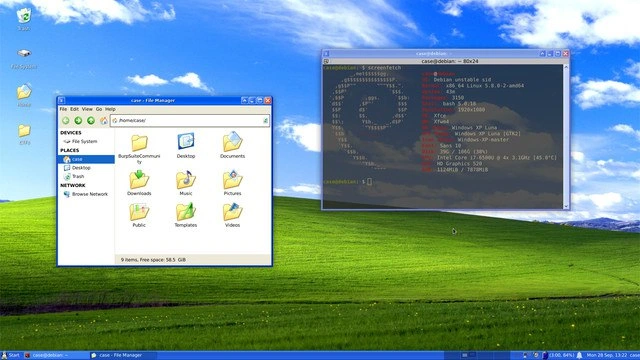
What’s happening in this image is a bit like a tech optical illusion. The computer looks as if it’s running Windows XP – an old operating system from the early 2000s known for its green hill “Bliss” wallpaper and chunky blue taskbar – but it’s actually running Linux (specifically, a Debian Linux distribution). The key clue is in that text-filled window on the right: that’s a terminal showing an app called neofetch which prints out system information. It clearly says “OS: Debian unstable sid”, along with other details like the Linux kernel version and that the window manager (WM) in use is xfwm4. In plain terms, this means the core system is Debian Linux (Sid is just the codename for the unstable version of Debian, where all the newest updates land).

So how can a Linux system look almost exactly like Windows XP? Thanks to the desktop environment and theme. Linux systems separate the underlying engine (the kernel & OS) from the graphical user interface. Here the user is running the Xfce desktop environment, which is known for being lightweight and highly customizable. Xfce (with its window manager xfwm4) lets you apply different themes that change the appearance of windows, buttons, menus, and icons. This person installed a Windows XP “Luna” theme on Xfce – Luna was the name of XP’s default theme – so now all the visuals (colors, shapes of window borders, icons for folders) copy the Windows XP style. Even the taskbar at the bottom has been skinned to mirror the classic XP taskbar (complete with what looks like a Start button on the left and system tray clock on the right). The left window in the screenshot is a Linux file manager (likely Xfce’s Thunar or similar) but it’s made to look like XP’s Windows Explorer, with folders like Documents, Music, Pictures arranged just like on Windows. Only the title “user – File Manager” and perhaps the style of the minimize/maximize/close buttons give away that it’s not the real Explorer.

The right window is a terminal emulator (a window that lets you use the command-line shell). In it, the user ran neofetch, which is a popular command-line tool that displays your system info alongside an ASCII art logo (in this case, the Debian logo). The output lists things like the OS name, kernel version, uptime, and importantly the Theme: WinXP Luna which confirms that a Windows XP theme is applied. This is a deliberate way to reveal the trick: anyone can see from that info that it’s Debian Linux running, not Windows. Developers often share screenshots like this to show off their customized setups – it’s almost a friendly brag, saying “Look, I’ve tuned my Linux box to feel like Windows XP for fun.” It’s also a nod to retro computing vibes; Windows XP is now considered retro or “classic” since it’s about 20 years old and Microsoft long ago ended support for it (in 2014).

For a newer developer or someone not familiar with Linux: think of a theme as a skin for your Operating System’s interface. Windows XP, Windows 10, macOS, GNOME on Linux – all have different looks by default. But Linux is highly customizable. You can make a Linux desktop imitate the look of almost any OS. There are themes to make Linux look like Mac OS, or in this case, look exactly like Windows XP. It involves installing theme files (which might include icon images, color schemes, and style definitions) and sometimes tweaking configuration. Here, the user did all that tweaking so perfectly that at first glance you’d swear you’re seeing an old Windows XP screen. Even the iconic “Bliss” wallpaper (the grassy hill with blue sky) is set, which immediately screams “XP!” to anyone who used computers in the 2000s.

Why would someone do this? Often, it’s just for the fun and nostalgia. Developers love to personalize their workspace – you’ve probably seen people customize their code editor with funky colors or their terminal prompt with their name or funny symbols. In the Linux world, this extends to the whole desktop. There’s even a community (jokingly called “Unix porn”) where people share screenshots of their beautifully themed desktops. Running Debian Sid (an advanced, somewhat risky version of Debian with the latest software) with an XP theme is a tongue-in-cheek way to combine new and old. It’s like saying “I have the newest Linux stuff running, but I miss the look of my first PC, so I brought it back.” It doesn’t change how the computer works – it’s still Linux under the skin – but it brings a smile, and maybe memories of using MS Paint or Minesweeper on Windows XP back in the day. Plus, if someone walks by and sees that screen, their reaction might be, “Whoa, are you seriously running Windows XP?!” and that little prankish moment is pretty satisfying to a techie.

In short, this meme is highlighting a Linux customization adventure. We see the clash of eras: a 2021 Debian Linux system disguised as a 2001 Windows OS. It’s all about looks being deceiving. For a junior developer or anyone new to this: remember that with a bit of know-how, you can make your Linux desktop look however you want. Today it’s an XP throwback; tomorrow you could theme it to look like a hacker’s terminal from The Matrix or give it a macOS vibe. That’s the power and fun of open-source tweaking – your system’s appearance is just another thing you control, like LEGOs you can rebuild. And as this meme shows, sometimes developers do it just for a laugh and a trip down memory lane.

Level 3: Sid in Luna’s Clothing

At first glance, this desktop is a time-warp paradox: the friendly Windows XP “Luna” theme — with its bright blue taskbar, blissful green-hill wallpaper, and cheerful folder icons — is front and center. But a closer look at the right-side terminal (running the neofetch tool) spills the truth: this machine’s identity is pure Debian Sid (the unstable branch of Debian Linux) under the hood. The meme’s humor comes from this undercover OS scenario: a cutting-edge Linux system camouflaged perfectly as a circa-2001 Windows PC. It’s a nerdy double-take moment that makes seasoned devs smirk, because we’re seeing a modern open-source OS cosplay as one of the most iconic proprietary UIs of tech history.

Why do this? Partly out of nostalgia, partly for the hackerly joy of customization. Old-school devs remember Windows XP with a mix of fondness and eye-rolling (the Fisher-Price color scheme was both beloved and mocked). By running Debian (named after Toy Story’s mischief-maker Sid, who “breaks toys”) and then skinning it with XP’s Luna theme, the user bridges eras of computing. It’s like a vintage body on a modern engine: the comforting look of XP’s Start menu and window borders, powered by the latest Linux kernel 5.10 and Bash 5.1 underneath. There’s irony in running “unstable” Debian while presenting as the decade-old stable Windows aesthetic — a bit of geek humor about appearances versus reality. In a way, it’s poking fun at both systems: Windows XP’s UI was lovable but its internals are outdated, so here we enjoy that classic look safely atop a robust Linux base that won’t bluescreen on us.

This mash-up also nods to the long tradition of theming and customization in developer culture. Linux users are famous for tweaking every pixel of their environment (there’s even a slang term “ricing” for obsessively customizing your desktop appearance). Here we see an extreme example: the Xfce window manager (xfwm4) is running a “WinXP Luna” theme pack, complete with XP-style icons, fonts, and window controls. The file manager on the left isn’t actually Windows Explorer, but it’s skinned so well (even the toolbar and folder tree mimic XP) that you’d have to read the window title or specs to guess it’s actually Thunar or another Linux file browser. The terminal on the right proudly shows the ASCII Debian swirl logo via neofetch, listing details like “OS: Debian unstable sid” and “WM: xfwm4”. That’s intentional — in Linux circles, showing off your neofetch output alongside a gorgeous desktop screenshot is a humblebrag about your setup. It says: “Look, I’ve got Debian Sid with 1h 32m uptime and this sweet XP theme — ask me about my dotfiles.”

Speaking of dotfiles, you can bet some configuration sorcery went into this illusion. The user likely scoured theme archives for the WinXP Luna GTK theme and matching icon packs, tweaked the panel to sit at the bottom like a taskbar, maybe even added a faux “Start” button. Perhaps they even adjusted their terminal colors or prompt to stay in character. For example, one could cheekily set the Bash prompt to imitate a Windows path:

# In ~/.bashrc, make the shell prompt resemble a Windows XP Command Prompt
export PS1="C:\\Documents and Settings\\casual> "

This level of Linux customization resonates with developers because it’s both frivolous and impressive. It’s a reminder that on Linux, the desktop environment is just another replaceable layer; the GUI’s look-and-feel is not hardwired into the Operating System. In contrast, back in 2001, if you wanted to change Windows XP’s appearance, you were stuck with blue/silver/olive green or resorting to unofficial skinning hacks. Here, however, our Debian user can bend the entire interface to their will. The meme captures that empowerement: the freedom to reshape your environment to the point of nostalgic absurdity.

Ultimately, the humor is in the absurd authenticity of the disguise. It’s the computing equivalent of a prank: imagine walking by a colleague’s desk and doing a double-take because it looks like they’re running Windows XP in 2021. You might sputter, “Wait, XP?!” — only for them to open a terminal and reveal the latest Debian unstable (sid) with all the modern trappings. It’s a geeky inside joke about how far we’ll go for a comfy interface or a bit of retro fun. We have a modern Linux system proudly wearing a nostalgic UI skin, proving that sometimes developers mix Tech History with today’s tech just because we can. After all, what’s the point of having a powerful open-source OS if not to occasionally dress it up in yesterday’s favorite outfit?

Description

The screenshot shows the classic green-hill Windows XP “Bliss” wallpaper, a blue XP-styled taskbar at the bottom, and two open windows. On the left is a file manager titled “user - File Manager” whose toolbar, folder icons, and traffic-light buttons are skinned to look exactly like Windows XP Explorer; visible folders include “Desktop, Documents, Downloads, Music, Pictures, Videos, Public, Templates.” On the right is a terminal window titled “casual@debian: ~ - 80x24” running neofetch: the ASCII Debian swirl appears, and the printed system details read “OS: Debian unstable sid, Kernel: 5.10.0-2-amd64, WM: xfwm4, Theme: WinXP Luna, Shell: bash 5.1.0, Uptime: 1h 32m” plus CPU, GPU and RAM stats. Despite the unmistakable XP look, the neofetch output clearly reveals the machine is actually Debian Linux, highlighting the irony of re-skinning a modern Linux box for nostalgia. For developers, it’s a nod to theming, dot-file tweaking, and the familiar habit of making *nix environments imitate bygone GUIs while still living in the terminal
Comments

6
Anonymous ★ Top Pick Proof that UI is just management’s API: wrap Debian Sid in an XP Luna skin and the execs will sign off on another year of “extended Windows support” while you live happily in bash 5.1
  1. Anonymous ★ Top Pick

    Proof that UI is just management’s API: wrap Debian Sid in an XP Luna skin and the execs will sign off on another year of “extended Windows support” while you live happily in bash 5.1

  2. Anonymous

    The only thing more stable than that Bliss wallpaper is the legacy XP box in production that nobody dares to migrate because it's running a critical business process through a VB6 app that Karen from accounting wrote in 2003

  3. Anonymous

    When your production server is running Debian but your manager insists on seeing a 'user-friendly interface' during the demo, so you fire up the Windows XP VM to show them the folders while neofetch quietly flexes the actual system specs in the background. Peak enterprise architecture: where the GUI is just window dressing for the terminal doing all the real work

  4. Anonymous

    Implemented the “Windows-only desktop” requirement as a presentation-layer adapter - looks like XP for the screenshot, still apt-get for the pager

  5. Anonymous

    Security wanted Debian, ops demanded “no UI changes,” so we shipped Xfce skinned as Luna - CAB called it a patch while the kernel jumped two decades

  6. Anonymous

    XP as hypervisor: stable because it's too legacy to accrue new CVEs

Use J and K for navigation