Skip to content
DevMeme
5857 of 7435
When Windows and Linux Split, Docker Becomes the Custody Arrangement
Containerization Post #6414, on Nov 22, 2024 in TG

When Windows and Linux Split, Docker Becomes the Custody Arrangement

Why is this Containerization meme funny?

Level 1: Parents Fight, Kid in a Box

Imagine a child whose parents have divorced and are always arguing about where the child should live. One parent lives in one house, the other in a different house, and they just can’t agree. In a weird twist, instead of constantly shuffling the kid between houses or choosing one, they decide to put the kid in a neutral little room that isn’t in Mom’s house or Dad’s house. It’s like saying, “If we can’t have you live comfortably in either of our homes, you’ll stay in this small apartment in between.” Not an ideal solution, right? But at least the parents stop fighting directly over the kid because the kid is now in a separate, neutral place.

In the meme, Windows and Linux are the mom and dad – two households that are very different. The “kid” is like a developer or a piece of software caught in the middle of their fight. Neither the Windows home nor the Linux home is working out perfectly for this kid because the parents have such different house rules and environments. So what’s the solution? The kid ends up in the care of someone else – represented by that big Docker box (the whale logo) at the bottom. Think of Docker as a friendly caregiver or a safe clubhouse that isn’t exactly either parent’s house but provides the basic needs. The caption “Divorce leads children to the worst places” is a joking way to say the poor kid had to go somewhere not as cozy as home (like living out of a suitcase or in this case, a container) because the parents couldn’t cooperate.

It’s funny (in a silly way) because in real life, if parents fought so much that the kid had to live in a shipping container or a tiny room somewhere neutral, that would be pretty extreme! In technology, Docker is kind of that extreme-but-useful neutral place. The humor comes from mixing something emotionally serious (divorcing parents and a custody battle) with something nerdy and not at all emotional (computer operating systems and software containers). Even if you don’t know the tech, you can see the Windows logo and the penguin pulling the guy apart and guess “those two don’t get along.” And you see the scared guy over a gap and a box at the bottom, you think “uh oh, if he falls, he’s going into that box.”

In simple terms: The meme is saying that when two big important things (like Windows and Linux, or like mom and dad) can’t work together, the ones who suffer are the little guys (like the developer or the child). And sometimes the solution is to put the little guy in an odd place that neither parent controls (Docker, in tech; maybe a neutral grandmother’s house or a boarding school in a family analogy). It’s poking fun at how, in the programming world, we often solve disagreements between systems by adding another thing (Docker) as a workaround. It’s like if your parents couldn’t agree on which language to speak at home, so you just go live at school where you have your own language class – not a perfect analogy, but you get the idea.

So, even without any technical knowledge, you can appreciate: Windows and Linux split up, developer falls into Docker’s arms. It’s a lighthearted take on a real problem, using a family drama scenario to make it memorable and giggle-worthy. The “kid in a box” image is absurd, which is exactly why it’s funny – it exaggerates the feeling of being stuck with an awkward solution when the obvious ones (just pick a home/OS!) aren’t available.

Level 2: Bickering OS, Docker Mediator

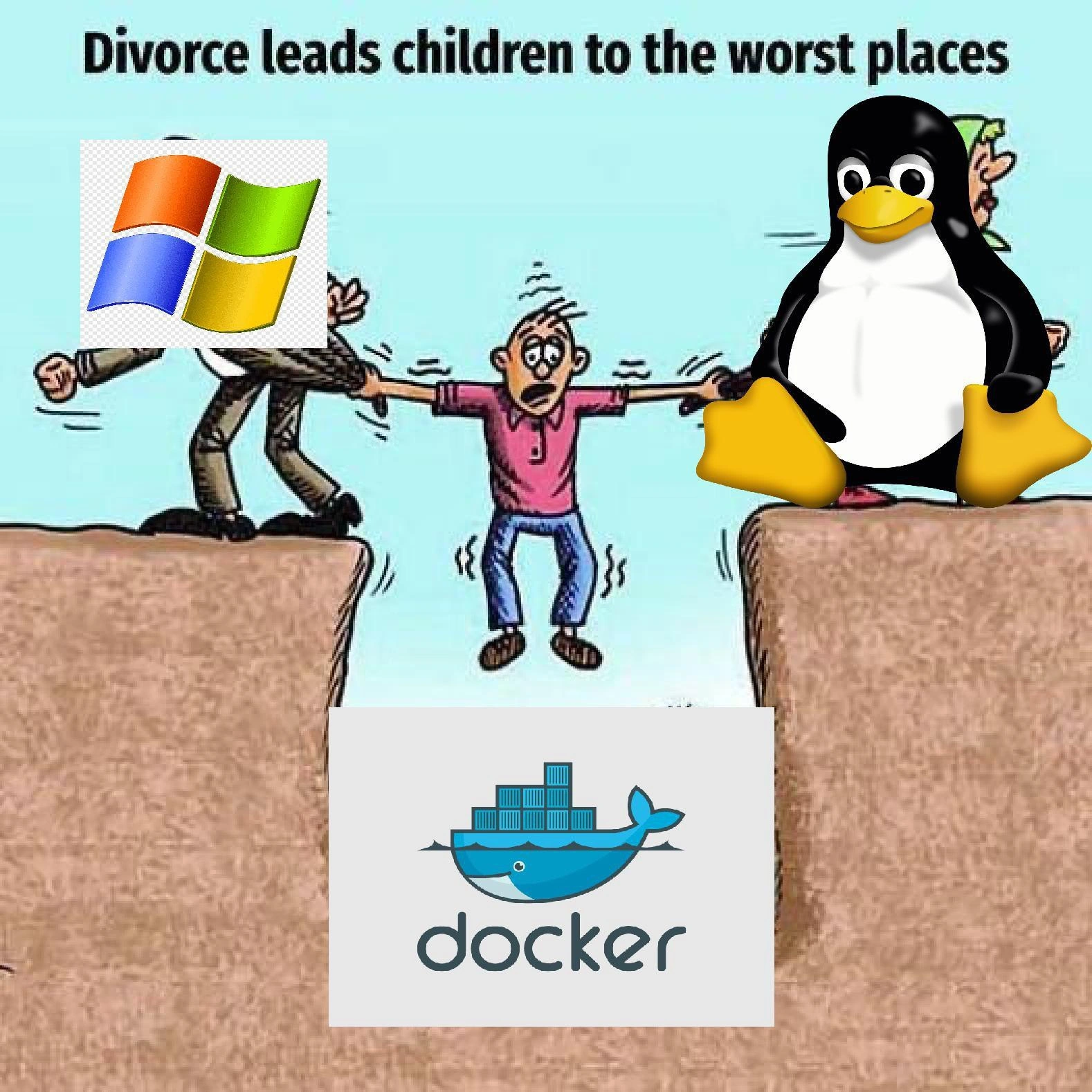
In the image, the figure on the left with the Windows logo for a head represents a Windows operating system, and the figure on the right with the Tux penguin head represents a Linux operating system. These are like two parents in this cartoon scenario. The person in the middle (the 'child') represents the developer or the software project caught between these two different environments. The text at the top says “Divorce leads children to the worst places,” setting up a joke that compares the tech issue to a messy family split.

Let’s break down the tech part: Windows and Linux are two different operating systems (OS). An OS is basically the master program on your computer that manages hardware and runs other programs. Windows and Linux have some major differences under the hood. For example:

  • File paths: Windows uses backslashes and drives (e.g., C:\Projects\MyApp\), while Linux uses forward slashes and no drive letters (e.g., /home/user/MyApp/).
  • Case sensitivity: Windows generally treats file names as case-insensitive (README.txt is the same as readme.txt), whereas Linux is case-sensitive (those would be two different files).
  • Line endings in text files: Windows and Linux use different special characters to end lines, which can cause funky issues when moving files between them.
  • Shell/Commands: In Linux, you often use the Bash shell with commands like ls, grep, etc. In Windows, you might use PowerShell or Command Prompt with different commands like dir.
  • Software dependencies: Some software is built specifically for one OS and won’t run on the other without some compatibility layer. For instance, a .exe file is a Windows executable, not natively runnable on Linux.

Because of these differences and others, an application that’s developed in one environment (say on a developer’s Windows PC) might not run exactly the same in another (like on a Linux server). This is a common situation in software teams, and it can cause a lot of “But it worked on my machine!” moments when something fails in the different environment. That’s the tug-of-war the meme is portraying: Windows and Linux each have their own quirks pulling the project in different directions.

Now, where does Docker come in? Docker is represented by the big blue whale logo at the bottom (the whale carrying containers). Docker is a technology for containerization. Containerization means packaging an application along with everything it needs to run (like specific libraries, runtime, and often a snapshot of an OS filesystem) into a single unit called a container. Think of a container like a ready-to-go box. If you have an app that runs on Linux normally, you put it in a Linux container. If you run that container on a Windows machine, Docker will ensure the app still sees a Linux environment inside that box. It’s as if the app is tricked into thinking, “I’m in my comfortable Linux home,” even though Docker is handling it on a Windows host.

The analogy in the meme is that Docker becomes the mediator or the “custody arrangement” for the child (the project). Since Windows and Linux (the parents) aren’t cooperating nicely, the solution is to place the child in Docker’s care – a neutral environment. In a literal divorce scenario, this might be like sending the kid to a neutral location (say a relative’s house or a special guardian) because the parents can’t share nicely. In tech terms, Docker is that neutral ground where the code will run the same way everywhere. It’s not actually a place but an isolated environment.

Why joke that this is “the worst place”? It’s a bit of exaggeration for humor. Running things in Docker can sometimes be less straightforward than running directly on the host OS. If you’re new, you have to learn Docker’s way of doing things. For example:

  • To run your application, you might write a Dockerfile (a small text file with instructions to set up the container: e.g., “use this base image (like a lightweight Linux), copy my application files into it, then run this command”).
  • You then build this into a Docker image (kind of like a recipe turning into a ready meal), and then you run a container from that image.
  • If you want to, say, open a webpage from an app in Docker, you might need to map ports (so that, for example, the web server running in the container on port 5000 is accessible as port 5000 on your Windows host).
  • If you want the container to see some files from your computer, you have to set up volume mounts or file sharing with Docker.

It’s an extra layer of setup. For someone not familiar, it can feel like you fell into a complicated system (“worst places” is just an over-the-top way to say it’s not super comfy at first). It’s somewhat similar to having a mediator who has strict rules – solves the big problem (parents not fighting in front of the kid), but introduces some strict protocols to follow.

Another reason for the joke is historically, using Docker on Windows had some performance issues and gotchas. Before Windows had WSL2, Docker actually ran a hidden virtual machine to run Linux containers. That sometimes made things slow or prone to weird bugs. Now it’s better with WSL2 (essentially Windows has a Linux subsystem built-in, which Docker uses), but there’s still a notion that “if only Windows and Linux could get along natively, we wouldn’t need Docker as a go-between”. So, calling it “the worst place” is poking fun at the fact that the poor developer might prefer just developing directly on one OS if they could, but instead they have to learn this container stuff.

Let’s clarify the roles in this “story”:

  • Windows (OS) – one parent. Maybe the dev’s laptop OS. Visualized by the Windows logo head.
  • Linux (OS) – the other parent. Maybe the production server OS, or another dev’s environment. Visualized by Tux the penguin.
  • The Child – stands in for the software or the developer stuck between the two environments. The child’s anxious face = the dev’s anxiety when things aren’t working.
  • Docker – the big whale at the bottom of the gap. Represents the container platform that will catch the project. In the drawing it’s like a safety net at the bottom of a circus act – if the kid falls (i.e., if direct compatibility fails), Docker catches them.

In real developer life, an example scenario could be: You wrote a web application in Node.js on Windows. It works great on your PC. When you deploy it to a Linux server, it crashes because of a path issue or a missing library (maybe you had something installed on Windows that isn’t on Linux). After pulling your hair out, you decide to use Docker. You create a Docker image that’s based on a Linux environment (say using the official Node.js Docker image which is Linux-based). Now you run that Docker image on your Windows for development, and also deploy that same image to your Linux server. Lo and behold, the environment inside the container is identical in both cases (it’s the same Linux + Node version + libraries you set in the image). The app is happy everywhere. Problem solved! You essentially gave the app its own consistent home.

For a newer developer, learning Docker is an extra step, but it has become a very common tool in DevOps and development because of these benefits. It’s almost a rite of passage to go from “it works on my machine, why not on yours?” to “let’s containerize this so we never have that fight again.” The meme is just packaging that concept in a humorous, slightly dramatic way.

So, the takeaway at this level: Windows and Linux often fight in the context of software compatibility (bickering OS parents). Docker is the mediator that provides a compromise solution (a container where the software can run uniformly). It’s funny because of the divorce analogy, but it’s referencing a real solution developers use to handle cross-OS issues.

Level 3: Cross-Platform Tug-of-War

This meme nails a feeling that veteran developers know all too well: being yanked back and forth by dueling environments. It’s depicting a classic cross_platform_development struggle. Imagine a team where half the folks work on Windows laptops and the app ultimately deploys to a Linux server (a pretty common setup in enterprises). Right away, you have a recipe for “But it worked on my machine!” – that infamous phrase that often signals an environment-specific bug. The Windows user might have one version of a library or a subtle OS-specific behavior that doesn’t match the Linux server. Maybe the app writes to a file path like C:\tmp\myapp\ which is valid on Windows, but in Linux that path means nothing (C: what?). Or perhaps the code is case-insensitive on one file system (Windows is) but the deployment is on a case-sensitive FS (most Linux file systems), causing it to fail to find a file named with different casing. These are the everyday little nightmares of cross-OS tug-of-war.

In the meme, Windows and Linux are the feuding parents, each pulling an arm of the poor developer (or project). That terrified, stretched-out figure in the middle – every developer who’s dealt with environment drift can relate. It’s the “uh oh, production is broken because the server is Linux and I only tested on Windows” scenario (or vice versa). In a DevOps culture, we aim to avoid this by “shifting left” environment consistency – basically, don’t let prod be the only place that’s Linux if devs are on Windows. That’s where Docker swoops in heroically (or as the meme teases, at least as the lesser of two evils). Docker gives us platform_agnostic_builds: you package your app in a container image, and that image includes an OS layer (often a slim Linux distro) plus all your app’s dependencies. Now anyone running that image, whether on a Windows machine or a Linux machine, will be running the same binary, on the same kind of OS environment (the one inside the container). It’s like saying, “Fine, if our two OS parents can’t agree, we’ll let the kid have his own apartment.” The container becomes that apartment, carried around like a backpack.

The punchline “Docker becomes the custody arrangement” is both funny and a little jab at reality. In real divorces, custody arrangements are a lot of work – schedules, rules, handoffs. Same with Docker: it solves problems but introduces its own complexity. Seasoned devs chuckle at this because we’ve all been that “kid” shuttling between systems, and Docker felt like the court-appointed solution. It does bring peace: no more “works on Windows but not on Linux” – if it works in the Docker container, it works wherever Docker runs that container. This is why DevOps/SRE folks heavily promote containerization: it tames the configuration drift. One team I was on literally told every developer on day one: “Set up Docker and run our app through that, don’t try to install everything natively on your OS.” It saved us countless "well it passed on my laptop" headaches.

However, any experienced engineer will also nod at the “worst places” part. Why call Docker land one of the worst places? Well, consider what using Docker on Windows used to entail: You’d install Docker Desktop, which might enable Hyper-V (meaning other VM tools like VirtualBox would conflict). You’d attempt to mount your project folder into a container and suddenly hit docker_on_windows quirks like case-sensitivity issues or very slow file I/O through the mount. You’d find yourself debugging why localhost:3000 isn’t reachable, only to discover you had to tick some networking checkbox or find the right IP for the Docker VM. It could be a non-trivial tax on development time just to get the darn thing working. Meanwhile on Linux, using Docker is more native (since containers are a Linux tech at heart), but it’s not without its own headaches (like messing with iptables rules, or cleaning up dangling volumes consuming disk space, etc.). The meme exaggerates to “worst places” for comedic effect – a Docker container isn’t actually a hellhole; it’s just that living inside a container is a more constrained life for an app than running free on a host OS. There’s limited access to host resources, and you have to explicitly permit any interaction (ports, files, devices). It’s sandboxed – great for reproducibility and security, but sometimes painful when you want to break out of the sandbox for a quick task.

We also have the context of linux_vs_windows_containers differences. A senior dev might recall that Microsoft’s first attempt to get Docker running on Windows (circa Windows Server 2016) introduced Windows Containers and Hyper-V Isolation. There were (and are) essentially two types of containers on Windows: “Windows Server containers” which share the kernel like Linux containers do (but obviously the Windows kernel), and “Hyper-V isolated containers” which are more like a VM per container. This split was needed because the Windows kernel wasn’t built with containers in mind from day one like Linux was, so some workloads needed the extra isolation of a tiny VM per container. For a DevOps person, that’s an added wrinkle: your CI/CD might need to build both Linux and Windows container images for cross-platform apps, doubling the work. And those images are not interchangeable – you can’t run a Windows container on a Linux host or vice versa. So even with Docker, truly universal portability has fine print. The meme’s Docker whale catching the kid implies Docker will solve it all, but we as grizzled engineers know there’s a lot of glue (and YAML config files) making that illusion possible.

Speaking of glue, modern solutions like WSL2 have significantly improved the Docker-on-Windows story. With WSL2, running a Linux Docker container on Windows is faster and more seamless – the Windows logo parent essentially has Linux internally now, so the fighting is less. It’s like one parent decided to learn the other’s language for the sake of the kid. This has been a relief: fewer “Why is Docker so slow on Windows?” complaints on forums, meaning the custody arrangement is getting smoother over time. Still, Docker itself has overhead: image builds can be slow, image sizes can be big, and there’s a complexity in orchestrating multiple containers (hello Kubernetes, which is like the school bus shuttling lots of container “kids” around a distributed neighborhood – but that’s another meme entirely!).

In essence, the humor lands because it combines a domestic drama everyone understands (parents splitting, poor kid caught in between) with a nerdy tech struggle (OS incompatibility, developers caught in the middle). It’s absurdly relatable. We laugh, perhaps a bit ruefully, because we’ve lived that scenario of juggling PATH differences or line-ending issues at 1 AM, then sighing and saying, “Alright, let’s dockerize this and be done with the madness.” The RelatableDevExperience tag is spot on – whether you’re a DevOps engineer setting up CI or a backend dev just trying to get code running on a coworker’s machine, you’ve likely used Docker as the great mediator. And much like a custody arrangement, it’s not perfect peace, but it’s better than constant fighting.

To put the trade-offs in perspective, consider these approaches to our Windows/Linux divide:

Approach Consistency across environments Complexity/Overhead
Standardize on one OS (e.g. All devs and servers use Linux) High – no OS differences to worry about. Everyone’s in the same environment. Low complexity – simple setup, but often impractical in orgs that require Windows for other reasons.
Mix OS without containers (Status quo “it works on my machine” approach) Low – lots of subtle differences can bite you. Medium – devs spend time writing OS-specific fixes or instructions. “Works here, breaks there” cycle.
Use Docker containers everywhere (the meme’s scenario) High – container provides a uniform environment (usually Linux) everywhere. Higher initial complexity – learn Docker, write Dockerfiles, slight runtime overhead (VM or WSL2).

Most teams eventually choose the third option when the first isn’t feasible. It’s additional work, but it preempts so many cross-OS problems that it pays off. Docker becomes the mediator that enforces a consistent contract: “This app shall run with Ubuntu 22.04 and these 10 libraries, no matter where you execute it.” You trade some upfront effort for long-term sanity.

In summary, the senior perspective here is a knowing smile and a sigh: we’ve seen this Windows vs Linux tug-of-war many times, and Docker is that clunky but effective peace treaty that stops the fight. It’s funny because the metaphor is so on-point – who knew DevOps infrastructure could be explained with divorcing parents and a child’s custody? And yet, here we are, containers full of code-children, visiting every platform like it’s a weekend with the other parent.

Level 4: CGroup Therapy

Under the hood of Docker, there’s some serious OS sorcery at work. In Linux, containerization is built on kernel features like namespaces and cgroups (control groups). Namespaces provide isolation – each container thinks it’s running on its own little system (it has its own process list, file system view, network interfaces, etc.), separate from the host. Cgroups meanwhile enforce resource limits – they’re basically group therapy for processes, keeping them from hogging all the CPU or memory. Together, these let you run many containers on one Linux host as if they’re separate mini-computers.

But here’s the catch: containers share the host’s kernel. A container isn’t a full virtual machine; it relies on the host OS kernel to do the heavy lifting. This is fine when the container’s expected OS matches the host (e.g. a Linux container on a Linux host). However, when you have a Windows vs Linux split, the whole model gets tricky. A binary built for Linux expects Linux system calls; on Windows those calls mean nothing (and vice versa). It’s like a child who speaks only French trying to live in a house where everyone speaks only English – they need a translator or they just won’t understand each other.

So how do we bridge this chasm? Enter some clever engineering: on Windows, Docker literally sneaks a Linux kernel into the room. Early versions of Docker for Windows achieved this by running a lightweight Linux virtual machine behind the scenes (using Hyper-V or VirtualBox). The Docker CLI you use on Windows was basically forwarding your container runs into that hidden VM. More recently, Microsoft introduced WSL2 (Windows Subsystem for Linux 2), which is essentially an optimized Linux kernel running inside Windows. Docker Desktop now integrates with WSL2, meaning when you run a Linux container on a Windows machine, it’s executed by an actual Linux kernel provided by WSL2. From the outside it looks like Docker is magically making a Linux container run on Windows, but under the hood, a mini Linux is running to keep that container happy. This is the “custody arrangement” in action at the kernel level – Windows had to host a Linux environment to make the child (the containerized app) comfortable.

It’s worth noting that Docker isn’t a one-trick pony – it can also handle Windows containers. Microsoft worked to containerize Windows by introducing their own isolation primitives. You can have a Windows container image (with, say, a Nano Server base) that runs on a Windows host. Docker will manage it similarly, but under the hood it uses Windows’ kernel for that container. However, a Windows container can’t run on a Linux host, and a Linux container can’t run on a Windows host without help, because of those fundamental kernel differences. There was an experimental project known as LCOW (Linux Containers on Windows) that tried to make it seamless – essentially it would automatically spin up a utility VM for a Linux container on a Windows host. But it turned out simpler in the end just to use WSL2 or Hyper-V directly. In short, the “neutral ground” Docker provides is actually a thin layer on top of whichever Operating System kernel the container needs. It’s a bit like a child spending weekdays speaking English at dad’s and weekends speaking French at mom’s – except Docker’s trick is bringing a French tutor into dad’s house so the kid can stick to French all week.

From a systems theory perspective, this highlights an abstraction trade-off. Docker’s container_runtime_abstraction gives developers a uniform interface to deploy applications, hiding low-level details. But when the underlying platforms diverge (Windows NT kernel vs. Linux kernel), the abstraction has to paper over a serious gap. We’re bumping into the fundamental design differences born from the history of these OSes. Linux was built with POSIX in mind, with system calls and filesystems like ext4, whereas Windows NT grew from a different lineage (with Win32 APIs, NTFS, registry, etc.). Docker effectively says, “don’t worry, I’ll take care of those differences,” using virtualization tricks to maintain the illusion of sameness. It’s a testament to how far OS virtualization has come: we’re leveraging decades of research in virtual machines, scheduling, and file system sharing (e.g., VirtIO, 9p filesystem mounts, you name it) to make something as complex as cross-OS containerization feel (mostly) seamless.

This deep technical feat is why the meme’s scenario is both absurd and spot-on. The os_divorce_analogy is playing out at the kernel level. Windows and Linux normally cannot share custody of a process – one or the other must be in charge. Docker’s solution is essentially to give the child process dual citizenship: it carries its own little Linux world wherever it goes, even into Windows territory. Academically, it’s fascinating – an application can be packaged with a binary interface expectation (Linux syscalls) and Docker + WSL2 ensures those syscalls get fulfilled by a real Linux kernel even on a Windows host. It’s like solving a custody battle by building a duplicate of one parent’s house inside the other parent’s living room. Crazy, but it works. And of course, this comes with overhead: there’s memory and CPU cost to running that auxiliary kernel, and some latency in communication between the container and the host. Those are the “lawyer fees” of this custody battle, so to speak – the price of the peace.

Description

Cartoon-style meme on a sky-blue background. Text at the top reads, "Divorce leads children to the worst places" in bold black font. On the left cliff stands a humanoid figure whose head is replaced by the classic four-color Windows logo; on the right cliff a similar figure has the Tux penguin for a head. A child in the middle (face blurred) is pulled in opposite directions by both "parents" while teetering over a gap. At the bottom of the chasm is a large Docker logo (blue whale carrying shipping containers) implying that if the tug-of-war fails, the child will fall into container land. The scene satirically depicts cross-platform friction: Windows and Linux environments fighting over workloads, leaving developers to rely on Docker as the painful compromise
Comments

25
Anonymous ★ Top Pick Containers were supposed to be the peace treaty, but they’ve ended up as the weekend shuttle for binaries whose OS parents still refuse to share a file system
  1. Anonymous ★ Top Pick

    Containers were supposed to be the peace treaty, but they’ve ended up as the weekend shuttle for binaries whose OS parents still refuse to share a file system

  2. Anonymous

    After 15 years of wrestling with Docker Desktop's WSL2 backend eating 16GB of RAM just to run a single nginx container, you realize the real custody battle isn't between Windows and Linux - it's between your sanity and the Docker daemon that somehow needs admin privileges to map a port

  3. Anonymous

    The real tragedy isn't the custody battle - it's that Docker still has to explain to both parents why it needs WSL2 to visit Windows, while Linux just natively understands. At least the child support payments come in the form of container orchestration fees, equally distributed across both platforms' cloud bills

  4. Anonymous

    DevOps joint custody: Windows wants Docker Desktop, Linux demands cgroups v2 - so the kid lives in OCI land where path separators and CRLF/LF negotiate peace via 2am bind mounts

  5. Anonymous

    Windows and Linux divorced, but Docker got full custody - and your on-call rotations

  6. Anonymous

    Windows and Linux split custody, so the kid lives with Docker - weekends are WSL2, weekdays are bind‑mount visitation, and permissions get negotiated via UID maps and cgroups v2

  7. @H3R3T1C 1y

    Well Docker is more linux than w$n

    1. @Bonessssss 1y

      win -> ping win

  8. @H3R3T1C 1y

    even the most used on w$n is with WSL

  9. @jaaaaded 1y

    docker is just linux cgroups

    1. @Bonessssss 1y

      - You can't store and then restore cgroup as you can with a Docker image - On top of that, containers allow for predefined environment (except kernel version) - On the other hand (I think) most IPC methods are unavailable between processes that are not running in the same container (and cgroups don't have that limitation)

  10. @H3R3T1C 1y

    hummm more linux namespaces

    1. @ygerlach 1y

      Docker uses cgroups and namespaces to implement its features. But you can for example use systemd containers to have even better system integration.

      1. @andrei_nik_kolesnikov 1y

        podman, that is?

      2. @chupasaurus 1y

        By not having a sane way to interact from shell with netns created by systemd, for example. Such better @ much wow.

  11. @H3R3T1C 1y

    cgroup is for resources control

  12. @ygerlach 1y

    podman is yet another implementation. I am talking about the systemd-nspawn command.

    1. @andrei_nik_kolesnikov 1y

      Podman uses systemd-nspawn as its underlying container runtime

      1. @ygerlach 1y

        Ah, didnt know that. Last time i checked they where using runc or something like that. Where is that stated?

        1. @andrei_nik_kolesnikov 1y

          https://wiki.gentoo.org/wiki/Podman https://wiki.gentoo.org/wiki/Systemd/systemd-nspawn podman is a daemonless container engine for developing, managing, and running OCI Containers on Linux, aiming to be a drop-in replacement for Docker ... On systemd-based systems, Podman uses systemd slices to allow Podman to run rootless, i.e. as a non-privileged user. systemd-nspawn is a lightweight, loosely chroot-like, OS-level OCI container environment native to systemd

  13. @mira_the_cat 1y

    tan ni la mi wile toki e toki pona

  14. @SamsonovAnton 1y

    What's the divorce between 🪟 and 🐧 they are talking about?

  15. @LostGhost11 1y

    Docker is only there because distro-specific package managers are terrible

  16. dev_meme 1y

    At this stage I have no idea if this is satire or just pure trolling

  17. dev_meme 1y

    Yeah, that's how it should be Damn, I even lost a few golden memes because after finding them I went deeper checking "is it actually funny and correct" and then... Bah, where is the meme? Well, it was long time ago, I rarely do it like this now

Use J and K for navigation