When Your Fridge Has a Zero-Day Vulnerability
Why is this IoT meme funny?
Level 1: Please Wait… For Water
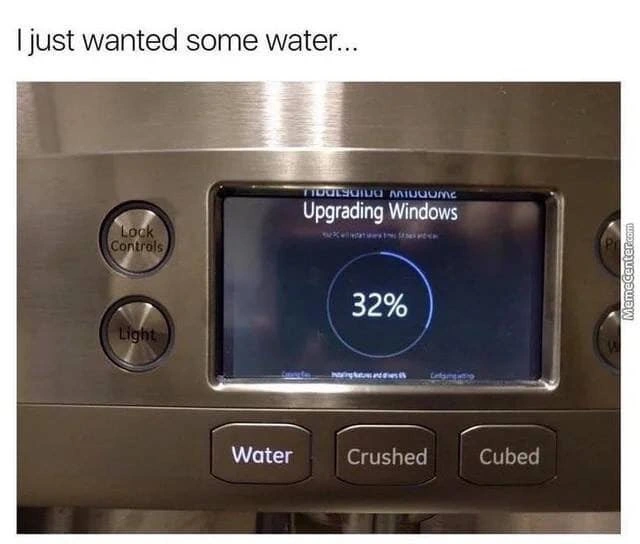
Imagine you go to your kitchen, feeling really thirsty, and you press the button on your fridge for a glass of water. But instead of getting water right away, a little screen on the fridge says, “Upgrading... 32% complete. Please wait.” You’d probably blink in surprise and maybe laugh at how silly that is. A fridge isn’t supposed to act like a computer that needs to install updates when you’re just trying to get a drink! It’s like if your sink faucet suddenly had a loading bar and made you wait before any water comes out. It’s funny because we don’t expect our appliances to say, “Not now, I’m busy updating,” especially when we’re thirsty. The meme makes us laugh by showing a normal everyday task (getting some water) being stopped by something very technical and out-of-place. It’s the contrast between a simple need and a high-tech hiccup that makes it so absurd and entertaining. In other words, even a child can see the humor: you just wanted water, and your goofy high-tech fridge told you to please wait. Who wouldn’t find that a bit ridiculous?
Level 2: When Appliances Go PC
Let’s break this down in simpler terms. We have a refrigerator – but not just any fridge, it’s a smart fridge. That means it has a built-in computer (with a touchscreen) inside it. This is an example of an embedded system: a computer embedded within a device we don’t normally think of as a computer. And because it’s a smart appliance connected to the internet and maybe your phone, it’s part of the IoT (Internet of Things) trend of connecting everyday devices to the web.
Normally, a fridge’s computer runs some lightweight specialized software (often just called firmware) to handle things like temperature control, button presses, and dispensing water or ice. Firmware is basically the program that’s permanently installed to make the fridge do its job. However, modern high-end fridges come with more complex features – like playing music, showing recipes, or letting you grocery-shop from the door. To support all that fancy stuff, manufacturers sometimes use a full operating system. An operating system (OS) is the core software that manages a computer’s hardware and runs apps; examples of OSes are Windows, Linux, or Android. In this meme, the fridge’s touchscreen is literally showing a Windows firmwareUpdate screen. That suggests this fridge is running a version of Microsoft Windows to power its display and smart features! Yes, a Windows computer hiding in your fridge.
So what’s happening in the image? The fridge decided to launch a system update at the exact moment someone pressed the button for water. Instead of dispensing water, the screen says “Upgrading Windows – 32%”. This means the fridge’s computer is busy updating its operating system software. While it’s updating, it looks like the fridge’s controls are temporarily unusable or unresponsive (you can even see a lit indicator that says "Lock Controls", which is fitting because everything is locked up). Essentially, the fridge is saying, “Hold on, I’m busy updating my brain; I can’t do fridge things right now.”
For a newer developer or anyone unfamiliar with this territory, think of it like when your laptop or phone does a system update. During the update, you often can’t use the device for a while – it might restart and show a progress bar, and you just have to wait until it finishes. That’s normal behavior for computers. But here the funny (and frustrating) thing is that an appliance – something very basic like a water dispenser – is acting like your PC. You just wanted a drink of water, nothing complicated, and suddenly you’re facing what looks exactly like the Windows update screen from an office computer. It’s technology intruding into real life in an inconvenient way.
Let’s clarify a few terms and why this is happening in a simpler way:
- Smart Appliance: A home device with advanced digital features, often internet-connected. This fridge is “smart” because it has computing capabilities and a display.
- Embedded System: The internal computer system inside a device. Here, the fridge’s embedded system is pretty powerful since it runs a full OS.
- Operating System: The master program that manages a computer’s tasks. Windows is the OS here – which is unusual, because we don’t expect a fridge to run the same kind of OS as a personal computer.
- Firmware Update (or OS update): Updating the software that runs the device. Companies push updates to appliances to add features or fix bugs/security issues. But those updates usually aim to avoid disrupting basic functionality at bad times.
Now think about User Experience (UX): It’s obviously a bad user experience if your fridge won’t give you water when you ask for it. The meme highlights this irony: the more computerized and “advanced” we make something, the more it can annoy us with computer-like problems. A simple old fridge with a mechanical button never suddenly told you “please wait, updating.” But a Windows-powered fridge just might! That contrast is what makes people smirk when they see this image.
This is also a bit of hardware humor because we’re seeing a piece of kitchen hardware (the fridge) behaving like a software gadget. It’s funny and absurd: a water_dispenser getting held up by a progress bar. We don’t expect to troubleshoot or wait on a fridge like we do on a laptop. The whole situation is an extreme example of how modern gadgets, even appliances, have become so complex that they occasionally do things that make us scratch our heads. It’s both a tech joke and a commentary: has technology perhaps gone a little too far when even getting water involves an update?
In summary, this meme is pointing out how a fridge (something very ordinary) now contains a computer similar to a PC, and therefore it can have the same annoyances a PC has – like random updates that make you wait. It’s amusing because it mixes up our expectations: we expect to wait for a computer to update, but waiting for your fridge to finish updating before you can get a glass of water? That sounds like a joke… and that’s exactly why it’s funny (and a tiny bit scary about the future!).
Level 3: Smart Fridge, Dumb Timing
Now let’s look at the meme from a seasoned developer’s perspective. The image combines a mundane kitchen scenario with an all-too-familiar tech frustration: a forced update interrupting our day. We’ve got a smart fridge – an internet-connected appliance with a touchscreen – that’s decided now is the perfect time to run a Windows update. The result? Instead of water, you get a screen reading “Upgrading Windows… 32%” with a stalled progress wheel – the fridge is literally stuck_upgrading mid-process, turning the simple act of getting a drink into a mini IT nightmare. It’s the perfect example of when adding “smart” features leads to a not-so-smart situation.
The humor works so well because it’s a mashup of domains: kitchen convenience meets OperatingSystems hassle. Most of us have experienced a Windows PC insisting on updating right when we need to do something urgent. That sinking feeling of seeing “Configuring updates… 32%” instead of your desktop is now transplanted to your refrigerator. It’s a prime example of UX irony: the user experience is actually worse because of the “smart” technology. The fridge is too smart for its own good, running a complex OS that brings along baggage like lengthy reboots and progress bars. It's a classic HardwareHumor scenario where a physical device’s basic function (giving water) is held hostage by digital maintenance.
Why is this so relatable (and cringey) to experienced devs and IT folks? Because it highlights the IoT trend gone awry. In the rush to add touchscreens and internet features to everything – from toasters to toilets – companies often end up basically shoving a tablet or PC inside an appliance. This means your fridge isn't just cooling lettuce; it's also managing an entire software stack. And software stacks need patches. Cue the inevitable firmwareUpdate at an inconvenient time. A senior engineer might shake their head because they know this is a design flaw: critical appliance functions should be decoupled from non-critical software updates. In plain terms, dispensing water shouldn’t depend on the state of a 100 MB OS patch download.
Yet here we are: the fridge’s UI (fridge_ui) is locked on the update screen, and the buttons for "Water / Crushed / Cubed" do nothing. (Those might not even be true physical switches anymore, just inputs to the computer.) It’s like the appliance forgot its primary job because it’s busy “thinking about Windows.” This unexpected_downtime for a drink is both absurd and a bit too real. We've seen similar incidents: smart TVs that reboot to update right when you sit down to watch a show, or car GPS units that freeze because the infotainment OS crashed. The smart_appliance dream sometimes leads to very dumb moments.
Historically, refrigerator manufacturers never had to worry about software updates. A “dumb” fridge from 1995 never suddenly refused to dispense water because it was installing a patch – it didn’t even have an OS in the modern sense. But today, vendors partner with software companies, and some fridges actually run cut-down versions of major OSes. (There have been fridges powered by Windows variants and many that run on Android/Linux.) There are benefits: a full OS can display nice graphics, run apps, maybe even sync your grocery list to your phone. However, that comes at the cost of complexity. Seasoned devs have seen the pattern: more complex systems have more points of failure. A simple mechanical or microcontroller-based dispenser with a few hundred lines of code might run for decades without a glitch. A fridge running a multi-million-line OS will inevitably have the occasional hiccup, crash, or interminable update.
Another angle that industry insiders find funny is the parallel to corporate IT practices. Windows updates (especially the infamous scheduled ones on Patch Tuesday) are a known pain – IT departments carefully schedule them after hours to avoid disrupting work. Now imagine the kitchen as mission-critical infrastructure: ideally, the fridge should also update in the middle of the night when no one is fetching water or ice. Did the fridge’s software team not think of that scheduling? Maybe not – or maybe the update was so urgent (to fix a security vulnerability in the fridge’s Wi-Fi, perhaps) that it pushed immediately. Either way, the result is an ill-timed forced_update that feels comically out of place. One can almost picture the fridge apologizing: “Hang on a sec, installing critical updates. Your water will be ready in... 5 more minutes?”
For developers, this scenario also screams “lack of graceful fallback.” In high-reliability systems, we design fail-safes: if the fancy touch UI is down, a simple manual override should still work for core functions. But in this fridge design, it appears everything is tied into the central computer. That’s now a single point of failure affecting your thirst. The meme might well be a cautionary tale circulated at IoT meetups: don’t let an OS upgrade turn your appliance into a brick when users need it.
And of course, we find it humorous because it exaggerates a familiar frustration to an absurd level. It's one thing when your laptop reboots unexpectedly – you mutter and wait. But when your water_dispenser literally says “nope, updating,” that’s just next-level ridiculous. It's a relatable absurdity: even without being an expert, anyone can appreciate how over-the-top it is that pressing “Water” could result in “Upgrading Windows.” For the seasoned tech crowd, it’s a nod to every time technology got in the way of common sense. We laugh, perhaps a bit ruefully, because this is exactly the kind of cringe scenario we warn about, yet it still happens in the real world of IoT.
Lastly, there’s an implicit poke at big-tech ecosystems here. Microsoft has pushed Windows into the realm of IoT appliances (appliance_windows initiatives like Windows IoT Core), which means even fridges get caught up in the Windows way of doing things – including those progress circles and “Please wait” messages. The meme essentially says: we’ve given our fridge a Windows brain, and now it’s behaving like a Windows PC at the worst possible time. For a senior dev, that irony is crystal clear and darkly funny. It’s a perfect storm of EmbeddedSystemsAndIoT humor and real-life UXIrony – a modern cautionary comedy played out on a refrigerator door.
Level 4: Priority Inversion – Thirst Edition
At the highest technical level, this meme underscores a clash between real-time expectations and a general-purpose operating system undergoing maintenance. In a typical embedded appliance dedicated to a simple task (like dispensing water on demand), the software would be structured to respond immediately to inputs – often using an interrupt-driven approach or a small real-time OS (RTOS) that guarantees prompt handling of events. Pressing a button for water would trigger an interrupt or high-priority task that opens the valve almost instantly.
For example, in pseudo-code, the difference might look like:
// In a simple embedded controller (real-time response):
ISR(WATER_BUTTON_INTERRUPT) {
openWaterValve(); // water starts flowing immediately
}
// In a smart fridge with a full OS:
void onWaterButtonPressed() {
if (systemUpdating) {
// Update in progress, defer or ignore the water request
return;
}
openWaterValve(); // dispense water
}
However, in this scenario the fridge’s interface is apparently run by a full Windows operating system. Windows is a general-purpose OS not designed with hard real-time guarantees; it prioritizes fairness and throughput for various processes, not deterministic response time for any single button press. When Windows decides to perform a system update (especially a major firmware/OS upgrade), it often enters a special mode where normal multitasking is suspended or limited. The update process might run with elevated priority or even in a maintenance environment where user-interface threads are paused. Essentially, the fridge’s PC brain has locked itself in a critical section to upgrade system files, ignoring external inputs until it's done.
This is akin to a priority inversion where the trivial-sounding task of dispensing water (which is high priority to the thirsty human) is stuck waiting behind a resource-heavy update process that the OS deems more critical at the moment. The OS has effectively said, “Updating system, I’ll get to your water request later,” which is an absurd outcome if you think of a fridge as an appliance. From an operating systems theory perspective, it highlights why we rarely use consumer desktop OSes in safety-critical or real-time environments. In a true real-time system, tasks are scheduled so they meet strict deadlines (for example, dispensing water within milliseconds of a button press). Windows Update, on the other hand, doesn’t operate on those terms – it might even disable normal I/O processing while critical patches are being applied to avoid inconsistent state. This ensures atomicity and system integrity during the update (you wouldn't want someone toggling hardware in the middle of flashing the firmware), but it comes at the cost of unexpected downtime for the user.
In technical terms, the fridge’s designers sacrificed deterministic responsiveness by choosing a feature-rich OS platform. The underlying kernel of Windows isn’t a real-time kernel, so when it’s busy (like performing a kernel or driver update), it won’t context-switch to the water-dispensing task promptly – it might not even acknowledge the button press if the update service has taken control of the display and input. The system likely places the UI in a modal state (the full-screen “Upgrading Windows” notice) where normal operations are locked out.
This trade-off between up-to-date software and always-on reliability is a known dilemma in IoT device design. Some systems use dual-partition or A/B update schemes: one partition runs the system while the other can be updated in the background, then the device reboots quickly into the new firmware, minimizing downtime. But if this fridge is literally running standard Windows, it’s probably doing an in-place update which freezes functionality until completion. The meme’s progress circle stalled at 32% suggests the update isn’t quick – perhaps downloading files or migrating data – leaving the poor user in update limbo. (We’ve all seen a progress bar stick at some number for ages; it’s doubly frustrating when you’re just trying to get a drink!).
In summary, at this deep technical level we see the humor emerging from a fundamental design decision: using a non-real-time OS in an environment where the user expects immediate, real-time behavior. It’s a collision of two worlds – EmbeddedSystems meet general-purpose OperatingSystems – revealing how internal scheduling and maintenance operations can inadvertently create a comedic "denial-of-service" on your water dispenser. The meme captures a mini case study in OS scheduling and misaligned priorities: it’s what happens when you apply a giant OS hammer to a small fridge nail, and it’s both absurd and a little enlightening.
Description
A close-up photograph of a modern, stainless steel refrigerator's water and ice dispenser. The top caption reads, 'I just wanted some water...'. The central focus is the dispenser's small digital screen, which is unexpectedly displaying a classic 'Upgrading Windows' interface, complete with a circular progress bar at 32%. Below the screen are illuminated buttons for 'Water', 'Crushed', and 'Cubed', none of which are usable. A watermark from 'MemeCenter.com' is visible on the right edge. This meme is a satirical critique of the Internet of Things (IoT) and the trend of over-engineering simple household appliances. For senior developers, it humorously captures the absurdity of a critical, basic function (dispensing water) being blocked by a monolithic, general-purpose operating system's infamous update cycle, highlighting the fragility and unnecessary complexity introduced when simple hardware is bloated with software
Comments
7Comment deleted
I'm not saying our IoT fridge is over-engineered, but I had to decline the EULA and disable telemetry just to get a glass of water. Now it's asking for a reboot to apply security patches before it'll make crushed ice
If your hydration pipeline’s critical path includes win32k.sys, you’re one Patch Tuesday away from a Sev-1 thirst incident
The architect who decided a water dispenser needed a full Windows installation is the same one who thinks every microservice needs its own Kubernetes cluster
When your product manager insists on 'smart features' and the architect chooses Windows Embedded instead of a real-time OS, you get a refrigerator that needs to reboot during peak hydration hours. This is what happens when you treat a 200ms water dispenser task as if it needs a full desktop OS - somewhere, an embedded systems engineer is crying into their RTOS documentation while this fridge is probably running a SQL Server instance just to track ice cube inventory
Windows updates on IoT fridges: where 'eventual consistency' means your thirst eventually wins... after reboot
Five nines of hydration; zero nines during Patch Tuesday - the fridge’s control plane blocks on Windows Update
Pressed Water, got “Upgrading Windows (32%)” - we turned a $0.50 solenoid into enterprise IT; hydration now has change control and Patch Tuesday