Skip to content
DevMeme
2767 of 7435
Windows Update: The Divorce Settlement Edition
Microsoft Post #3057, on May 9, 2021 in TG

Windows Update: The Divorce Settlement Edition

Why is this Microsoft meme funny?

Level 1: Where’s My Other Half?

Imagine you have a big chocolate bar, and you were really excited to eat it. You open the wrapper, and half of it is missing! The entire right side of the chocolate bar is just gone, and only the left half is there. You might look around and joke, “Hey, who took the other half of my chocolate?!” Maybe you think your sibling or friend grabbed their share when you weren’t looking.

Now picture turning on a computer and seeing only the left half of the screen working, while the right half is completely black. It’s like the computer’s screen is a big chocolate bar and someone has taken the other half away. In the meme, the person jokingly says Melinda Gates took the missing half. Bill Gates (a famous guy who made Microsoft Windows) and his wife Melinda were splitting up, and people say that in a split-up (a divorce) each person might take half of what they owned together. So the joke is pretending that Melinda decided to take half of this Windows computer screen! It’s silly because of course real life doesn’t work that way – nobody can literally take half of your monitor – but the computer glitch made it look like half the screen disappeared. The person who had this happen is just having a laugh about it instead of getting upset.

So, it’s funny in a simple way: something that should be whole (a full screen, like a full chocolate bar) is suddenly only half there. Instead of blaming a technical problem, the joke blames a person who’s known for getting “half” of things in a divorce. Even if you don’t know about Bill and Melinda, you can laugh because the idea of someone already taking their half of your stuff is a goofy way to explain a computer acting weird. It’s like saying, “Oops, looks like someone claimed their share of my screen!” Kids might imagine a friend saying, “I’ll take my half of the video game screen now,” and then the game only showing on one side. It’s a playful, joking way to talk about something going wrong – turning frustration into a funny story about a missing other half.

Level 2: When Windows Splits Up

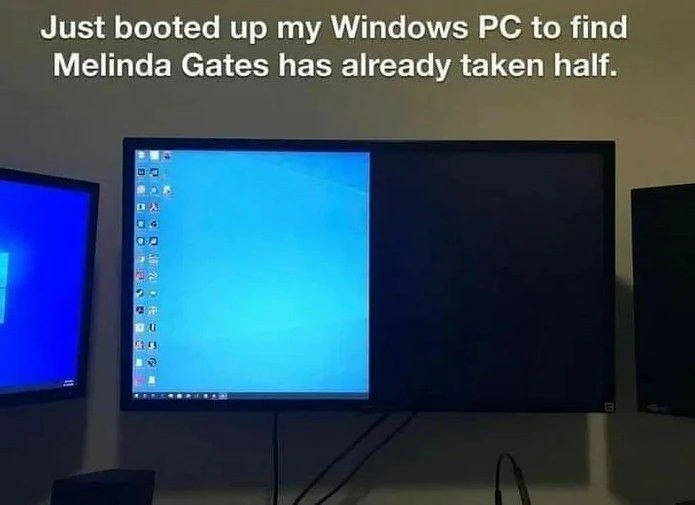
Let’s break this down in simpler terms. The meme shows a computer with three monitors on a desk. The middle monitor is really wide (widescreen), but only the left half of that screen is working – you see the normal Windows 10 desktop on that side (the familiar bright blue background and icons). The right half is completely black, as if the screen just didn’t turn on for that part. It looks almost like someone drew an invisible line down the middle of the monitor and everything to the right of the line is turned off. The caption text at the top jokes: “Just booted up my Windows PC to find Melinda Gates has already taken half.”

Why mention Melinda Gates? Well, Bill Gates (the co-founder of Microsoft, the company that makes Windows) and his wife Melinda Gates had just announced they were divorcing around the time of this post. In many divorces, there’s a idea that the spouses split their stuff about half-and-half (50/50). Bill Gates is extremely rich, so people were making jokes like “Melinda’s gonna take half of Bill’s assets.” This meme cleverly compares that situation to what’s happening on the screen – half of something is gone. In other words, the computer started up with only half the screen working and the person jokingly blames it on Melinda taking her half of the screen (as if the screen were an asset to split!). It’s a cheeky property_division_joke mixing tech with a bit of celebrity news.

Now, from a tech perspective, what’s actually happening with that half-dead monitor? This is likely a Windows display driver issue or a configuration bug. The operating system (Windows 10 in this case) is responsible for handling multiple monitors and the graphics card. When Windows boots, it uses a piece of software called a display driver (provided by your graphics card manufacturer or Microsoft) to talk to the monitor and set the correct resolution (the number of pixels). If something goes wrong in that communication – say the PC thinks the monitor’s width is smaller than it really is – you might get a scenario where only part of the screen is used. The rest of the pixels essentially go blank because the OS isn’t sending any image there. This is a type of bug (an error in software) in the sense that the system isn’t doing what it’s supposed to do.

People who use multiple monitors (especially developers and IT folks who love having lots of screen space) are very familiar with weird issues like this. For example, sometimes after a Windows update or when you plug in a new monitor, you might see:

  • One monitor stuck at the wrong resolution (everything is huge and low-res, or tiny and high-res).
  • A monitor that remains black even though it’s detected.
  • The arrangement is wrong (your mouse goes off the left side of one screen but doesn’t show up on the right side of the next screen because Windows thought the order was different).
  • Windows or icons that keep moving to the wrong monitor or appear half-off the screen.

These are everyday bugs in software configurations that can drive you a bit crazy until you fix them. The cause can be anything from a misbehaving driver, a loose cable, or Windows just having a bad day. In multi-monitor setups, Windows keeps track of each display’s settings. It identifies monitors by reading data from them (like their supported resolutions and model name – that info is part of the monitor’s EDID, though you don’t need to remember that acronym). If the monitor’s info isn’t read correctly at boot, Windows might assume a default that’s not quite right. Imagine the monitor is actually 3840 pixels wide (a common width for ultrawide screens), but Windows mistakenly thinks it’s only 1920 pixels wide. Windows will then only use 1920 pixels worth of the screen – roughly half – and ignore the rest, which appears black because nothing is being drawn there. It’s as if Windows is unintentionally treating the other half as a second monitor that doesn’t exist or just leaving it blank.

So in plain terms: Windows had a hiccup and only “lit up” half of a big monitor. For a developer who just wants to start coding, seeing only half your screen is like your desk suddenly shrinking in size. It’s annoying and puzzling. Usually, you’d troubleshoot by going into Windows Display Settings to see if the resolution or monitor layout is wrong. Maybe you’d update the display driver or simply restart the PC (since “turn it off and on again” is the universal fix for many tech problems 😁). Often these glitches resolve after a reboot or re-plugging the monitor cable. It’s the kind of trivial-but-frustrating tech issue that everyone encounters sooner or later.

Now, the humor comes from how the person who made the meme reacted to this frustration. Instead of just saying “ugh, Windows is buggy” they made a funny connection to something from the news. Bill Gates is closely associated with Windows (it’s Microsoft Windows, after all), and the irony of his personal life (dividing things up in a divorce) showing up on a Microsoft product (the screen splitting in half) is pretty hilarious to anyone who gets the reference. It’s a form of developer humor where we often joke that our computers have minds of their own or are influenced by real-world events.

For a junior developer or someone new to tech, the key points to understand are:

  • Multi-monitor setup: This means using more than one monitor with your computer to extend your desktop space. It’s great for productivity (like having code on one screen and documentation or a browser on another). But it also means more complexity in configuration.
  • Display driver bug: The display driver is software that helps the OS communicate with the graphics hardware and monitor. Bugs here can cause weird display issues, like the half-screen problem.
  • Windows OS quirks: Every operating system has its odd bugs. Windows, being the most popular desktop OS, has plenty of known quirks especially with hardware support. These issues are usually not constant, but when they pop up (like after an update or a reboot), they can surprise you.
  • Humor in tech: Tech folks love to make light of their problems. Instead of just complaining “my monitor is broken,” turning it into a joke about Melinda Gates “taking half” is a way to vent and laugh at the same time. It’s relatable because many of us know both the annoyance of such bugs and the public story of the Gates divorce.

In summary, the meme is saying: “My Windows computer only gave me half a screen after starting up. That’s such a crazy coincidence because Bill Gates’s wife is splitting things half-and-half in their divorce – haha, maybe she even took half of my screen!” It’s a nerdy, current-events twist on what otherwise is just a mundane tech annoyance. Understanding it doesn’t require deep technical knowledge, just a familiarity with Windows quirks and the sense of who Bill Gates is. And if you didn’t know about the Gates divorce, now you do – it was a big news story in 2021, and this meme was one of countless jokes people made linking that news to everyday life (or in our case, everyday tech issues).

Level 3: Split-Screen Settlement

"Just booted up my Windows PC to find Melinda Gates has already taken half."

This meme packs a double punch of Operating System humor and real-world irony. On one side, we have a classic Windows display glitch: an ultra-wide monitor showing only the left half of the desktop while the right half stays ominously black. On the other side, we have a timely reference to the Bill and Melinda Gates divorce (fresh news in early May 2021). The meme’s caption jokes that Melinda has already taken half – framing the screen’s missing half as if it’s part of a divorce property division. For seasoned developers and IT pros, this is peak HumorInTech: a marriage of a BugsInSoftware joke with a pop culture event, executed with perfect 50/50 irony.

From a technical standpoint, this image screams multi-monitor misadventure. The center widescreen is behaving as if its display driver or Windows itself bungled the resolution negotiation. The Microsoft Windows OS is known for occasionally misdetecting monitors or forgetting settings, especially in complex multi_monitor_troubles setups. The result? The GUI thinks the monitor’s width is half of what it actually is, so it only renders graphics on that left portion, leaving the rest blank – effectively giving you a half-working screen. If you’ve managed dual or triple monitors, you’ve likely encountered funky issues like windows appearing off-screen, wrong resolutions, or one monitor staying blank after boot. It’s the kind of quirk that triggers a weary sigh from veteran sysadmins: “Here we go again, Windows…”

Why is this funny to devs? It’s the juxtaposition of a software bug with a billionaire breakup. Bill Gates co-founded Microsoft and is synonymous with Windows – so when Windows 10 boots up with literally half the screen gone, it’s as if the OS itself is enacting the divorce settlement! The caption’s deadpan delivery (“Melinda Gates has already taken half”) anthropomorphizes the glitch: suddenly that black half of the screen isn’t just a tech issue, it’s Melinda claiming her share of the marital assets. 😂 For those in the know, the timing was perfect – the meme popped up days after the Gates announced their split, when the internet was abuzz with jokes about who gets what (even who gets Bill’s shares of Microsoft). Seeing a Windows bug align so perfectly with current events felt like the tech gods had a wicked sense of humor.

Digging into the OperatingSystems mechanics, what could cause such a screen_split_bug? A few plausible culprits:

  • Resolution Misnegotiation: During boot, Windows queries the monitor’s EDID (Extended Display Identification Data) to figure out supported modes. If that handshake goes haywire (say, the monitor reports strange data or the OS misinterprets it), Windows might set a resolution that’s literally half the monitor’s native width. The left half fills with the desktop at, say, 1920×1080, while the right half is simply beyond the drawn area (appearing black).
  • Display Driver Glitch: A buggy or outdated graphics driver can exhibit odd behavior on ultra-wides. Perhaps the driver initialized the screen as two logical displays side-by-side (each half as one display) but only one “half” got output. It’s not unheard of for new driver updates to introduce funky multi-monitor Bugs – a classic “fix one thing, break another” scenario.
  • Monitor Hardware Mode (PBP): Some large monitors support Picture-by-Picture mode, splitting the screen into two inputs. If accidentally toggled, the monitor could behave like two smaller monitors stuck together. Windows might then only use one “input” (half the panel) because the other half expects a second PC. The result: your center screen looks divorced from itself – one half showing Windows, the other half an empty void.
  • Virtual Display Artifacts: Tools that create virtual displays (for recording or remote desktop) sometimes leave phantom half screens. If a virtual display or misconfigured dock was present, Windows might think the full monitor is partly an extended screen that’s no longer there, leaving a blank remainder.

For a battle-hardened developer, such multi_monitor_troubles are painfully relatable. You come into the office, boot up your rig excited for the day, and bam – half your real estate is missing. It’s not that different from coming home to find half the furniture gone. Usually, your first reaction (after a facepalm) is to dive into display settings or fiddle with cables. The meme’s author, instead of screaming at the screen, channeled that frustration into a joke: “Looks like Melinda already got her share.” It’s a coping mechanism tech folks use often – we laugh so we don’t cry. 😅

On a systemic level, this highlights the ongoing quirks of managing hardware via software. An Operating System like Windows must accommodate endless combinations of GPUs, drivers, and monitors. Even with modern plug-and-play standards, weird edge cases slip through. That’s why even in 2021 (decades into Windows development), we still encounter display bugs that feel bizarre. And of course, they always surface at the most inconvenient times – morning standups, important demos, or Monday mornings when patience is thinnest. The veteran crowd has a running joke that every Windows Update is a dice roll: will my audio still work? will my third monitor still light up? It’s like a soap opera with your PC’s peripherals.

The Bill & Melinda Gates divorce reference adds a satirical layer about splitting things in half. In high-profile divorces, it’s often joked that everything will be divided 50/50. Here the poor developer’s Windows PC apparently took the joke literally and “split” the display down the middle. It’s especially ironic because Bill Gates is essentially “Mr. Windows” – seeing his own product symbolically reflect his personal life is comedic gold. It’s humor that developers appreciate: a blend of current events and our daily battle with technology’s capriciousness.

To really appreciate this joke, you have to recognize both parts: the technical snafu and the real-world event. If you’ve wrestled with a misbehaving monitor, you nod knowingly at the half-active screen – yep, seen that one. If you’ve followed tech news, you smirk at the Melinda punchline. When combined, it’s an unexpected synergy: a mundane software bug elevated to meme status by tying it to a billionaire’s split. It’s the kind of clever mashup that gets shared around the office Slack, giving everyone a chuckle (and maybe prompting someone to update their display drivers). In summary, this meme lands so well because it transforms a frustrating Windows bug into a brilliant geeky joke — turning a dreaded morning surprise into a moment of communal laughter among techies.

Description

A photograph of a widescreen computer monitor with a caption above it that reads, 'Just booted up my Windows PC to find Melinda Gates has already taken half.' The monitor's display is perfectly split down the middle: the left half shows a classic blue Windows desktop with icons lined up on the side, while the right half is completely black and devoid of any content. This meme is a topical joke from early May 2021, immediately following the announcement of Bill and Melinda Gates' divorce. The humor comes from the visual pun, literally interpreting the 'taking half' of assets in a divorce settlement and applying it to the user's Windows operating system, a product synonymous with Bill Gates. For tech professionals, it's a clever blend of a common display glitch with a major tech news event

Comments

11
Anonymous ★ Top Pick It's the new resource allocation model in the latest Windows update. Half the screen buffer is now in an irrevocable trust
  1. Anonymous ★ Top Pick

    It's the new resource allocation model in the latest Windows update. Half the screen buffer is now in an irrevocable trust

  2. Anonymous

    My display driver’s gone full microservice - left-half render pod is healthy, right-half failed its liveness probe. Apparently Windows is doing blue-green deploys one pixel column at a time

  3. Anonymous

    Ah yes, the classic Windows Update 2021.DIVORCE - where even your display drivers respect community property laws. Next patch notes: 'Fixed issue where kernel panic occurs when trying to access shared memory blocks.'

  4. Anonymous

    When your display driver's asset allocation algorithm implements community property law instead of proper viewport rendering - clearly someone merged the divorce settlement logic into the graphics pipeline. This is what happens when your GPU lawyer negotiates screen real estate distribution at boot time

  5. Anonymous

    Windows finally automating equitable partition: Melinda's alimony as a boot-time display driver feature

  6. Anonymous

    Classic EDID/DWM split-brain: Windows thinks 3840x2160, the panel reports 1920x2160; must be that NTFS ACL entry - gates:take_half

  7. Anonymous

    Windows boot: EDID hiccup and DisplayPort MST tiles the panel, so my 4K gets a clean 50/50 - Explorer keeps the icons, the update service gets custody of the rest

  8. @sashakity 5y

    are they getting divorced or something

    1. Deleted Account 5y

      Yap, that's because bill gates cheated on her with Linus Torvalds. If you wanna know more, google "WSL2"

      1. @sashakity 5y

        lmao

      2. @adelith 5y

        No, thx

Use J and K for navigation