Skip to content
DevMeme
5782 of 7435
Unmasking Windows 11: Cute Anime Girl vs. Terminator Core
Microsoft Post #6338, on Oct 17, 2024 in TG

Unmasking Windows 11: Cute Anime Girl vs. Terminator Core

Why is this Microsoft meme funny?

Level 1: Monster Behind the Mask

Imagine you have a super cute toy robot that talks to you and helps with your homework. It smiles, tells jokes, and you really like it. But one day, you discover that inside this friendly robot, there’s a secret camera and it’s been sending your conversations back to the toy company the whole time. 😬 Suddenly, that cute helpful robot feels a lot less innocent, right? You might feel a bit scared or betrayed, like “Oh no, what is it really up to?”

That’s what this funny picture is about. It’s like a scene from Scooby-Doo: at first we see a nice, friendly character (Windows 11 dressed as a sweet anime girl saying hello). But then the mask comes off – literally – and underneath there’s a scary robot face with glowing red eyes, listing a bunch of sneaky things it was doing. The guy who took the mask off (Fred) is so shocked that he wishes he could put it back on and pretend he never saw it! The joke here is that Windows 11 (the newest version of Microsoft Windows on computers) seems very friendly and modern when you use it, but hidden inside it are things that people don’t like (like it might be watching what you do, always suggesting its own services, or pushing you to save stuff on the cloud).

In simple terms, it’s like a wolf in sheep’s clothing story – something that looks cute and harmless on the outside but has a not-so-nice side hiding beneath. The picture makes us laugh because it captures that “Uh oh!” feeling in a silly, exaggerated way. We’re laughing at how true it can feel: sometimes we’d rather keep the mask on and not know about the creepy stuff inside!

Level 2: Friendly UI, Hidden Spy

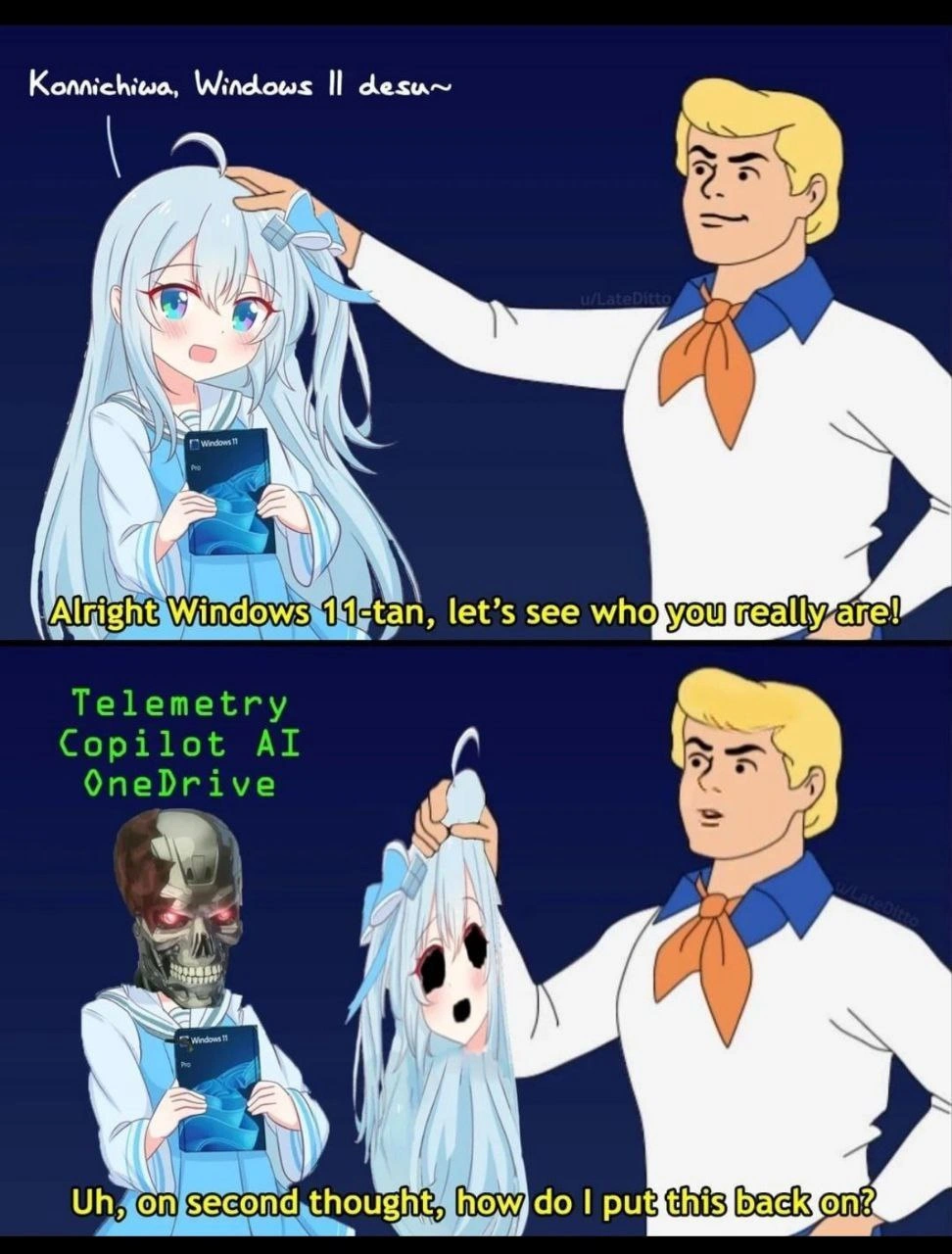
This meme uses a simple cartoon scene to illustrate what many people feel about Windows 11: it looks friendly and modern on the outside, but under the surface it’s doing things you might not like. The top panel shows a cheerful blue-haired anime girl holding a Windows 11 Pro box, introducing herself in Japanese (“Hello, I’m Windows 11!” in a cute way). This character is Windows 11-tan, essentially Windows 11 personified as a cute anime-style girl. (Fun fact: tech communities sometimes create these “OS-tan” characters to give operating systems a playful human form.) Next to her is Fred from the Scooby-Doo cartoons, who says, “Alright Windows 11-tan, let’s see who you really are!” – a classic line from Scooby-Doo during monster unmasking scenes. This sets up the joke: we’re about to peel back the friendly mask of Windows 11.

In the bottom panel, Fred has removed the “mask” (the anime face) from Windows 11-tan. What’s underneath? A Terminator-like robot skull with glowing red eyes wearing the same outfit and still clutching the Windows 11 box. 😨 In mid-air, we see green text labels next to this scary reveal: Telemetry, Copilot AI, OneDrive. These are the hidden identities of the “monster” that Windows 11-tan really is. Essentially, the meme is saying: Behind Windows 11’s nice user interface, it’s really all about telemetry, Copilot, and OneDrive. Fred looks startled and says, “Uh, on second thought, how do I put this back on?” meaning he’s shocked by the true form and kinda wishes he hadn’t uncovered it. It’s a humorous way to express regret at discovering an uncomfortable truth.

Let’s break down those three big words, since they’re key to understanding the joke:

  • Telemetry: In simple terms, telemetry is data that Windows 11 collects from your computer and sends back to Microsoft. It might include things like which apps you use, performance metrics, error logs, and other diagnostic info. Microsoft says this helps them improve the OS by understanding how real users behave and when problems happen. However, to many users (especially developers and privacy-conscious folks), it feels like the OS is spying on them. It can be seen as an invasion of privacy or just unnecessary bloat using your internet bandwidth and CPU. In Windows 11, some level of telemetry is always on by default – you can adjust it (e.g. send “Required diagnostic data” vs “Optional diagnostic data”), but you can’t completely turn it off unless you use special enterprise settings. That’s why telemetry is listed as part of the “monster” here: it’s the not-so-friendly part of Windows that’s quietly watching and reporting what you do.

  • Copilot AI: This refers to a new feature in Windows 11 – essentially an AI assistant integrated into the operating system. It’s called Windows Copilot. Think of it like having a version of ChatGPT or a smart assistant right in your sidebar. You can ask it to do tasks like adjust settings, summarize documents, or answer questions using Bing’s AI. Sounds cool, right? But many developers and power users are a bit wary of it. Why? Because for Copilot to help you, it might need to access your content or at least send your queries to Microsoft’s servers to get answers (that’s where the AI processing happens). This raises both privacy concerns (what data is it looking at or sending out?) and performance concerns (it might be running when you don’t need it, using memory/CPU). Plus, if you’re a person who likes to do things manually, a pop-up AI suggesting things might feel intrusive. In the meme, Copilot AI is listed as part of the scary hidden identity because some users feel it was forced on them – an unwanted, possibly creepy addition under the hood of Windows 11’s friendly facade. It’s like the OS is saying “I come with an AI that’s always around,” and not everyone is comfortable with that.

  • OneDrive: This is Microsoft’s cloud storage service (similar to Dropbox or Google Drive). Windows 11 heavily pushes OneDrive integration. For example, when you set up Windows, it encourages you to sign in with a Microsoft account (which links to OneDrive), and it may default to saving your documents and photos to your OneDrive cloud. It even adds OneDrive into File Explorer, and might pester you with “Set up OneDrive” notifications if you’re not using it. While cloud backup can be convenient, a lot of developers find this annoying if they prefer storing files locally or using a different service. They call it bloat because it’s an extra feature running that they might not want – taking up system resources and cluttering the interface. Some also joke about it being “forced” because Windows doesn’t always make it obvious how to operate without a OneDrive account. In the meme, OneDrive is part of the monster because to many tech-savvy users, it’s the unwelcome tag-along friend that Windows brought to the party without asking.

Now, why does Fred (representing a curious user or developer) want to put the mask back on? That line is funny because it’s the opposite of what usually happens in Scooby-Doo. Normally, the heroes are happy to expose the villain’s identity. But here, the “villain” is essentially features of Windows 11 – and you can’t exactly remove them completely. It’s as if he’s saying, “Yikes, I was not ready for that. Can we pretend I didn’t see it?” This reflects how a lot of us feel when we dig into the latest OS settings or tech news and discover something unsettling. For example, a new developer might excitedly install Windows 11 for its sleek design and then discover things like ads in the Start menu, required online accounts, continuous background data syncing, etc. It can be a bit of a “oh no” moment – you realize this shiny OS has some strings attached.

The Scooby-Doo unmasking setup is a lighthearted way to convey that feeling. It’s culturally recognizable: even if you haven’t seen the show, you likely know the trope – the good guys literally ripping a disguise off the bad guy to reveal the truth. In online memes, it’s often used to show that something is not what it seems. Here Windows 11 seems like a helpful, sweet “girl” (even speaking polite Japanese to be extra lovable), but in reality it’s hiding a Terminator-like persona: relentless, robotic, and focused on its mission (which many users interpret as “collect data and push Microsoft’s agenda”). The terminator imagery strengthens the idea that these features are not friendly – it’s a machine that won’t easily stop. Those glowing red eyes? That’s classic shorthand for “evil robot” in sci-fi.

For someone new to the field or a junior developer, this meme is basically saying: As nice as Windows 11 looks, be aware that it’s doing some things you might not immediately see – and you might not like those things. It’s exaggerating for effect, of course. Windows 11 isn’t actually a killer robot, and features like telemetry or OneDrive aren’t literally villains – they have their purposes (diagnostics can improve stability, cloud storage can save your files). But the frustration is real because these things are often on by default and not always transparent. Many developers learn this the first time they set up a development environment on Windows 10/11: you spend the first hour googling “How to disable Windows telemetry” or “Remove OneDrive integration” or “Turn off Cortana/AI in Windows 11” because those defaults can interfere with performance or privacy. It’s almost a rite of passage.

In summary, the meme is a funny illustration of the tension between a product’s appearance and its reality. OperatingSystems like Windows 11 market themselves as user-friendly (even adorable in this satire), but they also serve the company’s goals (data collection, service integration). For a junior dev or any user, it’s a good reminder: always peek under the hood of the tools you use! Just be prepared – you might not love what you find, and as the meme jokes, you might wish you could un-see it afterwards. It’s tech humor (TechSatire) with a lesson: even the nicest UIs can hide some spooky surprises.

Level 3: Skynet in a Sundress

At the deepest level, this meme skewers Windows 11’s cute public face by revealing the cold, mechanical reality underneath. The anime girl “Windows 11-tan” is a personification of the OS–a playful nod to the old OS-tan internet meme where operating systems were drawn as friendly anime characters. Here she greets us with “Konnichiwa, Windows 11 desu~” (Japanese for “Hello, I’m Windows 11~”), acting all innocent. But Fred (from Scooby-Doo, ever the problem-sleuthing engineer in this scenario) isn’t buying it. He says, “Alright Windows 11-tan, let’s see who you really are!” and literally peels off the kawaii UI mask. Underneath lurks a Terminator-style skull with glowing red eyes – a perfect metaphor for the surveillance and bloatware many developers suspect within. The floating green text spells it out: Telemetry, Copilot AI, OneDrive – the trio of “villains” hiding behind that friendly Start menu. It’s a darkly funny mask_reveal_meme that channels a shared industry joke: Windows’ cheerful interface conceals a terminator_skeleton of background processes constantly watching, logging, and pushing cloud services.

Why is this funny to seasoned developers? Because it’s painfully true. We’ve all experienced the polished updates of modern Windows, only to find more telemetry hooks siphoning system data, more “smart” assistants like Windows Copilot popping up uninvited, and deeper ties to Microsoft’s cloud (hello forced OneDrive sync). The meme plays on that classic Scooby-Doo unmasking trope – normally used to expose the bad guy – and twists it. Fred’s subtitle line, “Uh, on second thought, how do I put this back on?” nails the punchline: even the hero regrets unveiling the truth. It’s as if a sysadmin dug into the OS internals, discovered just how much Windows 11 behaves like corporate spyware, and thought “Nope, didn’t need to see that.” There’s a real-world echo here: often when developers trace mysterious network traffic or CPU usage on Windows, they end up muttering “I wish I hadn’t looked; it’s just Windows phoning home again.”

This humor hits on privacy concerns and software bloat that industry veterans know all too well. Telemetry is the data Windows continuously collects – usage stats, app activity, maybe even your voice commands – under the benign guise of “diagnostics” to improve user experience. In practice, it often feels like Big Brother in a blue dress: an omnipresent watcher you never truly invited. Enterprise admins can tweak or limit it, but home/pro users are stuck with at least some level of this always-on monitoring. It’s the reason forums are filled with PowerShell scripts and gpedit.msc tweaks to disable DiagTrack (the telemetry service). Seasoned devs joke that Windows 11 Pro should be renamed “Windows 11 Pro Telemetry Edition”. The meme’s Terminator imagery – that menacing metal endoskeleton – perfectly embodies how inescapable and soulless this data collection can feel. It’s the telemetry_overload monster: relentless like Skynet, lurking beneath a smile.

Then there’s Copilot AI, Microsoft’s latest “helpful” feature baked into Windows. In theory, it’s a nifty AI assistant ready to help organize your day, answer questions, or even write code snippets. In practice, many developers see it as Clippy’s creepy cyborg descendant – always there, consuming resources, and potentially scanning your context to offer help (“I see you’re trying to ignore me, mind if I upload your desktop contents to Bing?” 🙄). The AI is cloud-powered, meaning it likely sends data to Microsoft’s servers whenever it’s invoked. For devs, that raises red flags: what data is being sent? Can we opt out? Why is this thing running when we didn’t ask for it? It feels intrusive, especially on a dev machine meant to run lean. The meme lumps Copilot with telemetry because both share that whiff of “we’re doing things behind the scenes with your info.” The Terminator analogy fits here too – an AI that might be helpful, but you can’t shake the feeling it’s just gathering intel before the machine uprising (or, y’know, targeted ads).

And of course, OneDrive – the cloud storage tentacle of Microsoft’s ecosystem – gets its turn on the villain roster. OneDrive integration in Windows 11 is everywhere: the OS begs you to sign in with a Microsoft account, defaults to saving documents in OneDrive, and persistently nudges you if you stray. For developers who prefer local control (or who use GitHub, Dropbox, or anything else), this microsoft_onedrive_bloat is exasperating. It’s not inherently evil – syncing files across devices can be useful – but the forced nature of it feels like a bait-and-switch. We expected a standalone OS; we got a gateway drug to Microsoft’s cloud services. It’s the friendly anime sidekick that turns out to be a clingy salesman in disguise: “Notice you saved a file, want to back it up to OneDrive? No? Are you sure? I’ll ask again later!” The meme portrays OneDrive as part of the monster because for many devs, it’s yet another thing to disable after a fresh install, alongside the games and unsolicited “suggestions” in the Start menu. Bloat and feature creep have turned what used to be an OS into a busy dashboard for a whole ecosystem of products.

All these elements – telemetry, AI assistant, cloud tie-ins – reflect a broader truth: modern OSes, especially from Microsoft, have pivoted from the straightforward tools of old (just an OS to run your programs) into service platforms of their own. It’s a trade-off: you get fancy features and “smarter” experiences, but you give up simplicity and some privacy. Veteran developers have watched this evolution since the days of Windows XP and 7, and many aren’t too happy about it. We remember when an operating system didn’t nag you to log into an account or bombard you with “tips”. Now it sometimes feels like the OS is less your PC’s master control and more Microsoft’s satellite office on your hardware. The joke in this meme exaggerates that feeling to brilliant effect. By using the innocence of anime art and the familiar Scooby-Doo gag, it highlights the absurdity: Windows 11’s polished UI and colorful themes are just a mask worn by a data-harvesting, cloud-pushing machine. And Fred’s reaction – wanting to put the mask back on – is an extra wink to the audience: once you see how the sausage is made (or how the OS is tracking you), you might wish you hadn’t looked. It’s a rueful laugh of recognition for anyone who’s spent an afternoon rifling through privacy settings or de-bloating a new installation.

In short, the meme resonates on multiple layers of tech humor. It references pop culture (Scooby-Doo, anime OS-tan characters, Terminator’s iconic killer robot) to make a point about OperatingSystems today: the friendlier and more fun the facade, the more we wonder what PrivacyConcerns hide beneath. It’s funny because it’s true – and a little scary. A seasoned dev sees this and chuckles and winces at the same time. After all, we’ve been Fred, peeling back the UI to inspect startup tasks, only to sigh, “Yep, it’s exactly what I feared.”

Description

A two-panel meme using the 'Fred unmasking' format from the cartoon Scooby-Doo to critique Windows 11. In the first panel, Fred Jones is patting the head of a cute anime girl with light blue hair, who is a 'moe' anthropomorphism of the operating system, known as 'Windows 11-tan.' She says, 'Konnichiwa, Windows 11 desu~' and holds a box for Windows 11 Pro. Fred says, 'Alright Windows 11-tan, let's see who you really are!'. In the second panel, Fred has pulled off the girl's face as a mask, revealing a menacing T-800 Terminator skeleton with glowing red eyes underneath, still wearing the same blue and white outfit and holding the Windows box. To the side, green text lists the Terminator's true components: 'Telemetry, Copilot AI, OneDrive'. A horrified Fred looks at the mask and asks, 'Uh, on second thought, how do I put this back on?'. The meme satirizes the perception that Windows 11's sleek, user-friendly appearance conceals aggressive and invasive features like data collection (Telemetry), forced AI integration (Copilot), and deep cloud service integration (OneDrive), which are seen as hostile to the user, much like a killer robot


Comments

15
Anonymous ★ Top Pick Windows 11 is like a mystery box from marketing: the outside promises a delightful user experience, but the inside is just a Skynet beta test you can't opt out of
  1. Anonymous ★ Top Pick

    Windows 11 is like a mystery box from marketing: the outside promises a delightful user experience, but the inside is just a Skynet beta test you can't opt out of

  2. Anonymous

    Windows 11: the only OS where “Disable telemetry” in Group Policy spawns a new svchost called DefinitelyNotTelemetry.exe - then Copilot helpfully offers to back it up to OneDrive

  3. Anonymous

    After 20 years in the industry, I've learned that every new Windows version is just three telemetry services in a trench coat pretending to be an operating system - and now they've added an AI to help collect data more efficiently

  4. Anonymous

    Windows 11 is like that startup that promises a sleek, modern experience but the Terms of Service reveal they're actually a data broker with an OS side hustle. The cute anime mascot is just the UX layer - underneath it's all telemetry pipelines, forced cloud sync, and an AI copilot that's definitely logging your keystrokes for 'product improvement.' At least with Linux you know the kernel isn't phoning home to Redmond every time you compile something

  5. Anonymous

    Windows 11 is basically SaaS with a kernel; every Moment update turns your carefully crafted GPOs into best‑effort hints while data.microsoft.com keeps winning the retry loop

  6. Anonymous

    Windows 11's layered architecture: Shiny UI on top, telemetry panopticon below - every keystroke a perfect observability win for Redmond

  7. Anonymous

    Windows 11 unmasking: cute UI outside, telemetry, Copilot, and OneDrive inside; Patch Tuesday means a Group Policy + registry speedrun to tape the mask back on

  8. @azizhakberdiev 1y

    Same with Linux, but there's open source inside

    1. @chupasaurus 1y

      Which file manager on Linux is dependent on screenshot-archive with OCR and semantic search?

  9. @paletteOvO 1y

    i would like this function though if all processes are open source and local/self-hostedable

    1. @hotsadboi 1y

      may I present to you: local onedrive

      1. @azizhakberdiev 1y

        I miss the days I could simply plug a different one into my pc without any configuration and use it

      2. @paletteOvO 1y

        i mean screenshot with ocr and ai searching😂

        1. @hotsadboi 1y

          iirc, windows has a good ocr in powertoys. I sometimes use tesseract on linux, it's not perfect and more often than not requires manual editing, but it gets the job done

      3. @ZgGPuo8dZef58K6hxxGVj3Z2 1y

        Sir, I bought it but it doesn’t have wifi

Use J and K for navigation