Imagining developer hell: C++ frontend with Excel-VBA backend web stack
Why is this Backend meme funny?
Level 1: Wrong Tools, Big Mess
Imagine you have to build something using completely wrong tools – it’s going to be a huge mess, right? This meme is funny because it’s basically saying a developer’s version of hell is having to use the wrong tools for the job every step of the way. Think of it like this: you want to make a simple peanut butter and jelly sandwich, but someone says, “Sure, you can make it, but you must spread the jelly with a chainsaw and toast the bread in a freezer.” That sounds crazy! The chainsaw is way too powerful and clumsy for spreading jelly (you’ll splatter jelly everywhere, and it’s super hard to control), and a freezer is the opposite of what you need to toast bread (it makes things cold, not warm and crispy). In the end, your simple sandwich would turn into a disaster: jelly all over the place and frozen bread.
In the same way, a website has parts that need the right tools. Using C++ to make the part of the website you see is like using a chainsaw for jelly – it’s a very strong tool, but not meant for that task, so it makes everything more complicated than it should be. And using Excel (a spreadsheet program) to do the server’s job is like using a freezer as an oven – it’s just the completely wrong thing, so it can’t do the job properly. The result for the developer is frustration and chaos, much like our imaginary sandwich-making.
So the meme is joking that being forced to build a website with those mismatched tools would be a developer’s personal nightmare – their own special “bad place.” It’s funny in the way that imagining any ridiculously wrong tool use is funny, and it also has a bit of an “ouch” factor because anyone can see how doomed and messy that project would be. In short, it’s saying: using the wrong tools can turn a simple job into an awful experience. And that idea is clear and humorous even without technical knowledge, just like our chainsaw and freezer cooking example.
Level 2: Wrong Tools for the Job
Let’s step back and explain why this tech stack is such a bad idea, in simpler terms. In web development, we usually separate the frontend and backend roles with the appropriate tools:
The frontend is what runs in a user’s browser – basically everything the user sees and interacts with (buttons, text, images on the webpage). Frontend code is typically written in languages like HTML (for structure), CSS (for styling), and JavaScript (for interactivity). These are high-level languages tailored for creating web pages. Modern frontend development might use frameworks like React or Angular (written in JavaScript/TypeScript) to make dynamic, interactive UIs. The key is that browsers are designed to understand these web languages. Using C++ for a frontend is highly unusual. C++ is a powerful, low-level programming language usually used for building things like game engines, operating systems, or high-performance backend services – not for making things appear in a web browser. There is a possibility of compiling C++ into WebAssembly to run in the browser, but that’s typically reserved for very compute-heavy needs (like a graphics engine or video codec), not general UI. So saying “C++ as frontend” is like saying you’ll write the website’s interactive buttons and forms in a language that browsers don’t natively understand. It’s an inappropriate tech stack choice because you’d be ignoring all the tools browsers give you for free. It’s technically doable (with a lot of extra work), but it’s like reinventing the wheel – a very heavy wheel that might not fit.
The backend is what runs on the server – it handles logic, data storage, and the heavy lifting that the user doesn’t see directly. Common backend languages include Python, Java, JavaScript (Node.js), C#, Ruby, etc. These languages run on servers and talk to databases (like MySQL, PostgreSQL, MongoDB) to store and retrieve information. A typical backend is designed to handle many requests from users at the same time, ensure data is consistent, and run without manual intervention. Now, Excel and VBA as a backend is a giant red flag. Excel is a spreadsheet program – basically an interactive grid of cells that people use for calculations, budgeting, data analysis, etc. VBA (Visual Basic for Applications) is the scripting language inside Excel that can automate tasks (like a macro that formats a report or performs a complex calculation across cells). Neither is meant to act as a server. For one, Excel isn’t built to handle multiple users or web requests. It’s something you open on your desktop to manipulate data by hand or with macros. It also isn’t running constantly waiting for requests – someone would have to start Excel, and it’s usually run with a user interface (even if you try to hide it, it’s not a background service in the typical sense). Using Excel as a database means treating a spreadsheet file (
.xlsx) kind of like it was a server holding data. That’s extremely fragile: if two parts of the program try to write to the same file simultaneously, you get conflicts or file locks. If Excel is busy doing a calculation, it won’t respond to a new request until it’s done (unlike real databases that handle concurrency gracefully). And if there’s an error in a macro, it might just stop processing altogether until someone clicks “OK” on an error dialog – you obviously can’t have that happening on a headless server machine.
So why is the combination so funny (or scary)? Because it mixes things in a completely wrong way:
- C++ on the frontend is like using a bulldozer to crack a nut. It’s overkill and makes simple things hard. Web frontends benefit from being flexible and easy to change; C++ is rigid and complex to change once compiled. A junior dev might not even know how to get C++ to run in a browser, because it’s not ordinary at all – you’d have to learn about compiling to WebAssembly or making a browser plugin, which is advanced stuff that gives you very little benefit for huge effort.
- Excel/VBA on the backend is like using scotch tape to hold up a load-bearing wall. It’s a fragile hack. If someone in the office were doing this for a quick one-off task (“Oh I don’t know how to set up a database, I’ll just put the data in Excel and write a macro”), we’d understand – but it’s not maintainable for a real website. A new developer on the team would be baffled: Where is our code? “Oh, part of it is in this Excel file macro.” That’s not how backend code is usually organized. Normally, backend code sits in version-controlled files on a server, not hidden inside cells of a spreadsheet.
Some important terms and why they apply here:
- Tech Debt (Technical Debt): This refers to when you take short-cuts in code or architecture that save time now but create big maintenance problems later. Using Excel as a backend might have been a “quick fix” for someone who didn’t want to set up a database, but it becomes tech debt – every new feature or bug fix will be expensive and risky because the foundation is weak.
- Over Engineering: This means using a solution that is far more complicated or powerful than necessary. C++ for a web UI is over-engineering because you could use simpler tools (like just HTML/JS) to do the same job more easily and with fewer bugs. It’s like building a robotic arm to butter your toast – technically impressive, but unnecessary and prone to breaking.
- Bad Practices: These are approaches that experienced developers have learned to avoid because they usually lead to trouble. Both aspects of this stack are bad practices: one should not use Excel as a database for an actual website (bad practice from a backend perspective), and one should not ignore web-standard tech in favor of low-level code on the frontend (bad practice for maintainability and security).
- Spaghetti Code: This term describes code that is tangled and messy, like a heap of spaghetti. When you use the wrong tools, you often have to write convoluted glue code to make them talk to each other. For example, imagine the code needed to connect a C++ program to an Excel file – likely lots of custom wrappers, special-case handling, and odd dependencies. The result is a system where the logic flow is hard to follow, twisting through languages and files in a confusing way. Excel macros themselves can become spaghetti code because they often start simple but, over time, people keep adding patches (maybe a new formula here, a quick macro there) until it’s a snarled mess that nobody fully understands.
For a junior developer or someone just learning, the humor also lies in contrast to what they’re being taught. In a web development course, you’d learn something like:
- Frontend: HTML/CSS/JavaScript – maybe use a nice library or framework.
- Backend: use Python + Flask, or Node.js, or Java + Spring Boot – something designed for servers.
- Database: use an actual database or at least a structured file, not a GUI program like Excel. If someone then said, “Actually, let’s do the opposite: use the hardest low-level language on the front and a toy tool on the back,” you’d think they’re joking. And in this meme, it is a joke – an extreme one. It highlights the concept of inappropriate_tech_stack by using an obviously mismatched set of technologies.
In reality, why would this be anyone’s “hell”? Because working on such a project would be extremely frustrating:
- Every change on the frontend would be slow: compile C++ code, ensure it works in the browser environment (most web devs don’t even have a build pipeline for C++ in frontend).
- Every issue on the backend would be hard to debug: you can’t easily print debug logs from an Excel macro to your server console. You’d probably have to open Excel manually to see what went wrong.
- Collaboration is hard: two devs can’t comfortably work on the Excel file at the same time without stepping on each other’s toes, whereas real code can be merged from multiple people.
- Testing is a nightmare: how do you write an automated test for an Excel macro that’s supposed to respond to a web query? You’d need Excel running in test mode – it’s not what any standard testing framework expects.
In summary, at this level we explain that frontend and backend each have typical tech stacks, and this meme deliberately inverts them with absurd choices. A new developer might not yet have experienced this, but they can understand:
- C++ is a powerful but complex language normally for other things, not webpages.
- Excel is a great tool for certain tasks, but not for running a website’s server.
So the meme is basically saying: imagine being forced to build a website with the worst possible choice of tools for each part – that’s my nightmare. Even someone new to coding can sense how inefficient and cumbersome that would be, especially when framed as “hell.” It’s a lesson in why we match tools to tasks: the right tool (like a proper database) makes life easier, the wrong tool (Excel as a database) makes it harder. And here, they’ve chosen all the wrong tools, so it’s ultra-hard and very, very easy to mess up.
Level 3: Full-Stack from Hell
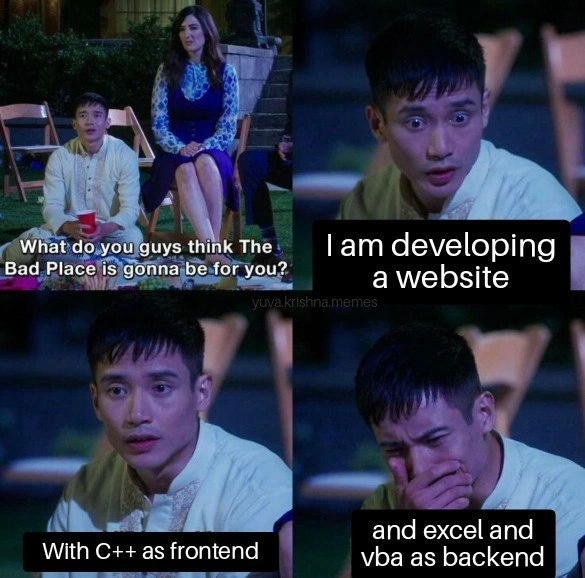
From a senior developer’s perspective, this meme is painfully hilarious because it concocts the most nightmarish tech stack imaginable. The scenario is essentially a full-stack abomination that flips conventional roles: using C++ as the frontend and Excel + VBA as the backend. In the meme (a scene from The Good Place repurposed for developer humor), a character describes his personalized hell (the “Bad Place”) as being forced to build a website with this stack. Seasoned engineers immediately cringe-smile at this because it hits a nerve – it’s the ultimate example of BadPractices and TechDebt rolled into one cursed project.
Why is this combo so horrific? Let’s break it down:
C++ frontend: Typically, frontend code for websites is HTML/CSS/JavaScript – technologies optimized for rendering in browsers, with high-level constructs for UI elements. Using C++ for the UI means you’re probably compiling native code to run in the browser (perhaps via a WebAssembly module or an old-school plugin). It’s massively over-engineered for rendering buttons and text. Every tiny UI change would require recompilation. Imagine debugging a segmentation fault because a button’s click handler tried to
freesomething it shouldn’t – in a browser context! That’s a nightmare no frontend dev wants. It also suggests a disregard for web standards: instead of using well-supported frameworks, someone is stubbornly forcing a low-level language into the UI layer. It’s like hammering a screw: doable with brute force, but you’ll ruin the screw and the wall.Excel + VBA backend: This is even worse. A backend’s job is to handle multiple users, store data reliably, and run business logic on a server 24/7. Excel is a single-user desktop application meant for interactive use by one person at a time, not a multi-user server. Yet, here it’s being used as a database and application server, with VBA (Visual Basic for Applications) macros serving as the server logic. This is the kind of technical debt you expect in a frightful legacy system: perhaps some non-programmer manager built a critical workflow in Excel because “it worked at the time,” and now that is the system. For a real developer, inheriting such a system is terrifying. Excel doesn’t handle concurrent writes well – if two requests try to update the spreadsheet, one might fail or overwrite the other. There’s no source control for changes, so a “fix” to a macro can’t be code-reviewed easily; it lives hidden in a binary
.xlsmfile. SpaghettiCode is virtually guaranteed because complex logic in Excel macros tends to grow organically without proper structure. Veteran devs have war stories about some finance or HR department’s mission-critical spreadsheet that nobody understands, but everyone fears to touch. Now imagine that monstrosity is actually your production web server! A single cell edited wrong or a macro error (#VALUE!or runtime error) could take down your whole site. Logging and error handling are almost non-existent – if Excel crashes (not unheard of when macros misbehave), it might just pop a silent dialog on a headless server or hang indefinitely. The error-handling is literally anOn Error Resume Nextaway from silently failing to update crucial data.
What makes this meme so funny to experienced devs is that it’s barely an exaggeration of real horror scenarios. We’ve seen things that come uncomfortably close:
- Websites where the “database” was actually an Excel file sitting on a network drive, with some script reading/writing CSV export because the team lacked a real DB or the business users insisted on using Excel for visibility.
- Enterprise “dashboards” where an Excel macro generates HTML reports, or users upload Excel files which the server then parses and acts upon, effectively treating Excel as an API. The slightest format change breaks everything.
- Legacy systems where core logic was written in VBA decades ago and gets called via some crusty COM interface by newer code. For instance, a C++ service might actually spin up an Excel instance via OLE automation to run a pricing model coded by quants in Excel. It’s as fragile and slow as it sounds – if Excel throws a popup or waits for user input, that service just hangs.
The C++ frontend part evokes memories of early web experiments gone wrong:
- Think of older web apps requiring a browser plugin (like a custom ActiveX control written in C++). If you’ve ever had to support an app that only runs on IE6 because it embeds a C++ control for the UI, you know that pain. It’s the kind of thing that breaks with every Windows update and certainly doesn’t work cross-platform. A seasoned dev sees “C++ frontend” and immediately imagines dependency hell (which Visual C++ runtime is installed on the client?), deployment nightmares, and a barrage of security prompts (“This application wants to run: Are you sure you trust ‘Unknown Publisher’?”). In modern terms, doing it via WebAssembly might sidestep the compatibility issues, but you’d basically be writing your own UI library from scratch in C++ or adapting something like Qt to compile to WASM – either way, massively complex for little gain.
In short, this meme pokes fun at an architectural worst-case scenario. It’s funny because it’s absurdly out-of-touch with best practices: no sane tech lead would approve this stack unless under duress or as a cruel joke. It riffs on the concept of a custom-tailored hell: for developers, “hell” isn’t demons and fire, it’s being forced to build or maintain a system that violates everything we know about sound software design. The front is an over-engineered, non-idiomatic choice, and the back is an under-engineered, flaky solution – simultaneously. Each part alone is hard to work with; together, they form a kind of devil’s spaghetti where every strand (integration point) is tangled:
- Integration pain: How does the C++ front-end talk to the Excel backend? HTTP requests hitting an Excel COM server? Maybe the C++ app directly opens a network share to the Excel file? Any integration path is ugly. If it’s HTTP, then you likely have a thin web server in front that on each request invokes an Excel macro. Imagine the latency when each page load triggers Excel to recalc a sheet – hope the users like waiting! If the C++ frontend somehow directly manipulates the Excel file, you’re bypassing all web safety (and probably constantly corrupting the file).
- Debugging & Maintenance: A veteran dev sees a future of horror: stepping through C++ code with a debugger is hard enough, now add that the bug might actually be in a VBA macro triggered deep inside an Excel cell. You fix one bug and inadvertently break a spreadsheet formula reference on the other side. You can’t unit-test this easily – you probably have to fire up a full Excel instance and a fully compiled frontend to test even a small change. Continuous integration? Forget it, how do you even automate Excel without a desktop session? This is where TechDebt becomes crushing: any new feature or bug fix takes ten times longer because the architecture fights you at every step.
- Scalability & Reliability: Seasoned engineers care about things like scaling to more users and not waking up at 3 AM because the server crashed. With Excel as a backend, scaling beyond one user is a prayer. There’s a reason we use proper databases and server frameworks – they handle concurrency, provide transaction safety, and are designed to run headless. Excel is meant to be interacted with; if a macro pops up an alert box (“Are you sure you want to delete this row?”), your whole backend is stuck waiting on a dialog that no one can see. As for reliability, Excel has a tendency to lock files and sometimes just crash or refuse to open if the file is in use. A backend that behaves like a cranky desktop app is a pager-duty nightmare.
Thus, the meme’s punchline lands: any developer who has been around the block sees this stack and practically hears the screams of a soul condemned. It’s BackendHumor and FrontendHumor united in one over-the-top scenario. The look of shame and horror on the character’s face in the final panel says it all: he knows this is a sin against computing. In meetings, we joke about bad ideas, like “what if we just keep all our data in an Excel sheet, ha ha…” – this meme takes that joke to its ultimate extreme. It’s funny because it’s TechHumor that doubles as a cautionary tale: this is what happens if you ignore all good advice and do everything wrong. In a sense, it’s a satirical take on inappropriate tech stack choices, exaggerated to the point that it becomes a developer’s version of a horror-comedy. We laugh, perhaps a bit nervously, because deep down every senior dev fears ending up on a project from the “Bad Place” like this one.
To put a cherry on top, here’s a pseudo-visual of what working with an Excel backend might look like in code form, which should send shivers down any programmer’s spine:
' Pseudo-code for a backend query using Excel VBA.
' Imagine this being invoked for each web request... 😨
Function GetUserData(username As String) As String
Dim ws As Worksheet
Set ws = ThisWorkbook.Worksheets("Users")
Dim foundCell As Range
Set foundCell = ws.Columns("A").Find(username)
If foundCell Is Nothing Then
GetUserData = "User not found"
Else
' Let's assume user data is in the next column
GetUserData = foundCell.Offset(0, 1).Value
End If
End Function
The thought of relying on something like the above in production is comically horrifying. A senior developer can foresee all the ways this goes wrong: what if two people call GetUserData at once? What if the “Users” sheet is sorted differently on one call? Who version-controls this logic? It’s the embodiment of cursed_architecture. In summary, the meme lands so well with experienced devs because it combines two realms of nightmare – a frontend that’s overly complex and alien to its environment, and a backend that’s laughably flimsy and misused – creating a perfect storm of full_stack_abomination. This is one of those laughs that’s half humor, half horror.
Level 4: Turing-Complete Torture
At the most theoretical level, this meme highlights a perverse use of Turing-complete tools in the most counterintuitive way. Both C++ and Excel VBA are Turing-complete languages, meaning in theory you can compute anything with them. But just because you can implement any logic with these tools doesn’t mean you should bind them together for a web application. This is a textbook example of a Turing tar-pit – a term for when a system is theoretically capable of anything, but practically it’s a quagmire to use for real tasks.
Using C++ as a frontend essentially means running native or compiled code in the browser environment – something historically attempted via ActiveX controls or NPAPI plugins in the dark days of Internet Explorer. Those approaches were infamous for security nightmares and stability issues. Modern browsers do allow running compiled C++ through WebAssembly, but writing an entire UI in C++/WebAssembly is overkill and strips away decades of ergonomic web-layer abstractions. It’s like treating the browser as an OS and reimplementing the UI layer from scratch in assembly-like fashion. You lose automatic memory management, safety nets of the DOM, and basically reinvent GUI rendering at the pixel level. The fundamental web principle of using HTML/CSS for structure and presentation is thrown out; instead you have a binary blob trying to paint pixels – powerful, but devoid of the browser’s usual optimizations. The computational complexity of trivial UI tasks skyrockets when you manage them with manual memory and pointer arithmetic. The slightest mistake (e.g. a null pointer or buffer overflow) in a C++ frontend could crash the entire page or even pose a security risk, whereas typical JavaScript errors just log to console. It’s an absurd inversion of web architecture, violating the layered design that makes the internet robust.
On the other end, Excel + VBA as a backend is a theoretical abuse of an office tool as a server. Excel’s calculation engine and VBA scripting are indeed powerful (financial analysts basically write programs in it every day), and Excel acts like a rudimentary in-memory database. But Excel was never designed for multi-user concurrent access, networked queries, or uptime reliability. Running server logic via Excel means fighting against fundamentals of OS process management and inter-process communication. Likely you’d have some COM automation or OLE connector where a server process spawns an invisible Excel instance to read/write data. Under the hood, that’s spawning a heavy GUI application to do a database’s job – an O(n^∞) solution in terms of scalability. As user load increases, this “backend” would bottleneck horribly: Excel might lock the workbook file (single writer), consume massive memory for large datasets, and can deadlock if two requests come in simultaneously. Classic database theory (transactions, ACID properties, proper indexing) is completely absent. Instead, you get fragile macros that can break if someone renames a worksheet or sorts a column. The meme’s absurd stack violates core principles of distributed systems and software architecture – there’s no clear separation of concerns, no statelessness. It’s a cursed architecture where every layer bleeds into the others in ungodly ways.
In computer science terms, this stack is entropy maximized. Each component negates the usual guarantees of the other: C++ introduces manual memory management and undefined behavior into the client-side (which is normally sandboxed and managed), and Excel introduces mutable shared state and manual process control into the server-side (which is normally automated and scalable). The theoretical outcome is an intractable system where verifying correctness or performance is nearly impossible. Formal methods or proofs that normally apply to web frameworks or databases just break down here; there’s no clear model for how an Excel-driven server behaves under load or how a C++ UI interacts with a browser’s event loop. It’s beyond CAP theorem or any conventional model — it’s more like “choose two: safety, sanity, or scalability.” Fundamentally, the humor arises from this violation of all known good theory: a personal hell where every abstraction is misused, so the poor developer is stuck wrestling with the physical reality of how software and hardware don’t want to cooperate in this configuration. It’s a demonstration of the adage that any sufficiently powerful system can be turned into a personal torture device if used improperly.
Description
Four-panel meme using a scene from the TV show 'The Good Place.' Panel 1 (top-left) shows three people sitting outdoors at night on folding chairs; one asks, “What do you guys think The Bad Place is gonna be for you?”. Panel 2 (top-right) zooms on the male character who says, overlaid in white text on black box, “I am developing a website”. Panel 3 (bottom-left) continues his blank stare with caption “With C++ as frontend”. Panel 4 (bottom-right) shows him looking down in shame with caption “and excel and vba as backend”. The humor comes from the absurd, nightmarish tech stack choice: using C++ - a systems language - for browser UI and relying on Excel spreadsheets plus VBA macros as the server side, evoking architectural horror and technical debt nightmares for seasoned engineers
Comments
16Comment deleted
We told management it was “cloud-native”: C++ compiled to WebAssembly for the UI, headless Excel + VBA for the REST layer - because nothing scales like segmentation faults wrapped in circular references
The real torture isn't maintaining a 20-year-old COBOL system - it's explaining to your CTO why the new microservice is written in VBA and the frontend bundler is actually just a makefile calling g++. At least in actual hell, the suffering makes sense
Hell isn't fire and brimstone; it's a 2GB .xlsm as the system of record and a segfault every time someone resizes the login form
Ah yes, the mythical tech stack that makes microservices look simple: C++ for DOM manipulation (because who needs garbage collection when you can have memory leaks in the browser?), Excel as your 'distributed database' (complete with .xlsx file locking for 'concurrency control'), and VBA macros as your REST API layer. It's the architectural decision that answers the question 'What if we took every wrong turn possible?' - truly the Bad Place of software engineering, where your CI/CD pipeline is literally someone clicking 'Enable Macros' and your scaling strategy is 'open more Excel windows.' The only thing missing is storing session state in Word documents
Nothing says enterprise like a full stack where the UI is C++ compiled to WASM, the service layer is a VBA macro scheduled by someone’s Outlook, and the consistency model is “who opened the spreadsheet last.”
Call it SOA: Spreadsheet-Oriented Architecture - C++ ‘frontend’ via WASM, pivot tables as the DB, and deploys blocked because someone left the XLSX open
C++ frontend segfaults your DOM, VBA backend VLOOKUPs into infinite recursion - hell's MVP for 'minimum viable product'
Is this really possible? I know it's possible to use PowerShell on the backend. But how to use Excel for such purpose? Comment deleted
https://docs.microsoft.com/en-us/office/dev/add-ins/reference/overview/excel-add-ins-reference-overview Comment deleted
Murder is never justifiable. But the exception proves the rule. Comment deleted
But WASM is fast at least Comment deleted
+ Comment deleted
Ngl that sounds like a fun challenge Comment deleted
I think the intention is for some automation job instead of a DB. Comment deleted
still better then most webtech today tho Comment deleted
This is disaster Comment deleted