Skip to content
DevMeme
4244 of 7435
When your pull request hits merge conflicts everywhere in the repository
VersionControl Post #4639, on Jul 4, 2022 in TG

When your pull request hits merge conflicts everywhere in the repository

Why is this VersionControl meme funny?

Level 1: When Branches Attack

Think of it like two friends coloring the same drawing. You have a coloring book and so does your friend, and you both decide to color the same picture but separately. You color the sky on your page blue, while your friend decided to color the sky green on their page. Now imagine later you want to make one perfect picture by combining your work and your friend’s work. Uh-oh! The sky can’t be both blue and green at the same time in one picture. You have a conflict: whose color should the sky be in the final drawing? You and your friend have to talk and choose one, or find a way to blend it, but the point is, you can’t just mash the two versions together without fixing that difference.

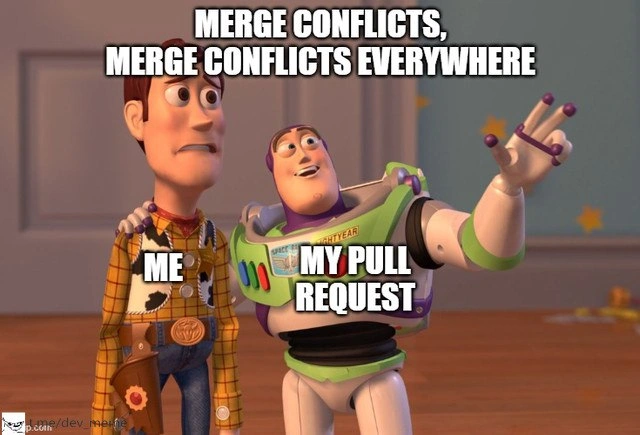
This meme is showing that kind of problem happening everywhere in a project. The two characters from Toy Story are used to represent the people involved: Woody (the cowboy) represents the programmer (maybe you), and Buzz Lightyear (the space ranger) represents the programmer’s set of changes (their “pull request”). In the picture, Buzz has an arm flung out wide, as if showing a whole room full of something, and he’s saying, “Merge conflicts, merge conflicts everywhere!” Meanwhile, Woody looks completely overwhelmed, like “Oh no, this is a disaster.” In our coloring book example, a “merge conflict everywhere” would be like finding out not just the sky, but every part of the picture you colored conflicts with what your friend colored. Maybe you colored the trees autumn orange and your friend colored them summer green – and this happened for every tree, every cloud, every character on the page. If you tried to combine your books, you’d have to discuss the color of every little thing. That would be pretty frustrating, right? That’s why Woody (the developer) looks horrified in the meme – having conflicts in lots of places means a lot of extra work and decision-making to sort it out.

Even though this situation is frustrating in real life, the meme makes it funny by using a cartoon scene and a bit of exaggeration. It’s not often literally everywhere in the code, but it can sure feel like that. Seeing Buzz happily point out “everywhere!” while Woody panics is a silly way to describe a programmer’s feelings when things go wrong. It’s like if your homework suddenly had red error marks on every line and a cartoon character popped up saying “Errors, errors everywhere!” You’d probably laugh at how ridiculous that is (after maybe feeling a bit scared).

So, the emotional core here is: surprise and overwhelm. The programmer didn’t expect so many problems, and now they have to deal with them. But by packaging that feeling into a Toy Story joke, it becomes something to smile about. It shows that this experience – where everything seems to conflict and nothing fits together – is common enough that we joke about it. In simple words, the meme is telling us: “Sometimes when we try to put everyone’s work together, it’s a big jumbled mess. It happens to all of us, and it’s both awful and kind of funny when you think about it with some toy characters.” Even kids know the idea of two people disagreeing and having to fix it; here it’s just dressed up in programmer clothes. And that’s why it’s funny – it takes a complicated, stressful moment and turns it into a colorful, exaggerated story we can all chuckle at.

Level 2: git push --force-with-lease

If you’re a newer developer or just getting used to team coding, this meme is highlighting one of the classic version control nightmares in a playful way. Let’s break it down. In the image, Buzz Lightyear (the astronaut toy) is labeled “My Pull Request”, and Woody (the cowboy toy) is labeled “Me” – that’s the developer. Buzz is pointing outward, excitedly proclaiming “Merge conflicts, merge conflicts everywhere!” while Woody looks completely overwhelmed. This setup comes from a popular Toy Story meme format where one character proudly shows something that is all over the place, and the other is in disbelief. Here, the thing that’s everywhere is merge conflicts – a term that might sound scary if you haven’t run into it yet.

So, what is a merge conflict? Imagine you and a teammate edited the same file (or even the same few lines of code) in different ways. When you try to combine your changes, the version control system (in most cases, Git) doesn’t know whose change to take. It basically says, “Hey, both of you changed this, and I can’t automatically merge it. You need to decide what the final code should be.” That situation is a merge conflict. It usually happens during a git merge or when you pull in updates from the main branch. In a collaborative project, developers create separate branches (like parallel timelines of the code) to work on features or fixes. A pull request is a way of asking to merge your branch back into the main code (often called the main or master branch) after you’re done with your work. It’s also a moment where your colleagues review your code – part of the code review process – to catch issues or suggest improvements.

Now, ideally, merging your code back in is seamless. But if your branch has drifted too far from the main branch (meaning a lot changed in the main code while you were working), you can end up in “pull request merge hell” – basically a state where your PR can’t merge cleanly because of many conflicts. The text “merge conflicts everywhere” humorously exaggerates that feeling when conflict errors pop up in many files at once. It’s the developer equivalent of stepping into quicksand: the more you struggle, the more conflicts seem to appear. In reality, it might be a handful of files with conflicts, but it feels like it’s everywhere, especially if you’re not expecting it.

Let’s picture a simple scenario that leads to this outcome:

  1. You branch off the main code. Let’s say you make a new branch called feature/login-page to add a new login page. At this point, your branch is an exact copy of the main codebase.
  2. Work in isolation: You spend a week building out the login feature on feature/login-page. You change a few files – perhaps LoginController.java, some HTML template, and maybe you update a config file.
  3. Meanwhile on main: Other team members haven’t been idle. They’ve been updating the main branch. Perhaps someone refactored LoginController.java to AuthController.java. Another person might have updated that same config file you touched, but for a different reason (say, toggling a feature flag).
  4. Open a Pull Request: You finish your work and open a pull request to merge feature/login-page into main. Now Git tries to automatically combine your changes with the latest main... and it hits snags.
  5. Merge conflicts appear: Git finds that the LoginController.java you modified doesn’t cleanly merge into AuthController.java (since on main it’s been renamed and changed). That config file? Both you and someone else edited the same lines in different ways. Git can’t choose one version without possibly throwing away the other important change, so it marks these as conflicts.
  6. “Resolve conflicts” step: The code hosting platform (GitHub, GitLab, etc.) or Git itself now stops the process and effectively says, “Please fix these conflicts and then continue.” You (Woody in the meme) see a list of files with conflict markers or a message like “This branch has conflicts that must be resolved.”

When Buzz (your PR) says “merge conflicts everywhere,” it’s referencing that potentially long list of conflicts you now have to deal with. Resolving a merge conflict means you, the developer, must open each conflicted file and manually decide what the code should finally look like. If you open such a file, you’ll see special markers that Git puts in, looking something like this:

<<<<<<< HEAD (Main branch version)
public class AuthController {
    // code that your teammate wrote or changed
    ...
=======
public class LoginController {
    // code that you wrote in your feature branch
    ...
>>>>>>> feature/login-page (Your branch version)

These markers <<<<<< HEAD, =======, and >>>>>> feature/login-page show the two versions of the code. Everything between <<<<<<< HEAD and ======= is the code from the main branch, and everything between ======= and >>>>>> feature/login-page is what you wrote on your branch. It’s now up to you to edit this file: choose one side or the other, or combine them into a coherent final version. After editing, you remove those marker lines and make the code conflict-free. This process can be repetitive and time-consuming, especially when conflicts are scattered across many files. It’s no wonder Woody looks distraught – it’s like being handed a stack of homework corrections you didn’t expect.

Now, about that title “git push --force-with-lease” – this is a slightly advanced Git concept that often comes into play with merge conflicts in pull requests. Once you resolve the conflicts locally, you need to update your branch (and thus the PR). If you chose to merge the latest main into your branch to resolve conflicts, you can just commit the fixes and push normally. But if you chose to rebase your branch on top of main (which means you kind of rewrote your branch’s history to make it as if you started from the latest main), then your branch’s history has changed. In that case, the remote repository will reject a normal push because your local branch history no longer matches what’s on the server. This is where you’d use a force push. The --force-with-lease option is a safer way to force push – it ensures you don’t accidentally overwrite someone else’s work on the remote. In simple terms, git push --force-with-lease says: “Replace the remote branch with my branch, but only do it if no one else has added new commits to that branch in the meantime.” This is important in teams, so you don’t wipe out a teammate’s commit. New developers might not use this command daily, but it’s a lifesaver when you’ve done a rebase or heavy conflict fix-up and need to update the PR. In the meme context, dropping that phrase is a wink to those who have been in the trenches of conflict resolution; it’s the final step after sorting out the mess – you force push your now-resolved, up-to-date branch and pray everything passes.

For a junior developer, hitting a minefield of merge conflicts can be intimidating. You might worry “Did I do something wrong?” But the truth is, merge conflicts are a normal part of working with Git in a team. They’re essentially Git asking humans for help. The meme is funny to developers precisely because it blows this situation out of proportion in a way we emotionally relate to. We’ve all had that moment where a simple update turned into an hour (or more) of untangling code changes. The phrase “everywhere” is exaggeration – normally, not every file conflicts – but it sure feels like it when you’re in the midst of it. It becomes a developer pain point turned joke. And seeing beloved characters like Buzz and Woody in the meme adds a dash of lightheartedness. It’s a bit like saying, “Look, even these toy characters can’t believe how crazy this is!”

Another subtle joke here is how Buzz (the pull request) is enthusiastic, almost proud: “Look, buddy, conflicts everywhere!” Meanwhile, the developer (Woody) is stunned as if thinking, “This is not what I wanted to see.” It’s an ironic role reversal – usually we want our pull requests to be helpful, but here it’s almost like the PR itself is happy to dump problems on us. That’s the kind of tongue-in-cheek humor developers enjoy: attributing cheeky personality to our tools and code. In reality, no PR is happy to have conflicts; it’s just a byproduct of timing and parallel work. But imagining your PR gleefully pointing out conflicts — that’s comedy born from frustration.

In summary at this level: A pull request hitting widespread merge conflicts is a situation every coder learns to deal with. The meme uses a famous scene to turn that frustrating experience into something we can laugh at. By labeling Woody as “Me,” it invites you to put yourself in his shoes (which is easy, because if you write code with others, you likely already have!). And by labeling Buzz as “My Pull Request,” it humorously suggests your own code can surprise (or betray) you by revealing conflicts all over. The key takeaways for a newer developer are: merge conflicts happen when collaborators make conflicting changes, they require a manual fix (don’t panic, just take them one at a time), and they’re best avoided by keeping your branch updated regularly. And maybe the most important lesson: it’s okay to laugh about the headaches, because even the best devs run into them. In the world of developer humor, a meme like this is a nod that says “we’ve all been there, and it’s ridiculous, isn’t it?”

Level 3: Rebase vs Reality

Merge conflicts are the uninvited guests at every large code reunion. This meme nails a painfully familiar scenario: you open a pull request after working in a branch for days (or weeks) only to discover the codebase has moved on without you. The image leverages the classic Toy Story "X everywhere" meme template: Buzz Lightyear (labeled "My Pull Request") is excitedly gesturing at the panorama of problems, while Woody ("Me") stands by, shell-shocked. The caption >“MERGE CONFLICTS, MERGE CONFLICTS EVERYWHERE” is both absurd and accurate – it captures that sinking feeling when conflicts seem to spring from every corner of the repository. The bright Pixar visuals give it a satirical contrast: a cheerful cartoon scene underscoring a very real developer nightmare. It’s a slice of VersionControl humor that makes experienced devs both laugh and cringe, because we’ve all been Woody in this scene.

Under the hood, Git tries to auto-merge changes using a three-way merge algorithm. It looks at your branch, the latest main branch, and their common ancestor to combine changes. Git is pretty smart about merging non-overlapping edits, but when two people edit the same lines or closely related code, Git throws up its hands and declares a merge conflict. Essentially, “I see changes in the same place from both sides; I can’t decide which to keep.” Now multiply this by dozens of files: that’s the “everywhere” the meme is exaggerating. It’s funny because it’s true – sometimes a PR from a long-lived branch feels like every file you touch has a conflict marker waiting. The meme’s humor comes from absurd amplification of a real pain point: one or two conflicts are normal, but “everywhere” comically reflects how it feels when you’re overwhelmed by merge issues.

From a senior developer perspective, the image also pokes at a common workflow failure. Ideally, we know to keep our branches up-to-date and integrate changes frequently. In reality (“Rebase vs Reality”), we often postpone syncing with the main branch until the last minute. Maybe there was a rush to finish the feature, or an assumption that integration would be painless. Then Reality hits: the main branch has evolved (other PRs merged, files renamed, maybe a big refactor landed), and your once-clean feature branch is now a tangled mess. Seasoned devs chuckle because we’ve seen this happen again and again. We’ve been burned by the massive merge commit that includes half a dozen conflict resolutions, or the daunting interactive rebase where every commit stops with a merge conflict to resolve. The phrase “merge conflict hell” exists for a reason.

The subtitle here, Rebase vs Reality, hints at the ideal vs actual handling of such situations. A git rebase is a beautiful concept: it reapplies your changes on top of the latest code, giving a linear history. But when your branch is far behind, rebasing becomes a tedious replay of conflicts. Each commit in your branch may trigger a stop for manual resolution. On paper, rebasing keeps history clean; in practice, it can feel like repeatedly stubbing your toe on the same furniture in a dark room. The alternative is merging the main branch into your branch (creating a merge commit), which can dump all the conflicts on you in one big batch. Pick your poison – either way, you’re manually editing files, deciding which changes to keep. Senior engineers grin at the “git push --force-with-lease” reference (coming in the next level) because it’s a telltale sign of someone who just performed a tricky rebase and is now gingerly pushing their corrected branch up, hoping not to clobber anyone else’s work. It’s a subtle nod to the advanced Git kung fu often needed to escape merge-conflict jail.

What makes this meme especially relatable is the systemic issue it highlights. In CodeReview culture, we create pull requests for peers to review and approve. But those PRs live on a branch that’s often a moving target relative to main. In a large team (or a hot project), even a day or two of divergence can introduce conflicts as others commit to main. It’s a DeveloperExperience (DX) pain point: you did the work, you wrote tests, you got approvals, and just when you think you’re done, Git says “not so fast!” Now you’re context-switching back into coding mode, resolving merge conflicts at the eleventh hour. This can introduce new bugs (resolving conflicts incorrectly is a known hazard) and certainly introduces frustration. The meme captures that exasperation perfectly with Woody’s dismayed expression. It’s the face of someone who opened their PR ready to celebrate, and instead got a list of file conflicts longer than a CVS receipt.

Real-world war stories amplify why this resonates. Perhaps a colleague merged a huge PR that renamed functions, reformatted code style, or restructured modules across the codebase. Suddenly, your humble feature branch that touched, say, the UserController and a config file now conflicts in all those places because that colleague’s changes overlap with yours. Maybe they changed UserController to AccountController and updated indentation everywhere – now your branch can’t align without manual edits in each changed file. If multiple such sweeping changes happened, you truly have conflicts everywhere. There’s dark humor in this scenario: the absurdity of a seemingly innocent feature branch turning into an hours-long merge conflict safari. That’s Buzz (your PR) gleefully pointing out the chaos to Woody (you, the beleaguered dev), “Look at all these conflicts!” Meanwhile, you’re thinking “This is fine… I’m fine…” with internal screaming.

The experienced dev chuckles also because they know preventative measures, yet those often fall by the wayside. We all say we’ll do trunk-based development or at least frequently merge main into our branch to catch issues early. But realities of deadlines, big features, or just human procrastination mean branches live longer than they should. The result? A nasty integration sprint at the end. The meme is effectively a critique of that common anti-pattern in a humorous wrapper. It’s pointing out the elephant (or rather, the infinite merge conflict snakes) in the room: “This wouldn’t have happened if we had integrated continuously… but here we are.” Everyone in the room nods, perhaps with a nervous laugh, remembering some hellish Friday evening resolving conflicts while fireworks (or on July 4, literal fireworks) went off in the background.

In summary (though we’re not actually concluding yet!), this meme’s brilliance is layering a ubiquitous pop-culture image over a universally understood developer frustration. It’s a bit cathartic – we laugh because it’s true. The Buzz and Woody “everywhere” format typically exaggerates some widespread phenomenon, and merge conflicts definitely feel widespread when you hit one big enough. For senior engineers, it’s a knowing laugh with a side of PTSD: version control mishaps are a rite of passage. The next time someone jokes “It’s always DNS” or “Works on my machine”, you can add this one: “Merge conflicts, merge conflicts everywhere” – the perfect tagline for those days when your version control tool turns against you. And yes, even though Woody (the developer) looks horrified, we can appreciate Buzz’s almost innocent enthusiasm: your PR wanted to change the world, alright… it just happened to collide with everyone else’s changes while doing so.

Description

Meme based on the Toy Story “X everywhere” format. In a child’s bedroom setting, the left character (Woody) has a blurred face and a white label over his chest reading “ME”. The right character (Buzz Lightyear) also has a blurred face, is gesturing expansively with one arm, and has a white label on his torso reading “MY PULL REQUEST”. Large bold white text spans the top: “MERGE CONFLICTS, MERGE CONFLICTS EVERYWHERE”. Bright Pixar colors contrast with the frustration implied. Technically, the image jokes about Git workflows where a developer’s pull request encounters pervasive merge conflicts after the main branch has diverged, highlighting everyday pain points of version-control and code-review processes

Comments

8
Anonymous ★ Top Pick My two-line hotfix triggered conflicts in five services, three autogenerated protobufs, and a Makefile last touched in CVS - turns out Git’s “directed acyclic graph” is just enterprise Jenga
  1. Anonymous ★ Top Pick

    My two-line hotfix triggered conflicts in five services, three autogenerated protobufs, and a Makefile last touched in CVS - turns out Git’s “directed acyclic graph” is just enterprise Jenga

  2. Anonymous

    After 15 years in the industry, I've learned that 'merge conflicts everywhere' is just Git's way of saying 'remember that architectural decision you made 6 months ago? Time to defend it line by line to your past self who clearly had different opinions.'

  3. Anonymous

    The moment you realize your feature branch has been sitting for three days while main got 47 commits, and now your 'simple UI tweak' PR requires resolving conflicts in files you've never even heard of. Bonus points if half the conflicts are in package-lock.json and you're questioning every life decision that led you to this moment

  4. Anonymous

    Merge conflicts: Git's polite reminder that your rebase paradise collides with reality's cherry-picked hotfixes from last sprint

  5. Anonymous

    Left a feature branch simmering for two sprints in the monorepo; now git rerere is the only teammate who remembers how to resolve it

  6. Anonymous

    My 12-line PR after a week in the monorepo: 4k-line lockfile brawl, generated code screaming, and Git asking me to choose “ours” or “theirs” when the correct answer is “neither.”

  7. @TERASKULL 4y

    merge first, leave early

  8. @azizhakberdiev 4y

    Forcepush to master goes brrrrr

Use J and K for navigation