Skip to content
DevMeme
6596 of 7435
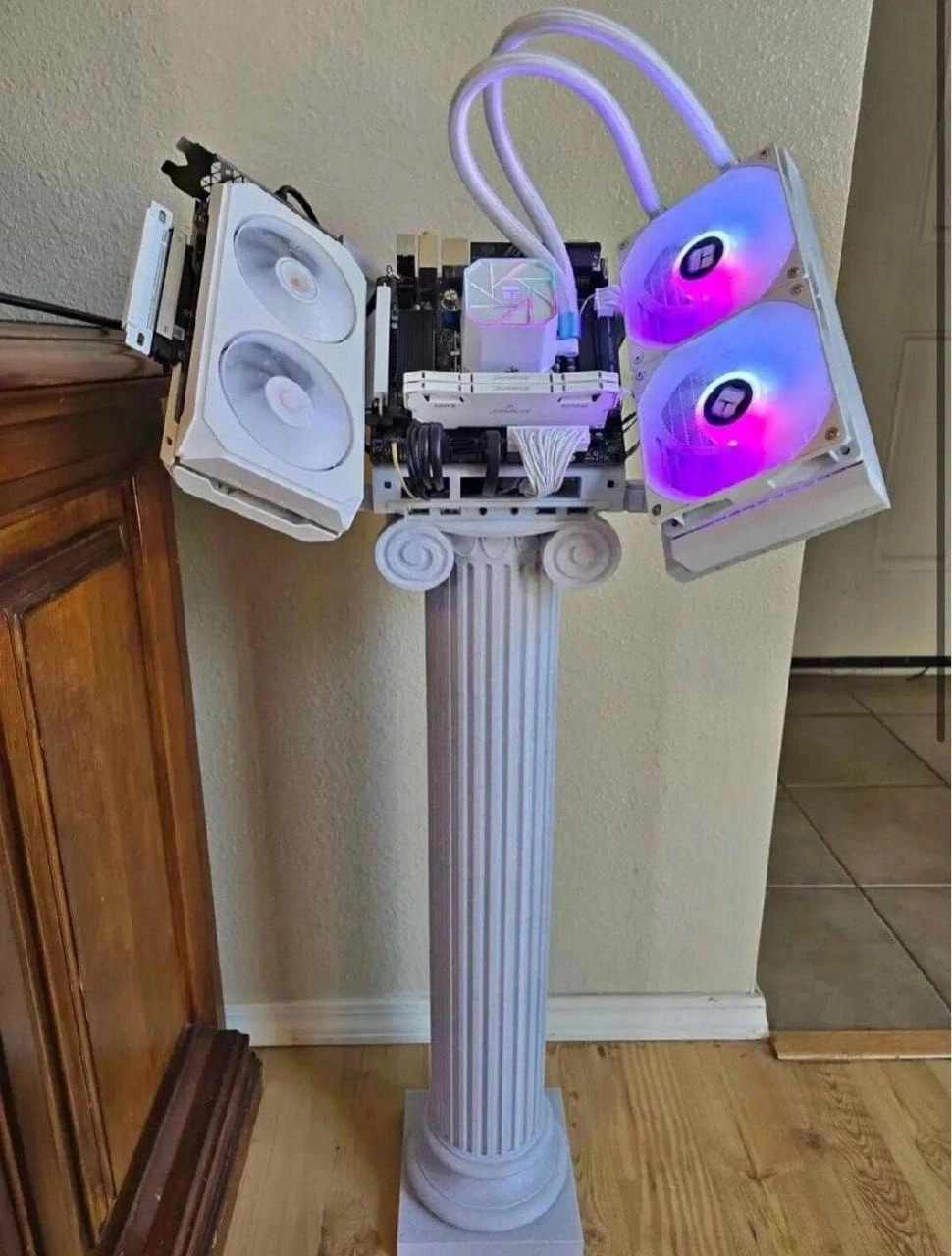
Open-Air PC Build Mounted on Greek Ionic Column as Case Alternative
Hardware Post #7229, on Oct 7, 2025 in TG

Open-Air PC Build Mounted on Greek Ionic Column as Case Alternative

Why is this Hardware meme funny?

Level 1: Computer on a Pedestal

Imagine someone loves their computer so much that they turn it into a trophy in their house. 🔮 Picture taking all the important parts of a computer out of the usual box and then putting them on top of a tall, white column – the kind you might use to display a statue or a flower pot. They add some glowing fans and tubes with water to keep it cool, so it shines with purple and blue lights. Now the computer isn’t just a machine that sits under a desk; it’s standing proudly in the room like a piece of art on a pedestal. It’s as if they’re saying, “This PC is my masterpiece!” It’s funny because nobody normally does this – it’s a very over-the-top way to show off a PC. Just like a kid might put their favorite toy on a special stand for everyone to see, this person put their high-powered computer on a literal pillar. They made a normal device look like an exhibit in a museum or a hero on a stage. The humor comes from that contrast: a plain old computer turned into a shining monument, all for the sake of showing off how cool and powerful it is.

Level 2: Open-Air Showpiece

What we have here is an extreme PC case mod that turns a computer into a display piece. In a normal computer, all the parts (motherboard, CPU, graphics card, etc.) are enclosed in a case – usually a metal box with fans. But this builder threw the rulebook out the window. They decided not to use a traditional case at all and instead mounted the components on a tall Greek-style column. This means the computer is completely open-air – its parts are exposed to the surroundings, not hidden behind panels. It’s both a functional decision (for cooling) and a bold stylistic choice (it looks like a tech sculpture). Let’s break down what’s going on in this setup, piece by piece:

  • Case Mod: A case mod is short for case modification – basically, customizing your computer’s case or how your computer’s hardware is mounted. Here the modder’s "case" is actually a column pedestal. That’s highly unusual! It’s done to make the PC look awesome and unique. This particular mod embraces an architectural aesthetic – using a classical column, the kind you’d see in ancient Greek buildings, as the foundation for the PC.

  • Motherboard: This is the main circuit board of the PC where everything connects (CPU, RAM, GPU, etc.). In the photo, the motherboard is mounted flat on top of the column (the flat top part of the column is called the capital). Normally, the motherboard would be screwed inside a case, but here it’s attached out in the open. It’s like the “stage” where all other components perform.

  • CPU and Water Block: The CPU (central processing unit) is the brain of the computer, and it gets hot when it works hard. To keep it cool, the builder used liquid cooling. The little box with glowing patterns sitting on the CPU is a water block. It’s a piece of the cooling system that sits directly on top of the CPU. Inside that block, water (or a special coolant liquid) absorbs heat from the CPU. The water block in the image probably has some RGB lighting in it, so it glows while it’s working – that’s both for cool temps and cool looks.

  • Liquid Cooling System (Pipes, Radiators, Pump): Liquid cooling is an advanced way to cool a PC, often used by enthusiasts who want better temperatures than air cooling can provide. In this build, you can see translucent tubes coming out of the CPU’s water block – those carry the hot water away from the CPU to the radiators. A radiator in a PC is similar to a car radiator: it’s a metal device with lots of thin fins. When hot water flows through it, the heat transfers to those fins and gets blown away by fans. Here we have two radiators, one on each side of the column (the white rectangles with fans attached). Each radiator has two fans mounted on it. The fans force air through the radiator fins to cool the water down. Once the water is cooled, it travels back through the loop (another tube) into the CPU water block to pick up more heat, and the cycle repeats. There’s likely a pump (sometimes built into either the water block or a separate unit) that keeps the liquid moving through the system continuously. Having two large 240mm radiators is a lot of cooling power – that’s something you’d do if the CPU is very power-hungry or heavily overclocked, and possibly if the GPU is also included in the loop. Many extreme PC builds even put the GPU on water cooling too, but from the picture it looks like the GPU might still be air-cooled (since it has its own fans).

  • Fans with RGB Lights: The fans attached to the radiators aren’t ordinary fans; they have RGB LED lights. RGB means Red, Green, Blue LEDs, and “addressable” means each LED’s color can be controlled individually by software. PC builders use RGB lighting to make their rigs look flashy – you can program the lights to any color or to cycle through colors. In the image, the fans are glowing purple and blue, which gives a nice contrast against the white hardware. It’s definitely eye-catching. RGB lighting doesn’t make the computer run any faster (it’s mostly aesthetic bling), but in enthusiast culture, having a glowing rig is pretty common for bragging rights and personalization. Think of it like custom neon lights under a sports car – it doesn’t help the car drive better, but it looks cool at a show.

  • GPU (Graphics Card): The graphics card is the big white component on the left side of the build with two fans of its own. The GPU is responsible for rendering images, running games, and handling graphical computations. High-end GPUs generate a lot of heat (sometimes as much or more than the CPU). This one has two fans built onto it (which means it likely has a hefty heatsink under its shroud). The GPU is plugged into the motherboard (into a slot called PCIe). In a normal case, GPUs usually hang horizontally or vertically inside; here we see it sticking out to the side. It’s secured somehow (probably with the same bracket that would normally screw it into a case, but instead fixed to the column or a custom mount). It’s a hefty piece of hardware hanging off there, so the builder had to mount it solidly to ensure it doesn’t sag or break the slot. The white color of the GPU and fans suggests the builder picked parts to match a white color theme. Enthusiasts often choose components not just for performance but also to fit an aesthetic (here it’s all white and RGB-lit).

  • RAM (Memory): Those vertical sticks in the middle of the motherboard are the RAM modules. RAM is like the short-term memory of the computer that the CPU uses to store data while programs are running. In high-end builds, even RAM sticks often have heatspreaders (metal covers for cooling) and sometimes RGB lighting as well. It looks like these RAM sticks have white heatspreaders that match the build’s color scheme, and possibly subtle lights too. They’re placed close to the CPU (where the memory slots are on the motherboard).

  • Power Supply and Cables: All this hardware needs power. The power supply unit (PSU) is the box that you normally bolt inside a case; it takes electricity from the wall (AC) and converts it to DC power for the PC’s components. In this picture, the actual PSU isn’t clearly visible. It might be hidden inside or behind the column (perhaps in the base of the pillar) or sitting off to the side out of frame. However, we can see the power cables: notably the thick braided white cables coming up to the motherboard. Those likely include the 24-pin main power cable for the motherboard, the 8-pin CPU power cable, and PCIe power cables for the GPU. The cables are custom-sleeved in white for a clean look (sleeving is adding a colored braid over the wires to make them look neat and match the theme). They are routed cleanly so that, as much as possible, they don’t distract from the display. Cable management is actually a big part of showcase builds – you don’t want an ugly tangle of wires in your beautiful open-air PC. So it’s safe to assume the builder carefully ran the cables perhaps down through the hollow center of the column or along the backside where we can’t see them. This keeps the front view very tidy.

To sum it up, this creation is both a performance-optimized machine and an art piece. Why go to such lengths? For one, cooling performance. With everything open to air and that robust liquid cooling, this computer can run very fast without overheating. Gamers or developers who push their systems hard (or try to overclock them to run beyond stock speeds) rely on good cooling – and this kind of setup can give lower temperatures than a normal closed case. That potentially means higher stable speeds for the CPU/GPU, because cooler chips can run at higher frequencies. It’s like giving a car engine a super efficient radiator and cold air intake so you can rev it harder.

The other reason is pure showmanship and hobbyist pride. PC modders love to build outrageous rigs to express creativity. This one is practically saying, “Look at me, I’m not just a PC, I’m also furniture and art!” The classical Greek column gives it a tongue-in-cheek grandeur – as if the computer is so important it deserves to be on a pedestal (literally). It’s computer hardware meets interior design. The builder is showing off not only the hardware specs but also their craftsmanship in constructing this unique case mod. In online communities, people share such projects to inspire others or just for the fun of one-upping each other with wild ideas. This would definitely get a lot of attention in any PC building forum or contest because it’s one-of-a-kind.

For someone new to this, it’s important to note that most PCs are not built this way. This is an extreme custom project. Typical computers are kept in enclosed cases for practical reasons: protection, easier cooling management, noise reduction, and so on. Running a PC without any case (completely open-air like this) is something you usually only see in testing benches or competition showcases, since it’s not very protected. The fact that this builder went as far as to integrate a column as part of the design just ups the “wow” factor. It exemplifies over-engineering in a playful way – doing much more than necessary for the sake of performance gains and aesthetic flair.

The phrase “compute supremacy” in the caption isn’t a standard technical term; it’s a humorous twist. The builder is basically claiming their custom PC on a pedestal is the ultimate in computing power or performance (at least in spirit). It echoes how someone might brag about having the most powerful rig. There was a term “quantum supremacy” in the news a while back referring to quantum computers outperforming classical ones for the first time. Here, calling this home-brew PC a pillar of “compute supremacy” is a cheeky way to say “this machine is a king among PCs (and I’ve literally put it on a throne!).” It’s all in good fun, highlighting how excessive and proud this setup is.

In short, this meme shows a hardware enthusiast’s wild dream build: a computer turned into a showpiece, prioritizing cooling and looks over practicality. It’s both impressive and comical. Even if you’re just starting out in tech, you can appreciate the creativity. It’s like the PC equivalent of a concept car – something you build to push limits and draw attention, not because it’s the most sensible daily driver. And that’s why people in the community find it so entertaining and awesome at the same time.

Level 3: Monument to Overkill

This build is literally a monument to OverEngineering – a fully functional PC perched atop a Greek-style column. That’s right, instead of a normal rectangular case, the open-air PC build is mounted on a four-foot tall fluted pillar, like some kind of high-tech statue. The result is both jaw-dropping and hilarious. Seasoned engineers can’t help but smirk at the sheer engineering absurdity: someone took the term “tower PC” and cranked it up to 11, turning a computer into a piece of classical architecture. It’s a moment where hardware humor meets art gallery chic.

At first glance, you notice the twin 240 mm radiators jutting out on either side like futuristic wings. Each radiator has two large fans with programmable RGB LEDs (because what’s a showpiece without a little RGB overkill?). They glow in shifting purple and blue hues, giving off both cool air and cool vibes. These radiators are part of a custom liquid cooling loop. The translucent tubes looping over the top feed coolant to a CPU water block sitting squarely on the processor. Essentially, heat from the CPU (and possibly the GPU) is whisked away by liquid through those tubes into the radiators, where the fans dissipate it. It’s the same principle as a car’s radiator, just shrunken down and lit up like a mini Las Vegas. All this cooling hardware suggests the builder might be chasing extreme performance optimization – perhaps overclocking the CPU to squeeze out every last MHz. With two radiators, this rig could probably tame an overclocked processor and a power-hungry graphics card without breaking a sweat. In plain terms, the thing is likely as cool as Mount Olympus on a spring night, no matter how hard it’s crunching data.

Front and center on the pillar’s “capital” (the top part of the column) is the motherboard, proudly exposed. You can see the RAM sticks standing to attention and the hefty white GPU protruding on the left side with its twin fans. There’s no case to hide any of this – no side panels, no protective mesh, nothing. Every component is on display like an exhibit. The white braided cables are meticulously routed, almost decorative in how they drape, showing the kind of attention to detail hardware enthusiasts obsess over. It’s equal parts liquid_cooling_showpiece and test bench. In fact, veteran PC builders might recall using open test bench setups for troubleshooting or benchmarking, but here that concept has been transformed into an aesthetic statement. The whole assembly is like a shrine devoted to silicon and solder.

The meme’s caption captures the absurdity perfectly: “When your case mod turns into an actual pillar of compute supremacy.” 😄 This tongue-in-cheek line is funny on multiple levels. For one, it plays on the idea of compute supremacy, slyly nodding to tech buzzwords like “quantum supremacy” – except there’s nothing quantum here, just brute-force PC horsepower on a pedestal. By calling it a “pillar of compute supremacy,” it humorously implies this machine rules over lesser rigs from atop its throne (or rather, its column). It’s boasting about computing power in an over-the-top literal way. Senior engineers who’ve been around the block will appreciate this exaggeration: we’ve all seen colleagues treat high-end rigs or servers as if they were godly, and here someone actually worshipped performance enough to give it a temple of sorts! The classical Greek column aesthetic even hints at the idea of ancient gods – as if the PC is a deity of computation that deserves a place in the Parthenon.

There’s also an implicit industry joke about how quickly a wild proof-of-concept can become a permanent solution. What started as a crazy idea (“Hey, what if we mount a PC on a plaster column?!”) is now a fully operational machine. Seasoned devs have seen this pattern: a hacky prototype or an experimental setup that, because it surprisingly works, ends up being used in production for far longer than intended. This pillar PC is the physical embodiment of that phenomenon. It’s a one-off stunt turned into a daily driver. You can almost imagine a team saying, “We needed better cooling, so we temporarily set it up on this column… and well, it never got moved back.” Voila! – a proof-of-concept becomes a stone-cold (literally cool) production monument.

From a practical performance standpoint, this open-air design likely performs brilliantly in its primary goal: keeping temperatures low. With no case walls, airflow is completely unrestricted. The radiators can pull cool room air from all directions, and hot air isn’t getting trapped around the components. That means the CPU and GPU can boost to high clock speeds without hitting thermal throttling. In a way, this pillar is a hardcore performance optimization hack: it’s all about thermals. A traditional enclosed case, even a high-end one, usually has to manage air pathways and might run a few degrees warmer under load. Here, the builder has basically said, “forget normal cases, I’ll eliminate the case entirely to maximize cooling.” It’s the kind of extreme tweak an overclocker or performance-tuning geek dreams about. But – and this is where the seasoned perspective comes in – it’s a textbook trade-off. You gain some extra cooling headroom, sure, but you sacrifice almost everything else:

  • Dust protection: nonexistent. This rig will collect dust bunnies faster than a Roomba in an attic. Regular cleaning is the price of those cool temps.
  • Noise dampening: none. In a normal case, panels and insulation can soften the noise of fans and pumps. On a naked column, every whirr and gurgle is out in the open. Hope you like the sound of mini jet engines and bubbling coolant, because you’ll hear them.
  • Safety: yikes. One clumsy move, an accidental spill, or a curious cat, and you might have a very expensive modern art catastrophe. There’s something both hilarious and nerve-wracking about a completely exposed $3000 rig balanced on a slim pillar. It introduces a new meaning to “downtime” — literally, if it topples.

Despite all that, you can tell the creator is proud of this beast. And as fellow techies, we kind of love it too. It’s a conversation piece that embodies the spirit of over-engineering for the sake of performance and style. In the history of PC building, we went from plain beige towers in the ‘90s (designed to hide under your desk) to today’s RGB-clad transparent cases that show off your gear. This build says, “Hold my thermal paste, I can go further.” Why bother with any case at all? Let’s make the PC a free-standing sculpture! It’s the logical (if absurd) extreme of the trend toward treating high-end PCs like showroom cars. In an era where many gaming rigs have glass side panels to display their insides, this modder removed the frame entirely and put the whole machine on display, pedestal and all. The result is something you might expect to see at a tech expo or maybe as Tony Stark’s latest home decoration in an Iron Man film.

In the end, the humor lands so well because the builder knows it’s over-the-top and invites us to marvel at it. It’s simultaneously mocking and celebrating the idea of the ultimate “tower.” The PC is elevated – technically for better cooling, but also symbolically, as if to say “Behold, the ultimate gaming PC!” For experienced developers and hardware folks, there’s a mixture of laughter, respect, and a tiny bit of envy: we laugh because it’s impractical and gloriously excessive, we respect the skill and daring it took, and maybe we secretly envy the guts (and budget) it took to build a rig that literally stands on a pedestal. This is one architectural aesthetic mod that won’t be forgotten anytime soon – a true open-air showpiece in the gallery of extreme PC builds.

Description

A photograph of a custom PC build mounted on a white Greek Ionic column (a decorative architectural column roughly 4 feet tall). The build is completely caseless/open-air, with the motherboard, CPU cooler, and components exposed on top of the column's capital. Visible components include: a white AIO liquid cooler with dual radiators and fans (RGB-lit in pink/purple on one side), two additional case fans on the opposite side, a white PCIe riser or cable management system, and the motherboard with RAM. The build appears to use a white/silver aesthetic theme matching the column. The column sits in what appears to be a residential kitchen/hallway area with tile and hardwood flooring. This is peak r/pcmasterrace absurdist case modding

Comments

38
Anonymous ★ Top Pick The ancient Greeks didn't have enough thermal headroom in their server rooms either, which is why they invented open-air column architecture
  1. Anonymous ★ Top Pick

    The ancient Greeks didn't have enough thermal headroom in their server rooms either, which is why they invented open-air column architecture

  2. Anonymous

    Finally, a server that’s literally stateless - because the first time someone trips over that power cable, it’s achieving graceful column failure semantics

  3. Anonymous

    This is what happens when you tell a senior architect to 'implement proper separation of concerns' - they literally put the cooling on a pedestal and give it more architectural documentation than the entire microservices cluster running in prod

  4. Anonymous

    When your gaming rig's thermal performance is so legendary, you need to display it on a monument to Western civilization - because nothing says 'I optimized my cooling loop' quite like mounting your AIO on an Ionic column. The ancient Greeks built temples to their gods; we build shrines to our framerates. At least when this system inevitably becomes legacy hardware, archaeologists will know exactly where to excavate

  5. Anonymous

    Monolith architecture done right: zero network partitions, just pure GPU-bearing load distribution

  6. Anonymous

    Asked for an architecture built on strong pillars; the team delivered an Ionic column with RGB and no case - still more load‑bearing than our OKRs

  7. Anonymous

    We finally adopted pillar-based architecture: a water‑cooled monolith balanced on one Ionic SPOF; our HA strategy is nobody sneezes during deploy

  8. @XzChtoPicat14886752 9mo

    Бе

  9. @Valithor 9mo

    Based

  10. @Capstra 9mo

    oh boy can't wait to knock this over

    1. @Tosunatu41 9mo

      Imagine Cat wanting to jump on it

  11. @Strangerx 9mo

    admin absolutely has a column bias

    1. @SamsonovAnton 9mo

      It's just a classic kind of phallic symbol, nothing to worry about.

      1. dev_meme 9mo

        It’s specifically about columns tho No issue with phallic symbols on my side but this gentleman above in a chat knows what he is talking about 🤓

        1. @hur7m3 9mo

          cock

        2. @hur7m3 9mo

          dick

        3. @hur7m3 9mo

          wiener

        4. @hur7m3 9mo

          dong

        5. @hur7m3 9mo

          knob

        6. @hur7m3 9mo

          willy

  12. @hur7m3 9mo

    Dust my beloved

  13. @NikNikovsky 9mo

    I don't get this piece

    1. dev_meme 9mo

      No need to Just enjoy it

  14. @Algoinde 9mo

    if you own a cat, you will be lucky to witness the fall of the roman empire

  15. Deleted Account 9mo

    Не знаю зачем, но мне это надо

    1. dev_meme 9mo

      Hi there! Welcome to dev_meme but please, stick to usage of English around here, thanks in advance 🙏

      1. Deleted Account 9mo

        I understand, I'll try to speak English.

  16. @Vano_Meshkoff 9mo

    Во имя материнки, и процессора, и святой видюхи

  17. @Vano_Meshkoff 9mo

    Why

    1. @hur7m3 9mo

      Cos the other half doesn't speak russian silly

      1. @Algoinde 9mo

        Pretty sure it's way more than half, too

  18. @Vano_Meshkoff 9mo

    I don't speak English well, sorry about that

    1. @hur7m3 9mo

      As long as you're making an effort to speak English, others will make an effort to try to understand you.

      1. @Vano_Meshkoff 9mo

        I'm sorry, what?

    2. @Algoinde 9mo

      That's okay, that's how you practice

  19. @Vano_Meshkoff 9mo

    What does effort mean?

  20. @Vano_Meshkoff 9mo

    Oh, ok

  21. @ZanderBoBander 6mo

    Lectern PC. Neat idea

Use J and K for navigation