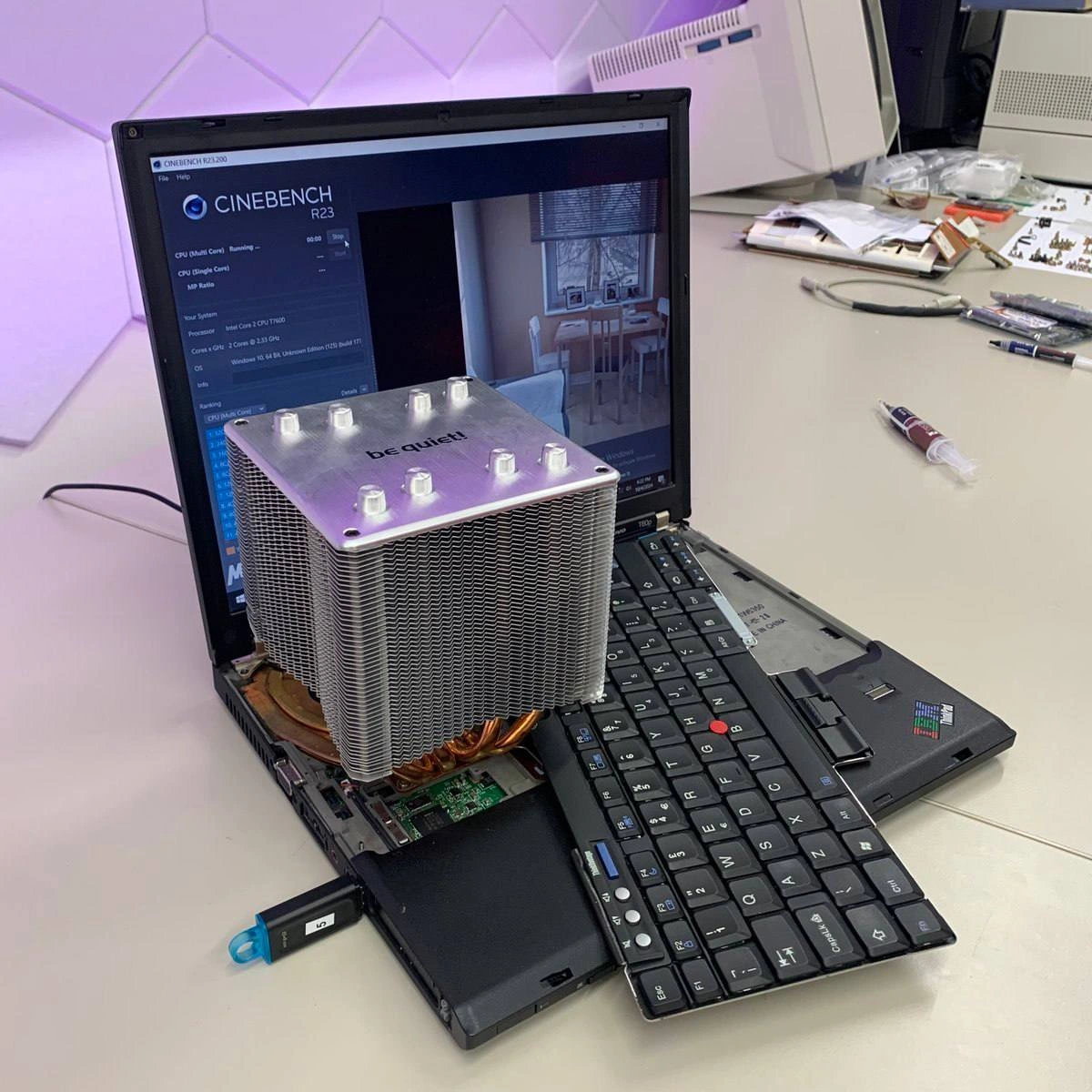
Massive Desktop CPU Tower Cooler Mounted on Old ThinkPad Running Cinebench
Why is this Hardware meme funny?
Level 1: Car Radiator on a Bicycle
Imagine you have a tiny bicycle that goes really fast, but whenever you pedal it super hard, it starts to get hot and slow down. Now imagine fixing that by taking a huge radiator from a car (you know, the big thing that keeps a car’s engine cool) and strapping it onto the little bicycle. 😄 It would look absolutely silly – the radiator is bigger than the bike itself! But with that giant radiator, the bike’s small engine (if it had one) would stay super cool no matter how hard it worked, and it wouldn’t have to slow down from overheating. This meme is just like that: a small laptop was getting too hot when working really hard, so someone attached a giant cooler (heat sink) meant for a big desktop computer onto it. The laptop now looks crazy because the cooler is enormous (it’s even covering where the keyboard was!), but that big metal block helps keep the laptop’s brain nice and cool. It’s funny because nobody would ever do this to a normal laptop – you’re basically trading away the laptop’s portability and looks just to make sure it doesn’t get hot. It’s an over-the-top, cartoonish solution to a simple problem (like using a sledgehammer to crack a nut), and that’s why it makes people who know computers laugh. The laptop won’t overheat now for sure, but good luck fitting it in a backpack!
Level 2: Laptop Cooling 101
At first glance, this picture can look confusing – why is there a huge metal block sitting inside a laptop, and why is the keyboard off to the side? Let’s break down what’s going on in simpler terms. The big metal block with fins (labeled “be quiet!” on the top) is a heat sink taken from a desktop computer. A heat sink’s job is to keep a computer’s CPU (the main chip/brain) cool by pulling away heat. It usually does this with lots of thin metal fins and sometimes heat pipes (those copper tubes you see) that spread heat out to air. In a normal laptop, the heat sink is much smaller – often a little copper plate connected to a tiny radiator and a small fan. Laptops are slim, so they can only fit a small cooler. That’s why laptops tend to get hot and their fans get loud when you do something intense (like gaming or running a heavy program). They have limited space to throw out the heat. Here, someone literally took a cooler from a big PC (which is huge because desktop CPUs can run very hot and need large coolers) and attached it to the laptop’s CPU. It’s like giving the laptop super lungs to breathe out heat. The phrase improvised_cooling_solution fits perfectly – this was not an official upgrade or easy snap-in part; it was a DIY, on-the-fly hack to solve overheating.
Now, why do all this? On the laptop’s screen, you can see a program called Cinebench R23. Cinebench is a benchmarking tool – basically, it tests how fast the computer can do a really hard task (rendering a 3D scene) and then gives a score. It’s a way to measure CPU performance. Running Cinebench really pushes the CPU to work 100%, which makes it get really hot. In a normal laptop, after a short time of that, the CPU would get so hot that it would start to slow itself down (this is called thermal throttling) to cool off. You might hear the fan roar at that point, and the performance would dip a bit to keep temperatures safe. But with this giant heat sink, the person is trying to stop the CPU from ever getting that hot in the first place. A bigger heat sink can keep the CPU much cooler because it has way more surface area and metal to absorb and dissipate heat. So the idea is: with super cooling, the CPU won’t need to throttle; it can potentially run at its full speed for longer, maybe giving a higher Cinebench score. In simple terms, they want to see this old laptop perform like a champ without breaking a sweat. It’s all about Performance Optimization – getting the best performance by preventing heat problems.
Let’s talk about the other details: The laptop is an IBM ThinkPad (you can spot the ThinkPad logo with the red dot on the keyboard). ThinkPads are iconic business laptops, and older models were built tough – some enthusiasts love to tinker with them. The keyboard in this image has been completely taken off and is lying to the side because when you open up a laptop for such a major mod, you often have to remove the keyboard to get to the insides. The keyboard is still attached by a ribbon cable (that’s why it’s hanging off to the right). It looks funny, but it’s just disconnected from its usual spot so the cooler could be mounted. That cooler is so large it occupies the space where the keyboard and palm rest used to be! In the right side of the laptop’s base, we see a USB stick labeled "OS". This likely means the laptop is booting its Operating System from that thumb drive. Maybe the internal drive was removed to make space or turned off, or perhaps the person set up a lightweight OS on the USB just for running benchmarks. It’s a clue that the whole setup is a bit makeshift. And see that syringe-looking thing on the desk? That’s a tube of thermal paste. Thermal paste is a special grease that you put between a CPU and a heat sink. It fills in tiny air gaps and helps heat flow from the CPU into the heat sink more efficiently. Whenever you install a new cooler, you use a bit of thermal paste to ensure good contact. The fact it’s lying there means the person likely just applied fresh paste when mounting this big cooler onto the laptop’s CPU (which is not a standard procedure for laptops – this is totally a custom job).
So, putting it all together: This old ThinkPad was likely running hot and slowing down during heavy tasks. The user decided to perform a crazy HardwareHack: remove the built-in cooling system and attach a far superior one from a desktop computer. It’s like taking the cooling fan from a huge engine and strapping it to a little go-kart’s engine. The result looks wild: the laptop’s guts are exposed, the keyboard is off, and a giant metal tower is sticking out of it. But technically, this over-the-top solution could keep the CPU cooler than ever, letting it run at max speed. It absolutely kills the portability and normal use of the laptop (you can’t exactly close the lid or use the keyboard properly), but that’s not the point here. The point was to push the hardware as far as possible just to see what happens – and to have a laugh. This is a prime example of tech humor where someone solves a problem (overheating) in a ridiculously effective way. If a normal laptop is a compact city car, this modified one is a little car with a giant truck engine cooling system strapped on. It’s both clever and comical, and it definitely highlights the difference between laptop and desktop engineering. In short, laptops run hot because they’re small, and this person solved it by ignoring the “small” part completely!
Level 3: Heat Sink Hijinks
This scene is a hardware hacker’s fever dream: an old IBM ThinkPad gutted open, its keyboard flopped aside, and in the middle of its chassis stands a gigantic be quiet! CPU heat sink that’s normally meant for a desktop tower. It’s an absurd example of OverEngineering in the name of extreme PerformanceOptimization. Essentially, the laptop’s modest cooling system has been replaced (or supplemented) by a desktop-class cooler in a wild attempt to eliminate thermal throttling and squeeze out every last bit of performance. And what better way to prove it than running CINEBENCH R23? On the screen, that benchmarking tool is churning through a 3D render, pushing the CPU to its limits while displaying live stats. Normally, a thin laptop under such load would ramp up its tiny fan and still get toasty, eventually slowing down (throttling) to avoid overheating. But this ThinkPad has been transformed into a Frankenstein testbench: with those massive copper heat pipes and aluminum fins stealing the show, the CPU can finally breathe (or rather, cool off) like a desktop.
The improvised_cooling_solution here is both hilarious and technically intriguing. Laptops usually rely on a small heat sink connected to heat pipes and a mini blower fan. They’re constrained by size – a thin profile means a tiny cooler, which means limited heat dissipation. This custom setup blows past those limits, bolting on a cooler bigger than the entire laptop’s base. The result? Potentially no more throttling – the CPU might sustain its highest turbo boost frequencies instead of dipping down to stay cool. It’s like taking a car engine that was electronically limited for safety and suddenly giving it a race-car radiator; the engine can now run flat-out without melting. In our case, the ThinkPad’s CPU (likely an aging one) is being allowed to run full tilt through the whole Cinebench run, because that towering heat sink is soaking up heat faster than the chip can produce it.
Of course, there’s some fine print to this scene. An old laptop motherboard can only handle so much; power delivery (the VRM circuitry) and firmware might cap the performance no matter how cool you get the CPU. So while this hardware hack surely improves cooling, it doesn’t magically turn the CPU into a modern monster – but it will prevent the slowdowns caused by overheating. The person behind this thinkpad_mod is clearly doing it for the fun and bragging rights of a higher benchmark score (and maybe to avoid buying a new PC!). The thermal paste syringe on the desk and those scattered screws indicate a recent open-heart surgery on the laptop – fresh paste to ensure good heat transfer between the CPU and that desktop cooler. And that USB stick labeled "OS" suggests they’re even booting the laptop from an external drive, possibly because the internal storage is removed or inaccessible after the mod (or maybe this machine is too old to easily run Windows 11 off its old disk, so a quick USB Linux or WinPE is being used to run Cinebench).
The whole setup is tongue-in-cheek engineering humor. The cooler’s brand name, be quiet!, is a funny contrast to the ridiculous spectacle – it’s as if the cooler is politely telling the laptop’s screaming-hot CPU to calm down. In practice, that massive cooler would make things quieter by reducing the need for a high-RPM tiny fan; a big heatsink can often dissipate heat with only a low whisper of a fan (if one is attached at all). The IBM ThinkPad itself, known for being a tank of a laptop, is now literally overshadowed by the cooler – you can barely see the motherboard peeking under those fins. The keyboard hanging off to the side is like a dropped jaw, emphasizing how shocked this poor laptop looks after the surgery. And let’s be honest: at this point the laptop_with_desktop_cooler is no longer a laptop in the traditional sense – you’re not going to fold this thing up and slip it into a bag. It’s more of a makeshift desktop (a portable in only the portable loosest sense). In trying to beat thermal limits, the creator has sacrificed all form factor and practicality.
Why is this so relatable (and hilarious) to seasoned tech folks? Because we’ve all chased performance or reliability in over-the-top ways at some point. Maybe not to this extreme of bolting a tower cooler onto a notebook, but the spirit is familiar: adding extra case fans, running a computer with the side panel off and a house fan blowing in, or undervolting and tweaking in BIOS to stop crashes. This image is that impulse dialed up to 11. It’s poking fun at the endless war between heat and performance: modern CPUs will go faster if they stay cooler, but laptops are tiny ovens. So here, someone declared war on heat with the biggest weapon they found on hand. It’s an engineer’s version of an absurd sight-gag, and also a nod to those who know that “hot” laptops can often be tamed with better cooling – if you’re willing to get crazy enough.
For perspective, here’s how a stock laptop and this modded contraption compare:
| Aspect | Normal ThinkPad (Stock) | This Modded ThinkPad |
|---|---|---|
| Cooling Solution | Small built-in fan + heatpipe | Gigantic desktop tower heatsink (multi-heatpipe) |
| Thermal Throttling | Kicks in under heavy load (CPU slows down) | Essentially eliminated (CPU stays cooler, no slow-down) |
| Noise Under Load | High-pitched fan whirr | be quiet! – ironically much quieter due to massive cooler |
| Portability | Yes, it’s a laptop – closes and goes in a bag | 😅 None – it’s an open-case desktop now (not exactly lap-friendly!) |
| Benchmark Scores | Limited by heat (good for its class) | Potentially higher (runs at full tilt longer) + bragging rights 🏆 |
In short, this meme’s scenario is a thermal_throttling_avoidance adventure. It exaggerates a real idea in computer engineering: keep a processor cool, and it can sustain high performance. But instead of the elegant solutions like liquid cooling or advanced thermal materials, it shows a comically blunt approach – overengineering to the max. The humor is in the visual shock and the implied thought process: “Laptop overheating? No problem, just slap a giant desktop cooler on it!” It’s an EngineeringHumor gem because it’s both crazy and kind of technically effective. Seasoned engineers laugh because we appreciate how ludicrous yet how ingenious this is. It reminds us of late-night hack sessions, where the goal is to make something work no matter how ridiculous the method looks. This ThinkPad modder achieved exactly that – defeating laptop thermals with desktop might, and creating a spectacular bench-top conversation piece in the process.
Description
A photograph of an old IBM/Lenovo ThinkPad laptop with its keyboard partially removed, exposing the internals. A massive 'be quiet!' desktop tower CPU cooler (with copper heat pipes and a large aluminum fin stack) has been mounted directly onto the laptop's CPU, towering absurdly over the small laptop. The screen shows Cinebench R23 running a benchmark, displaying the system has an Intel Core 2 CPU T7600 (2 cores at 2.33 GHz) running Windows 10 64-bit. The laptop appears to be on a desk with various tools, thermal paste, and small components scattered around. This is a real (not photoshopped) hardware mod where someone fitted a full-size desktop cooler onto a tiny laptop processor for maximum thermal headroom
Comments
13Comment deleted
When your laptop thermal throttles at 90C so you install a cooler rated for 250W TDP on a 34W mobile chip. The CPU is now running at absolute zero but the laptop weighs 15 pounds
Proof that in performance engineering, the quickest way to eliminate thermal throttling is to delete the laptop form factor and call it a micro-datacenter
When your PM asks for 'laptop performance with desktop power' and you take it literally - nothing says 'portable workstation' quite like a 2kg heatsink that requires its own carry-on luggage and makes TSA question your life choices
When the PM asks if you can improve laptop performance by 10% but you're a hardware engineer who doesn't believe in half-measures. Sure, it's no longer portable and violates every thermal design guideline, but those Cinebench scores don't lie. This is what 'thinking outside the chassis' really means - literally removing the constraints and bolting on a solution that's three times the size of the problem. Peak engineering: when your cooling solution has better airflow than your office HVAC system
Nothing says performance engineering like converting a ThinkPad into a heatsink with a screen - PL1 fixed, typing deprecated
Desktop cooler on a ThinkPad: because stock laptop thermals accrue tech debt faster than a decade-old Java monolith
Cinebench kept tripping PL1 after 20 seconds, so we solved it the enterprise way: vertical scaling - bolt a monolith on top - now the “laptop” finally meets its SLO for sustained turbo
Win 10 on this Damn Comment deleted
Core 2 Duo from 2006 ain't that bad if you strip all of the unnecessary crap out of Windows 10. Comment deleted
it is finally quiet Comment deleted
Thinkpad❎ ThinkTank✔️ Comment deleted
Rotated USB-A port 😳 Comment deleted
Pretty common at that time Comment deleted