Skip to content
DevMeme
1464 of 7435
The IDE's Emotional Rollercoaster with C++ Templates
IDEs Editors Post #1639, on May 29, 2020 in TG

The IDE's Emotional Rollercoaster with C++ Templates

Why is this IDEs Editors meme funny?

Level 1: Let Me Finish!

Imagine you’re telling your friend a story, but you stop in the middle of a sentence to think of the next part. Suddenly, your friend gasps and says, “That doesn’t make any sense at all!” – basically freaking out because the story isn’t complete. You’d probably turn to them and say, “Hey, relax, let me finish talking!” Once you do finish the sentence, your friend goes “Ohh, now I get it,” and is totally calm again.

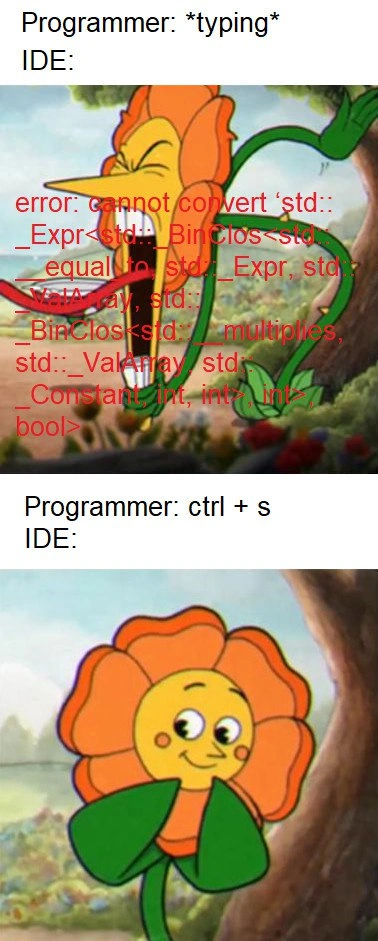
In this meme, the coder is like the person telling the story, and the computer (IDE) is the panicky friend. While the coder is still “talking” (typing the code), the computer sees something it doesn’t understand and starts screaming in confusion (showing a big scary error message, kind of like “This is wrong! This is wrong!”). It’s doing that because, halfway through, the code looks wrong – just like a half-told story. Then the coder hits save (which is like saying “I’m done, now you can read it”). The moment the code is complete and saved, the computer goes “Oh, okay, everything’s fine!” and all those scary warnings disappear. The top picture with the yelling flower is the computer freaking out mid-story, and the bottom picture with the smiling flower is after the coder says “I’m finished now,” and everything makes sense.

The funny part is how extreme the computer’s reaction is. It’s just like a friend who overreacts before hearing the whole situation. We find it humorous because we know the computer is being a bit silly – if it just waited a second for us to finish typing, it wouldn’t have to panic. The meme captures that everyday coding moment in a simple, cartoon way: sometimes you just want to tell your over-eager helper, “Hold on, I’m not done yet!”

Level 2: The Ctrl+S Effect

Let’s break down what’s happening in this meme for a newer programmer. First, an IDE (Integrated Development Environment) is the application you use to write code (examples are Visual Studio, VS Code, CLion, etc.). It often has a text editor, a compiler, and other tools built-in. A compiler is the program that takes your C++ code and turns it into something the computer can run, but it’s also like a strict grammar teacher – if your code has any mistakes, the compiler will output error messages explaining what’s wrong (in very technical terms). Modern IDEs try to be helpful by running a bit of compilation while you are typing, to catch errors early. This is called real-time linting or error checking. Those red squiggly lines under your code and the pop-up error messages? – that’s the IDE warning you as you go, rather than waiting for you to hit a “build” button.

Now, C++ is a language notorious for very long and confusing error messages, especially when you use templates. Templates in C++ are like blueprints for code that can work with any data type. They’re super useful (for example, std::vector<int> and std::vector<float> are both made from the same std::vector<T> template, just with different types filled in). But if you misuse a template or two templates don’t match up, the error text can explode because the compiler feels the need to tell you about each step it took in trying to make the template work. In the meme, the programmer was likely dealing with a template-based thing (the mention of std::ValArray in the error is a hint). The error that appeared is full of intimidating jargon: std::_Expr, _BinClos, std::Constant<int,int>… This is basically the compiler dumping out the complicated type it was dealing with when it got confused. It tried to convert one type to another and failed, and it’s letting you know in the only language it speaks – C++ template gibberish. Think of it like this: the IDE is saying “I tried to understand your code and I got this big hairball of a type that I can’t put where you want it. I don’t know how to explain it simply, so here’s the whole hairball.” For a new developer, seeing something like that can be really scary. (Don’t worry – even veteran devs often groan when they see those messages!).

So what does pressing Ctrl+S (the save command) do here? It’s almost like telling the IDE “Okay, I’m done with that part, you can officially check it now.” When you’re typing, you might pause mid-line, and the poor IDE is left guessing what you’re trying to do. For example, if you start writing an if statement like if (myValarray == otherValarray and then stop, the IDE goes “Uh oh, they’re comparing two valarrays… that usually returns an array of bools, which I can’t use as a single bool for an if! ERROR!” It lights up an error because, at that exact moment, the code is indeed incomplete/wrong. That’s what we see in the top panel: Programmer is typing, IDE shows a blaring error. The bottom panel shows the programmer hitting save. Saving the file often triggers the IDE to re-analyze the code (or in some setups, it only fully checks on save). If the programmer finished the thought (maybe they completed the if statement properly or added a cast or whatever was needed), then the IDE finds no error on re-checking. All the red error text disappears – the flower (IDE) stops screaming and smiles. In simple terms, the act of saving calms the IDE down because it now sees the complete, corrected code. It’s a funny exaggeration of a real workflow: many of us hit save often, not just to not lose work, but to get the IDE to refresh its understanding of our code. If an error was just a temporary glitch while coding, saving or finishing the line clears it out.

The meme uses a cartoon orange flower character to represent the IDE’s mood. In the first panel, the flower looks panicked and is literally screaming out an error in bright red text – that’s the IDE being “dramatic” about the code problem. In the second panel, after Ctrl+S, the flower is all smiles, meaning the IDE is satisfied and quiet because the code is okay now. The humor here comes from the dramatic switch: the IDE goes from screaming about a complicated error to completely chill, just because the programmer hit save (which to non-coders might seem like a trivial action). But as a developer, you quickly learn that “Works after Save” is a real thing – sometimes the development tools just need you to stop tinkering for a second so they can catch up. This meme is poking fun at that little quirk of the coding life: until you finish writing and save your code, don’t be surprised if your editor acts like the sky is falling.

Level 3: IDE Tantrum

Every seasoned C++ developer has experienced this: you’re in the middle of typing a line of code and suddenly your IDE freaks out with a wall of red text. It’s like the IDE’s parser throws a little tantrum because it can’t make sense of code that isn’t finished yet. In the meme’s first panel, the flower (representing the IDE) is screaming with an absurdly verbose error. That error text – cannot convert std::_Expr<...> to bool – is a prime example of a C++ template error going off the rails. It usually happens when you do something like compare two complex objects or use templates in a way the compiler doesn’t expect. Here it might be complaining about a std::valarray comparison, printing a ton of internal gobbledygook about expression types that even senior devs can barely parse. The humor (and horror) comes from how over-the-top the message is: the IDE basically yells a novel at you for a minor issue.

What’s funny is that this catastrophic-looking error often isn’t catastrophic at all – it can be a transient false alarm. In many modern IDEs, there’s a background compile or IntelliSense process that checks your code as you type. The moment you type something that momentarily breaks the code’s syntax or type logic, the IDE redlines everything and blasts an error. Imagine you haven’t finished a template expression or you’re calling a function that you’ve declared two lines below (which the live checker hasn’t seen yet). The poor IDE thinks your code is broken and cries foul in the loudest way possible. You, the programmer, have learned to sigh and say, “Relax, I’m not done typing.” In the meme, that’s exactly what pressing Ctrl+S does – it’s the universal “calm down” signal. Save the file, and the IDE re-evaluates with the completed code, often realizing there’s actually no issue, or at least trimming the error to a reasonable size. The second panel’s smiling flower shows that instant serenity we feel when the red squiggles and scary messages disappear.

This scenario is painfully relatable in the world of C++ because of how verbose and labyrinthine its error messages can get. A tiny mistake, like forgetting a ) or using the wrong type in a template, can produce a chain-reaction of errors. The compiler might not know exactly what you were intending, so it reports every possible thing that looks off. Experienced developers have a morbid saying: “Never panic at the first error message; scroll further up for the real cause.” Often the first screenful of a template error is just noise, and the actual issue was a missing #include or a typo. We’ve all been conditioned to ignore the scary red wall until we finish writing the line or check the code thoroughly. The meme nails this common experience: the IDE’s real-time linting is both a savior and a nuisance – it’s great when it catches a true mistake early, but it also cries wolf whenever your code is in a half-written state. Seasoned coders often chuckle at this and might even disable live error highlighting for particularly template-heavy projects, just to preserve their sanity. After all, nothing shatters your coding flow like an IDE screaming in red that your half-written generics are an “error!!!”.

By the time you hit save (or finish the thought), everything magically compiles and the IDE goes, “Oh, all good!” The flower stops screaming and gives a goofy grin. It’s a moment of debugging frustration instantly turning into relief. The humor has a cathartic twist: we laugh at the absurdity that pressing save – a seemingly non-magical act – is like offering the panicking IDE a paper bag to breathe into. In practice, Ctrl+S might trigger a proper compile or just signals that you’ve paused typing, but to us it feels like a ritual to ward off the angry red errors. Every developer has that reflex: code a bit, see the IDE freaking out in red, quickly hit save, and watch the red squiggles vanish. It’s the modern programmer’s CTRL+S zen moment. We find it funny because it’s true – our tools are incredibly advanced, yet sometimes act like an over-eager hall monitor raising false alarms until we tell them, “I know, I know, let me finish…”

Level 4: Templated Terrors

Under the hood, C++ template errors often resemble a hydra of angle brackets and underscores. The bizarre message in the meme – something like std::_Expr<std::_BinClos<std::_equal_to<...>, bool> – is a direct glimpse into the compiler’s innards. Here the compiler is yelling about an expression template type: a fancy internal construct the C++ standard library uses for things like std::valarray. Expression templates perform operations (like vectorized math) at compile time to avoid creating temporary objects. They’re powerful, but when something goes wrong, the compiler essentially prints the entire type it constructed. In this case, it tried to interpret a half-formed expression (perhaps a valarray comparison) as a bool and choked on it. The result? – a monstrously verbose type description that reads like machine hieroglyphics.

Why are these errors so scary-long? It’s partly because the C++ template system is Turing-complete – effectively a programming language within the compiler. When you write template-heavy code, the compiler instantiates templates, deduces types, and even evaluates code at compile time. If there’s a mismatch or a missing piece (say, you haven’t finished typing an expression), the compiler’s confusion unfolds in the error output. Each _Expr or _BinClos in that message is a template meta-function or “closure” that the compiler tried to compose. It’s essentially showing you a compile-time call stack of template instantiations and overload resolutions. Academic papers have been written on ways to tame these diagnostics, but fundamentally the compiler is just following orders: print out why things failed, no matter how deep the rabbit hole goes. Early compilers would dump every layer of template substitution; the term “template instantiation depth” became synonymous with “how many pages will this error be?”. Modern compilers (and the new C++20 concepts) attempt to give more human-readable errors by truncating or summarizing these chains. Still, as of 2020, a complex generics error can look exactly like the meme: technically precise, and practically terrifying.

Now add real-time code analysis to this mix. Traditional C++ compilation is batch-oriented – you feed in complete code, and it checks everything then. But an IDE with live error checking runs a mini-compiler continuously, parsing code that may be incomplete or in flux. This is a non-trivial computer science problem: parsing an incomplete C++ translation unit is like trying to verify a proof that’s only half-written. The language’s grammar isn’t easily forgiving; a missing semicolon or an open angle bracket can send the parser down the wrong path. The live compiler (often a background thread or separate language server) might misinterpret an unfinished template as an outright type error. Essentially, the tool attempts to speculate what you meant, sometimes guessing wrong and spewing an error. As soon as you hit Ctrl+S (save), it triggers a more definitive compile or at least a synchronization point. The compiler can then see the code in a consistent state and often realizes there’s actually no error – hence the eerie silence after the scream. In effect, the meme’s phenomenon is born from the fundamental complexity of C++’s compile-time logic and the challenges of providing instantaneous feedback in such a complex language. It’s a clash between theoretical computer science and human coding habits: the compiler’s demand for completeness versus the developer’s iterative thought process. The result, as humorously depicted, is compile-time chaos until the code’s completeness restores order.

Description

A two-panel meme using the Cagney Carnation flower boss from the video game Cuphead. The first panel is captioned 'Programmer: *typing*' and 'IDE:'. The flower is shown in its aggressive, enraged state, screaming. Overlaid on its open mouth is a long, intimidating red C++ template error message that reads, 'error: cannot convert ‘std::_Expr<std::_BinClos<std::_equal_to, std::_Expr, std::_ValArray, std::_BinClos<std::_multiplies, std::_ValArray, std::_Constant, int, int>, int>, bool>'. The second panel is captioned 'Programmer: ctrl + s' and 'IDE:'. It shows the same flower character, now calm and smiling sweetly. The meme hilariously captures the experience of using a powerful IDE with a complex language like C++. As the developer types, the IDE's live error checker often flags incomplete code with massive, unhelpful template errors, only for them to vanish the moment the file is saved and the code is in a valid state again, making the IDE appear moody and overly dramatic
Comments

7
Anonymous ★ Top Pick My IDE's linter has the emotional stability of a React component rendering based on unmemoized props. It panics on every keystroke until a save triggers a reconciliation
  1. Anonymous ★ Top Pick

    My IDE's linter has the emotional stability of a React component rendering based on unmemoized props. It panics on every keystroke until a save triggers a reconciliation

  2. Anonymous

    Live-parsing half-typed C++ templates turns the IDE into a tiny distributed system: red errors during the partition, and the moment you Ctrl+S it reaches eventual consistency and acts like nothing ever happened

  3. Anonymous

    After 20 years in the industry, I've learned that sometimes the best debugging tool is Ctrl+S - it's like the IDE's way of saying 'let me finish parsing before you panic about that type annotation that's actually fine.'

  4. Anonymous

    Ah yes, the classic C++ developer meditation technique: when your IDE screams template instantiation errors at you mid-keystroke, just Ctrl+S and watch the red squiggles vanish like they were never there. It's the programming equivalent of 'have you tried turning it off and on again,' except the IDE is gaslighting you about whether your std::_Expr<_Binclos<...>> was ever actually a problem. Senior engineers know this dance well - the IDE's eager parser hasn't seen your closing brace yet, but it's already convinced your perfectly valid expression template is an affront to type theory. Save early, save often, not for data loss prevention, but for mental health preservation

  5. Anonymous

    My IDE implements CAP: mid-keystroke it goes AP and spews std::_Expr hieroglyphs; ctrl+s is the linearizability fence that finally reconciles the LSP with reality

  6. Anonymous

    Ctrl+S: turning C++ compile rage into floral zen, because link-time errors respect no one's save ritual

  7. Anonymous

    IntelliSense is an eventually consistent system: mid-keystroke it spews a 500-line std::_Expr apocalypse; Ctrl+S commits and the indexer converges - suddenly SFINAE makes it fine

Use J and K for navigation