The Literal Installation Wizard
Why is this TechHistory meme funny?
Level 1: Magical Helper
Imagine your computer says, “A magical helper will set up your game now.” You might picture a friendly wizard appearing in your room to help install it. 🤓 That’s exactly what this joke shows! Usually, when a computer mentions a “wizard” for installing something, it just means the computer will guide you through the steps by itself. But this meme pretends the wizard is real. In the top part of the picture, the computer is saying it will use a wizard to install the software. In the bottom part, we suddenly see a real storybook-style wizard with a long beard sitting at a laptop, saying “Hold on…” as he works. It looks like the poor wizard is actually inside the computer, doing all the installation work by hand!
This is funny because of the mix-up between pretend and real. We know computers don’t literally have wizards inside them — “wizard” is just a playful word for a setup program. But the image imagines it literally: like Gandalf or Dumbledore is in there clicking the Next button and copying files for you. It’s the same kind of silly as if someone said “I have elves in my workshop making these toys,” and you opened the door to see real elves with tools. The surprise of seeing a fantasy character in a modern tech situation makes us laugh. So, the meme is basically a goofy way of saying: when the computer says it has a wizard to help, it doesn’t mean a real wizard… but what if it did? Seeing a magical old man using a shiny MacBook to install software is so out-of-place and unexpected that it tickles our funny bone. It’s a simple joke that even a non-tech person can giggle at — we’re laughing at the idea of mixing magic with our everyday computers, which just feels delightfully absurd.
Level 2: The Not-So-Magical Wizard
In computing, an “installation wizard” is just a friendly name for a guided setup program. It’s not an actual person or a magician; it’s a step-by-step helper built into the software. When you install a new application and see a window that says something like “Welcome to the Setup Wizard,” the computer is basically saying, “Hey, I’ll walk you through this installation.” The term wizard in this context implies it will make things easy, almost like magic. But of course, it’s all just programmed instructions under the hood — no real spells being cast!
This meme plays on that double meaning in a big way. It essentially imagines: what if the “wizard” mentioned in the installer was a real, live wizard? The meme is split into two panels to tell this joke.
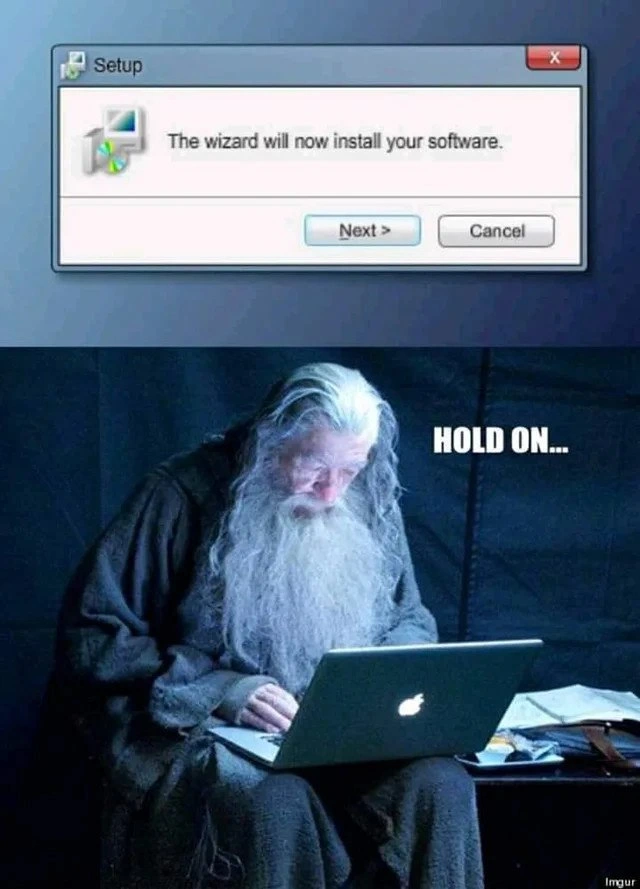
Top panel: It shows a screenshot of a Windows installer dialog box. This is a very typical setup dialog from older versions of Windows. There’s a title bar that says “Setup,” and next to it an icon of a CD and a software box (throwing back to the days when software came in physical boxes with CDs). Inside the window, the text reads: “The wizard will now install your software.” Beneath that, you see two buttons: Next > and Cancel. If you’ve ever installed software on Windows, this layout will look familiar — it’s that classic wizard interface where you click “Next” to go through different steps (like choosing an install location, agreeing to a license, etc.). When the installer says “the wizard will install your software,” it’s referring to itself (the program) in a friendly way. It means everything will be taken care of automatically after you hit that Next button.
Bottom panel: Here’s where the humor kicks in. We see an actual wizard (the kind from fantasy stories) sitting in front of a laptop. He’s wearing robes, he has a long white beard – basically he looks like Dumbledore or Gandalf – and he’s using a modern silver MacBook. Next to this image, the caption says “HOLD ON…” in big white letters. The way it’s presented, it’s like the wizard himself is saying “Hold on...” as he works. This makes it look like the wizard is personally doing the software installation on the laptop and needs a moment to get things under control.
So, the joke is that the computer said a wizard would install the software, and surprise – there’s actually a wrinkled old magic guy at a computer trying to make it happen! It’s a literal and silly interpretation of the word “wizard.” This kind of wizard pun makes us laugh because normally we don’t think of the word that way when we’re using a PC. It’s taking a very non-literal term from tech and flipping it to its literal meaning.
There’s also an extra layer of comedy due to the cross-platform mix-up shown. The installer dialog is from Windows, but the wizard is using a MacBook (which runs macOS). In reality, Windows installers don’t run on Macs like that. Typically, if you have a Mac and you need to install software, you either use a Mac-specific installer or something like the App Store or a disk image. Windows installers (like a .exe or .msi file) are meant for Windows systems. So seeing a Windows “Setup Wizard” message paired with an Apple laptop is intentionally absurd. It’s like showing someone trying to use the wrong key for a door — the pieces don’t normally go together, and that’s why it’s funny. For many developers, though, that scenario isn’t entirely alien: for example, a developer might write code on a Mac but then use a special environment (like a virtual machine or compatibility layer) to test a Windows installer. It can feel a bit like putting on a wizard hat and doing something unnatural, which is exactly what the meme depicts (albeit in a much more whimsical way).
To put it in simpler terms, the meme is personifying the software installation process. Instead of the “wizard” being invisible software doing things in the background, they’ve made him a character we can see. And apparently, he’s a bit overwhelmed — hence the “HOLD ON...” plea for patience. If you’ve ever watched an installer progress bar creep slowly or encountered a confusing setup prompt, you know the feeling of “Hold on, give it a second…”. The meme exaggerates that by having the wizard himself appear to be working frantically on the computer. It’s a fun way to visualize the idea that installing software, especially on a new or different system, sometimes feels like you’ve got to perform magic.
For someone new to tech, the takeaway joke is: computers use the word “wizard” to mean a helper program, but here we’re joking that it’s an actual wizard in robes doing the work. The mismatch between user-friendly wording and literal reality creates the comedy. And the visual of a grandpa-looking wizard furiously typing on a high-tech laptop — that’s just inherently funny because it mixes old-fashioned magic with modern technology. It highlights how sometimes tech terms (like “wizard”) can sound really strange if you think about them literally. The meme has fun with that quirk, and anyone who’s installed software on different systems can appreciate the humor in seeing those worlds collide.
Level 3: Wizard of OS
This meme takes a common piece of software jargon and gives it a hilarious literal twist. It blends the world of UX/UI design with fantasy imagery to create a perfect slice of developer humor. In the top panel, we see a classic Windows installer setup dialog. It’s the kind of installer UI many of us remember: a small window with grey-blue borders, a CD-and-box icon (symbolizing software installation media), and friendly text that reads “The wizard will now install your software.” Right away, this taps into a bit of nostalgia in user interface design. The word “wizard” here is tech lingo for a guided installation process—a series of screens that help you configure and install software step-by-step. It’s meant to make the process feel easy, maybe even a bit magical, as if an expert is walking you through. But the meme asks a fun question: what if that “wizard” were literally real?
In the bottom panel, the joke comes to life. We see a literal wizard — a robed figure with a flowing white beard (think Gandalf from Lord of the Rings) — hunched over a modern laptop. And not just any laptop, but a sleek MacBook with the glowing Apple logo. Next to him, big bold letters shout “HOLD ON…” as if the wizard is urgently telling us to wait. This quirky scene mashes together two different tech worlds for comedic effect: a Windows software message on top, and an Apple hardware reality on the bottom. It’s a cheeky bit of cross-platform humor. For anyone who works across Operating Systems, there’s an extra chuckle here. Developers often use MacBooks for coding work, even when building or fixing software that will run on Windows. Seeing a medieval wizard on a Mac trying to deal with a Windows-style installer feels like a tongue-in-cheek nod to those cross-OS adventures. It’s as if the poor wizard is bridging two universes at once — one foot in the Windows world, one in the Mac world — frantically performing tech magic to make them cooperate.
For veteran developers, this meme hits on a couple of levels. First, there’s the absurd literal interpretation of the term “installation wizard.” In real life, of course, no magic is involved in installing software, but sometimes it feels that way — especially with those old-school installers that would say reassuring things like “Please wait while the wizard installs this application.” That phrasing is a legacy from an earlier era of software design (90s and 2000s), epitomized by tools like InstallShield Wizard and the Microsoft Office Assistants. Back then, calling a setup program a wizard was meant to convey that the computer would guide you through a complex task, almost like a helpful magic user at your side. Over time, as installers became more streamlined (or as software moved to app stores and package managers), the “wizard” terminology started to feel antiquated. Encountering it today gives many of us a fond flashback – and a slight eye-roll – because it’s both charming and a bit dated. The meme capitalizes on that charm, imagining that somewhere in the background of these legacy installers there really is a wise old wizard pulling the levers. It humorously suggests that those installers were so convoluted, they might as well have required actual sorcery to work. (Seasoned devs might recall times an install mysteriously failed and jokingly thought, “Maybe I need to sacrifice a byte to the software gods for this to succeed.”)
Second, the image of the befuddled wizard hunched over the MacBook captures the feel of wrestling with odd installation problems or compatibility issues. It’s the ultimate tech irony: the “wizard” that was supposed to make things effortless is now shown sweating over a laptop, telling us to hold on. Anyone who’s dealt with a finicky installer or a deployment script that just wouldn’t cooperate can relate to that moment of “Hold on, this isn’t as straightforward as promised!” The meme is basically an inside joke among developers: we all know that even “automated” processes sometimes need a ton of behind-the-scenes tweaking. The wizard’s exasperated look and the urgent caption parody the reality that installing software — especially in unfamiliar or cross-platform environments — can turn into a troubleshooting saga. It hints that under the polished wizard UI, there’s a lot of grunt work (or real magic?) happening to get everything in place.
From a Developer Experience (DX) angle, the meme also spotlights the contrast between friendly UI language and the actual developer toil. The installer’s phrasing is calm and reassuring, as if saying “sit back, I’ve got this.” Meanwhile, the developer (depicted here as a literal wizard) might be scrambling to fix a hiccup, edit a config file, or resolve a missing dependency. It’s a playful reminder that what seems simple to the user often involves complexity behind the curtain. In fact, the whole scene is a fun reversal of The Wizard of Oz: instead of discovering that the great wizard is just an ordinary man behind a curtain, we discover that the “ordinary” setup program wizard is actually a real sorcerer behind a laptop! This Wizard of OS (Operating Systems) twist underscores why the meme resonates with the tech crowd. It mixes fantasy and reality, and pokes fun at the mystical terminology we’ve inherited in software development. Ultimately, the humor lands because it’s both clever and relatable. If you’ve ever clicked “Next, Next, Finish” on a setup dialog or spent a late night debugging an installation script, the image of a tired Gandalf-type figure installing your software on a Mac feels hilariously apt. It’s saying: behind every “Next >” button, there might as well be a bearded wizard working overtime — and that idea is pure tech humor gold for those in the know.
Description
This is a two-panel meme that plays on technical jargon. The top panel displays a classic graphical user interface (GUI) window from an older version of Windows, likely XP or 7. The window is a setup dialog that reads, 'The wizard will now install your software.' In the bottom panel, the character Gandalf the Grey from 'The Lord of the Rings', a literal wizard, is shown sitting in a dimly lit room, intently focused on a modern MacBook. The text 'HOLD ON...' is superimposed over this image. The humor comes from the literal interpretation of the term 'installation wizard', a guided setup process, as if an actual wizard like Gandalf is personally handling the software installation and needs a moment to concentrate. The juxtaposition of the antiquated Windows UI, the fantasy character, and a sleek Apple laptop adds to the absurdity and charm

Comments
12Comment deleted
He's not stalling, he's just trying to remember if he's supposed to cast './configure', 'make', or 'You shall not pass!'
Every “Setup Wizard” dialog is just a grey-beard on a Mac frantically cross-compiling, code-signing, and notarizing a 2 GB Electron installer - that loading bar is him casting async spells
After 20 years in tech, I've realized installation wizards are just like real wizards - they promise magic, speak in cryptic incantations about registry keys and environment variables, and when something goes wrong, they vanish leaving only a cryptic error code and the faint smell of corrupted DLLs
Every senior engineer knows that 'The wizard will now install your software' is really just a polite way of saying 'I'm about to modify your PATH, add three browser toolbars you didn't ask for, change your default search engine, and install a system tray application that starts on boot.' That moment of Gandalf-like contemplation before clicking Next isn't paranoia - it's the accumulated wisdom of a thousand production incidents that started with 'I just clicked through the installer.'
Setup wizards promise simplicity but deliver PATH Armageddon - Gandalf knows: brew install or perish in dependency hell
“The wizard will now install your software” - cut to a wizard on a Mac alt-tabbing into a Windows VM, tailing MSI logs and whispering GUIDs to appease error 1603
Turns out the ‘setup wizard’ is busy juggling WiX MSI ICE errors, codesigning a DMG for notarization, and explaining to Product why macOS doesn’t have a “Next >” button
ms windows on mac - this is magic 😉 Comment deleted
Why not Comment deleted
I heard these companies don't like each other. even if such a combination were possible, I would avoid it because it could be explosive 😜 Comment deleted
And still it's actually quite easy to install Win on Mac, using the provided Boot Camp solution. I've been using it on MacBook Pro 16, no big issues so far. Comment deleted
A: When are u going to return money u borrowed? It was long ago B: When wizard will install your software in front of me A: hehe, sure Comment deleted