Skip to content
DevMeme
3431 of 7435
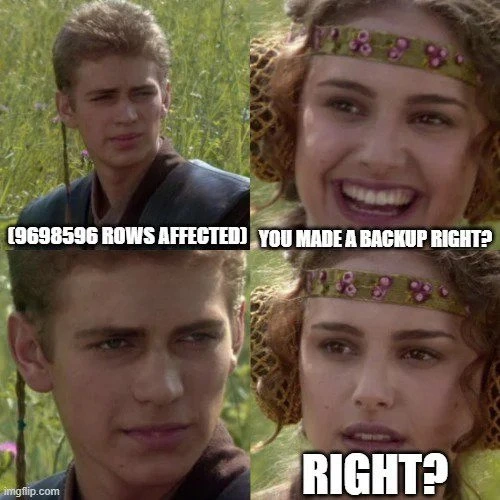
When your update hits 9-million rows and Padme asks about WHERE
Databases Post #3764, on Oct 1, 2021 in TG

When your update hits 9-million rows and Padme asks about WHERE

Why is this Databases meme funny?

Level 1: Big Oops, Whole Table

Imagine you were only supposed to change one thing, but you accidentally changed everything. 😱 Think of it like this: you meant to water one houseplant, but you left the hose on and flooded the whole garden. Now your friend looks at the soaked backyard and asks nervously, “You only watered that one plant… right?” In the meme, the developer is like “oops” (with a guilty smile) because he forgot to target just the one plant. Padme’s face (the friend) goes from happy to very worried, saying “...RIGHT?” because she realizes something went very wrong. The joke is funny because we all know someone who made a big goof by not being careful, and we share that uh-oh feeling. In simple terms: one tiny mistake, huge mess – and a lesson about being extra careful next time!

Level 2: Missing WHERE, Big Scare

Let’s break down what’s happening in simpler terms. In SQL (Structured Query Language), an UPDATE statement is used to change data in a database table. A WHERE clause in that statement is like a filter – it tells the database which rows to change. If you leave out the WHERE clause, the database assumes you mean “all rows.” That’s why the meme’s text reads (9698596 rows affected): it’s showing the number of rows changed when someone ran an UPDATE query without any filter. In other words, the query updated every row in the table – nearly 9.7 million of them! This is almost never what you want. It’s a huge mistake, often called a mass update error, and it can ruin the accuracy (data integrity) of your information.

In the meme panels, Padme represents the cautious colleague (or just your inner common sense) asking the developer: “You added a WHERE clause… right?” She’s basically saying, “You did limit the update to only the specific information you meant to change, didn’t you?” In the third panel Anakin (the developer) just smiles awkwardly without answering – a sure sign he did NOT include the WHERE clause. In the final panel Padme looks horrified and repeats “…Right?”, now fully realizing the developer’s blunder. This mirrors the moment of panic in real life when someone discovers that a database script was run without proper safeguards.

To visualize the technical part, here’s what the situation looks like in SQL code:

-- What the developer intended (update just one specific user, for example):
UPDATE users
SET is_active = 0
WHERE user_id = 42;  -- Only user with ID 42 is affected.

-- What the developer actually ran (missing WHERE clause):
UPDATE users
SET is_active = 0;
-- This updates every user in the entire table (all rows become inactive). OOPS!
-- The database reports: "9698596 rows affected" (meaning all users were updated).

In the first query above, the WHERE user_id = 42 part restricts the change to just that one user. In the second query, that restriction is gone, so every row in the users table got updated. That’s exactly the nightmare depicted in the meme. The tags like update_without_where and mass_update_error refer to this kind of mistake. It’s a well-known goof in database management: if you run an UPDATE or DELETE without specifying which records to affect, you might accidentally change or remove everything.

This is why Padme’s concerned question is so important. Not using a WHERE clause in a big database command is equivalent to saying “apply this change everywhere.” In a production environment (like a live company database), that can be a disaster. Usually, developers are extremely careful with such queries. They might do a dry-run on a test database or enclose the commands in a transaction (so they can ROLLBACK if something’s wrong) or at least double-check the WHERE clause twice. The meme pokes fun at the scenario where someone apparently skipped all those safety measures. It’s both humorous and a little scary – the kind of joke that makes a new developer chuckle nervously and an experienced DBA cringe remembering past close calls.

Oh, and about backups: Often the next question after such an incident is, “You have a recent backup, right?” If millions of rows were incorrectly updated, the fastest recovery is restoring the data from a backup copy taken before the change. No WHERE clause = big cleanup effort. The meme doesn’t show that part explicitly, but it’s exactly why Padme (and everyone else) would be so worried.

Level 3: Clause for Concern

This meme captures a database horror story that senior developers know all too well. In the first panel, Anakin (the developer) proudly sees the result **(9698596 ROWS AFFECTED)** – a message indicating how many records a SQL command changed. Nearly ten million rows updated at once is a massive red flag. The joke here is a dark twist on DatabaseHumor: it’s funny only because it’s true that an UPDATE without a WHERE clause can wreak havoc. Padme’s line “You added a WHERE clause… right?” highlights the unspoken rule of SQL: always constrain your DatabaseQuery. Her growing alarm (panel 4: “…RIGHT?”) is every team lead’s reaction when they suspect a developer just executed an update_without_where.

In real-life Database operations, forgetting the WHERE clause on an UPDATE or DELETE is like hitting “Select All” on your data by mistake. It’s a classic mass_update_error. That (9698596 rows affected) isn’t a proud achievement – it’s the database basically screaming, “You just modified everything!” Padme’s anxious look embodies the DataIntegrity panic: she’s hoping this is just a bad joke. Anakin’s guilty smile in panel 3 (silence) means he did run the update on the entire table. Cue the sql_rollback_panic – except if this was a production database, the changes might have auto-committed instantly. No quick Ctrl-Z here. A seasoned dev reading this meme feels a chill: did he at least wrap it in a transaction? Was there a recent DatabaseTransaction backup? In other words, if no WHERE was used, please tell us there’s a fallback plan.

The humor lands because it’s painfully relatable. Experienced engineers have either made this mistake once or have come terrifyingly close. The meme’s Star Wars format adds a layer of ironic comedy: Anakin’s overconfidence mirrors a dev running a script they think is safe. Padme’s concern is the code review voice in your head asking, “You didn’t just run that in production… did you?” The contrast between Anakin’s naïve grin and Padme’s dawning horror is a perfect analogy for how a simple oversight (one missing clause) can escalate into a full-blown Rowpocalypse. After all, nothing says Bugs quite like writing an UPDATE query that accidentally touches every single row. No WHERE, no mercy – that’s the lesson hidden under this meme’s witty façade.

Description

Four-panel Star Wars meadow meme featuring Anakin and Padme. Panel 1 shows Anakin smiling confidently in tall grass; a bold white impact-font caption along the bottom reads “(9698596 ROWS AFFECTED)”. Panel 2 shows Padme looking concerned toward him with the caption “YOU ADDED A WHERE CLAUSE…”. Panel 3 returns to Anakin, still smiling but now silent, with no text. Panel 4 shows Padme’s expression shifting to alarm, the caption finishing “…RIGHT?”. Technically, the joke highlights the nightmare of executing an UPDATE or DELETE statement in SQL without a WHERE clause, accidentally modifying nearly ten million rows and jeopardizing data integrity

Comments

9
Anonymous ★ Top Pick Prod says “9,698,596 rows affected,” and suddenly the whole incident channel discovers that treating WHERE as optional syntactic sugar turns a 2 AM point-in-time restore into our new release pipeline
  1. Anonymous ★ Top Pick

    Prod says “9,698,596 rows affected,” and suddenly the whole incident channel discovers that treating WHERE as optional syntactic sugar turns a 2 AM point-in-time restore into our new release pipeline

  2. Anonymous

    The only thing worse than seeing '9698596 rows affected' when you expected 1 is realizing your backup strategy was 'YOLO mode' and your resume update query is about to affect exactly 1 row - yours

  3. Anonymous

    The moment between seeing '9.6M rows affected' and remembering you didn't run BEGIN TRANSACTION is when you truly understand why DBAs have trust issues and why every senior engineer has a story that starts with 'So there I was, no backup, production database...' - it's the database equivalent of deploying on Friday at 4:59 PM, except you can't just roll back the container

  4. Anonymous

    “9,698,596 rows affected” - autocommit + no WHERE: an unscheduled PITR drill, faithfully streamed to every replica

  5. Anonymous

    That moment 'COMMIT;' hits after skipping the mysqldump - your RPO just became 'hopeful prayers'

  6. Anonymous

    “9698596 rows affected” is the loudest unit test you can run in prod - also known as autocommit with no WHERE clause

  7. @Agent1378 4y

    Rollback rollback rollback....

  8. @mrybs1 4y

    Left

  9. @sylfn 4y

    translation: ay dont meik paynaple saunds

Use J and K for navigation