When the IDE's 'Fix' Breaks the Build
Why is this IDEs Editors meme funny?
Level 1: Autocorrect Gone Wrong
Imagine you’re writing a sentence in English and your phone’s autocorrect suggests a change. You tap “OK” without really looking, hoping it fixes a typo. But oh no! The autocorrect ended up using the wrong word, and now your sentence doesn’t make sense. You show it to your teacher, and your teacher just puts their hands on their hips and gives you a stern, disappointed look. In this story, the phone’s autocorrect is like the IDE giving you a code suggestion, and the teacher is like the compiler catching the mistake. It’s funny (and a bit embarrassing) because you tried to fix something with a helpful tool, but the “fix” made things worse. The teacher’s unamused expression – just like the man in the meme – says, “You should have been more careful,” without them even needing to say a word. It’s a lighthearted way to remind us not to trust those automatic suggestions blindly, whether in texting or in coding!
Level 2: When Help Hurts
This meme highlights a situation almost every coder encounters: your coding tool tries to help you, but ends up causing new problems. Let’s break it down in simpler terms. The IDE (Integrated Development Environment) is basically the application you write your code in – think of it as a super-powered text editor tailored for programming. Examples are Visual Studio Code, IntelliJ IDEA, or Eclipse. These editors do more than just let you type; they actually understand the code to some extent. They underline mistakes, highlight syntax in pretty colors, and often give suggestions. For instance, an IDE might notice you declared a variable you never used and gently suggest, “Hey, you could remove this,” or it might auto-complete a phrase as you type, or even offer to fix simple errors for you.
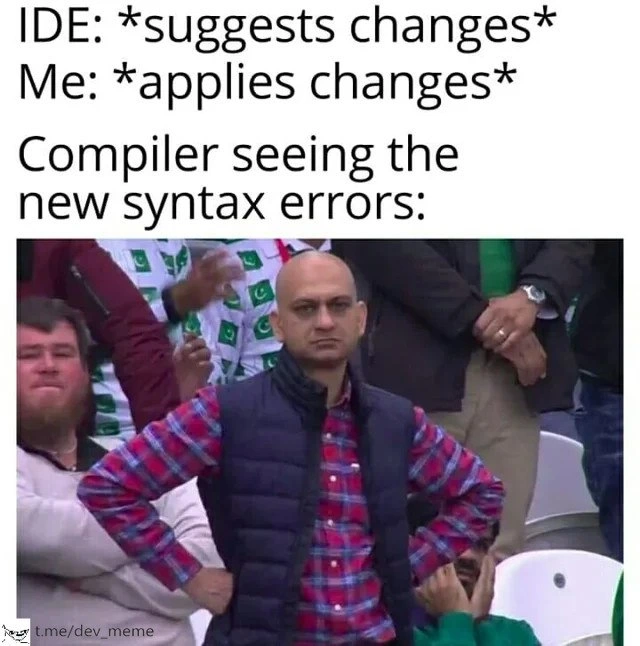
In the meme, the text says: IDE: suggests changes. That means the IDE spotted something in the code and offered a change (maybe a small refactoring or a modernization of the syntax). Next, Me: applies changes – the developer (me) clicks “Yes” or otherwise accepts the IDE’s automatic fix. So far so good, right? But then we see “Compiler seeing the new syntax errors:” followed by the unimpressed man image. The compiler is a different tool in the development chain. While the IDE is what you write code in, the compiler is what takes that code and tries to translate it into a form the computer can actually run (like turning it into machine code or bytecode). In doing so, the compiler checks the code very strictly. If the code violates the language’s rules, the compiler will stop and report an error.
A syntax error is basically a formatting or grammar mistake in your code – something that breaks the rules of the programming language. It’s akin to a sentence fragment or a misspelled word in an essay; the compiler just says “I don’t understand this, it doesn’t follow the language rules.” For example, in many languages forgetting a ; at the end of a statement or having an extra curly brace { without a matching } will cause a syntax error. The compiler’s job is to catch these things; it won’t produce an executable program until you fix them.
Now, normally a developer writes code, and if there’s a mistake, the compiler points it out. Here though, the twist is that the mistake was introduced by the IDE’s auto-fix feature. The IDE tried to help by auto-correcting or changing something, but that change wasn’t actually correct from the compiler’s point of view. Perhaps the IDE suggested a fancy new way to write the code or moved things around in a way that accidentally broke the proper structure. The result: when the developer goes to compile the code (or if the IDE auto-compiles on the fly), the compiler encounters those SyntaxErrors and throws up error messages.
The meme’s joke is that the compiler is “silently judging” your code. Of course, compilers don’t really judge or feel anything – they just output errors in a very blunt way. But as a human, you might imagine that if the compiler were a person, it would be giving you the same look as that unimpressed guy in the stadium. Arms on hips, face of disapproval, as if saying, “I leave you alone for one second and look what you did to the code.” It’s funny because the developer in the scenario thought they were doing the right thing by trusting the IDE, and instantly it backfired. The “helper” caused more work. This is a common DeveloperFrustration: you try to save time with a tool, yet you end up spending more time fixing what the tool did.
In simpler terms: the IDE is your helpful assistant, and the compiler is the strict supervisor. In the meme, the assistant gave bad advice, the programmer followed it, and the supervisor (compiler) caught the mistake and is now unimpressed. The lesson many of us learn here is “trust, but verify.” Just because an IDE can auto-fix something doesn’t mean the fix is always correct. As a newcomer, it’s easy to assume the computer knows best – after all, it’s suggesting it, so it must be right. But programming languages can be tricky, and tools sometimes make wrong guesses. The meme humorously captures that facepalm moment when you realize clicking “apply suggestion” was a mistake. You then have to go manually clean up the code to appease the compiler.
The categories here – Compilers, IDEs/Editors, Bugs, Code Quality – all tie in. The compiler ensures code quality by refusing bad code. The IDE is the editor giving the suggestion. The new syntax errors are essentially new bugs introduced into the code. And ultimately, blindly applying suggestions can harm your code’s quality rather than improve it. The meme resonates with developers because it’s a situation that’s both frustrating and a little bit funny in hindsight. Who hasn’t clicked a quick-fix and immediately seen the code turn into a sea of red errors? It teaches you to always double-check what that “magic” button actually does.
Level 3: Quick Fix Fallout
Every experienced developer can recall a “quick fix” gone wrong. The meme nails this shared experience with the setup IDE: suggests changes → Me: applies changes → Compiler: new errors everywhere. It’s poking fun at the overconfidence we sometimes place in our tools. We’ve all been there: you see that little lightbulb icon or prompt in your editor (perhaps from a linter or an auto-refactor tool) and think, “Sure, let’s apply this suggestion, it’ll save me time.” But instead of solving the issue or improving the code, it introduces fresh bugs – in this case, obvious syntax errors that weren’t there before. The result? You’ve traded one problem for another and the compiler isn’t amused.
The reaction photo of the unimpressed man with hands on hips perfectly encapsulates the compiler’s attitude in that moment. The compiler is like, “Really? You’re giving me code with SyntaxErrors now?” It’s that compilation_facepalm vibe. The humor here comes from anthropomorphizing the compiler – a piece of software – as this deadpan, judgmental person. The compiler doesn’t actually feel emotions, but when it immediately spits out errors in response to an IDE’s auto-fix, it feels like a silent judgment. The meme’s text “Compiler seeing the new syntax errors:” combined with that photo is essentially saying: the compiler is not angry, just very disappointed. 😏
Why do these situations happen so often? A few real-world reasons:
- Version Mismatch: The IDE might use assumptions from a newer language version or different environment than your project. For example, an IDE could suggest using a new keyword or syntax (like a modern lambda or the
varkeyword in Java) that your project’s compiler doesn’t support. Instant syntax error! - Context Blindness: Many auto-fixes are generic. They apply a pattern (like “replace string concatenation with
StringBuilder” or “convert old callback to new async syntax”) without full awareness of context. If your code has a slightly different structure, the generic fix might insert code in the wrong place or format it incorrectly. - Incomplete Refactoring: Sometimes the tool fixes one instance but not all. Imagine the IDE suggests renaming a variable and you hit apply, but it only updated one function and not another. Now you have a compiler error in the other place because the old name is still hanging around.
- Tool Bugs: It’s rare but it happens – the IDE’s suggestion engine might have a bug. Perhaps the rule for the auto-fix had a flaw, leading it to generate code that doesn’t compile. The result is unintentional autocompletion_fail.
In our meme scenario, the IDE likely tried to do something intended to improve the code or satisfy a rule. Maybe it was a minor refactor, like “remove unused variable” or “add missing type annotation”. The developer, expecting only good things, applied it. Now enter the compiler: as soon as you hit build (or maybe the IDE’s live compiler ran), red error markers appear. The compiler doesn’t care that “the IDE told me to do it!” It treats the new code with the same strict scrutiny as always. In a tone-deaf but technically correct way, it lists out the syntax errors. There’s a classic developer joke here: the compiler is always right. If it says there’s an error, there is. You can almost hear it monotoning: “Error: unexpected token } at line 12” while giving you that blank stare from the meme.
A concrete example: say you have a Java code snippet and your IDE suggests using a newer language feature:
// Original code
List<String> names = new ArrayList<>();
// IDE suggestion: "Use 'var' for type inference" (a feature in Java 10+)
var names = new ArrayList<>(); // Me: applies changes (assuming it's all good)
If your project is using Java 8, the above change is invalid. The compiler will throw an error like:
error: cannot find symbol
symbol: class var
Here, the IDE introduced a keyword that the Java 8 compiler doesn’t recognize (var), resulting in a compile error. The compiler’s output is dry, but as a developer you can almost sense a snark: “I have no idea what var is supposed to mean here.” The man in the reaction image, arms akimbo, is basically the compiler saying “What is this nonsense?”
The senior engineering perspective on this meme is also a wink at CodeQuality and diligence. We often install plugins or rely on automated fixes to maintain code quality (removing unused imports, fixing formatting, updating syntax). But blindly trusting these tools can backfire. The meme humorously reminds us that no matter how advanced our IDEs get, the traditional compile-test cycle still rules. The compiler is the ultimate gatekeeper. It will catch anything that doesn’t conform, whether that came from our own hands or from an IDE’s misguided “help”. In a team setting, this is like when someone merges a supposedly safe automated refactor and the Continuous Integration build breaks – the whole team sees that “Oops” moment. It’s embarrassing but also comic, because it’s usually quickly fixed once identified.
Crucially, experienced devs learn to always review what the IDE is about to do. Auto-fixes are like magic tricks: impressive, but you don’t fully trust them without looking closely. The meme’s scenario is funny because it’s a rookie mistake we’ve all made (and sometimes still do when we’re in a hurry!). The CompilerErrors that follow feel like a slap on the wrist. It’s as if the compiler is saying, “Next time, read what that suggestion actually did!” – echoing the sentiments of a grumpy senior dev performing a code review. In short, “When IDE auto-fixes create syntax errors and compiler silently judges your code” is a comedic way to bond over a lesson most of us learn the hard way: automation can help, but it won’t save you from understanding your code. The compiler’s stoic judgment is ultimately for our own good – it forces us to slow down and do it right. Better a compiler scolding now than a production bug later!
Level 4: The Grammar Police
At the heart of this meme is a clash between formal language rules and heuristic helpers. A modern compiler is an unforgiving enforcer of a programming language’s formal grammar. It tokenizes your code, builds an AST (Abstract Syntax Tree), and checks every symbol against the strict rules defined (often in a BNF grammar or similar formal specification). If anything is out of place – a missing semicolon, a misplaced parenthesis, an unexpected keyword – the compiler immediately flags a syntax error. There’s no negotiating with these rules; compilers operate like mathematical machines, methodically applying grammar and semantic checks.
On the other side, an IDE (Integrated Development Environment) often uses smart heuristics to assist the developer. Many IDEs run a background language server or static analysis that tries to understand your code on the fly. They offer suggestions: “hey, you could simplify this”, “import that package”, or “let me auto-correct this style issue”. These suggestions come from a mix of pattern matching, incomplete parsing, or even AI-driven code completion. Unlike the compiler’s deterministic process, an IDE’s auto-fix is a best-effort guess. It doesn’t always have full context – it might be working with an incomplete snapshot of code or applying a generic rule without fully checking the surrounding code’s state. In academic terms, the IDE’s approach is opportunistic and not guaranteed to preserve the program’s correctness or compliance with the grammar in every case.
This fundamental mismatch sets the stage for ide_autofix chaos. The IDE might introduce code that superficially looks right but violates the language’s grammar or the project’s configured standards. For example, consider language version differences: the IDE’s suggestions might use syntax from the latest language spec, but your compiler could be an older version. The result? The compiler’s parser hits an unexpected token and throws up its hands (and some error messages). There’s an underlying context-free vs. context-sensitive mismatch here too. An IDE might only understand the code in a context-free way (just looking at local patterns) whereas the compiler checks the context-sensitive rules (like scoping, declarations, language version, etc.) with full rigor. The humor emerges from this dissonance: a tool meant to help you isn’t bound by the same strict rules, so it can suggest something that the strict rules then vehemently reject.
In more theoretical terms, compilers are designed to prioritize correctness over convenience – they perform thorough checks (lexical analysis, parsing, type checking) and won’t produce an output binary or runnable program if any step fails. IDE suggestions prioritize developer productivity – speed and convenience – and they assume the developer will remain in the loop to catch issues. It’s a classic example of how automation in software development bumps against the limits of formal systems. We have research and tools (some refactoring engines use formal methods to ensure transformations are semantics-preserving), but no IDE is perfect. Thus, we get scenarios like this meme: the IDE cheerfully makes a change that violates the language’s grammar, and the compiler – bound by the laws of computability and language design – responds with a stoic list of errors. The compiler might be a program, but in moments like this it feels like the ultimate strict schoolmaster, upholding the sanctity of the language and silently judging any deviation with unblinking, logical disapproval.
Description
A popular meme format known as the 'Disappointed Cricket Fan'. The image is captioned with a relatable developer scenario. The text reads: 'IDE: *suggests changes*', 'Me: *applies changes*', and 'Compiler seeing the new syntax errors:'. The image below this text shows a man with a bald head, wearing a plaid shirt and a blue vest, standing with his hands on his hips and a look of profound disappointment and frustration on his face. He is in a crowd of people. This meme humorously personifies the compiler, which is imagined to be exasperated when a developer blindly accepts an automated suggestion from their Integrated Development Environment (IDE) that, instead of fixing the issue, introduces new syntax errors. It highlights a common folly in development where trusting the tool's 'quick fix' without understanding the context leads to more problems. A watermark for 't.me/dev_meme' is visible in the bottom-left corner
Comments
7Comment deleted
My IDE's refactoring suggestions have the same success rate as a blindfolded chimp throwing darts at a dependency graph
I hit ‘Apply quick-fix’ and my IDE cheerfully rewrote everything with Java 17 syntax; the build server running javac 1.8 just gave me that stadium-level hands-on-hips glare
After 20 years in the industry, I've learned that IDE suggestions are like junior developer code reviews - they mean well, but accepting them without scrutiny is how you end up explaining to the CTO why production is down because you trusted IntelliSense to refactor your dependency injection container
The IDE is that overly confident junior dev who suggests 'improvements' with absolute certainty, only for the compiler - the grizzled senior architect - to stand there with hands on hips, silently judging every decision that led to this moment. It's the classic tale of static analysis hubris meeting the cold, unforgiving reality of actual compilation, where your 'quick refactor' just introduced 47 new errors across 12 files, and now you're explaining to the team why the build pipeline has been red for 20 minutes
IDEs peddle quick fixes like venture capital pitches: flashy promises, instant regret on first compile
Your IDE’s quick-fix is optimistic concurrency; the compiler enforces serializable isolation and aborts
Apply the IDE’s quick fix; the CI’s older compiler calls it a syntax error - nothing reveals toolchain drift faster