
Skip to content
DevMeme
3447 of 7435
The Silent 'Oh No' of a Compromising Git Blame
VersionControl Post #3781, on Oct 7, 2021 in TG

The Silent 'Oh No' of a Compromising Git Blame

Why is this VersionControl meme funny?

Level 1: Not Me!

Imagine you and a group of friends are playing ball in the house (even though you shouldn’t). Suddenly, a window gets broken by accident. Uh-oh! An adult walks in and asks, “Alright, who did this?” All of you stand there, hands behind your backs, maybe whistling and looking at the ceiling, going “Not me!” even though one of you clearly threw the ball. In the middle of the room, the evidence is right there – a baseball with one of your names on it, lying among the broken glass.

In this story, the broken window is like a bug in a computer program, and the baseball with the name on it is like a record in the code that says who caused the problem. In programming, developers use a tool that can show who last changed a piece of the code – it’s as if the code has a little tag with the person’s name on it. When something breaks, they check the code and find the name of who wrote that part. It’s a bit like the adult finding the baseball with a name.

Now, even though the name is there, the group of friends (the developers, in the computer world) all make innocent faces like “I have no idea how that happened!” It’s a funny situation because everyone knows who did it, but they’re all pretending they don’t. They’re not really being mean about it – it’s more like a playful, uh-oh we got caught moment. They’ll fix the window (or the bug) soon, but for a second they all share a look like, “Let’s act casual and maybe we won’t get in trouble, heh.”

So the meme is joking that when programmers find out one of their own friends caused a problem in the code, they all react just like you kids did with the broken window: by going “Not me!” and trying to look innocent, even though the proof is right there. It’s funny to us because it’s a very human reaction – nobody likes being blamed for a mistake, and it’s easier to smile and shrug than to immediately say “Oops, my bad!” This little moment of pretending not to know anything is something many people can relate to, whether it’s about broken windows or broken code.

Level 2: The Blame Game

Let’s break down what’s happening in this meme in simpler terms. It’s all about Git and a command called git blame, and how software teams react when that command pins a bug on one of them. Git is a popular version control system that developers use to manage and track changes in code. Think of version control as a save-file system for code: every time you make changes, you commit them (save a snapshot) with a message, and Git keeps those snapshots in a timeline known as the commit history. This history includes who made each change and when. It’s super useful because if something ever breaks, you can look back and see exactly what changed in the code and who was involved.

Now, git blame is a specific tool/command in Git that tells you, for each line of a file, the last commit that modified that line. It will literally put a name next to each line, identifying the author of the change (plus the commit ID and date). Why do developers use this? Imagine you discover a bug in a specific line of code. By running git blame on that file, you can see who last touched that line and hopefully ask them “Hey, do you remember why this is like this?” It’s meant for debugging and getting context, not truly to blame your teammates – despite the ominous name. But of course, it does effectively call out the person who wrote the code in question.

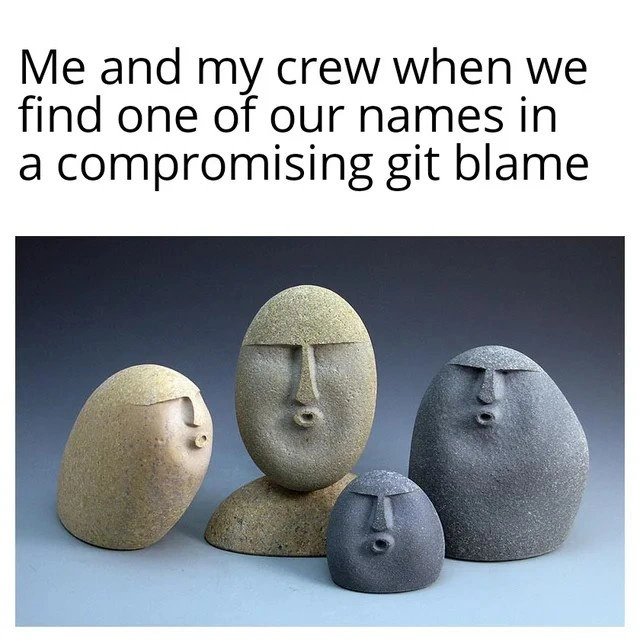
So the meme describes a situation: “Me and my crew when we find one of our names in a compromising git blame.” In everyday terms, this means: our dev team runs git blame to see who wrote the buggy code, and it turns out it’s one of us. When that happens, everyone in the team tends to react in a comically over-the-top innocent way – like “Huh, who could it be? Certainly none of us!” The image attached (those stone sculptures with big oval faces and little “o”-shaped mouths) perfectly captures that mood. They look like a group of people all suddenly whistling innocently and avoiding eye contact. It’s the same energy as a few kids who accidentally broke something and then act like they have no idea what happened when a grown-up asks.

Why would finding your name via git blame be compromising or embarrassing? Because it’s basically catching you red-handed as the last person who touched the code that’s now broken. Your name is right there in the Git history, so there’s no denying you were involved. Maybe you wrote that code long ago and forgot about it, or maybe it was a quick fix you weren’t proud of. Either way, it doesn’t feel great to be the one seemingly responsible for a bug – even though bugs are a normal part of programming. The word “compromising” here implies something that makes you look bad or at fault, like being caught in the act. A compromising commit history might include things like messy code, hacky solutions, or funny commit messages that you wouldn’t necessarily want shown on a big screen.

Let’s unpack a typical scenario in a dev team:

  • Something in the software isn’t working (we have a bug 🐛). Say users are hitting an error when trying to checkout on our website.
  • The team starts troubleshooting. We look at the error and trace it to a specific function in the code.
  • To understand why that function is doing what it’s doing, someone runs git blame on the file to see the history of that part of the code. This will show a list of the most recent changes to each line along with the author.
  • Aha! The blame output shows that line 256 of payment.js was last changed by Alice in a commit from 3 months ago, and the commit message says “temporarily hardcode tax rate – will fix later.” Uh-oh… looks like Alice introduced a temporary hack that never got fixed. Now that hack might be causing the bug.
  • The whole team sees this and immediately everyone turns to Alice like, “So… about that fix?”

At that moment, Alice might do what this meme is joking about: act surprised or chagrined in an exaggerated way, maybe jokingly whistling or saying “Who, me? I have no recollection of such code!” The rest of the team, “her crew,” might also join in on the joking. They all know exactly what’s going on, but by playing it off humorously, they show that it’s all in good spirit. After all, today it’s Alice, tomorrow it’ll be someone else’s turn – every developer eventually writes a bug that comes back to haunt them. It’s a relatable situation that’s both slightly painful (oh no, I caused a problem) and funny (we’re all human and make mistakes).

A key term here is version control accountability. Because Git tracks every change with an author, it brings a certain accountability: you can’t just sneak a change in and pretend it wasn’t you when things go wrong. Your name is attached to that change. In a healthy team, this is not about blame in a negative sense, but rather about understanding history and responsibility. However, emotionally it can still feel like “getting caught.” Especially for newer developers (junior devs), the first time you see your name on a line that broke the build can make your heart skip a beat. You learn quickly that Git never forgets. Even those “quick fixes” or sloppy patches you did under pressure will be there in the log.

The meme is popular in DeveloperHumor circles because it satirizes this exact experience. Many programming in-jokes revolve around the tools we use daily, and git blame is notorious. In fact, calling it the “blame game” is an inside joke: nobody wants to play it, but we all end up doing so during bug hunts. There’s even a common comedic question: “Alright, who broke the build?” followed by running git blame to find the “culprit.” And usually, if it’s your friend or co-worker, you both share a knowing look. If it’s you yourself, you might suddenly find your shoes very interesting 😅.

It’s worth noting that while this is humorous, in real practice most teams try to handle such moments without actual finger-pointing or shaming. The meme exaggerates the pretending to be innocent part for comic effect. In a good team, discovering you wrote a buggy line just leads to “Okay, now I remember why I did that. Let’s fix it properly.” Often, the person whose name shows up will explain the context: “I wrote that because we had an issue with X and needed a quick patch; I agree it needs improvement now.” Meanwhile, everyone else might rib them gently like “Nice going!” but then move on to solving the problem.

One more thing: the stone faces in the image add an extra layer to the joke. They are literally stone sculptures with blank, neutral expressions, each with a little pursed mouth. It’s like a snapshot of four developers all sitting stiffly and whistling a tune, trying to look uninvolved. The phrase “whistling innocently” is classic body language for “I’m pretending I know nothing.” It’s often depicted in cartoons: a character does something naughty, then when questioned, they whistle and look away as if they’re innocent. That’s exactly what these stone figures look like. The meme maker is effectively saying: this is us, my team, whenever git blame calls one of us out. We all put on that same innocent look.

In summary, this meme is a funny take on a common programmer experience:

  • Git blame is being used to find who wrote a buggy line of code.
  • It reveals a team member’s name (maybe revealing some “questionable” code they wrote).
  • The whole team collectively reacts with playful denial and innocent faces, as if to say “We have no idea how that code got there!” even though one of them obviously did it.
  • It’s humorous because it’s a shared, light-hearted embarrassment – a very relatable pain for anyone who’s worked on code with others. Instead of getting angry, the team in the joke chooses to make it a bonding moment of comedy.

If you’re new to programming, don’t worry – writing code that breaks something is normal, and git blame isn’t actually there to humiliate you. It’s just a tool, and this kind of meme shows programmers have a sense of humor about our own mishaps. It reminds us that behind every broken line is a human who probably went “oops.” And sometimes, that human is looking right back at you from the mirror (or in this case, from the Git log!).

Level 3: History Written in Stone

In the world of Git and version control, nothing is truly lost or forgotten – every change we make is essentially carved in stone. When a bug surfaces and someone runs git blame on the offending file, the commit history acts like an immutable ledger of code crimes. The meme caption, “Me and my crew when we find one of our names in a compromising git blame,” hits hard because it’s a scenario every dev team knows too well. You’re knee-deep in debugging a nasty bug, you pull up git blame to see who last touched that suspicious line… and there it is: one of your team’s names (or gasp, your own) in bright terminal text. The whole squad instantly recognizes the culprit, and the reaction is a synchronized, stone-faced “😮” of feigned innocence – just like those oval stone sculptures with pursed “o” mouths pretending to whistle innocently. It’s a DeveloperHumor moment born from RelatablePain: you’ve been caught by the very tool that’s supposed to help, and now all you can do is exchange awkward glances and silently agree to never speak of this again (until the next standup, anyway).

From a senior dev perspective, the humor comes from the clash between ideal and reality. We preach blameless post-mortems and team accountability, but the first thing we do when the app crashes is run the blame game – literally. VersionControl tools like Git keep a permanent, line-by-line history of who wrote what. That’s fantastic for tracing bugs (this is Debugging_Troubleshooting 101), but it also means our past Bugs and quick-and-dirty fixes are on full display. There’s a shared understanding among experienced engineers: git blame is super useful, yet it has a way of dredging up ancient embarrassments. Maybe it’s a hack you committed at 3 AM to hotfix production, or some clever absurd workaround you wrote as a junior. Months or years later, when something breaks, git blame shines a spotlight on that exact line and attaches your name to it. Talk about a compromising_commit_history – it’s like finding your own signature on a broken piece of code.

Why is this funny? Because it’s true. We’ve all been there, sitting around the console like those stone-faced figures, trying to look totally surprised that the code is broken, even though the evidence (the commit metadata) is pointing right at us. The git_blamed_face – that wide-eyed “uh-oh” expression – is practically a rite of passage in software teams. It’s the face you make when someone reading the git blame output slowly turns your way with a grin. You might cough and say, “Heh, wow, who wrote that? Must have been an old commit… weird… 😶.” The whole crew joins in the charade, whistling innocently as if we all don’t see the author’s name right there in the repository’s history. It’s a form of collective comic DeveloperInJokes: everybody knows exactly what’s going on (maybe Bob hard-coded a value, or Alice disabled tests in that commit), but we all play along, at least for a moment, pretending that line magically wrote itself.

This meme pokes fun at team dynamics under version control transparency. Modern development culture encourages collaboration via tools like Git, meaning every change is attributed and shared – great for accountability, but it definitely creates these “caught red-handed” situations. People love to joke that git blame should actually be called git praise or git annotate to sound nicer. But nope, Git just comes right out with it: “Who broke this? Let’s blame someone.” The harsh honesty of that command is part of the humor. In fact, some other version control systems use softer terms (Subversion has svn blame alias annotate; Mercurial uses hg blame or annotate too), but Git sticks with the blunt terminology. That design decision reflects a bit of Linus Torvalds’ tongue-in-cheek attitude—he once joked that blame is meant to assign responsibility, not (just) shame. Still, in practice, the VersionControlHumor is that developers treat git blame output like the results of a DNA test on a daytime talk show: “Bob… you are the author!” Cue Bob’s shocked face.

Let’s not forget the questionable part of “questionable commit history.” Often the commits we fear seeing in blame are the ones with sketchy code or cringe-worthy commit messages. Imagine digging through the log and finding a commit message like “Fix later, I promise” or “temporary hack, works somehow” attached to the broken code. That’s a who_wrote_this_code hall-of-fame entry. In those cases, the entire team winces because we all understand the context: deadlines, pressure, or oversight led to a subpar change that TechnicalDebt has now come due. The meme captures that shared culpability. It’s the whole squad’s questionable history, not just one person’s. In a tight-knit dev team, everyone has at least one embarrassing commit in the logs. So when one surfaces, the reaction is a mix of “oh no, it was one of us” and “whew, glad it’s not me this time… but I’m next.” The RelatablePain is evenly spread.

From an engineering perspective, it’s fascinating (and a bit terrifying) how Git’s design ensures accountability. Every commit is identified by a hash and contains the author’s name, email, timestamp, and message. These commits link together forming a blockchain-like history (Git’s internal Merkle tree), which is extremely hard to alter once shared. So that embarrassing line of code is literally preserved in the repository’s DNA. Unless you rewrite history (a dangerous game in shared repos), you cannot escape your past commits. The source control is the single source of truth (and occasionally shame). When code breaks, we use tools like git bisect or git blame to perform what’s essentially forensic analysis – digging through past changes to finger-point at the likely cause. It’s an invaluable technique in Debugging_Troubleshooting: find the exact commit that introduced the bug and often you find the “why” behind it (perhaps the commit message or diff hints at the intent). But on the flip side, it immediately links a name to the bug, and that’s where human nature kicks in and the innocent whistling begins.

One might wonder: why do smart developers keep ending up in this meme-worthy situation? The answer has less to do with skill and more to do with context and incentives. In the real world, we often make trade-offs—maybe you merged a risky PR on Friday to meet a release deadline, planning to refactor on Monday (spoiler: Monday never came for that code). Fast-forward, and now that rushed change is leaking memory or throwing exceptions. Of course it’s your name next to the offending line. It’s not that you’re a bad programmer; it’s that the circumstance practically guaranteed a sketchy commit. We’ve institutionalized procedures like code review and CI tests to catch these issues, but no process is foolproof. Some problems only emerge in production, and someone’s commit from six months ago suddenly becomes a murder mystery clue. That’s why this scenario is so darkly funny to the seasoned dev: it’s inevitable. Git never forgets, and eventually every developer meets a bug traced back to their ID. As a team, you collectively accumulate these “war stories” in the repository. So when one pops up, all you can do is shrug, share a rueful laugh, and fix the darn thing. The codebase keeps receipts, and sometimes those receipts are hilarious in hindsight (“Who wrote this spaghetti?”apparently, we all did at some point).

In summary, at the senior level this meme is a nod to the operational truth that code history is permanent and accountability is inescapable in modern development. It lampoons the habit of developers to go wide-eyed and quiet when git blame implicates them, capturing a mix of embarrassment and camaraderie. The title “exposes the whole squad’s questionable commit history” underscores that it’s rarely one bad programmer – it’s the entire team’s collection of less-than-proud moments. By highlighting this, the meme resonates across dev teams: we’ve all left fingerprints in the code that we hope remain buried, and we’ve all worn the “not me, no idea how that got there” expression when those fingerprints are dug up. It’s both a humbling reminder and an inside joke – in the repository of life (or code), you can run but you can’t hide from the Hall of Blame.

# Example of a compromising git blame output (just for illustration):
$ git blame utils.js -L 75,80  
^1f24c0ea (Alice 2021-01-15 09:42:10 -0500 75)  // TODO: remove this hack before launch  
^1f24c0ea (Alice 2021-01-15 09:42:10 -0500 76)  export function calculatePrice(order) {  
d34db33f (Bob   2021-07-22 14:17:05 -0500 77)      let total = 0;  
d34db33f (Bob   2021-07-22 14:17:05 -0500 78)      if (order.discount) total = applyDiscount(order);  
d34db33f (Bob   2021-07-22 14:17:05 -0500 79)      else total = /* quick fix */ order.basePrice;  
d34db33f (Bob   2021-07-22 14:17:05 -0500 80)      return total;  } 

In this fictitious blame snippet, Alice left a “TODO remove this hack” comment that never got addressed, and Bob later introduced a quick fix that might be causing a bug. If a problem occurs in calculatePrice, both Alice and Bob have some explaining to do — cue the innocent whistling.

Description

A two-part meme featuring a text caption above an image. The caption at the top reads, 'Me and my crew when we find one of our names in a compromising git blame'. Below the text, the image displays four stone sculptures of varying sizes and shades of gray and beige, each carved to resemble a primitive head. All four figures share the same comically shocked expression, with wide, circular, open mouths and minimalist features, conveying a collective sense of surprise and dismay. The meme humorously captures the shared, silent awkwardness a development team experiences when using the 'git blame' command to investigate a bug, only to discover that one of their own teammates wrote the problematic code. This tool, which annotates each line of code with the author's name, turns a technical investigation into a moment of social tension, perfectly mirrored by the stone-faced, 'uh-oh' expressions of the sculptures


Comments

7
Anonymous ★ Top Pick The five stages of 'git blame': denial, anger, bargaining, depression, and finally, 'git rebase -i HEAD~10' and force-pushing
  1. Anonymous ★ Top Pick

    The five stages of 'git blame': denial, anger, bargaining, depression, and finally, 'git rebase -i HEAD~10' and force-pushing

  2. Anonymous

    Nothing bonds a senior team like the suggestion of a repo-wide clang-format commit - instant witness protection for all those 2014 “temporary” hacks when git blame comes knocking

  3. Anonymous

    The best part about git blame is discovering that the "idiot who wrote this garbage" was you six months ago, right after you confidently told the team you'd finally learned how to properly handle async state

  4. Anonymous

    The moment when `git blame` transforms from a debugging tool into a team trust exercise - because nothing says 'psychological safety' quite like discovering your tech lead's name next to that NULL pointer dereference from three years ago that's been causing intermittent production crashes. At least you're all in it together, staring at each other like these stone faces, silently calculating whose turn it is to take the fall in the post-mortem

  5. Anonymous

    Git blame: where your distributed team's alibis collapse faster than a consensus algorithm under partition

  6. Anonymous

    Git blame: the tool that turns whoever ran Prettier in 2019 into the arsonist - unless someone remembers -w -C -M. Cue the stone-faced postmortem

  7. Anonymous

    Prod’s on fire, git blame points at my whitespace-only commit; suddenly I’m leading a brown bag on blame.ignoreRevsFile, -w, and collective ownership

Use J and K for navigation
