Skip to content
DevMeme
3200 of 7435
RAID Levels Explained with Water Coolers
Storage Post #3521, on Aug 10, 2021 in TG

RAID Levels Explained with Water Coolers

Why is this Storage meme funny?

Level 1: Better Safe than Thirsty

Imagine you have a big jug of water for a group of friends on a hot day. If you only have one jug and it accidentally tips over or runs out, everyone’s going to be thirsty and unhappy. That’s basically what the first picture is showing – just one bottle, and if something goes wrong with it, there’s no water left. Now, suppose you bring two jugs and set them up so if one is empty, the other still has water. That’s like having a backup jug, so drinks keep flowing no matter what. The funny pictures are doing exactly this but in a silly way: they put extra water bottles on the dispenser so there’s always a spare or a second source. One picture even has three or four bottles balanced around – that’s just saying “we really, really don’t want to run out of water!” It looks ridiculous (and it would be in real life – water would spill everywhere if you tried this), but it makes a point. In a normal office, you’d never stack bottles like that, yet we do keep spare full bottles nearby for safety. In the computer world, we keep spare drives or even whole spare computers for the same reason. The joke is funny because it takes this common-sense idea – always have a backup so you’re not caught empty – and shows it in an over-the-top visual at the office cooler. Even if you don’t know anything about computers, you can laugh at how extreme it looks. And if you do know computers, you’re laughing because you’ve been taught the exact same lesson with servers: don’t put all your water in one jug (or all your data on one drive). This meme is basically saying, “if you want to stay happy and safe, plan for things to go wrong – whether it’s a thirst emergency or a server crash – and you’ll never be left dry.” Better to have extra water (or extra copies of data) than to be caught thirsty (or sorry) when something breaks!

Level 2: Redundancy Refresher

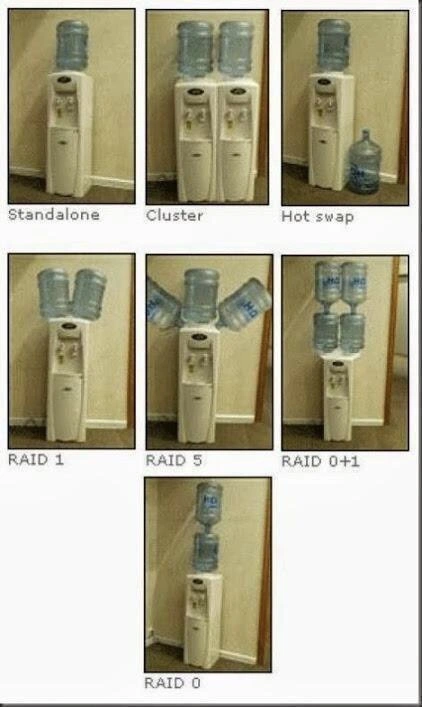
Let’s break down what each part of this meme means in plain terms. It’s basically a quick visual guide to backup strategies and redundancy in systems, using water bottles to represent computer drives and servers. RAID stands for Redundant Array of Independent Disks – which is a fancy way to say “a bunch of hard drives working together to store data with some backup capability.” The whole point of RAID and clustering is to avoid having a single point of failure. Think of each water jug as a hard drive full of data (or water, in this case). The dispenser is like the computer or server that uses that data/water. Now, here’s what each label in the meme is referring to in real life:

  • Standalone – This is just one water bottle on the cooler. In computer terms, that’s a single hard disk with no backup or partner. The cooler will dispense water from that one jug until it’s empty or removed. If that bottle runs out or is taken off, there’s no water left – service over. Similarly, a standalone disk system means if that drive fails, the system can’t access the data anymore. It’s simple but very risky; there’s no safety net.
  • Cluster – Here we see two bottles on one cooler. A cluster in IT means two (or more) machines serving the same purpose, so if one goes down, the other can immediately take over. In the water analogy, imagine the cooler somehow drawing from two jugs: if one jug is empty or removed, the other jug still keeps the water flowing. In practice, an HA (High Availability) cluster usually involves two separate servers that monitor each other – if one fails, the other steps in so users never notice an outage. The meme simplifies this by putting two bottles on one cooler to show dual supply. The idea is high availability: more than one source, so the “service” (water dispensing) continues even if one source disappears.
  • Hot swap – The picture shows a water jug on standby next to the cooler, ready to be swapped in. “Hot-swappable” in hardware means you can replace a component (like a hard disk) without turning the whole system off. Many server disk bays are hot-swappable – if a drive is failing, you pull it out and plug in a new one while everything else keeps running. In the water cooler scenario, hot swap is demonstrated by having a spare bottle right there. The moment the active bottle is empty, you quickly swap in the fresh one without shutting the cooler off. Minimal interruption, nobody has to wait long for water. This teaches the concept of failover and quick recovery: design your system (or office setup) so you can fix problems on the fly.
  • RAID 1 – This is labeled on the image with two bottles tilted together above the cooler. RAID 1 is called mirroring. It means you have two (or more) drives that are exact copies of each other. Every piece of data is written to both drives. Why? Because if one drive fails, the other one still has all the data. In the water analogy, two jugs simultaneously provide water. If one jug is removed or empties, the other jug still has water and can feed the dispenser, so people using the cooler wouldn’t notice a difference. You effectively have a built-in backup running at all times. The downside in real life is that you only get the storage capacity of one drive (since the second drive is a duplicate). In the meme, it’s like having two jugs but only the water from one jug’s worth at any time – you sacrifice capacity for safety.
  • RAID 5 – The meme shows three bottles around the cooler for this one. RAID 5 is a bit more complex: it uses striping with parity. That means it spreads data across at least three drives and also stores parity information (a special kind of calculated data) that can be used to rebuild the info of one drive if it fails. In simpler terms: imagine splitting your files into two parts (for two of the drives) and on the third drive you store a “recipe” (parity) to recreate either part if one is lost. If any one of the three drives crashes, the system can use the remaining data + the parity “recipe” to rebuild what was on the failed drive. In the water cooler, having three jugs means any one jug could be taken away and you’d still have water from the other two to fulfill demand. The parity concept isn’t directly shown (the water bottles don’t do math!), but the key idea is redundancy with efficient use of space. With RAID 5, you don’t need a full extra drive for a mirror, you just need one drive’s worth of space for parity that protects the whole group. It’s a common setup in servers because you get a good balance of redundancy and storage efficiency.
  • RAID 0+1 (also known popularly as RAID 10) – This one combines the ideas of RAID 0 and RAID 1. RAID 0 by itself is “striping” – splitting data across multiple drives for speed and more storage, but with zero redundancy (we’ll explain RAID 0 next). RAID 1 we know is mirroring for safety. RAID 0+1 means you first stripe data across two drives (that’s the RAID 0 part: like two drives acting as one big fast drive), and then you mirror that whole striped set onto another set of drives (that’s the +1 part, a mirror copy). So typically you need four drives: two are used for the stripe (split data), and the other two have an exact copy of that stripe. In the image, four water jugs stacked two-by-two illustrate this: you can think of the top two jugs together as one big volume (striped data spread between them), and the bottom two jugs as the duplicate of that volume. If any single jug fails, there’s still a copy of whatever was in it somewhere in that stack. In a real server, RAID 0+1/10 gives you the speed and capacity benefits of combining drives and the safety of mirroring, but it uses a lot of drives (50% of the total drive space is for protection, just like RAID 1). It’s usually used for databases or systems where you need both performance and fault tolerance.
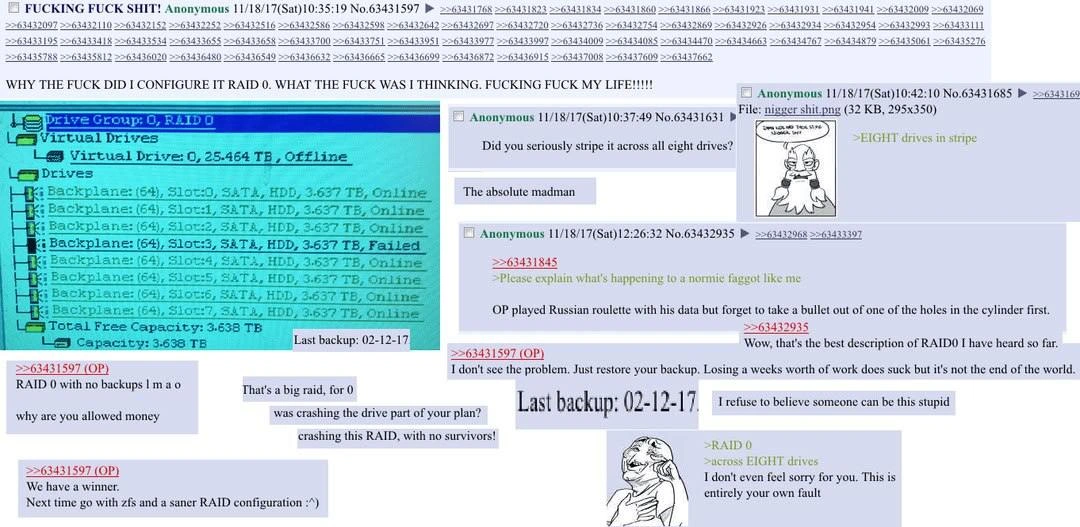
  • RAID 0 – Lastly, the meme shows this as a single bottle balancing dangerously on the cooler. RAID 0 is actually the odd one out because it’s not redundant at all – it’s all about performance and capacity. With RAID 0, you take two or more drives and stripe data across them, which means you break the data into chunks and write them across drives in parallel. This makes reading and writing faster (and uses all drives’ space efficiently). However, if even one drive in a RAID 0 array fails, the entire array fails because each drive had part of the data. It’s like ripping chapters of a book into two piles – if you lose one pile, the story is incomplete. So RAID 0 is high-risk: great when everything works, but there’s no safety net. The meme emphasizes this by showing that one bottle in a weird unstable position – it’s visually saying “this setup is asking for trouble.” In truth, many professionals avoid RAID 0 for important data because the increased speed isn’t worth the risk of losing everything if a single drive dies. You’d typically only use RAID 0 for things like scratch storage or where speed matters more than safety (and you have backups elsewhere).

What ties all these together is the idea of redundancy and failover in hardware. The meme manages to cover both server-level redundancy (the cluster) and disk-level redundancy (the RAID levels) using the same water cooler theme. It’s like an office training poster for new IT folks: each term – standalone, cluster, hot swap, RAID 1, 5, 0+1, 0 – is illustrated in a way you can remember. And because it’s funny, it sticks in your mind better. A junior developer or admin might not have known what “RAID 5” means; after seeing this, they’ll at least recall “oh, that’s the one with three drives where one can fail.” It’s a raid_levels_explained cheat-sheet you can giggle at. By mapping storage concepts to a water cooler, the meme makes learning a dry topic (pun intended) more engaging. After all, staying hydrated is critical – both in the office and in keeping your data safe! And just as you’d have spare water for the office, in IT you always want spares and backups for your data.

Level 3: High Availability on Tap

This meme is prime SysAdminHumor: it turns a mundane office water dispenser into a mini-lesson on keeping systems running. Every seasoned system administrator immediately recognizes these setups from their life in the server room. It’s essentially a RAID levels explained comic using water jugs. The humor comes from how spot-on the analogies are, despite the absurdity of balancing bottles. It’s the kind of tech humor where you laugh because it’s true. Only a storage nerd would look at a water cooler and see a diagram of disk configurations and high availability strategies – and that’s exactly what’s happening here.

Take the Standalone image: just one lonely water jug perched on the cooler. Any sysadmin glancing at that feels a tiny pang of anxiety – one bottle means a single point of failure. If that jug runs dry or topples, everyone’s thirsty. It’s the water equivalent of a server with a single hard drive: cheap and simple, but when it fails, game over. We’ve all been there with a non-redundant system that goes down: no backups, no mirror, just frantic scrambling. The meme playfully jabs at that scenario, highlighting how fragile a standalone setup is.

Now look at Cluster, with two bottles side by side on one cooler. It immediately evokes an HighAvailability cluster – two servers (or water sources) sharing the load. In theory, if one bottle empties or is removed, the other can keep the water flowing so office hydration doesn’t stop. This mirrors the idea of an active-passive cluster or an active-active pair: one server can pick up the slack if its partner fails. It’s funny because physically placing two giant jugs on one dispenser is overkill (and probably spills everywhere), but conceptually it’s what big companies do for their critical systems. An experienced admin chuckles thinking, “Sure, you can cluster water jugs… just don’t bump that cooler!” It also slyly points out a nuance that veterans know: having two of something is great, but if they both depend on one base (the cooler unit), you haven’t fully eliminated your single point of failure. Real clusters duplicate the entire machine, not just the resource, but hey – it’s a meme, not an engineering schematic.

The Hot swap panel is a scenario every hardware geek loves: a bottle on standby, ready to replace the main one without delay. In the server world, seeing a failed drive’s status light go red at 3 AM is stressful, but knowing you can hot-swap in a new drive without powering down is a relief. The meme captures that feeling with the spare jug waiting on the floor – the moment the primary bottle empties, you’d whip it out and plug in the new one, barely missing a beat. It’s everyday office life doubling as a hardware_failover_visual. You can almost imagine a sysadmin narrating to a junior colleague by the cooler: “See, we keep a spare handy so we don’t have to turn off the water supply – just like we swap drives in a live server chassis. No downtime for coffee drinkers or customers!”

Moving down to the RAID examples, RAID 1 with two tilted bottles is classic mirroring dramatized. The bottles are angled as if each one is independently feeding the cooler. The joke here is that with RAID 1, you have two copies of all your data (or two sources of water). So even if one bottle falls off its perch (one disk dies), the other one instantly takes over and nobody in the office goes thirsty or even notices a problem. This is bread-and-butter redundancy: simple, effective, and something every systems administrator relies on for important drives. The humor is partly in the visual – those two heavy jugs balancing precariously – but any veteran knows that mirrored hard drives are actually the least exciting part of their day. They just quietly do the job, and you only appreciate them when one dies and the system keeps chugging along as if nothing happened. That’s peace of mind in a pictorial form.

RAID 5 ups the ante to three bottles, each tilted toward the center. To the uninitiated it looks like a circus act, but to the initiated it screams “distributed parity!” The meme maker even has the middle jug straight up, flanked by two angled ones, which might imply how RAID 5 distributes data and parity across all drives. The comedic element is that it looks like a hydra of water bottles attacking this poor cooler. But anyone who’s managed servers knows RAID 5 was the sweetheart of mid-2000s storage: you’d get more usable disk space than mirrors, yet still survive one disk failure. A grizzled sysadmin might recall war stories of a RAID 5 array “rebuilding” after a drive swap – hours of nail-biting as the system reconstructs data onto a new disk, praying no second drive dies in the meantime. The meme’s balancing act vibe captures that tension: things are stable for now, but you really don’t want another bottle (drive) to slip before you stabilize the situation. It’s funny and a bit too real if you’ve lived through a degraded RAID 5.

Then there’s RAID 0+1 (often referred to as RAID 10) with four bottles stacked two-by-two. This one looks absolutely insane – a veritable fortress of water. It’s a cheeky reference to combining RAID 0 (striping) and RAID 1 (mirroring) together: you get the speed and capacity of combining drives, plus the safety of a backup copy. The meme visually conveys “striping” by having multiple bottles involved, and “mirroring” by having a second set of them. If one bottle in the stack were to fall, presumably its mirrored buddy is still there to provide water. The seasoned folks appreciate that someone bothered to illustrate this nested RAID concept with actual heavy jugs – it’s the kind of over-the-top demonstration you do when you’re really committed to storage humor. You can imagine the office conversation: “Why are there four bottles on the cooler?” – “Don’t worry, it’s just our RAID 10 water supply experiment!” It’s absurd, but it’s teaching a legitimate point: more drives, configured cleverly, can give you both performance and redundancy.

Finally, the pièce de résistance: RAID 0 at the bottom, one bottle balancing precariously on the dispenser edge. To a layperson, that image is simply ridiculous – why would anyone do that? But to the IT crowd, it lands as a punchline. RAID 0 is known for offering zero safety (it’s even joked that the “0” is how many drives can fail before you’re in trouble). By placing the bottle off-kilter, the meme maker wordlessly says: “This is a disaster waiting to happen.” It’s an exaggeration of how risky RAID 0 feels to an ops veteran. Sure, RAID 0 can double your disk speed and capacity by using two drives – but every time we’ve seen someone use it for something important, we’ve cringed, because all it takes is one disk failure to lose everything. The humor isn’t just in the silly balancing act, it’s in the shared experience: we all know someone who ran their system on RAID 0 for that sweet speed boost and then learned the hard way what “no redundancy” truly means. Seeing that wobbling water jug, we’re laughing and simultaneously muttering “yep, accidents waiting to happen – been there, cleaned that up.”

Overall, what makes this meme hilarious to the IT crowd is that it’s an office_meme_storage scenario that perfectly nails complex ideas in one glance. It’s a storage redundancy training aid disguised as a joke. The next time a junior admin asks “What’s RAID 5 again?”, a senior might just show them this image and say “picture our water cooler when it’s juggling three bottles.” It’s relatable and educational. The absurdity of the visuals (seriously, who balanced three water jugs like that?) combined with the dead-on accuracy of the analogies creates that “ahaha – oh wow, true” reaction. In the world of TechHumor, nothing beats a meme that’s as informative as it is funny. And nothing bonds sysadmins quite like collectively giggling at a water cooler that’s clearly about to violate several office safety policies, all in the name of illustrating high availability.

Level 4: Parity by the Gallon

Under the hood of this goofy water-cooler collage lies some serious storage science. Each scenario in the meme corresponds to a principle of fault tolerance that systems administration folks deal with daily. For instance, RAID 5 isn’t just “three jugs at funny angles” – it’s implementing a parity-based error correction. In a RAID 5 array, data is split across drives with one drive storing a parity block (computed by an XOR of the other blocks). If any one drive fails, its missing data can be reconstructed from the parity and the remaining drives. It’s like a simple equation: if A + B + C = D (with D being parity), you can solve for any one missing term. In binary terms, parity uses A XOR B XOR C = P. Lose disk B? Compute A XOR C XOR P to get it back. The water cooler analogy doesn’t literally show binary math, but it humorously embodies the concept of distributed resilience: three water sources such that if one “spills” (fails), the other two can reconstitute the lost supply.

Another concept lurking here is reliability math. A standalone single disk has a certain failure probability (say 5% in a year). Two independent disks in RAID 1 (mirroring) dramatically reduce the chance of total failure – both drives would have to fail together (0.05 × 0.05 = 0.25% if independent). That’s why the dual-jug setup of RAID 1 is stable: the odds of both water bottles being empty or busted simultaneously are very low. Conversely, RAID 0 (striping without redundancy) multiplies failure risk: if two drives each have 95% annual survival, a RAID 0 array of two has about 0.95×0.95 ≈ 90.25% survival – nearly a 10% chance of catastrophe. The meme drives that home with the precariously balanced single bottle labeled “RAID 0,” visually implying “this will end in a spill.” It’s a playful nod to the reality that RAID 0 is all about performance at the cost of HighAvailability – one slip and your data (or water) is gone.

The inclusion of a Cluster (two jugs on one dispenser) highlights another layer of high availability: system-level redundancy. In true computing terms, a cluster means two servers (each with its own storage) configured so that if one goes down, the other seamlessly takes over. The meme’s “Cluster” has two bottles feeding one cooler, which is a bit tongue-in-cheek – the water_cooler_raid_analogy isn’t perfect engineering. After all, both jugs still rely on one dispenser unit; that dispenser is a single point of failure (like two servers sharing one power supply – not a real redundancy in systems design!). A seasoned architect might chuckle at that detail: a proper cluster would be two separate coolers with maybe a shared tap or two faucets. But as a visual gag, it conveys the general idea of dual sources for continuous service. The same goes for Hot swap: in enterprise hardware, hot-swappable drives or power supplies mean you can replace a failed component without shutting down the system. The meme’s “Hot swap” shows a spare bottle ready on the side – a quick replacement when the main jug empties, minimizing downtime. In reliability engineering terms, hot swapping cuts down the MTTR (Mean Time To Repair), which in turn improves overall availability. A system is not just about not failing; it’s about how fast you recover when something does fail. Having that spare bottle at arm’s reach is the difference between a brief hiccup and a long thirsty afternoon.

From a historical perspective, this quirky RAID cheat sheet echoes the origins of RAID itself. Back in 1988, a famous paper “A Case for Redundant Arrays of Inexpensive Disks” (note: originally Inexpensive Independent Disks) laid out RAID levels to replace ultra-reliable but costly mainframe disks with many cheap drives working in tandem. That research introduced RAID 1, RAID 5, etc., as formalized strategies – many of which we see reenacted in these photos. Even RAID 0+1 (or RAID 10) makes an appearance with four bottles stacked in a two-by-two formation, combining striping and mirroring. (Strictly speaking, RAID 0+1 vs RAID 1+0 is a nuanced discussion about whether you mirror stripes or stripe mirrors – a trivia tidbit that storage geeks love to debate. The meme labels it 0+1, but visually it’s just “lots of bottles” to get the point across.) The key takeaway is that redundancy can be layered: you can stripe data for speed and mirror it for safety, at the cost of more hardware. Our water cooler with four jugs dramatizes that layered approach – it’s over-the-top in the kitchen, but commonplace in the datacenter.

At its core, this meme illustrates fundamental Storage engineering principles with a bit of slapstick. Every additional bottle or clever arrangement corresponds to a design that tolerates failures better. It’s a crash course in storage_redundancy_training and hardware failover strategy, all delivered with a sight gag. And it underscores an important truth in IT: whether we’re talking disks or water jugs, redundancy in systems is what keeps catastrophe at bay. The mathematics of fault tolerance, the XOR parity calculations, the probability theory of multiple failures – that’s the serious science. The laughter comes from seeing those abstract ideas acted out by an office water cooler on the verge of drenching the floor.

Description

A seven-panel image grid that humorously explains server and storage concepts using water coolers as a visual analogy. The post is captioned 'RAID cheetsheet'. Each panel shows a different configuration: 'Standalone' (one cooler), 'Cluster' (two separate coolers), 'Hot swap' (one cooler with a spare water jug nearby), 'RAID 1' (one cooler with two jugs feeding it, representing mirroring), 'RAID 5' (one cooler with three jugs, representing striping with parity), 'RAID 0+1' (a four-jug, two-level setup representing a stripe of mirrors), and 'RAID 0' (one cooler with two jugs stacked vertically, representing striping). This meme is a classic in the IT community, beloved by senior engineers and sysadmins for its clever and intuitive simplification of complex data storage and redundancy concepts. The humor lies in the absurdity and accuracy of the analogy
Comments

10
Anonymous ★ Top Pick The RAID 0 water cooler configuration offers incredible hydration throughput, but it's all fun and games until a single leaky jug brings down the whole office
  1. Anonymous ★ Top Pick

    The RAID 0 water cooler configuration offers incredible hydration throughput, but it's all fun and games until a single leaky jug brings down the whole office

  2. Anonymous

    Great RAID walkthrough - mirrors, parity, hot-swap bottles - yet the whole “five-nines” story still relies on a single $40 compressor. Classic enterprise HA

  3. Anonymous

    The only RAID configuration missing is RAID 10 - probably because nobody wants to explain to facilities why we need four water coolers for the same number of people, just like explaining to finance why we need double the storage for 'redundancy'

  4. Anonymous

    Finally, a RAID explanation that makes sense to management: 'It's like having backup water bottles, but some configurations mean everyone dies of thirst when one bottle fails.' Though I'm concerned about the RAID 0 setup - that's basically balancing your entire database on a single point of failure while telling stakeholders you've 'optimized for performance.'

  5. Anonymous

    Looks fine until the 14TB RAID 5 rebuild hits a URE - bring towels

  6. Anonymous

    Product chose RAID 0 for “more flow rate” - great throughput, catastrophic MTBF

  7. Anonymous

    RAID 5 stack: Lose one jug to a spill, parity saves the day - lose the bottom one, and your whole array cascades into a dehydrated outage

  8. @NiKryukov 4y

    Raid shadow legends

    1. ẞonny 4y

      Lol

  9. ẞonny 4y

    U r a legend

Use J and K for navigation