VSCode Trust Issues: 'Of Course I Know The Author, He's Me'
Why is this IDEs Editors meme funny?
Level 1: I Trust Myself
Imagine you have a diary that only you write in. One day, you open it up, and a little magical lock on the diary asks, “Are you sure you trust the person who wrote these entries?” You’d probably giggle and say, “Well, of course I trust them – I’m the one who wrote it!” It sounds silly for a lock to question if you trust your own writing, right?
That’s exactly why this picture is funny. The computer (Visual Studio Code, a program people use to write code) is double-checking if the code in a folder is safe. This is like the diary’s lock being extra careful. Most of the time it’s a good thing to be careful – if it was someone else’s code, you do want to be asked. But in this case, the person opening the code is the same person who wrote it. It’s so obvious to the person that the code is safe, it feels a bit ridiculous that the computer even asked. The old man in the picture (that’s Obi-Wan from Star Wars, a wise character) is basically saying, “Of course I know the author. It’s me.” He’s answering the computer’s question in a funny way.
So the whole joke is like a door security guard asking you for ID to enter your own house. You show him your face and say, “I live here – it’s my house!” Both you and the guard sort of go, “Oh, duh.” In the same way, the developer and the computer have that little moment of “Oh, right, you wrote this.” It’s a goofy, lighthearted reminder that sometimes our gadgets can be a tiny bit too cautious, which makes us laugh.
Level 2: Untrusted by Default
Let’s break down what’s happening in simpler terms. Visual Studio Code (VSCode) is a very popular code editor (an IDE) that many developers use to write software. In mid-2021, VSCode added a security feature called “Workspace Trust.” Basically, whenever you open a folder of code, VSCode might pause and ask: “Do you trust the authors of the files in this folder?” If you click “Yes, I trust the authors,” then VSCode will behave normally, enabling all features. If you say “No” (or don’t trust it yet), VSCode goes into a restricted mode where it won’t automatically run certain things from that folder (like debugging tasks, extensions, or scripts). This is meant to protect you in case the code is from an unknown or untrusted source. It’s a bit like how your web browser might warn you before downloading an unfamiliar file, or how your phone might say “This app is from the internet, are you sure?”
Now, the funny part comes when that security prompt shows up for code that you yourself wrote. Imagine you’ve been working on a project (say a personal website or a side project app) on your laptop. Later, you copy that project to a new folder, or you pull it from GitHub onto a new computer. From VSCode’s perspective, this folder is brand new territory – it has no record that it’s “your” code. So the editor, being cautious, pops up the question about trust. As the developer, you’re staring at a prompt essentially asking if you trust the author of the code, and you realize you are the author! It feels a little absurd, right? You might chuckle and think, “Well of course I trust the author – it’s me!”
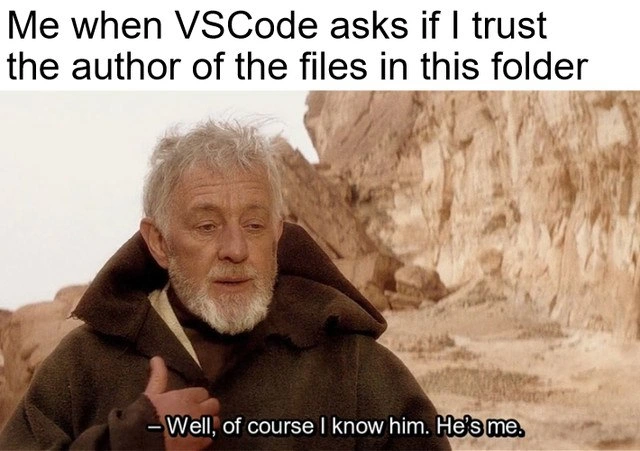
The meme uses a scene from Star Wars to illustrate this moment. In the image, the Jedi character Obi-Wan Kenobi is telling Luke Skywalker “Of course I know him. He’s me,” when asked about someone named Obi-Wan. In other words, Obi-Wan is Obi-Wan – he’s identifying himself as the person in question. The top text of the meme says, “Me when VSCode asks if I trust the author of the files in this folder.” So, when the editor asks “Do you trust the author?”, the meme’s punchline (via Obi-Wan) is “I know the author... he’s me.” It’s a perfect fit: a wise, bearded Obi-Wan (kind of like a wise senior developer) humorously confirming his own identity.
A few terms to clarify here:
- IDE (Integrated Development Environment): This is a software application like VSCode that provides comprehensive facilities to programmers (like editing code, debugging, etc.). VSCode is a lightweight IDE or advanced text editor.
- Workspace/Folder: In VSCode, the folder you open is your workspace. The files in it could be from any source – you might have written them, or you might have downloaded someone else’s project.
- Trusting the authors: This means you’re telling VSCode “I know where this code comes from, it’s safe to enable full functionality.” If you don’t trust it, VSCode will be careful (to avoid running anything that could be harmful). It’s a bit like telling your operating system that a downloaded app is from a verified developer vs. an unknown source.
- Security vs. Usability: This is a common theme in tech. More security (like extra prompts and restrictions) can sometimes make a tool a bit less convenient to use. Less security might be more convenient but can be risky. Here, asking for trust is a security step. It can be slightly annoying (usability issue) but it exists to keep you safe.
- Developer Experience (DX): This refers to how a tool feels for a developer using it day-to-day. A good DX means the tool is easy, smooth, and maybe even enjoyable to use. A lot of prompts or friction can make DX worse, even if they add safety. In this case, some devs feel the trust prompt, while well-intentioned, adds a little bump in their workflow.
For a newer developer, the first encounter with this trust dialog can be confusing or funny. You might think, “Why is my editor acting like it doesn’t know I wrote this code? I literally just made it!” The key is, the editor doesn’t actually know who wrote those files – it only knows whether you’ve marked the location as trusted before. Many people, after seeing this a few times, understand why it’s there. They might even configure settings (for example, setting "security.workspace.trust.enabled": false in VSCode’s settings JSON) to disable the prompt if it gets too annoying – basically telling VSCode “let’s skip the trust fall, I’ll take the risk.” But at least initially, it’s a funny realization that our tools are becoming a bit like cautious hall monitors.
In summary, the meme gets its humor from a very relatable developer experience: our software asks us for permission to trust code that we already know is okay. It’s poking fun at the cautious nature of our tools. The Star Wars reference just makes it extra epic and memorable for anyone who gets the reference. It’s Obi-Wan (the user) gently teasing VSCode (the system) for not realizing who it’s dealing with. Trust issues, even with oneself, become a source of a good laugh in the developer community.
Level 3: Trust Nobody, Not Even Yourself
Experienced developers can’t help but smirk at this scenario. It’s a textbook Security vs Usability moment that many of us have lived through. VS Code introduced the workspace_trust feature around 2021, and suddenly our beloved editor started questioning every folder like an overzealous gatekeeper. The meme nails the ridiculousness: “Do I trust the author of these files?” – I stare at the screen and realize the IDEs_Editors (in this case VS Code) are effectively asking if I trust… me. Obi-Wan’s famous line, “Well, of course I know him. He’s me,” fits perfectly here. It’s the senior developer’s Jedi-level inside joke: I am the author you’re looking for. 🧙♂️
Why is this so humorous? Because it shines light on the developer experience (DX) friction caused by broad security measures. In principle, it’s great that our tools care about safety. In practice, many of us work in mono-repos (one giant repository for many projects) or juggle multiple side projects. That means we see this trust prompt a lot – often for code we wrote or repos we set up ourselves. Open a project on a new machine? Prompt. Check out a new branch in the mono-repo? Prompt again for that folder. It doesn’t remember that you are a long-time contributor. After the tenth time clicking “Yes, Trust,” you start feeling that security_prompt_fatigue kicking in. It’s the same vibe as those old Windows “Are you sure?” dialogs – necessary, but after a while you just slap the “Yes” button on reflex. The difference here is the comic twist that you’re essentially granting trust to yourself, giving new meaning to the phrase Trust Issues in Tech.
There’s also a layer of shared developer trauma being playfully acknowledged. We’ve all been bitten by something we thought was safe – maybe a third-party library or a copy-pasted script – so now the tools default to distrust. Seasoned engineers have seen how a harmless-looking repo can hide dangerous scripts (hello rm -rf / in a rogue shell script!). So on one hand, we appreciate the caution. On the other hand, when the caution crosses into our own backyard, it feels like overkill. It’s as if the system is saying “Look, nothing personal, but I don’t even trust your coding until you say so.” Cue the eye roll. This is where DeveloperHumor thrives: we recognize the good intent but also the slightly absurd reality.
Importantly, fixing this isn’t as straightforward as it sounds. How is VS Code supposed to know you are the same “author” who created the files? It doesn’t have a magic crystal ball or a developer DNA scanner. There’s no easy programmatic way to verify author identity for arbitrary code on disk – at least not without an entire infrastructure of code signing, which most personal projects lack. The VS Code team opted for a simple prompt rather than silently guessing. They likely decided that false positives (“This is probably safe”) were more dangerous than false negatives (bugging you about safe code). As a result, security won a small battle over convenience here. And as senior devs, we’ve learned that any security feature that’s slightly inconvenient will eventually become the butt of jokes. This meme is exactly that: a lighthearted roast of an IDE’s well-meaning but sometimes goofy-feeling security measure.
The Star Wars reference amplifies the joke for us nerds. Obi-Wan Kenobi humorously revealing his identity mirrors the dev asserting “Yes, I’m the author, you dumb machine.” It adds a dash of epic movie nostalgia to what is otherwise a mundane click in VS Code. In a way, the meme is also self-referential to our dev culture: we love to quote movies and geek references to describe tech situations. And here we have the ultimate self-referential developer moment — the author of code verifying the author of code. It resonates with anyone who’s ever felt a slight impostor syndrome twinge or laughed at the idea of having to prove their own work is safe. In short, it’s funny because it’s true: in today’s world even our own code gets the side-eye from our tools, and we can either cry or laugh about it. This meme chooses laughter.
Level 4: Becoming the Root of Trust
At the deepest level, this meme pokes fun at the chain of trust in software security. Modern systems often follow a Zero Trust philosophy – trust nothing by default, verify everything. VS Code’s workspace trust prompt is an example of this principle in action. In cryptographic terms, the editor has no root certificate or cryptographic proof that “you” are the author of the code. It’s as if VS Code is saying: “We have no trusted authority for this code’s origin, so we need you to vouch for it.” Essentially, the developer must act as their own certificate authority, a self-signed developer cert of sorts, by clicking “Yes, I trust the authors.” This is a bit of a paradox — you’re providing trust for yourself, akin to a self-signed SSL certificate that you manually add to a browser’s trust store.
Behind the humor is a serious design: the prompt exists to prevent supply chain attacks and malicious code execution. Without explicit trust, VS Code restricts certain actions (like auto-running tasks, loading extensions, or debugging) in that folder. Why? Because code isn’t just text; it can have scripts that run when the project opens (say, a postinstall script or a devcontainer config). If someone slipped a malicious file into a project and you opened it blindly, bad things could happen. This “trust on first use” approach forces a conscious check. It’s reminiscent of how SSH asks you to confirm a server’s fingerprint the first time – once you approve, it’s remembered as safe. Here, the developer’s click becomes the root of trust for that workspace.
From a theoretical perspective, it highlights an inherent limitation: computers do not intrinsically know who wrote a piece of code. There’s no built-in provenance or digital signature on a plain folder of files. In an enterprise setting, code signing or cryptographic identity might establish author trust (e.g. signed commits, verified publishers), but your personal project doesn’t come with a digital notary stamp. So VS Code does the next best thing: it asks you, effectively turning human intuition into a security input. It’s both clever and absurd. Clever, because it implements a broad security rule (assume nothing is trusted) with a simple prompt. Absurd (and funny) because the rule is so broad that even Obi-Wan developer himself must formally acknowledge trust in his own code. The meme captures this ironic loop of trust: the system’s quest for security becomes a moment of self-referential comedy when the author and the “unknown” author are one and the same.
Description
A popular meme format featuring Obi-Wan Kenobi from Star Wars saying, '- Well, of course I know him. He's me.' The image is captioned with the text: 'Me when VSCode asks if I trust the author of the files in this folder'. This meme perfectly captures the humorous and slightly absurd moment developers experience when their own code editor questions their trustworthiness. It refers to the 'Workspace Trust' feature in Visual Studio Code, a security measure designed to protect users from potentially malicious code downloaded from the internet. The joke lies in the internal monologue of every developer who has initiated a new project on their local machine, only to be met with a prompt that implies they might be their own worst enemy
Comments
9Comment deleted
I always click 'Yes, I trust the author.' It's the author from three months ago, who decided `any` was a good type and wrote zero documentation, that I have serious trust issues with
If only VSCode accepted `git config --global user.name` as a certificate authority, we’d be shipping to prod a lot faster
The real trust issue isn't whether I trust the author - it's whether I trust the version of myself who wrote this code at 3 AM six months ago without comments, proper error handling, or any recollection of what problem I was actually trying to solve
The VSCode workspace trust feature: because apparently even your own git commits from 10 minutes ago need a security clearance. It's the digital equivalent of your IDE asking 'Are you sure you're you?' every time you open a project - as if your SSH keys, GPG signatures, and commit history weren't enough proof. Nothing says 'modern development workflow' quite like being treated as a potential supply chain attack vector against yourself
VSCode Workspace Trust: the rare security feature where 'trust me, I wrote it' bypasses zero-trust entirely - until Monday's refactor
Workspace Trust asks if I trust the author; I do - but by our threat model, Past‑Me, Inc. is an unvetted vendor, so it stays in Restricted Mode until the postinstall scripts pass review
I trust the author - except the 2019 version of me who thought npm postinstall piping curl into bash and auto‑attach debugging were good ideas; Workspace Trust keeps that guy in quarantine
I can remember that I once tried to write code that would execute when you just open the project and look in the designer Comment deleted
It worked pretty well Comment deleted