The True Cost of Switching to Vim
Why is this IDEs Editors meme funny?
Level 1: Too Hard to Be Fun
Imagine someone gives you a super fancy new toy that all the big kids say is really awesome. But when you try to play with it, the controls are incredibly confusing. For example, one moment the buttons on it draw pictures, and the next moment those same buttons do something completely different like erase the whole picture — it depends on some secret mode the toy is in. You’re not sure what’s going on because nobody told you the rules. Instead of having fun, you start feeling upset because even simple things, like starting or stopping the toy, are really hard.
It’s like if you got a new video game that was supposed to be the coolest game ever, but the controller is super strange. You press what you think is the “jump” button, and it unexpectedly makes your character quit the game, or do something odd. Every time you try to do something, the game surprises you in a bad way. You’d probably stop enjoying the game pretty fast, right? You might even want to go back to your old simple games that made sense.
That’s exactly what this joke is about: a tool (in this case, a computer program called Vim that programmers use to write text) is so hard to use at first that it can take away a lot of the fun and happiness you have. The tweet is joking that if your life was a video game, switching to Vim is like choosing a hard mode that’ll drain your happiness bar by “87%”. Of course, that number is made-up and silly on purpose, but it means “a whole lot.” In plain terms, the meme is saying: Using Vim can make a person much more frustrated than they were before. It’s a funny, exaggerated way to warn that this fancy tool might be too hard to be fun (at least until you learn it). So even if you don’t know what Vim is, you can laugh at the idea that a tool could be so complicated that it steals your joy—kind of like a toy or game that’s so frustrating that you stop smiling while playing with it.
Level 2: Two Modes, Too Hard
Let’s break down why this joke is funny, in simpler terms. Vim is a program for editing text, and it runs in a terminal window (that plain black box where you type commands, known as a command-line interface). Unlike familiar editors (say, Notepad or Microsoft Word, or modern code editors like VS Code) that are pretty straightforward—what you press is what gets typed—Vim works very differently. It has modes, which means the same keys on your keyboard do different things depending on the mode you’re in. The two main modes are usually called Normal mode and Insert mode:
- In Normal mode, you’re giving Vim commands. Keys don’t directly insert themselves as text; instead, they might move the cursor or delete stuff. For example, pressing the
xkey in Normal mode will delete the character under the cursor (think of it like issuing a delete command). - In Insert mode, you can actually type text into your file like you would in any regular editor. The letters you press appear in the document.
You switch from Normal to Insert mode by pressing a specific key (usually i for “insert”). And to get back to Normal mode (to issue commands again), you press the Escape key (labeled Esc on the keyboard). If this sounds a bit confusing, that’s exactly the point! It’s very easy for a new user to get lost. Imagine you start Vim and try to type your code, but nothing happens or strange things happen because, surprise, you were still in Normal mode and didn’t realize it. You might see your text cursor zipping around the screen or lines getting unexpectedly deleted, all because Vim interpreted your keystrokes as commands, not text input. Frustrating, right?
Now, why would anyone put up with this? Well, Vim’s design comes from early computing days. By using modes, Vim lets almost every key on the keyboard act as a shortcut or command when in Normal mode. This can be incredibly efficient once you learn it. For instance, if you want to delete a word in Vim, you can hit dw (d = delete, w = word) and it will remove a word quickly. Or press dd to delete an entire line. These shortcuts mean you don’t have to move your hands away to arrow keys or a mouse—you can manipulate text at lightning speed. That’s awesome for experienced users, but for beginners it feels like stumbling through a dark room full of tripwires.
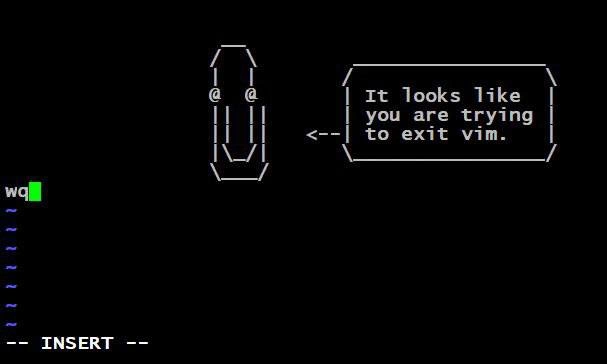
One of the biggest learning curve moments in Vim is simply figuring out how to exit the program. It’s almost a running gag among developers. If you’re in Vim and you don’t know what to do, clicking the “X” on the terminal window or even rebooting your computer might honestly feel easier than exiting properly. Of course, there is a proper way:
- First, press
Escto make sure you’re in Normal mode (you can pressEsca few times just to be extra sure—Vim won’t mind). - Then type
:qand hit Enter. (:qstands for “quit”). But if you’ve made changes in the file and haven’t saved, Vim will prevent you from quitting. In that case, you have two options:- Type
:wqand hit Enter. This means “write (save) and quit.” It will save your changes to the file and then exit. - Or, if you don’t want to save your changes, type
:q!and hit Enter. The!tells Vim “I really mean it, quit and throw away my changes.” (Think of it like force-quitting the editor.)
- Type
These commands (all starting with a colon :) might seem strange, but that’s how you talk to Vim in Normal mode. You type : and a command, and Vim executes it. Until you learn these, Vim can feel like a lock without a key. Many new users open Vim and genuinely have no idea how to close it – it’s not obvious at all. This is why the meme jokes about losing joy. The experience can be maddening: a tool as simple as a text editor suddenly feels like a puzzle game you’re losing.
Let’s translate the tweet’s message in plain language: “If you start using Vim, you might become very unhappy.” Why unhappy? Because at first, Vim makes easy things (like editing text, saving, quitting) much harder than you expect. It’s like taking something straightforward and adding a bunch of secret steps to it. The tweet exaggerates with “87% of the little joy you have left” to be funny, but it reflects a truth: people often try Vim hoping to be super productive, and then they hit this wall of confusion and frustration. That’s the relatable developer experience it’s poking fun at. Most programmers, at some point, have tried an overly complex tool or workflow and thought, “Why am I doing this to myself?” Vim is the poster child for that feeling in the world of text editors.
And about that number “87%” – it’s deliberately oddly specific to be humorous. There’s no real measurement of joy, of course. It could have been 90% or 99%, but saying “87%” makes it sound like a fake scientific fact or statistic, which adds to the silliness. It implies someone actually did a study on “joy loss after Vim adoption” (they didn’t, it’s just a joke!). This style of humor is common in tech memes: use of precise numbers or faux-official tone to make an absurd point. The account I Am Devloper that tweeted this often uses this formula to joke about developer life.
Let’s also touch on the term “editor wars” and why Vim comes up so much. In developer communities, people get very passionate about their tools – and text editors are a big one. Some swear by Vim, others love Emacs, and many today prefer modern editors/IDEs with more GUI (Graphical User Interface) elements like Visual Studio Code, Sublime Text, or JetBrains IDEs. These debates are half-serious, half-joking, and have been around for ages. It’s called a “war” but really it’s more like sports team rivalries or which superhero is better – mostly friendly banter. The Vim vs Emacs rivalry, in particular, is legendary and has spawned countless jokes. One classic joke: “Emacs is a great operating system, lacking only a decent editor”, and the retort from Emacs fans about Vim: “Vim users are people who enjoy quitting their editor as much as using it.” The meme we have here fits into that tradition – poking fun at Vim by saying it will drain your happiness. So if you’re new to this, know that it’s an old, running joke. TextEditorChoice can weirdly feel like a personality test in tech circles, and humor is how we deal with the absurdity of it.
In summary, at this level:
- Vim = powerful but tricky text editor (runs in the terminal, uses modes).
- Switching to Vim (from an easier editor) often = frustration and lost joy (at first).
- The tweet exaggerates that in a funny way so developers nod and laugh, saying “Yes, so true!” because many have felt that pain.
- It’s an inside joke about how a tool meant to help you can initially feel like it’s tormenting you. But remember, plenty of people do learn Vim and end up loving it — they just had to survive the rough beginning that this meme is teasing about.
Level 3: Insert Mode Blues
For anyone who’s spent late nights in front of a terminal, this meme hits home hard. Only 87% of your joy? — some of us might quip that’s an underestimate 😅. The humor here thrives on shared developer experience: the moment you decide to try Vim (often out of curiosity or peer pressure from veteran colleagues), you inevitably confront Vim’s harsh learning curve and its impact on your mood. This tweet is essentially saying: “Life as a developer is hard enough; switching to Vim will make it even more joyless.” It’s a playful exaggeration, tapping into the collective memory of programmers who’ve felt utterly defeated by a mere text editor. After all, nothing screams DeveloperPainPoints like being unable to quit a program without Googling it.
The context behind this is the decades-long saga of editor wars — the lighthearted (and sometimes heated) rivalry between camps of developers over their preferred text editor or IDE. Choosing a text editor in the programming world is almost a tribal affiliation. Do you wield the minimalist power of Vim? Or perhaps you side with Emacs, Vim’s equally venerable rival, known for its endless extensibility (and key chords that tie your fingers in knots)? Maybe you prefer modern GUI-based editors like VS Code or IntelliJ IDEA that prioritize user-friendly design. These choices often spark endless debates on forums and social media, dubbed the “Editor Wars”, though usually with a wink and nod. The tweet from “I Am Devloper” (@iamdevloper) parodies these holy wars by implying that switching sides (specifically, joining the Vim clan) might cost you dearly in happiness. It’s riffing on Vim’s reputation: powerful, yes, but user-friendly, no. Long-time devs find this funny because we’ve either experienced it ourselves or watched a teammate get Vim-struck: that deer-in-headlights look when they realize they don’t know how to exit Vim. In fact, the joke about “not being able to exit Vim” is so common that a Stack Overflow question titled “How do I exit the Vim editor?” became legendary, accumulating thousands of upvotes. It’s practically a rite of passage in tech—a hazing ritual by text editor.
Think about the scenario: you’re in a rush, maybe SSH’d into a production server to fix a hot issue. You open a config file and the only editor available is Vim (because almost every Unix-like system has it by default). You confidently type vim config.yaml… and suddenly you’re trapped in a foreign land. You try to edit a line, but random beeps or text deletion happen because you didn’t realize you were in command mode. Your stress level spikes; precious minutes tick away. Finally, someone slacks you: “Did you try pressing Esc then typing :wq?” You do that magic keystroke dance, and hallelujah, you’re free – but not before Vim has siphoned off a chunk of your soul. This little drama plays out in countless real-world instances, which is exactly why the tweet’s morbid comedy (losing “the little joy you have left in life”) resonates. It’s relatable developer experience distilled into one brutal one-liner.
The phrase “little joy you have left” also winks at the fact that modern software development can be stressful and draining on its own. Tight deadlines, elusive bugs, midnight deployments – by the time you encounter a tool fighting you, your “joy tank” is probably running low. So the tweet implies Vim will guzzle whatever remains. It’s dark humor, the kind that makes a group of devs laugh grimly during a late-night coding session. We laugh because it’s true enough: we’ve felt that despair when a supposedly helpful tool just makes life harder. The command-line interface nature of Vim compounds this feeling. Unlike a friendly GUI where you can click menus and see hints, Vim is like a black box with blinking cursor, expecting you to know what to do. That can make a newcomer feel unbelievably dumb. And nothing chips away at one’s joy (or confidence) like a tool that seems to mock your ignorance (even if in reality it’s just patiently waiting for the right command).
This meme also pokes at the culture of “hardcore” developer habits. There’s an unspoken trope that real programmers use Vim or other old-school tools, customizing their .vimrc in endless detail, and scoff at simpler editors. It’s mostly joking, but many juniors have taken the bait and tried to switch to Vim thinking it’s a rite of passage to programming enlightenment. The tweet essentially says: “Sure, go ahead, be elite, but say goodbye to your happiness.” In doing so, it satirizes the idea that adopting more complex, CLI-oriented tools automatically makes you a better developer. Yes, Vim is super powerful and lightweight, and remote servers love it—but forcing yourself to use it without being prepared will just torpedo your Developer eXperience (DX). The DeveloperExperience_DX tag is all about how tools affect a dev’s day-to-day happiness and efficiency. Here, Vim is portrayed as a net negative on the happiness scale, at least initially.
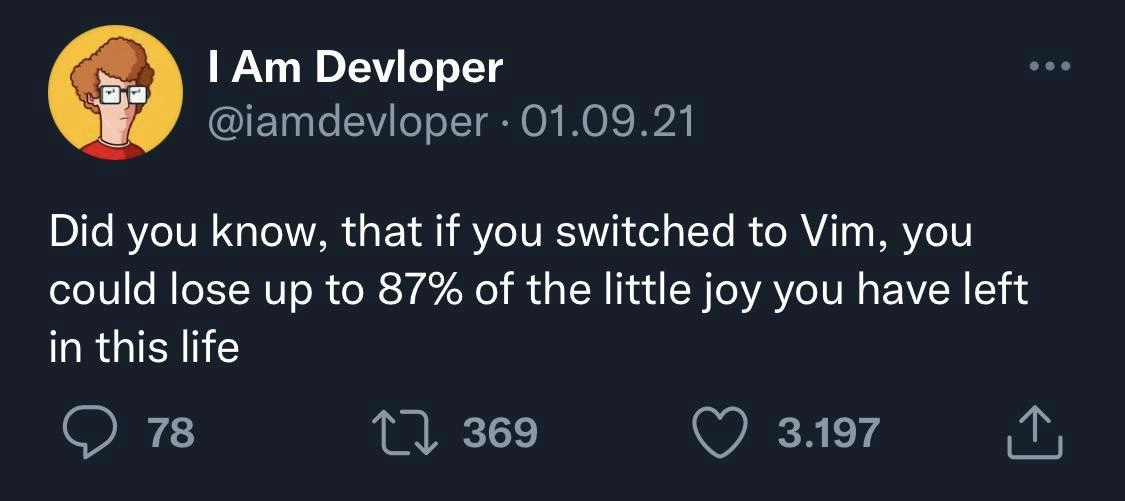
Finally, consider the format: it’s a tweet screenshot meme. The fact that this humor is delivered via a tweet (with those likes and retweets visible) is part of dev culture today. Popular developer tweets (especially from parody accounts like I Am Devloper) get screenshot and shared on Reddit, Slack, or meme pages, becoming inside jokes across the industry. The numbers—78 replies, 369 retweets, 3,197 likes—aren’t just filler; they signal that many people found this relatable and funny enough to engage with. When a joke about Vim “draining joy” gets thousands of likes, it confirms that Vim’s learning curve is a widely recognized source of pain (and laughter). It’s basically our community saying in unison: “Ha ha, yes, I too have suffered.” The meme’s popularity turns personal frustration into communal comedy. And as any battle-scarred engineer will tell you, sometimes the best way to cope with tech angst is to make a joke about it. In this case, the joke takes the form of faux-politeness (“Did you know...”) paired with a brutal punchline (losing 87% of your joy) – a combination that perfectly captures the mix of professionalism and despair one feels when fighting Vim. It’s humor at the expense of a tool we respect and fear in equal measure.
Level 4: Arcane Editor Efficiency
The tweet’s hyper-specific jab—“lose up to 87% of the little joy you have left”—is a tongue-in-cheek reference to the arcane design of Vim and its effect on a developer’s psyche. At a deep technical level, Vim (short for Vi Improved) embodies a philosophy of efficiency born in an earlier era of computing. It’s a modal editor operating in a command-line interface (CLI), meaning your keyboard doubles as a navigation console and a text input device depending on the mode. This design harks back to the 1970s, when computing resources were scarce and terminals had no fancy graphics (often not even arrow keys!). The original vi editor (ancestor of Vim) was created by Bill Joy on a teletype terminal: each key had to pull double-duty. For example, the keys H, J, K, L were repurposed for arrow-key navigation in command mode because early terminals like the Lear Siegler ADM-3A literally had arrows printed on those letters. In normal mode, pressing h moves left, j moves down, and so on. Every letter of the alphabet becomes a command. This efficient but unforgiving design lets adept users fly through text with minimal keystrokes—no mouse needed, hands never leaving the home row. It’s elegant from a computer science standpoint: fewer context switches and chording means higher throughput once you’ve internalized all the commands. In essence, Vim optimizes for expert productivity at the cost of initial learnability. This trade-off is a classic in software tool design: think of it like a Formula 1 car – capable of amazing performance, but brutal for amateurs who just want to drive to the grocery store.
The result of this design is a notoriously steep learning curve. In usability terms, Vim is the poster child for modal interaction – which often leads to mode errors (doing the right thing in the wrong mode). A novice might press dd thinking “two d’s, maybe that types two d’s?”, but in normal mode dd is a command that deletes a line. Oops! Academic research in Human-Computer Interaction has long noted that modes can confuse users unless there are strong visual cues, which in a text-only terminal are, well, minimal. Vim’s only cues are things like the tiny -- INSERT -- prompt when you’re in insert mode, easily overlooked by the untrained eye. This is partly why using Vim feels like wrestling a cryptic interface at first; the tool assumes you know what you’re doing. It’s a design that favors muscle memory and memorization over discoverability. And boy, does that memorization take its toll on your patience. The tweet’s oddly precise “87% joy” metric satirically quantifies this joy drain caused by Vim’s design. Of course, there’s no real math here—just a shared understanding among seasoned devs that mastering Vim often requires a significant upfront investment of effort (and sanity). It’s almost an inside joke in the developer community that using Vim is an exercise in productive masochism: you suffer through confusion and frustration now for the promise of god-like editing speed later. So when @iamdevloper jokes about Vim siphoning away the last drops of your happiness, it’s poking fun at this exact phenomenon: a tool so powerful, yet so abstruse, that adopting it can feel like signing away your remaining joy in exchange for arcane editing superpowers.
Description
This is a screenshot of a tweet from the popular satirical tech account 'I Am Devloper' (@iamdevloper). The tweet, dated 01.09.21, reads: 'Did you know, that if you switched to Vim, you could lose up to 87% of the little joy you have left in this life'. The image captures the text of the tweet along with the account's profile picture and engagement metrics (78 comments, 369 retweets, 3,197 likes). The humor is a sarcastic take on the notoriously steep learning curve of the Vim text editor. For experienced developers, this joke is highly relatable, as it acknowledges the initial pain and frustration of learning Vim's modal editing and complex commands, a rite of passage that is a common trope within developer communities. It playfully jabs at the editor's reputation for being user-unfriendly, despite its power and efficiency in the hands of an expert

Comments
58Comment deleted
Vim has two modes: 1. Beeping at you for typing. 2. Accidentally deleting half your file. The joy comes from discovering which mode you're in
Vim doesn’t drain your joy - it stashes it in an unnamed register you’ll never remember how to yank back
After 15 years, I finally escaped Vim... turns out the exit command was :wq all along, but by then I'd already rewritten the kernel in Vimscript and achieved enlightenment through regex-based refactoring
The real tragedy isn't losing 87% of your joy switching to Vim - it's that the remaining 13% is spent trying to explain to your pair programming partner why you just typed ':wq' into their Slack message, muscle memory having completely overridden your conscious thought. At least you didn't accidentally commit 'i' followed by your actual code changes to git, which is the Vim equivalent of leaving your turn signal on for 47 miles
87%? Optimistic - Vim's true toll hits 100% on first :q! mishap, but muscle memory rebates it in production configs... eventually
Vim is pure capex: negative NPV until hjkl amortizes - then your true lock-in isn’t the editor, it’s your fingers
Switching to Vim: 87% of your joy evaporates in modal context switches; the other 13% gets remapped to Caps Lock
I don't really understand why people use Vim in 2021. It's pretty straightforward but Emacs, for example is cool combine which also doesn't require X-server. Comment deleted
Cause vi installed by default on all linux or osx Comment deleted
It's good program. For editing configuration files it's nice solution. But for programming there are more much more comfortable programs. Comment deleted
For programming I prefer jetbrains IDEs, not text editors.. but the same vim support code highlighting Comment deleted
you must be fun at parties Comment deleted
mostly the normal mode, every other app is non-modal and once you get used to the modal approach you'll never look back Comment deleted
Where can I read about this structure comparison? Comment deleted
:h index.txt There also are plenty of chetsheets online. Comment deleted
Vim is definitely not the only modal editor or vi clone. But it certainly takes it to the extreme: https://rawgit.com/darcyparker/1886716/raw/eab57dfe784f016085251771d65a75a471ca22d4/vimModeStateDiagram.svg http://www.viemu.com/vi-vim-cheat-sheet.gif Other popular vi clones: Elvis Evil (Emacs Vi Layer) Kate (toggleable vi mode from settings) Nvi (default on BSDs) Busybox vi (default on embedded systems, kinda awful) Other modal editors that don't derive directly from vi are: https://github.com/martanne/vis http://kakoune.org/ Comment deleted
oh boy is this another opportunity for me to shill for micro Comment deleted
I like nano Comment deleted
why Comment deleted
easy to use :) Comment deleted
not really, micro is easier and a lot more powerful Comment deleted
it doesn't come preinstalled though, does it? Comment deleted
neither does nano Comment deleted
it does doe Comment deleted
It does Comment deleted
it does not come preinstalled on alpine, arch, nor debian if i recall Comment deleted
Comes on Debian and Ubuntu for sure Idk about arch, but is on manjaro Alpine indeed, but that's the point of alpine isn't it? Comment deleted
My nano Comment deleted
looks pretty cool Comment deleted
Yesterday thought of moving to nvim Today got panic attack Comment deleted
XD Comment deleted
fix your i3status btw Comment deleted
Getting off it, no color output :-\ Comment deleted
Seems i3bar doesn't digest plain ANSI colors. Consider adding output_format = "i3bar" in i3status settings. Via: https://forums.freebsd.org/threads/i3status-not-colorized.57667/ Comment deleted
But I've actually switched to polybar long ago. Mostly because of mouse actions (i.e. volume and backlight control with wheel scroll). Comment deleted
Nice, is it wayland compatible? Comment deleted
if you want polybar on wayland, maybe check out waybar :) No, it's not similar to swaybar, which is shit btw Comment deleted
my current desktop + waybar Comment deleted
I have that configured already Comment deleted
oh, nice Comment deleted
ehh, no. https://github.com/polybar/polybar/issues/414 Comment deleted
My favourite imba action is to open and close windows with mouse wheel. Comment deleted
my micro 😎 Comment deleted
I don't use vim most often, but the navigation language it has is amazing, if you go through the hassles of learning it. I use vs code with vim plugins for this exact thing. The way you don't really need mouse, and you can chain actions and verbs is the best there is. Comment deleted
Vim/Vi is like a religion, you have to be thoroughly indoctrinated to like it and the insanity behind the modal editor concept. Only psychopaths use it. Comment deleted
i use vim on my netbook (sic, welcome from 2010) because it works, and works well enough to be used as a substitute for IDE Comment deleted
Nice cat, otherwise psychopath Comment deleted
Indeed a very nice cat, I'd say 9/10 Comment deleted
forgot to say, my netbook is on Windows XP [and it still works], and vim runs under cygwin this is what I am called psycho for [ru: и за это меня считают ненормальным] Comment deleted
This message was very ed Comment deleted
Welcome to Linux community Comment deleted
Nice cat Comment deleted
*cheesy TV intro* nice cats and psychopaths the community of code & maths nice cats and psychopaths come here and learn about obscure archs dev with memes, as it seems, the group is an oddity (background music) left and right, in every sight, vim users is all I see (buildup to final refrain) nice cats and psychopats I guess the latter is common nice cats and psychopats sit down and watch, cause the show is commin' here Comment deleted
yeah I wrote a cheesy TV intro, what are you gonna do abt it? Comment deleted
Go to fiever and order a song Comment deleted
I could technically make it myself Comment deleted
Sounds like a sitcom into in my head Comment deleted
absolutely what I was going for Comment deleted