The World's Most Exclusive Conference is on Localhost
Why is this WebDev meme funny?
Level 1: The Wrong Address
Imagine you’re throwing a huge birthday party and you send invitations to all your friends. But on the invite, instead of writing the address of the venue, you just write “my house” without any street name or city. Only you know where “my house” is! Your friends would be confused, right? They’d probably chuckle and shake their heads, thinking, “Well, we can’t go to your party if we don’t know where to go!”
That’s exactly what happened here, but with a coding conference. The organizers accidentally told everyone “Hey, the registration is on my computer” (that’s what localhost basically means) instead of giving a real website address. It’s a silly mistake – they gave out a link that only works for themselves, not for anybody else. Developers found it funny in that second-hand embarrassment way. It’s like the event planners sent out an invite with the wrong address, so nobody can actually find the party. The humor comes from how basic and avoidable the mistake is: it made everyone do a little facepalm and think, “Oops! Somebody forgot to double-check the details.”
Level 2: Localhost Means Local Only
Let’s break down why developers chuckled and cringed at this. There’s a key piece of jargon here: localhost. In web development, localhost literally means “this computer.” It’s a special hostname that points to your own machine. When you’re building a web app on your laptop, you often run a local web server. By convention, that server is accessible at an address like http://localhost:3000. Here, 3000 is the port number – think of it like a channel or doorway on your computer where the development web server listens for requests. Many frameworks (like React’s development server or Node.js apps using Express) default to port 3000 for convenience.
So, if I’m coding a site and test it on my machine, I might go to localhost:3000/registration in my browser to see the registration page. That’s perfectly normal in a LocalDevelopmentSetup. The problem? That address only works for me, on my computer. It’s not a public website on the internet – it’s a private door into whatever I’m running locally. If I send that address to you, your browser will look at your computer for a service on port 3000. Unless you happen to be running the same app yourself, you’ll hit a dead end (most likely your browser shows a “Site can’t be reached” or a similar error).
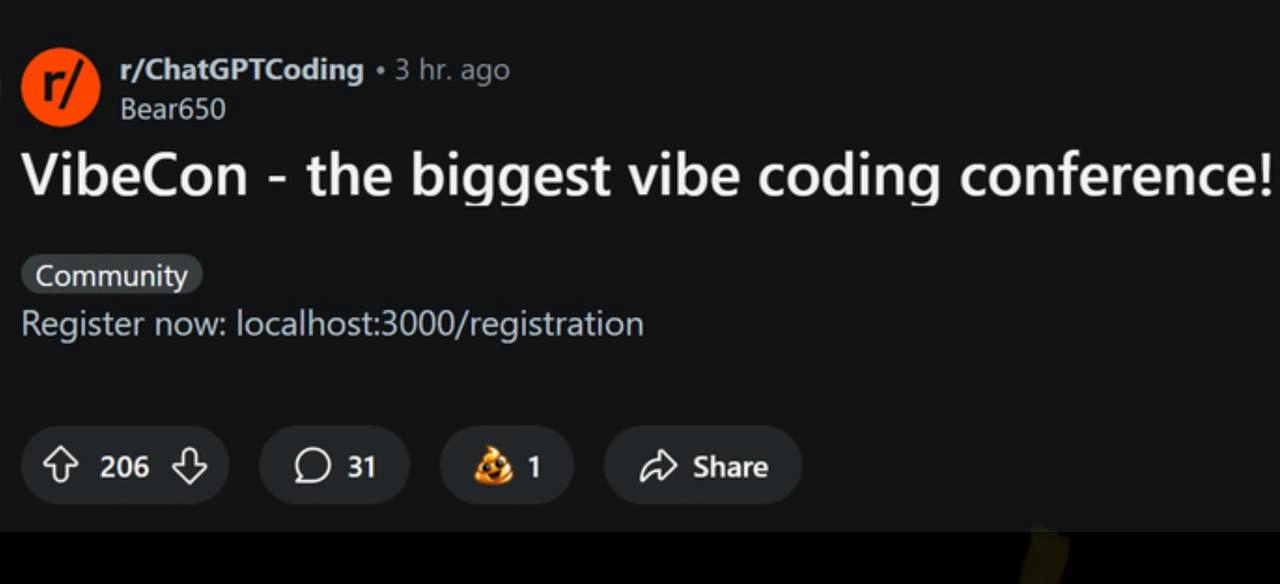
Now imagine a big programming conference (here humorously named VibeCon) making a public post that says “Register now: localhost:3000/registration”. Every developer reading that immediately recognizes the flub. This link is pointing to nowhere for anyone except perhaps the original developer. It’s the equivalent of giving directions to your own house when inviting the whole world to an event – it just doesn’t make sense to anyone else. Hence the quiet facepalms.
Why would this happen? Often, web projects use different settings for development and production. In development, you might use placeholders or local addresses. In production, you use real URLs (like vibecon.com/registration). Typically, there are configuration files or environment variables that get swapped out when you deploy. If those aren’t set up correctly, a default like “localhost” could slip through. It’s a classic deployment mistake: the team either forgot to replace a dummy link with the real one, or the build/test process didn’t catch that the wrong URL was in use.
For someone newer to coding, think of it this way: have you ever written a school project and left a big obvious TODO or placeholder text in it, because you planned to fill it in later? If you forget and turn it in, it’s embarrassing. In software, a common placeholder is using localhost for testing. Forgetting to change localhost to the actual website domain before release is the same kind of oops. It tells everyone “this wasn’t fully checked before going out.”
The Reddit post format shown (dark mode, r/ChatGPTCoding) just provides context that this was shared in an online developer community. The little poop emoji award one user gave is a playful way to say “yikes, what a crappy mistake” in a joking manner. Developers find this funny because it’s a mix of schadenfreude (laughing at someone else’s error that we totally have almost made ourselves) and relief that it’s not our bug—this time. It’s communal humor around the pitfalls of configuration and deployment in WebDevelopment.
In short, localhost:3000 is a dead-end for anyone not on the original dev’s machine. A public registration link pointing there turns the big fancy announcement into an inadvertent joke. And every dev who’s deployed an app knows that sinking feeling: “Oh no… did I leave a dev link in production?” Usually we catch it; sometimes, like here, we don’t.
Level 3: Localhost Goes Live
At first glance, this WebDev blunder is a chef’s kiss of deploymentFailures. The conference announcement proudly proclaims:
VibeCon – the biggest vibe coding conference!
Register now:localhost:3000/registration
Cue the collective groan and facepalm from developers worldwide. This is the textbook definition of an environment_configuration_mistake: an internal development link (localhost:3000) leaking into a production announcement (dev_environment_leak). Every experienced dev has seen some flavor of this conference_marketing_fail before. It’s the kind of slip-up where a url_placeholder_not_replaced slithers past what should have been a rigorous release_readiness_check. Who needs QA when you’ve got vibes, right? 🙃
Why is this so hilariously painful? In development, localhost:3000 is like your personal sandbox – it refers to your own machine. Many Node/React apps spin up a local server on port 3000 by default (port_3000_default, courtesy of Create React App and friends). It’s a harmless LocalDevelopmentSetup detail until it escapes into the wild. Seeing localhost:3000/registration in a conference ad is like seeing a big “INSERT_REAL_LINK_HERE” in bright red letters. It tells every seasoned engineer: “Oops, someone forgot to swap out the dev URL for the real one.”
From a senior perspective, this joke bites because it’s too real. Picture a frantic team lead realizing the registration link in the mass email or on the homepage still points to a developer’s laptop. It’s 5 PM on Friday and the "biggest vibe coding conference" just sent thousands of would-be attendees to, well, nowhere. This isn’t a deep technical failure like a distributed consensus bug or an it’s always DNS snafu – it’s pure human/config error. And those can be just as catastrophic (and embarrassing).
Let’s be clear: if a user actually clicks that localhost:3000/registration link, their browser will try to talk to their own computer on port 3000. Unless they magically have the conference’s registration app running on their PC (they won’t), nothing happens. It’s the ultimate “Works on My Machine” fiasco – the link probably worked for the developer testing it locally, but for everyone else it’s dead on arrival.
In coding terms, it’s like this: the devs might have had something like:
// config.js – a simplified example of how this goof could happen
const registrationURL = process.env.REGISTRATION_URL || "http://localhost:3000/registration";
// If REGISTRATION_URL isn't set in prod, it falls back to localhost (oops!)
console.log(`Register now: ${registrationURL}`);
Perhaps the REGISTRATION_URL environment variable wasn’t set for the production build, so the app fell back to the localhost default. Or maybe someone hard-coded the placeholder URL during testing and forgot to remove it. Either way, that internal internal_url_exposed is now out in the open, and every dev who sees it instantly knows the dev team dropped the ball. It’s a DeploymentFail that doubles as dark comedy: a supposedly polished announcement revealing a peek behind the curtain – the dev environment lurking where the polished product link should be.
In the Reddit screenshot, notice the poop-emoji award 💩 under the post. That’s the community’s tongue-in-cheek way of saying “this is a crappy mistake, but chef’s kiss for the laughs.” The upvotes and comments show fellow devs piling on with war stories of their own config goofs. (Let’s be honest, giving out a local URL in a production setting is a rite of passage / horror story every dev crowd can bond over.)
And the cherry on top? The post is on a coding subreddit with the title hyping “the biggest vibe coding conference!”. The irony writes itself: The vibes are immaculate, but the engineering workflow… not so much. A conference about code that can’t even get their links out of localhost – that’s meme gold. The situation satirizes how even high-profile, “industry-leading” events can screw up basic Deployment 101. It’s a gentle (or not-so-gentle) reminder: always double-check your config before going live, or the internet will catch you slipping.
Description
This image is a screenshot of a post from the Reddit community r/ChatGPTCoding. The post, made by user Bear650, has a large title that reads, 'VibeCon - the biggest vibe coding conference!'. Below the title, under a 'Community' tag, is the registration link: 'Register now: localhost:3000/registration'. The humor is a classic in-joke for web developers. The URL 'localhost:3000' refers to a server running on the user's own computer, making it inaccessible to anyone else on the internet. It brilliantly satirizes the trend of developers grandly announcing projects or events that are still in a very early, local-only development stage. The name 'VibeCon' itself adds to the humor, suggesting a very casual and perhaps disorganized event, a stark contrast to the often serious and corporate nature of major tech conferences

Comments
17Comment deleted
The first rule of VibeCon is you can't talk about VibeCon, mostly because the DNS record doesn't exist and your router has no idea what you're asking for
VibeCon 2024: pioneering the “localhost-first” architecture - sub-millisecond sign-ups, 100% cache hit rate, and exactly zero concurrent users
After 20 years in tech, I've seen countless production incidents, but nothing quite captures the essence of 'works on my machine' like promoting your global conference with a localhost URL - at least they're being transparent about their infrastructure budget
Finally, a tech conference with zero travel costs, no badge scanning, and guaranteed front-row seating - though the networking opportunities are limited to your rubber duck and that half-empty coffee mug. The keynote speaker (you) will be presenting 'Microservices Architecture for a Single-User Application' followed by a panel discussion on 'Why My Local Environment Works But Production Doesn't.' CORS policies strictly enforced
Register now at localhost:3000 - the conference where Zero Trust is enforced by the loopback interface and capacity planning maxes out at whoever has the organizer’s laptop open
VibeCon registration on localhost:3000 - finally, a conference as production-ready as that startup demo
Bold GTM strategy: register at localhost:3000 - the zero‑trust, single‑tenant funnel with a 100% bounce rate off anyone not on the organizer’s laptop
Isn’t that just annoying though? Comment deleted
goonerbait bots are way more annoying Comment deleted
but Weib trolling isn't Comment deleted
... until sie calls the Polizei Comment deleted
well. if you go all the way to calling police... usually it's possible to recognize it goes way too much before one needs to call the police. Comment deleted
You're walking in a direction I'm reluctant to follow Comment deleted
I don't walk it either. Comment deleted
A meeting for con artists pretending to be programmers? 🤔 Comment deleted
I know what localhost is - I don't know what registration causes here. Comment deleted
Unless it's a nothingburger prank, which.. is respectable Comment deleted